You're on Monte Carlo: It Finds and Triages the Incident. Data Workers Resolves It, From Day One
You run Monte Carlo. Its monitors and Triage Agent find the incident; Data Workers diagnoses it, fixes it at the source behind approvals and verifies it.
Your data team runs on Monte Carlo. Volume, freshness, schema and field health monitors watch the tables that matter, many defined as monitors-as-code next to your dbt project. The Triage Agent, on by default, scores every new alert HIGH, MEDIUM or LOW and writes its rationale onto the alert. The Troubleshoot button on any alert starts the Troubleshooting Agent (in preview), which works through hundreds of hypotheses across data changes, Airflow and dbt failures and code changes. The Operations Agent answers questions about alerts and table health, and Monte Carlo's MCP server puts alerts, lineage and monitors inside Claude Code or Cursor. Monte Carlo is the smoke alarm, and a very good one. Data Workers is the crew.
The alert is where the on-call's day starts: find the failed sync, stop bad numbers before they act, get the data back, rerun, check downstream, close the alert. Data Workers does that work from day one, on top of the Monte Carlo you already tuned, with a named approver for every change and a receipt for every fix.
Key takeaways
- •Monte Carlo keeps its job. Monitors, the Triage Agent, the Troubleshooting Agent, routing and the alert history stay where they are.
- •The alert starts the loop. Data Workers reads your Monte Carlo monitors and their results over Monte Carlo's API through a native connector, traces the cause across ingestion, the warehouse, dbt and reverse ETL, and proposes the fix with its blast radius.
- •The blast radius goes past the dashboard. When a table feeds a sync into a CRM, Data Workers finds the sync and gets it held before bad data reaches customers.
- •Fixed means verified. After the approved fix, Data Workers checks volume and source counts, and runs the Monte Carlo monitor again.
- •Autonomy per domain. Each data domain climbs from L0 manual to L4 autonomous at the pace your team sets.
Monte Carlo is the smoke alarm. Data Workers is the crew.
One Monday night across Stripe, Airbyte, BigQuery, dbt Cloud, Monte Carlo, Hightouch and HubSpot. The company bills through two Stripe accounts, US and EU, and Airbyte loads both into BigQuery. A dbt Cloud job builds fct_payments, and Hightouch syncs each customer's last payment into HubSpot, where a past-due workflow emails customers at 08:00. This is an illustration, not a customer case.
| Time | System | What happens |
|---|---|---|
| Mon 23:50 | Stripe | The payments team rotates the EU account's restricted API key; the Airbyte connection still holds the old one |
| Tue 00:30 | Airbyte | The EU Stripe connection fails on authentication; the US connection syncs normally |
| 02:00 | dbt Cloud | The nightly job runs green on US rows alone; fct_payments lands 41% below its normal daily volume |
| 06:12 | Monte Carlo | The volume monitor on fct_payments alerts; the Triage Agent scores it HIGH because the table feeds the HubSpot sync |
| 06:15 | Data Workers | Reads the monitor result, traces the gap through stg_stripe__charges to the failed EU connection, and finds the 07:30 Hightouch sync: 4,120 EU customers would show no payment since Friday |
| 06:22 | Data Workers | Proposes the plan with its blast radius: hold the sync, update the key and resync EU, rerun the affected models, verify, release the sync |
| 06:40 | Spellbook | The RevOps owner of the HubSpot sync approves and pauses the sync in Hightouch |
| 06:55 | Airbyte | The platform engineer who owns the connection updates the key and starts the EU resync |
| 07:20 | dbt Cloud | With the resync complete, the payments data owner queues the approved dbt Cloud rerun for the affected models, recorded in Spellbook |
| 07:45 | BigQuery, Monte Carlo | Data Workers verifies: volume in range, EU row counts match the resync, no duplicate or null payment IDs, and a fresh run of the Monte Carlo monitor is in range |
| 07:50 | Monte Carlo | The on-call's client posts the receipt link onto the alert through Monte Carlo's MCP server and marks it fixed |
| 07:55 | Hightouch | RevOps resumes the sync on correct data; the 08:00 workflow emails nobody who paid |
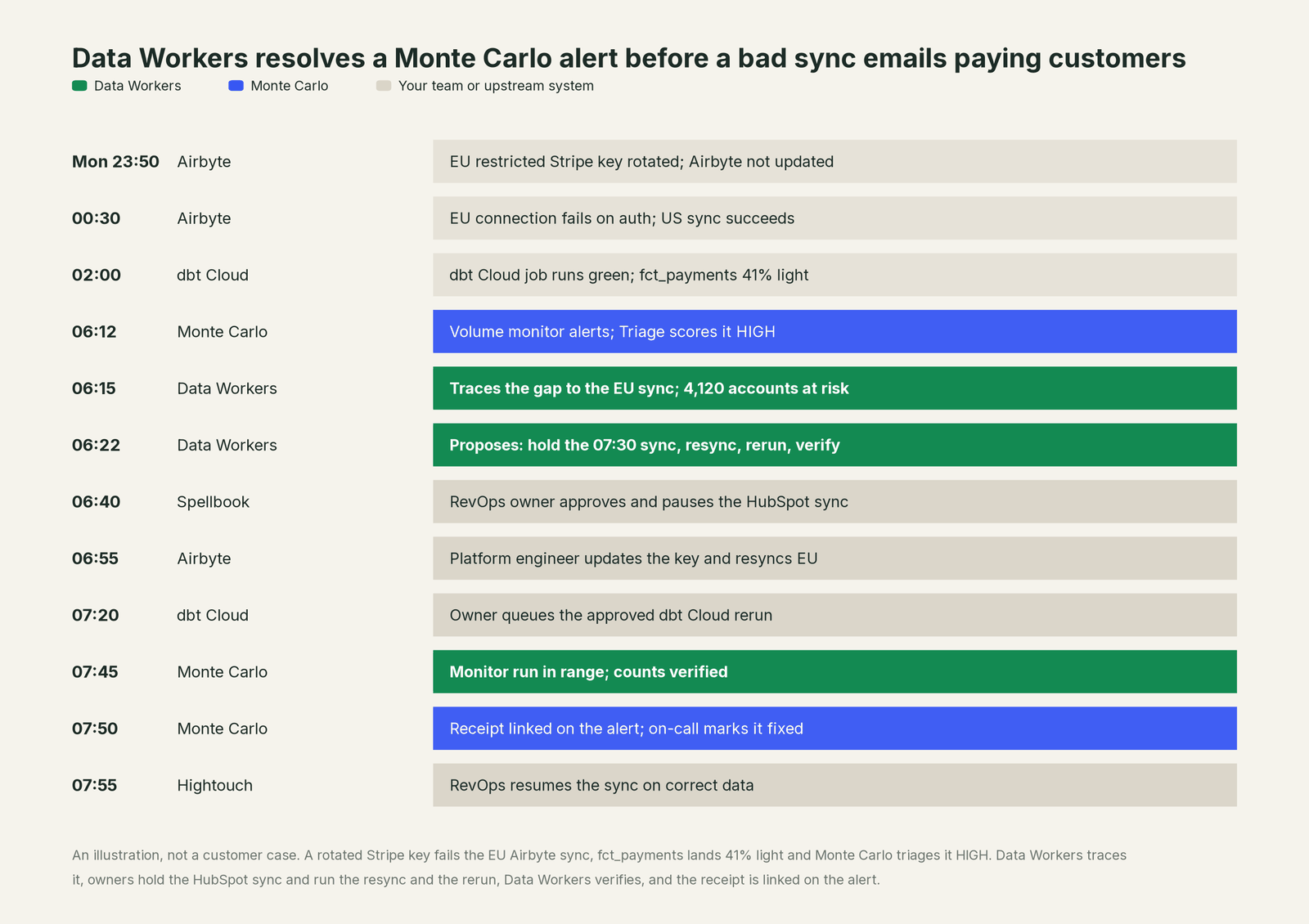
Monte Carlo did its part perfectly: it caught a table that ran green but came in light, and ranked it HIGH for the right reason. What changed is the hour after: the cause found on arrival, the one system that could hurt customers held before it ran, two owners each approving their own step. When the key rotates again next quarter, Data Workers recalls this incident with get_incident_history and goes straight to the Airbyte connection.
| Job | What Monte Carlo does | What Data Workers does |
|---|---|---|
| Detection | Volume, freshness, schema and field health monitors with ML thresholds | Reads those monitors and results; also checks volume and nulls itself and tracks load lag against baselines, so a repeat break is caught upstream |
| Prioritizing | The Triage Agent scores every alert on likelihood and impact | Starts with the HIGH alerts and adds the blast radius in the systems that act on the data |
| Investigation | The Troubleshooting Agent (preview) tests hypotheses across data, dbt, Airflow and code changes | Follows the cause past the warehouse into the Airbyte connection and forward into Hightouch and HubSpot |
| The fix | The Agent Toolkit's Remediation skill proposes and runs fixes inside one engineer's coding-agent session | Proposes the full plan, routes each step to the named owner of that system, queues the reruns once approved |
| Verification | The monitor clears on its next run | Checks counts and nulls, takes the owner's test results, and runs the Monte Carlo monitor again |
| The record | The alert, its triage reasoning and its history | A receipt: cause, steps, approvers, checks, before and after values, how to undo it |
Why doesn't Monte Carlo just do this itself?
Because Monte Carlo built a product for knowing when data is wrong and how much it matters, and its design follows from that job. Its documentation draws the line clearly: the Cost & Performance agent "recommends; it does not act on your behalf," and "Monte Carlo is read-only by design." The Troubleshooting Agent highlights likely causes and changes nothing. The MCP server, which requires an Editor role or above, writes only Monte Carlo's own objects: update_alert, create_or_update_table_monitor, create_agent_metric_monitor. The open-source Remediation skill confirms with the engineer and executes through whatever MCP servers that engineer has connected, so the context, the approvals and the record live in one session.
That is the right design for a product with read access to thousands of data estates. Resolving the incident above is a different product with different liability. It touches an Airbyte connection owned by the platform team, a Hightouch sync owned by RevOps and dbt models owned by analytics engineering. Each step needs its owner's approval, a rollback path, a blast radius that reaches HubSpot, verification against the source and a receipt an auditor can read. Someone has to be accountable for changes in tools Monte Carlo doesn't run. That is the product Data Workers is.
Every tool owns a slice. Data Workers covers the whole lifecycle
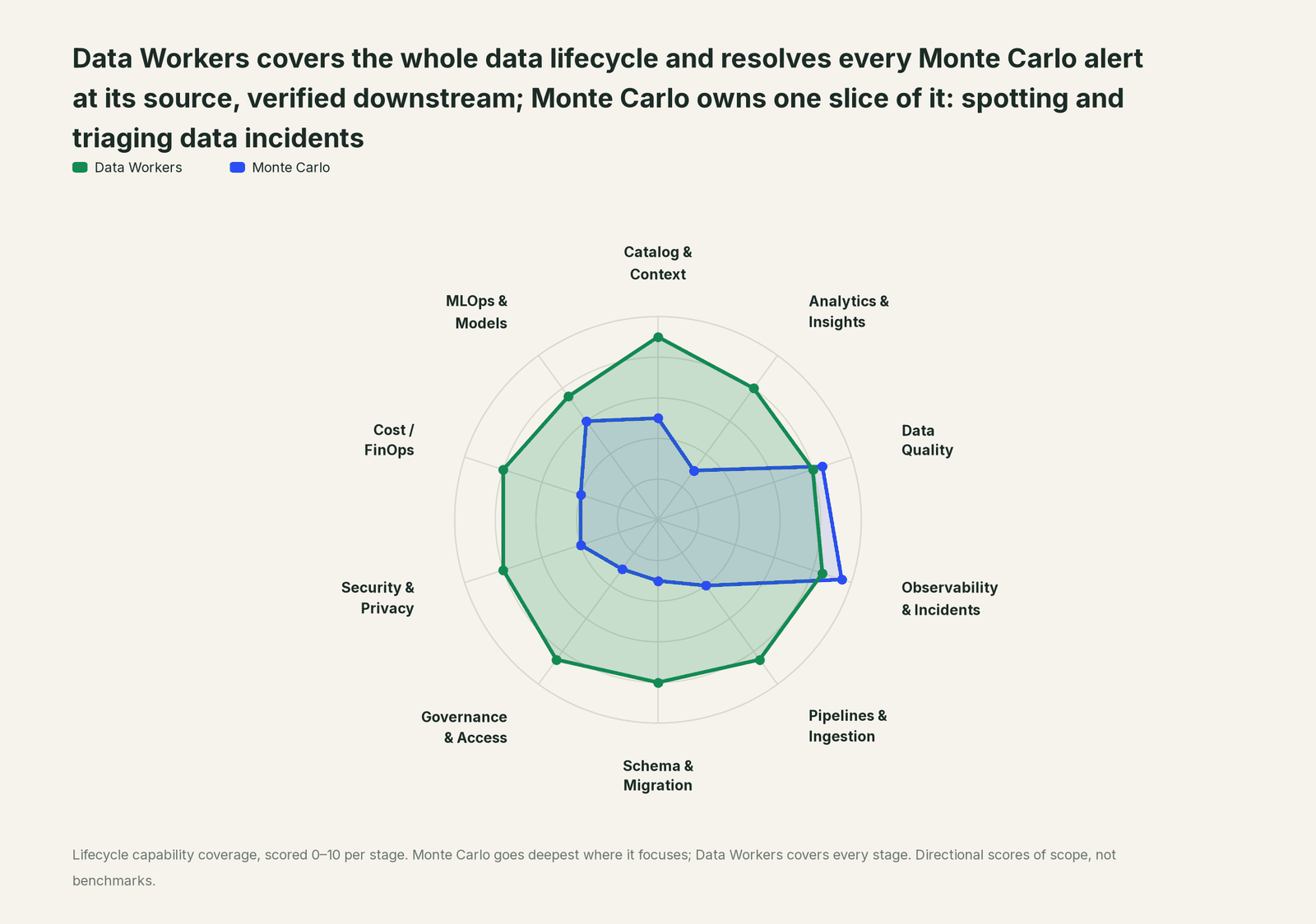
Monte Carlo owns one slice and owns it well: spotting and triaging data incidents. Each point tool adds another console, another contract and another handoff. Data Workers covers the whole lifecycle with one context, one approval flow and one audit trail, and builds on Monte Carlo where your on-call already looks.
| Stage | Data Workers | Monte Carlo | Why we scored it this way |
|---|---|---|---|
| Catalog & Context | 9 | 5 | Monte Carlo catalogs the assets, field-level lineage and domains it monitors. Data Workers keeps one context graph across Airbyte, BigQuery, dbt Cloud and the reverse ETL syncs that read it. |
| Analytics & Insights | 8 | 3 | Monte Carlo reports on the health of its alerts and tables. Data Workers answers business questions over the same governed graph. |
| Data Quality | 8 | 8.5 | Monte Carlo leads: field, validation and custom SQL monitors with ML thresholds, plus Monitoring Agent recommendations. Data Workers writes and repairs checks and dbt tests. |
| Observability & Incidents | 8.5 | 9.5 | Monte Carlo's home stage: ML monitors, a Triage Agent on by default and alert routing. Data Workers owns the loop after the alert: diagnose, fix, verify, record. |
| Pipelines & Ingestion | 8.5 | 4 | Monte Carlo watches job health and points the Troubleshooting Agent at failed runs. Data Workers traces the failed sync, holds what it would break and queues the rerun behind approval. |
| Schema & Migration | 8 | 3 | Monte Carlo flags schema changes and its PR Agent comments a risk score. Data Workers detects schema changes, scores their blast radius and generates migrations with rollback SQL. |
| Governance & Access | 8.5 | 3 | Monte Carlo governs who can use Monte Carlo. Data Workers proposes least-privilege grants on your data platforms behind approvals. |
| Security & Privacy | 8 | 4 | Monte Carlo secures its own platform and logs activity in it. Data Workers acts on the estate and leaves a tamper-evident receipt on every change. |
| Cost / FinOps | 8 | 4 | Monte Carlo's Cost & Performance agent ranks savings and "recommends; it does not act". Data Workers traces Snowflake credits to the dbt model behind them and drafts the fix for its owner. |
| MLOps & Models | 7.5 | 6 | Monte Carlo watches AI agents in production with Agent Observability and Agent Lineage. Data Workers keeps the data under your models fresh and correct. |
If you are choosing between the two rather than building on Monte Carlo, read Monte Carlo vs Data Workers and Data Workers vs data observability.
How Monte Carlo and Data Workers work together
Monte Carlo stays where alerts are raised and triaged. The on-call works in Claude Code, Cursor or Codex, with Monte Carlo's MCP server and Data Workers side by side. Spellbook Data Catalog (in preview) is where people look: each proposed change, who approved it and how to roll it back. Data Context Wizard keeps one governed context graph across BigQuery, dbt Cloud, Airbyte and Hightouch, the Data-Agents Swarm does the work, and the Autonomous Data-Conductor runs each fix end to end: detect, diagnose, fix, review, verify, remember.
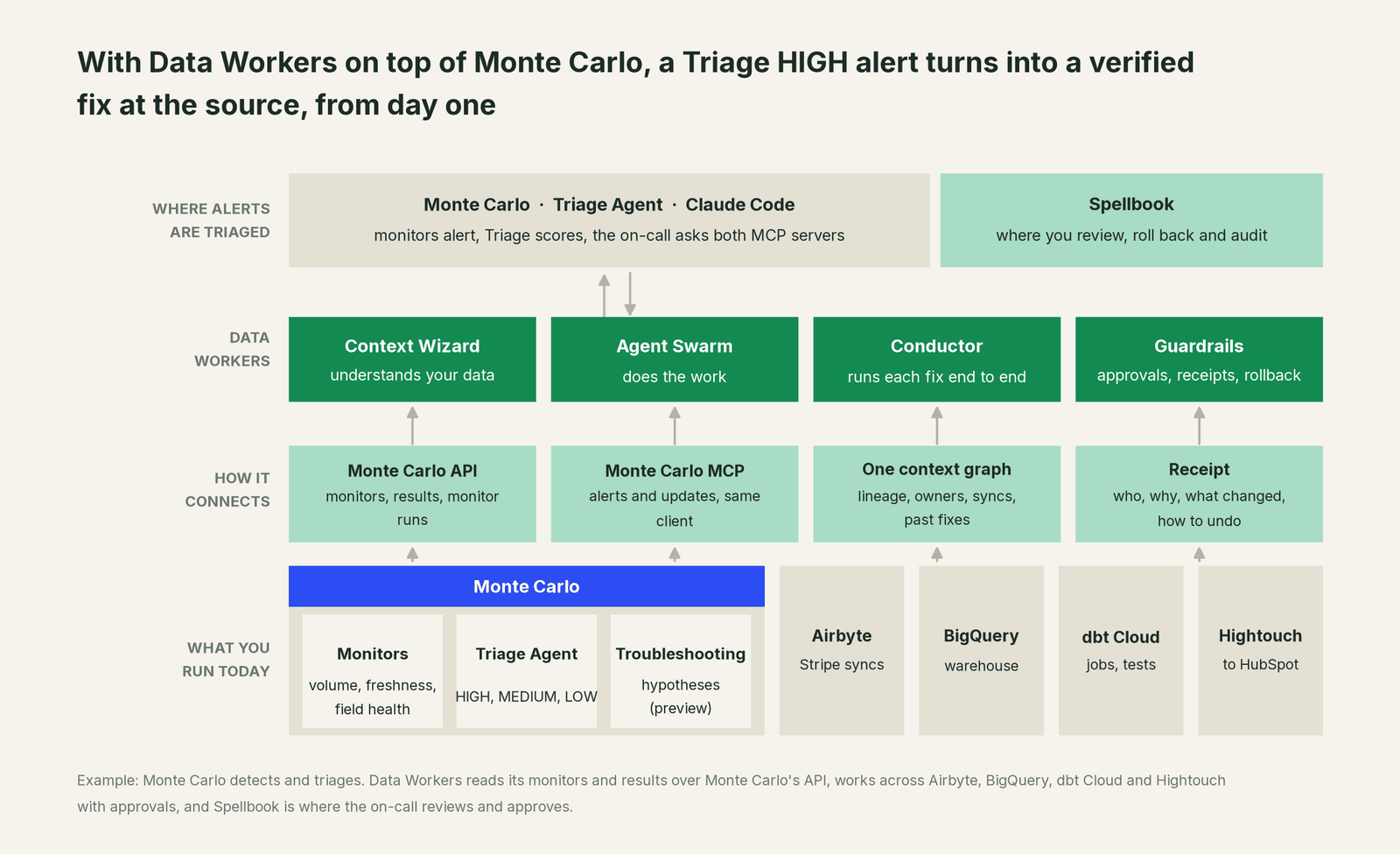
What Data Workers reads from Monte Carlo, and what it writes. Data Workers connects natively to Monte Carlo over its API. It reads your monitors (name, table, type, status) and their latest results, and runs a monitor with run_monte_carlo_suite to confirm a fix held. That is the only thing its connector does inside Monte Carlo: it never edits a monitor, a threshold or your routing. Alerts, Triage verdicts and lineage reach the on-call through Monte Carlo's MCP server in the same client (get_alerts, alert_assessment, get_asset_lineage), and the update back onto the alert goes through that server too: your team's MCP client calls update_alert under Monte Carlo's own permissions. Data changes never go through Monte Carlo. BigQuery and dbt Cloud connect natively; Airbyte, Hightouch, Stripe and HubSpot connect over their APIs or MCP servers today, and the owner of each system resyncs or pauses it. The full wiring is in the Monte Carlo integration guide.
The tools that run the incident. diagnose_incident and get_root_cause work through the evidence; trace_cross_platform_lineage and blast_radius_analysis map what sits around the table; get_incident_history checks for repeats; remediate runs approved playbooks and escalates anything uncertain to a person; run_quality_check verifies; every step lands in get_audit_trail.
Setup over MCP today. Every Data Workers agent is an MCP server. The client setup guide documents the path: clone the open-source repo and add one start-agent.sh entry per agent beside Monte Carlo's server.
# Example: Monte Carlo's MCP server plus Data Workers in Claude Code
# Monte Carlo's remote server (OAuth sign-in on first connection; Editor role or above)
claude mcp add --transport http monte-carlo https://mcp.getmontecarlo.com/mcp

# Data Workers agents over stdio, from a clone of the open-source repo
claude mcp add --scope user dw-incidents -- "$(pwd)/start-agent.sh" dw-incidents
claude mcp add --scope user dw-catalog -- "$(pwd)/start-agent.sh" dw-context-catalog
claude mcp add --scope user dw-quality -- "$(pwd)/start-agent.sh" dw-quality
claude mcp add --scope user dw-connectors -- "$(pwd)/start-agent.sh" dw-connectors
Ask "why is fct_payments light this morning?" and the client calls both servers. For a shared endpoint, the Data Workers remote server serves /mcp with an API key (bearer) or OAuth tokens from your identity provider, verified through JWKS. Give the Data Workers connector its own Monte Carlo API key; Monte Carlo's MCP server keys are a separate credential.
One alert, L0 to L4, set per domain.

- •L0 manual. The on-call reads the Triage score and works the incident by hand, as today.
- •L1 observe. Data Workers adds the diagnosis and blast radius in Spellbook, linked from the alert. Nothing changes.
- •L2 propose. Data Workers proposes the full plan; each step waits for its system owner's approval.
- •L3 act reversibly. For change classes with a proven record, such as verifying a confirmed resync and closing the incident, Data Workers runs the step and records the receipt; dbt Cloud reruns stay with the owner.
- •L4 autonomous. For a scoped domain such as payments, Data Workers catches the volume gap in
stg_stripe__chargesbefore the dbt run, routes the resync to the connection owner and verifies after it. The Monte Carlo monitor never fires.
For the safety model, read is it safe to let AI agents change production data, how approvals work and autonomy levels L0 to L4. On where data lives: the agents run in your infrastructure and hold your credentials, your data stays in your systems, and the hosted Conductor sees workflow metadata only.
What changes for your team
Monte Carlo made every incident visible and ranked. Data Workers gives the on-call a crew.
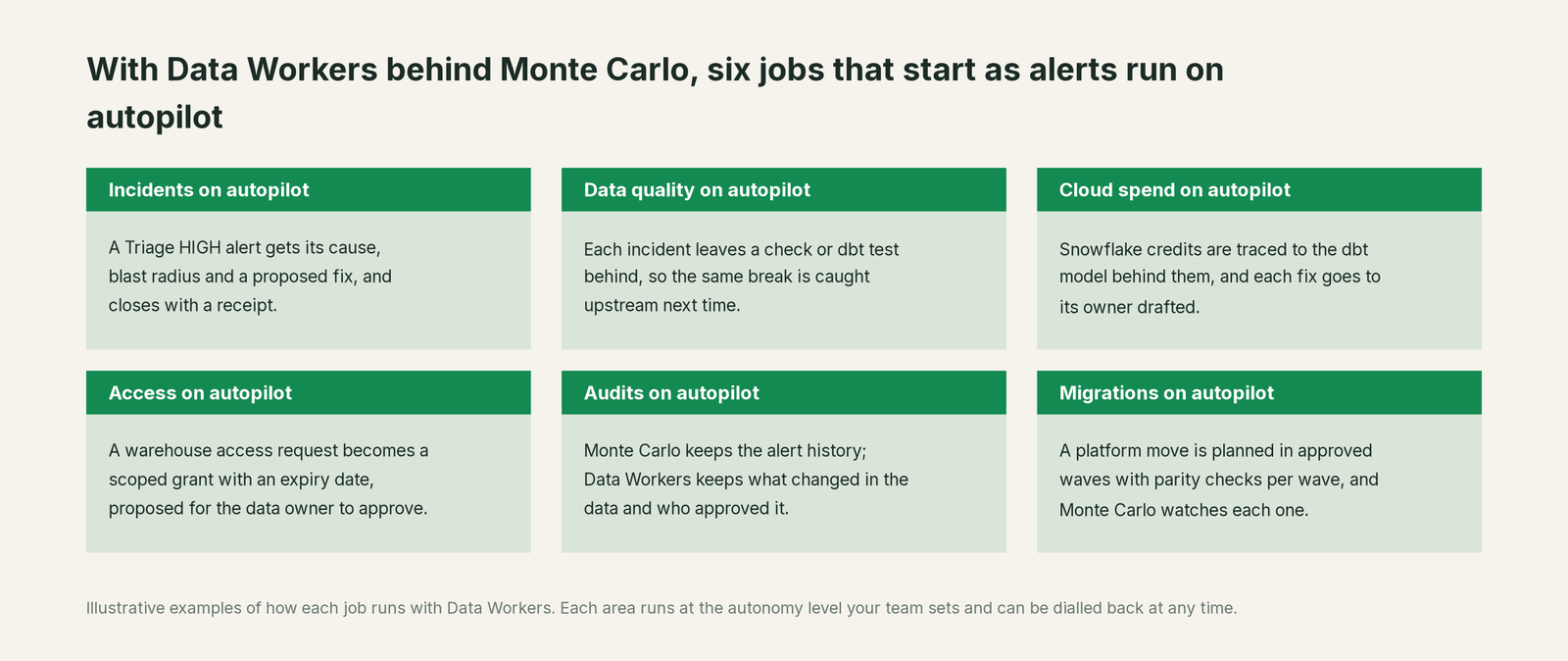
- •Incidents. A Triage HIGH alert gets its cause, blast radius and a proposed fix, and closes with a receipt.
- •Data quality. Each incident leaves a check or dbt test behind, so the same break is caught upstream.
- •Cloud spend. Snowflake credits are traced to the dbt model behind them, and each fix goes to its owner drafted.
- •Access. A warehouse access request becomes a scoped grant with an expiry date, proposed for the data owner to approve.
- •Audits. Monte Carlo keeps the alert history; Data Workers keeps what changed in the data and who approved it.
- •Migrations. A platform move is planned in approved waves with parity checks per wave, and Monte Carlo watches each one.
The on-call changes most: less tracing, more reviewing a plan. Who approves what is set per domain (who owns the agents). For prompts that already work against Monte Carlo in a coding agent, see Claude Code Monte Carlo workflows, and for the category view, beyond data observability: autonomous resolution.
Keep Monte Carlo, or consolidate?
Keep Monte Carlo if you love it; Data Workers works with it from day one. Many teams consolidate once Data Workers runs that slice too.
Most teams keep Monte Carlo: its monitors are tuned and its Triage scores trusted. What they consolidate is the stack around it: overlapping test alerts on the same break, a catalog nobody keeps current, per-team rerun scripts. If you are weighing building this layer yourself on Monte Carlo's MCP server and a coding agent, read build it ourselves with Claude Code and MCP servers: the MCP calls are the easy part; the context graph, approvals across owners and rollback are the work. For leaders, see the Monte Carlo guide for data leaders and the Monte Carlo automation playbook. The same pattern runs across the category: you're on Bigeye, you're on Soda, you're on Datadog and every connector in Data Workers integrations.
The case for your CFO
The outcome: you already pay Monte Carlo to find data incidents early and rank them. Data Workers turns the HIGH ones from a morning of tracing into a diagnosis on arrival and a fix with one approval per owner, so the numbers behind billing emails, CRM workflows and revenue reports are right before they reach customers.
The risk story is plain. Autonomy is set per domain: at L1 Data Workers only reads; at L2 it changes nothing until a named person approves; at L3 it applies changes it can undo. An unanswered approval request expires and escalates, never auto-grants. No agent can promote its own work. Every change carries a receipt: the cause, the steps, who approved them, what they touched downstream, how they were verified and how to undo them. An org-wide stop halts all autonomous dispatch. Zero migration: Monte Carlo, BigQuery, dbt Cloud, Airbyte and Hightouch stay where they are.
Why now: the Triage Agent already ranks every alert as it arrives, so the slow part is the fix, which crosses three or four systems and their owners. Bad data in a reverse ETL sync emails customers. The first win is read-only: every Monte Carlo alert in one domain, such as payments, gets a diagnosis and a blast radius on arrival. What stays the same: your monitors, triage, routing, on-call rotation and review process. For the numbers, see the ROI of agentic data operations, and for the bigger picture, what an agentic data platform is.
The sentence to repeat upstairs: "Monte Carlo tells us which data broke and how much it matters; Data Workers fixes it, with an approval and a receipt for every change."
Getting started
Start with a pilot. Pick one domain whose alerts live in Monte Carlo, such as payments, connect Data Workers to Monte Carlo, your warehouse, dbt Cloud and the tools around them, and run at L1 so every alert gets a diagnosis and a blast radius. Then turn on the first write class at L2, such as dbt fixes proposed as diffs for owner approval. The pilot path and plans are on the pricing page, and the pilot is credited in full against the first year.
FAQ
Does Data Workers have a Monte Carlo connector? Yes. Data Workers connects natively to Monte Carlo over its API, reads your monitors and their latest results, and runs a monitor to confirm a fix. Alerts, Triage verdicts and lineage come through Monte Carlo's MCP server, beside Data Workers in clients such as Claude Code, Cursor and Codex.
Does Data Workers change anything in Monte Carlo? Its connector runs monitors to verify fixes and never edits monitors, thresholds or routing. Updates on an alert go through Monte Carlo's MCP server from your team's client, under Monte Carlo's permissions (Editor role or above).
We have the Triage Agent and the Troubleshooting Agent. What is left? The work after them. Triage ranks the alert and Troubleshooting (in preview) highlights the likely cause. Data Workers takes the cause into the systems that produced and consume the data, gets each owner's approval for their step, queues the reruns, verifies downstream and leaves a receipt.
How is this different from Monte Carlo's Remediation skill? The Remediation skill in Monte Carlo's open-source Agent Toolkit proposes and executes fixes from one engineer's coding-agent session. Data Workers runs the fix as a governed workflow across owners: one context graph of every system, approvals routed to each step's owner, per-domain autonomy, rollback and a receipt that outlives the session. Both can sit in the same client.
Can we start without giving Data Workers write access? Yes. Start at L1 observe with read-only credentials for Monte Carlo's API, the warehouse, dbt Cloud and the tools around them. Every alert gets a diagnosis and a blast radius, and your team reviews the records against the bar it set before turning on the first write class.
Sources
- •Monte Carlo homepage ("The Agent Trust Platform For Data + AI Observability"; Agentic Operations, Agent Fleet, MCP & Agent Toolkit), https://montecarlo.ai/ (montecarlodata.com redirects here; checked Oct 2, 2026)
- •Monte Carlo Docs, Triage Agent (on by default; automated troubleshooting off by default), https://docs.getmontecarlo.com/docs/triage-agent (checked Oct 2, 2026)
- •Monte Carlo Docs, Troubleshooting Agent (preview caveats; updated about 2 months ago), https://docs.getmontecarlo.com/docs/troubleshooting-agent (checked Oct 2, 2026)
- •Monte Carlo Docs, Operations Agent ("runs with the same permissions as the user"), https://docs.getmontecarlo.com/docs/operations-agent (checked Oct 2, 2026)
- •Monte Carlo Docs, MCP Server (Editor role or above;
update_alert,create_or_update_table_monitor,create_agent_metric_monitor; updated 3 days ago), https://docs.getmontecarlo.com/docs/mcp-server (checked Oct 2, 2026) - •Monte Carlo Docs, Warehouse Cost & Performance Agent ("recommends; it does not act on your behalf"; "read-only by design"), https://docs.getmontecarlo.com/docs/cost-agent (checked Oct 2, 2026)
- •Monte Carlo Docs, Agent Observability overview, https://docs.getmontecarlo.com/docs/agent-monitors-overview (checked Oct 2, 2026)
- •Monte Carlo, Agent Toolkit on GitHub (Remediation skill; Apache-2.0; last commit Oct 1, 2026), https://github.com/monte-carlo-data/mc-agent-toolkit (checked Oct 2, 2026)
- •Data Workers open-source repository, https://github.com/DataWorkersProject/dataworkers-claw-community (checked Oct 2, 2026)
- •Data Workers client setup guide, https://dataworkers.io/opensource-docs/client-setup/ (checked Oct 2, 2026)
- •Data Workers, Data-Agents Swarm, https://dataworkers.io/product/data-agents-swarm/ (checked Oct 2, 2026)