Data Workers + Monte Carlo: A Monte Carlo Integration That Turns Alerts Into Verified Fixes
A Monte Carlo integration over its MCP server and API: the alert starts a Data Workers fix, the fix is verified downstream, and the receipt lands back on the alert.
Monte Carlo is the smoke alarm for your data. Data Workers is the crew that puts the fire out. This Monte Carlo integration connects the two: a Monte Carlo alert opens the loop, Data Workers finds the cause and fixes it where it lives, checks that the fix held, and puts the receipt back onto the same alert through Monte Carlo's own tools. Your monitors, your Triage Agent and your routing stay exactly as they are.
Your estate probably looks like this. Fivetran or Airflow loads data into Snowflake, Databricks or BigQuery. dbt builds the models. Tableau or Looker sits on top. Monte Carlo watches all of it: volume, freshness and schema monitors fire, the Triage Agent scores each alert for likelihood and impact, and the alert routes to a Slack channel, a Jira project or ServiceNow by audience and domain. Then a person takes over. Someone acknowledges the alert, opens the DAG, reruns a task, rebuilds a model, checks the dashboard, and marks the alert fixed, often hours after it fired.
Data Workers is the agentic data platform that runs the whole data lifecycle, and the job after the alert is where it starts with most Monte Carlo teams. Here is how it wires into Monte Carlo, what it reads, what goes back onto the alert, and what Monte Carlo keeps owning.
Key takeaways
- •Monte Carlo keeps detecting. Monitors, ML thresholds, the Triage Agent, alert routing and tickets stay in Monte Carlo.
- •The alert starts the loop. Monte Carlo's MCP server brings the alert, its Triage verdict and lineage into the same session as Data Workers, which reads Monte Carlo's monitors and their results over the GraphQL API.
- •Fixes land at the source. Data Workers diagnoses the cause in Airflow, dbt or the warehouse, proposes the fix behind the approvals you set, runs the approved reruns and verifies the result downstream, including a fresh run of the Monte Carlo monitor.
- •The receipt goes back on the alert. Data Workers writes the diagnosis, the plan and the receipt; Monte Carlo's own MCP tools in the same session set the alert to work in progress, post them as comments and mark it fixed once the fix is verified.
- •Start read-only. Monte Carlo's MCP server has a read-only mode. Begin there, then open comments and status, then approved fixes, one domain at a time.
- •Keep Monte Carlo, or consolidate later. This page is about the wiring. For the choice itself, read Monte Carlo vs Data Workers.
What Monte Carlo does, and why teams keep it
Monte Carlo is a data and AI observability platform, now positioned as an Agent Trust Platform. It learns how your tables normally behave and raises an alert when freshness, volume, schema or field values move out of range. Teams keep it because its monitors are tuned to their estate, its lineage shows what an alert touches, and its routing gets the right alert to the right channel. That signal is the best possible input to a loop that fixes things.
Monte Carlo has also opened itself up to agents this year. Its MCP server is available as a verified connector in the Claude directory, its open-source Agent Toolkit ships skills for coding agents, and its API exposes alerts, comments and owners as first-class objects.
| Area | What Monte Carlo ships | Status, October 2026 |
|---|---|---|
| Monitors | Freshness, volume, schema, field metrics, validation, custom SQL; monitors-as-code | Available |
| Triage Agent | Scores every alert HIGH, MEDIUM or LOW on likelihood and impact; on by default | GA |
| Troubleshooting Agent | Tests hypotheses across data, dbt and Airflow failures, code changes and lineage | Preview |
| MCP server | Remote server with OAuth, scoped keys and the Claude connector; Editor role or above | Available; reference updated Sept 2026 |
| MCP read-only mode | x-mcp-readonly: true hides write tools such as update_alert | Available |
| GraphQL API | One endpoint for alerts, monitors, lineage and comments; alert operations labelled experimental | Available |
| Webhooks | Eight alert events, HMAC SHA-512 signature in x-mcd-signature | Scale tier and up |
| Agent Toolkit | Apache 2.0 skills for Claude Code, Cursor, Codex and others, incl. Triage and Remediation | Public repo |
One vocabulary note. In Monte Carlo's current API the alert is the unit of work. An alert becomes an incident when someone declares a severity, SEV-1 to SEV-4, and the older incident operations are deprecated in favour of the alert ones. We use the same words here.
What comes in from Monte Carlo, and what goes back
This is the core of the integration. Data Workers works with Monte Carlo through Monte Carlo's own surfaces: its GraphQL API for monitors and their results, and its MCP server, in the same client, for alerts and the updates back onto them. Everything that goes back into Monte Carlo lands on Monte Carlo's own objects: the alert, its comments, its owner and, when you approve it, a monitor run or a new monitor. Fixes to your data never go through Monte Carlo. They go through Airflow, dbt, Git and the warehouse, with their own permissions.
| What comes in from Monte Carlo | What goes back into Monte Carlo |
|---|---|
Alerts (get_alerts): type, affected tables, status, timestamps | Alert status (update_alert): work in progress while it works, fixed once verified |
The Triage verdict (alert_assessment or the stored triage): likelihood and impact | An alert comment (create_or_update_alert_comment): diagnosis, plan, then the receipt |
Lineage (get_asset_lineage): upstream sources and downstream reports | The alert owner (set_alert_owner): the engineer who holds the approval |
| Monitors and their latest results over the GraphQL API, and your monitors-as-code YAML in Git | A declared severity, when the blast radius warrants an incident, after approval |
| Troubleshooting Agent results, where you've enabled it | A monitor run with run_monte_carlo_suite to verify the fix, and new or tuned monitors proposed as monitors-as-code |
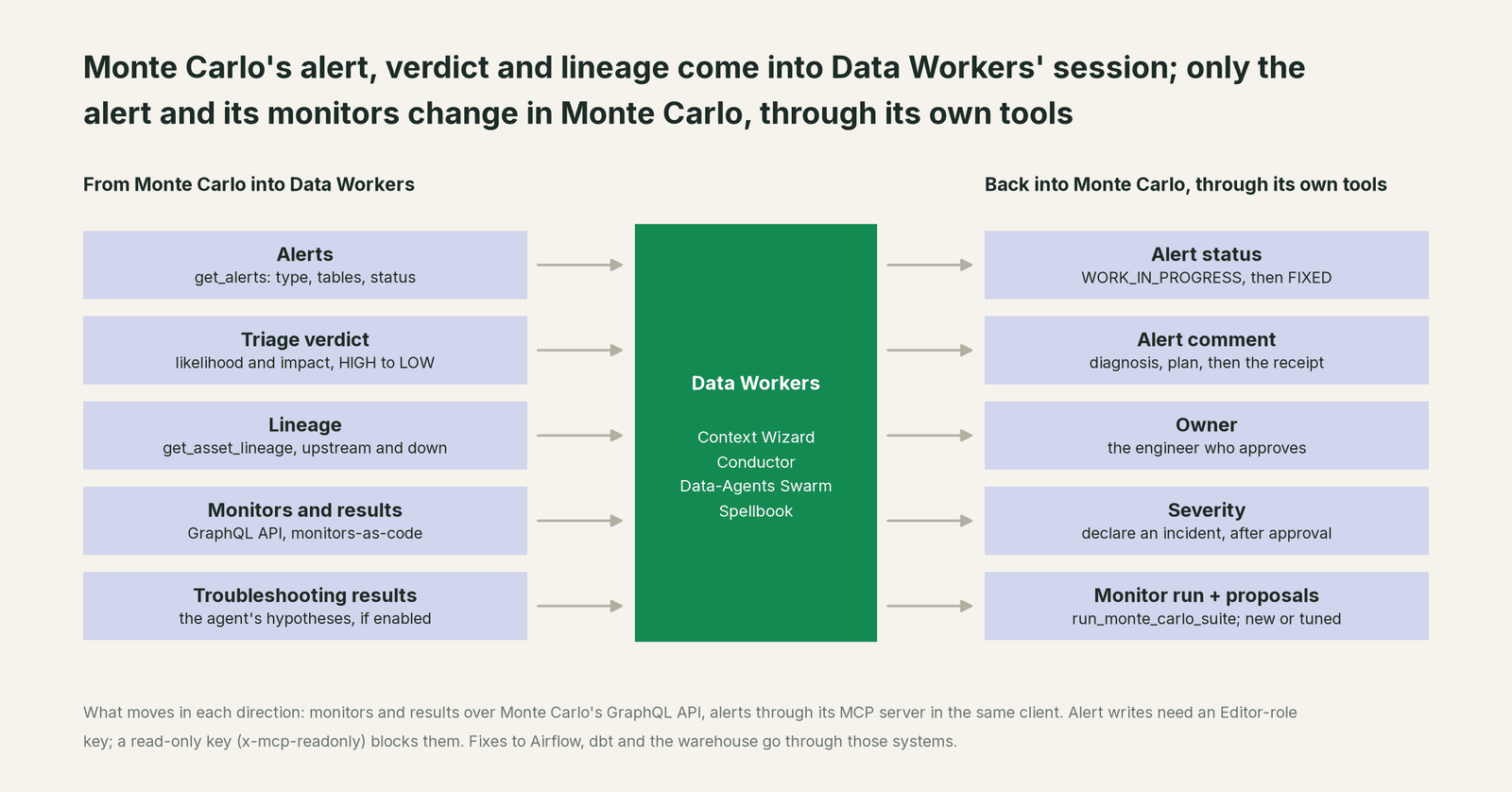
A few agents do most of the Monte Carlo work. The Incident Debugging agent takes the alert and the Triage verdict as its starting point and follows lineage past the table that alerted, into the DAG run, the dbt model or the source that caused it. The Data Context & Catalog agent joins Monte Carlo's lineage with the dbt manifest, Airflow DAG structure and BI metadata in Data Context Wizard, so the diagnosis knows what each table means and who reads it. The Data Change Review agent diffs row counts and values before and after a fix. The Autonomous Data-Conductor sequences the work, holds each step at the autonomy level you set, and closes the loop only after verification.
Monte Carlo's alert says what moved. Data Workers adds why it moved, what fixes it, and proof that the fix held.
One alert, every handoff
Here is a scenario most Monte Carlo teams will recognize. It's an illustration, not a customer case.
At 04:00 the Airflow task orders_load times out against Snowflake and retries. The first attempt had already committed, so the 04:00 batch lands in raw.orders twice. At 04:20 the dbt incremental model fct_orders builds on top and doubles that hour. At 05:10 Monte Carlo's volume monitor on fct_orders fires, and the Triage Agent scores it HIGH because the table feeds the Tableau orders dashboard that sales ops opens at 08:30.
| Step | Where it runs | What happens | Who decides |
|---|---|---|---|
| 1. Alert | Monte Carlo | The volume monitor fires and the Triage Agent writes its HIGH score onto the alert. Routing posts it to the data team's Slack channel as usual. | Monte Carlo |
| 2. Pick up | Monte Carlo MCP server | The alert, its verdict and its lineage come into the on-call session through Monte Carlo's MCP server, and Data Workers starts the investigation. The status goes to work in progress with a comment that it is being investigated, through Monte Carlo's own tools, so nobody duplicates the work. | Data Workers, with Monte Carlo's tools in the same session |
| 3. Diagnose | Airflow, Snowflake | Data Workers reads the DAG run and task attempts, finds the retry, and counts 41,200 duplicate order_ids in the 04:00 batch. Nothing upstream of Airflow changed. | Data Workers, read-only |
| 4. Propose | Spellbook, GitHub | Data Workers proposes three steps with their blast radius: a cleanup statement for the duplicate rows in raw.orders, with Snowflake Time Travel as the rollback path, a rebuild of the affected window of fct_orders, and a diff that makes orders_load idempotent with a MERGE, for the owner to merge. The plan goes onto the Monte Carlo alert as a comment, with the approving engineer as owner. | Data Workers proposes |
| 5. Approve | Spellbook, GitHub | The on-call engineer reviews the plan, approves it at 07:40 and runs the cleanup. The code change lands through your normal review flow. | A named engineer |
| 6. Fix | Snowflake, dbt | With the duplicates gone, Data Workers triggers the dbt rebuild for the window. | Approved in step 5 |
| 7. Verify | dbt, Snowflake, Monte Carlo | Counts match the source system, the unique test on order_id passes, and Data Workers runs Monte Carlo's volume monitor with run_monte_carlo_suite: it is back in range. | Data Workers, read-only |
| 8. Close | Monte Carlo | The receipt goes onto the alert as a comment and the status to fixed, through Monte Carlo's tools in the same session. Anyone who opens the alert, in Monte Carlo or from the Slack thread, sees what happened. | The on-call engineer at the propose level |
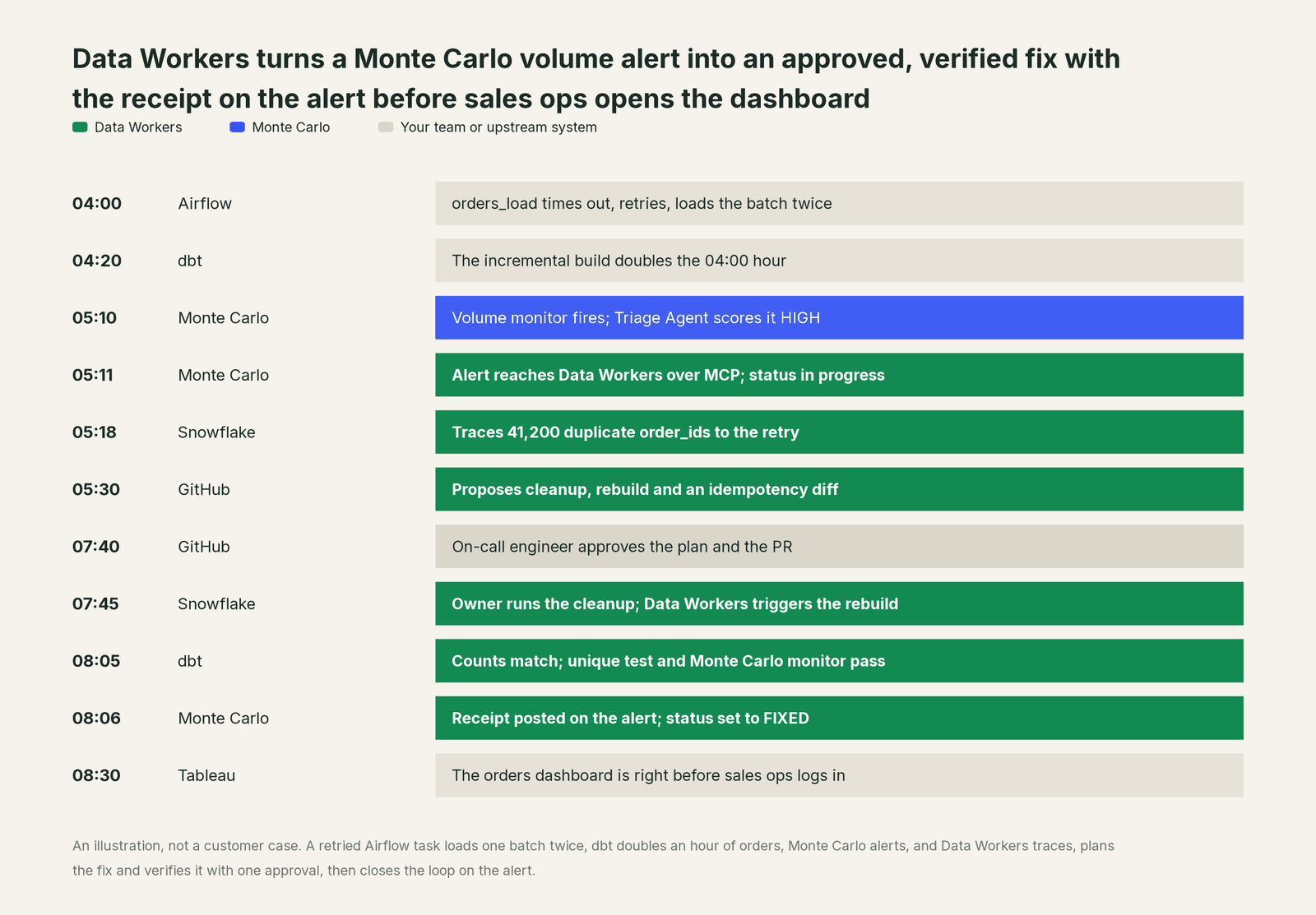
Monte Carlo did what it does best: it caught the volume jump and ranked it. Every fix ran through the system that owns the data, with one approval in the middle. The record of the whole thing lives where your team already looks for it, on the Monte Carlo alert. The receipt says what changed, who approved it, which checks ran, the before and after counts, and how to roll it back.
Why doesn't Monte Carlo just do this itself?
Monte Carlo built a great product for one job: knowing when data is wrong and how much it matters. Its design follows from that job, and it's the right design.
Monte Carlo is read-only by design. Its Cost agent documentation says so in those words: "The agent recommends; it does not act on your behalf." Its MCP write tools change Monte Carlo's own objects, such as an alert's status or a monitor, and a single header switches them off. Its open-source Remediation skill runs inside one engineer's coding agent, and its own safety rules say pipeline triggers, data changes, code changes and marking an alert fixed always need that engineer's confirmation in the session.
That's a sensible line for a company that holds read credentials to thousands of estates. Writing to production data across systems is a different product category. It needs blast-radius scoping across Airflow, dbt and the warehouse, approvals that cover a delete and a code change in the same incident, rollback for each step, receipts an auditor can read, context about every other system in the estate, and someone accountable for changes in tools Monte Carlo doesn't own. Monte Carlo's focus on detection is why it's good at detection. That cross-system layer is the product Data Workers is.
Monte Carlo MCP, the API and webhooks: how to connect today
Data Workers reads Monte Carlo's monitors and their results over its GraphQL API, and Monte Carlo's MCP server sits next to Data Workers in the same place your team already works: Data Workers agents are MCP servers, so your coding agent (Claude Code, Codex or Cursor) holds Monte Carlo's server and Data Workers side by side, and alert updates go through Monte Carlo's own tools. They're separate servers with separate jobs and separate keys.
Week one: read only.
- •Give Data Workers a Monte Carlo API key for monitors and their results.
- •Create a Monte Carlo MCP key for your team's coding agent and connect it to
https://mcp.getmontecarlo.com/mcp/with the headerx-mcp-readonly: true. Write tools such asupdate_alertdisappear for that key. - •Narrow the tools further with
x-mcp-tools, for exampleget_alerts,alert_assessment,get_asset_lineage,get_monitors. If you restrict network access by IP, add Data Workers to the allow list. - •Connect the systems behind your alerts with read-only roles: the warehouse, the dbt manifest and run history, Airflow's REST API, and the BI metadata.
- •Every agent starts observe-only. The first thing you see is a replay of recent Monte Carlo alerts: the cause, the fix it would have proposed, and the blast radius for each.
Week two onward: comments and status, then approved fixes.
- •Swap to a key without the read-only header and allow
create_or_update_alert_comment,update_alertandset_alert_owner. Writes need an Editor role or above in Monte Carlo. Each alert now carries Data Workers' diagnosis and a work-in-progress status, while people still do the fixing. - •Open approved fixes for one domain: Airflow reruns for named DAGs, dbt rebuilds for named models, warehouse changes proposed for the owner to run, and diffs that never merge themselves.
- •Decide who marks an alert fixed. At the propose level a person confirms it, the same rule Monte Carlo's own Remediation skill follows. At higher levels it is set as soon as Data Workers' verification passes.
Webhooks and routing. Monte Carlo's webhooks fire on eight alert events: created, acknowledged, status updated, owner changed, ticket attached, marked as incident, unmarked, and resolved. Each is signed with HMAC SHA-512 when you set a secret. Keep them pointed wherever they point today; when an alert is updated from the session, those events fire like any other update, so anything already listening to them sees the change without new routing.
The scopes above are an illustration; use the roles and key types your Monte Carlo plan offers.
Guardrails: approvals, and what Monte Carlo owns
What Monte Carlo stays responsible for. Monitors and their thresholds, the Triage Agent's scores, the Troubleshooting Agent, alert routing by audience and domain, tickets created from alerts, and who in your organization can act on an alert. Data Workers never edits a monitor without an approval and never changes your routing.
What Data Workers enforces on top.
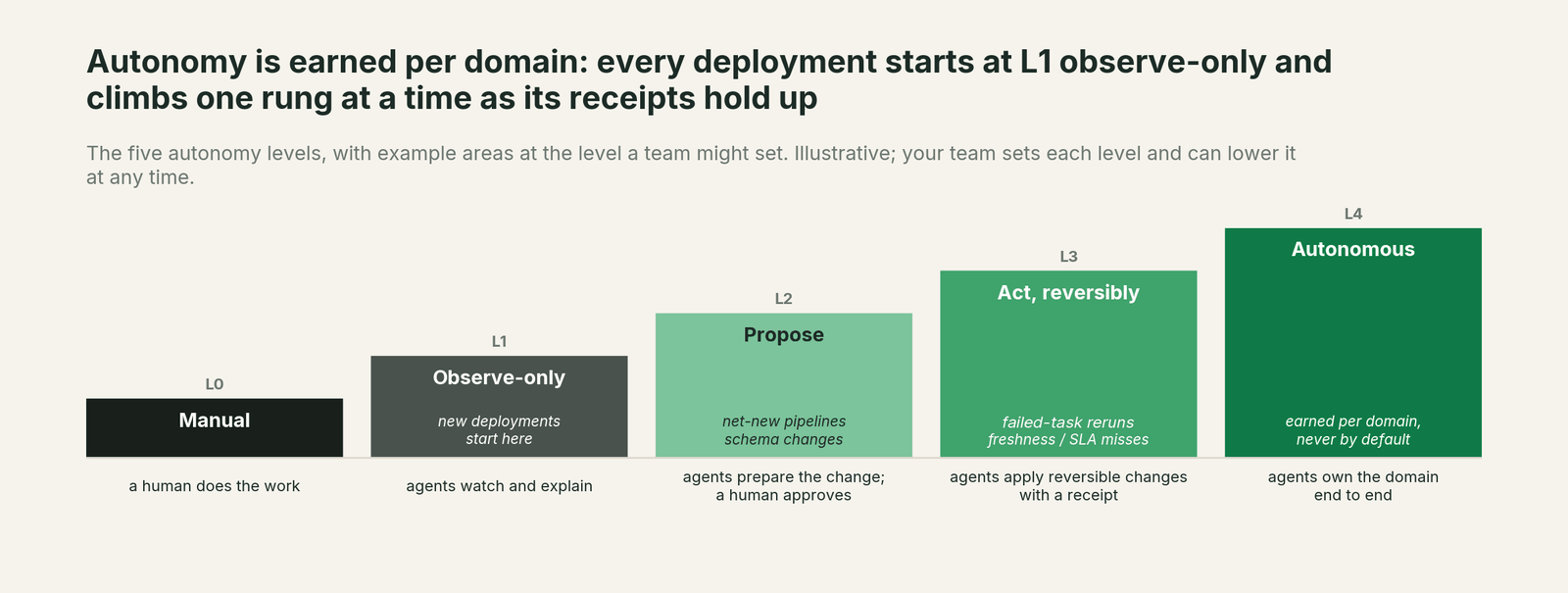
- •Read-only start. New deployments are observe-only, on a Monte Carlo key that can't write. You extend autonomy one domain at a time as the receipts earn trust.
- •Autonomy per domain, L0 to L4. Comments and status updates can move fast while data changes stay at "propose" until you decide otherwise.
- •Approvals where they belong. Code changes are diffs your owners merge under your branch protection. Data changes and anything irreversible need a named human.
- •No self-approval. No agent can promote its own work.
- •Receipts. Every change records the diff, the approver, the blast radius, the checks run, the before and after values and the rollback path in a tamper-evident, hash-chained log, and links it from the Monte Carlo alert.
- •Rollback. Each step carries its undo: a revert for code, a rerun for a job, Time Travel or a backup for a table.
- •Least privilege. Data Workers acts with the grants you give it, through Monte Carlo's, Airflow's, GitHub's and the warehouse's own permission systems.
How it fits together
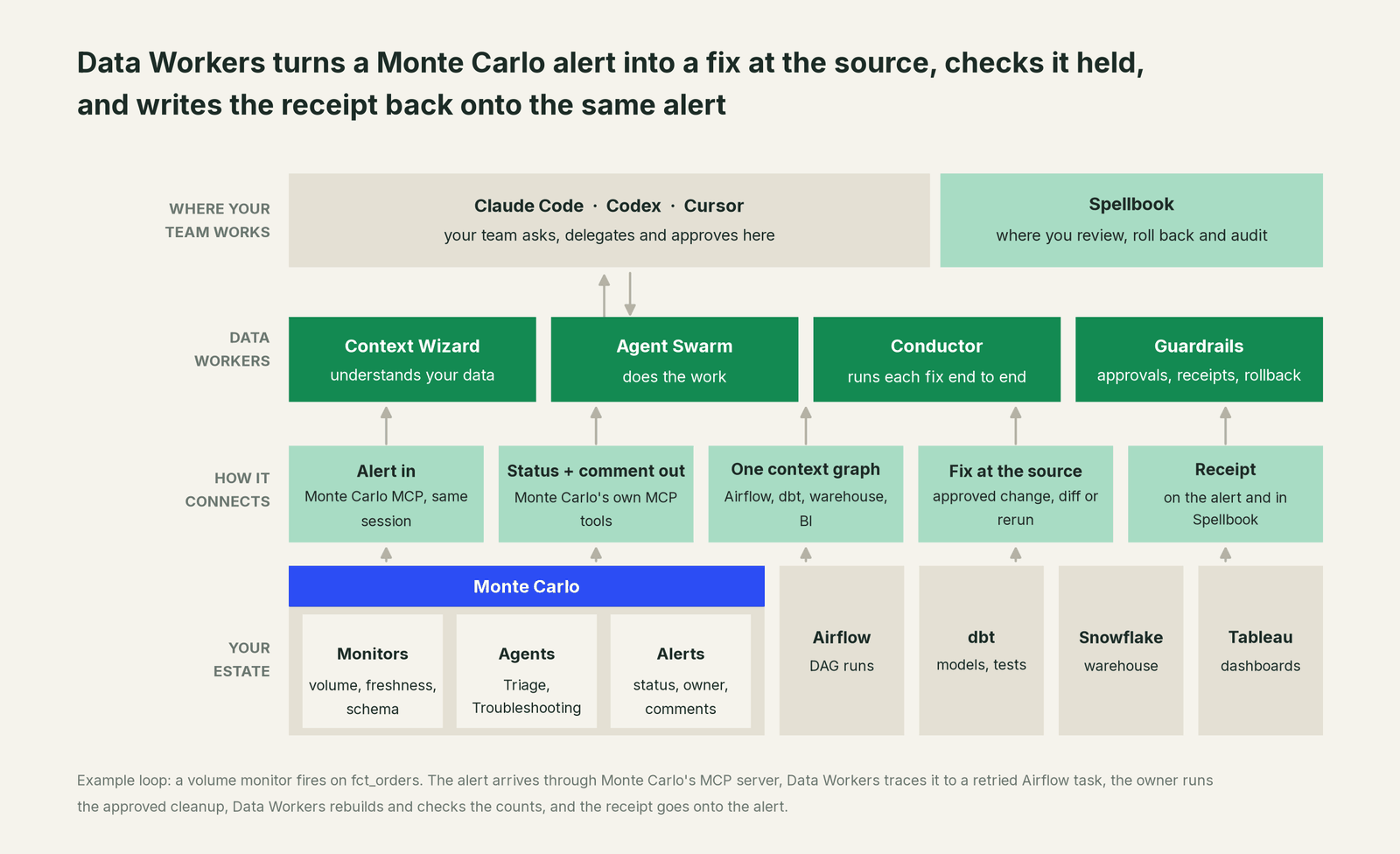
Your team works in its coding agent and reviews in Spellbook Data Catalog, which is in preview. The Data-Agents Swarm does the work, and the Autonomous Data-Conductor runs each fix end to end. Monte Carlo stays where detection, triage and routing live. Nothing migrates, and Data Workers stores metadata and scrubbed facts, not copies of your tables. It connects to the rest of the estate through 50+ connectors.
What changes for your team
The on-call engineer stops starting the morning by reconstructing what an alert means. They open a Monte Carlo alert that already carries the cause, the plan, the blast radius and an owner, and they approve or edit it. On-call changes from "find it" to "approve it". The alert history in Monte Carlo becomes a record of closed loops: what fired, what fixed it and how it was proven. Platform leads get one audit trail across Airflow, dbt and the warehouse. Sales ops and finance get the dashboard right before they open it. For the step-by-step path from alerts to agents that fix and verify, read the playbook From Monte Carlo to an autonomous data platform. For the executive view, read the Monte Carlo data leader's guide.
The case for your CFO
The outcome. The money already spent on Monte Carlo pays off at the fix as well as the alarm. Alerts turn into verified fixes, the numbers leaders rely on are right by the time they look, and every change comes with a record of what happened and who approved it.
The risk story. At the observe level, agents read Monte Carlo and your estate on keys that can't write. At the propose level, they comment and plan, and a named engineer approves each fix. Acting levels are reversible and only for domains you choose. No agent can promote its own work, every change has a rollback path, and each receipt holds the diff, the approver, the blast radius, the checks run and the before and after values. There is no migration.
Why now. Monte Carlo has opened MCP write tools and published agent skills that fix data. Agents are going to act on your alerts either way; the choice is between one engineer's session at a time and one approval flow and audit trail across the estate.
The first win. Volume and freshness alerts in one domain, where the fix is usually a rerun or a cleanup with a clear rollback.
What stays the same. Monte Carlo, its monitors and routing, your tickets, your reviewers, and the coding agent your team already uses.
The pilot path. Start with a pilot on one domain: read-only first, then comments and status, then approved fixes. The pilot is credited in full against the first year.
One sentence for upstairs: "Monte Carlo still tells us what broke; now its alert starts a fix that Data Workers verifies and records back on that same alert."
When Monte Carlo on its own is enough
If your alert volume is low, most alerts resolve themselves or turn out to be expected, and one engineer can fix the rest before anyone notices, Monte Carlo with its Triage Agent and Agent Toolkit may be all you need. Once alerts start in one system and need fixes in two others, or the same classes of alert keep coming back, an operating layer that fixes at the source and verifies every fix starts paying for itself.
FAQ
How does the Monte Carlo integration work? Data Workers reads Monte Carlo's monitors and their results over the GraphQL API, and Monte Carlo's MCP server brings alerts, Triage verdicts and lineage into the same session. Data Workers diagnoses the cause in the system where it lives, proposes the fix behind your approvals, verifies the result downstream, and the status and receipt go back onto the alert through Monte Carlo's own tools.
Can Data Workers use a read-only Monte Carlo MCP key? Yes, and that's how we recommend starting. With x-mcp-readonly: true, Monte Carlo hides its write tools, so the session can read and diagnose but can't change an alert. Open comments and status later.
Will Data Workers add alerts or re-monitor our tables? No. Monte Carlo stays the detector. Data Workers acts on Monte Carlo's alerts and only proposes a new or tuned monitor when a fix shows a gap, as a change you approve.
Who marks a Monte Carlo alert fixed? You decide per domain. At the propose level a person confirms it. At higher levels it is set as soon as the checks pass, and the receipt on the alert shows which checks those were.
Does it work with Monte Carlo's Claude connector and Agent Toolkit? Yes. They run in the same client as separate servers. Monte Carlo's skills help an engineer triage and investigate in a session; Data Workers runs the fix across systems with one approval flow and one audit trail.
What happens to our Slack, Jira and ServiceNow routing? Nothing changes. Routing stays in Monte Carlo. When an alert is updated from the session, Monte Carlo fires its webhook events for that update just as it would for a person.
Do we have to replace Monte Carlo? No. Keep it and let its alerts drive the loop. Some teams consolidate later once Data Workers runs detection for a domain too; Monte Carlo vs Data Workers covers that choice.
Sources
Sources for Monte Carlo capabilities and statuses, current as of October 2, 2026: the Monte Carlo MCP server (tools, auth, Editor role; updated Sept 29, 2026), MCP server reference and operations (toolsets, read-only mode, tool restrictions, network access; updated Sept 4, 2026), the Monte Carlo API overview and API reference (alert queries, updateAlert, setAlertOwner, createOrUpdateAlertComment, declared severity, deprecated incident operations), webhooks (events, payload, signature), the Monte Carlo Agent Toolkit (Automated Triage and Remediation skills, MCP tool list, confirmation rules), the Triage Agent, the Troubleshooting Agent, the Cost agent ("read-only by design"), alerting and communication and pricing (webhooks from the Scale tier). Product names and statuses change quickly; if we've got something wrong, tell us and we'll fix it.