You're on Bigeye: It Drafts the Remediation SQL. Data Workers Fixes the Data and Proves It
Bigeye catches the data issue and bigAI drafts the remediation SQL. Data Workers diagnoses across systems, fixes with approval, verifies and leaves a receipt.
Your data platform team runs on Bigeye. It recommends metrics for every table and column, Autothresholds learn what normal looks like, and when a metric breaks its threshold Bigeye opens an issue, merges related issues into an incident and walks lineage upstream to the cause, often through systems most tools never reach: SQL Server, Db2, Netezza, SSIS, ADF, Cognos and BusinessObjects. bigAI, in public preview, adds Suggested Resolutions, Suggested Preventions and, since September 15, 2026, AI Remediation SQL in beta, which drafts the UPDATE or DELETE that would repair the affected rows. bigAI Chat, generally available since August 19, 2026, answers questions and changes monitors and issues once you approve. Agent Trust Hub watches how Claude Code, Cursor and Databricks Genie sessions touch your data. Bigeye is the smoke alarm, and one of the best in the building. Data Workers is the crew.
Bigeye will tell you that the null rate on billing.invoices.amount jumped overnight, show you the SSIS package upstream and hand you a SQL statement to copy. Somebody still has to check what it does downstream, get it approved, run it, rebuild what depends on it and confirm the finance numbers. Data Workers does that work behind approvals and leaves a receipt.
Key takeaways
- •Bigeye keeps its job. Metrics, Autothresholds, issues, lineage, bigAI and Agent Trust Hub stay exactly where they are.
- •The drafted SQL becomes a governed change. The on-call's assistant brings the issue and its lineage in from Bigeye's MCP server, and Data Workers checks the Remediation SQL against everything downstream and proposes the full repair: data fix with undo, model rebuild, upstream change.
- •A named owner approves; Data Workers verifies. The owner approves in Spellbook and reruns the dbt Cloud rebuild, Data Workers checks quality, load baselines and totals, and the receipt link goes onto the Bigeye issue.
- •Two MCP servers in one client. Run the Bigeye MCP gateway beside Data Workers in Claude Code: Bigeye answers what broke and where it came from, Data Workers fixes it.
- •Autonomy per domain. Each data domain climbs from L0 manual to L4 autonomous at the pace your team sets.
Bigeye is the smoke alarm. Data Workers is the crew.
Bigeye monitors and detects, and bigAI explains and drafts. Data Workers diagnoses across systems, fixes behind approvals and verifies. Here is a Tuesday with both in place, across a SQL Server ERP, SSIS, Snowflake, dbt Cloud and the Power BI finance pack. This is an illustration, not a customer case.
| Time | System | What happens |
|---|---|---|
| Mon 22:00 | SQL Server ERP | A billing module release starts padding currency codes with a trailing space ('EUR ') |
| Tue 01:15 | SSIS | The invoice load's currency lookup misses on the padded codes; the package still reports success |
| 01:20 | Snowflake | 6,312 rows land in billing.invoices with a null amount |
| 03:00 | dbt Cloud | The nightly job builds the incremental fct_revenue model on top of the nulls |
| 08:05 | Bigeye | The Autothreshold on the amount null rate opens an issue; lineage points to the SSIS package |
| 08:09 | Bigeye bigAI | Remediation SQL drafts an UPDATE for the invoice rows with a null amount |
| 08:12 | Data Workers | Reads the issue over the Bigeye MCP server, traces lineage past the invoice table and finds that fct_revenue already holds Tuesday's partition, so fixing the base table alone would leave revenue wrong |
| 08:20 | Data Workers | Proposes the repair: the corrected UPDATE scoped to the 6,312 rows with its undo written in, a rebuild of the affected fct_revenue partitions, and a trimmed currency match for the SSIS owner |
| 08:45 | Spellbook | The finance data owner reviews the proposed repair and its blast radius, checks the affected rows in Snowflake, then approves and applies it |
| 09:05 | dbt Cloud | The owner reruns the dbt Cloud job for the affected partitions after approval; the tests pass |
| 09:20 | Snowflake | Data Workers verifies the null rate and load lag against their baselines; the owner's query matches revenue totals to the ERP invoice source |
| 09:25 | Bigeye | The metric returns inside its Autothreshold; the issue closes with the receipt linked |
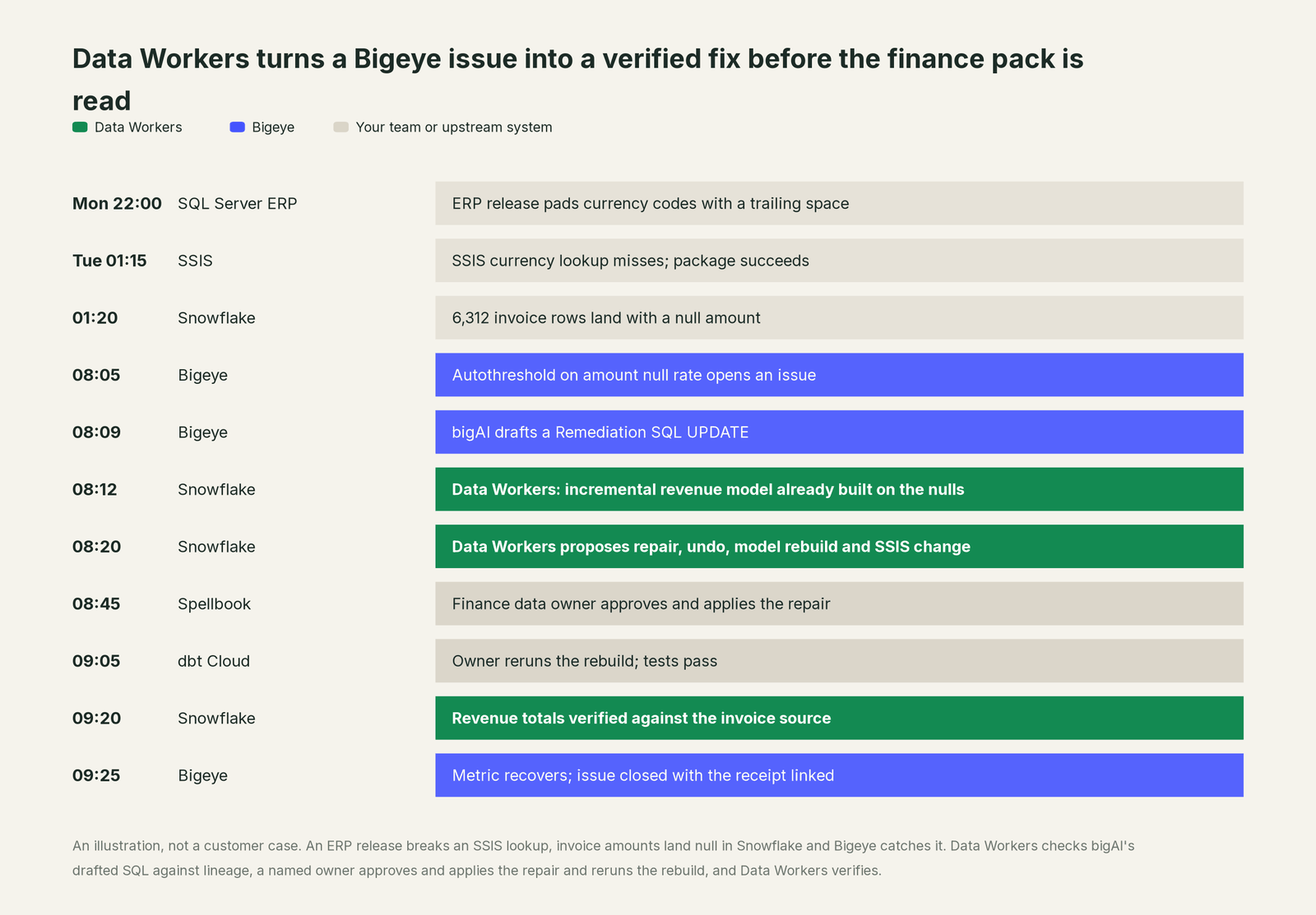
Bigeye did its job: it caught a null spike behind a legacy package and drafted the repair. What changed is everything after the draft. The SQL was checked against lineage before anyone ran it, the fact the draft could not see (an incremental model already built on bad rows) was in the proposal, a named owner approved one change set, and finance opened a correct Power BI pack with a record of what changed.
| Job | What Bigeye does | What Data Workers does |
|---|---|---|
| Detection | Recommended metrics and Autothresholds catch freshness, volume, null-rate and distribution breaks | Watches freshness, volume and schema itself, catching many breaks before a metric fires |
| Root cause | Lineage to the upstream table, job or package, including legacy systems | Joins Bigeye's lineage to dbt, orchestrator runs and incident history to find what changed and what else it touched |
| The fix | bigAI suggests resolutions and drafts Remediation SQL for a person to copy and run | Proposes the complete repair (data fix with undo, model rebuild, upstream change) with blast radius, routed to a named owner |
| Running it | Your team runs the SQL in its own client | The owner approves and applies the data repair from Spellbook; Data Workers queues the reruns through your orchestrator |
| Verification | The metric returns inside its threshold | Checks freshness, quality, volume and totals on every downstream model the fix touched |
| The record | The issue, its incident and its timeline | A receipt: the cause, the diff, who approved it, what it touched, how it was verified and how to undo it |
Why doesn't Bigeye just do this itself?
Because Bigeye made a clear, sensible choice about where its product ends, and its documentation says so. Suggested Preventions "cannot be applied by Bigeye automatically. You will need to modify your ETL job using your existing software development process." Remediation SQL is a beta feature, off by default, and "Bigeye generates the SQL but does not execute it on your behalf"; the docs tell you to copy it "and run it in your own database client or workflow tooling", and to review it first because the model works from "sampled row previews and metric metadata, which may not capture every edge case in your data." bigAI Chat proposes changes to Bigeye's own monitors and issues and runs nothing until a person clicks Approve. The MCP server's writes stay inside Bigeye too: issues, incidents, metrics, dimensions, tags and glossary terms.
That is the right line for a monitoring product: Bigeye can be pointed at every table in a regulated enterprise because nobody worries it will change one. Running an UPDATE on a production finance table is a different product with a different liability: check it against everything downstream, get the owner's approval, have an undo before it runs, rebuild the dependent dbt models, give the SSIS owner the fix that stops the repeat, and prove the numbers for the auditor. Bigeye would have to own changes in Snowflake, dbt Cloud and SSIS, systems it watches but does not run. Data Workers is built for exactly that job.
Every tool owns a slice. Data Workers covers the whole lifecycle
Bigeye owns detection and explanation, and it reaches further into legacy estates than most. Each point tool adds another console, another contract and another handoff. Data Workers covers the whole lifecycle with one context, one approval flow and one audit trail.
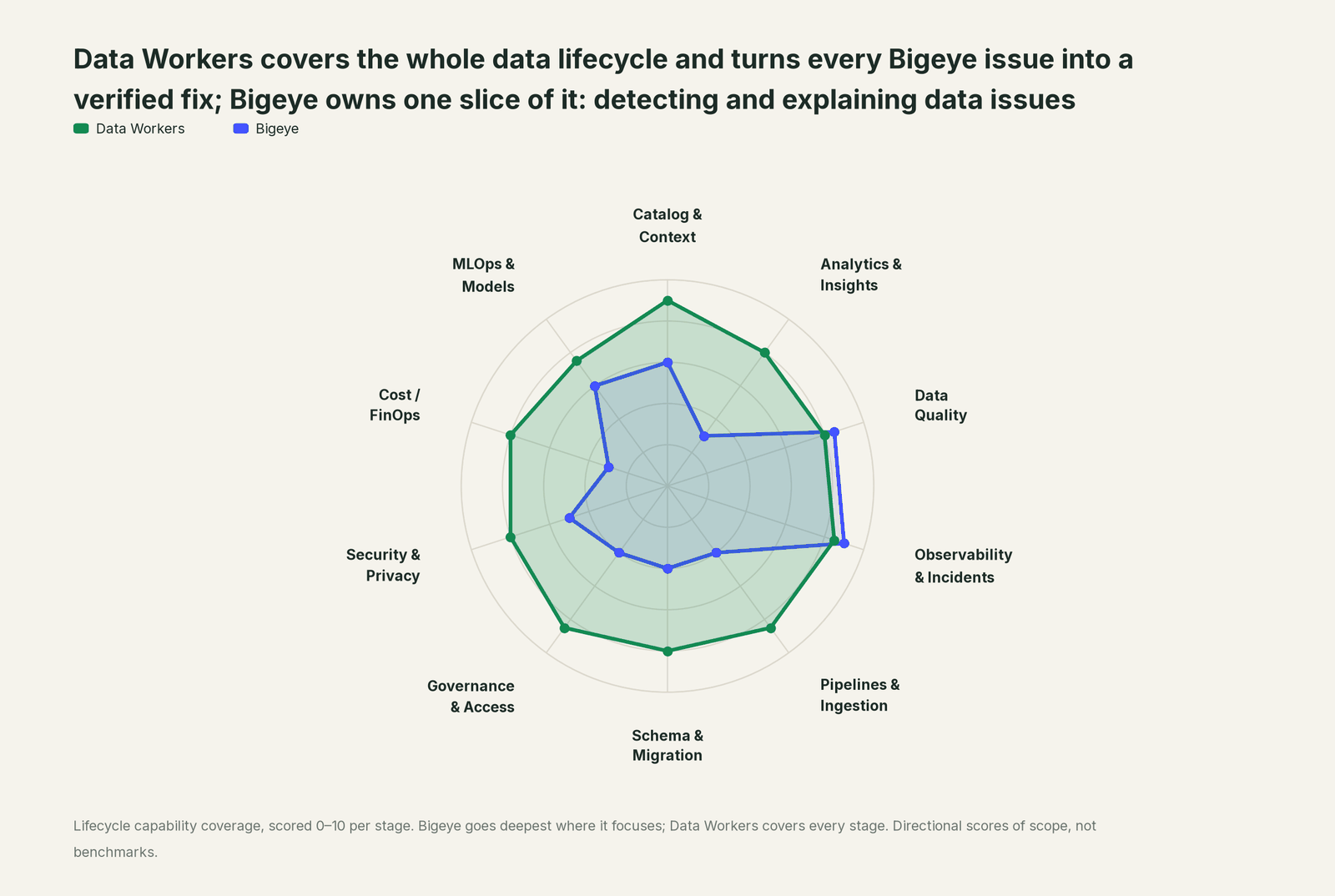
| Stage | Data Workers | Bigeye | Why we scored it this way |
|---|---|---|---|
| Catalog & Context | 9 | 6 | Bigeye's catalog, glossary and lineage reach legacy systems such as SSIS, Db2 and Cognos. Data Workers keeps one governed context graph of definitions, owners, lineage, quality and usage across every platform. |
| Analytics & Insights | 8 | 3 | bigAI Chat answers questions about issues and tables. Data Workers answers data questions from governed definitions with lineage behind every number. |
| Data Quality | 8 | 8.5 | Bigeye's home stage: recommended metrics and Autothresholds put ML monitors on new tables with little setup. Data Workers writes and runs checks and proposes the dbt tests behind them. |
| Observability & Incidents | 8.5 | 9 | Bigeye's home stage: issues, incidents, lineage to the upstream cause and bigAI Suggested Resolutions. Data Workers diagnoses across systems, fixes with approval and verifies the fix. |
| Pipelines & Ingestion | 8.5 | 4 | Lineage shows which ETL job feeds a table, and Preventions suggest ETL changes for your team to make. Data Workers queues reruns and backfills through your orchestrator, with approvals. |
| Schema & Migration | 8 | 4 | Lineage shows what a change upstream will break. Data Workers catches schema changes, scores their blast radius and plans migrations in waves. |
| Governance & Access | 8.5 | 4 | AI Trust policies track how agents use data. Data Workers dry-runs each warehouse access request and proposes a time-bound grant for the owner to approve. |
| Security & Privacy | 8 | 5 | Evidence Reports rank agents and data resources by risk, including data sensitivity. Data Workers' pull request review flags new columns whose names or annotations look sensitive, and leaves a receipt on every data change. |
| Cost / FinOps | 8 | 3 | Bigeye does not manage warehouse spend. Data Workers traces Snowflake credits to the dbt model behind them and drafts the fix for its owner. |
| MLOps & Models | 7.5 | 6 | Agent Trust Hub watches Claude Code, Cursor and Genie sessions and the data they touch. Data Workers keeps the data under your models fresh and correct. |
Bigeye leads on its two home stages, as it should. For the category view, read Bigeye, Anomalo, Sifflet and Soda vs Data Workers and Data Workers vs data observability; for head-to-head questions, see Data Workers vs Bigeye and Bigeye vs Monte Carlo.
How Bigeye and Data Workers work together
Bigeye stays on top, where Autothresholds fire and bigAI suggests. Spellbook Data Catalog (in preview) is where the data team reviews each proposed change, who approved it and how to roll it back. Between them, Data Context Wizard keeps one governed context graph, the Data-Agents Swarm does the work with 20 specialized agents, and the Autonomous Data-Conductor runs each fix end to end: detect, diagnose, fix, review, verify, remember.
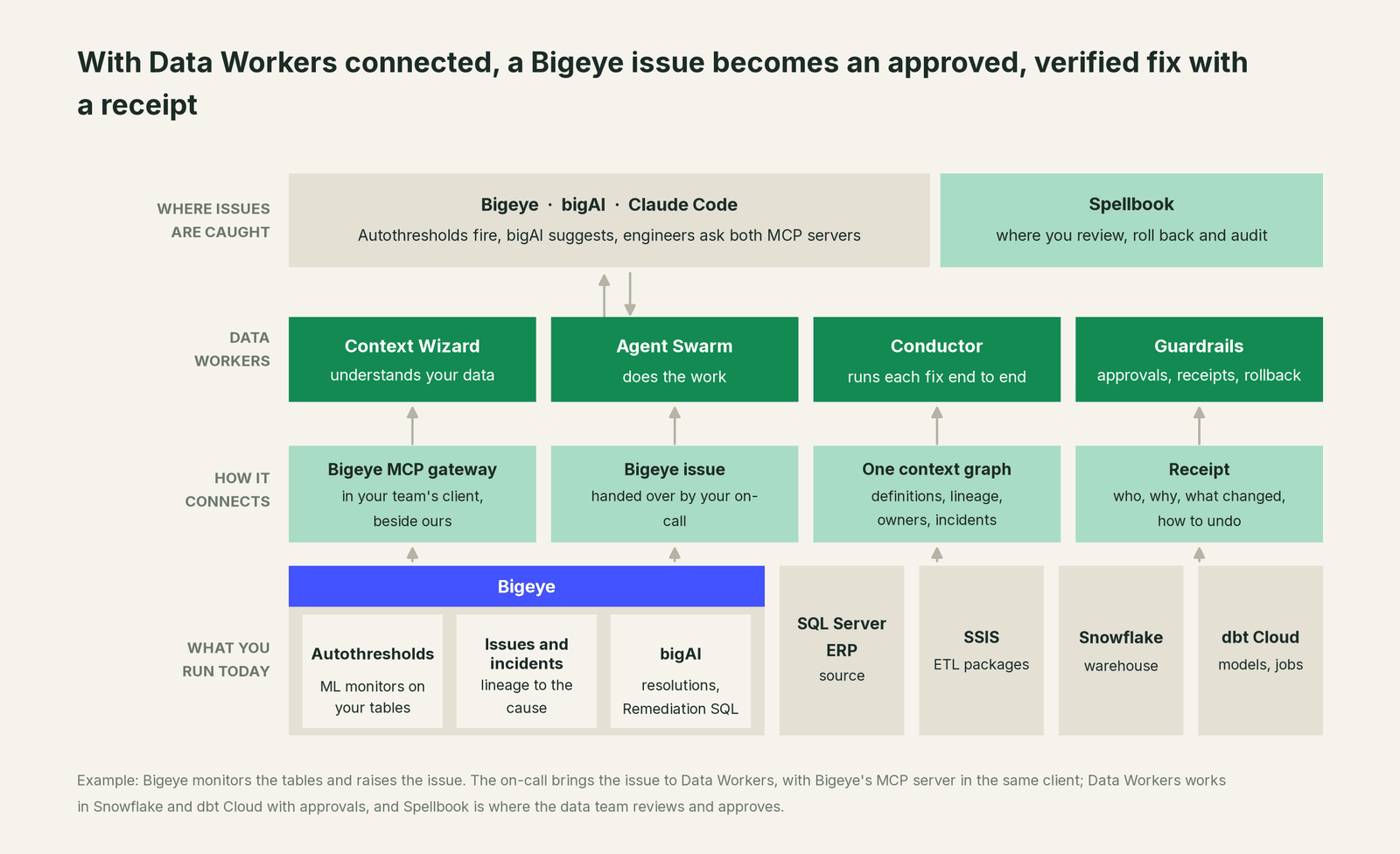
Bigeye to Data Workers. Bigeye connects over its API or MCP server today: your team's assistant reads issues, incidents, lineage and upstream root causes side by side with Data Workers, whose own checks rest on the warehouse, dbt and the orchestrator. Snowflake and dbt Cloud are native connectors; SQL Server, SSIS and Power BI connect over their APIs. A new Bigeye issue starts a diagnosis: diagnose_incident and get_root_cause work the evidence, trace_cross_platform_lineage and blast_radius_analysis map everything downstream, and get_incident_history checks for repeats. remediate proposes data changes for the owner to approve and apply; reruns are queued through your orchestrator. run_quality_check, monitor_metrics and get_quality_score verify, and every step lands in get_audit_trail.
Data Workers to Bigeye. When the fix is verified, the receipt link goes onto the issue's timeline through the Bigeye MCP server's update_issue tool (it takes a timeline message), called from the client that runs both servers. Bigeye's history then shows how the issue was resolved.
Side by side in one client. Bigeye documents its hosted MCP gateway for Claude Code, Snowflake Cortex Code (CoCo) and GitHub Copilot CLI, authenticated with a Bigeye API key and workspace ID. Every Data Workers agent is an MCP server; the client setup guide documents the path: clone the open-source repo and add one start-agent.sh entry per agent.
# Example: Bigeye MCP gateway plus Data Workers in Claude Code
# Bigeye's documented setup, with your API key and workspace ID
claude mcp add --transport http bigeye https://mcpgateway.bigeye.com/mcp \
  --header "Authorization: apikey <YOUR_API_KEY>" \
  --header "x-bigeye-workspace-id: <YOUR_WORKSPACE_ID>"

# Data Workers agents over stdio, from a clone of the open-source repo
claude mcp add dw-context-catalog -- /path/to/dataworkers-claw-community/start-agent.sh dw-context-catalog
claude mcp add dw-incidents -- /path/to/dataworkers-claw-community/start-agent.sh dw-incidents
claude mcp add dw-quality -- /path/to/dataworkers-claw-community/start-agent.sh dw-quality
Ask "why are invoice amounts null this morning, and what does the fix touch?" and the client calls both: Bigeye returns the issue, the SSIS lineage and the drafted SQL; Data Workers returns the downstream models built on the bad rows and a proposed repair with its blast radius. Bigeye's API key scopes what the client can do in Bigeye; Data Workers' guardrail decides whether a data change may run in that domain. For a shared endpoint, the Data Workers remote server takes an API key (bearer) or OAuth tokens from your identity provider, verified through JWKS.
One Bigeye issue, L0 to L4. The same null-rate issue on billing.invoices, at each level of the autonomy ladder, set per domain.

- •L0 manual. An engineer edits the bigAI draft and runs it by hand.
- •L1 observe. Data Workers posts the diagnosis: the SSIS cause, the 6,312 rows and everything downstream. Nothing changes.
- •L2 propose. Data Workers proposes the repair, the undo, the rebuild and the SSIS change; nothing runs until the finance data owner approves.
- •L3 act reversibly. For proven change classes, such as rerunning a load or rebuilding a partition, Data Workers queues the step through the orchestrator, verifies it and records the receipt.
- •L4 autonomous. In a scoped domain with a long clean record, Data Workers handles the repeatable steps end to end; data repairs still go to the owner.
For the safety model, read is it safe to let AI agents change production data, how approvals work, autonomy levels L0 to L4 and how to roll back an AI agent change. On where data lives: the agents run in your infrastructure and the hosted Conductor sees workflow metadata only.
What changes for your team
Bigeye made every broken table visible. Data Workers gives the team a crew.
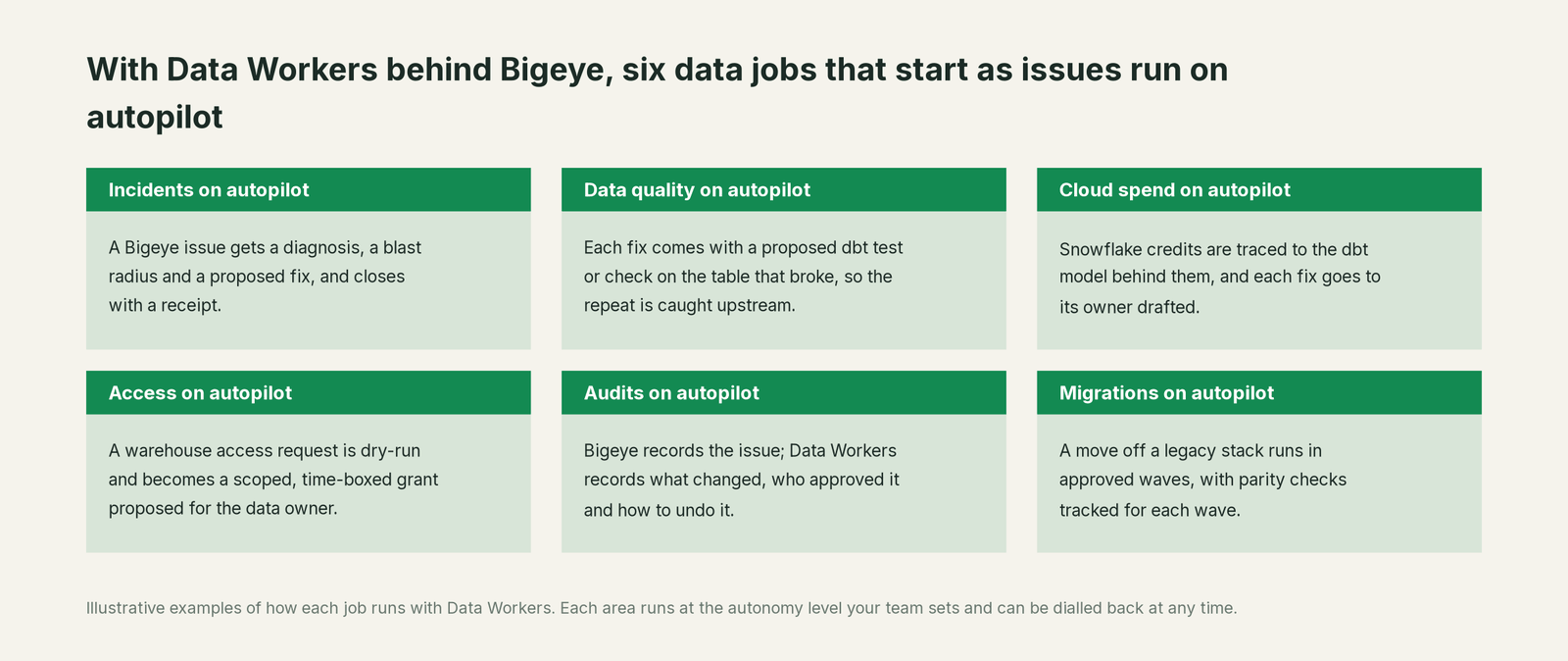
- •Incidents. A Bigeye issue arrives with a diagnosis, a blast radius and a proposed fix, and closes with a receipt.
- •Data quality. Each fix comes with a proposed dbt test or check on the table that broke, so the repeat is caught upstream.
- •Cloud spend. Snowflake credits are traced to the dbt model behind them, and each fix goes to its owner drafted.
- •Access. A warehouse access request is dry-run and becomes a scoped, time-boxed grant proposed for the data owner.
- •Audits. Bigeye records the issue; Data Workers records what changed, who approved it and how to undo it.
- •Migrations. A move off SSIS or another legacy stack runs in approved waves, with parity checks planned and tracked for each wave.
The on-call changes most: it reviews proposals instead of writing repair SQL at 8 a.m. See the data incident response playbook, beyond data observability: autonomous resolution and who owns the agents.
Keep Bigeye, or consolidate?
Keep Bigeye if you love it; Data Workers works with it from day one. Many teams consolidate once Data Workers runs that slice too.
Most Bigeye customers keep it, especially where legacy lineage and Agent Trust Hub matter to the governance office. What teams consolidate is the stack around it: a second quality tool alerting on the same break, hand-written repair scripts, a runbook wiki. If you are weighing building the fix layer yourself on the Bigeye MCP gateway and a coding agent, read build it ourselves with Claude Code and MCP servers: the MCP calls are the easy part; the context graph, approvals and rollback are the work. Across the category, see you're on Monte Carlo, you're on Anomalo and you're on Soda, Data Workers integrations and what is an agentic data platform.
The case for your CFO
The outcome: you already pay Bigeye to find bad data before the business does. Data Workers turns each Bigeye issue from a morning of tracing and hand-checked SQL into a diagnosis on arrival and a complete fix with one approval, so revenue and billing numbers are right before anyone reads them.
The risk story is plain. Autonomy is set per domain: L1 only reads; L2 changes nothing until a named person approves; L3 applies changes it can undo. Data repairs such as the invoice UPDATE always go to the table's owner with their undo written in. An unanswered approval request expires and escalates, never auto-grants. No agent can promote its own work. Every change carries a receipt: the cause, the diff, who approved it, what it touched, how it was verified and how to undo it. An org-wide stop halts all autonomous dispatch. Zero migration: Bigeye, Snowflake, dbt Cloud, SSIS and Power BI stay where they are.
Why now: bigAI already drafts the repair, so the slow part is checking, approving, running and proving the fix across systems. The first win is read-only: every Bigeye issue in one domain gets a diagnosis and a blast radius, while monitors, permissions and dbt review stay the same. For the numbers, see the ROI of agentic data operations.
The sentence to repeat upstairs: "Bigeye tells us the data broke and drafts a fix; Data Workers makes the fix safe, runs it with an approval and proves it held."
Getting started
Start with a pilot. Pick one domain whose issues already live in Bigeye, such as the billing tables behind the finance pack, connect Data Workers to Bigeye, Snowflake and dbt Cloud, and run at L1 so every issue gets a diagnosis and a blast radius. Then turn on the first write class at L2, such as partition rebuilds with owner approval. The pilot path and plans are on the pricing page, and the pilot is credited in full against the first year.
FAQ
How does Data Workers connect to Bigeye? Over Bigeye's API or MCP server today. It reads issues, incidents, lineage and upstream root causes; the receipt link goes onto the issue timeline through Bigeye's update_issue. You can also run both MCP servers in Claude Code and ask both in one conversation.
bigAI already drafts Remediation SQL. Why add Data Workers? The draft is a single statement built from sampled rows, and Bigeye's docs say to review it and run it yourself. Data Workers adds what it cannot see: the models already built on the bad rows, their rebuild, the undo, the upstream change that stops the repeat, a named approver and a verified result.
Does Data Workers run the UPDATE or DELETE in our warehouse? No. Data repairs are proposed with the query that finds the affected rows, the blast radius and the undo, and the table's owner approves and applies them. Data Workers then queues the dependent reruns, verifies the result and records the receipt.
Does Data Workers change anything in Bigeye? Only the issue timeline: a message linking the receipt, so Bigeye shows how the issue was resolved. Monitors, thresholds and policies stay under your Bigeye admins.
Bigeye's lineage reaches SSIS and other legacy systems. Does Data Workers use it? Yes. Data Workers joins Bigeye's lineage to dbt, orchestrator runs and incident history in one context graph, so a cause in an SSIS package is tied to every Snowflake model and report it affects.
How does this relate to Agent Trust Hub? Agent Trust Hub watches how AI agents such as Claude Code, Cursor and Genie sessions use your data. Data Workers' agents act under per-domain approvals and record every change in an audit trail, so governance sees both who touched the data and what changed.
Sources
- •Bigeye, homepage (Bigeye Data Observability and AI Trust Platform; Agent Trust Hub, bigAI Chat, AI Guardian), https://www.bigeye.com/ (checked Oct 2, 2026)
- •Bigeye Docs, bigAI (public preview), https://docs.bigeye.com/docs/bigai (checked Oct 2, 2026)
- •Bigeye Docs, bigAI Chat (approval before any change; updated Aug 14, 2026), https://docs.bigeye.com/docs/bigai-chat (checked Oct 2, 2026)
- •Bigeye Docs, Suggested Resolutions, https://docs.bigeye.com/docs/suggested-resolutions (checked Oct 2, 2026)
- •Bigeye Docs, Suggested Preventions, https://docs.bigeye.com/docs/suggested-preventions (checked Oct 2, 2026)
- •Bigeye Docs, AI Remediation SQL (beta), https://docs.bigeye.com/docs/remediation-sql (checked Oct 2, 2026)
- •Bigeye Docs, Deploy Metrics and Thresholds, https://docs.bigeye.com/docs/deploy-metrics and https://docs.bigeye.com/docs/autothresholds (checked Oct 2, 2026)
- •Bigeye Docs, Platform release notes (Agent Trust Hub Jun 17; Genie Spaces Jul 16; bigAI Chat GA and Claude Code monitoring Aug 19; Remediation SQL 2.92.0 Sep 15; Evidence Reports 2.95.0 Sep 24; Cursor sessions 2.96.0 Sep 29, 2026), https://docs.bigeye.com/docs/bigeye-platform-release-notes (checked Oct 2, 2026)
- •Bigeye Docs, MCP Server (gateway URL, API key and workspace headers; updated Aug 11, 2026), https://docs.bigeye.com/docs/bigeye-mcp-server (checked Oct 2, 2026)
- •Bigeye MCP server repository (tool list;
update_issuetimeline message), https://github.com/bigeyedata/bigeye-mcp-server (checked Oct 2, 2026) - •Data Workers open-source repository, https://github.com/DataWorkersProject/dataworkers-claw-community (checked Oct 2, 2026)
- •Data Workers client setup guide, https://dataworkers.io/opensource-docs/client-setup/ (checked Oct 2, 2026)