You're on Sigma: Spreadsheet Analysis Runs on Your Warehouse. Data Workers Keeps What's in the Cells Right, Including What People Write Back
Already on Sigma? Data Workers checks the warehouse tables under every workbook, including models built on input-table write-back, traces a wrong number to its cause and fixes it behind a named approval.
Your finance and operations teams left Excel for Sigma. They build workbooks on live warehouse tables, pivot without an extract and reuse the metrics your data team defined in Sigma data models. Planners type forecast overrides and targets straight into input tables, Sigma writes those rows to a write schema in your warehouse, and a warehouse view lets dbt reuse them. Since Sigma's Oct 2 release, Sigma Assistant in the workbook, Sigma agents and MCP connectors for agents are generally available, and analysts reach Sigma from Claude, Cursor or Codex through the Sigma MCP server. Sigma puts spreadsheet analysis on the warehouse. Data Workers owns whether what's in the cells is right: it checks the tables under each workbook after every run, traces a wrong number to the edit, load or model that caused it, proposes the fix behind a named approval and verifies it with a receipt.
Key takeaways
- •Sigma keeps its job. Workbooks, data models, input tables, materializations, Sigma Assistant and Sigma agents stay with the people who own them today.
- •Input tables make every planner a data producer. Data Workers checks the models built on those rows after every run, like any other source.
- •The fix lands where the cause is. Data Workers proposes the upstream change as a diff for its owner, routes it to a named approver and queues the rerun. The input table owner cleans the rows in Sigma.
- •Data Workers changes nothing in Sigma. It works natively on the warehouse, dbt and the orchestrator underneath, and connects to Sigma over its REST API today. Your team's own client can use the Sigma MCP server next to Data Workers.
- •Start with one planning workbook, check every table under it, and climb from L0 manual to L4 autonomous per domain.
Sigma puts spreadsheet analysis on the warehouse. Data Workers owns whether what's in the cells is right.
Input tables are a gift to finance teams and a new kind of source for data teams. Planners can paste up to 2,000 rows at once, with validation, data entry permissions and row edit history. Sigma writes each input table to a write schema with an edit log, and recommends a warehouse view when other tools need the data. Once a dbt model reads that view, a planner's paste is part of your pipeline, and every rule the pipeline relies on (one row per key, sensible totals) depends on how carefully someone pasted at 4 p.m.
Here is a Wednesday morning with Data Workers next to a Sigma organization on Snowflake. This is an illustration, not a customer case.
| Time | System | What happens |
|---|---|---|
| Tue 16:05 | Sigma | An FP&A analyst updates EMEA Q1 opex overrides in the Plan overrides input table of the FY27 Plan workbook. She means to replace 412 rows with a revised block and pastes it below the original instead. |
| 16:06 | Snowflake | Sigma writes the rows to the write schema. The view FINANCE.PLAN_OVERRIDES_V now returns 824 EMEA Q1 rows: 412 pairs on the same region, cost center and month. |
| Wed 02:00 | Prefect, dbt | The finance-nightly flow runs dbt build. stg_plan_overrides builds override_id from region, cost center and month; fct_plan sums overrides per key. The run is green. EMEA Q1 opex plan reads $36.8M instead of $18.4M. |
| 02:40 | Data Workers | The post-run run_quality_check on stg_plan_overrides fails uniqueness on override_id: a distinct ratio of 0.5, half as many distinct values as rows. The EMEA Q1 plan total the team records with monitor_metrics jumps from its $18.4M baseline to $36.8M and is flagged. |
| 02:43 | Data Workers, Slack | blast_radius_analysis finds fct_plan, two downstream models and, from a context-graph note the team recorded, the Plan vs Actual workbook. Another note adds that its data model materializes at 06:00 for the 09:00 CFO staff review. Data Workers opens an incident and posts to #fpa-data with send_slack_alert. |
| 06:00 | Sigma | The Plan vs Actual data model materializes on schedule and picks up the doubled plan. |
| 06:30 | Sigma | The FP&A lead opens the input table's audit history and sees the 16:05 paste next to the originals entered last week. |
| 06:45 | Sigma Assistant | The EMEA finance director asks how Q1 opex is tracking. Assistant answers faithfully from the materialized model: 49% under plan. The right answer is 2% over. |
| 07:00 | Data Workers | Proposes the fix as a diff for the owner to merge: stg_plan_overrides keeps the latest edit per override_id, plus a dbt unique test for the owner's project so a repeat paste fails the run instead of the plan. With it: the blast radius, the rerun plan and the undo (revert the diff). It asks the input table owner to remove the superseded rows. The approval request reaches the analytics engineering lead in Slack. |
| 07:15 | Sigma | The FP&A analyst deletes the original rows from the input table. |
| 07:25 | Spellbook | The lead approves in Spellbook; the dbt owner merges the diff. |
| 07:30 | Prefect | Data Workers queues the approved finance-nightly rerun with trigger_prefect_flow. |
| 07:55 | Snowflake | The run finishes. run_quality_check passes uniqueness on override_id, and the recorded EMEA Q1 plan is back at $18.4M. |
| 08:05 | Sigma | The data model owner reruns the Plan vs Actual materialization. |
| 08:20 | Claude, Sigma MCP server | The FP&A lead asks Claude, through the team's Sigma MCP connection, for EMEA Q1 opex plan: $18.4M, matching the recorded value. Data Workers writes the receipt (cause, diff, approver, rerun, checks) and a graph note that fct_plan depends on unique keys from the Plan overrides input table. |
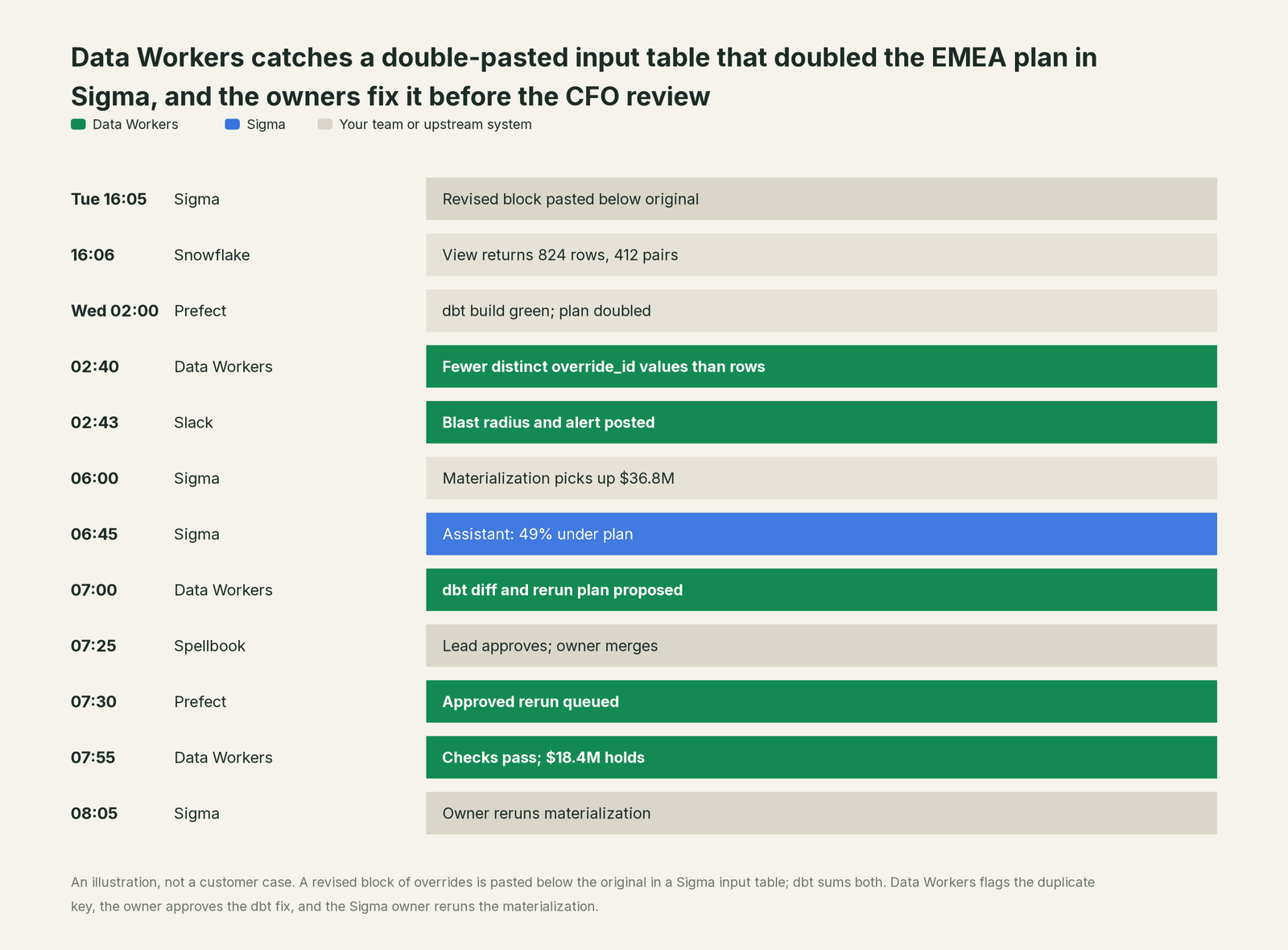
Every tool did its job: Sigma saved and logged the paste, dbt summed what the model said to sum, and Prefect ran on time. The problem was a human edit, valid row by row, that broke an assumption three systems downstream. Data Workers caught it before business hours, a named person approved the fix, and the CFO review opened on the right plan.
| Job | What Sigma does | What Data Workers does |
|---|---|---|
| The analysis | Live, spreadsheet-style workbooks and reports on warehouse tables, with metrics from data models | Keeps the warehouse tables and dbt models under those workbooks right |
| The write-back | Input tables capture overrides and targets with validation, permissions, row history and an edit log | Checks the models built on write-back for key uniqueness, nulls and row counts after every run |
| The break | Shows whatever the warehouse returns; materializations serve the latest copy | Catches the broken assumption, traces it to the edit or model that caused it and lists the workbooks it reaches |
| The fix | Owners edit input table rows, rerun materializations and update data models | Proposes the upstream fix as a diff for its owner, routes it to a named approver and queues the approved rerun |
| The proof | Answers again from fresh data, in the workbook, Sigma Assistant or a Sigma agent | Re-checks the tables, compares the recorded value and writes a receipt with cause, diff, approver and undo |
Why doesn't Sigma just do this itself?
Sigma made a clear, sensible bet: keep the data in the warehouse, query it live, and give business users a spreadsheet they already know, write-back included. Its guardrails fit that job well. Input tables offer validation lists, data entry permissions, row edit history and a warehouse-native audit history view. Each Sigma MCP tool needs the same permission as the matching action in the Sigma UI. Sigma agents work inside a workbook, use only the actions and MCP connectors their user may use, and let users approve the tasks an agent performs.
All of that protects Sigma's own surface. A planner's paste is a legitimate edit, and Sigma is right to save it. What it means for a dbt model, a Prefect flow and a board workbook three steps away is a question about systems Sigma doesn't run. Fixing it took a dbt change, an analytics lead's approval, an orchestrator rerun and a warehouse check afterwards. That is a different product with different liability: cross-system context, blast-radius scoping, approvals, rollback and receipts across vendors. It is the product Data Workers is, and it builds on the Sigma organization your finance team already lives in.
Every tool owns a slice. Data Workers covers the whole lifecycle
Sigma owns one slice outright: spreadsheet-style analysis and write-back directly on the warehouse. Each point tool adds another console, contract and handoff. Data Workers covers the whole lifecycle with one context, one approval flow and one audit trail, and builds on the Sigma organization you already run.
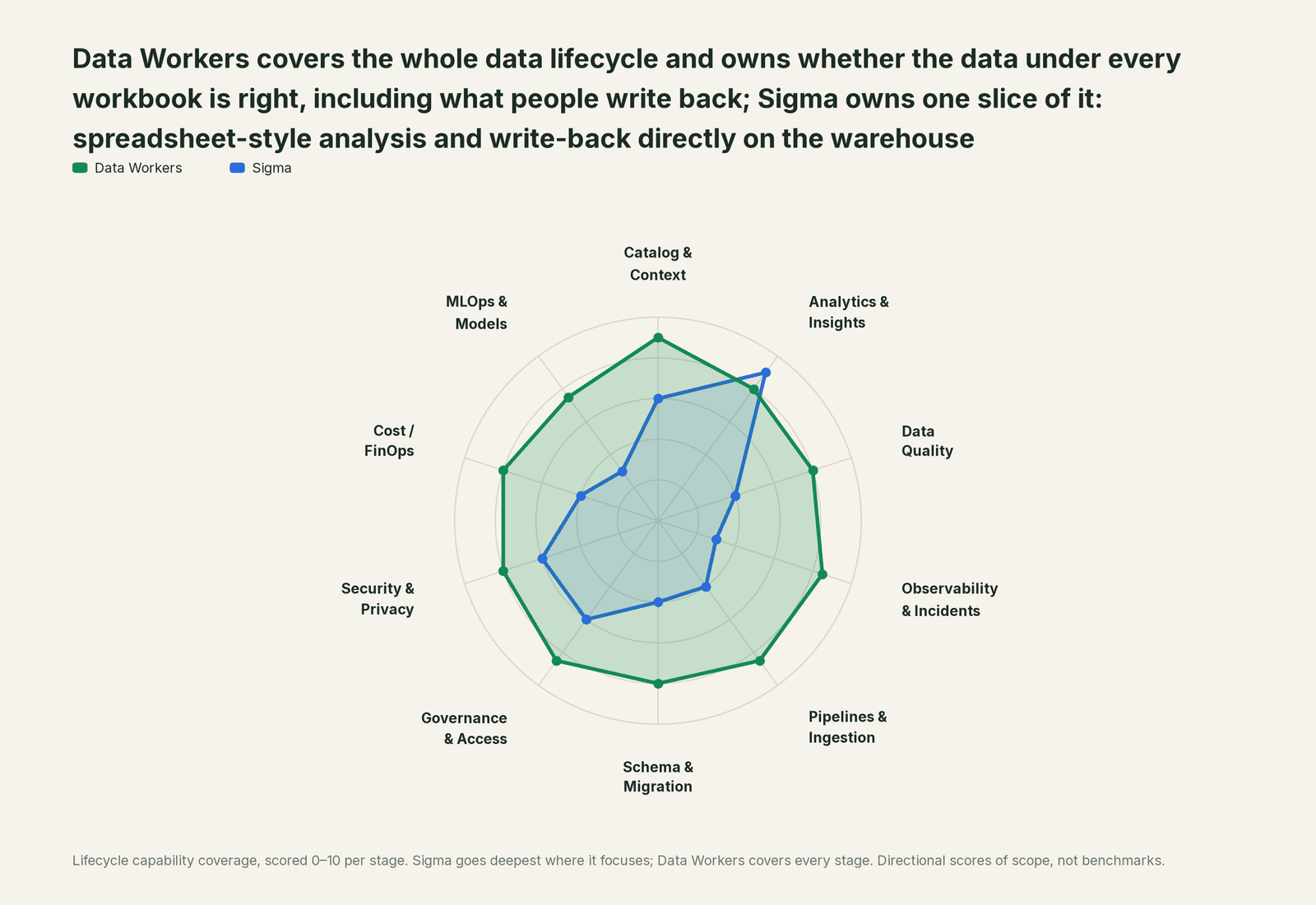
| Stage | Data Workers | Sigma | Why we scored it this way |
|---|---|---|---|
| Catalog & Context | 9 | 6 | Sigma data models hold governed tables and metrics, and the dbt integration shows dbt descriptions in Sigma. Data Workers keeps one governed context graph across every platform, joined to lineage, quality and owners. |
| Analytics & Insights | 8 | 9 | Sigma's home stage: workbooks, data models, reports, AI apps, Sigma Assistant (GA in the workbook, Oct 2026) and Sigma agents (GA, Oct 2026), all on live warehouse queries. Data Workers makes sure the tables under them are right. |
| Data Quality | 8 | 4 | Input tables offer validation, data entry permissions and protected columns, and dbt Core metadata (Beta) can surface freshness and test results in Sigma. Data Workers checks the warehouse tables after every run for key uniqueness, nulls and row counts. |
| Observability & Incidents | 8.5 | 3 | Sigma shows what the warehouse returns and records who edited each input table row. Data Workers traces a wrong number to the edit, load or model that caused it, proposes the fix and verifies it. |
| Pipelines & Ingestion | 8.5 | 4 | Materializations write workbook and data model results back to the warehouse on a schedule. Data Workers queues approved reruns through the orchestrator for the pipelines under them. |
| Schema & Migration | 8 | 4 | Workbooks and reports as code (Beta) and version tags manage Sigma content. Data Workers reviews dbt changes and scopes the blast radius across the models and declared workbooks they reach. |
| Governance & Access | 8.5 | 6 | Account types, document access, connection permissions and data entry permissions govern Sigma itself. Data Workers routes every data change to a named approver. |
| Security & Privacy | 8 | 6 | Queries run in the warehouse under its access controls, and audit logs record AI conversations. Data Workers leaves a receipt on every data change and proposes masking for the owner to apply. |
| Cost / FinOps | 8 | 4 | Materialization can cut repeat compute for heavy workbooks. Data Workers attributes Snowflake spend per query and per dbt model through query tags, and reads the BigQuery account total from the Jobs API. |
| MLOps & Models | 7.5 | 3 | Sigma agents can call warehouse agents such as Cortex Agents and Genie Agents. Data Workers keeps the data under models and agents healthy. |
How Sigma and Data Workers work together
Your people stay where they are: Sigma for finance and operations, Claude or Cursor with the Sigma MCP server for analysts, Slack for alerts and approval requests. Spellbook Data Catalog (in preview) is where the data team looks: each proposed fix, its blast radius, approver and rollback. Underneath, Data Context Wizard keeps one governed context graph, the Data-Agents Swarm (20+ specialist agents) does the work, and the Autonomous Data-Conductor runs each fix end to end behind per-domain guardrails.
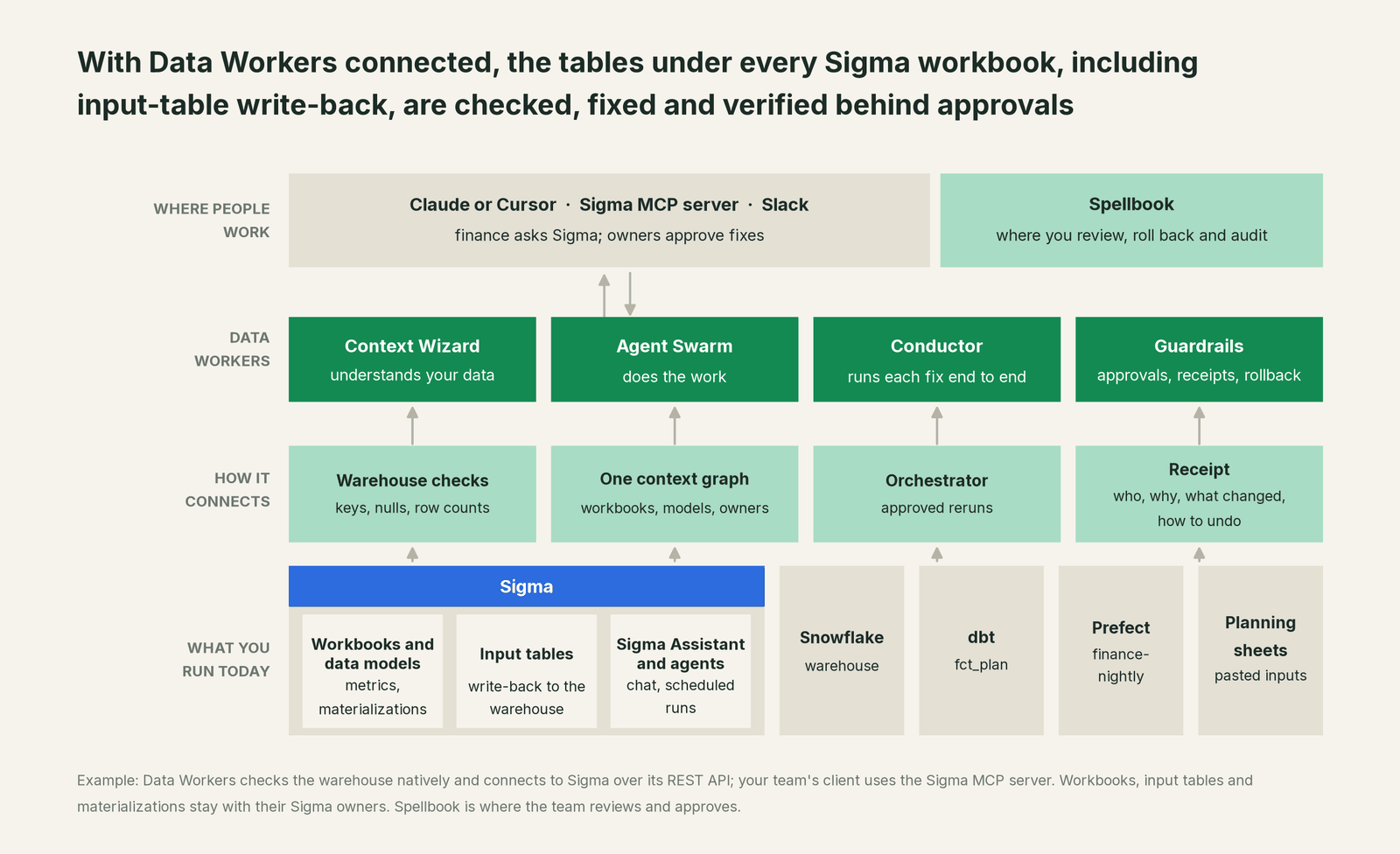
How Data Workers connects. Data Workers connects to Sigma over its REST API today and does its own work natively on what sits under Sigma: the warehouse, dbt and the orchestrator. Workbooks enter the blast radius when your team records them in the context graph, along with notes such as a materialization schedule. Data Workers writes nothing to Sigma: no input table edits, materialization runs or data model changes. BI is read by design.
What Data Workers checks under each workbook. run_quality_check runs nulls, uniqueness on id columns and minimum row counts on Snowflake tables (BigQuery with a service-account key), including staging models built on input-table views, and get_quality_score rolls them up. monitor_metrics holds the values your team records, such as plan totals by region, against their baseline. trace_cross_platform_lineage and blast_radius_analysis follow a table back to its source and forward to every model and declared workbook; diagnose_incident, remediate and get_incident_history run and record the incident. Your data stays in your systems: the agents, warehouse credentials and model key run in your infrastructure, and the hosted Conductor sees workflow metadata only.
Setup over MCP today. Clone the open-source repository and add start-agent.sh entries to your client's MCP config, as the client setup docs show. The Sigma MCP server can sit next to Data Workers in the same client for your own questions; Data Workers' agents never call it. Each Sigma MCP tool needs the same permission as the action in the Sigma UI, so for analysts who only ask questions, assign an account type that can view and explore but not edit or run materializations.
// Example: .cursor/mcp.json. The sigma entry is your team's own connection
// to the Sigma MCP server (OAuth on first connect); Data Workers does not call it.
{
  "mcpServers": {
    "sigma": {
      "url": "SIGMA_MCP_URL"
    },
    "dw-context-catalog": {
      "command": "/path/to/dataworkers-claw-community/start-agent.sh",
      "args": ["dw-context-catalog"]
    },
    "dw-quality": {
      "command": "/path/to/dataworkers-claw-community/start-agent.sh",
      "args": ["dw-quality"]
    },
    "dw-incidents": {
      "command": "/path/to/dataworkers-claw-community/start-agent.sh",
      "args": ["dw-incidents"]
    }
  }
}
Copy your Sigma MCP URL from your Sigma profile under Integrations, and list the tools with your client's own command. An analyst can then ask "is everything under the FY27 Plan workbook healthy?" and get sources from Sigma's server and lineage, checks and open incidents from Data Workers in one answer.
Where fixes go. Data Workers proposes the change as a diff for the owner to merge, usually a dbt model, test or source mapping, with its blast radius and undo step. It opens the pull request itself when your team turns on the dbt GitHub pull-request target. After approval it queues the orchestrator rerun. Input table rows are cleaned by their owner, and Sigma's owners decide when materializations rerun.
One request, L0 to L4. The autonomy ladder is set per domain.

- •L0 manual. Data Workers is connected and not acting.
- •L1 observe. Data Workers checks every table under your planning workbooks and logs what it would do.
- •L2 propose. Data Workers drafts the upstream fix with its blast radius. A named owner approves in Spellbook before anything runs.
- •L3 act reversibly. For proven classes, such as queuing the rerun after an approved staging fix, Data Workers acts, verifies and records the undo.
- •L4 autonomous. For a narrow class in one domain, Data Workers fixes and verifies on its own and posts the receipt.
Approvals go to a named person; a request nobody answers expires and escalates, and never grants itself. No agent can promote its own work. The full safety model is in is it safe to let AI agents change production data, how approvals work and where does our data go.
If you also run Looker or Tableau, You're on Looker and You're on Tableau show the same loop there. For the orchestrator in this example, see You're on Prefect; if your Sigma metrics come from Snowflake, see You're on Snowflake Semantic Views.
What changes for your team
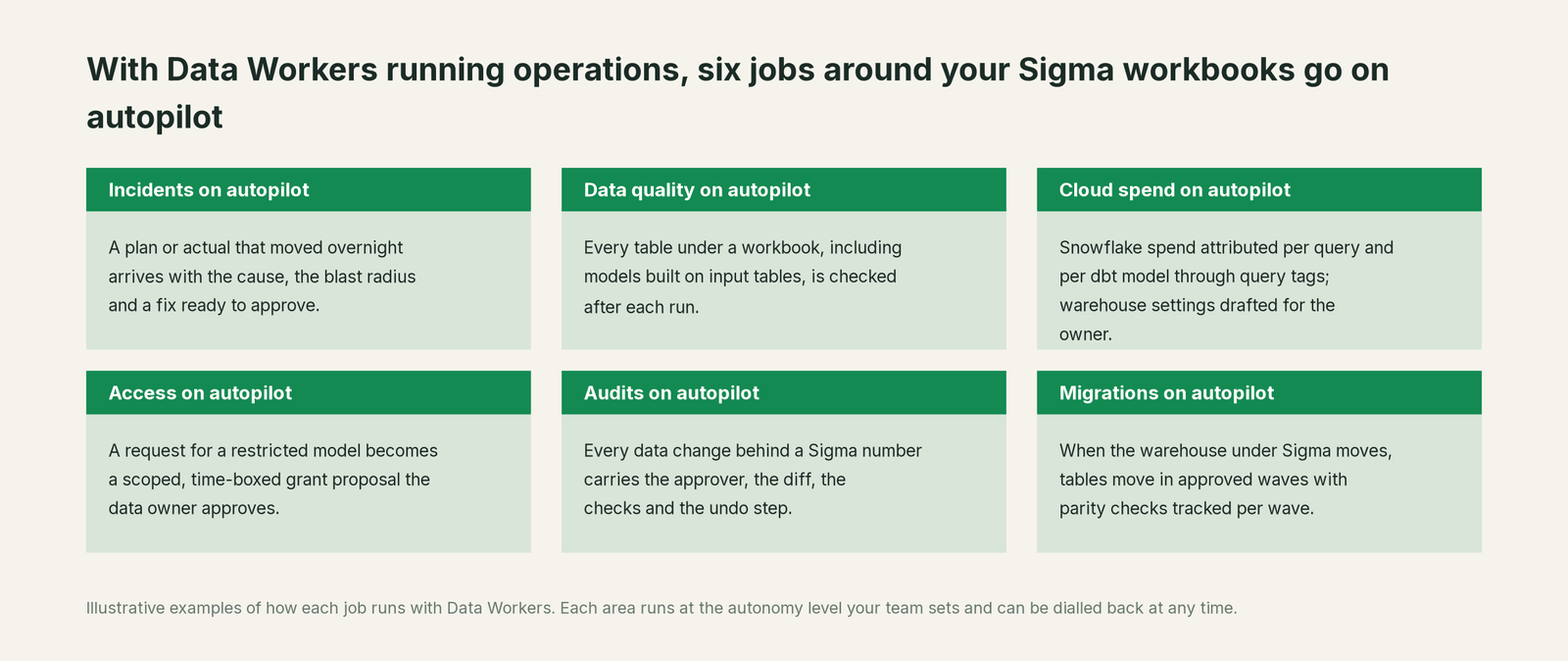
Sigma teams lose hours to one question: did the number move because of the metric, the model, the data or someone's edit? With Data Workers next to Sigma, these jobs run on autopilot at the level you set.
- •Incidents. A plan or actual that moved overnight arrives with the cause, the blast radius and a fix ready to approve.
- •Data quality. Every table under a workbook, including models built on input tables, is checked after each run.
- •Cloud spend. Snowflake spend is attributed per query and per dbt model through query tags; warehouse settings are drafted for the owner to apply.
- •Access. A request for a restricted model becomes a scoped, time-boxed grant proposal the data owner approves.
- •Audits. Every data change behind a Sigma number carries the approver, the diff, the checks and the undo step.
- •Migrations. When the warehouse under Sigma moves, tables move in approved waves with parity checks tracked per wave.
Keep Sigma, or consolidate?
Keep Sigma if you love it; Data Workers works with it from day one. Many teams consolidate once Data Workers runs that slice too.
Most teams keep Sigma: the workbooks finance trusts, input tables, data models and embedded analytics belong there. What they consolidate is the tooling around it: a separate warehouse data-quality tool, a script that diffs the overrides view each morning, and a spreadsheet of which workbook depends on which dbt model. If you are weighing building this yourself on the Sigma MCP server, read build it ourselves with Claude Code and MCP servers: connecting servers is the easy part; cross-system context, approvals and rollback are the work. See Data Workers integrations for what it reads and changes on each system.
The case for your CFO
The outcome: the plan, forecast and actuals your finance team reads in Sigma stay right, including the numbers your planners type in, and when something breaks, the fix arrives before the meeting with a named approver.
The risk story: Data Workers changes nothing in Sigma. It proposes upstream fixes as diffs, and nothing runs until the named owner approves. Every change is verified afterwards and leaves a receipt: what broke, what changed, who approved it and how to undo it. Autonomy is set per domain from L0 manual to L4 autonomous, and an org-wide stop halts all autonomous dispatch. There is zero migration.
Why now: Sigma Assistant and Sigma agents are generally available, and they answer from the same tables your planners write into. A bad paste no longer waits for an analyst to spot an odd chart; it reaches a finance director as a confident sentence.
The first win: one planning workbook, such as the board plan, with every table under it checked after each run. What stays the same: your Sigma workbooks, input tables and account types, your warehouse, dbt, orchestrator and review process. For the numbers, see the ROI of agentic data operations.
The sentence to repeat upstairs: "Sigma keeps putting our analysis on the warehouse; Data Workers makes sure the data under it, including what our planners write back, is right, and a named owner approves every fix with a receipt."
Getting started
Start with a pilot. Pick the Sigma workbook behind a number people act on, such as the board plan, connect Data Workers read-only to the warehouse, dbt and orchestrator under it, and let it check every table that workbook reads before turning on the first fix class. The pilot path and plans are on the pricing page, and the pilot is credited in full against the first year.
FAQ
Does Data Workers edit our input tables or Sigma content? No. Input table rows, workbooks, data models, metrics and materializations stay with their Sigma owners. When an input table needs cleaning, Data Workers says what and why, and the owner makes the edit in Sigma.
Can Data Workers check the data our planners write back? Yes, once a model reads the warehouse view your team created for the input table. Data Workers checks the models built on that view for key uniqueness, nulls and row counts after every run, and holds the totals you record to a baseline.
Does Data Workers rerun Sigma materializations? No. After an approved fix and rerun, your materialization schedule or the data model owner refreshes it. Data Workers re-checks the warehouse tables and records the result.
Do Data Workers' agents use the Sigma MCP server? No. Your team can run it side by side in the same client. Data Workers relies on its own warehouse, dbt and orchestrator connections.
Which warehouses does this cover? The table checks run natively on Snowflake, BigQuery and Postgres, and Data Workers works natively with dbt, Airflow, Dagster and Prefect across 50+ connectors.
Sources
- •Sigma, What's new, Oct 2, 2026 (Sigma agents GA, Sigma Assistant in the workbook GA, MCP connectors for Sigma agents GA, calling Sigma agents from the Sigma MCP server, Assistant build mode reuses data model metrics), https://help.sigmacomputing.com/changelog/2026-10-02 (checked Oct 3, 2026)
- •Sigma, What's new, Sep 25, 2026 (chat history GA; warehouse agents with Assistant and agents GA), https://help.sigmacomputing.com/changelog/2026-09-25 (checked Oct 3, 2026)
- •Sigma, What's new, Sep 18, 2026 (Migrate to Sigma with an AI assistant Beta; workbooks from a code representation Beta; list and run Sigma agents API Beta; audit log events for AI conversations), https://help.sigmacomputing.com/changelog/2026-09-18 (checked Oct 3, 2026)
- •Sigma, What's new, May 22, 2026 (dbt Core integration Beta: freshness, data quality and descriptions in Sigma), https://help.sigmacomputing.com/changelog/2026-05-22 (checked Oct 3, 2026)
- •Sigma, Release notes index, https://help.sigmacomputing.com/docs/release-notes (checked Oct 3, 2026)
- •Sigma, Input tables overview (paste up to 2,000 rows, validation, data entry permissions, row edit history; write schemas, edit log, warehouse views for retrieval), https://help.sigmacomputing.com/docs/intro-to-input-tables (checked Oct 3, 2026)
- •Sigma, View input table audit history (row-level and schema history as a warehouse-native view), https://help.sigmacomputing.com/docs/view-input-table-audit-history (checked Oct 3, 2026)
- •Sigma, Apply data validation to input table columns, https://help.sigmacomputing.com/docs/apply-data-validation-to-input-table-columns (checked Oct 3, 2026)
- •Sigma, About the Sigma MCP server (tools based on the REST API; each tool needs the same permission as the UI action; run a materialization job), https://help.sigmacomputing.com/docs/sigma-mcp-server (checked Oct 3, 2026)
- •Sigma, Use the Sigma MCP server (OAuth; Claude, ChatGPT, Codex, Cortex Code, Cursor; MCP URL under Profile > Integrations; Cursor mcp.json template; calling Sigma agents), https://help.sigmacomputing.com/docs/use-sigma-mcp-server (checked Oct 3, 2026)
- •Sigma, About Sigma agents (workbook-scoped; tools limited to what the user may use; consumption credits), https://help.sigmacomputing.com/docs/sigma-agents (checked Oct 3, 2026)
- •Sigma, Materialization (data model materialization GA, workbook element materialization public beta; written to the write-back schema), https://help.sigmacomputing.com/docs/materialization (checked Oct 3, 2026)
- •Data Workers, Client setup (open-source docs), https://dataworkers.io/opensource-docs/client-setup/ (checked Oct 3, 2026)
- •Data Workers open-source repository, agent tools and start-agent.sh, https://github.com/DataWorkersProject/dataworkers-claw-community (checked Oct 3, 2026)