You're on Talend: Your Team Builds the Jobs in Qlik Talend Cloud. Data Workers Owns Whether What They Deliver Is Right
Talend Studio Jobs and Qlik Talend Cloud pipelines can run green while a lookup quietly doubles rows. Data Workers catches what landed wrong, traces it downstream and gets the fix approved.
Your team designs Jobs in Talend Studio: components on a canvas, a tMap doing the joins and lookups, context variables per environment, the project in Git. Jobs are published to Qlik Talend Cloud, where Talend Management Console turns them into tasks and plans that run on a Remote Engine inside your network. Newer work may run as Qlik Talend Data Integration pipelines with change data capture, and datasets carry a Qlik Talend Trust Score from 0 to 5. Talend Open Studio was retired on January 31, 2024; most teams moved to commercial Talend Studio and Qlik Talend Cloud.
A Talend Job does exactly what its logic says. That is why a Job can finish green, with no rejects, after a source change makes one lookup return two rows where it used to return one. Data Workers checks what your Jobs land, traces it through dbt, BI and everything that reads it, and gets the fix approved before anyone acts on the number.
Key takeaways
- •Talend keeps its job. Jobs, tMap logic, tasks, plans, Remote Engines and Trust Score rules stay with your team. Data Workers works on what the Jobs deliver.
- •A green task gets checked too. Uniqueness and volume checks, plus load lag against a baseline, on the tables your Jobs load in BigQuery or Snowflake turn a clean run with doubled rows into a diagnosed incident the same night.
- •Connected over Talend's API or MCP server today. Data Workers reads the landed tables natively in the warehouse; the Qlik MCP server sits beside the Data Workers agents in the same client for Trust Score, freshness and lineage.
- •Every fix goes through a named person. The owner approves the hold, the Job change and the rerun plan, and runs the Talend side; each step leaves a receipt.
- •Autonomy is set per domain. Start at L1 observe, move to L2 propose, and open L3 act reversibly for narrow classes once the record earns it.
Talend is where your jobs are built. Data Workers owns whether what they deliver is right.
Talend's job is to move and shape data faithfully, exactly as the team designed it. The job after the run is different: notice that a successful load delivered wrong data, tie it to a source change, size the damage, hold what would publish it, get the Job fixed, rerun and rebuild in order, and prove the result. Here is one night at an industrial pump manufacturer. This is an illustration, not a customer case.
| Time | System | What happens |
|---|---|---|
| Wed 16:40 | JD Edwards EnterpriseOne | Supply chain opens a new branch/plant, MX20 in Monterrey, and copies item branch records for 1,840 pump and seal items from the Houston plant |
| Thu 01:00 | Talend Management Console + Remote Engine | The nightly task runs the Talend Studio Job j_jde_open_orders_to_bq. Its tMap looks up item branch on short item number alone to pick up the commodity class, with the lookup set to All matches. Order lines for the 1,840 items now match two rows. The Job reloads jde_raw.open_order_lines in BigQuery with 48,906 rows against 44,694 the night before. The task finishes green with no rejects |
| 01:25 | Qlik Talend Cloud | The dataset's Trust Score is recomputed and holds at 4.4: every duplicated row is complete and valid |
| 01:40 | Data Workers + BigQuery | The uniqueness check on order_line_id (document, type and line) fails with 4,212 duplicate keys, and the row count the team records with monitor_metrics is 9.4% above its baseline. Data Workers opens an incident |
| 01:48 | Data Workers + BigQuery | Diagnosis: every duplicate pair differs only in the joined branch/plant columns (Houston and MX20), and every affected item has a new MX20 row in jde_raw.item_branch, landed by the same run. The lookup fanned out; no order changed in the source. Blast radius: the 04:00 dbt Cloud job that builds fct_open_backlog, the Qlik Cloud Analytics app "Backlog by plant" from the team's context-graph note, and the 08:00 order-to-cash review that reads it. Backlog would read $19.8M high |
| 01:52 | Jira Service Management + Slack | Data Workers opens a Service Request in the JSM project with the diagnosis and sends the approval request to the Job's owner, the integration on-call engineer, in Slack |
| 02:20 | Spellbook | The owner reviews three proposals: hold the 04:00 dbt Cloud job; change the tMap lookup to join on short item number and branch/plant with Unique match; and a run plan (rerun the task, recheck, then rebuild). She approves all three |
| 02:25 | dbt Cloud | She pauses the job's schedule |
| 02:40 | Talend Studio + Qlik Talend Cloud | On a test branch she asks the AI assistant (Qlik Answers, preview) to add branch/plant to the tMap join, reviews the mapping, merges it and publishes the new artifact version. The task picks it up |
| 03:05 | Talend Management Console | She runs the task. The table reloads with 44,701 rows |
| 03:20 | Data Workers + BigQuery | Data Workers re-runs the checks: zero duplicate keys, row count back at baseline, load lag back inside its band |
| 03:25 | dbt Cloud | The owner queues the approved run, recorded against her approval in Data Workers; fct_open_backlog rebuilds by 03:50 |
| 03:55 | Data Workers | remediate re-checks the quality assertions on the rebuilt models, and the backlog metric the team records is back inside its day-over-day band. Data Workers posts the receipt to the ticket as a comment |
| 04:05 | dbt Cloud + Jira Service Management | The owner restores the schedule and resolves the ticket, which links the receipt: cause, approvals, runs, checks passed and the undo |
| 06:00 | Qlik Cloud Analytics | "Backlog by plant" reloads on its own schedule from corrected tables |
| 08:00 | Order-to-cash review | Plant managers commit ship dates against the true backlog |
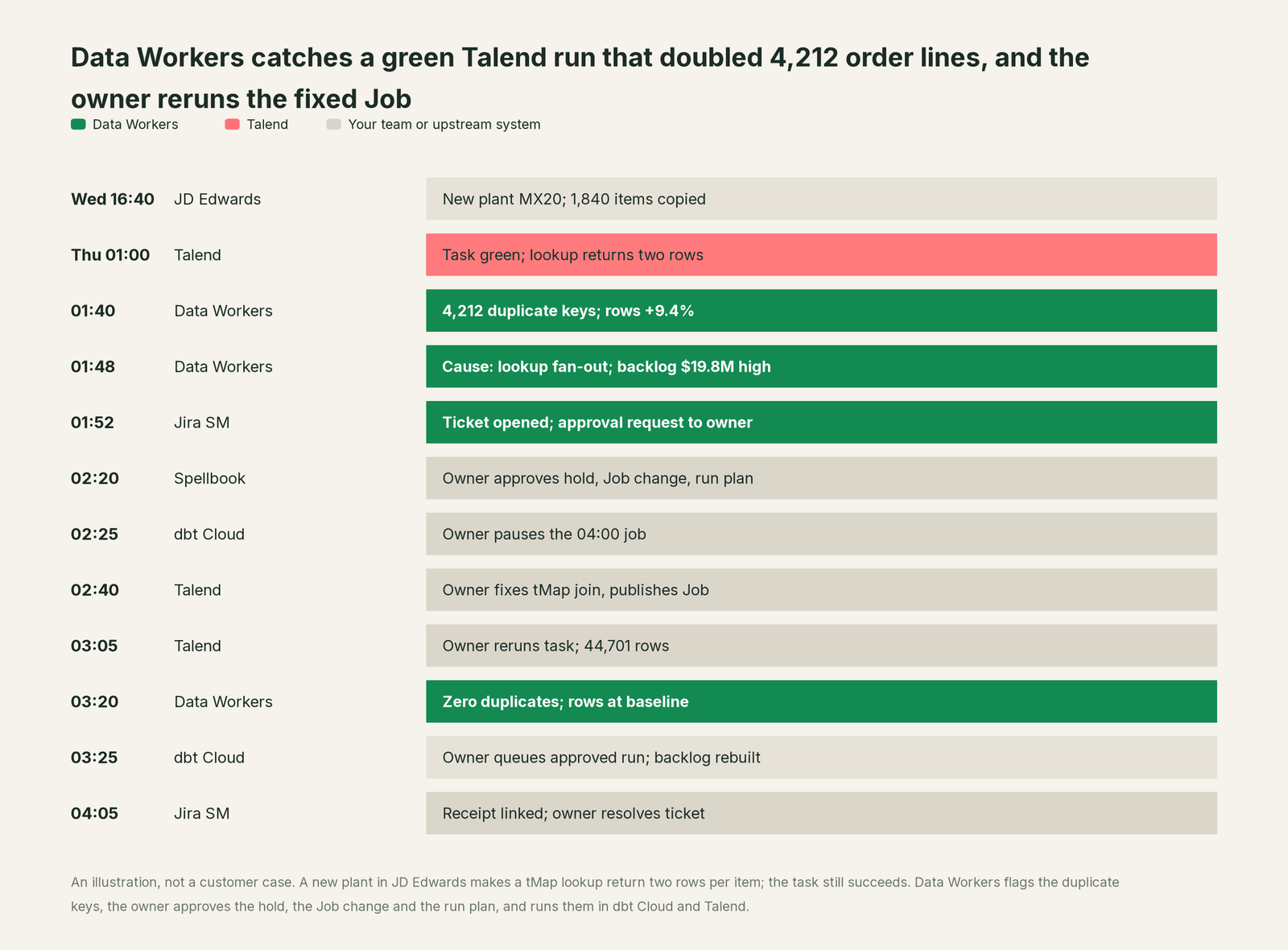
Every part of Talend did its job: the Job ran the logic it was given, the engine finished cleanly, and the Trust Score correctly reported complete, valid data. Catching it takes knowledge Talend was never meant to hold: that a master-data copy in JD Edwards changes what a lookup returns, and that plant managers commit dates from the model it feeds.
| Job | What Talend does | What Data Workers does |
|---|---|---|
| The build | Studio Jobs, tMap, routines and context variables; Qlik Talend Data Integration pipelines; the AI assistant (preview) drafts mappings and code | Reads what the Jobs land, natively in the warehouse; connects to Talend over its API or MCP server |
| The run | Tasks and plans in Talend Management Console on Remote or Cloud Engines, with logs and run history | Checks the landed data after each run: uniqueness and volume, plus load lag and metrics the team records against a baseline |
| The quality signal | Trust Score per dataset, rules, profiling and stewardship campaigns | Turns a failed check into an incident with a cause and a blast radius across dbt models, BI apps and downstream jobs |
| The fix | Runs whatever Job version the team publishes | Proposes the Job change, the hold and the run plan to the owner, who approves and applies them |
| The rerun | The owner reruns the task in Talend Management Console or through its API | Queues the approved downstream runs through your orchestrator, in order, and hands dbt Cloud runs to the owner with the plan |
| The proof | Execution logs, and lineage per task execution in Qlik Cloud | Re-checks the tables and writes a receipt: what changed, who approved it, how it was checked, how to undo it |
Why doesn't Talend just do this itself?
Because Talend is built to execute the logic your team designs, faithfully, and to measure datasets on their own terms. A tMap lookup set to All matches passes every match to the output, as Qlik documents; Talend has no business second-guessing a join a developer configured. The Trust Score aggregates dimensions such as completeness, usage and discoverability into one number from 0 to 5, and Trust Score for AI adds accuracy, diversity and timeliness. A doubled order line is complete and fresh. Whether it doubles a backlog number in a dbt model and a Qlik app is a question about every system after the Job.
Qlik's AI work points the same way, sensibly. The AI assistant (Qlik Answers) in Talend Studio, in preview since Studio R2026-09, generates code, maps data in tMap and troubleshoots runtime errors; Qlik advises using it on a test branch first. Qlik describes its Data Engineering Agents (Data Quality, Data Product, Catalog & Glossary, Declarative Pipelines, Helper) as typically running "under human review (proposing changes for an engineer to approve)". The Qlik MCP server acts on Qlik Cloud resources with the connecting user's roles. All of that builds and governs work inside Qlik.
Owning whether delivered data is right across JD Edwards, Talend, BigQuery, dbt Cloud, a BI app and a ticket queue is a different product: a context graph of every table and consumer, blast-radius scoping, named approvers, a recorded undo and receipts. That is Data Workers. More in is it safe to let AI agents change production data.
Every tool owns a slice. Data Workers covers the whole lifecycle
Each point tool adds another console, contract and handoff. Data Workers covers the whole lifecycle with one context, one approval flow and one audit trail, and builds on the Talend Jobs already there.
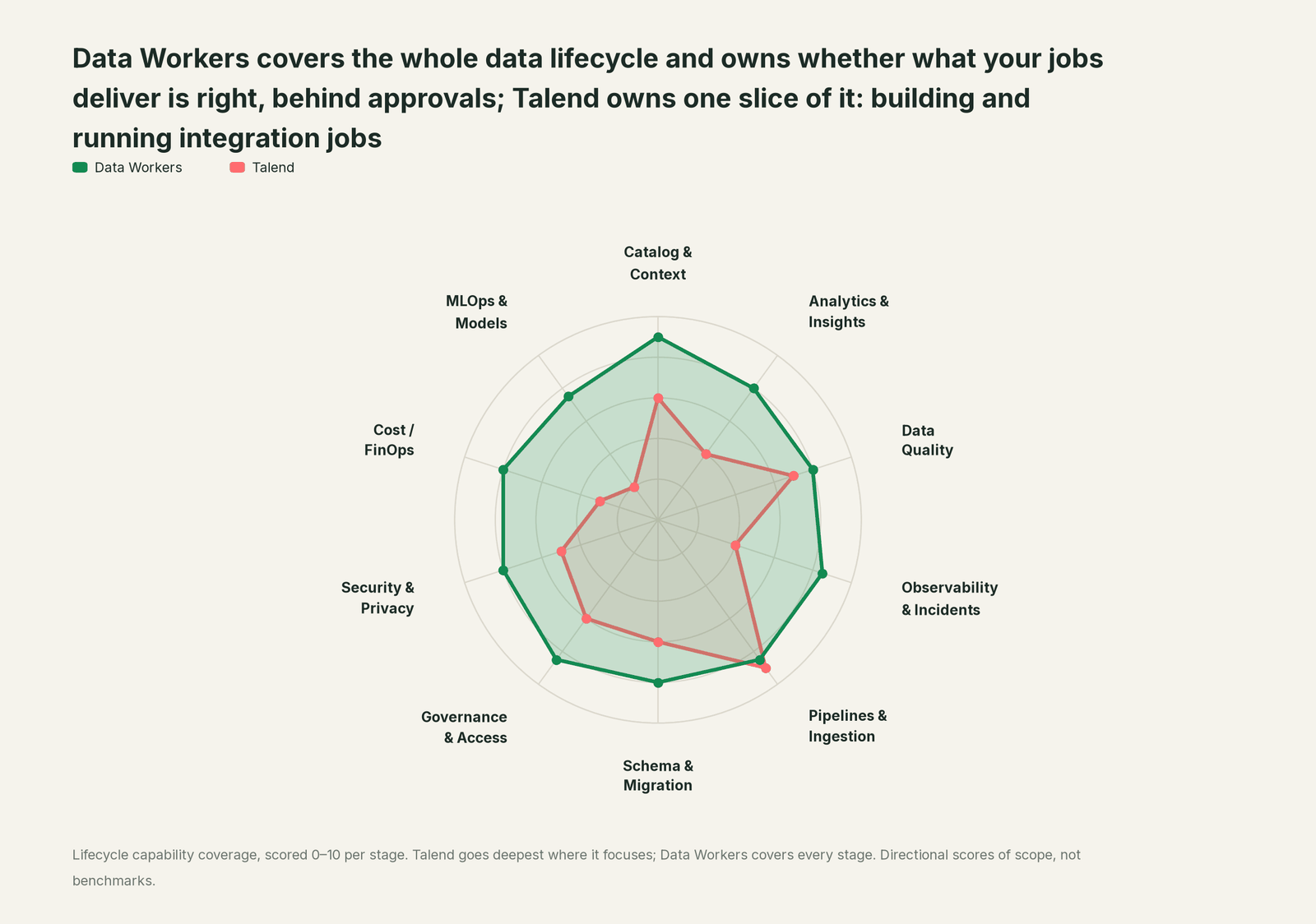
| Stage | Data Workers | Talend | Why we scored it this way |
|---|---|---|---|
| Catalog & Context | 9 | 6 | Talend Data Catalog, data products, a marketplace and Qlik's Catalog & Glossary Agent organize Qlik-side assets. Data Workers keeps one governed context graph of what each table means, who owns it and what reads it, across every vendor. |
| Analytics & Insights | 8 | 4 | Analytics is a separate Qlik product, Qlik Cloud Analytics; Talend lands and shapes the data for it. Data Workers answers data questions from governed definitions with lineage behind every number. |
| Data Quality | 8 | 7 | Trust Score, rules, profiling on semantic types and stewardship campaigns are real strengths. Data Workers runs uniqueness and volume checks, plus a load-lag baseline, on the tables Jobs load and turns a failure into a diagnosed incident. |
| Observability & Incidents | 8.5 | 4 | Task logs, run history and notifications in Talend Management Console explain a failed run. Data Workers diagnoses the data incident when the run succeeded, proposes the fix and verifies it. |
| Pipelines & Ingestion | 8.5 | 9 | Talend's home stage: Studio Jobs, CDC pipelines, application and API integration, Remote Engines and the AI assistant (preview). Data Workers plans the rerun and the rebuilds for the owner. |
| Schema & Migration | 8 | 6 | Column-level lineage and impact analysis in Premium, and per-execution lineage since R2026-09. Data Workers traces a landed change through dbt, BI and downstream jobs, and plans migrations in approved waves. |
| Governance & Access | 8.5 | 6 | Roles, spaces, stewardship and governed data products inside Qlik. Data Workers routes every data change to a named approver. |
| Security & Privacy | 8 | 5 | Remote Engines keep execution in your network, and Studio masking components protect values in flight. Data Workers leaves a receipt on every data change. |
| Cost / FinOps | 8 | 3 | Plans are priced by Qlik; warehouse spend sits in the warehouse. Data Workers reads Snowflake spend down to the dbt model and BigQuery spend from the Jobs API. |
| MLOps & Models | 7.5 | 2 | Pipelines for AI use cases and Trust Score for AI prepare data for models. Data Workers keeps the data under models and agents healthy. |
How Talend and Data Workers work together
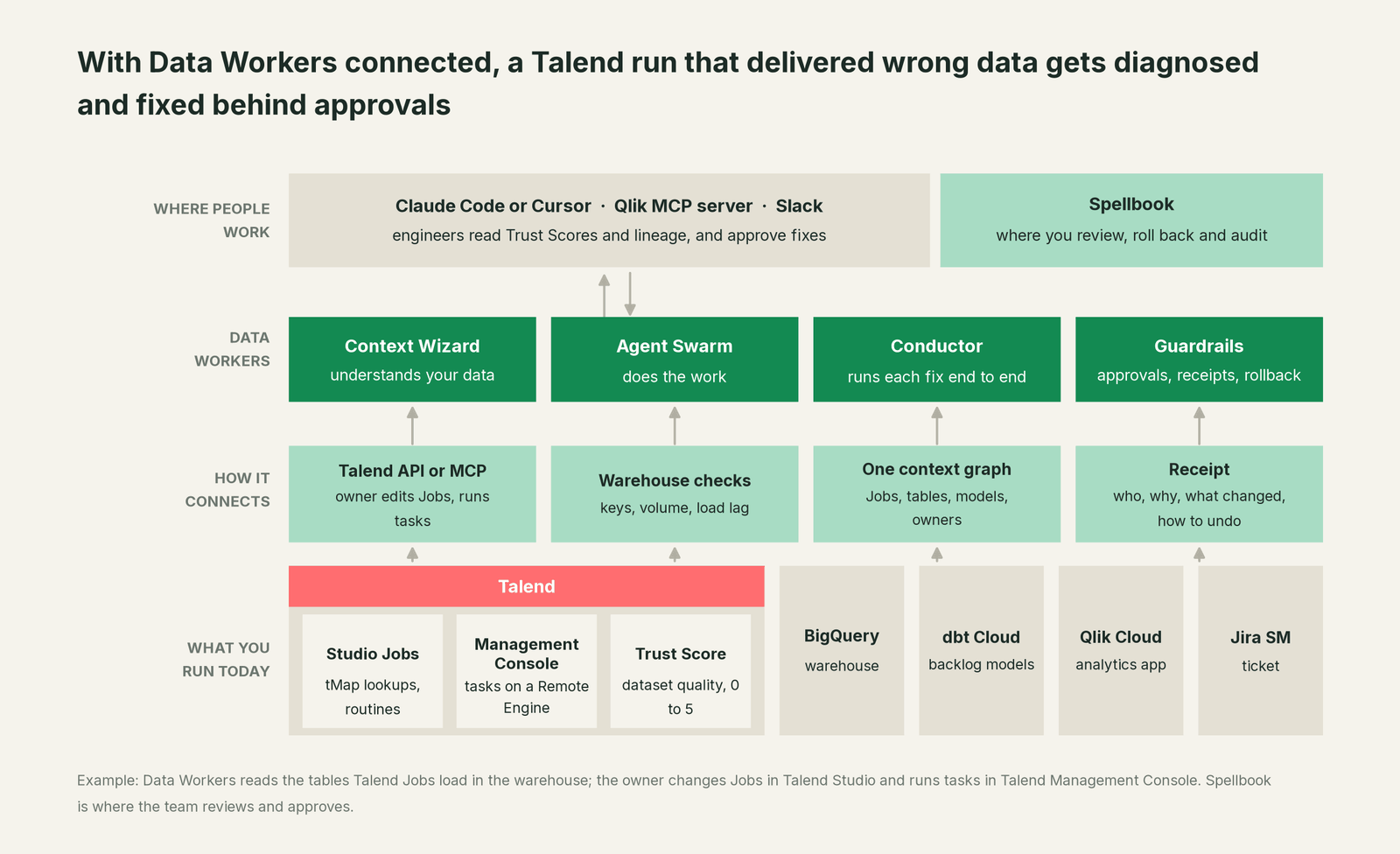
Data Workers connects to Talend over its API or MCP server today, and to JD Edwards and Qlik Cloud Analytics the same way. What it needs from each run sits in the warehouse, where it reads the landed tables natively. Data Workers never runs, pauses or edits a Talend Job: it describes the Job change for the owner to make in Studio and proposes the rerun for the owner to start in Talend Management Console. The rest of this incident runs on native connections: BigQuery, dbt Cloud (models and runs from its manifest), Jira Service Management and Slack, among 50+ connectors.
The Qlik MCP server and the Data Workers agents run side by side in one client. A tenant admin activates Qlik MCP and sets up the client connection; after that it acts with your Qlik roles and space permissions, so the owner reads a dataset's Trust Score, freshness and lineage in the same session where Data Workers explains what last night's run did. The Data Workers side follows the documented client setup: clone the open-source repo and add each agent's start-agent.sh entry.
# Example: the Qlik MCP server plus Data Workers agents in Claude Code
# Qlik MCP: a tenant admin activates it and sets up the OAuth client; authenticate from /mcp
claude mcp add --transport http qlik https://<tenant-id>.<region>.qlikcloud.com/api/ai/mcp

# Data Workers agents, from a clone of the open-source repo
claude mcp add --scope user dw-incidents -- "$(pwd)/start-agent.sh" dw-incidents
claude mcp add --scope user dw-quality -- "$(pwd)/start-agent.sh" dw-quality
claude mcp add --scope user dw-catalog -- "$(pwd)/start-agent.sh" dw-context-catalog
claude mcp add --scope user dw-connectors -- "$(pwd)/start-agent.sh" dw-connectors
List the tools with your client's own command (/mcp in Claude Code). In this incident: run_quality_check (dw-quality) checks uniqueness and row counts on BigQuery; monitor_metrics (dw-incidents) tracks the row count and backlog value against their baselines; diagnose_incident names the cause; blast_radius_analysis and trace_cross_platform_lineage (dw-context-catalog) map the models and recorded readers reached; create_jira_sm_ticket (dw-connectors) opens the ticket; remediate re-checks the assertions after the rebuild and escalates any failure to a person. On the Qlik side, qlik_get_dataset_trust_score, qlik_get_dataset_freshness and qlik_get_lineage cover the owner's view.
In production the agents run in your infrastructure and hold the warehouse credentials and model key, much as a Remote Engine keeps Talend's execution in your network. Your data stays in your systems; the hosted Conductor sees workflow metadata only. More in where does our data go.
One incident, L0 to L4, set per domain:

- •L0 manual. An analyst finds the duplicates at noon, after plant managers committed dates.
- •L1 observe. Data Workers flags the duplicate keys at 01:40 with the cause and blast radius. Nothing changes.
- •L2 propose. Data Workers proposes the hold, the Job change and the run plan; nothing moves until the named owner approves.
- •L3 act reversibly. For a class with a clean record, Data Workers queues the approved rebuilds through your orchestrator itself. Job changes and task runs stay with the owner.
- •L4 autonomous. For a scoped domain, Data Workers checks each load as it lands, so the fix is proposed before any downstream job runs.
More in who owns the agents and how approvals work for AI data agents.
What changes for your team
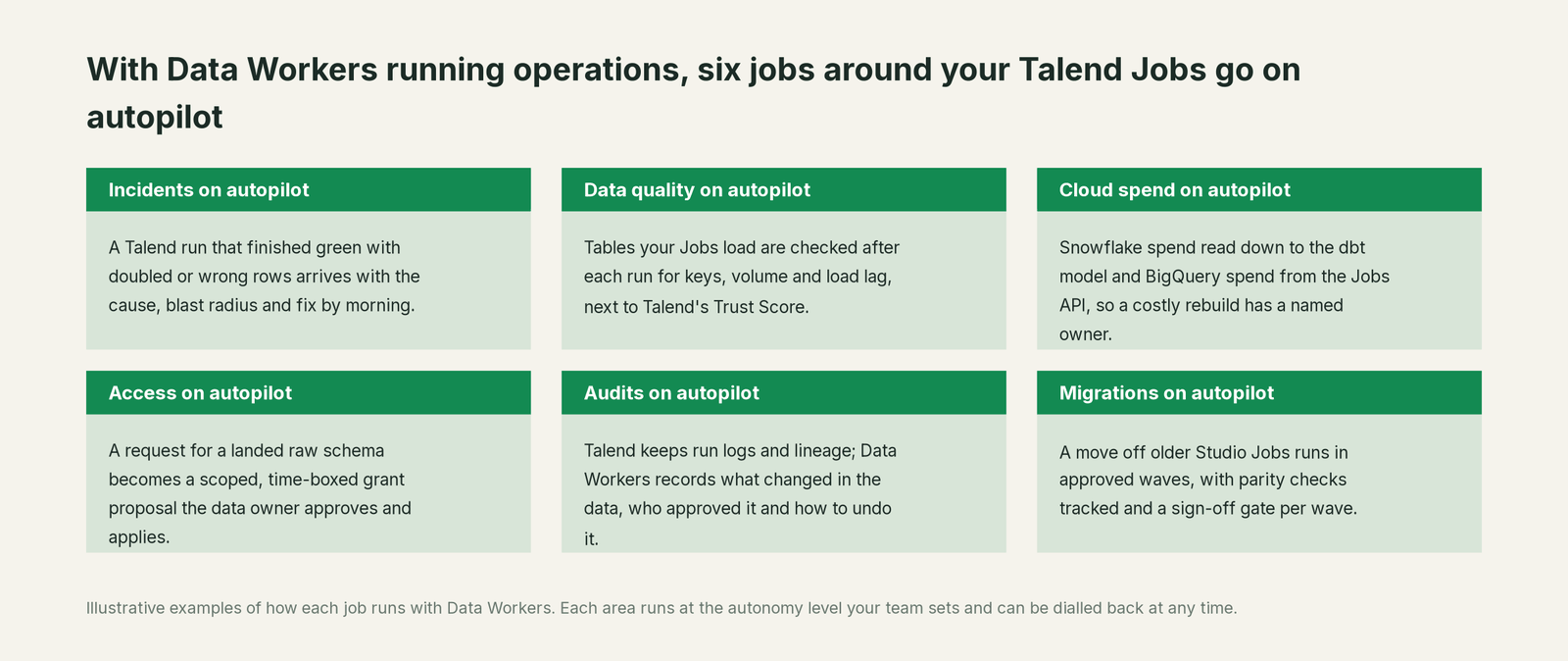
- •On-call starts from a cause. The ticket carries the duplicate keys, the damage, the proposed Job change and the run plan.
- •Master-data changes stop surprising the Jobs. A new plant or a recoded customer in the ERP shows up as a checked load, not a wrong number in a meeting.
- •One record for integration and analytics teams. Both see the same incident and receipt in Spellbook Data Catalog (in preview), linked from the Jira Service Management ticket.
Moving off older Studio Jobs? See legacy ETL modernization and modernizing legacy ETL to dbt. Data Workers plans each wave with its parity checks and holds the completion gate for the owner's sign-off.
Keep Talend, or consolidate?
Keep Talend if you love it; Data Workers works with it from day one. Many teams consolidate once Data Workers runs that slice too.
Most Talend teams keep it: years of Studio Jobs, routines and connectors to ERP, mainframe and SaaS systems are hard to replace. What they consolidate is the tooling around the delivered data: a separate observability tool, row-count scripts bolted onto Jobs and "rerun and eyeball the app" runbooks. Many Qlik estates run more than one mover (Qlik Replicate, Stitch) and dbt on top; one incident record spans them. What Data Workers reads and changes is in what integrations Data Workers supports.
Weighing a build on the Qlik MCP server and a coding agent? Read build it ourselves with Claude Code and MCP servers: reading a Trust Score from a chat is easy; the context graph, approvals, undo and receipts are the work.
The case for your CFO
The outcome. When a Talend Job delivers wrong data into the tables behind backlog, revenue or margin, it is caught the same night and corrected before anyone acts on it, with a record of how it was checked.
The risk story. At L0 and L1, agents only read. At L2 they propose and a named person approves; an unanswered request expires and escalates, never auto-grants. At L3 they act on reversible changes inside the domains you open; L4 is a later choice per domain. Job changes and task runs stay with the owner. No agent can promote its own work, and an org-wide stop halts all autonomous dispatch. Every change carries a receipt: what changed, who approved it, the blast radius and the undo.
Why now. Qlik now puts agents and an MCP server on the same data your Jobs deliver, so a wrong row reaches more people and more agents before anyone opens a dashboard.
The first win. L1 on the Jobs that feed money numbers: a master-data change in the ERP becomes a diagnosed incident before the first downstream model builds.
What stays the same. Nothing migrates: Talend Studio, Qlik Talend Cloud, your Jobs and engines, your dbt project, warehouse, Qlik apps and on-call rota. For the numbers, see the ROI of agentic data operations.
The sentence for upstairs: "Talend runs our integration jobs; Data Workers makes sure what they deliver is right and gets it fixed with our approval when it isn't, before anyone commits a date or a number."
Getting started
Start with a pilot. Pick the Talend Jobs that feed the numbers leaders and customers read, give Data Workers read access to the schemas they load, and run at L1 for a few weeks. Then turn on L2 for one domain, and open L3 for a narrow class once the receipts show the agents were right. The pilot path is on the pricing page, and the pilot is credited in full against the first year.
FAQ
How does Data Workers connect to Talend? Over Talend's API or MCP server today, with the Qlik MCP server in the same client for Trust Score, freshness and lineage. Data Workers reads and checks the tables your Jobs load natively in BigQuery or Snowflake. It works the same for Studio Jobs and Qlik Talend Data Integration pipelines.
Our task finished green and the Trust Score didn't move. How can the data be wrong? Both report what they were built to report. The task ran the Job's logic without errors, and the Trust Score measures dimensions such as completeness, usage and discoverability. A lookup that fans out after a master-data change produces rows that are complete and valid, just too many. Data Workers checks keys, row counts and the metrics the business reads.
Will Data Workers run, pause or edit our Talend Jobs? No. Jobs, tasks, plans and engines stay with the owner. Data Workers describes the change and the run plan, and queues approved downstream runs through your orchestrator; dbt Cloud runs go to the owner with the plan.
We still have Jobs built in Talend Open Studio. Does that matter? Qlik retired Open Studio on January 31, 2024 and no longer hosts or updates it. Data Workers checks the tables any Job lands, whichever Studio built it, so it covers old and new Jobs through a move to commercial Studio, Qlik Talend Cloud or dbt.
How is this different from Qlik's Data Quality Agent? Qlik describes it as retrieving Trust Scores, creating rules and detecting anomalies, under human review. Data Workers works across vendors: it ties a failed check to the cause, the models and apps it reaches, the approval and the rerun order, with one receipt.
Should we let agents act through the Qlik MCP server? Qlik designed it carefully: it acts with the user's own roles and space permissions, a tenant admin sets up each client, and every five billable tool calls count as one question against monthly capacity. Its tools can also create automations, change dataset quality settings and start app reloads; keep those behind an approval where money or customers are involved. Data Workers adds the cross-system context and the approval flow.
Sources
All checked Oct 3, 2026.
- •Qlik, Qlik Talend Cloud (agents with engineers approving; MCP for Enterprise AI), https://www.qlik.com/us/products/qlik-talend-cloud
- •Qlik, Qlik Talend Cloud pricing (Premium: lineage and impact analysis, quality, stewardship, Trust Score), https://www.qlik.com/us/pricing/data-integration-products-pricing
- •Qlik, Talend Open Studio (retired January 31, 2024), https://www.qlik.com/us/products/talend-open-studio
- •Qlik, Agentic Data Engineering (agents; human-review FAQ), https://www.qlik.com/us/agentic-ai/agentic-data-engineering
- •Qlik, Data Quality and Governance (Trust Score dimensions; Trust Score for AI), https://www.qlik.com/us/products/data-quality-governance
- •Qlik Help, Data Inventory concepts (Trust Score 0 to 5; updated Oct 1, 2026), https://help.qlik.com/talend/en-US/data-inventory-user-guide/Cloud/talend-cloud-data-inventory-concepts
- •Qlik Help, Talend Studio R2026-09 new features and the AI assistant (Qlik Answers) page (preview; updated Oct 1, 2026), https://help.qlik.com/talend/en-US/release-notes/8.0/r2026-09-studio-new-features, https://help.qlik.com/talend/en-US/studio-user-guide/8.0-R2026-09/qlik-answers-talend-studio
- •Qlik Help, Talend Management Console R2026-09 (lineage per task execution; updated Oct 1, 2026), https://help.qlik.com/talend/en-US/release-notes/8.0/r2026-09-cloud-management-console
- •Qlik Help, tMap match models Unique Match and All Matches (updated Oct 1, 2026), https://help.qlik.com/talend/en-US/studio-user-guide/8.0-R2026-09/all-matches; tDataMasking, https://help.qlik.com/talend/en-US/components/8.0/data-privacy/tdatamasking
- •Qlik Help, Qlik MCP tools, administration and connection (user role and space permissions; admin activation; five billable calls per question; updated Oct 2, 2026), https://help.qlik.com/en-US/cloud-services/Subsystems/Hub/Content/Sense_Hub/QlikMCP/Qlik-MCP-server-tools.htm, https://help.qlik.com/en-US/cloud-services/Subsystems/Hub/Content/Sense_Hub/QlikMCP/Administering-Qlik-MCP.htm, https://help.qlik.com/en-US/cloud-services/Subsystems/Hub/Content/Sense_Hub/QlikMCP/Connecting-Qlik-MCP-server.htm
- •Data Workers open-source repository and client setup, https://github.com/DataWorkersProject/dataworkers-claw-community, https://dataworkers.io/opensource-docs/client-setup/