You're on Qlik Replicate: It Streams Every Change Out of Your Core Systems. Data Workers Owns Whether What Lands Is Right
Qlik Replicate tasks stay green while a DB2 utility load or an apply exception leaves rows behind. Data Workers catches what landed wrong downstream, traces it and gets the fix approved.
Your core systems still live where they have lived for decades: loan servicing or policy admin on DB2 for z/OS, IMS segments, SAP ECC, Oracle and SQL Server. Qlik Replicate, once Attunity Replicate, reads their logs and keeps targets current. Each task pairs a source endpoint with a target endpoint, runs a full load and then applies changes in one of four modes. Task settings decide the DDL handling policy, what happens on an apply conflict, and when a table gets suspended. Qlik Enterprise Manager watches the tasks across your Replicate servers, with a Message Center, notifications and analytics. The current release, May 2026, added an IBM IMS source endpoint, streaming into Google BigQuery and a Cloudera Iceberg target.
Replicate is built to keep that stream moving. When something unusual happens on one table, its defaults log it, warn and carry on, so one odd table doesn't stop every other table behind it. That is the right design, and it is why a task can stay green while a table on the target quietly stops matching the source. Data Workers checks what your tasks land, traces it through dbt, BI and every job that reads it, and gets the fix approved before anyone acts on the number.
Key takeaways
- •Replicate keeps its job. Tasks, endpoints, DDL handling, error policies, reloads and Enterprise Manager stay with your integration team. Data Workers works on what the tasks land.
- •A green task gets checked too. Key and volume checks on the landed tables, plus a watch on Replicate's own
attrep_apply_exceptionscontrol table, turn a quiet gap into a diagnosed incident before the morning. - •Connected over Replicate's API today. Data Workers reads the landed tables and control tables natively in BigQuery or Snowflake; Enterprise Manager's REST API covers the task side.
- •Every fix goes through a named person. The task owner approves the hold, the table reload and the run plan, and runs the Replicate side; each step leaves a receipt.
- •Autonomy is set per domain. Start at L1 observe, move to L2 propose, and open L3 act reversibly for narrow classes once the record earns it.
Qlik Replicate is the change stream out of your core systems. Data Workers is the owner of what lands downstream.
Replicate's job is to copy every logged change faithfully, in order, with the least load on the source. The job after the change lands is different: notice that the target no longer means what the source means, tie it to a cause, size the damage, hold what would publish it, get the table put right, rebuild in order, and prove the result. Here is one weekend at a regional bank that has just bought a portfolio of auto loans (an illustration, not a customer case).
| Time | System | What happens |
|---|---|---|
| Sat 13:10 | DB2 for z/OS | The conversion team boards 6,412 acquired auto loans into the loan servicing table LNSV.LOAN_MASTER. To finish inside the weekend window, the conversion job uses the DB2 LOAD utility with RESUME YES instead of the online boarding transaction |
| 13:12 | Qlik Replicate | The task LNSV_DB2Z_TO_BQ reads the subtype 83 log record and writes a warning to the task log: DB2z utility (subtype 83) variation 3 (LOAD RESUME YES). The internal setting for utility loads is at its default, IGNORE, so the table keeps replicating and the task stays Running. The loaded rows never arrive as change events |
| Mon 02:00 | DB2 for z/OS | The nightly payment posting batch inserts the weekend's payments into LOAN_TXN and updates balances in LOAN_MASTER, including 1,906 of the acquired loans |
| 02:04 | Qlik Replicate + BigQuery | The payments land in raw_lnsv.loan_txn. Each balance update for an acquired loan finds no target record. The task's Apply Conflicts policy is the default, log the record to the exceptions table, so the task continues and writes 1,906 rows to attrep_apply_exceptions |
| 03:00 | Airflow + dbt | The Airflow 2 DAG lnsv_dbt_nightly runs dbt build. fct_loan_balances joins payments to loans and drops the 1,906 orphans; the relationships test on loan_txn.loan_id is set to warn, so the build succeeds with 1,906 warnings |
| 03:20 | Data Workers + BigQuery | The nightly count of new rows in attrep_apply_exceptions, which the team records with monitor_metrics, reads 1,906 against a norm of 0 to 3, and the owner's nightly dbt run reports the relationships test going from 0 to 1,906 failing rows. Data Workers opens an incident |
| 03:28 | Data Workers + BigQuery | Diagnosis: the two counts match, no schema change is on record for LOAN_MASTER, and the context graph holds the conversion team's note about Saturday's portfolio boarding. diagnose_incident classifies it as missing source rows: rows reached the source outside the change stream. blast_radius_analysis finds fct_loan_balances, fct_delinquency and the Looker "Loan portfolio" Explore; the same note adds the 07:00 Airflow DAG alco_liquidity_extract that feeds the 09:00 asset-liability committee (ALCO) pack |
| 03:32 | Opsgenie + Teams + email | Data Workers raises an Opsgenie alert for the data platform on-call, posts the finding to the team's Teams channel and emails the approval request to the Replicate task owner |
| 05:40 | Qlik Enterprise Manager | The owner opens the task's log messages and finds Saturday's subtype 83 warning for LOAN_MASTER at 13:12. Cause confirmed |
| 05:50 | Spellbook | The owner reviews four proposals: hold alco_liquidity_extract; reload LOAN_MASTER in the task; a run plan (recheck after the reload, then rebuild the loan models); and prevention: set the utility-load option to SUSPEND so the next utility load suspends the table in plain sight, raise the relationships test to error, and add a step to the conversion runbook. She approves all four |
| 05:55 | Airflow | She pauses alco_liquidity_extract |
| 06:00 | Qlik Replicate | She selects LOAN_MASTER in the task's monitor view and clicks Reload. The reload finishes at 06:31 |
| 06:35 | Data Workers + BigQuery | run_quality_check passes uniqueness on loan_id and the minimum row count; the row count the team records with monitor_metrics is 6,412 above its baseline, matching the conversion manifest |
| 06:40 | Data Workers + Airflow | Data Workers queues the approved lnsv_dbt_nightly run; the loan models rebuild by 06:58 and the relationships test passes with 0 orphans |
| 07:02 | Data Workers + Opsgenie | remediate re-checks the quality assertions on the rebuilt models, and the portfolio balance the team records is back inside its band. Data Workers writes the receipt and closes the Opsgenie alert |
| 07:10 | Airflow | The owner unpauses and runs alco_liquidity_extract |
| 09:00 | ALCO | Treasury reviews liquidity and the balance sheet with the acquired portfolio in it |
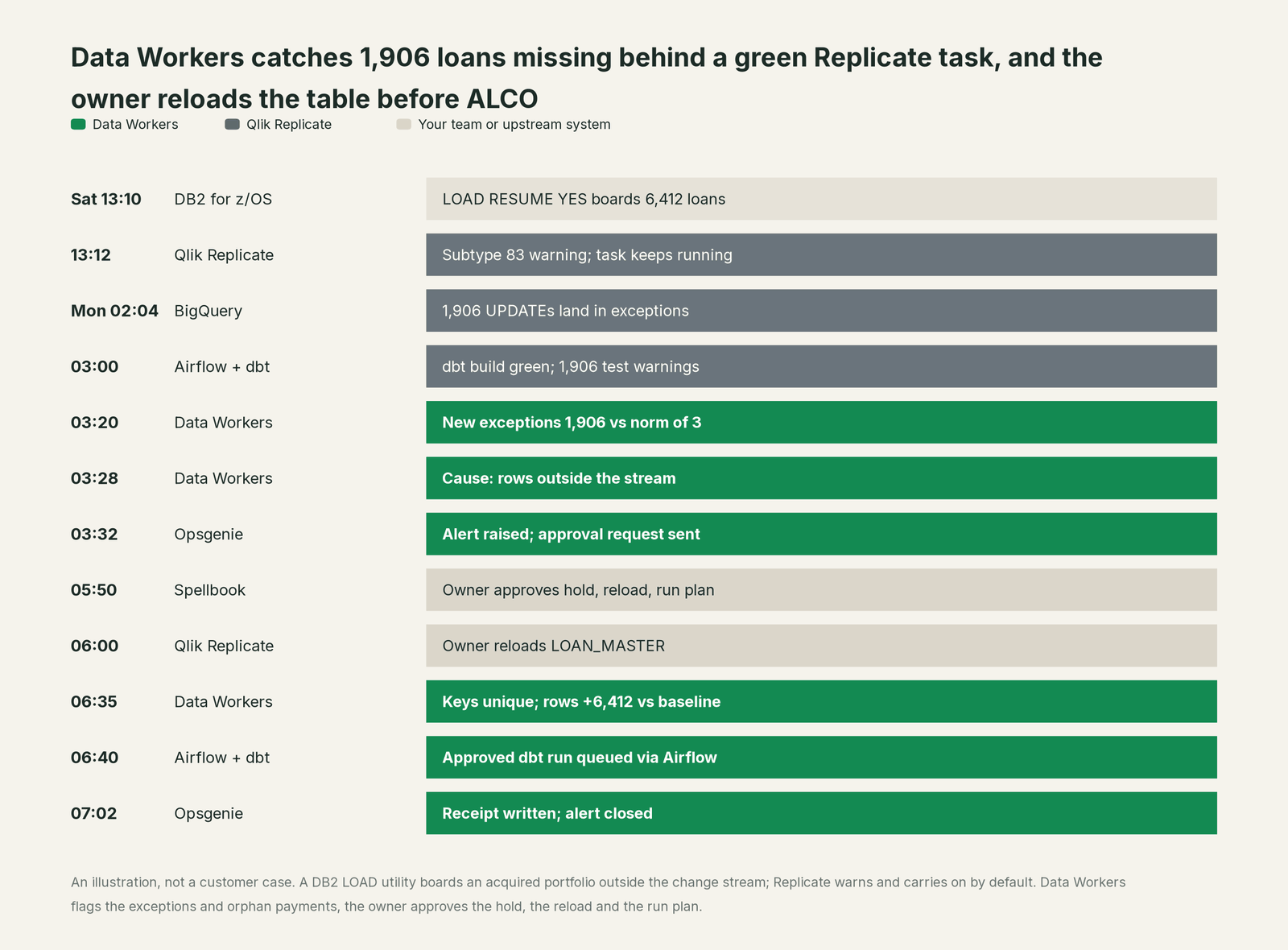
Every part of Replicate did its job. It flagged the utility load in its log, kept the other 140 tables flowing, and recorded every update it could not apply, exactly as configured. Catching it takes knowledge Replicate was never meant to hold: that a conversion team loaded rows on Saturday, and that a liquidity pack is built from the table at 07:00 on Monday.
| Job | What Qlik Replicate does | What Data Workers does |
|---|---|---|
| The capture | Reads DB2 for z/OS, IMS, SAP, Oracle and SQL Server logs with a light footprint | Reads what the tasks land, natively in the warehouse; connects to Replicate over its API |
| The apply | Applies changes by task policy: DDL handling, apply conflicts, table errors | Checks the landed tables for keys and volume, and the exceptions count against its norm |
| The signal | Task log warnings, Message Center notifications and analytics in Enterprise Manager | Turns a failed check into an incident with a cause and a blast radius across dbt models, BI and downstream jobs |
| The fix | Reloads a table or resumes a task when the owner asks | Proposes the hold, the reload, the policy change and the run plan to the owner, who approves and applies them |
| The rebuild | Keeps applying changes after the reload | Queues the approved downstream runs through Airflow, Dagster or Prefect, in order, and hands dbt Cloud reruns to their owner |
| The proof | Task logs and control tables | Re-checks the tables and writes a receipt: what changed, who approved it, how it was checked, how to undo it |
Why doesn't Qlik Replicate just do this itself?
Because Replicate is built to keep a high-volume stream out of core systems running, and its defaults protect that stream. Qlik documents that a LOAD RESUME YES, LOAD REPLACE or REORG DISCARD on a DB2 for z/OS table produces a warning, and suspends the table only if an internal option is set to SUSPEND; the default is IGNORE. An UPDATE with no matching target record is logged to the exceptions table while the task continues. A table error suspends that one table while the rest keep going. On the DDL side, each task chooses to apply or ignore a source ALTER, DROP or TRUNCATE, and some targets can't take every change: for BigQuery, Qlik lists drop column, rename column and change column data type as unsupported DDLs. Stopping a mainframe CDC task to chase one table would cost every other table behind it. These are sensible choices.
Replicate also has no view of what a table means downstream: that fct_delinquency reads LOAN_MASTER, that a Looker Explore and a committee pack sit on top, or who owns the decision to hold them. Qlik puts its agent work in Qlik Talend Cloud, where "AI agents spot issues and recommend fixes. Stewards review and approve," and its MCP server serves Qlik Cloud. Replicate itself has no MCP server.
Owning whether landed data is right across DB2, Replicate, BigQuery, dbt, Airflow and Looker is a different product: a context graph of every table and consumer, blast-radius scoping, named approvers, a recorded undo and receipts, with liability for changes in tools Replicate doesn't own. That is Data Workers. More in is it safe to let AI agents change production data.
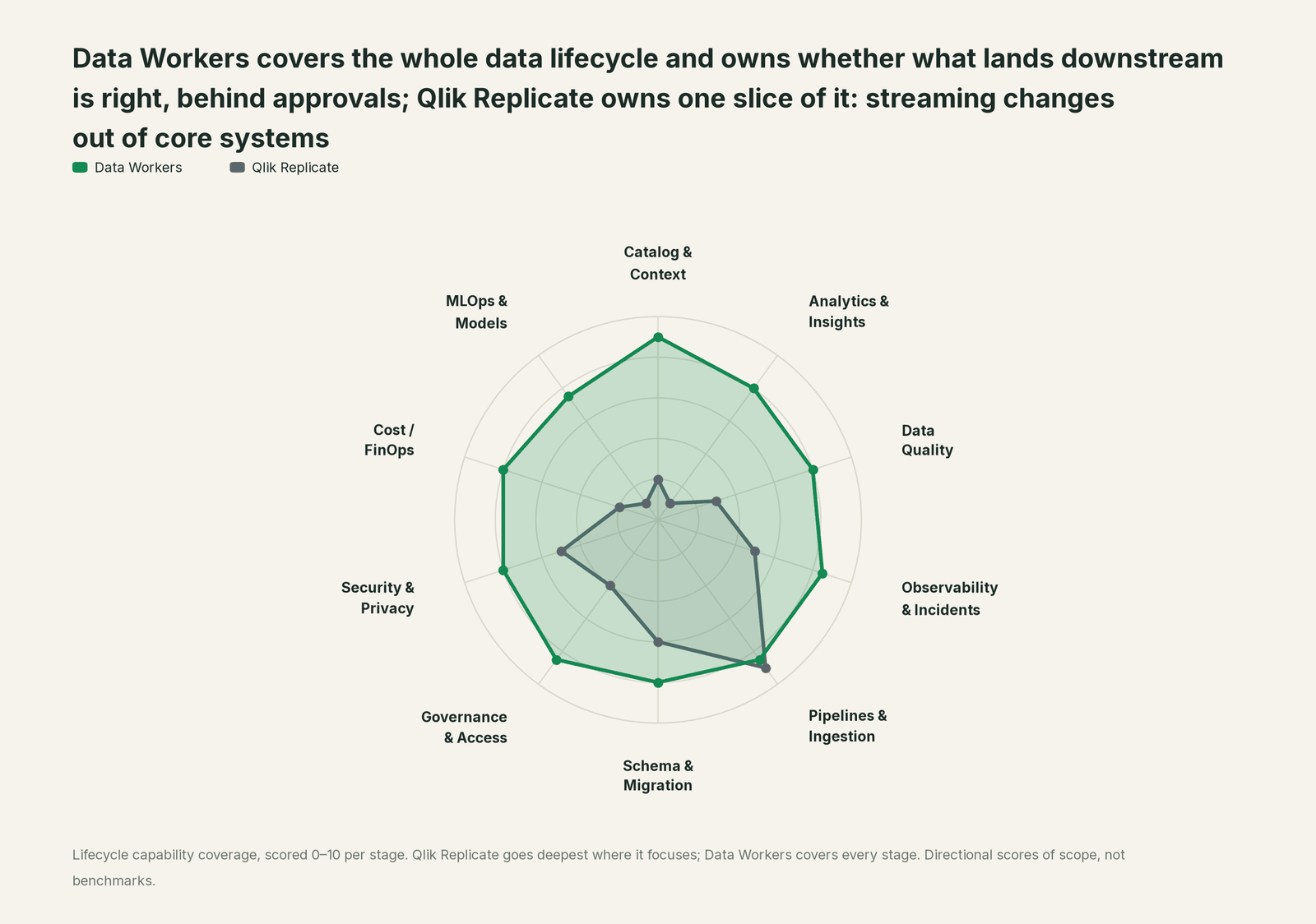
Every tool owns a slice. Data Workers covers the whole lifecycle
Each point tool adds another console, contract and handoff. Data Workers covers the whole lifecycle with one context, one approval flow and one audit trail, and builds on the Replicate tasks already there.
| Stage | Data Workers | Qlik Replicate | Why we scored it this way |
|---|---|---|---|
| Catalog & Context | 9 | 2 | Replicate keeps task and table metadata; meaning, owners and consumers live elsewhere. Data Workers keeps one governed context graph of what each table means, who owns it and what reads it. |
| Analytics & Insights | 8 | 1 | Replicate delivers the data analytics run on; it does not answer business questions. Data Workers answers from governed definitions with lineage behind every number. |
| Data Quality | 8 | 3 | Apply conflicts, exceptions and data errors are handled by task policy, which protects the stream. Data Workers runs uniqueness, volume and null checks on the landed tables and turns a failure into a diagnosed incident. |
| Observability & Incidents | 8.5 | 5 | Enterprise Manager monitors tasks across servers, with Message Center notifications and analytics on throughput and changes applied. Data Workers diagnoses the data incident when every task is green, proposes the fix and verifies it. |
| Pipelines & Ingestion | 8.5 | 9 | Replicate's home stage: log-based CDC from DB2 for z/OS, IMS, SAP, Oracle and SQL Server into warehouses, lakes and Kafka, with full load, reloads and four apply modes. Data Workers plans the reload and the rebuilds for the owner. |
| Schema & Migration | 8 | 6 | DDL handling per task applies or ignores source ALTER, DROP and TRUNCATE on the target. Data Workers traces a landed change through dbt, BI and downstream jobs, and plans migrations in approved waves. |
| Governance & Access | 8.5 | 4 | Enterprise Manager roles decide who designs and runs tasks. Data Workers routes every data change to a named approver. |
| Security & Privacy | 8 | 5 | Replicate runs on your own servers, and the May 2026 IMS endpoint uses mTLS for authentication and encryption. Data Workers leaves a receipt on every data change. |
| Cost / FinOps | 8 | 2 | Licensing is Qlik's; target spend sits in the warehouse. Data Workers reads BigQuery spend from the Jobs API and Snowflake spend down to the dbt model. |
| MLOps & Models | 7.5 | 1 | Replicate feeds the tables models train on, without a model view. Data Workers keeps the data under models and agents healthy. |
How Qlik Replicate and Data Workers work together
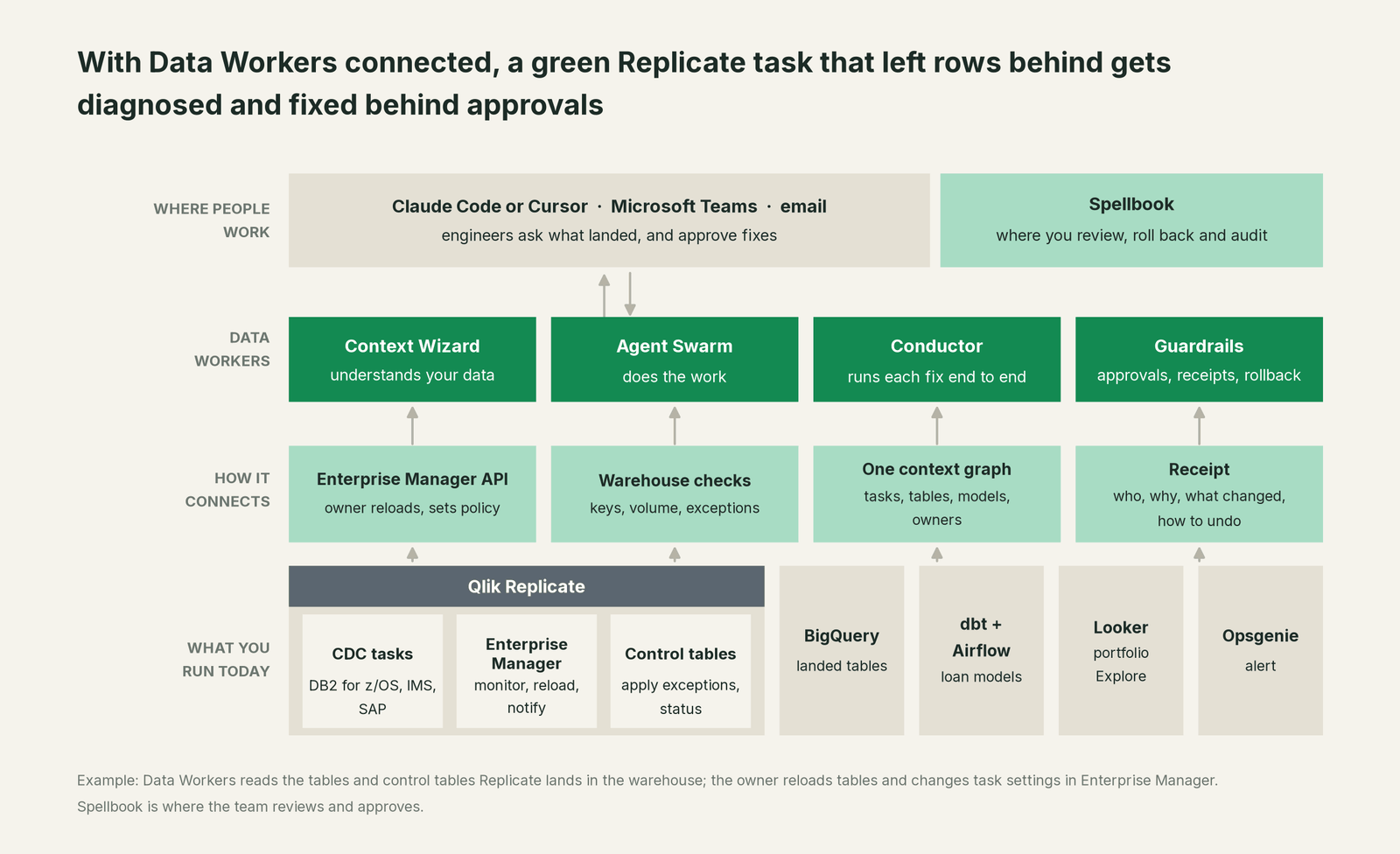
Data Workers connects to Qlik Replicate over its API today: Enterprise Manager's REST, .NET and Python APIs cover the task side. Most of what Data Workers needs sits in the target, where it reads natively: the landed tables, and control tables such as attrep_apply_exceptions, whose rows Qlik never deletes. Data Workers never runs, stops, reloads or edits a Replicate task. It proposes the reload and the policy change for the owner to make in Enterprise Manager or the Replicate console. The rest of this incident runs on native connections: BigQuery, dbt, Airflow 2, Looker, Opsgenie and Microsoft Teams, among 50+ connectors.
Engineers work with Data Workers in their own assistant or coding agent and keep Enterprise Manager for the task side. Setup follows the documented client setup: clone the open-source repo and add each agent's start-agent.sh entry.
# Example: Data Workers agents in Claude Code, from a clone of the open-source repo
claude mcp add --scope user dw-incidents -- "$(pwd)/start-agent.sh" dw-incidents
claude mcp add --scope user dw-quality -- "$(pwd)/start-agent.sh" dw-quality
claude mcp add --scope user dw-catalog -- "$(pwd)/start-agent.sh" dw-context-catalog
claude mcp add --scope user dw-connectors -- "$(pwd)/start-agent.sh" dw-connectors
claude mcp add --scope user dw-schema -- "$(pwd)/start-agent.sh" dw-schema
List the tools with your client's own command (/mcp in Claude Code). In this incident: monitor_metrics (dw-incidents) tracks the exceptions count, row count and portfolio balance against their baselines; diagnose_incident classifies the cause; blast_radius_analysis and trace_cross_platform_lineage (dw-context-catalog) map the models, Explore and DAG reached; run_quality_check (dw-quality) checks keys and minimum volume on BigQuery; send_opsgenie_alert and send_teams_alert raise the alert and post the finding; trigger_airflow_dag queues the approved rebuild; remediate re-checks the assertions after the rebuild and escalates any failure to a person.
In production the agents run in your infrastructure and hold the warehouse credentials and model key, next to the Replicate servers you already run. Your data stays in your systems; the hosted Conductor sees workflow metadata only. More in where does our data go.
One incident, L0 to L4, set per domain:

- •L0 manual. Treasury notices the portfolio is missing from the ALCO pack at 09:15 and the meeting is rescheduled.
- •L1 observe. Data Workers flags the exceptions and orphan payments at 03:20 with the cause and blast radius. Nothing changes.
- •L2 propose. Data Workers proposes the hold, the reload, the policy change and the run plan; nothing moves until the named owner approves.
- •L3 act reversibly. For a class with a clean record, Data Workers queues the rebuild itself once the owner's reload passes its checks.
- •L4 autonomous. For a scoped domain, Data Workers runs the downstream loop on its own: checks, alert, rebuild, verification and receipt. Reloads and task settings always stay with the owner.
More in who owns the agents and how approvals work for AI data agents.
What changes for your team
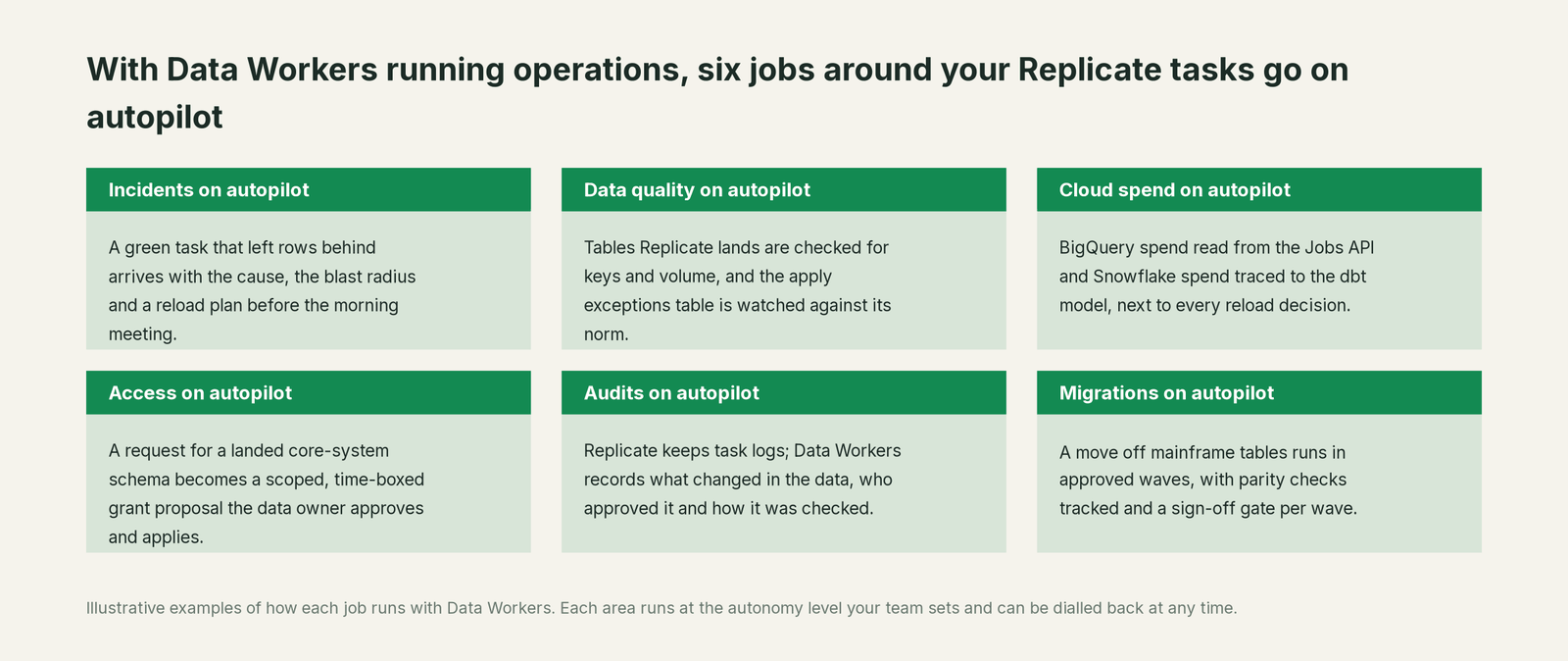
- •On-call starts from a cause. The alert carries the exceptions, the damage and the reload plan, so the first call is a decision.
- •Mainframe and SAP events stop surprising analytics. A utility load, a conversion or a DDL the task ignored shows up as a checked table, not a wrong number in a committee pack.
- •One record for integration and data teams. The DBA who owns the task and the analytics engineer who owns the model see the same incident and receipt in Spellbook Data Catalog (in preview).
Planning to move tables off the mainframe or SAP ECC? Data Workers plans each wave with its parity checks, tracks them and holds the completion gate for the owner's sign-off. Background on the pattern: what is CDC and change data capture explained.
Keep Qlik Replicate, or consolidate?
Keep Qlik Replicate if you love it; Data Workers works with it from day one. Many teams consolidate once Data Workers runs that slice too.
Most Replicate shops keep it: log-based capture from DB2 for z/OS, IMS and SAP is hard, specialized work, and Replicate does it with little load on the source. What they consolidate is the tooling around the landed data: a separate observability product, hand-run count scripts, and runbooks that say "reload and ask finance to check". Many Qlik estates run more than one mover, such as Talend, Stitch or Estuary; one incident record spans them. The full comparison of CDC tools is in CDC tools compared, and what Data Workers reads and changes is in what integrations Data Workers supports.
Weighing a build on the Enterprise Manager API and a coding agent? Read build it ourselves with Claude Code and MCP servers: the context graph, approvals, undo and receipts are the work.
The case for your CFO
The outcome. When a Replicate task leaves rows behind or lands a change wrong in the tables behind balances, liquidity or revenue, it is caught before the next business meeting and corrected with a record of how it was checked.
The risk story. At L0 and L1, agents only read. At L2 they propose and a named person approves; an unanswered request expires and escalates, never auto-grants. At L3 they act on reversible changes inside the domains you open; L4 is a later choice per domain. Reloads, task settings and anything on the mainframe stay with the owner. No agent can promote its own work, and an org-wide stop halts all autonomous dispatch. Every change carries a receipt: what changed, who approved it, the blast radius and the undo.
Why now. Replicate's May 2026 release brings IMS and streaming BigQuery loads, so more core-system data reaches cloud warehouses faster, where dashboards, models and agents read it first.
The first win. L1 on the tasks that feed money numbers: a utility load or an ignored DDL becomes a diagnosed incident before the first downstream job runs.
What stays the same. Nothing migrates: Replicate, Enterprise Manager, your tasks and policies, DB2 and SAP, your dbt project, warehouse, BI and on-call rota. For the numbers, see the ROI of agentic data operations.
The sentence for upstairs: "Qlik Replicate streams changes out of our core systems; Data Workers makes sure what lands is right and gets it fixed with our approval when it isn't, before it reaches a committee pack."
Getting started
Start with a pilot. Pick the Replicate tasks that feed the numbers leaders and regulators read, give Data Workers read access to the target schemas and the control tables, and run at L1 for a few weeks. Then turn on L2 for one domain, and open L3 for a narrow class once the receipts show the agents were right. The pilot path is on the pricing page, and the pilot is credited in full against the first year.
FAQ
How does Data Workers connect to Qlik Replicate? Over Replicate's API today, through Enterprise Manager's REST API for the task side. Data Workers reads the landed tables and control tables natively in BigQuery or Snowflake, so most checks need nothing from Replicate.
How does Data Workers handle Qlik Replicate DDL changes? Replicate applies or ignores a source ALTER, DROP or TRUNCATE per task, and some targets can't take every change (on BigQuery, Qlik lists drop column, rename column and type changes as unsupported). Data Workers takes the change from the source team's pull request or the owner, traces it to the dbt models and dashboards that read the table, and proposes the fix to the owner.
Our task is green and Enterprise Manager shows no errors. How can the target be wrong? Both report what they were built to report. By default, a DB2 utility load produces a warning and the table keeps running, and an UPDATE with no target record goes to the exceptions table while the task continues. Data Workers checks keys and row counts, and holds load lag and the exceptions count to their norms.
Will Data Workers reload tables, stop tasks or change our task settings? No. Tasks, endpoints, policies and reloads stay with the owner. Data Workers proposes the reload, the policy change and the run plan, and queues approved downstream runs through Airflow, Dagster or Prefect; dbt Cloud reruns go to their owner.
Can Data Workers compare our DB2 tables with the target row by row? Data Workers works from the target side: landed tables, control tables, dbt results and the metrics your team records against a baseline. In this incident that was enough to find the gap and size it. A full source-to-target reconciliation stays with the owner's own tooling.
We run Qlik Talend Cloud too. Does this change anything? No. Data Workers checks what any Qlik mover lands, whether it is a Replicate task, a Qlik Talend Cloud pipeline or a Talend Job. See you're on Talend for the Talend side.
Sources
All checked Oct 3, 2026.
- •Qlik Help, What's new in Replicate May 2026 (IMS source, BigQuery streaming, Cloudera Iceberg, MS-CDC ADD COLUMN behaviour; updated Oct 1, 2026), https://help.qlik.com/en-US/replicate/May2026/Content/Replicate/Main/Release_Notes/features.htm
- •Qlik Help, Supported source endpoints (DB2 for z/OS, IMS, VSAM, SAP; updated Oct 1, 2026), https://help.qlik.com/en-US/replicate/May2026/Content/Replicate/Main/Support%20Matrix/supported_source_endpoints.htm
- •Qlik Help, DB2 for z/OS: handling actions resulting in subtype 83 (LOAD RESUME YES warning; db2LoadOption default IGNORE; updated Oct 1, 2026), https://help.qlik.com/en-US/replicate/May2026/Content/Global_Common/Content/SharedReplicateHDD/IBM4DB2-zos/handling_sub83_utilities.htm
- •Qlik Help, Apply Conflicts and Table Errors task settings (defaults; updated Oct 1, 2026), https://help.qlik.com/en-US/replicate/May2026/Content/Global_Common/Content/SharedEMReplicate/Customize%20Tasks/tasks_applyErrorStab.htm, https://help.qlik.com/en-US/replicate/May2026/Content/Global_Common/Content/SharedEMReplicate/Customize%20Tasks/tasks_tableErrorStab.htm
- •Qlik Help, Apply Changes Settings (DDL handling policy; updated Oct 1, 2026), https://help.qlik.com/en-US/replicate/May2026/Content/Global_Common/Content/SharedEMReplicate/Customize%20Tasks/tasks_applychangsetstab.htm
- •Qlik Help, Apply exceptions control table (updated Oct 1, 2026), https://help.qlik.com/en-US/replicate/May2026/Content/Replicate/Main/Control%20Tables/apply_exceptions.htm
- •Qlik Help, Google Cloud BigQuery target limitations (unsupported DDLs; updated Oct 1, 2026), https://help.qlik.com/en-US/replicate/May2026/Content/Replicate/Main/Google%20Cloud%20BigQuery/bigquery_limitations_postgresql_source.htm
- •Qlik Help, Reloading tables from the monitor view (updated Oct 1, 2026), https://help.qlik.com/en-US/replicate/May2026/Content/Global_Common/Content/SharedEMReplicate/Monitor%20and%20Control%20Tasks/monitoring_full_load_all_tables.htm
- •Qlik Help, Qlik Enterprise Manager (monitoring, Message Center, REST, .NET and Python APIs; updated Oct 1, 2026), https://help.qlik.com/en-US/enterprise-manager/May2026/Content/EnterpriseManager/Main/Release_Notes/features.htm
- •Qlik, Qlik Replicate product page, https://www.qlik.com/us/products/qlik-replicate
- •Qlik, Qlik Talend Cloud product page (agentless CDC from databases, SAP, mainframe and SaaS; agents with stewards approving; MCP Server), https://www.qlik.com/us/products/qlik-talend-cloud
- •Data Workers open-source repository and client setup, https://github.com/DataWorkersProject/dataworkers-claw-community, https://dataworkers.io/opensource-docs/client-setup/