You're on Stitch: The Simple, Low-Cost Way You Replicate SaaS and Database Data. Data Workers Owns Whether It's Right
Stitch, now part of Qlik, replicates SaaS and database data into your warehouse and splits a column rather than lose a value. Data Workers catches what that does downstream, gets the fix approved and plans any move to Qlik Talend Cloud in waves.
Your team set Stitch up years ago and mostly leaves it alone. You added integrations for Salesforce, Zendesk Support or a production PostgreSQL database, picked the tables to replicate, chose Key-based Incremental, Log-based Incremental or Full Table for each, and pointed them at Snowflake, BigQuery, Redshift or PostgreSQL. Replication jobs run on a schedule, every row carries _sdc_batched_at, and a failed extraction sends an email you can route to Slack or PagerDuty. Plans start at $100 a month. It does one job, cheaply and well.
Stitch is now part of Qlik. Its homepage says Qlik is "building the best of our technology into Qlik Talend Cloud," new buyers are pointed to a Qlik Talend Cloud trial, and existing customers log in as before. The integrations are still maintained: the changelog shows Salesforce, Zendesk Support, Klaviyo and Pipedrive updates through Sep 24, 2026. So most Stitch teams face two questions. Is what Stitch lands right today? And when we move to Qlik Talend Cloud, how do we know nothing broke? Data Workers answers both, on top of the Stitch integrations already there.
Key takeaways
- •Stitch keeps its job. Integrations, table selection, replication methods, schedules and the destination stay with your team. Data Workers works on what the replication jobs land.
- •A split column gets caught the hour it lands. When a source changes a field's type, Stitch keeps every value by adding a typed column such as
__stand leaving the original null. Data Workers flags the new column and the null spike, traces them through dbt and BI, and gets the fix approved. - •Connected over Stitch's API today. Data Workers reads the landed tables and
_sdccolumns natively in Snowflake or BigQuery; the owner runs replication in Stitch or through the Stitch Connect API. - •Every fix goes through a named person. The owner approves the hold, the dbt diff and the test, and runs anything on the Stitch side; each step leaves a receipt.
- •The move to Qlik Talend Cloud runs in approved waves. Data Workers plans each wave with its parity checks, tracks them and holds the completion gate for the owner's sign-off.
Stitch is the replication you set and forget. Data Workers is the owner of what it replicated.
Stitch's job is to extract every record, keep running when a source changes shape, and never throw a value away. The job after the load is different: notice that a successful job changed what a column means downstream, size the damage, hold anything that would ship the error, get the cause fixed and prove the result. Here is one afternoon in a B2B software company's support organization. This is an illustration, not a customer case.
| Time | System | What happens |
|---|---|---|
| Tue 14:40 | Salesforce | To record round-the-clock coverage, the Salesforce admin converts the Account field Support_Entitlement_Hours__c from Number to Text and uses Data Loader to set 318 premier accounts to "24x7". Every other account keeps "4" or "8" |
| 15:00 | Stitch | The Salesforce integration's replication job (Key-based Incremental on systemModStamp) picks up the 318 edited accounts. In Snowflake, Stitch keeps support_entitlement_hours__c as a NUMBER column, leaves it null for those rows and adds support_entitlement_hours__c__st to hold the text. The job succeeds |
| 15:00 | Stitch | The Zendesk Support integration loads the latest tickets on its 30-minute schedule, as usual |
| 15:30 | dbt Cloud | The hourly job builds fct_ticket_sla, which joins tickets to accounts and coalesces a missing entitlement to the 72-hour default. Premier tickets now get a 72-hour target. Breaches on the premier tier drop from 41 to 3. Every test passes |
| 15:42 | Data Workers + Snowflake | run_quality_check reads 10.1% nulls on support_entitlement_hours__c against a 30-day norm of 0.4%. Data Workers opens an incident |
| 15:48 | Data Workers | The Snowflake owner's query, attached to the incident, shows a new __st column: the nulls and the new column arrived in the same load (one _sdc_batched_at), and every null row has a value in __st. diagnose_incident classifies it with the schema change as the cause: Stitch split the column after a type change at the source. blast_radius_analysis maps what reads it: fct_ticket_sla and the Looker "Support SLA" Explore, which the team's note in the context graph says feeds the 17:00 premier breach list to support managers |
| 15:52 | PagerDuty + Slack | Data Workers raises a PagerDuty incident for the analytics on-call and sends the approval request to the model owner and the Salesforce admin in Slack |
| 16:20 | Spellbook | The owner reviews three proposals: hold the 17:00 delivery; a dbt diff to stg_salesforce__accounts that reads both columns and maps "24x7" to the one-hour target support operations signed off; and a test that no premier account has a null entitlement. She approves all three |
| 16:25 | Looker | The Looker admin pauses the scheduled delivery |
| 16:40 | GitHub | Her coding agent opens the pull request from the approved diff; Data Workers posts the blast radius on it, and she merges |
| 16:45 | dbt Cloud | The team's scheduler queues the approved job, with the approval on Data Workers' record; the SLA models rebuild by 17:05 |
| 17:10 | Data Workers + Snowflake | Data Workers verifies: the resolved entitlement is null for 0.4% of accounts, back at its norm; dbt Cloud reports the new test passing; the premier breach count, a metric the team records with monitor_metrics, reads 41 and sits inside its baseline. remediate re-checks the quality assertions on the rebuilt models |
| 17:15 | PagerDuty | Data Workers resolves the incident with a link to the receipt: cause, approvals, runs, checks passed and the undo |
| 17:30 | Looker | The admin resumes the schedule; the breach list reaches support managers with 41 tickets, not 3 |
| Wed 09:00 | Zendesk + Looker | The premier escalation review works the right tickets, and two at-risk renewals get a call the same morning |
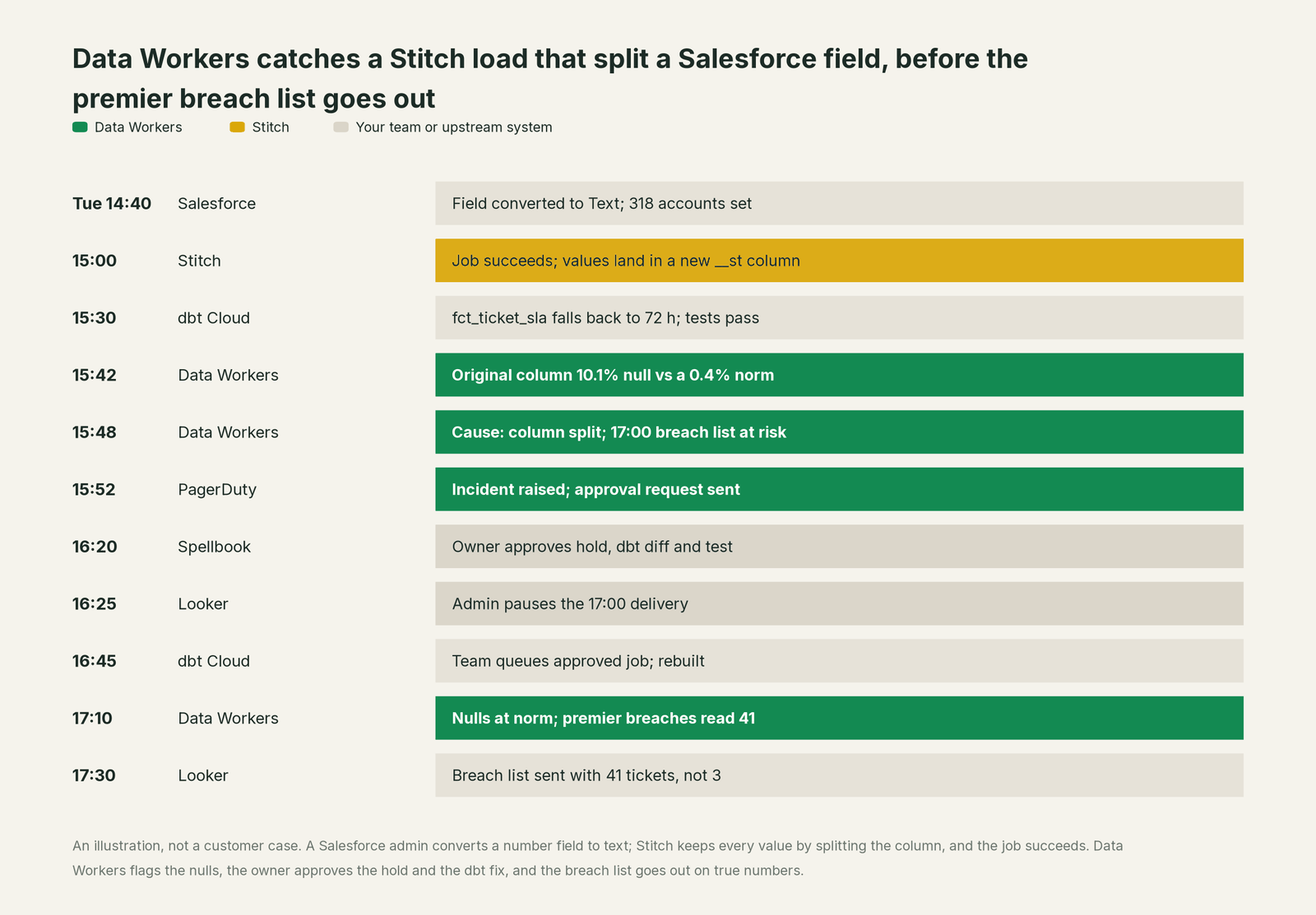
Nothing in Stitch needed to change. Stitch did what its docs promise: a value of a new type gets its own column. Catching the problem takes knowledge Stitch was never meant to hold: that a dbt model reads only the original column, and that 72 hours is a plausible but wrong default.
| Job | What Stitch does | What Data Workers does |
|---|---|---|
| The move | Runs replication jobs from 130+ sources on Singer taps, with log-based, key-based and full-table methods | Reads what the jobs land, natively in Snowflake or BigQuery; connects to Stitch over its API |
| The signal | Extraction logs, loading reports and notifications when a job fails | Checks the landed data itself: nulls, volume, freshness and new columns against a baseline, so a successful job with a split column still raises an incident |
| The diagnosis | Explains a failed extraction or load from its logs | Joins the split column, the _sdc batch, lineage and owners into one cause, with the blast radius across dbt models and Looker Explores |
| The fix | Keeps every value in a correctly typed column | Proposes the hold, the dbt diff and the test to a named owner, who approves and applies them |
| The rerun | Starts and stops replication jobs and pauses sources, in the app or through the Connect API | Proposes any re-replication with the reason and the tables involved; queues approved downstream runs through Airflow, Dagster or Prefect, with dbt Cloud jobs on the team's scheduler |
| The proof | Keeps extraction logs and loading reports | Re-checks the tables and writes a receipt: what changed, who approved it, how it was checked, how to undo it |
Why doesn't Stitch just do this itself?
Because Stitch is built to replicate faithfully and simply. When a column receives a value of a new type, Stitch documents that it "will create a new column for the newly detected data type." When a column is removed at the source, Stitch fills it with nulls and never drops it. Those rules protect your data: nothing is lost or rewritten without you. They also mean a job can succeed while a model that reads the original column quietly changes its answer. Stitch has no way to know that a dbt model coalesces nulls to a default, and it was never meant to.
The scope is a sensible business decision. Stitch stays the simple, predictable product its customers bought, and Qlik puts new investment into Qlik Talend Cloud. Owning whether replicated data is right across Salesforce, a warehouse, dbt, BI and a support team's morning review is a different product: a context graph of every table and consumer, blast-radius scoping, named approvers, a recorded undo and receipts an auditor can read. That is Data Workers. More in is it safe to let AI agents change production data.
Every tool owns a slice. Data Workers covers the whole lifecycle
Each point tool adds another console, contract and handoff. Data Workers covers the whole lifecycle with one context, one approval flow and one audit trail, and builds on the Stitch integrations already there.
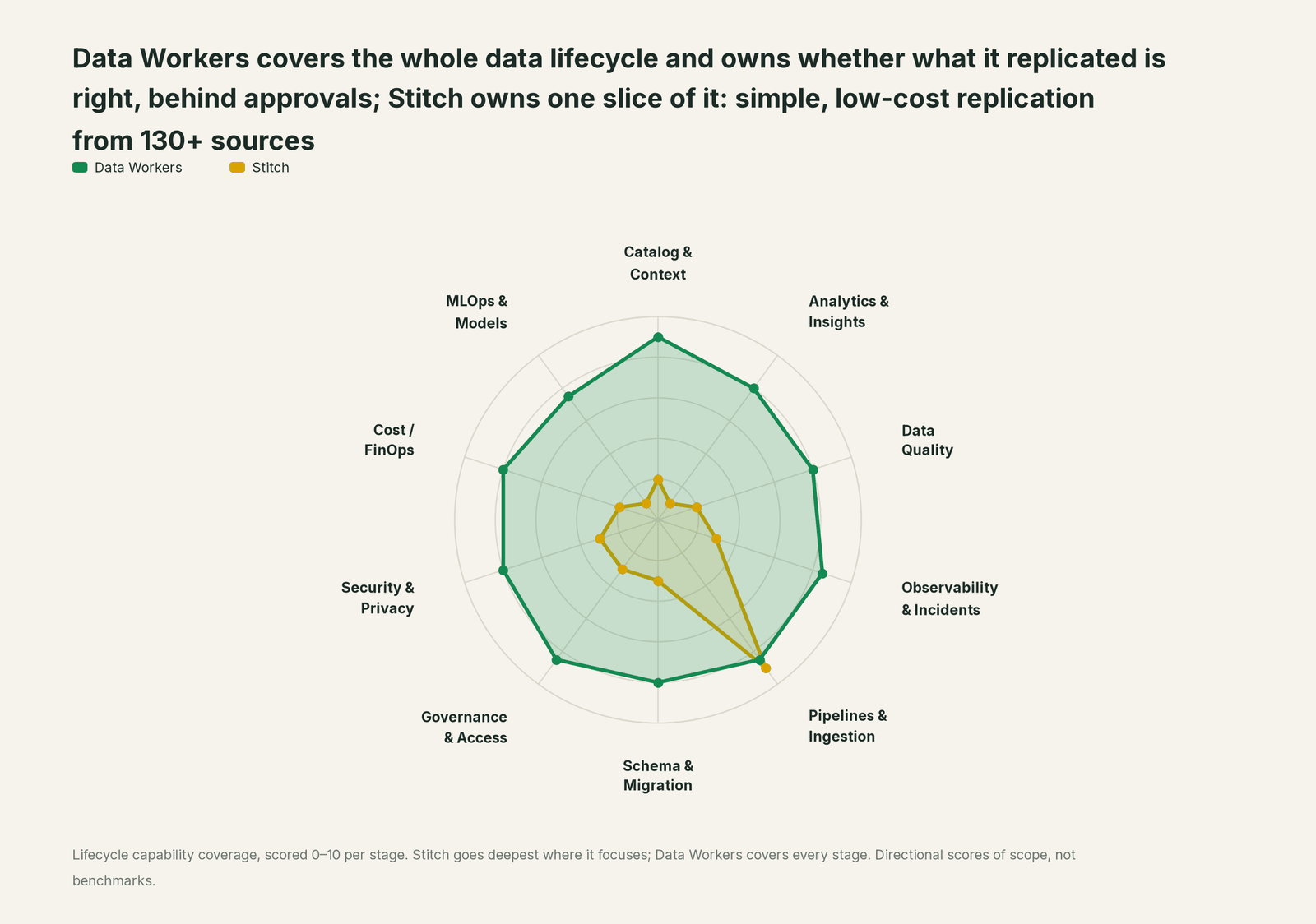
| Stage | Data Workers | Stitch | Why we scored it this way |
|---|---|---|---|
| Catalog & Context | 9 | 2 | Stitch documents each integration's tables, keys and joins. Data Workers keeps one governed context graph of what each table means, who owns it and what reads it. |
| Analytics & Insights | 8 | 1 | Not Stitch's job: it loads the warehouse and leaves the numbers to BI. Data Workers answers data questions from governed definitions with lineage behind every number. |
| Data Quality | 8 | 2 | Rejected records land in _sdc_rejected and mixed types get their own column, so nothing is lost. Data Workers checks nulls and volume on the landed tables and tracks load lag against a baseline. |
| Observability & Incidents | 8.5 | 3 | Extraction logs, loading reports and notifications to email, Slack, PagerDuty or Datadog explain a failed job. Data Workers diagnoses the incident when the job succeeded. |
| Pipelines & Ingestion | 8.5 | 9 | Stitch's home stage: 130+ sources on Singer taps, log-based, key-based and full-table replication, scheduling and the Connect API. Data Workers proposes re-replication for the owner. |
| Schema & Migration | 8 | 3 | Adds new columns and splits a column when its type changes, never dropping data. Data Workers traces the split through dbt and BI and plans the move to Qlik Talend Cloud in waves. |
| Governance & Access | 8.5 | 3 | Stitch controls who uses the account and which tables replicate. Data Workers routes every data change to a named approver. |
| Security & Privacy | 8 | 3 | SSH tunnels, VPC peering, AWS PrivateLink and HIPAA options protect the move. Data Workers leaves a receipt on every data change. |
| Cost / FinOps | 8 | 2 | Row-based plans make the replication bill predictable; warehouse spend sits in the warehouse. Data Workers traces Snowflake credits to the dbt model behind them through query tags. |
| MLOps & Models | 7.5 | 1 | Not Stitch's job. Data Workers keeps the data under models and agents healthy. |
How Stitch and Data Workers work together
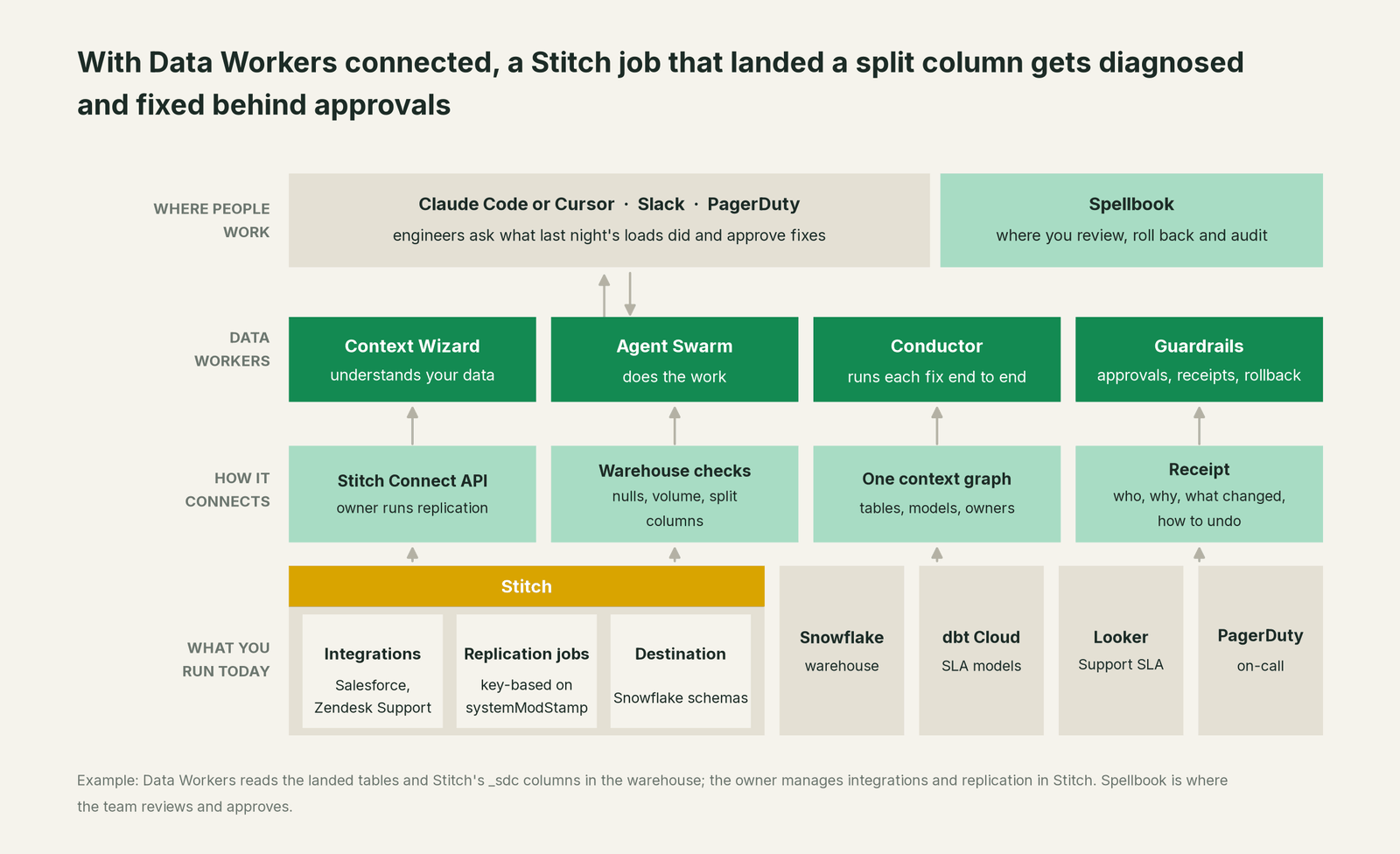
Data Workers connects to Stitch over its API today. What it needs from each replication job already sits in the warehouse: the landed tables, any new __st or __fl columns, and the _sdc_batched_at column that ties rows to a load. Data Workers reads those natively in Snowflake and BigQuery. Integrations, schedules and replication stay with your team: Data Workers never starts, stops or pauses Stitch replication. When a fix needs fresh data, it proposes the re-replication with the reason and the tables involved, and the owner runs it in Stitch or through the Connect API. The rest of this incident runs on native connections: Snowflake, dbt Cloud, Looker (read), PagerDuty, Slack and GitHub, among 50+ connectors.
Stitch has no MCP server, so the Data Workers agents sit in your coding agent or assistant on their own. The setup follows the documented client setup: clone the open-source repo and add each agent's start-agent.sh entry.
# Example: Data Workers agents in Claude Code, from a clone of the open-source repo
claude mcp add --scope user dw-incidents -- "$(pwd)/start-agent.sh" dw-incidents
claude mcp add --scope user dw-quality -- "$(pwd)/start-agent.sh" dw-quality
claude mcp add --scope user dw-catalog -- "$(pwd)/start-agent.sh" dw-context-catalog
claude mcp add --scope user dw-schema -- "$(pwd)/start-agent.sh" dw-schema
claude mcp add --scope user dw-connectors -- "$(pwd)/start-agent.sh" dw-connectors
List the tools with your client's own command (/mcp in Claude Code). In this incident: run_quality_check (dw-quality) runs the null and volume checks that surface the split; diagnose_incident names the cause; blast_radius_analysis and trace_cross_platform_lineage (dw-context-catalog) map what the nulls reached; the team's dbt Cloud scheduler runs the approved rebuild; monitor_metrics tracks the breach count against its baseline; remediate re-checks the quality assertions and escalates any failure to a person.
In production the agents run in your infrastructure and hold the warehouse credentials and model key. Your data stays in your systems; the hosted Conductor sees workflow metadata only. More in where does our data go.
One incident, L0 to L4, set per domain:

- •L0 manual. A premier customer asks on Thursday why an escalation sat for two days; an analyst finds the
__stcolumn that afternoon. - •L1 observe. Data Workers flags the split column and the null spike at 15:42 with the cause and blast radius. Nothing changes.
- •L2 propose. Data Workers proposes the hold, the dbt diff and the test; nothing moves until the named owner approves, and an unanswered request expires and escalates, never auto-grants.
- •L3 act reversibly. For a class with a clean record, Data Workers queues the rebuilds itself and sends any failed check to a person. Stitch stays with the owner.
- •L4 autonomous. For a scoped domain, Data Workers checks each load as it lands, so the owner's fix is waiting before the next dbt job runs.
Who sets those levels: who owns the agents, how approvals work for AI data agents and autonomy levels L0 to L4 explained.
What changes for your team
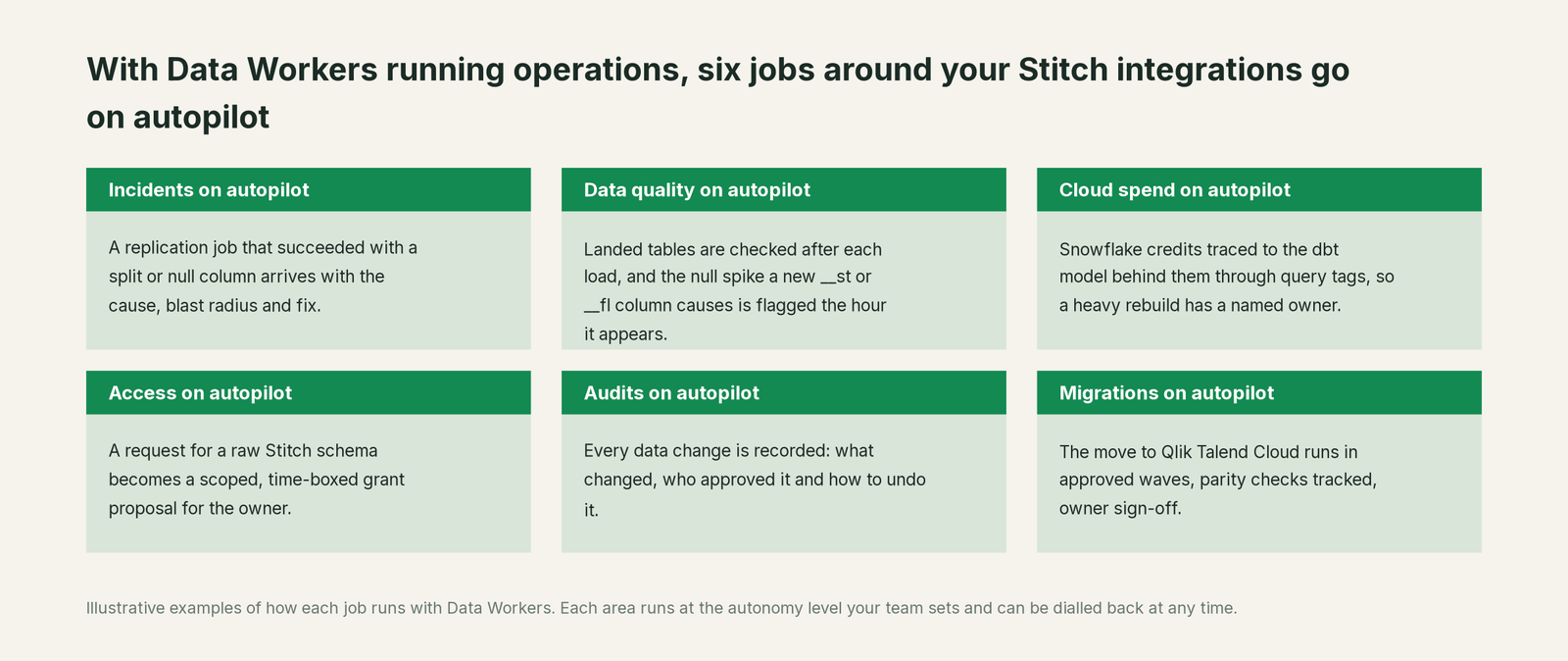
- •Set-and-forget gets a second pair of eyes. Integrations nobody has opened in a year still get every load checked.
- •On-call starts from a cause. The PagerDuty incident carries the split column, the damage, the proposed fix and the rebuild plan.
- •Deliveries that go to people get a guard. When an Explore behind a scheduled delivery reads a table that just went wrong, the hold is proposed before it sends.
- •One record for data, support and RevOps. Everyone sees the same incident and receipt in Spellbook Data Catalog (in preview), linked from the PagerDuty incident.
More: Data Workers integrations and the data ingestion vs ETL primer.
Keep Stitch, or consolidate?
Keep Stitch if you love it; Data Workers works with it from day one. Many teams consolidate once Data Workers runs that slice too.
For many Stitch teams the answer today is keep it: it is cheap, stable and maintained. The open question is when to move to Qlik Talend Cloud; Qlik frames it around contract renewal. Qlik's Migration Center lays out the path: Stitch's data movement maps to the Qlik Talend Cloud Starter edition, an integration becomes a "data source" and a destination a "target", you replicate into a new schema, verify the datasets against the Stitch schema (Qlik publishes example hash comparison queries), repoint downstream processes and then pause the Stitch integration.
Verify and repoint are where estates slip: every dbt source and Explore that reads a Stitch schema has to move, and split columns like __st may not exist in the new schema. Data Workers plans the move in waves: which integrations go first, what each wave repoints, and the parity checks (row counts, null shares, freshness, Qlik's hash comparisons) each wave must pass. It tracks those checks and holds the completion gate until the owner signs off, while Stitch keeps running. Comparing your options? See you're on Talend for teams already on Qlik Talend Cloud, and you're on Fivetran and you're on Airbyte for the other managed movers. Downstream of all of them, you're on dbt and you're on Looker cover the models and Explores.
Weighing a build on a coding agent? Read build it ourselves with Claude Code and MCP servers: querying a __st column is easy; the context graph, approvals, undo and receipts are the work.
The case for your CFO
The outcome. When a Stitch job lands data that changes what a model reports, it is caught the same hour and corrected before a customer or manager acts on it, with a record of how it was checked. When the move to Qlik Talend Cloud comes, it lands in signed-off waves instead of a big-bang cutover.
The risk story. At L0 and L1, agents only read. At L2 they propose and a named person approves; an unanswered request expires and escalates, never auto-grants. At L3 they act on reversible changes inside the domains you open; L4 is a later choice per domain. Replication, integrations and resets stay with the owner in Stitch. No agent can promote its own work, and an org-wide stop halts all autonomous dispatch. Every change carries a receipt: what changed, who approved it, the blast radius and the undo.
Why now. Qlik points Stitch's future to Qlik Talend Cloud, so a migration is on most Stitch teams' calendar. Checks on what lands today give you the baseline that migration will be judged against.
The first win. L1 on the integrations that feed customer and revenue numbers: a split column or a null spike becomes a diagnosed incident before the next dbt job runs.
What stays the same. Nothing migrates for Data Workers: Stitch, your warehouse, your dbt project, Looker and your on-call rota. For the numbers, see the ROI of agentic data operations.
The sentence for upstairs: "Stitch keeps replicating our data cheaply; Data Workers makes sure what it lands is right, gets it fixed with our approval when it isn't, and will carry us to Qlik Talend Cloud in signed-off steps."
Getting started
Start with a pilot. Pick the Stitch integrations that feed the numbers customers and leaders read, give Data Workers read access to the schemas they write, and run at L1 for a few weeks. Then turn on L2 for one domain, and open L3 for a narrow class once the receipts show the agents were right. If a move to Qlik Talend Cloud is coming, add its first wave plan to the pilot. The pilot path is on the pricing page, and the pilot is credited in full against the first year.
FAQ
How does Data Workers connect to Stitch? Over Stitch's API today. Data Workers reads the landed tables and _sdc columns natively in your warehouse, and the owner keeps running replication in Stitch or through the Connect API (an upgraded feature, from the Advanced plan).
Our replication job succeeded. Why is a column suddenly null? When a source sends a value of a different type, Stitch keeps it in a new typed column (in Snowflake, for example __st for text or __fl for numbers) and the original column is null for those rows. On Redshift the original column is renamed with its type. Models that read the original column change their answer without an error. Data Workers flags the new column and the nulls on the load where they appear.
Will Data Workers start, stop or pause our Stitch replication? No. Integrations, schedules, replication jobs and resets stay with the owner. Data Workers proposes a re-replication with the reason and the tables involved, and queues approved downstream runs through your orchestrator, with dbt Cloud jobs on the team's scheduler.
Is Stitch going away? Qlik says it is building the best of Stitch's technology into Qlik Talend Cloud and points new buyers there, while existing customers keep logging in and integrations were still being updated in September 2026. Qlik's Migration Center publishes a Stitch-to-Qlik Talend Cloud path and a coaching service for customers approaching renewal. Plan the move on your own timeline.
Can Data Workers help us move from Stitch to Qlik Talend Cloud? Yes. Data Workers plans each wave with its parity checks, tracks them and holds the completion gate for the owner's sign-off. Your team builds the Qlik Talend Cloud pipelines; Data Workers maps every model and dashboard that reads the Stitch schema so each one is repointed and checked.
We also run Fivetran or a CDC tool next to Stitch. Does that change anything? No. Data Workers reads what every mover lands in the warehouse, so one incident record and one approval flow span Stitch, Fivetran, Airbyte or a CDC tool.
Sources
All checked Oct 3, 2026.
- •Stitch homepage ("Stitch is now part of Qlik"; 130+ sources; Qlik Talend Cloud trial), https://www.stitchdata.com/
- •Stitch pricing (Standard from $100/month; Connect API access, post-load webhooks, PrivateLink, VPC peering, HIPAA BAA), https://www.stitchdata.com/pricing/
- •Stitch changelog (Salesforce v2 Sep 11, Zendesk Support v2 Sep 21, Klaviyo Sep 22, Pipedrive v2 Sep 24, 2026), https://www.stitchdata.com/docs/changelog
- •Stitch docs, table structural changes (column splitting by destination), https://www.stitchdata.com/docs/replication/loading/understanding-table-structural-changes
- •Stitch docs, system tables and columns, https://www.stitchdata.com/docs/replication/loading/system-tables-columns
- •Stitch docs, Salesforce v2 (Replication Key
systemModStamp), https://www.stitchdata.com/docs/integrations/saas/salesforce, and Zendesk Support v2, https://www.stitchdata.com/docs/integrations/saas/zendesk - •Stitch Connect API (start and stop replication jobs, pause sources; an upgraded feature), https://www.stitchdata.com/docs/developers/stitch-connect/api
- •Stitch docs, custom notification list (PagerDuty, Datadog, Slack), https://www.stitchdata.com/docs/account-security/notifications/extend-email-notifications
- •Qlik Migration Center, Stitch pages (updated Oct 1, 2026): comparing, verifying datasets, transitioning schemas, migration coaching, https://help.qlik.com/en-US/migration/Content/Migration/stitch-comparing-to-QTC.htm, https://help.qlik.com/en-US/migration/Content/Migration/stitch-verifying-datasets.htm, https://help.qlik.com/en-US/migration/Content/Migration/stitch-transitioning-schemas.htm, https://help.qlik.com/en-US/migration/Content/Migration/stitch-additional-resources.htm
- •Data Workers open-source repository, https://github.com/DataWorkersProject/dataworkers-claw-community, and client setup guide, https://dataworkers.io/opensource-docs/client-setup/