You're on Qlik: It Turns Associative Analytics Into Decisions Across the Business. Data Workers Owns Whether the Data Loaded Into Those Apps Is Right
Already on Qlik Cloud Analytics? Data Workers checks the warehouse tables your apps reload from, flags an app count that falls off its baseline, fixes the cause upstream behind approvals and verifies the number.
Your Qlik developers own a tenant full of apps: extract apps that pull from Snowflake and store QVDs, and analytics apps with sheets and master measures that plant managers and the supply chain VP open every morning. Reloads run on schedules set years ago. On top of the associative engine, Qlik Answers agents answer questions from app data, the Discovery Agent posts what changed since the last refresh into each user's feed, and the Qlik MCP server, included with every Qlik Cloud subscription once an admin activates it, lets Claude or ChatGPT search apps, read load scripts, start reloads and build sheets. Qlik's agentic data engineering went generally available on June 30, 2026; that announcement said the Qlik Analytics Agent was planned for Q3 2026. Qlik turns associative analytics into decisions across the business. Data Workers owns whether the data loaded into those apps is right, and fixes it upstream behind approvals when it isn't.
A reload that finishes is not a reload that loaded the right rows, and every app, feed card and Qlik Answers reply inherits the difference.
Key takeaways
- •Qlik keeps its job. Apps, load scripts, QVDs, Qlik Answers and the Discovery Agent stay as they are. Data Workers connects over Qlik's APIs or MCP server today.
- •The tables your apps reload from get checked after every build. Data Workers runs key, null and row-count checks on Snowflake and flags the counts your team records, from the warehouse and from each app after its reload, against a baseline.
- •Reload timing becomes context, not tribal knowledge. Each extract app's reload slot and watermark sit in the context graph next to the dbt models it reads, so an app count that drops is tied to the build that overran the slot.
- •Fixes happen upstream, behind a named approval. The dbt change goes to its owner as a diff, the rerun is queued in Dagster after approval, and the reload stays with the Qlik developer.
- •The number is verified, with a receipt. The app count returns to its baseline and matches the warehouse; the receipt records cause, approver, verification and undo.
Qlik turns associative analytics into decisions across the business. Data Workers owns whether the data loaded into those apps is right.
Qlik's help documents the incremental load pattern most large tenants use: select rows WHERE ModificationTime >= #$(LastExecTime)#, concatenate the QVD rows WHERE NOT Exists(PrimaryKey), store a new QVD. Qlik "loads records inserted into the database or updated in the database after the last script execution". It is fast and the right design, and it trusts that a row's timestamp is the moment the row became visible. When a build stamps rows with its start time and commits them an hour later, a reload in between moves the watermark past rows it never saw.
Here is quarter close at a packaged-food manufacturer: Qlik Cloud Analytics on Snowflake, SAP S/4HANA replicated by Qlik Talend Cloud, dbt Core run by Dagster. An illustrative example. Every system reports success.
| Time | System | What happens |
|---|---|---|
| Wed Sep 30 23:59 | SAP S/4HANA | Quarter-end shipping closes. Plants post goods issue on 41,812 outbound delivery items, more than twice a normal day |
| Thu 00:10 | Qlik Talend Cloud + Snowflake | Replication lands the delivery tables in RAW_SAP. The larger volume finishes at 03:58 instead of the usual 02:40 |
| 04:06 | Dagster + dbt Core | The landing sensor starts the supply_chain_nightly job. fct_shipments is an incremental merge, and each row's dbt_loaded_at is set from run_started_at: 04:06 |
| 05:00 | Qlik Cloud | The scheduled reload of the extract app SHP_01_Extract runs the insert-and-update script on DBT_LOADED_AT. The merge has not committed, so the query returns 0 new rows. The script stores the QVD and saves 05:00 as its watermark. Reload succeeded |
| 05:15 | Qlik Cloud | The analytics app Shipments & OTIF reloads from the QVDs. September 30 shows nothing shipped |
| 05:20 | Data Workers | The count the team records from the app after each reload lands in monitor_metrics: Sept 30 shipments at 0, far below the quarter-end baseline. Flagged |
| 05:31 | Snowflake | The merge commits 41,812 rows, every one stamped 04:06, behind the watermark the reload just saved. No future incremental reload will select them |
| 05:34 | Dagster | The job succeeds |
| 05:36 | Data Workers + Snowflake | run_quality_check on fct_shipments passes: keys unique, no nulls, row count above its minimum. The team's Snowflake count for Sept 30 in monitor_metrics reads 41,812, in range. The nightly finish time, 05:34, is two hours past its baseline |
| 05:38 | Data Workers + Dagster | Data Workers reads the Dagster run: the fct_shipments step ran 04:06 to 05:31. The Qlik developer's note in the context graph records SHP_01_Extract at 05:00, incremental on DBT_LOADED_AT. diagnose_incident classifies a source delay; blast_radius_analysis follows the developer's context-graph notes to Shipments & OTIF and two planning apps. The finding: the warehouse holds 41,812 rows the app lacks, committed after the reload started and behind its watermark |
| 05:41 | Teams + email | send_teams_alert posts the finding to the supply chain data channel. The approval request goes by email to the analytics engineering lead, with the Qlik developer named on the plan |
| 06:10 | Qlik Cloud | The Discovery Agent's insight trigger fires on the 05:15 refresh. Plant managers' feeds show a card: Sept 30 shipments down sharply |
| 06:20 | Claude Code + Qlik MCP | The Qlik developer reads the reload log with qlik_get_reload_log: 0 rows fetched from FCT_SHIPMENTS at 05:00. She confirms the finding in the incident |
| 06:25 | Spellbook | One proposal: a diff adding a restate_business_date variable to fct_shipments that re-merges one business day with a fresh dbt_loaded_at; a Dagster restate run for Sept 30 after the merge; a reload of SHP_01_Extract for the Qlik developer. Blast radius and undo travel with it |
| 06:30 | Qlik Answers | The supply chain VP asks how Q3 closed. The assistant answers from the app: shipments 3.4% below plan. The on-call replies in the thread that a fix is under review |
| 06:40 | GitHub + Spellbook | The lead reviews the receipt, merges the diff and approves the run. The undo (revert the diff; restated rows keep their values and only carry a new stamp) is written into the plan for the owner |
| 06:44 | Data Workers + Dagster | trigger_dagster_job queues the approved restate run. Data Workers reads the run until it completes at 07:01 |
| 07:02 | Data Workers + Snowflake | Checks pass again; the Snowflake count for Sept 30 still reads 41,812, the value the app must match |
| 07:05 | Claude Code + Qlik MCP | The developer starts the reload with qlik_start_app_reload; the log shows 41,812 rows fetched and merged by key. Shipments & OTIF reloads after it |
| 07:14 | Claude Code + Qlik MCP + Data Workers | She reads the Sept 30 KPI with qlik_get_chart_data: 41,812. The app count the team records lands in monitor_metrics back in its baseline, matching Snowflake. Data Workers closes the incident with the receipt |
| 07:30 | Supply chain call | Plant managers and the VP review Q3 on the right numbers: 1.2% above plan |
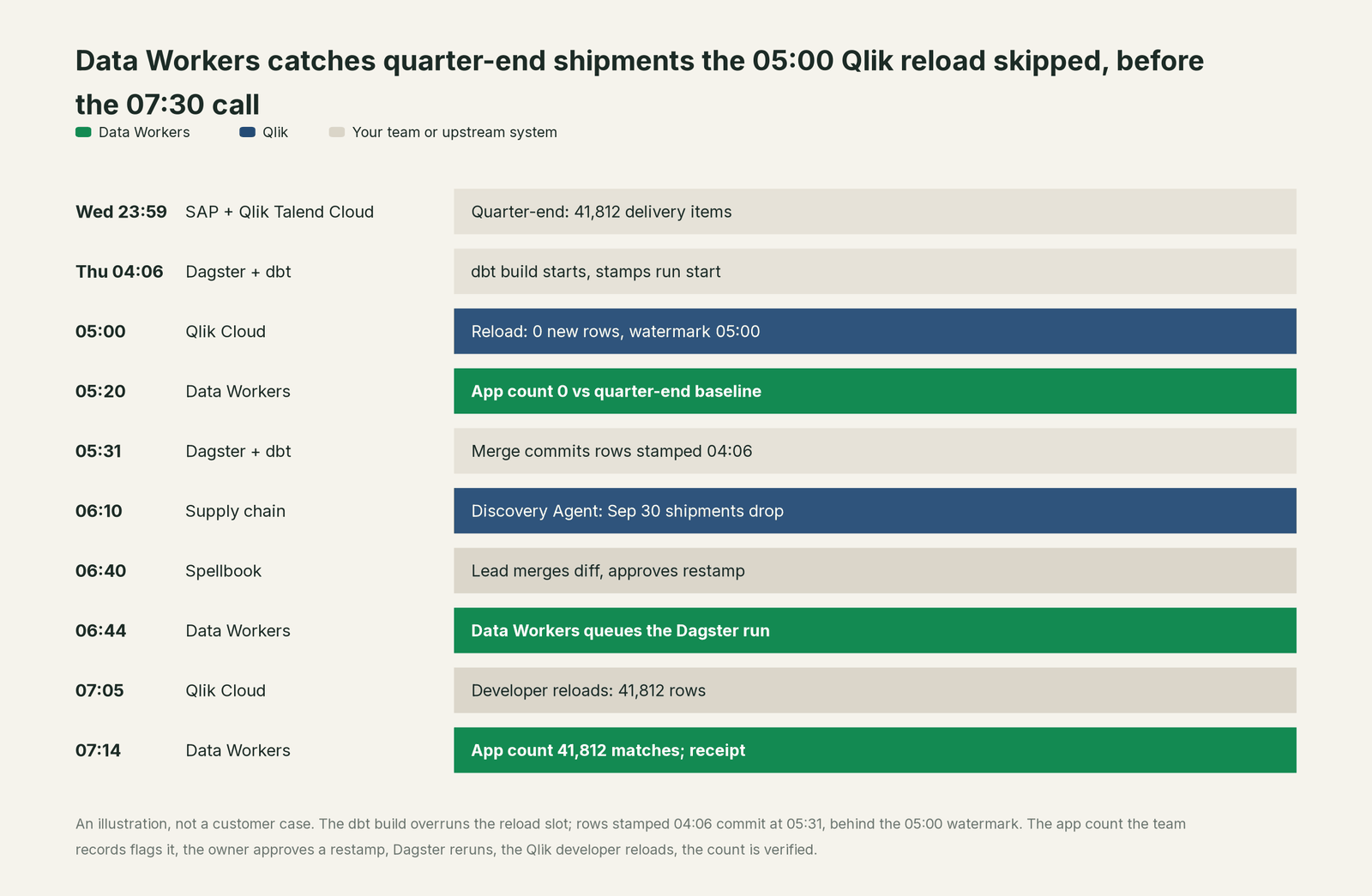
Every tool did its job, and the reload ran the documented pattern on schedule. Without the app count the team records, the gap would have lasted until someone noticed it in a board pack, because no future incremental reload would pick those rows up. Data Workers attached two hardening suggestions to the receipt for the Qlik developer: take the watermark from the largest DBT_LOADED_AT in the QVD, with an overlap the NOT Exists step dedupes, and start the extract reload when the Dagster job succeeds.
| Job | What Qlik does | What Data Workers does |
|---|---|---|
| The app | Sheets, master measures, the associative engine, Qlik Answers and Discovery Agent feeds | Makes sure the tables each app reloads from are right before people read them |
| The load script | Pulls new and changed rows into QVDs on a watermark | Holds each extract app's reload slot and watermark as context next to the dbt models it reads |
| The reload | Runs on a schedule and reports success, with a log | Flags an app count off its baseline, ties it to the build that overran the slot and names the reload the fix needs; the Qlik developer runs it |
| The fix | Shows what the warehouse returned at reload time | Proposes the upstream change as a diff for the owner and queues the approved Dagster run |
| The proof | Answers chart and KPI queries, including through Qlik MCP | Checks the app count against the warehouse value and leaves a receipt with cause, approver, verification and undo |
| The context | Glossaries, data products and lineage inside Qlik Cloud | One context graph across SAP replication, Snowflake, dbt, Dagster and every app |
Why doesn't Qlik just do this itself?
Because Qlik built the engine where the business explores and decides, and its design fits that job. A reload loads what the database returns at that moment; an incremental script trusts the timestamp it is given; the Discovery Agent reports what changed since the last refresh, which is what a business user needs. Qlik's own agents act inside Qlik with care: Qlik MCP tools run as the connecting user with that user's roles and space permissions, and its data engineering agents work inside Qlik Talend Cloud.
The cause sat in three systems Qlik does not run: a dbt model's timestamp logic, a Dagster job's timing and a Snowflake table. Changing them means writing to other teams' production data, with a blast radius, an approval, a rollback path and accountability. An analytics platform sensibly keeps that away from where executives read numbers. That cross-system, approval-gated work is the product Data Workers is. See is it safe to let AI agents change production data.
Every tool owns a slice. Data Workers covers the whole lifecycle
Qlik owns one slice outright: turning associative analytics into decisions. Each point tool adds another console, contract and handoff. Data Workers covers the whole lifecycle with one context, one approval flow and one audit trail.
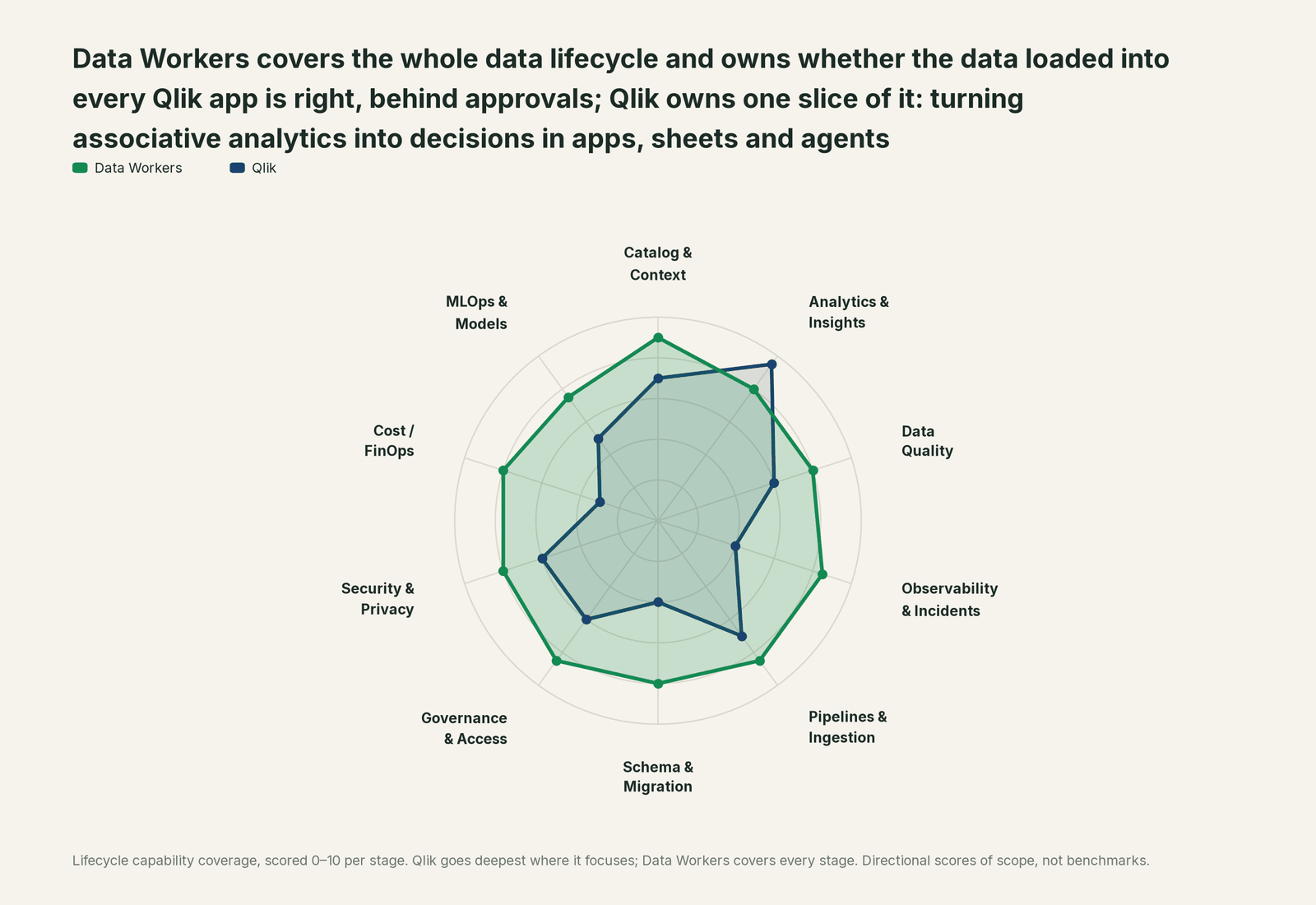
| Stage | Data Workers | Qlik | Why we scored it this way |
|---|---|---|---|
| Catalog & Context | 9 | 7 | Master items, business glossaries, data products and lineage give Qlik users shared meaning. Data Workers keeps one governed context graph across sources, the warehouse, dbt, orchestrators and every app. |
| Analytics & Insights | 8 | 9.5 | Qlik's home stage: the associative engine, sheets, Qlik Answers agents and the Discovery Agent feed. Data Workers makes sure the data each app loads is right. |
| Data Quality | 8 | 6 | Qlik Talend Cloud scores trust and runs quality rules on datasets. Data Workers checks the warehouse tables under each app after every build and fixes the cause upstream. |
| Observability & Incidents | 8.5 | 4 | Reload logs report success or failure, and the Discovery Agent flags changes between refreshes. Data Workers traces a wrong number back to the build that caused it and verifies the fix. |
| Pipelines & Ingestion | 8.5 | 7 | Qlik Talend Cloud and Open Lakehouse move and shape data at scale; load scripts bring it into apps. Data Workers queues approved reruns in the orchestrators that build the warehouse. |
| Schema & Migration | 8 | 4 | Load scripts adapt to changed fields inside each app. Data Workers reviews the dbt changes underneath and scopes their blast radius before they merge. |
| Governance & Access | 8.5 | 6 | Spaces, roles and section access govern who sees what. Data Workers routes every data change to a named approver. |
| Security & Privacy | 8 | 6 | Section access and tenant controls protect each viewer's slice. Data Workers leaves a receipt on every data change and proposes masking for the owner to apply. |
| Cost / FinOps | 8 | 3 | Capacity meters track Qlik's own questions and data volumes. Data Workers attributes Snowflake spend to each query and dbt model through query tags. |
| MLOps & Models | 7.5 | 5 | Qlik Predict builds and deploys models inside Qlik Cloud. Data Workers keeps the data under models, apps and agents healthy. |
How Qlik and Data Workers work together
The business stays in Qlik, engineers in Claude Code or Cursor, alerts in Teams, approvals by email or Slack. Spellbook Data Catalog (in preview) is where the data team reviews each proposal, its blast radius, approver and rollback. Underneath, Data Context Wizard keeps one governed context graph, the Data-Agents Swarm's 20+ specialist agents do the work, and the Autonomous Data-Conductor runs each fix end to end (detect, diagnose, fix, review, verify, remember).
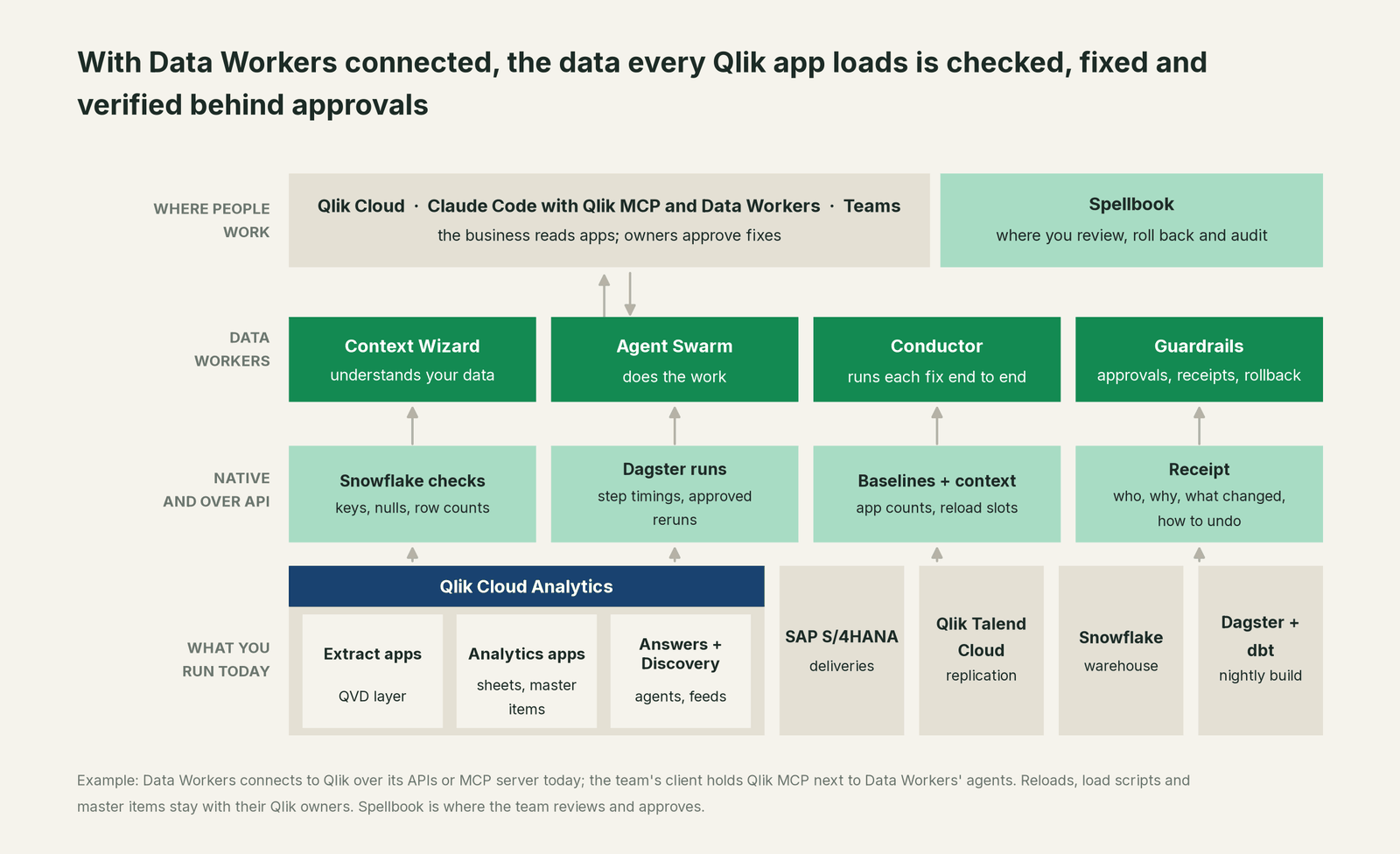
How Data Workers connects to Qlik. Data Workers connects to Qlik Cloud over its APIs or the Qlik MCP server today, and to SAP S/4HANA and Qlik Talend Cloud the same way. Qlik MCP sits in your team's client next to Data Workers' agents, so a developer can read a reload log and ask Data Workers why a number moved in one conversation. Data Workers' agents never call Qlik MCP themselves and write nothing to Qlik by design: reloads, load scripts, master items and Qlik Talend Cloud tasks stay with their owners. Each extract app's reload slot and watermark live in the context graph as the developer's notes, tied to its dbt models.
What Data Workers reads underneath. Snowflake checks with run_quality_check (nulls, uniqueness on ID columns, row counts); monitor_metrics baselines for the counts your team records, from Snowflake and from each app after its reload; dbt Core manifest lineage; and Dagster runs with their step timings, queued with trigger_dagster_job once approved. explain_table adds a table's definition, lineage and trust score. Your data stays in your systems: the agents run in your infrastructure with your credentials and model key, and the hosted Conductor sees workflow metadata only (where does our data go).
Setup over MCP today. Clone the open-source repository and add start-agent.sh entries to your client, as the client setup docs show. Add Qlik MCP as a remote server at your tenant's address after a tenant admin activates it, grants the Qlik MCP permission and creates or approves the OAuth client.
// Example: .mcp.json for Claude Code. Qlik MCP (remote, OAuth sign-in)
// next to Data Workers agents from a clone of the open-source repo.
{
  "mcpServers": {
    "qlik": { "type": "http", "url": "https://<tenant-id>.<region>.qlikcloud.com/api/ai/mcp" },
    "dw-context-catalog": { "command": "/path/to/dataworkers-claw-community/start-agent.sh", "args": ["dw-context-catalog"] },
    "dw-quality":         { "command": "/path/to/dataworkers-claw-community/start-agent.sh", "args": ["dw-quality"] },
    "dw-incidents":       { "command": "/path/to/dataworkers-claw-community/start-agent.sh", "args": ["dw-incidents"] },
    "dw-connectors":      { "command": "/path/to/dataworkers-claw-community/start-agent.sh", "args": ["dw-connectors"] }
  }
}
List the tools with your client's own command (/mcp in Claude Code). Qlik MCP runs as the signed-in user, so give analysts a role without script edit rights and keep tool approval on for reloads and script changes. Every five billable Qlik MCP tool calls use one question from the tenant's monthly Qlik Answers and MCP quota.
One request, L0 to L4. The autonomy ladder is set per domain.

- •L0 manual. Your team traces a missing quarter by hand.
- •L1 observe. Data Workers checks the tables under each app, flags app counts and build finish times against their baselines and names the affected apps. It changes nothing.
- •L2 propose. Data Workers drafts the dbt diff and the Dagster run with the blast radius. A named person approves; an unanswered request expires and escalates, never auto-grants.
- •L3 act reversibly. For change classes with a proven record, such as queuing the Dagster restate of one business day, Data Workers acts, verifies and records the undo.
- •L4 autonomous. For a scoped, trusted class, Data Workers fixes, verifies and posts the receipt. No agent can promote its own work; the org-wide stop halts all autonomous dispatch.
More on how approvals work, the autonomy levels and who owns the agents. Related guides: Qlik Replicate, Talend, Dagster, Tableau, Power BI and MCP servers for BI tools.
What changes for your team
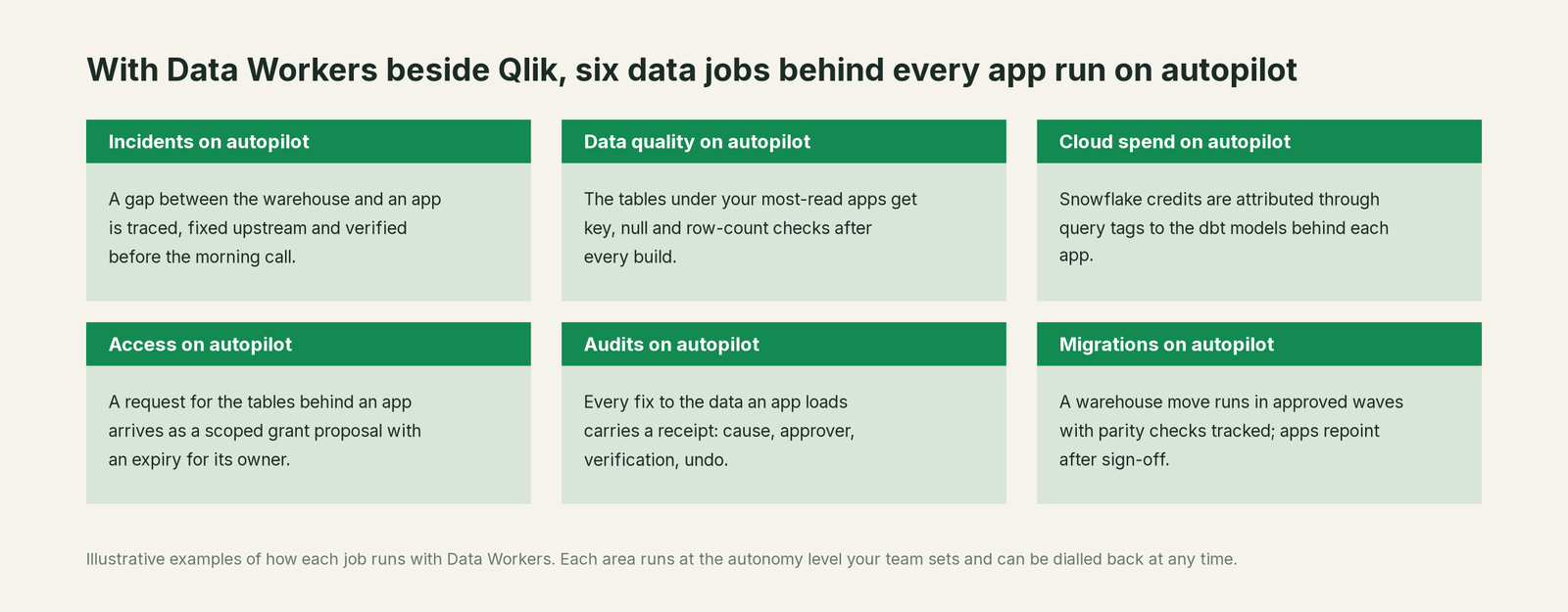
Qlik teams lose hours to one question: is it the script, the QVD or the warehouse? With Data Workers next to Qlik, these jobs run on autopilot at the level you set.
- •Incidents. A gap between the warehouse and an app is traced, fixed upstream and verified before the morning call.
- •Data quality. The tables under your most-read apps get key, null and row-count checks after every build.
- •Cloud spend. Snowflake credits are attributed through query tags to the dbt models behind each app.
- •Access. A request for the tables behind an app arrives as a scoped grant proposal with an expiry for its owner.
- •Audits. Every fix to the data an app loads carries a receipt: cause, approver, verification and undo.
- •Migrations. A warehouse move runs in approved waves with parity checks tracked; apps repoint after sign-off.
Keep Qlik, or consolidate?
Keep Qlik if you love it; Data Workers works with it from day one. Many teams consolidate once Data Workers runs that slice too.
Qlik should stay. What teams consolidate is the tooling around it: a separate warehouse test runner, a wiki page listing which extract app reads which model, a Teams thread as the incident record. Weighing a build on Qlik MCP and a coding agent? Read build it ourselves with Claude Code and MCP servers: the connection is the easy part; context, approvals and rollback are the work. See the integrations page and what is an agentic data platform.
The case for your CFO
The outcome: the numbers executives read in Qlik are complete when they open them, and an upstream build that overruns or breaks is caught and fixed before the morning call, not after the board pack.
The risk story is plain. Data Workers changes nothing in Qlik. Upstream, every change is proposed with its blast radius, approved by a named owner, verified against a recorded value and written up in a receipt: who approved it, what it touched, how to undo it. Autonomy is set per domain, L0 to L4, and can be dialled back any time. Zero migration: Qlik Cloud, Qlik Talend Cloud, Snowflake, dbt and Dagster stay put.
Why now: Qlik Answers, the Discovery Agent and Qlik MCP put app data in front of agents, so a missing day becomes a confident sentence in a feed or a chat. The first win: the three apps leadership reads most, their reload slots recorded and their daily counts tracked against the warehouse, read-only. What stays the same: your apps, scripts, reload schedules, spaces and section access. For the numbers, see the ROI of agentic data operations.
The sentence to repeat upstairs: "Qlik is where we decide; Data Workers makes sure what Qlik loaded is true, and fixes it with an owner's approval and a receipt."
Getting started
Start with a pilot. Pick the apps your leaders read most, record each app's dbt models, its extract app's reload slot and watermark in the context graph and its headline count after each reload, connect Snowflake and Dagster read-only, and run a few weeks before you enable the first fix class. The pilot path and plans are on the pricing page, and the pilot is credited in full against the first year.
FAQ
Does Data Workers reload our Qlik apps? No, by design. When a fix needs a reload, the plan names the app and the kind of reload, and the Qlik developer runs it, from the hub or through Qlik MCP in her own client, or the next scheduled reload picks it up.
Why would an incremental reload miss rows forever? The documented pattern loads rows stamped at or after the last execution time. Rows stamped with a build's start time but committed after a reload began sit behind the saved watermark, so no later incremental reload selects them. Restamping or a full reload brings them in; a watermark taken from the QVD's own data, with an overlap, prevents the repeat.
Does Data Workers read Qlik reload logs or app data? Your team's client holds Qlik MCP next to Data Workers' agents, and the developer reads the reload log and chart data there. Data Workers learns that a reload came up short from the app count your team records with monitor_metrics, and works out why from what it reads natively: Snowflake checks, Dagster runs, dbt lineage and the context graph.
We use Qlik Talend Cloud data quality. Do we need both? They work at different points. Qlik Talend Cloud scores trust and runs rules on datasets inside Qlik. Data Workers checks the warehouse tables after each build, ties a failure to its cause across replication, dbt, Dagster and the apps, and fixes it upstream behind an approval.
Is our data sent to Data Workers? Your data stays in your systems. The agents run in your infrastructure with your credentials and model key; the hosted Conductor sees workflow metadata only, such as table names, diffs and approval handles.
Sources
- •Qlik Help, Qlik MCP server, updated Oct 2, 2026, https://help.qlik.com/en-US/cloud-services/Subsystems/Hub/Content/Sense_Hub/QlikMCP/Qlik-MCP-server.htm (checked Oct 3, 2026)
- •Qlik Help, Qlik MCP tools, updated Oct 2, 2026, https://help.qlik.com/en-US/cloud-services/Subsystems/Hub/Content/Sense_Hub/QlikMCP/Qlik-MCP-server-tools.htm (checked Oct 3, 2026)
- •Qlik Help, Deploying and administering Qlik MCP server, updated Oct 2, 2026, https://help.qlik.com/en-US/cloud-services/Subsystems/Hub/Content/Sense_Hub/QlikMCP/Administering-Qlik-MCP.htm (checked Oct 3, 2026)
- •Qlik Help, Connecting to the Qlik MCP server, updated Oct 2, 2026, https://help.qlik.com/en-US/cloud-services/Subsystems/Hub/Content/Sense_Hub/QlikMCP/Connecting-Qlik-MCP-server.htm (checked Oct 3, 2026)
- •Qlik Help, Qlik Answers, updated Oct 2, 2026, https://help.qlik.com/en-US/cloud-services/Subsystems/Hub/Content/Sense_Hub/QlikAnswers/Qlik-Answers.htm (checked Oct 3, 2026)
- •Qlik Help, Discovery Agent, updated Oct 2, 2026, https://help.qlik.com/en-US/cloud-services/Subsystems/Hub/Content/Sense_Hub/DiscoveryAgent/discovery-agent.htm (checked Oct 3, 2026)
- •Qlik Help, Loading new and updated records with incremental load, updated Oct 2, 2026, https://help.qlik.com/en-US/cloud-services/Subsystems/Hub/Content/Sense_Hub/LoadData/use-QVD-files-incremental-load.htm (checked Oct 3, 2026)
- •Qlik Help, Qlik Predict, updated Oct 2, 2026, https://help.qlik.com/en-US/cloud-services/Subsystems/Hub/Content/Sense_Hub/AutoML/home-automl.htm (checked Oct 3, 2026)
- •Qlik Help, Talend Cloud documentation, updated Oct 2, 2026, https://help.qlik.com/en-US/cloud-services/Content/Sense_Helpsites/Home-talend-cloud.htm (checked Oct 3, 2026)
- •Qlik, Qlik Delivers Agentic Data Engineering in Qlik Cloud (GA Jun 30, 2026; Analytics Agent planned for Q3 2026), https://www.qlik.com/us/news/company/press-room/press-releases/qlik-delivers-agentic-data-engineering-in-qlik-cloud-to-help-enterprises-build-trusted-data-for-ai (checked Oct 3, 2026)
- •Qlik, Agentic Analytics page, https://www.qlik.com/us/agentic-ai/agentic-analytics (checked Oct 3, 2026)
- •Qlik, Qlik Cloud Analytics product page, https://www.qlik.com/us/products/qlik-cloud-analytics (checked Oct 3, 2026)
- •Qlik, Qlik Open Lakehouse, https://www.qlik.com/us/products/qlik-open-lakehouse (checked Oct 3, 2026)
- •Data Workers, Client setup, https://dataworkers.io/opensource-docs/client-setup/ (checked Oct 3, 2026)
- •Data Workers open-source repository, https://github.com/DataWorkersProject/dataworkers-claw-community (checked Oct 3, 2026)