You're on Jedify: Keep the Context Graph, and Keep the Data Under Every Answer Right
Already on Jedify? Data Workers reads its context graph as one governed source, adds cross-engine lineage and quality, and fixes the pipelines under each metric with approvals and receipts.
Your analytics agents run on Jedify. Semantic Fusion connected to your warehouse, your dbt project, your BI tools and the documents that explain the business, and built a context graph of concepts, metrics, relationships, a business glossary and answer guidance. Your data experts verify each entity before business users can query it, run test sets as a regression suite, and, since Model Versioning arrived in beta on August 18, review changes on a branch with a YAML diff and restore any version from the last 90 days. People ask Jedify in the app and in Slack, Deep Research Agents run multi-step investigations, Jedify has been a connector in Claude since August 11, and since September 10 the MCP tools each person gets follow their Jedify role. Jedify is where your business meaning lives for analytics agents. Data Context Wizard is where every agent reads it, next to lineage, quality and usage, with a named owner on every fact.
That split matters on the morning a number moves for a reason no definition explains. Jedify knows what "Active Customers" means. Whether the rows under it are still right lives in the pipelines: the application database, the change stream, the lakehouse, dbt and the orchestrator. Data Workers is the agentic data platform that runs that work across the whole data lifecycle. It reads Jedify's graph as one source of context, joins it to lineage and quality across every engine, and fixes the data under each metric with one approval flow and a receipt.
Key takeaways
- •Jedify keeps its job. Semantic Fusion, entity verification, test sets, Model Versioning, the Deep Research Agents, the Slack app and the MCP server stay exactly where they are.
- •Bring your own context. Your team's assistant brings Jedify's graph into Data Context Wizard from Jedify's MCP server as proposals, with provenance, and it stays yours. Jedify's definitions sit next to dbt metrics, warehouse semantics, lineage, quality scores and owners in one governed view.
- •Data Workers fixes what is under the metric. When a source change skews a Jedify answer, Data Workers traces it across Postgres, Kafka, Databricks, dbt and Dagster, proposes the fix with its blast radius and verifies the result.
- •Each system keeps its own approvals. Data fixes go through Spellbook to a named owner. Definition changes go to Jedify's data experts and publish through Jedify's own confirmation and versioning flow, by design.
- •Start with a pilot. Both MCP servers in one client, read-only, one domain; then one fix class, on the ladder from L0 manual to L4 autonomous.
Jedify is the context graph. Data Workers is the agentic data platform that runs the data under every answer.
Jedify calls itself "The Context Graph for Enterprise AI" and promises to "give agents full context. Not metadata." Agentic processes generate the model, then "your data teams inspect and tweak it with full transparency". The model has real structure: concepts and metrics with base queries and attributes, shared semantic dimensions, relationships with cardinality and join keys, and statements for the glossary and synonyms. Check Changes keeps the semantic catalog in step with the warehouse's columns and types. On Snowflake, Jedify is live on the Marketplace and maintains governed Snowflake Semantic Views. For agentic applications, the homepage presents MCP and A2A servers; the docs cover the MCP server, in Asker, Editor and Builder modes, and a REST API.
What a context graph holds is meaning. It assumes the rows under each base query are what the business thinks they are. Here is a weekend with Data Workers next to Jedify. This is an illustration, not a customer case.
| Time | System | What happens |
|---|---|---|
| Fri 16:10 | Postgres (billing service) | A product release adds paused to the subscription_status enum so customers can pause instead of cancel |
| Fri 16:12 | Debezium, Kafka | The CDC connector streams the first paused rows to the billing.subscriptions topic |
| Fri 16:30 | Databricks | Streaming ingest lands the rows in the bronze Delta table |
| Sat 02:00 | Dagster, dbt | The nightly job builds dim_customers; its is_active flag is status <> 'canceled', so paused accounts count as active |
| Sat 02:20 | Data Workers | A value-distribution check on dim_customers.status flags a new value on 3% of rows. Data Workers traces lineage from the Postgres column through Kafka and Delta to dim_customers, and through Jedify's graph to the Active Customers concept and the Net Revenue Retention metric |
| Sat 02:30 | Spellbook | Data Workers opens an incident with two proposals for the owner: a dbt diff that maps each status explicitly and adds an accepted-values test, and a definition note for Jedify's Active Customers concept |
| Mon 08:40 | Spellbook | The RevOps lead who owns Active Customers rules that paused accounts are not active and approves; dbt CI passes |
| Mon 09:05 | Dagster | Data Workers reruns the affected dim_customers partitions |
| Mon 09:20 | Claude with Jedify's MCP server | Jedify's data expert, in Editor mode, updates the concept's definition text, runs the domain's test set against the pending change, reviews the diff and confirms the publish |
| Mon 09:45 | Databricks | Data Workers re-runs its checks, confirms the active-customer count is back on its monitor_metrics baseline and writes the receipt |
| Mon 10:00 | Slack | The weekly business review asks Jedify for active customers, and the answer is right |
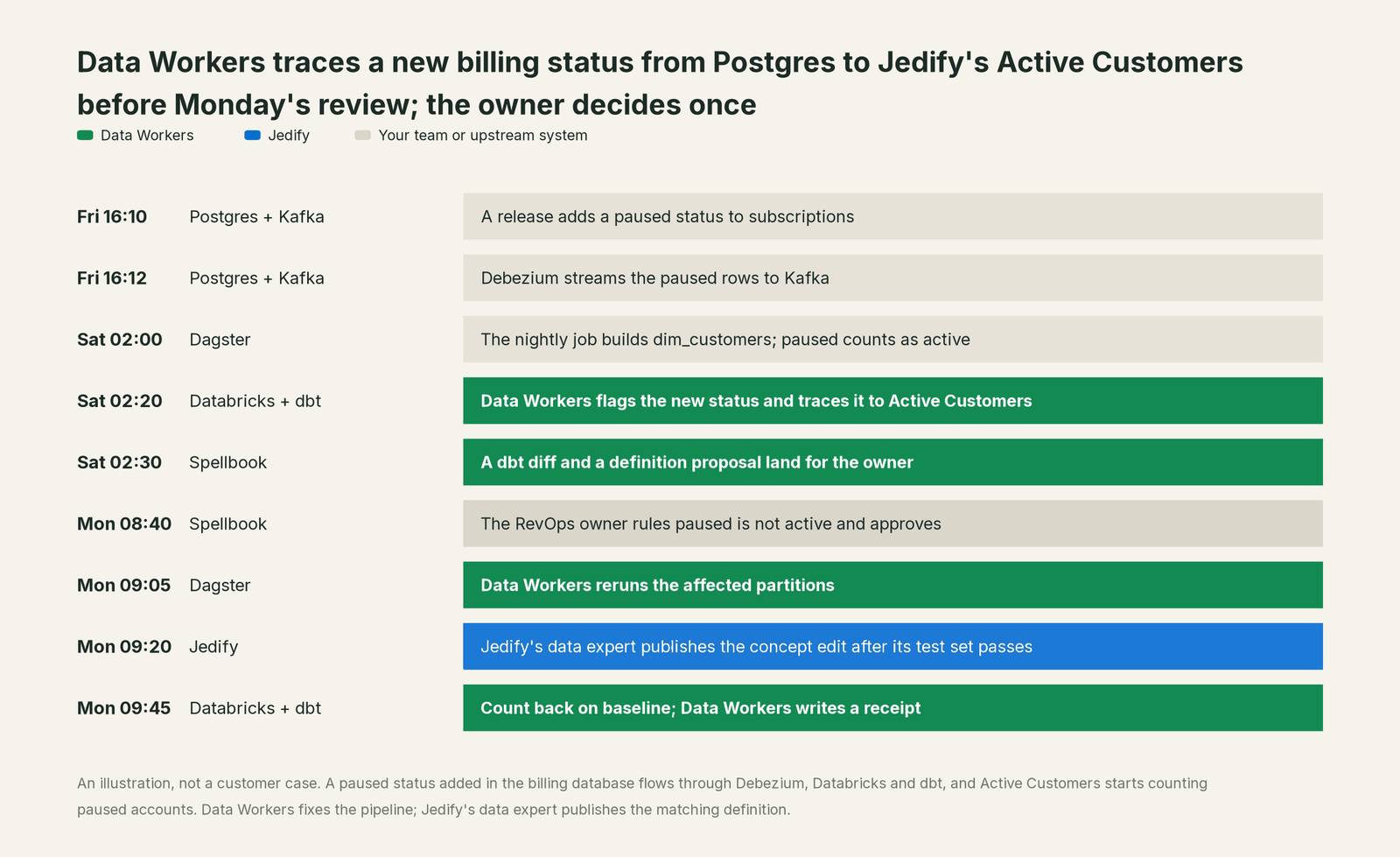
Every tool did its job, and Jedify answered from a verified definition. The rows under it changed meaning. Data Workers caught the shift, traced it from Postgres to the metric and gave one named owner one decision; Jedify's own review flow carried the matching definition change.
| Job | What Jedify does | What Data Workers does |
|---|---|---|
| The meaning | Builds and maintains the context graph: concepts, metrics, relationships, glossary, answer guidance | Reads the graph as one context source and ties each entity to the tables, models and pipelines under it |
| The answers | Ask Jedify, Deep Research Agents, custom agents, Slack, embedded analytics, MCP and REST API | Makes sure the data behind those answers is fresh, complete and correct |
| Drift | Check Changes detects new, removed and retyped columns in the warehouse | Detects value and volume shifts upstream and traces them across Postgres, Kafka, Databricks and dbt |
| The fix | Data experts edit base queries and definitions; Editor mode publishes only after confirmation | Proposes pipeline and dbt fixes with blast radius, routes them to the owner, applies them reversibly |
| The decision | Verified, unverified and pending-review statuses; versioned branches with review and restore | One approval flow across every engine, with a named owner per fact |
| The proof | Test sets compare answers with a golden standard | Checks and baselines on the changed tables, and a receipt for every change |
Why doesn't Jedify just do this itself?
Because Jedify built a focused product for one hard job, modeling business meaning so agents answer accurately, and made careful choices for it. Its connectors read warehouses, BI tools, dbt and API sources. Its agents ask; its Asker tools include a run_sql_query limited to read-only SELECT. Its write path changes its own model, and on Snowflake the Semantic Views it maintains: in Editor mode, "Nothing goes live until you confirm," publishes are versioned, and roles decide who may edit. That is the right boundary for a context graph that every business user trusts.
Fixing the data is a different product with a different liability: lineage across the source database, change stream, lakehouse, dbt and orchestrator; quality checks under every metric; blast-radius scoping; approvals routed to each model's owner; rollback for every change class; and responsibility for changes in systems Jedify doesn't run. A context graph that reached into your Kafka connectors and dbt repo would carry that risk on behalf of every customer. Jedify keeps the meaning sharp. Data Workers is the crew for the data under it.
Every tool owns a slice. Data Workers covers the whole lifecycle
Jedify owns one slice of the lifecycle, and owns it well: the business context graph analytics agents answer from. Each point tool adds another console, contract and handoff. Data Workers covers the whole lifecycle with one context, one approval flow and one audit trail, and builds on Jedify where your people already ask.
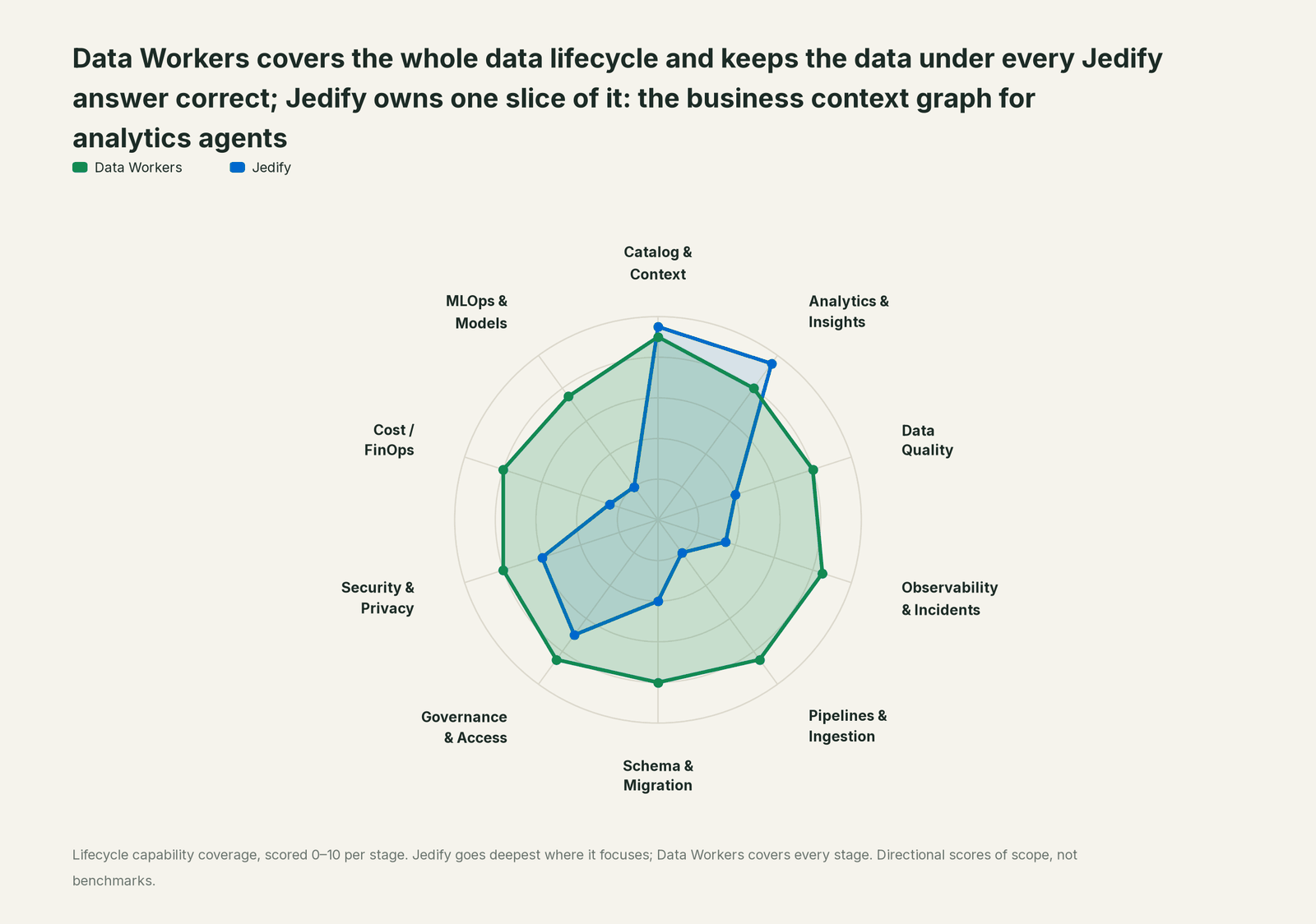
| Stage | Data Workers | Jedify | Why we scored it this way |
|---|---|---|---|
| Catalog & Context | 9 | 9.5 | Jedify's home stage: Semantic Fusion builds a context graph of concepts, metrics, relationships and glossary from your sources and query history, with verified, unverified and pending-review statuses. Your team's assistant brings it in next to Data Workers' lineage, quality and usage. |
| Analytics & Insights | 8 | 9.5 | Jedify's other home stage: Ask Jedify, Deep Research Agents, custom agents, the Slack app, embedded analytics and the MCP server answer from that graph. Data Workers answers metric questions through governed definitions. |
| Data Quality | 8 | 4 | Test sets compare answers with a golden standard and catch regressions in the model. Data Workers writes, runs and repairs quality checks on the tables under each metric. |
| Observability & Incidents | 8.5 | 3.5 | Check Changes and drift detection keep the graph in step with the warehouse. Data Workers detects the data break upstream, traces it across systems, fixes it and verifies the result. |
| Pipelines & Ingestion | 8.5 | 2 | Jedify reads warehouses, BI tools, dbt and API sources through its connectors. Data Workers builds, reruns and backfills the pipelines that feed them, behind approvals. |
| Schema & Migration | 8 | 4 | Check Changes flags new, removed and retyped columns, and data experts update base queries. Data Workers sees an upstream schema change in the dbt manifest or in review and assesses its impact on every reader. |
| Governance & Access | 8.5 | 7 | Strong over its own model: User, Data Expert and Admin roles, SSO and IdP groups, entity statuses, versioned branches with review and 90-day restore. Data Workers proposes and applies grants on your data platforms by policy. |
| Security & Privacy | 8 | 6 | Forwards each user's identity to Snowflake row access policies and scopes API keys to their owner. Data Workers flags sensitive column names in pull request review and proposes masking for the owner. |
| Cost / FinOps | 8 | 2.5 | Grounded context keeps agent questions efficient for Jedify's own traffic. Data Workers traces Snowflake credits to the dbt model behind them and drafts the fix for its owner. |
| MLOps & Models | 7.5 | 2 | Model training and monitoring are outside a context graph's job. Data Workers keeps the data under your models healthy and connects to MLflow and W&B. |
How Jedify and Data Workers work together
Your assistant or coding agent stays on top, where people ask. Spellbook Data Catalog (in preview) is where the data team looks: each proposed change, its approver, what it touched and how to roll it back. Between them run four layers: Context Wizard keeps one governed context graph across every platform, the Data-Agents Swarm does the work with more than 20 specialist agents, the Autonomous Data-Conductor runs each fix end to end (detect, diagnose, fix, review, verify, remember), and per-domain guardrails hold approvals, receipts and rollback.
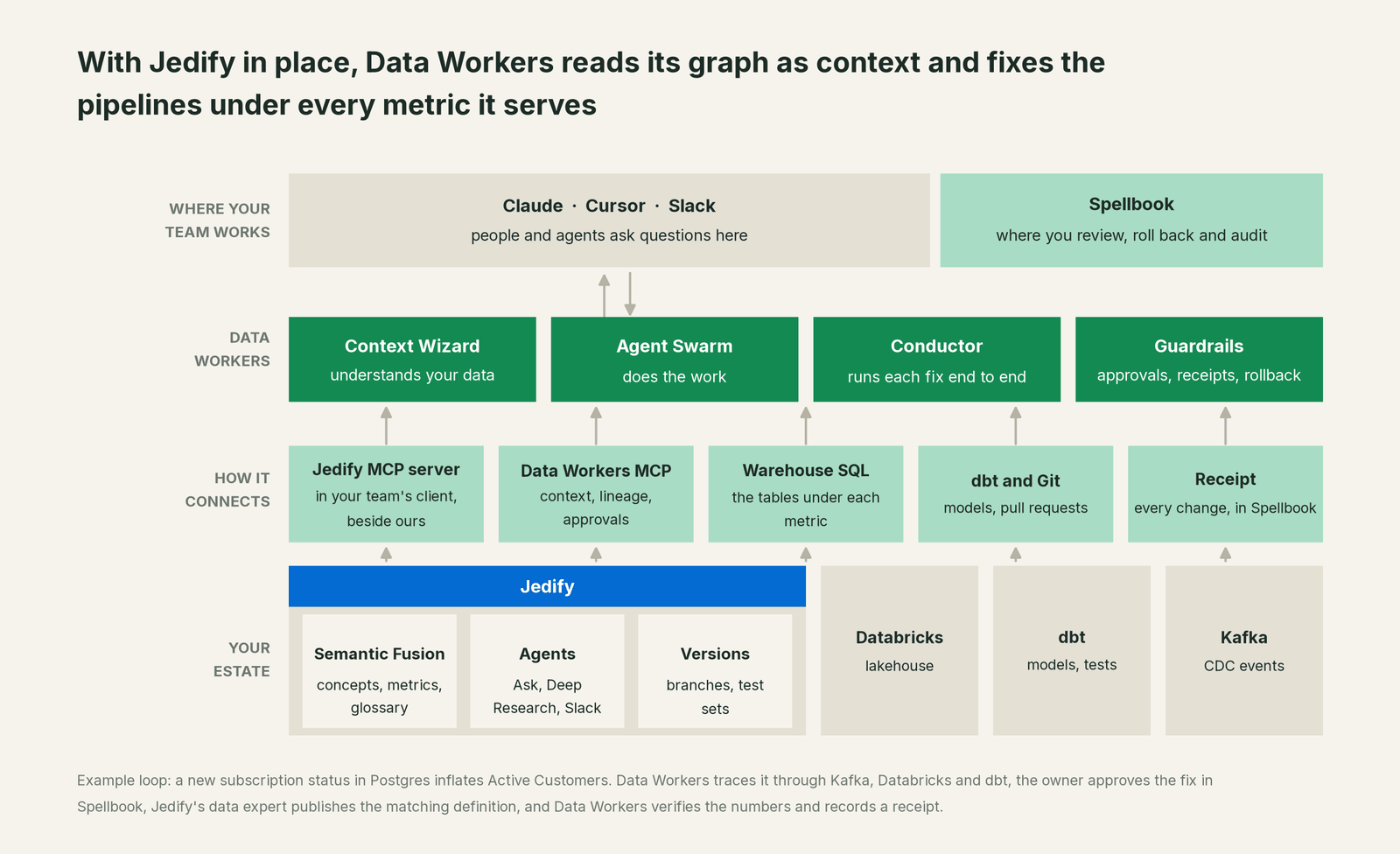
Bring your own context. Jedify's graph is one of several places your company keeps meaning, next to dbt metrics, warehouse semantic views and decisions in Slack threads. Your team's assistant reads Jedify over its MCP server today, with Jedify's search and entity tools, side by side with Data Workers, and Context Wizard records what it hands over with its source attached. A definition your data experts verified in Jedify can be recorded as a business rule with define_business_rule, and an owner can mark the canonical table under it with mark_authoritative. When Jedify's Active Customers and a dbt metric disagree, the conflict goes to a named person; no agent promotes a definition on its own. The context stays yours, with provenance on every fact; the hub, bring your own context, covers the full pattern.
Writes stay where they belong. Data Workers never writes into Jedify's model, by design. Fixes land upstream, as a dbt diff, a rerun or a connector change, behind approvals in Spellbook. Definition changes go to Jedify's data experts as proposals, published through Jedify's Editor flow: a validated pending change, a test set run with ask_benchmark, a diff with compare_changes where Context Graph Versioning is on, and publish_change, which asks for explicit confirmation before anything goes live.
Setup over MCP today. Jedify documents three ways to connect: its connector in Claude, the @jedify/mcp-auth local proxy for Claude Desktop, Cursor or Claude Code, and a hosted agent pointed at https://be.jedify.com/mcp with an API key. Tenant Admins and Data experts get Asker, Editor and Builder tools, Users get Asker, and an API key runs in Asker unless the URL selects another mode. Data Workers' documented path is the open-source repo's start-agent.sh, listed next to Jedify in the same client config:
Example: claude_desktop_config.json with Jedify and Data Workers
{
  "mcpServers": {
    "jedify": {
      "command": "npx",
      "args": ["-y", "@jedify/mcp-auth"],
      "env": { "REMOTE_MCP_URL": "https://be.jedify.com/mcp/message?mode=asker" }
    },
    "dw-context-catalog": {
      "command": "/path/to/dataworkers-claw-community/start-agent.sh",
      "args": ["dw-context-catalog"]
    },
    "dw-quality": {
      "command": "/path/to/dataworkers-claw-community/start-agent.sh",
      "args": ["dw-quality"]
    },
    "dw-incidents": {
      "command": "/path/to/dataworkers-claw-community/start-agent.sh",
      "args": ["dw-incidents"]
    }
  }
}
The ?mode=asker suffix keeps this client on Jedify's question tools for the pilot; drop it and your role's modes apply. List tools with the client's own command (for example /mcp). This guide uses explain_table, resolve_metric, trace_cross_platform_lineage and blast_radius_analysis on dw-context-catalog, run_quality_check and get_quality_score on dw-quality, and get_incident_history, diagnose_incident and remediate on dw-incidents. For the product's remote endpoint and credentials, read where does our data go.
One question end to end, L0 to L4. The autonomy ladder is set per domain.

- •L0 manual. Jedify answers; when a number looks wrong, your team investigates by hand.
- •L1 observe. Read tools only. Ask "why did active customers jump?" and Jedify returns the metric and its SQL while Data Workers walks lineage with
trace_cross_platform_lineage, checksget_quality_score, and lists the open incident withget_incident_history. - •L2 propose. Data Workers drafts the dbt diff and the definition proposal with blast radius. Nothing reaches production until the owner approves in Spellbook and CI passes.
- •L3 act reversibly. For proven change classes, such as reruns and backfills of failed partitions, Data Workers applies the change, re-runs the checks on the changed tables, with the undo recorded before it runs.
- •L4 autonomous. For a scoped domain like freshness failures in the subscription marts, Data Workers fixes overnight, and Jedify's Monday answers rest on verified data.
Each step up is a per-domain decision backed by receipts, reversible any time. For the safety model, read is it safe to let AI agents change production data.
Neighbouring context layers follow the same pattern: you're on Kaelio, you're on Promethium and, if Jedify maintains your views on Snowflake, you're on Snowflake semantic views. For the modelling side, read Data Workers + dbt and Data Workers on Databricks.
What changes for your team
Jedify lets business teams ask the data in plain language. Data Workers runs the jobs underneath, so those questions don't turn into a queue of "is this number right?" tickets.
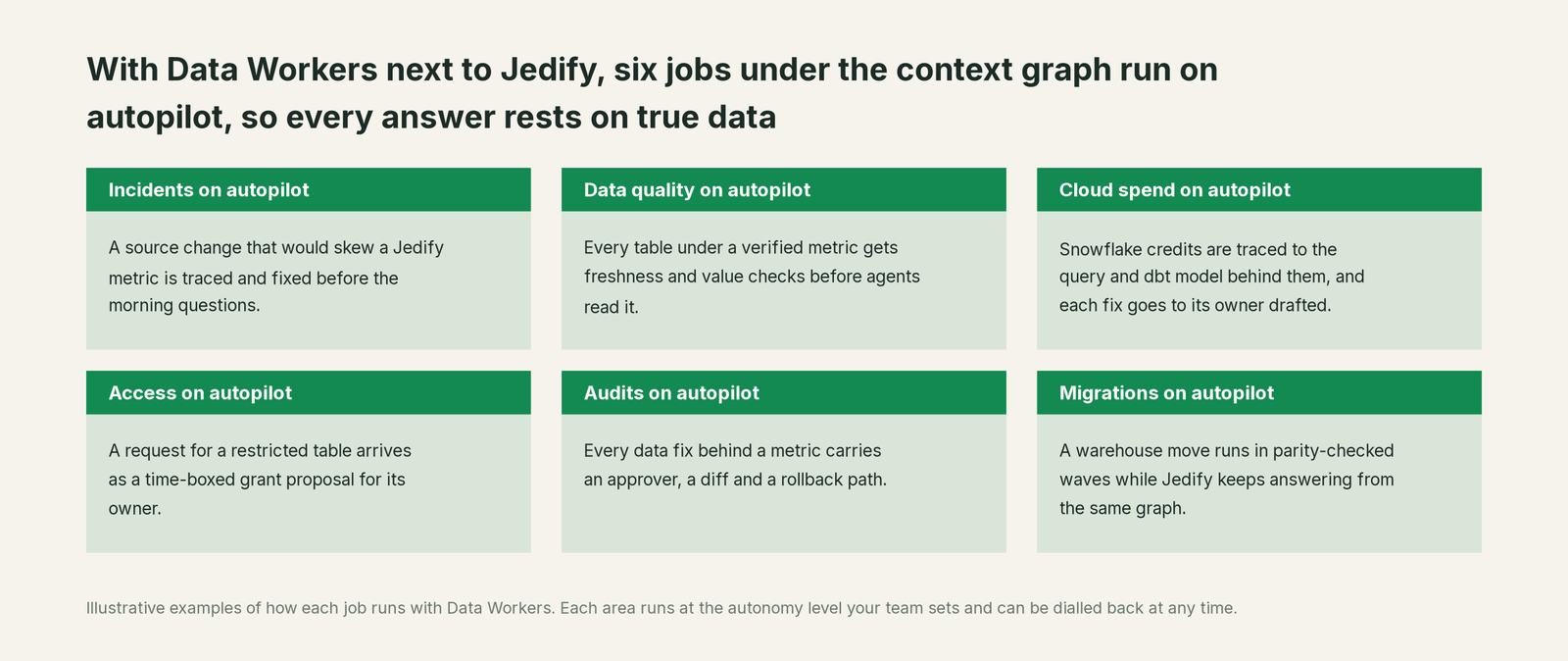
- •Incidents. A source change that would skew a Jedify metric is traced and fixed before the morning questions.
- •Data quality. Every table under a verified metric gets freshness and value checks; every break that reached an answer becomes a test.
- •Cloud spend. Snowflake credits are traced to the query and dbt model behind them, and each fix goes to its owner drafted.
- •Access. A request for a restricted table arrives as a time-boxed grant proposal for its owner.
- •Audits. Jedify records who merged each model version; Data Workers records who changed what in the data, why, and how to undo it.
- •Migrations. A warehouse move runs in parity-checked waves while Jedify keeps answering from the same graph.
Your data experts spend their time on meaning instead of chasing pipeline breaks that look like definition problems.
Keep Jedify, or consolidate?
Keep Jedify if you love it; Data Workers works with it from day one. Many teams consolidate once Data Workers runs that slice too.
Most teams keep Jedify: its entities are verified, its test sets encode what "right" means, and business users already ask it. Data Workers runs the rest of the lifecycle around it: cross-engine lineage, quality, incident repair, change control and evidence. Where teams consolidate, it is usually a separate observability tool, a duplicate glossary or a second catalog. Weighing a build? Read build it ourselves with Claude Code and MCP servers: the MCP endpoint is the easy part; approvals and rollback are the work.
The case for your CFO
The outcome: Jedify gives people accurate answers in plain language, and every forecast and board metric made from those answers rests on the rows underneath. Data Workers keeps those rows correct, current and auditable, and repairs them when they aren't.
The risk story is clear. Jedify's roles and confirmation step govern its definitions. Data Workers sets autonomy per domain from L0 manual to L4 autonomous: at L1 agents only read, at L2 they propose and a named owner approves, at L3 they apply reversible changes with verification. Every change carries a receipt: what changed, why, who approved it, the downstream diff and how to undo it. Zero migration: Postgres, Kafka, Databricks, dbt, Dagster and Jedify stay where they are.
Why now: a wrong number no longer reaches one analyst; it reaches everyone who asks, and every agent that acts on it. The first win is a read-only pilot in one domain, such as subscriptions, where Data Workers explains every surprising Jedify answer with lineage, quality and the open incident, then one fix class behind approvals. What stays the same: Jedify seats, entities, test sets and review flow, warehouse grants and your dbt review process. For the numbers, see the ROI of agentic data operations.
The sentence to repeat upstairs: "Jedify gives our agents the meaning of every metric; Data Workers runs the data under that meaning across every system, with an owner's approval and a receipt on every fix."
Getting started
Start with a pilot. Pick one domain where Jedify answers drive decisions, such as subscriptions or revenue, connect Jedify and Data Workers in the same client with read tools only, and run it for a few weeks before enabling the first fix class. The pilot path and plans are on the pricing page, and the pilot is credited in full against the first year.
FAQ
Jedify already builds a context graph. Why would we need Data Context Wizard too? Jedify's graph stays the meaning your analytics agents answer from. Data Context Wizard reads it as one source among several, next to dbt metrics, lineage, quality scores and owners, so every agent reads the same governed view with provenance.
Will Data Workers change our Jedify definitions? No. Data Workers never writes into Jedify's model, by design. When a fix needs a definition change, it goes to your Jedify data experts as a proposal, and they publish it through Jedify's Editor flow, which validates the change, lets them run test sets against it and asks for confirmation before anything goes live.
Jedify's Check Changes already detects drift. What does Data Workers add? Check Changes keeps Jedify's catalog in step with the warehouse's columns and types. Data Workers watches the data itself, values, volumes and lateness against baselines your team records, from the source database through dbt, and fixes the pipeline when an upstream change would skew an answer.
How does Data Workers connect to Jedify? Over Jedify's MCP server today, or its REST API. Jedify's roles and API-key modes decide which tools each connection sees; a read-only pilot uses Asker mode.
What shows up in the audit trail? Two complementary records. Jedify shows who pushed and merged each version of the context graph; Data Workers' receipts cover the data: cause, diff, approver, verification and rollback path.
Sources
- •Jedify, homepage, https://www.jedify.com/ (checked Oct 2, 2026)
- •Jedify, Platform, https://www.jedify.com/platform/ (checked Oct 2, 2026)
- •Jedify, Semantic Fusion, https://www.jedify.com/platform/semantic-fusion/ (checked Oct 2, 2026)
- •Jedify, Data Agents, https://www.jedify.com/platform/data-agents/ (checked Oct 2, 2026)
- •Jedify, Snowflake partnership, https://www.jedify.com/snowflakes-partnership/ (checked Oct 2, 2026)
- •Jedify docs, MCP overview, https://docs.jedify.com/mcp/overview (checked Oct 2, 2026)
- •Jedify docs, MCP modes, https://docs.jedify.com/mcp/modes (checked Oct 2, 2026)
- •Jedify docs, Connect, https://docs.jedify.com/mcp/connect (checked Oct 2, 2026)
- •Jedify docs, Authentication, https://docs.jedify.com/mcp/authentication (checked Oct 2, 2026)
- •Jedify docs, Asker tools, https://docs.jedify.com/mcp/asker/tools-reference (checked Oct 2, 2026)
- •Jedify docs, Editor tools, https://docs.jedify.com/mcp/editor/tools-reference (checked Oct 2, 2026)
- •Jedify docs, Context Graph Versioning, https://docs.jedify.com/semantic-fusion/versioning/overview (checked Oct 2, 2026)
- •Jedify docs, Semantic entities status, https://docs.jedify.com/semantic-fusion/understanding/entities-status (checked Oct 2, 2026)
- •Jedify docs, Check Changes in the Semantic Catalog, https://docs.jedify.com/semantic-fusion/catalog/check-changes (checked Oct 2, 2026)
- •Jedify docs, Test sets, https://docs.jedify.com/semantic-fusion/test-sets (checked Oct 2, 2026)
- •Jedify docs, Role-based access control, https://docs.jedify.com/settings/rbac (checked Oct 2, 2026)
- •Jedify docs, Snowflake row-level security, https://docs.jedify.com/settings/data-connectors/snowflake-row-level-security (checked Oct 2, 2026)
- •Jedify docs, REST API, https://docs.jedify.com/api-reference/overview (checked Oct 2, 2026)
- •Jedify docs, Changelog (May 31, Aug 11, Aug 18 and Sep 10, 2026 releases), https://docs.jedify.com/changelog (checked Oct 2, 2026)
- •Data Workers, client setup, https://dataworkers.io/opensource-docs/client-setup/ (checked Oct 2, 2026)
- •Data Workers open-source repository, tool registrations, https://github.com/DataWorkersProject/dataworkers-claw-community (checked Oct 2, 2026)