You're on Dynatrace: It Root-Causes the Problem. Data Workers Fixes the Data the Problem Left Behind
Dynatrace Intelligence finds the root cause of a service problem. Data Workers finds the data that problem left wrong, fixes it with approval and proves the fix.
Your engineers live in Dynatrace. OneAgent instruments the Java services, Smartscape maps how every service, process and host depends on the others, and Grail holds the logs, metrics, traces and events you query with DQL. When something breaks, a problem opens, and Dynatrace Intelligence, the causal AI long known as Davis, applies "deterministic, causation-based analysis" over that topology to name the root cause. Around it sit agentic workflows (Preview) that propose fixes or rollbacks, SRE agents (the Cloud SRE Agent is available now; the Autonomous SRE Agent and a no-code Agent Builder were announced on July 27, 2026 for August), Dynatrace Assist, and a remote Dynatrace MCP server. Dynatrace is where application, infrastructure and log observability runs, with Dynatrace Intelligence root-causing service problems. Data Workers is where data incidents get diagnosed, fixed and verified.
Dynatrace will tell you a release exhausted a connection pool, and the problem closes once the rollback lands. But a closed problem can leave thousands of rows written twice in the tables downstream while every service looks healthy. Data Workers finds that gap, repairs it with a named approver, checks the numbers and leaves a receipt.
Key takeaways
- •Dynatrace keeps its job. Problems, Smartscape, Grail and your workflows stay put. Its causal root cause is the best starting point a data incident can have.
- •A closed problem can hide wrong data. Retries and partial writes during a service problem land in the tables downstream. Data Workers catches that damage and fixes it.
- •Dynatrace Data Observability covers Grail. Its checks watch data ingested into Grail. Data Workers works on your Databricks, warehouse and pipeline tables.
- •Two MCP servers, one client. Dynatrace answers what broke in the service; Data Workers fixes what broke in the data.
- •Autonomy per domain. Each domain climbs from L0 manual to L4 autonomous at your pace, with approvals, rollback and receipts.
Dynatrace is the smoke alarm. Data Workers is the crew.
Dynatrace sees the symptom in your infrastructure, and with causal AI it sees the cause too. Data Workers fixes the data behind it and proves the fix. Here is a Tuesday at an insurer running Java on Azure: a Spring Boot policy-service on AKS writing to Azure Database for PostgreSQL, Debezium on Kafka Connect streaming changes to ADLS, Databricks with Unity Catalog building silver and gold Delta tables, Azure Data Factory running the gold pipelines, and a Qlik Sense app the actuaries read. This is an illustration, not a customer case.
| Time | System | What happens |
|---|---|---|
| Tue 09:14 | policy-service (AKS) | Release 7.3 ships with a smaller JDBC connection pool; Dynatrace records the deployment |
| 09:21 | Dynatrace | A problem opens: response time degradation on policy-service, with failed requests from the broker portal |
| 09:24 | Dynatrace Intelligence | Names the root cause from Smartscape topology: pool exhaustion after release 7.3. An agentic workflow (Preview) proposes the rollback |
| 09:33 | policy-service | The SRE approves; the rollback runs |
| 09:58 | Dynatrace | The problem closes. Every service is healthy |
| 10:42 | Data Workers | A uniqueness check on silver.policy_endorsements in Databricks fails: 3,912 endorsement IDs appear twice. The portal retried timed-out writes that had already committed, and Debezium carried both rows downstream |
| 10:47 | Data Workers | Reads the closed problem over Dynatrace's API and ties the duplicates to its 09:21 to 09:58 window. Blast radius: gold.written_premium_daily, the Qlik Sense "Written premium" app and the reserving extract |
| 10:53 | Data Workers | Proposes a dedupe keyed on endorsement ID and change sequence for the owner to approve and apply, an ADF gold rerun after it, and a diff to the ingestion job that drops repeated change events, for its owner to merge |
| 11:08 | Spellbook | The underwriting data owner reviews the duplicates and the premium impact, approves, and applies the dedupe |
| 11:15 | Azure Data Factory | Data Workers queues the gold pipeline rerun through ADF; gold.written_premium_daily rebuilds |
| 11:31 | Databricks | Data Workers re-runs the uniqueness check and the load baseline; both pass, and written premium matches the policy count in Postgres |
| 11:34 | Spellbook | The receipt records the cause, the change, the approver and the checks |
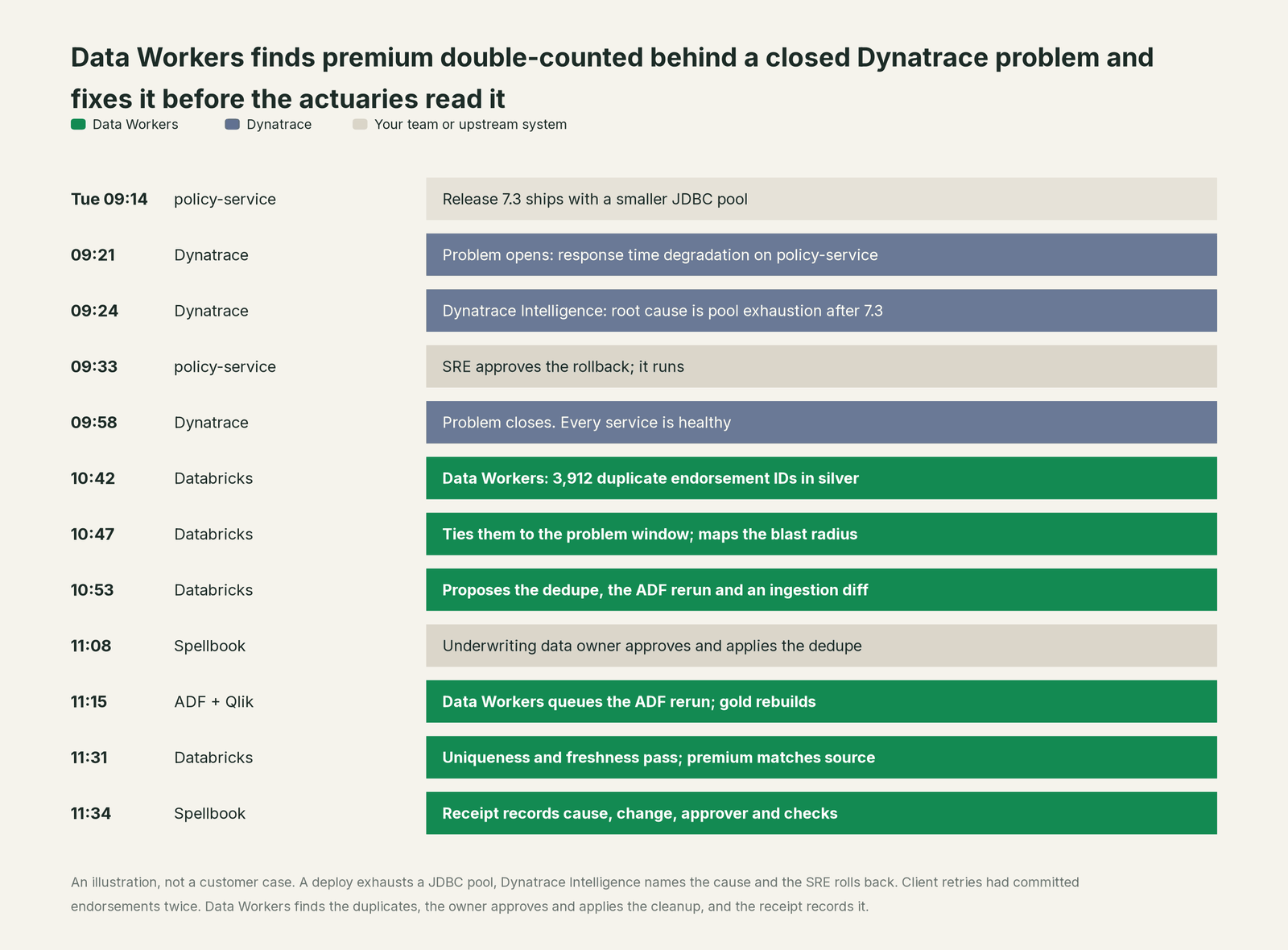
Dynatrace did everything it was built to do: Dynatrace Intelligence named the release and the pool without anyone opening a dashboard, and the rollback ended the service problem. The data incident started where that one ended. Without Data Workers, the first sign would have been an actuary asking why written premium jumped. With it, the duplicates were gone and verified before the reserving run.
| Job | What Dynatrace does | What Data Workers does |
|---|---|---|
| Detection | Baselines and anomaly detection on services, hosts and logs open a problem | Runs uniqueness, freshness and volume checks on the tables, so damage is caught when every service is healthy |
| Root cause | Dynatrace Intelligence walks Smartscape to a deterministic root cause | Traces the break into the data: which rows, tables, apps, extracts and owners |
| Coordination | Workflows open tickets, notify owners and run vetted runbooks | Routes the data fix to the table's named owner, with the evidence attached |
| The fix | Agentic workflows (Preview) propose fixes or rollbacks and run approved runbooks | Proposes the data change, routes it for approval and queues reruns through your orchestrator |
| Verification | The service baseline recovers and the problem closes | Re-checks the numbers: uniqueness, freshness, totals against the source |
| The record | The problem, its events and its root cause | A receipt: cause, diff, approver, what it touched, how it was verified, how to undo it |
Why doesn't Dynatrace just do this itself?
Because Dynatrace built its AI around the topology and telemetry it owns, and that focus is why its root cause is trusted. Its agentic layer is designed with care: the docs say Dynatrace Intelligence "can propose and run approved actions through agentic workflows and built-in agents operating under policy guardrails" (Preview), and the July 27 launch stresses "human approval and intervention where required". The actions it runs are the ones operations teams own: rollbacks, scaling and reconfiguration runbooks, tickets and notifications. Its Data Observability is scoped the same way, to "externally sourced data in Grail".
That is the right line for an observability platform. A data fix is a different job with a different liability: the duplicates leave a production Databricks table only after its owner approves, lineage has to show every gold table, Qlik app and extract that read them, the ADF pipeline reruns in order, and someone checks the totals against the source and writes a receipt an auditor can read. None of that is service telemetry. Data Workers is built for that job.
Every tool owns a slice. Data Workers covers the whole lifecycle
Dynatrace owns one slice and owns it well: problems are found and root-caused there. Each point tool adds another console, another contract and another handoff. Data Workers covers the whole lifecycle with one context, one approval flow and one audit trail, and builds on Dynatrace where your engineers already look.
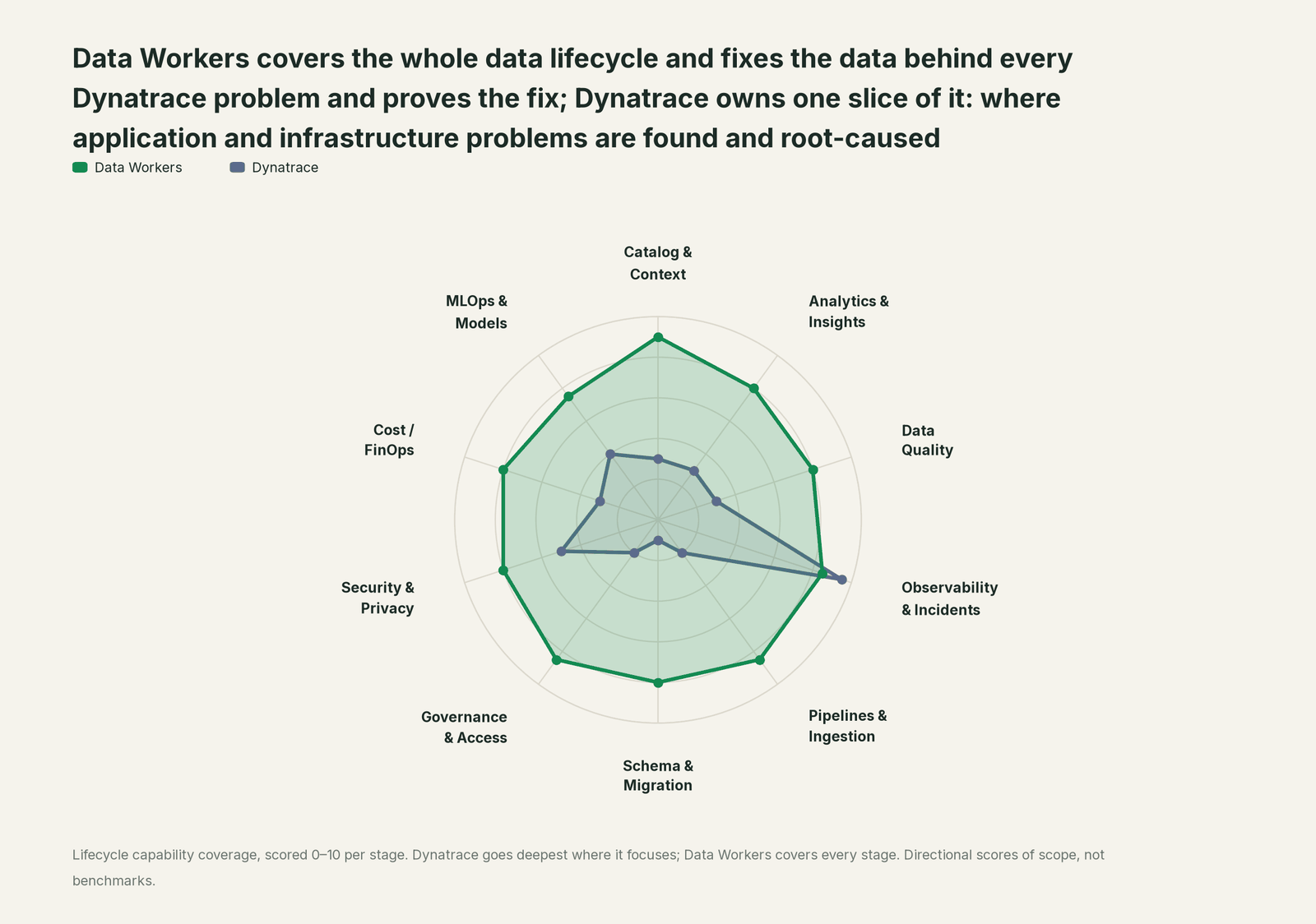
| Stage | Data Workers | Dynatrace | Why we scored it this way |
|---|---|---|---|
| Catalog & Context | 9 | 3 | Smartscape maps services, processes, hosts and their dependencies in real time, not tables and columns. Data Workers keeps one governed context graph of definitions, owners, lineage, quality and usage across every platform. |
| Analytics & Insights | 8 | 3 | DQL, Notebooks and Dashboards answer questions about telemetry in Grail, and Dynatrace Assist turns a prompt into DQL. Data Workers answers business data questions from governed definitions with lineage behind every number. |
| Data Quality | 8 | 3 | Data Observability checks freshness, volume, distribution, schema and lineage for data ingested into Grail. Data Workers writes, runs and repairs the checks on your Databricks and warehouse tables. |
| Observability & Incidents | 8.5 | 9.5 | Dynatrace's home stage: problems found and root-caused by deterministic causal AI over Smartscape, plus agentic workflows and SRE agents. Data Workers diagnoses the data incident across lineage, fixes it with approval and verifies it. |
| Pipelines & Ingestion | 8.5 | 2 | OpenPipeline shapes the telemetry Dynatrace ingests. Data Workers repairs the data pipeline itself: reruns and backfills through your orchestrator, with approvals. |
| Schema & Migration | 8 | 1 | Deployment events mark releases, not table schemas. Data Workers catches schema changes, scores their blast radius and plans migrations in waves. |
| Governance & Access | 8.5 | 2 | IAM policies govern who sees and does what in Dynatrace. Data Workers runs the access request queue for your data, with approved grants and their expiry on record. |
| Security & Privacy | 8 | 5 | Application Security finds runtime vulnerabilities in the services OneAgent sees, and a Security Agent triages them. Data Workers' pull request review flags new columns whose names or annotations look sensitive, and leaves a receipt on every data change. |
| Cost / FinOps | 8 | 3 | Dynatrace shows resource use of hosts and Kubernetes workloads. Data Workers attributes Snowflake spend down to the dbt model and drafts warehouse settings for the owner to apply. |
| MLOps & Models | 7.5 | 4 | AI Observability monitors LLM and agent apps for cost, latency and output quality, and the Arize acquisition (completed Oct 1, 2026) adds model and agent evaluation. Neither keeps training and feature tables right. Data Workers keeps the data under your models fresh and correct. |
Dynatrace leads where it should. For the broader split between watching systems and fixing data, read Data Workers vs data observability and what is an agentic data platform.
How Dynatrace and Data Workers work together
Dynatrace stays on top, where problems open and get root-caused. Spellbook Data Catalog (in preview) is where the data team reviews, approves and rolls back changes. Between them, Data Context Wizard keeps one governed context graph across Postgres, Databricks, ADF and the jobs between them, the Data-Agents Swarm does the work with specialist agents across 20+ domains, the Autonomous Data-Conductor runs each fix through detect, diagnose, fix, review and verify, and per-domain guardrails hold approvals, receipts and rollback.
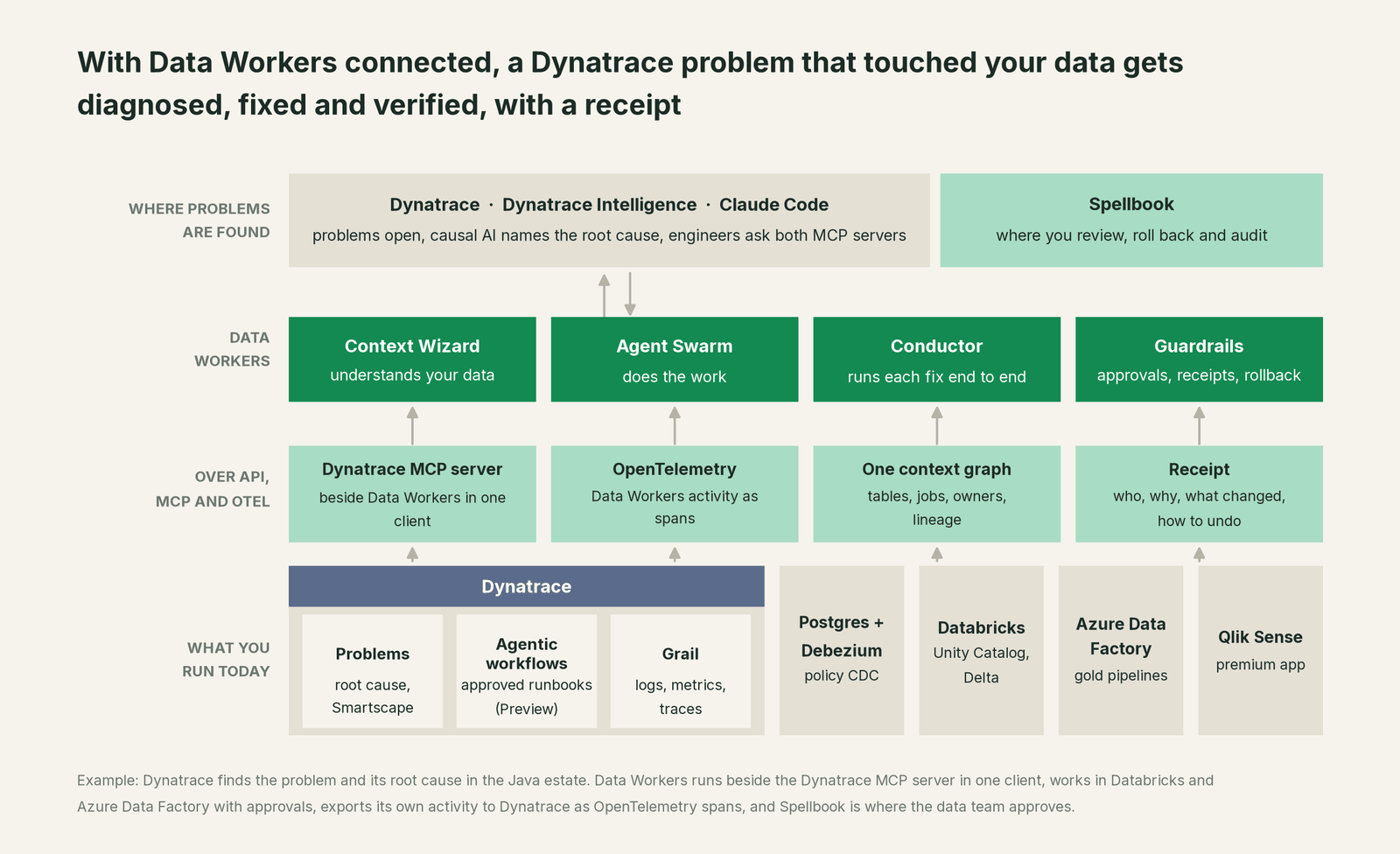
Data Workers and Dynatrace today. Data Workers connects to Dynatrace over its API or the Dynatrace MCP server today, so a data incident is tied to the problem and root cause Dynatrace already found. In the other direction, export_otel_spans exports Data Workers' agent activity as OpenTelemetry spans, which Dynatrace ingests like any other trace.
The data work. diagnose_incident and get_root_cause work through the evidence, trace_cross_platform_lineage and blast_radius_analysis map everything downstream of the broken table, and get_incident_history checks whether the same release pattern caused duplicates before. Verification uses the monitor_metrics baseline and the owner's test, and every step lands in get_audit_trail. PostgreSQL, Databricks with Unity Catalog, Azure Data Factory, Kafka Connect and ADLS are native connectors; Debezium and Qlik Sense connect over their APIs or MCP servers today.
Side by side in one client. Dynatrace publishes a Claude Code plugin for its remote MCP server; the user and the platform token need the mcp-gateway:servers:invoke and mcp-gateway:servers:read permissions plus read access to the data queried. Every Data Workers agent is an MCP server; the client setup guide documents the path: clone the open-source repo and add one start-agent.sh entry per agent.
# Example: Dynatrace remote MCP server plus Data Workers in Claude Code
# Dynatrace's documented plugin; set your environment URL and a platform token first
export DT_ENVIRONMENT=https://<your-environment-id>.apps.dynatrace.com
export DT_PLATFORM_TOKEN=<your-platform-token>
claude plugin install dynatrace@claude-plugins-official

# Data Workers agents over stdio, from a clone of the open-source repo
claude mcp add dw-catalog -- /path/to/dataworkers-claw-community/start-agent.sh dw-context-catalog
claude mcp add dw-incidents -- /path/to/dataworkers-claw-community/start-agent.sh dw-incidents
claude mcp add dw-quality -- /path/to/dataworkers-claw-community/start-agent.sh dw-quality
Ask "why did written premium jump this morning?" and the client calls both: Dynatrace returns the problem and its root cause; Data Workers returns the duplicate rows, the blast radius and a proposed dedupe. Data Workers' guardrail decides whether a data change may run in that domain, with a named approver. Dynatrace notes that Grail queries can carry consumption cost, so scope DQL time ranges in shared clients. For a shared endpoint, the Data Workers remote server serves /mcp with an API key (bearer) or OAuth tokens from your identity provider, verified through JWKS.
One problem, L0 to L4. The same incident at each level of the autonomy ladder, set per domain.

- •L0 manual. An engineer queries silver for duplicates and writes the cleanup by hand.
- •L1 observe. Data Workers runs the checks, ties the duplicates to the problem window and posts the blast radius. No data changes.
- •L2 propose. Data Workers proposes the dedupe, the ADF rerun and the ingestion diff. Nothing runs until the data owner approves in Spellbook.
- •L3 act reversibly. For change classes with a proven record, such as a gold rerun after an approved cleanup, Data Workers queues the rerun, verifies it and records the receipt.
- •L4 autonomous. In a scoped domain such as policy data, every closed problem triggers the table checks, and reruns that pass the domain's rules are queued and verified. Cleanups still go to the owner.
For the safety model, read is it safe to let AI agents change production data, how approvals work and autonomy levels L0 to L4. On where data lives: the agents run in your infrastructure, your data stays in your systems, and the hosted Conductor sees workflow metadata only.
What changes for your team
Dynatrace made every service and dependency visible. Data Workers gives the data team a crew for the data those services write.
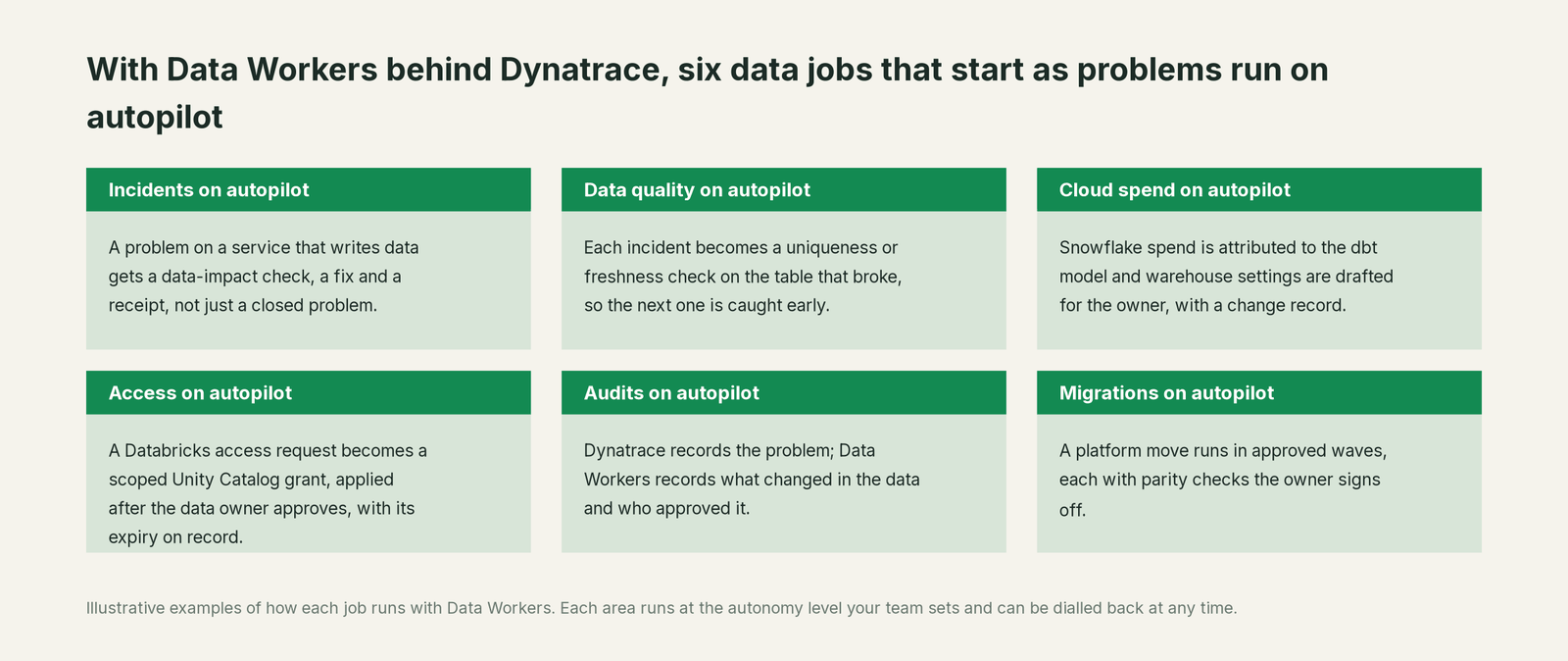
- •Incidents. A problem on a service that writes data gets a data-impact check, a fix and a receipt.
- •Data quality. Each incident becomes a uniqueness or freshness check on the table that broke.
- •Cloud spend. Snowflake spend is attributed to the dbt model, and warehouse settings are drafted for the owner.
- •Access. A Databricks access request becomes a scoped Unity Catalog grant, applied after the data owner approves, with its expiry on record.
- •Audits. Dynatrace records the problem; Data Workers records what changed in the data and who approved it.
- •Migrations. A platform move runs in approved waves, each with parity checks the owner signs off.
The data on-call changes most: the root cause and the data work arrive already scoped. See incidents agent root cause analysis, data reliability engineering and who owns the agents.
Keep Dynatrace, or consolidate?
Keep Dynatrace if you love it; Data Workers works with it from day one. Many teams consolidate once Data Workers runs that slice too.
For almost every Dynatrace customer the answer is to keep it: the Java estate and the operations workflows run there, and its root cause is what the data crew starts from. What teams consolidate is the stack around the lakehouse: a separate data observability contract, a data-quality tool, a stale catalog and per-team reconciliation notebooks. Building on the Dynatrace MCP server with a coding agent instead? See build it ourselves with Claude Code and MCP servers: the context graph, approvals and rollback are the work. The same pattern holds across the stack: you're on New Relic, you're on Datadog and you're on ServiceNow, with the full list in Data Workers integrations.
The case for your CFO
The outcome: you already pay Dynatrace to find problems and their causes. Data Workers makes sure the business numbers those services write are right after every problem, so a 09:33 rollback does not become a wrong premium figure in the reserving run.
The risk story is plain. Autonomy is set per domain: at L1 Data Workers changes no data; at L2 it changes nothing until a named person approves; at L3 it applies changes it can undo. An unanswered approval request expires and escalates, never auto-grants. No agent can promote its own work. Every change carries a receipt: the cause, the diff, the approver, what it touched downstream, how it was verified and how to undo it. An org-wide stop halts all autonomous dispatch. Zero migration: Dynatrace, Postgres, Databricks, ADF and Qlik Sense stay where they are.
Why now: Dynatrace Intelligence names the root cause of a service problem quickly. The slow part is now the data the problem left behind, several systems away from the telemetry. The first win is read-only: every closed problem on a service that writes to the lakehouse gets table checks and a blast radius. Your problem detection, workflows, on-call rotations, Unity Catalog permissions and code review stay the same. For the numbers, see the ROI of agentic data operations.
The sentence to repeat upstairs: "Dynatrace tells us why the service broke; Data Workers proves the data is right afterwards, with an approval and a receipt for every change."
Getting started
Start with a pilot. Pick one domain whose services Dynatrace already watches and whose tables feed a number people trust, such as the policy service behind written premium. Connect Data Workers to Postgres, Databricks and ADF, run it beside the Dynatrace MCP server, and start at L1 so every closed problem on those services gets table checks and a blast radius. Then turn on the first write class at L2, such as gold pipeline reruns after an approved cleanup. The pilot path and plans are on the pricing page, and the pilot is credited in full against the first year.
FAQ
Dynatrace has Data Observability. Isn't that the same thing? Dynatrace's Data Observability covers "externally sourced data in Grail": freshness, volume, distribution, schema and lineage for data ingested into Dynatrace. Data Workers works on the tables in your lakehouse and warehouse, and goes on to fix and verify them.
How is this different from Dynatrace Intelligence and the SRE agents? Dynatrace Intelligence finds the root cause of a service problem, and its agentic workflows (Preview) propose fixes or rollbacks and run approved runbooks. Data Workers works on the data: finding duplicate or missing rows, proposing the cleanup and queuing reruns, each with approval and a receipt. Dynatrace fixed the service; Data Workers fixed the premium.
Can Smartscape show our data lineage? Smartscape maps services, processes, hosts and their dependencies. Data Workers keeps table and column lineage across Postgres, Databricks, ADF and BI in its context graph, so a service problem can be followed into the tables it touched.
Does Data Workers connect to Dynatrace, and does it change anything there? It connects over Dynatrace's API or the Dynatrace MCP server today and changes nothing there: it reads problems, and its only output toward Dynatrace is its own activity as OpenTelemetry spans. Your detection settings, workflows, dashboards and IAM policies stay as they are.
Which Dynatrace MCP server should we use? The remote Dynatrace MCP server. The local open-source server was archived on September 11, 2026, with 2.1.2 as its final release, and Dynatrace points agent-to-agent use to the remote server.
Sources
- •Dynatrace Docs, Dynatrace Intelligence (deterministic, causation-based analysis; agentic workflows Preview; updated Jan 28, 2026), https://docs.dynatrace.com/docs/dynatrace-intelligence (checked Oct 2, 2026)
- •Dynatrace Docs, Dynatrace Intelligence agentic and generative AI (Dynatrace Assist; updated Mar 3, 2026), https://docs.dynatrace.com/docs/dynatrace-intelligence/agentic-and-generative-ai (checked Oct 2, 2026)
- •Dynatrace Docs, Dynatrace MCP server (remote endpoint, authentication, permissions, Claude Code plugin; updated Aug 20, 2026), https://docs.dynatrace.com/docs/dynatrace-intelligence/dynatrace-mcp (checked Oct 2, 2026)
- •Dynatrace Docs, Data Observability (externally sourced data in Grail; updated Jan 28, 2026), https://docs.dynatrace.com/docs/analyze-explore-automate/data-observability (checked Oct 2, 2026)
- •Dynatrace Docs, SaaS release notes sprint 344 (SRE Agent workflow template, rollout from Jul 29, 2026) and sprint 348 (agentic workflows for problem root cause analysis, rollout from Sep 22, 2026), https://docs.dynatrace.com/docs/whats-new/saas/sprint-344 and https://docs.dynatrace.com/docs/whats-new/saas/sprint-348 (checked Oct 2, 2026)
- •Dynatrace, Dynatrace Intelligence platform page (Developer, SRE and Security agents), https://www.dynatrace.com/platform/artificial-intelligence/ (checked Oct 2, 2026)
- •Dynatrace press release, Dynatrace Brings Autonomous Operations to Enterprise AI, Moving from Insight to Action (Jul 27, 2026), https://ir.dynatrace.com/news-events/press-releases/detail/432/dynatrace-brings-autonomous-operations-to-enterprise-ai-moving-from-insight-to-action (checked Oct 2, 2026)
- •Dynatrace press release, Dynatrace Completes Acquisition of Arize (Oct 1, 2026; also listed at https://www.dynatrace.com/news/press-release/), https://ir.dynatrace.com/news-events/press-releases/detail/439/dynatrace-completes-acquisition-of-arize-extending-ai-observability-across-the-full-development-lifecycle (checked Oct 2, 2026)
- •GitHub, dynatrace-oss/dynatrace-mcp (archived Sep 11, 2026; Grail query cost note), https://github.com/dynatrace-oss/dynatrace-mcp (checked Oct 2, 2026)
- •Dynatrace, OpenPipeline, https://www.dynatrace.com/platform/openpipeline/ and Application Security, https://www.dynatrace.com/platform/application-security/ (checked Oct 2, 2026)
- •Dynatrace, AI Observability, https://www.dynatrace.com/solutions/ai-observability/ (checked Oct 2, 2026)
- •Data Workers open-source repository, https://github.com/DataWorkersProject/dataworkers-claw-community (checked Oct 2, 2026)
- •Data Workers client setup guide, https://dataworkers.io/opensource-docs/client-setup/ (checked Oct 2, 2026)
- •Data Workers, Data-Agents Swarm, https://dataworkers.io/product/data-agents-swarm/ (checked Oct 2, 2026)