You're on Arize: Arize Watches Your Models and Agents in Production. Data Workers Fixes the Data Behind What It Flags
On Arize AX or Phoenix for drift, performance and agent monitoring? Keep it. Data Workers traces the upstream change behind each alert and fixes the data, behind approvals.
Your models report to Arize. Each production model logs its predictions, features and, when they land, its actuals into Arize AX, and monitors run on a schedule: performance by model type, drift with PSI, KL, JS or KS against a baseline you pick, and data quality monitors for percent empty and cardinality, with a delay window for batch loads. Your agents send traces to a tracing project, where online evals score them, Signal groups recurring failures into issues with a suggested fix, and Alyx, Arize's AI engineering agent, turns those failures into evaluations and tested prompt changes. Alerts land in Slack, PagerDuty, Opsgenie or Teams. Some teams self-host Phoenix, the open-source edition. On October 1, 2026, Dynatrace completed its acquisition of Arize; Dynatrace says Arize will continue supporting both AX and Phoenix.
Arize watches your models and agents in production very well. When a drift monitor fires, the question that eats the ML engineer's morning is one Arize does not own: what changed upstream, in which table, who owns it, and how does it get fixed safely. Data Workers owns that question. It traces the change behind what Arize flags, proposes the fix to the data owner, runs it behind approvals and leaves a receipt.
Key takeaways
- •Arize keeps its job. Monitors, tracing, evals, Signal, Alyx, Phoenix and the Arize AX MCP server stay where they are. Data Workers works with Arize from day one.
- •Data Workers works on the tables, not the predictions. Checks on feature tables in BigQuery, Snowflake or Postgres, team baselines and dbt lineage catch the upstream break, often before Arize's next window.
- •The model is a node in the graph. Register each production model once with its tables, and blast radius reaches it from any upstream dbt model.
- •Fixes go to data owners. Data Workers proposes the dbt diff, queues the rebuild through your orchestrator after a named person approves, and re-checks. The ML owner decides on reloads and retrains.
- •Every fix leaves a receipt with the evidence, diff, approver, checks and undo path.
- •Start with a pilot on two production models, read-only first, from L0 manual toward L4 autonomous.
Arize watches your models and agents in production. Data Workers fixes the data behind what Arize flags.
Arize answers what the model is doing: which feature moved, against which baseline, which cohort is hurting. Data Workers answers why the data moved: which upstream change did it, what else it reaches, who owns the fix and whether it held. Here is a drift alert that is really a broken join.
A food delivery company predicts delivery times with an ETA model logged to Arize AX. Its strongest feature, avg_prep_minutes_7d, comes from ml.store_eta_features in BigQuery: one row per store, rebuilt every night by a dbt model that joins order events to stores. Orders come from the app's PostgreSQL database through Fivetran. A Prefect flow runs dbt build at 01:00, and the serving team loads the fresh features at 06:00. Arize has a Percent Empty monitor and a PSI drift monitor on the feature, plus MAE on delivered orders. The team registered the ETA model in Data Workers' context graph with its feature table and training snapshot, and set the quality check on avg_prep_minutes_7d to a 2% null threshold (pass only when at least 98% of rows are filled). This is an illustration, not a customer case.
| Time | System | What happens |
|---|---|---|
| Tue 14:10 | PostgreSQL | The app team ships release 4.12: orders from stores on the new point-of-sale integration carry a new store_uuid, and store_id stays null for them. 61 of 680 stores are on the new integration |
| 14:25 | Fivetran and BigQuery | The next sync lands the new column in pg_orders.orders. Nothing fails |
| Wed 01:00 | Prefect and dbt | The nightly flow runs dbt build. int_store_prep_times inner-joins orders to dim_stores on store_id, so the 61 stores drop out, and ml.store_eta_features now has no avg_prep_minutes_7d for them. Every dbt test passes |
| 01:30 | Data Workers | run_quality_check on ml.store_eta_features: the null rate on avg_prep_minutes_7d is 9.0% against the 2% the team set on that check. The store_id distinct ratio and the row floor pass. The default null check, which passes up to 10% nulls, would have let this through. An incident opens |
| 01:36 | Slack and Spellbook | Data Workers posts the finding to data on-call and the ETA model owner. trace_cross_platform_lineage from the dbt manifest shows the feature built from int_store_prep_times, stg_orders and pg_orders.orders. blast_radius_analysis reaches the registered ETA model and its training snapshot. It recommends holding Thursday's retrain |
| 06:00 | ETA service | The serving team's job loads the features. The 61 stores score with the model's fallback for a missing value |
| 08:05 | Arize AX | The Percent Empty monitor on avg_prep_minutes_7d fires, then PSI drift on the same feature; MAE on the 61 stores climbs as deliveries complete. Alerts land in #ml-alerts |
| 08:12 | Arize AX | The ML engineer filters by store and sees every affected store on the new integration. The Data Workers card is already in the data channel |
| 08:20 | GitHub and dbt | The analytics engineer confirms from the release notes that new-POS orders key on store_uuid. Data Workers proposes the fix as a diff: stg_orders resolves the store key through dim_stores, which already carries both keys. Its pull request review shows the change reaches the feature table and the training snapshot only |
| 09:05 | Spellbook | The engineer merges. The data owner approves the rebuild |
| 09:07 | Prefect | Data Workers queues the flow run for the affected models and reads its status |
| 09:41 | BigQuery | run_quality_check passes: 0.1% nulls. Data Workers writes the receipt: check, lineage, diff, approver, rebuild, before and after, undo path. The approved fact "orders key on store_uuid for new-POS stores" lands in the graph |
| 09:50 | Arize AX | The ML owner reloads the features, re-runs the monitors, and keeps Thursday's retrain on the corrected snapshot |
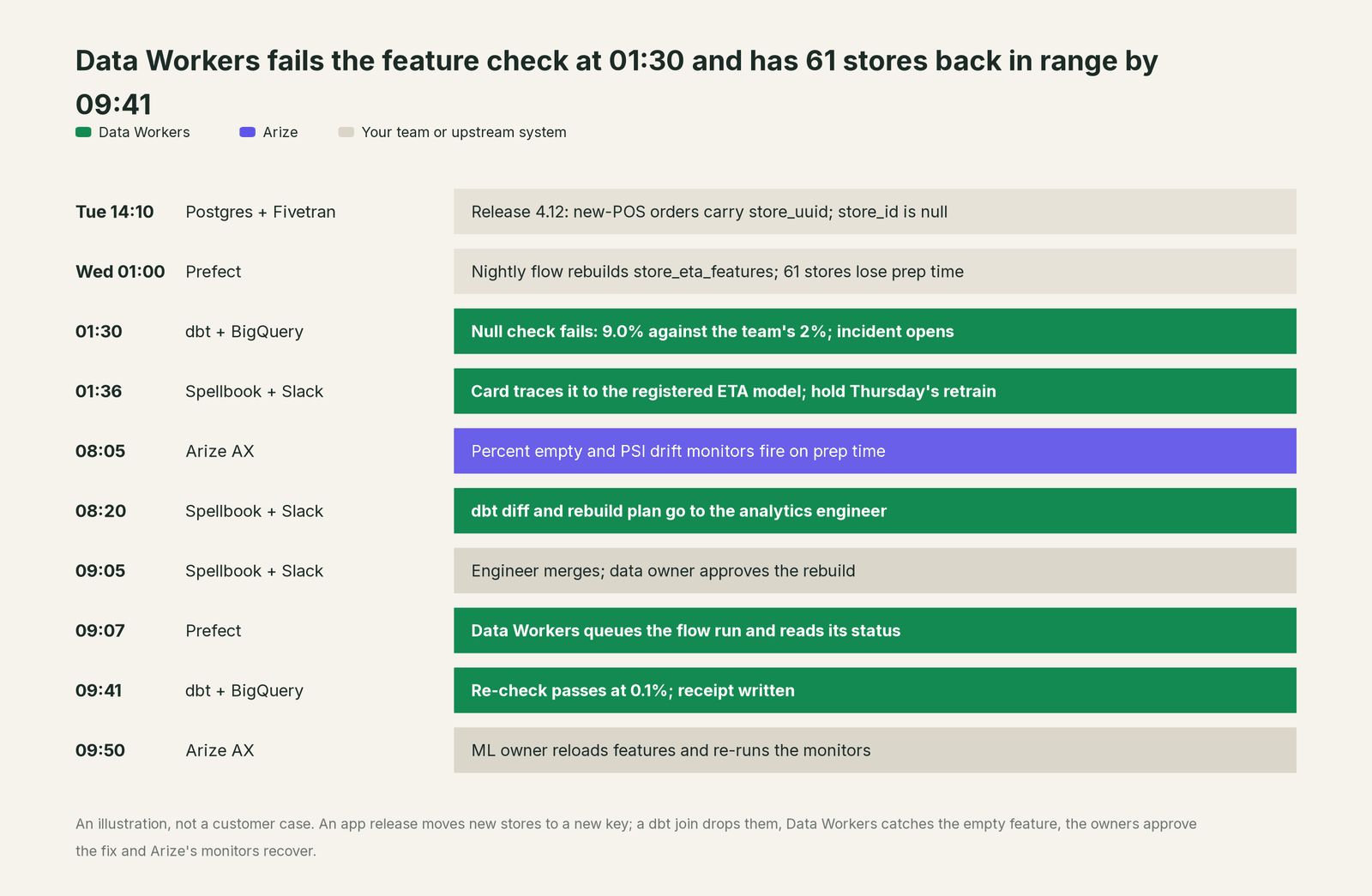
Every tool did its job. The problem lived between them: a join that quietly dropped 9% of stores with no test failing. A drift alert tells you a feature moved; it cannot tell you the move was a key change in another team's database. Data Workers caught the table, traced the cause, routed the fix and left model decisions to the model's owner.
| Job | What Arize does | What Data Workers does |
|---|---|---|
| The signal | Drift, data quality and performance monitors on what the model logs | Quality checks and baselines on the tables the model reads, after every build |
| The model | Holds production, training and validation data per model, with cohorts and SHAP | Holds the model as a graph node joined to its tables, features and owners |
| The cause | Shows which feature moved and for which cohort | Traces the change through the dbt manifest to the upstream model and its owner |
| The fix | The ML owner retrains, reloads or adjusts the model | Proposes the dbt diff; queues the rebuild through Prefect after approval; re-checks |
| The agents | Traces, evals, Signal issues and Alyx's proposed prompt changes | Fixes the tables an agent reads when an eval drop is really a data problem |
| The proof | Monitor history and alert threads | A receipt per fix: evidence, approver, checks, before and after, undo path |
Why doesn't Arize just do this itself?
Because Arize is built to observe. It takes in predictions, features, actuals and traces from any framework and cloud, compares them against baselines and tells the model owner what changed. Its agents work where Arize's data lives: Signal reads a tracing project's traces and writes an investigation with a suggested fix (on Enterprise it can open a repo-backed fix PR for the agent's code), and Alyx presents evaluations and prompt changes for review. The Arize AX MCP server, in alpha, is read-only by Arize's own description. That focus is why AI teams trust its numbers.
Fixing the feature table is a different product with a different liability. It needs warehouse and orchestrator credentials, lineage across another team's dbt models, a named owner's approval, a rollback path and proof the fix held. A monitor that rewrote another team's staging models would stop being a neutral witness. Inside Dynatrace, Arize's road leads toward one unified AI observability experience. Data Workers is the product on the other side of that line: the one that changes data, carefully.
Every tool owns a slice. Data Workers covers the whole lifecycle
Each point tool adds another console, another contract and another handoff. Data Workers covers the whole lifecycle with one context, one approval flow and one audit trail, and it builds on the tools already there.
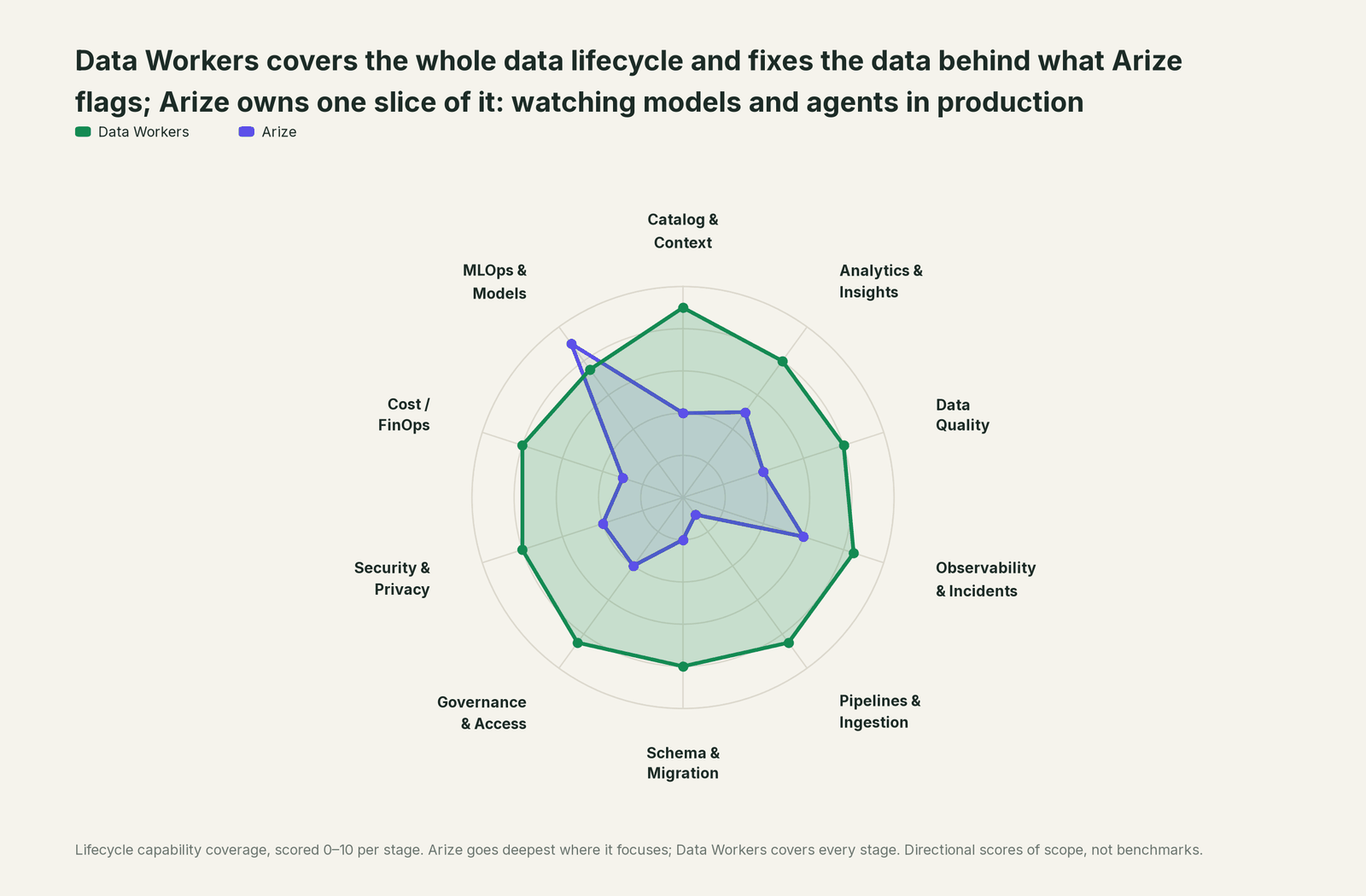
Arize's home stage is MLOps & Models, where it leads by design; Data Workers keeps the data under those models right.
| Stage | Data Workers | Arize | Why we scored it this way |
|---|---|---|---|
| Catalog & Context | 9 | 4 | Arize AX organizes models, tracing projects, datasets, experiments and prompts for AI teams. Data Workers joins tables, lineage, quality, owners and registered models in one governed graph. |
| Analytics & Insights | 8 | 5 | Dashboards, custom metrics and Alyx's custom views slice model and agent behavior by cohort. Data Workers answers questions about the data from governed context. |
| Data Quality | 8 | 4 | Data quality monitors track percent empty, cardinality and averages on the features a model logs. Data Workers checks the source tables themselves and fixes what fails where it starts. |
| Observability & Incidents | 8.5 | 6 | Drift, performance and trace monitors alert to Slack, PagerDuty, Opsgenie or Teams, and Signal groups trace failures into issues. Data Workers detects, diagnoses, fixes and verifies data incidents, with a receipt for each. |
| Pipelines & Ingestion | 8.5 | 1 | Arize receives predictions, features and actuals by stream or batch; it does not run the pipelines that build them. Data Workers queues reruns through your orchestrator after approval. |
| Schema & Migration | 8 | 2 | A model's logged schema is Arize's view of its inputs. Data Workers shows a dbt change's reach and writes migrations with rollback for the owner. |
| Governance & Access | 8.5 | 4 | Spaces, roles and API keys govern who sees which model and project. Data Workers routes each data change to a named approver and keeps the record. |
| Security & Privacy | 8 | 4 | Arize secures the predictions and traces it stores, SaaS or self-hosted. Data Workers proposes masking as a dry run for data owners to apply. |
| Cost / FinOps | 8 | 3 | Arize tracks token costs on traces. Data Workers attributes Snowflake spend to dbt models and reads AWS Cost Explorer. |
| MLOps & Models | 7.5 | 9 | The home stage: drift with PSI, KL, JS and KS, performance on delayed actuals, embedding drift, LLM tracing, evals, Signal and Alyx. Data Workers keeps the data under those models right. |
Scores are directional measures of scope, not benchmarks.
How Arize and Data Workers work together
Your people stay where they are: ML engineers in Arize, analytics engineers in dbt, platform engineers in Prefect, and Claude Code, Cursor or Codex for questions and code. Spellbook Data Catalog (in preview) is where the data team reviews each finding, change, blast radius, approver and rollback; approval requests reach people in Slack or email. Underneath, Data Context Wizard keeps one governed context graph, the Data-Agents Swarm does the work with 20+ specialist agents, and the Autonomous Data-Conductor runs each fix (detect, diagnose, fix, review, verify, remember) behind per-domain guardrails.
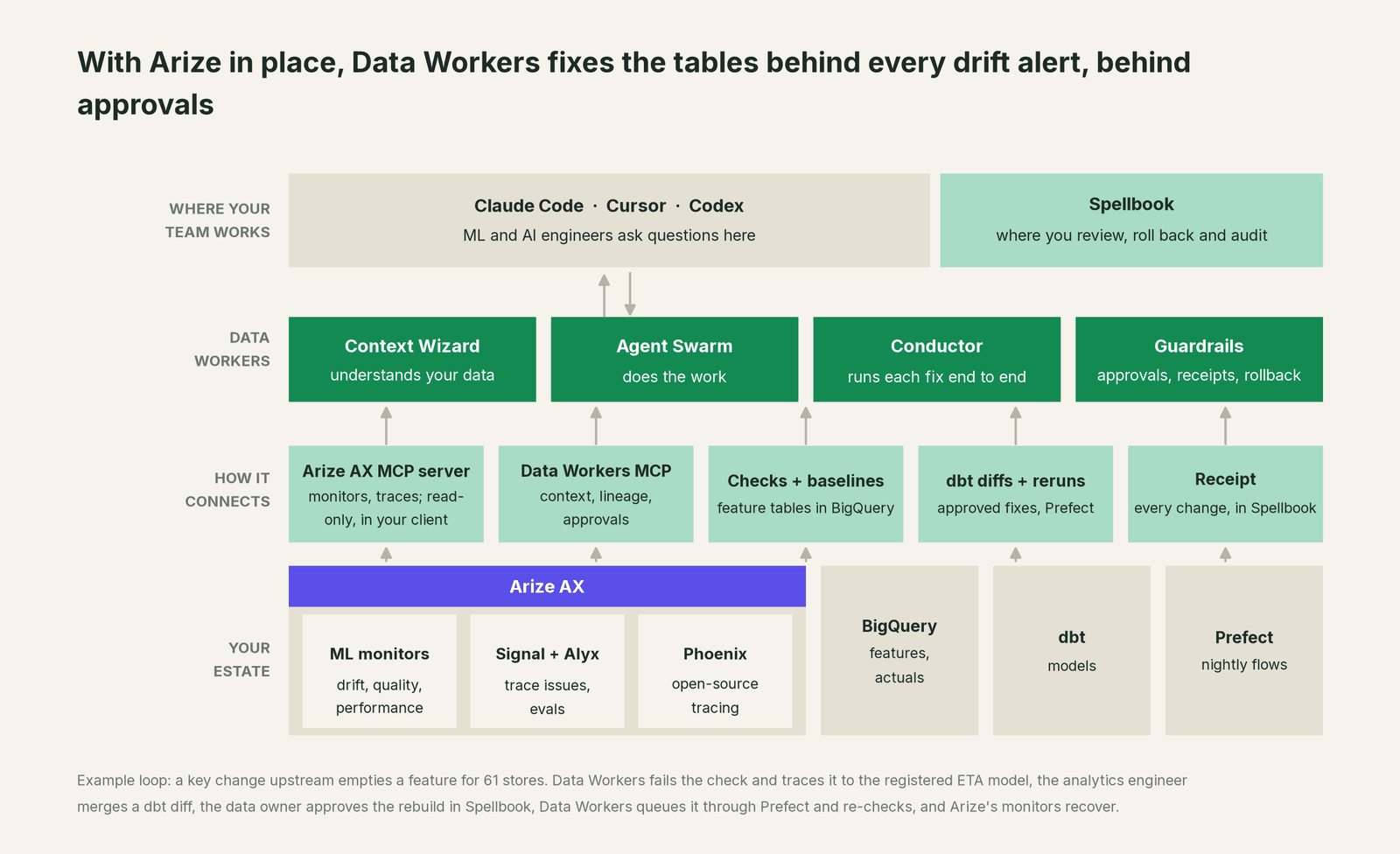
Where Arize fits. Arize stays the system of record for model and agent behavior. Data Workers connects to Arize over its API today, and your client runs the Arize AX MCP server side by side with Data Workers' MCP servers. Data Workers reads natively what sits under the model: BigQuery, Snowflake and Postgres checks, the dbt manifest, pull requests on GitHub, and Prefect, Airflow, Dagster or Azure Data Factory runs, among 50+ connectors. Your team registers each production model once with its feature, training and prediction tables, so lineage and blast radius reach it. See Inside the MLOps & Models Agent and the ML engineers guide.
What Data Workers writes, and where. To Arize, nothing: monitors, baselines and models belong to the ML owner. dbt fixes go to the model's owner as a diff to merge, and Data Workers opens the pull request when your team turns on the GitHub pull-request target. Rebuilds and backfills are queued through your orchestrator after approval; the owner runs any recorded undo. Approved facts land in the Context Wizard graph.
Setup today. Clone the open-source repository and add start-agent.sh entries to your client config, as the client setup docs show. Your client can add Arize's hosted MCP server next to them, so one assistant sees your monitors, traces and data operations; Data Workers' agents never call it.
// Example: .mcp.json for Claude Code
{
  "mcpServers": {
    "dw-context-catalog": {
      "command": "/path/to/dataworkers-claw-community/start-agent.sh",
      "args": ["dw-context-catalog"]
    },
    "dw-quality": {
      "command": "/path/to/dataworkers-claw-community/start-agent.sh",
      "args": ["dw-quality"]
    },
    "dw-incidents": {
      "command": "/path/to/dataworkers-claw-community/start-agent.sh",
      "args": ["dw-incidents"]
    },
    "arize-ax": {
      "type": "http",
      "url": "https://api.arize.com/mcp",
      "headers": { "Authorization": "Bearer ${ARIZE_API_KEY}" }
    }
  }
}
List the tools with your client's own command (/mcp in Claude Code), then ask "Arize says avg_prep_minutes_7d drifted overnight. Which dbt models build ml.store_eta_features, and what else reads them?"
One request, L0 to L4. The autonomy ladder is set per domain, so the ETA domain can sit at a different level from finance reporting.

- •L0 manual. Connected, not acting. The team finds the broken join after the Arize alert.
- •L1 observe. Data Workers flags each failed feature-table check with its blast radius and owners, and logs what each action would have needed.
- •L2 propose. Data Workers drafts the dbt diff and rebuild plan; owners approve before anything runs.
- •L3 act reversibly. For proven classes, such as queuing the rebuild after a fix merges, Data Workers acts, verifies and records it.
- •L4 autonomous. For a scoped, trusted class in one domain, Data Workers runs the loop end to end and posts the receipt. Retraining, feature loads and Arize monitors stay with the ML owner at every level.
Read more on safety, how approvals work, the autonomy levels and where your data goes.
What changes for your team
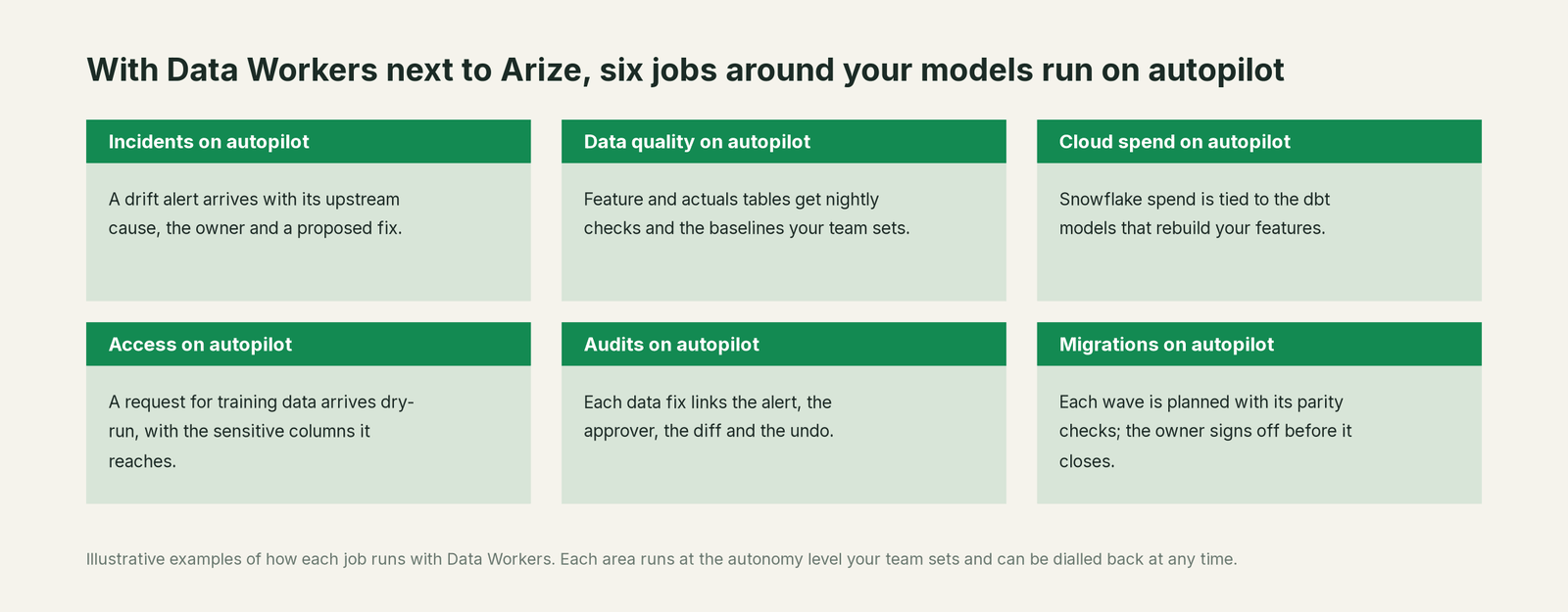
Teams on Arize know the moment a model moves. What costs them is the hour after: reading another team's dbt repo, threads bouncing between channels, a retrain nobody is sure is safe. With Data Workers, those jobs run on autopilot at the level you set.
- •Incidents. The upstream cause, owner and proposed fix, often posted before the drift alert fires.
- •Data quality. Feature and actuals tables get null, key and row-floor checks after every build, plus the baselines your team records.
- •Cloud spend. Snowflake spend is tied to the dbt models that rebuild your features, through query tags.
- •Access. Training-data requests arrive as dry runs, with the sensitive columns they reach.
- •Audits. Each data fix links the alert, the approver, the diff and the undo path.
- •Migrations. Waves planned with parity checks; the owner signs off.
Running other ML tools too? See You're on MLflow, You're on Amazon SageMaker and You're on Weights & Biases. On Dynatrace for application monitoring, You're on Dynatrace covers that side.
Keep Arize, or consolidate?
Keep Arize if you love it; Data Workers works with it from day one. Many teams consolidate once Data Workers runs that slice too.
Nearly every team keeps Arize: its monitors, baselines and traces are where model decisions get made. What teams consolidate is the tooling around it: hand-written null asserts in feature jobs, notebooks joining Arize exports to warehouse tables, and spreadsheets mapping features to dbt models. For background, see data quality for ML, data lineage for ML features and how Data Workers differs from data observability. If your features are built in dbt and orchestrated in Prefect, You're on dbt and You're on Prefect cover those sides. Building this layer yourself? Read build it ourselves with Claude Code and MCP servers: reading a check is the easy part; approvals, rollback and receipts are the work.
The case for your CFO
The outcome: when a production model drifts because of its data, the cause is found and fixed through its owner the same morning, and the retrain never learns from the broken window.
The risk story is plain. Data Workers changes nothing in Arize. dbt fixes arrive as diffs your engineers merge; rebuilds run only after a named approver says yes; retraining and feature loads stay with the model owner. Each action leaves a receipt with the trigger, evidence, diff, approver, checks and undo path. Unanswered requests expire and escalate, never auto-grant. No agent can promote its own work. Autonomy is set per domain from L0 manual to L4 autonomous, and an org-wide stop halts all autonomous dispatch. The agents run in your infrastructure; your data stays in your systems, and the hosted Conductor sees workflow metadata only. Zero migration.
Why now: retraining runs on a schedule, coding agents ship dbt and app changes faster, and ML vendors are consolidating. A model scoring with a missing feature costs real money in late deliveries, wrong prices or missed fraud. The first win: two production models registered with their feature tables, checked read-only, with a report of every upstream change that would have reached them. What stays the same: Arize, your monitors, your training code and your owners. Start with a pilot on the pricing page; for the numbers, see the ROI of agentic data operations.
The sentence to repeat upstairs: "Arize tells us when a model goes wrong; Data Workers fixes the data behind it, with an approval and a receipt for every change."
Getting started
Start with a pilot. Pick the two models your business feels first, register each with its feature and training tables in the context graph, connect Data Workers read-only to your warehouse, dbt project and orchestrator, set null thresholds on the checks for critical features, and review what it would have caught before Arize fired, then turn on the first fix class. The pilot path and plans are on the pricing page, and the pilot is credited in full against the first year.
FAQ
Does Data Workers read our Arize monitors or measure drift? Both stay with Arize. Data Workers connects over Arize's API today, and your client can run the read-only Arize AX MCP server next to Data Workers' MCP servers. Data Workers checks the tables under the model (nulls, keys, row counts and your team's baselines) and traces the cause when a feature moves.
Will Data Workers catch a small null rate on a feature? Yes, with a threshold that fits. The default null check passes up to 10% nulls, so teams set a stricter threshold on the check for the columns that must stay full (a 2% threshold passes only when 98% of rows are filled), or lower the deployment's default. In the example above, the 2% check caught a 9% gap.
Can Data Workers retrain the model or reload features? Those belong to the model owner. Data Workers can recommend holding a retrain while a feature table is wrong and show which tables the fix touched; the hold, the retrain and the feature load are the owner's call.
Does this help our agents traced in Arize? Yes, on the data side. When Signal or an eval points at bad retrieval context and the cause is a stalled documents table or a renamed column, Data Workers traces the table, proposes the fix and queues the rebuild after approval. The prompt change stays in your Arize workflow with Alyx.
Arize is now part of Dynatrace. Does that change anything? Not for this work. Dynatrace completed the acquisition on October 1, 2026 and says Arize will continue supporting AX and Phoenix. Data Workers works with whatever monitors your models report to.
Sources
- •Dynatrace press release, Dynatrace Completes Acquisition of Arize (Oct 1, 2026), https://ir.dynatrace.com/news-events/press-releases/detail/439/dynatrace-completes-acquisition-of-arize-extending-ai-observability-across-the-full-development-lifecycle and Dynatrace blog (Oct 1, 2026), https://www.dynatrace.com/news/blog/dynatrace-completes-acquisition-of-arize/ (checked Oct 3, 2026)
- •Arize AI home page: Arize AX, Phoenix OSS, Alyx, Signal, ADB, https://arize.com/ (checked Oct 3, 2026)
- •Arize docs, ML monitors: types (PSI, KL, JS, KS, Percent Empty, cardinality), baselines and delay window, https://arize.com/docs/ax/machine-learning/machine-learning/how-to-ml/monitors/setup and .../configure-monitors (checked Oct 3, 2026)
- •Arize docs, ML models client: predictions, delayed actuals, embeddings, SHAP, https://arize.com/docs/api-clients/python/version-8/client-resources/ml-models (checked Oct 3, 2026)
- •Arize docs, Continuously Monitor: tracing monitors, alerting integrations, https://arize.com/docs/ax/observe/production-monitoring (checked Oct 3, 2026)
- •Arize docs, Signal (plan limits, repo-backed fix PRs on Enterprise), https://arize.com/docs/ax/observe/signal, and Alyx, https://arize.com/docs/ax/alyx (checked Oct 3, 2026)
- •Arize docs, Arize AX MCP Server (alpha, read-only), connect and tool catalog, https://arize.com/docs/api-clients/mcp/overview (checked Oct 3, 2026)
- •Arize docs index: cost tracking, online evaluators, self-hosting, https://arize.com/docs/llms.txt (checked Oct 3, 2026)
- •Arize Phoenix releases, v20.19.0 (Oct 1, 2026), https://github.com/Arize-ai/phoenix/releases (checked Oct 3, 2026)
- •Data Workers client setup, https://dataworkers.io/opensource-docs/client-setup/, open-source repository, https://github.com/DataWorkersProject/dataworkers-claw-community, and pricing, https://dataworkers.io/pricing/ (checked Oct 3, 2026)