You're on Amazon SageMaker AI: SageMaker Trains and Serves the Model. Data Workers Fixes the Data Before the Next Training Job Reads It
On Amazon SageMaker AI? Keep it for training, the Model Registry and endpoints. Data Workers keeps the tables your models learn from right, traces upstream breaks to the models they reach and fixes them behind approvals.
Your models live in Amazon SageMaker AI, formerly Amazon SageMaker; the SageMaker name now covers AWS's wider data, analytics and AI platform with Unified Studio. Data scientists work in SageMaker Studio, now with a built-in coding agent (Kiro, Claude Code or Codex). Training runs as jobs or on HyperPod clusters. SageMaker Pipelines chains processing, training, evaluation and a condition step that decides whether a new version reaches the Model Registry and its IAM-enforced approval gates. Feature Store keeps offline and online stores, experiments land in managed MLflow, and endpoints deploy blue/green or rolling with auto-rollback. SageMaker AI trains and serves the model. What it learns from is built upstream, in dbt models, Snowflake tables and nightly jobs another team owns. Data Workers fixes the data before the next training job reads it: it catches the upstream change, traces it to the models it reaches, fixes it through the data owner and leaves a receipt.
Key takeaways
- •SageMaker AI keeps its job: training, Pipelines, the Model Registry, Feature Store, managed MLflow and endpoints stay where they are.
- •Data Workers keeps the tables your models learn from right: label and feature tables get checks and baselines, and an upstream change is traced through dbt lineage to every registered model.
- •Every data fix goes to a named owner as a diff with its blast radius and undo; after approval, Data Workers queues the rebuild through your orchestrator and re-checks the table.
- •The ML owner keeps the model decisions: rerunning a pipeline, approving a version and deploying stay in SageMaker AI.
- •SageMaker AI connects over its APIs or AWS's MCP servers today, in your team's client next to Data Workers' MCP servers.
SageMaker AI trains and serves the model. Data Workers fixes the data before the next training job reads it.
Here is a Monday at a card issuer. The fraud model, fraud-txn-scorer, retrains every week in a SageMaker pipeline, fraud-retrain-weekly, scheduled for Monday 02:00. A processing step joins features from the Feature Store offline store (feature group card_txn_features) with labels from the Snowflake table ml.txn_labels, which dbt builds from chargebacks in int_chargebacks. Training follows, then an evaluation step scores the new model on a holdout set the fraud analysts reviewed last quarter, then a condition step: PR-AUC must reach 0.70 or nothing is registered. A Step Functions state machine, risk_dbt_nightly, runs the dbt build on Snowflake at 01:00. Months ago the ML team registered the model in Data Workers' context graph with its training tables and features, and they record the daily fraud-label rate with monitor_metrics after each build. This is an illustration, not a customer case.
| Time | System | What happens |
|---|---|---|
| Sun 16:40 | GitHub + dbt | A pull request merges in the risk dbt repo: int_chargebacks now reads the card processor's new dispute export, keying is_fraud on its dispute_category field. Mastercard fraud disputes under reason codes 4837 (no cardholder authorization) and 4863 (cardholder does not recognize) carry a different category there, so they stop counting as fraud. The team had not added this repo to pull request review |
| Mon 01:00 | Step Functions + dbt | risk_dbt_nightly runs dbt build on Snowflake. int_chargebacks and ml.txn_labels are table models, so 18 months of labels are rebuilt with the new mapping. The finance mart fct_dispute_losses rebuilds too |
| 01:20 | Data Workers + Snowflake | The daily label rate the team records with monitor_metrics comes in at 0.17% against a baseline of 0.41% and is flagged. Data Workers posts the finding to the risk data owner in Slack and recommends holding Monday's retrain. The hold is the ML owner's call, and nobody sees the card overnight |
| 02:00 | SageMaker Pipelines | fraud-retrain-weekly starts. The processing step reads the relabelled ml.txn_labels; the training job learns from about 2,300 missing fraud cases labelled as genuine |
| 03:05 | SageMaker Pipelines | The evaluation step scores PR-AUC 0.58 on the analysts' holdout. The condition step fails and the register step is skipped. The run is logged in managed MLflow; the endpoint keeps serving version 37 |
| 07:40 | SageMaker Studio | The ML engineer reads the failed execution and the skipped register step, then finds Data Workers' 01:20 finding in Slack |
| 07:46 | Data Workers | From Claude Code in Studio she asks why the labels moved. blast_radius_analysis from int_chargebacks returns ml.txn_labels, the registered fraud-txn-scorer and fct_dispute_losses. The dbt manifest from Sunday's deploy shows int_chargebacks changed, and the merged pull request holds the new mapping |
| 08:02 | Spellbook + Slack | Data Workers proposes a diff to int_chargebacks that keeps the new export and maps both Mastercard codes back to fraud, plus a rebuild of int_chargebacks, ml.txn_labels and fct_dispute_losses. The undo, a Snowflake Time Travel restore of the three tables, is written into the plan for the owner. The approval request goes to the risk data owner, with the ML engineer and the finance analyst for disputes copied |
| 08:31 | Spellbook | The risk data owner reviews the diff, the blast radius and the undo, merges the diff and approves the rebuild |
| 08:34 | Step Functions | Data Workers queues an execution of risk_dbt_nightly with the three models as its input and reads the execution status; it succeeds at 08:52 |
| 08:57 | Data Workers + Snowflake | run_quality_check on ml.txn_labels passes its null, txn_id distinct-ratio and row-count checks; that check could never have caught the relabel. The label-rate baseline is what confirms the fix: back at 0.41%. Data Workers writes the receipt |
| 09:10 | SageMaker AI | The ML engineer, not Data Workers, reruns the pipeline. At 10:20 the condition step passes with PR-AUC 0.77, version 38 lands in the Model Registry as PendingManualApproval, and the ML lead approves it in SageMaker |
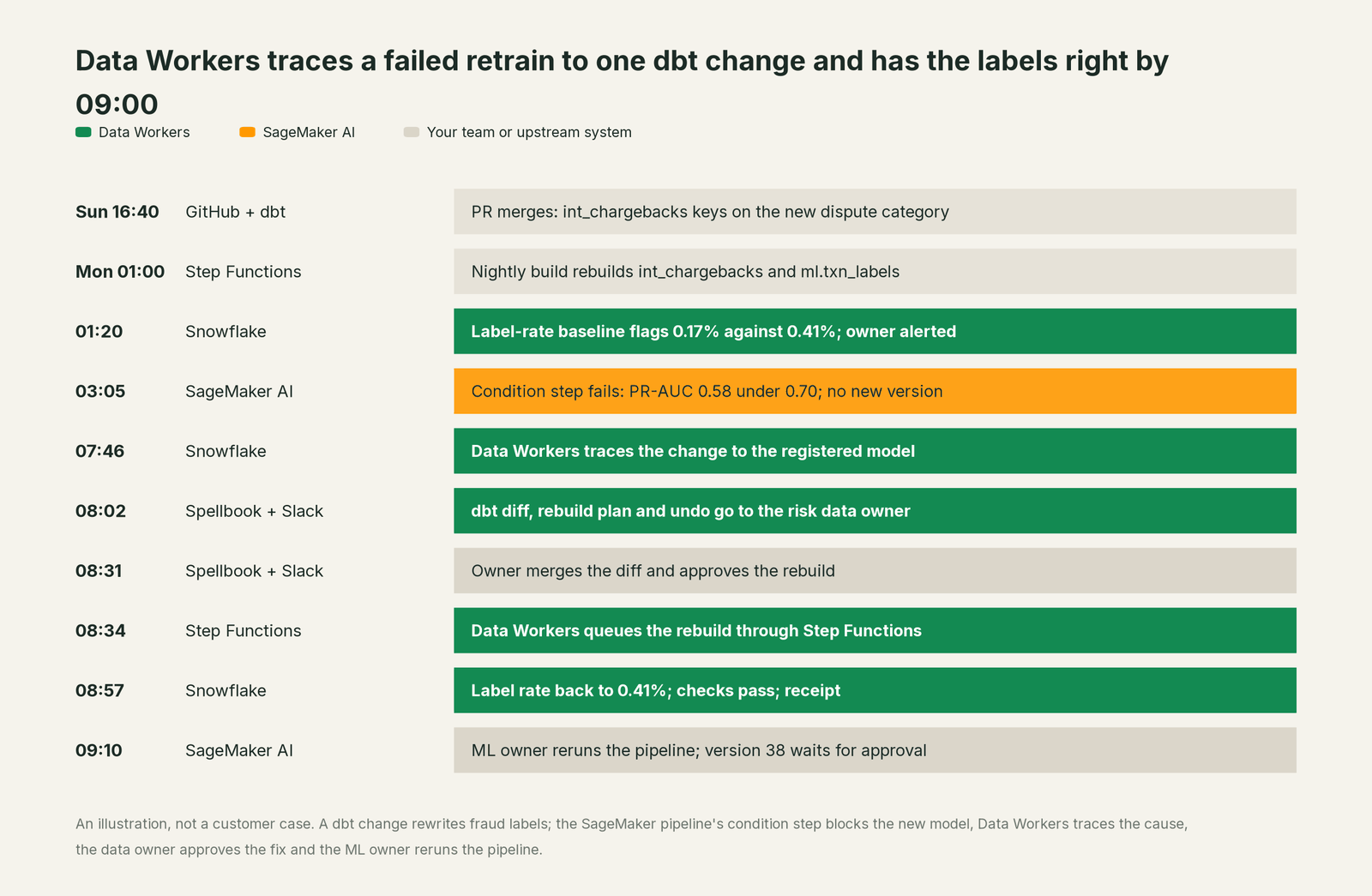
The pipeline's guard did its job: a worse model never reached the endpoint. It could not say why, because the cause sat in a dbt model in another team's repo, and the same change had quietly cut the fraud losses finance reports. One diff fixed both. The data owner approved the data change, the ML lead approved the model, and one receipt ties the two decisions together.
| Job | What SageMaker AI does | What Data Workers does |
|---|---|---|
| Training | Runs training jobs and HyperPod clusters at any scale | Keeps the label and feature tables those jobs read right |
| The gate | Pipelines evaluate each candidate and a condition step blocks a weak one | Explains why a candidate failed when the cause is data, and fixes it at the source |
| The record | Managed MLflow tracks runs; the Model Registry holds versions and approvals | Records the data change behind a run: diff, approver, undo, re-check |
| Features | Feature Store serves the offline and online stores | Traces the upstream tables behind the feature pipelines the team registered |
| Serving | Endpoints with blue/green and rolling deployments and auto-rollback | Stays out of serving, by design; the ML owner deploys |
| The fix | Retrains when the ML owner reruns the pipeline | Proposes the data fix as a diff for its owner and queues the rebuild through the orchestrator after approval |
| The proof | The next evaluation and condition step | Re-checks the table, confirms the baseline and writes a receipt |
Why doesn't SageMaker AI just do this itself?
Because SageMaker AI is built for the person who owns the model, and its view starts where data enters the pipeline. That is the right focus for an ML platform. Pipelines' QualityCheck and ClarifyCheck steps check drift against a baseline inside a run, the condition step blocks a weak candidate, and the coding agent in Studio writes the code you ask for. Model Monitor is no longer open to new customers; AWS's replacement guide points to open-source monitoring solutions built on SageMaker AI MLflow Apps and Evidently AI, with QuickSight and CloudWatch. AWS's own guidance for a model quality alert lists retraining and "auditing upstream systems". The SageMaker AI MCP server manages HyperPod clusters.
Auditing upstream systems means changing a dbt model in another team's repository, rebuilding Snowflake tables through another orchestrator and getting a data owner's approval for a change that also moves a finance report: a different owner, different credentials, a different liability. An ML platform that rewrote its upstream tables would be the consumer editing its own supplier. Data Workers is built for that side of the line.
Every tool owns a slice. Data Workers covers the whole lifecycle
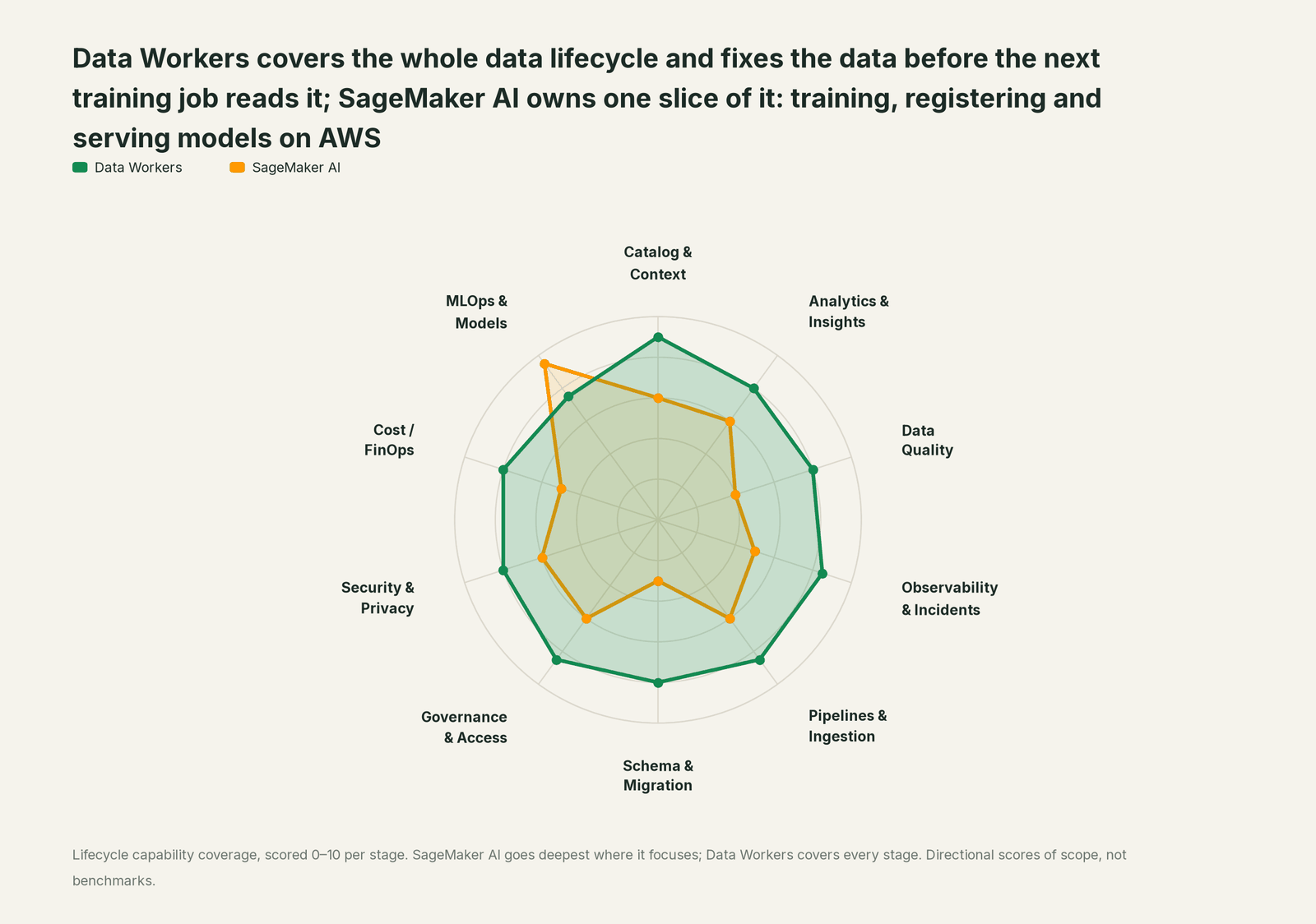
SageMaker AI owns training, registering and serving models on AWS. Each point tool adds another console, contract and handoff. Data Workers covers the whole lifecycle with one context, one approval flow and one audit trail.
| Stage | Data Workers | SageMaker AI | Why we scored it this way |
|---|---|---|---|
| Catalog & Context | 9 | 6 | SageMaker AI tracks experiments, model versions and lineage for its own jobs; SageMaker Catalog, built on Amazon DataZone, catalogs data and models next door (its own page covers it). Data Workers joins the tables under each model to dbt, runs and quality results in one graph. |
| Analytics & Insights | 8 | 6 | Studio notebooks, a built-in coding agent (Kiro, Claude Code or Codex) and Amazon Q Developer help data scientists explore and build. Data Workers answers questions from governed context and checks the numbers behind them. |
| Data Quality | 8 | 4 | Pipelines has QualityCheck and ClarifyCheck steps for the data inside a run, and Model Monitor is closed to new customers. Data Workers checks the source tables every night and fixes what fails where it starts. |
| Observability & Incidents | 8.5 | 5 | SageMaker AI emits pipeline, training and endpoint events to CloudWatch and EventBridge, and inference rolls back a bad deployment. Data Workers detects, diagnoses, fixes and verifies data incidents across systems, with a receipt for each. |
| Pipelines & Ingestion | 8.5 | 6 | Processing jobs, Feature Store ingestion and Pipelines move data into training and inference. Data Workers keeps the upstream jobs right and queues reruns through Step Functions, Airflow, Dagster, Prefect or ADF after approval. |
| Schema & Migration | 8 | 3 | Feature groups have a schema, but upstream table and dbt changes are outside SageMaker's view. Data Workers scores a change against everything downstream and proposes the fix with its undo. |
| Governance & Access | 8.5 | 6 | IAM, the Model Registry's approval gates and SageMaker's AI governance tools control who ships which model. Data Workers runs the data access queue and proposes each grant for its owner. |
| Security & Privacy | 8 | 6 | VPC isolation, KMS encryption and IAM protect training data and endpoints. Data Workers flags sensitive column names in pull request review and proposes masking for the owner. |
| Cost / FinOps | 8 | 5 | Training plans, Spot training and serverless inference help control ML spend. Data Workers reads AWS Cost Explorer monthly by service with a forecast and attributes Snowflake spend to the dbt model. |
| MLOps & Models | 7.5 | 9.5 | The home stage: training at any scale on HyperPod, Pipelines, the Model Registry with approval gates, Feature Store, managed MLflow and endpoints with blue/green deployments and auto-rollback. Data Workers keeps the data under those models right. |
How SageMaker AI and Data Workers work together
Your ML engineers stay in SageMaker Studio with their coding agent, and your data engineers stay in dbt and their orchestrator. Spellbook Data Catalog (in preview) is where both teams look: each finding, proposed change, blast radius, approver and rollback, with approval requests in Slack or email. Underneath, Data Context Wizard keeps one governed context graph, the Data-Agents Swarm's specialist agents do the work, and the Autonomous Data-Conductor runs each fix end to end.
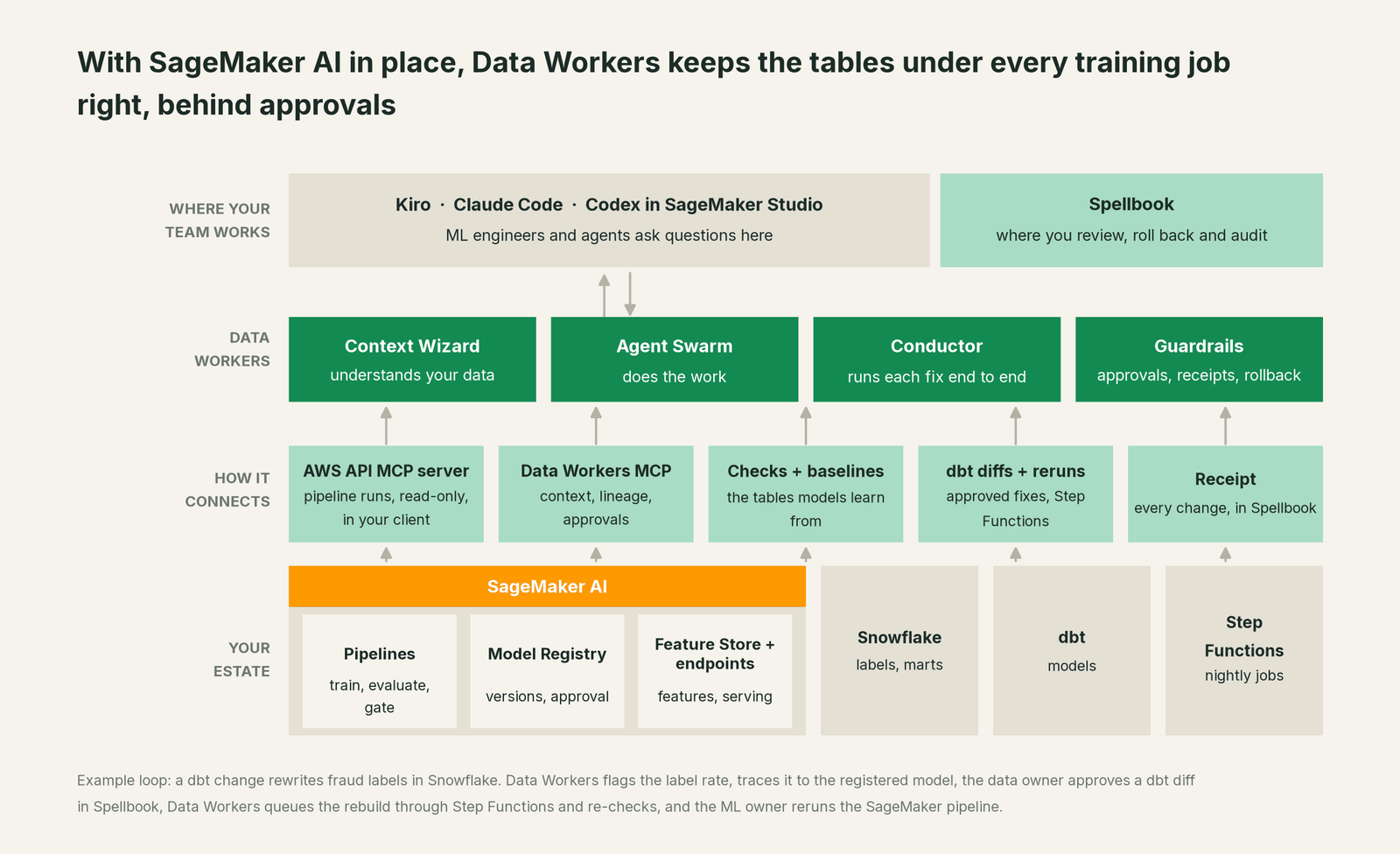
What Data Workers reads. Snowflake natively, where run_quality_check covers nulls, distinct IDs and a minimum row count (Postgres too, and BigQuery with a service-account key). The dbt manifest, which traces an upstream change to the tables a model reads. Step Functions, Airflow, Dagster, Prefect and ADF runs, and the metrics your team records with monitor_metrics, such as a daily label rate or a feature's mean. Your team registers each model once with its training tables, features and prediction table, so lineage and blast radius reach it. SageMaker AI, Feature Store and managed MLflow connect over their APIs or AWS's MCP servers today, in your team's client; Data Workers' agents work from what its own 50+ connectors read, AWS Cost Explorer and Slack among them.
What Data Workers writes, and where. To SageMaker AI, nothing. Pipeline reruns, version approvals and deployments stay with the ML owner. Data fixes go to the data owner as diffs to merge, and Data Workers opens the pull request itself when your team turns on the GitHub pull-request target. After approval, rebuilds and backfills are queued through your orchestrator, with the undo written into the plan for the owner to run if needed.
Setup today. Give Data Workers read access to the Snowflake schemas and dbt project behind your models, and orchestrator credentials scoped to the jobs that build them. Clone the open-source repository and add start-agent.sh entries to your client config, as the client setup docs show. AWS's API MCP server can sit alongside in read-only mode, so pipeline executions come into the same conversation.
// Example: .mcp.json for Claude Code in SageMaker Studio
{
  "mcpServers": {
    "dw-context-catalog": {
      "command": "/path/to/dataworkers-claw-community/start-agent.sh",
      "args": ["dw-context-catalog"]
    },
    "dw-quality": {
      "command": "/path/to/dataworkers-claw-community/start-agent.sh",
      "args": ["dw-quality"]
    },
    "dw-incidents": {
      "command": "/path/to/dataworkers-claw-community/start-agent.sh",
      "args": ["dw-incidents"]
    },
    "aws-api": {
      "command": "uvx",
      "args": ["awslabs.aws-api-mcp-server@latest"],
      "env": { "AWS_REGION": "us-east-1", "READ_OPERATIONS_ONLY": "true" }
    }
  }
}
List the tools with /mcp in Claude Code. An ML engineer can then ask "why did Monday's retrain fail, and did anything change in the tables it reads?" and the client answers with the pipeline execution from AWS's server and the lineage, checks and finding from Data Workers.
One request, L0 to L4. The ladder is set per domain, so the risk models can sit at a different level from marketing's.

- •L0 manual. Connected, not acting.
- •L1 observe. Data Workers reports each upstream change with the models it reaches and their owners, and logs what each action would have needed.
- •L2 propose. It drafts the dbt diff and the rebuild plan with blast radius and undo; the data owner approves before anything runs.
- •L3 act reversibly. For proven classes, such as queuing the rebuild of a label table after its fix merges, it acts, re-checks and records. Code still arrives as diffs.
- •L4 autonomous. For a scoped, trusted class in one domain, it runs the loop end to end and posts the receipt. Model decisions stay with the ML owner.
For the rest of AWS, read Data Workers on AWS; the catalog side is you're on AWS Glue Data Catalog and SageMaker Catalog. The ML engineer's view is in Data Workers for ML engineers and the agent behind it in inside the MLOps & Models Agent. The same pattern holds for MLflow, DataRobot and Domino Data Lab. For background, see data quality for ML, data lineage for ML features and every integration. On trust: safety, approvals, the autonomy levels and where your data goes.
What changes for your team
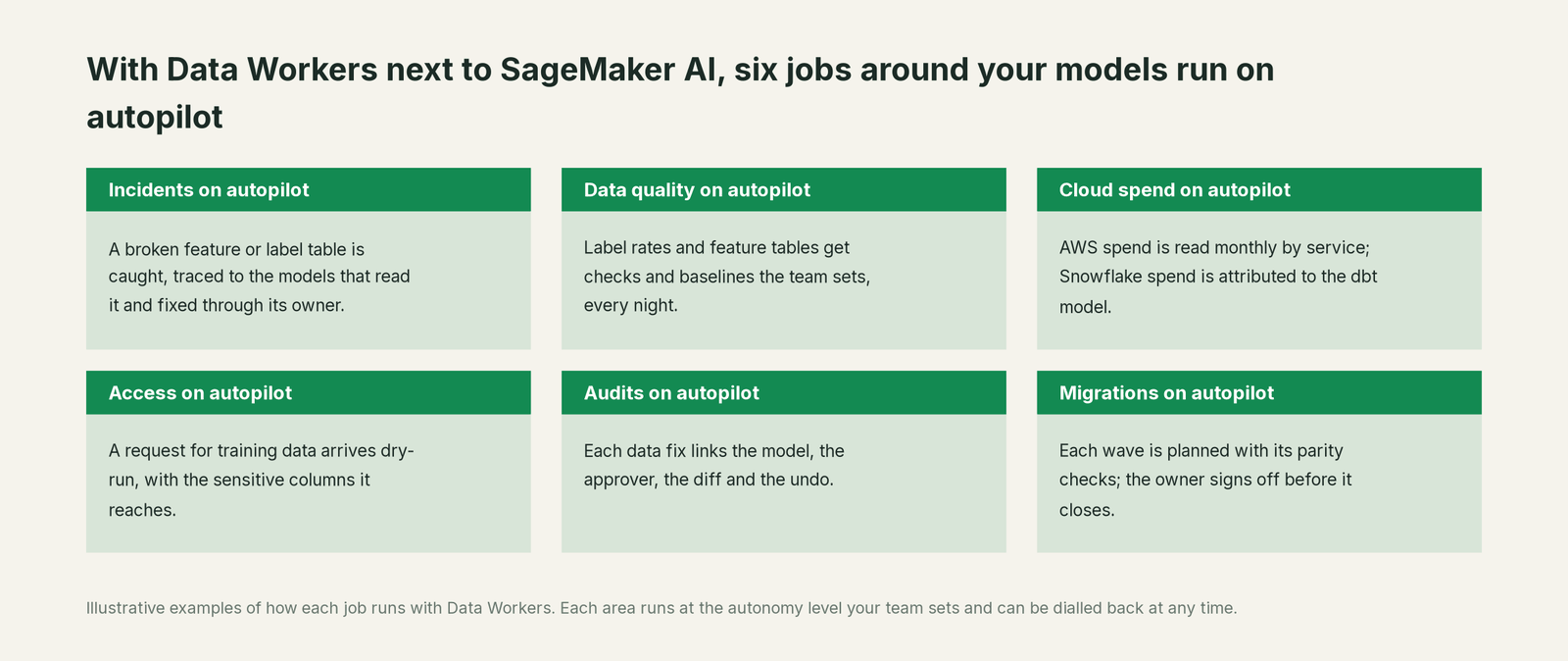
ML teams on SageMaker AI lose days to data they don't own: a failed condition step, a feature that moved overnight, a message to a data team that answers tomorrow. With Data Workers, six jobs run on autopilot at your level: data incidents traced to the models they reach, label and feature tables checked against the baselines the team sets, AWS spend read monthly by service and Snowflake spend attributed to the dbt model, training-data access requests arriving dry-run, audits that link the model, the data change, the approver, the diff and the undo, and migrations planned in waves with parity checks the owner signs off.
After this incident the team made two changes. The risk dbt repo joined pull request review, so a change that reaches a registered model's labels shows that reach before it merges. And the label-rate flag now pages the risk on-call ahead of the Monday retrain.
ML engineers keep their week for what only people decide: which model to build and which version to ship.
Keep SageMaker AI, or consolidate?
Keep SageMaker AI if you love it; Data Workers works with it from day one. Many teams consolidate once Data Workers runs that slice too.
SageMaker AI stays your training, registry and serving platform. What teams consolidate is the data tooling around it: Lambda functions that query label tables before a retrain, notebooks that compare this week's feature means with last week's, and spreadsheets of which dbt model feeds which pipeline. Model and prediction drift stay with the monitoring your ML team runs. Weighing a build on SageMaker's APIs and a coding agent? Read build it ourselves with Claude Code and MCP servers: reading a pipeline execution is easy; cross-system context, approvals and rollback are the work.
The case for your CFO
The outcome: models retrain on data that is right, on schedule. A broken upstream table becomes an approved fix before the retrain window, not a lost week and a quiet error in a finance report.
The risk story is plain. Data Workers changes nothing in SageMaker AI. Every data change shows its blast radius, goes to a named approver, is re-checked and leaves a receipt with the undo. Unanswered requests expire and escalate; they never auto-grant. No agent can promote its own work. Autonomy is set per domain, and an org-wide stop halts all autonomous dispatch. The agents run in your infrastructure; your data stays in your systems, and the hosted Conductor sees workflow metadata only. Zero migration.
Why now: models retrain more often, coding agents in Studio write more pipeline code, and Model Monitor is closed to new customers, so catching bad training data falls more on your own team. The first win is one model's tables, read-only, with a report of every upstream change that reaches them. Your AWS accounts, SageMaker AI and your deployment process stay the same. Start with a pilot; the path is on the pricing page, and the pilot is credited in full against the first year. See the ROI of agentic data operations.
The sentence to repeat upstairs: "SageMaker trains and serves our models; Data Workers makes sure the data they learn from is right, and every fix comes with an approval and a receipt."
Getting started
Start with a pilot. Pick the model whose retrains matter most, register it with its training tables, connect Data Workers read-only to the Snowflake schemas and dbt project behind it, record a label rate with monitor_metrics, and let it report upstream changes for a few weeks before turning on the first fix class. The pilot path and plans are on the pricing page, and the pilot is credited in full against the first year.
FAQ
Does Data Workers read SageMaker pipelines, the Model Registry or Feature Store? They connect over SageMaker's APIs or AWS's MCP servers today, in your team's client next to Data Workers. Data Workers' own work rests on what it reads natively: the warehouse tables, the dbt manifest, orchestrator runs and the metrics your team records. The ML owner reads pipeline executions and condition steps in SageMaker.
Does Data Workers retrain, approve or deploy models? No. Retraining, version approvals and deployments stay in SageMaker AI with the ML owner. Data Workers fixes the data, queues the rebuild after the data owner approves and tells the ML owner which model the change reached.
Is this a replacement for SageMaker Model Monitor? No. Data Workers does not measure drift in your model's predictions. It watches the tables your models learn from, with checks and the baselines your team sets, and fixes the upstream cause. Teams on Model Monitor keep it; new SageMaker AI customers follow AWS's replacement guide (open-source solutions on SageMaker AI MLflow Apps and Evidently AI, QuickSight, CloudWatch) for the model side.
What if our training data is in S3 or Redshift rather than Snowflake? Data Workers runs its table checks on Snowflake, Postgres and BigQuery. Elsewhere it works from the dbt manifest, orchestrator runs and the metrics your team records with monitor_metrics, and the owner runs the check in that system. Redshift, Glue and S3 connect over their APIs or AWS's MCP servers today.
How does this relate to SageMaker Catalog? SageMaker Catalog registers and shares data and models across SageMaker Unified Studio; its page is you're on AWS Glue Data Catalog and SageMaker Catalog. This page is about SageMaker AI, the ML service.
Where do the agents run, and what leaves our AWS accounts? The agents run in your infrastructure and hold the credentials. Your data stays in your systems; the hosted Conductor sees workflow metadata only (table names, proposals with diffs, approval handles), never rows, credentials or model keys.
Sources
- •AWS, Amazon SageMaker AI product page, https://aws.amazon.com/sagemaker/ai/ (checked Oct 3, 2026)
- •AWS, Amazon SageMaker (next generation) product page, https://aws.amazon.com/sagemaker/ (checked Oct 3, 2026)
- •AWS docs, Data and model quality monitoring with Amazon SageMaker Model Monitor, https://docs.aws.amazon.com/sagemaker/latest/dg/model-monitor.html (checked Oct 3, 2026)
- •AWS docs, Amazon SageMaker Model Monitor availability change, https://docs.aws.amazon.com/sagemaker/latest/dg/model-monitor-availability-change.html (checked Oct 3, 2026)
- •AWS, Amazon SageMaker AI pricing (flexible training plans, Spot, Serverless Inference), https://aws.amazon.com/sagemaker/ai/pricing/ (checked Oct 3, 2026)
- •AWS docs, Accelerate generative AI development using managed MLflow on Amazon SageMaker AI, https://docs.aws.amazon.com/sagemaker/latest/dg/mlflow.html (checked Oct 3, 2026)
- •AWS docs, Pipelines steps (Condition, QualityCheck, ClarifyCheck, Fail), https://docs.aws.amazon.com/sagemaker/latest/dg/build-and-manage-steps-types.html (checked Oct 3, 2026)
- •AWS docs, Update the approval status of a model, https://docs.aws.amazon.com/sagemaker/latest/dg/model-registry-approve.html (checked Oct 3, 2026)
- •AWS docs, Amazon SageMaker Feature Store, https://docs.aws.amazon.com/sagemaker/latest/dg/feature-store.html (checked Oct 3, 2026)
- •awslabs/mcp, Amazon SageMaker AI MCP Server README, https://github.com/awslabs/mcp/tree/main/src/sagemaker-ai-mcp-server (checked Oct 3, 2026)
- •awslabs/mcp, AWS API MCP Server README, https://github.com/awslabs/mcp/tree/main/src/aws-api-mcp-server (checked Oct 3, 2026)
- •Data Workers, Client setup (open-source docs), https://dataworkers.io/opensource-docs/client-setup/ (checked Oct 3, 2026)
- •Data Workers open-source repository, agent tools and start-agent.sh, https://github.com/DataWorkersProject/dataworkers-claw-community (checked Oct 3, 2026)
- •Data Workers, Spellbook Data Catalog product page, https://dataworkers.io/product/spellbook-data-catalog/ (checked Oct 3, 2026)