Real-time streaming operations, without the on-call scramble
Streaming breaks quietly: a consumer falls behind, a producer changes a schema, and tables go stale before anyone notices. Data Workers watches lag, topics and connectors, keeps schemas checked and registered, and puts streaming flows in the same lineage as batch.
Before and after
| Today | With Data Workers |
|---|---|
| Consumer lag found when a dashboard goes stale | Lag, topic health and connector status watched, trouble flagged first |
| A producer ships a schema change and consumers break | Compatibility checked before the change reaches consumers |
| Schemas registered by hand, topic by topic | Stream schemas registered and kept in step |
| Connector configs written from a runbook | Configurations drafted and validated for a person to review |
| Streaming lineage that stops at the topic | Streaming flows in the same lineage as batch |
Streaming failures are quiet and expensive. Nothing errors; the data just arrives late or wrong, and the on-call engineer works backwards from a stale table. The step-by-step guide to monitoring Kafka consumer lag shows the manual version of this work, and this page is the operating model that replaces it.
How it works
1. Watch the stream, not just the table
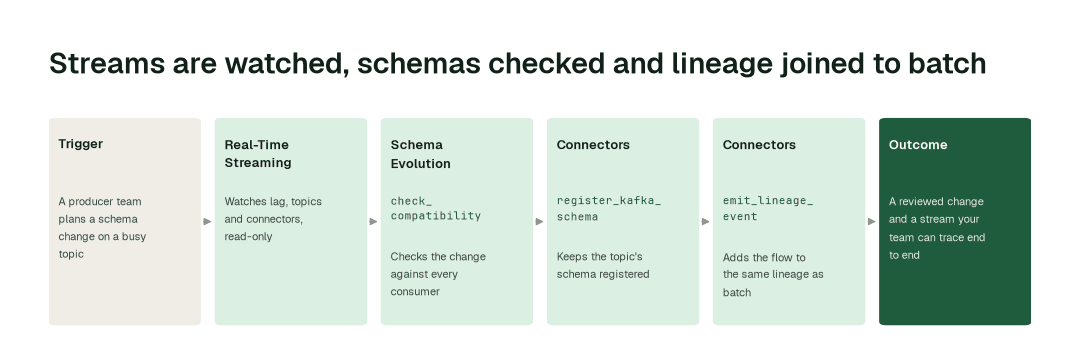
The Real-Time Streaming agent watches consumer lag, topic health and connector status on Kafka and Confluent Cloud, read-only. It flags trouble before the downstream tables go stale, so the first alert reaches the owner of the stream rather than the analyst who noticed a gap.
2. Check schemas before a change lands
The Connectors agent keeps your stream schemas registered with register_kafka_schema and register_stream_schema. Before a producer change ships, the Schema Evolution agent runs check_compatibility against the consumers that read the topic. Connector configurations are generated and validated for a person to review.
3. Put streams in the lineage
The Connectors agent records streaming flows with emit_lineage_event, so a topic, its connectors and its consumers show up in the same lineage as your batch models. "What breaks if this topic changes?" gets one answer, not two. See streaming lineage by hand versus with an agent.
The impact metrics we move
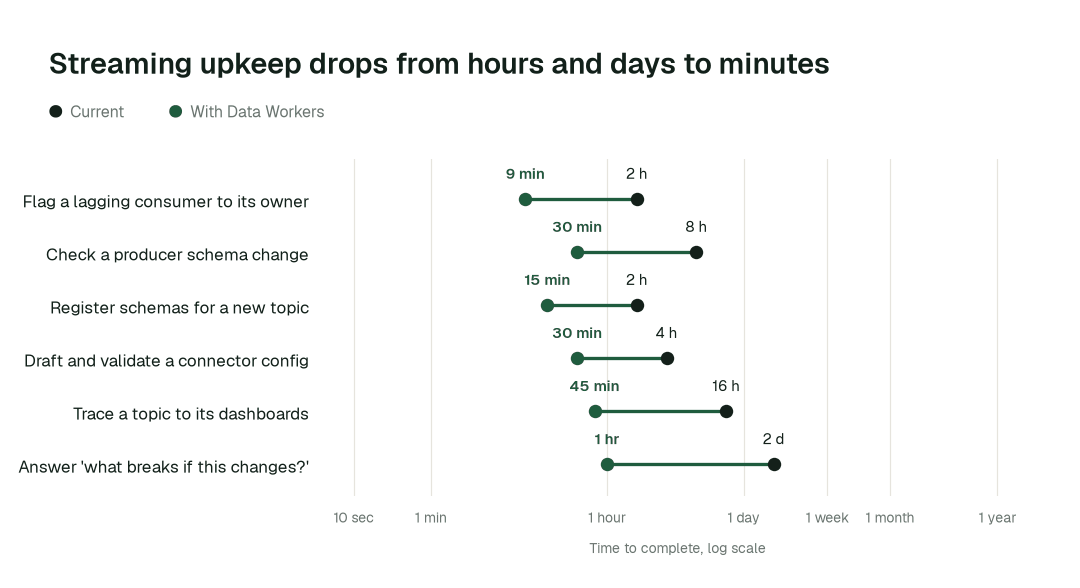
- •Consumer lag flagged to its owner: from about 2 h to 9 min
- •Producer change checked against consumers: from about 8 h to 30 min
- •Stream lineage question answered: from about 2 days to 1 h
Where teams start
- •Kafka consumer lag on revenue tables. Watch the consumer groups that feed the dashboards finance reads first.
- •Confluent Cloud environments. Read-only monitoring of topics, Schema Registry and Kafka Connect.
- •Schema Registry hygiene. Register the unregistered topics and check compatibility on every producer change.
- •Connector configuration. Draft and validate new connector configs for the platform team to approve.
- •CDC and event topics into the warehouse. Trace each topic to the tables and dashboards that depend on it.
What powers it
The Data-Agents Swarm supplies the agents above, with the Real-Time Streaming agent on the stream itself, the Connectors agent on schemas and lineage events, and the Data Context & Catalog agent reading the joined lineage. The Autonomous Data-Conductor coordinates them, and Autopilot Routines run the watching on a schedule you set. The Spellbook Data Catalog keeps what they learn about each stream documented. Streaming shows up in these related playbooks: instrumentation QA per release, meter data management and detection data quality. For the Kafka and Flink deep dive, read the Streaming Agent overview; for Confluent teams, see what stays with Confluent and what Data Workers owns.
The climb: from assisted to autonomous to agentic
Every transformation runs on the same ladder from our thesis. Streaming starts at watch and suggest, moves to acting after approval where your stream owners allow it, and the higher levels are where a domain can go on its own review record. Schema checks follow the same path as schema change management, and the Schema Evolution agent explains the checks in depth.
The pilot
- •Scope. One Kafka or Confluent Cloud environment, connected read-only, and the topics that feed your most-watched tables.
- •First week. Agents start by watching and suggesting. They show the lag and schema problems they would have flagged, with receipts.
- •By week two. Routine watching and schema checks run on their own; anything that changes a producer or a connector stays with a named approver.
- •At day 30. We review the impact metrics against your baseline:
- •Consumer lag flagged to its owner: from about 2 h to 9 min
- •Producer change checked against consumers: from about 8 h to 30 min
- •Stream lineage question answered: from about 2 days to 1 h
- •Cost. Start with a pilot ($7,500 one-time, credited in full against the first year). Scale is from $1,000 a month and Enterprise from $3,000 a month, billed annually, with unlimited seats, no usage meter and no markup on model spend. See pricing.
FAQ
Do the agents run or change our stream processors? No. They watch, check and propose. Flink and other stream processors stay with your streaming team, and connector changes are drafts for a person to approve.
Which stacks does this cover? Kafka and Confluent Cloud: consumer lag, topics, Schema Registry and Kafka Connect.
What access do the agents need? Read-only access to start. Nothing changes in your environment until a named approver says so.
What if a flag is wrong? The agent shows what it saw and why, you dismiss it, and the domain's review record reflects that. Streams stay at watch or suggest until the owner raises the level.