End-to-end lineage that agents keep current, streams and ML included
Lineage drawn once goes stale with the next release, and it stops at the edge of each tool. Data Workers joins the lineage your tools already hold, follows streams and trained models, and keeps it current, so "what breaks if I change this?" is answered before the change ships.
Before and after
| Today | With Data Workers |
|---|---|
| Lineage drawn by hand, out of date after the next release | Lineage kept current by agents as models and pipelines change |
| One partial map per tool: warehouse, catalog, BI, orchestrator | Lineage joined across platforms, from source to dashboard |
| Kafka flows and ML models missing from the picture | Streams and trained models in the same lineage |
| "What breaks if I change this?" answered by asking around | Blast radius shown before the change ships |
| Lineage locked inside one vendor's product | Lineage published in the open OpenLineage standard |
Every team now changes models and pipelines faster than anyone can redraw a diagram, and coding agents add to the pace. A lineage map that is a quarter old gives the wrong blast radius, which is worse than none. The complete guide to data lineage covers the concepts; this page is the operating model that keeps the map true, whether your questions are about tables or columns.
How it works
1. Join the lineage you already have
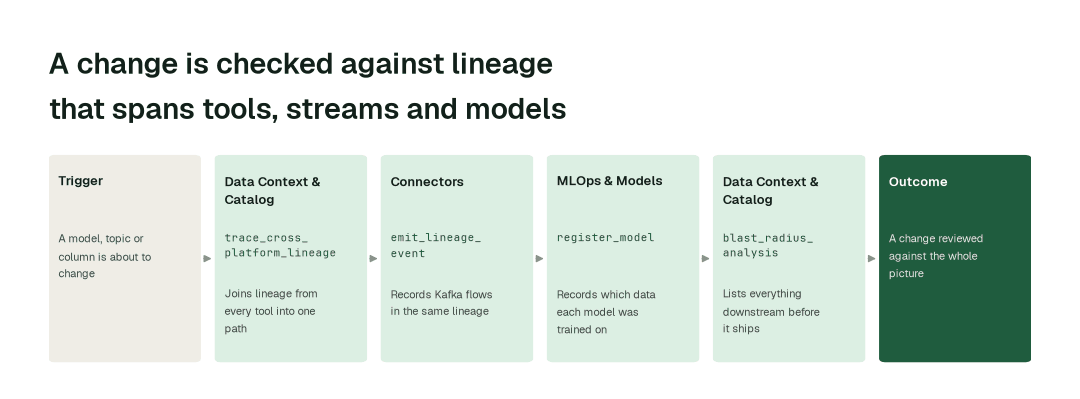
The Connectors agent reads the lineage held by your other tools: DataHub with get_datahub_lineage, Microsoft Purview with get_purview_lineage, OpenMetadata with get_om_lineage and dbt with get_dbt_model_lineage. The Data Context & Catalog agent joins it into one picture with trace_cross_platform_lineage, so a path from a source system to a dashboard is one answer, not four tabs.
2. Follow streams and models
The Connectors agent records Kafka flows with emit_lineage_event, so a topic, its connectors and its consumers sit in the same lineage as your batch models. The MLOps & Models agent registers each model with register_model, which records which data it was trained on. Lineage goes out in the open OpenLineage standard, so your other tools can use it.
3. Answer before the change ships
Before a model, topic or column changes, the Data Context & Catalog agent runs blast_radius_analysis and lists everything downstream. When agents find a gap, such as a job with no recorded inputs, they propose the missing link with update_lineage for the table's owner to approve.
The impact metrics we move
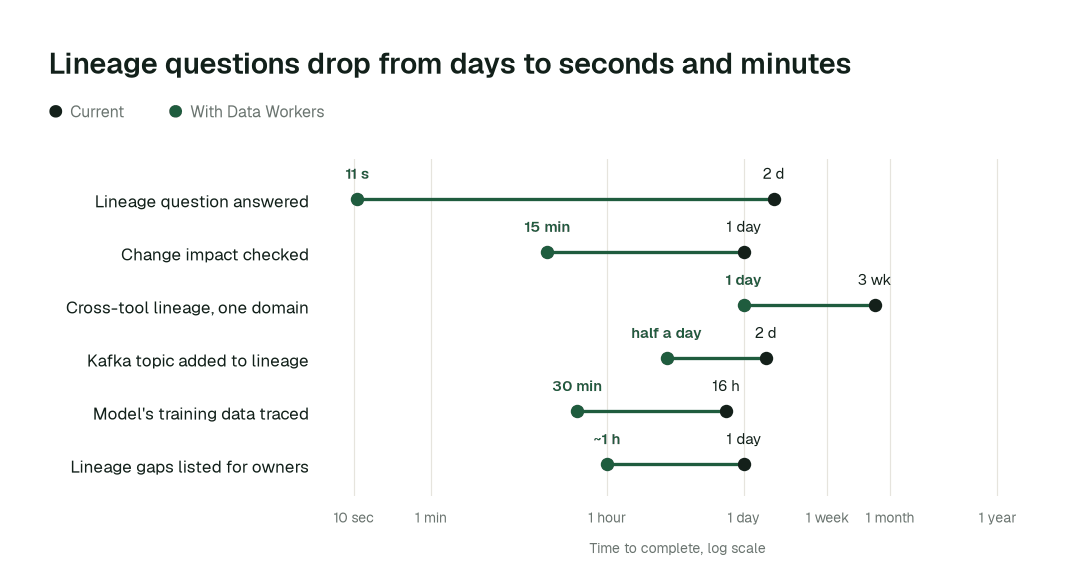
- •Lineage question answered: from about 2 days to seconds
- •Change impact checked before it ships: from about 1 day to 15 min
- •Cross-tool lineage joined for one domain: from about 3 weeks to 1 day
Where teams start
- •Warehouse to dashboard. Join warehouse, dbt and BI lineage for the tables finance reads first, on Snowflake or Databricks.
- •The catalog you already run. Read lineage from DataHub, OpenMetadata, Microsoft Purview or Unity Catalog and add the paths they miss.
- •Kafka topics feeding the warehouse. Put each topic, connector and consumer in the same picture as the batch models behind it. See streaming lineage by hand versus with an agent.
- •Models in production. Record which datasets each registered model was trained on, as in lineage for ML features.
- •Change review. Show the blast radius on every proposed schema or model change.
What powers it
The Data Context Wizard holds the shared understanding of your estate that every agent works from: where each table comes from, what it feeds and which copy to trust. The Data-Agents Swarm supplies the agents above, with the Real-Time Streaming agent on the stream itself. Autopilot Routines run the upkeep on a schedule or when something changes, and the Autonomous Data-Conductor coordinates the work. The Spellbook Data Catalog (in preview) shows what each asset feeds on its own page. Lineage matters most in AI and ML platform data, governed product metrics and rate case and regulatory reporting data.
The climb: from assisted to autonomous to agentic
Every transformation runs on the same ladder from our thesis. Lineage starts at watch and suggest: agents read, join and flag gaps. It moves to acting after approval where table owners allow it, and the higher levels are where a domain can go on its own review record.
The pilot
- •Scope. One domain from source system to dashboard, plus one Kafka environment or one registered model if you want streams or ML in the first pass.
- •First week. Agents start by watching and suggesting. They show the lineage they would have joined and the gaps they would have flagged, with receipts.
- •By week two. Routine upkeep runs on its own; any change to recorded lineage stays with a named approver.
- •At day 30. We review the impact metrics against your baseline:
- •Lineage question answered: from about 2 days to seconds
- •Change impact checked before it ships: from about 1 day to 15 min
- •Cross-tool lineage joined for one domain: from about 3 weeks to 1 day
- •Cost. Start with a pilot ($7,500 one-time, credited in full against the first year). Scale is from $1,000 a month and Enterprise from $3,000 a month, billed annually, with unlimited seats, no usage meter and no markup on model spend. See pricing.
FAQ
Is this table-level or column-level? The agents join the lineage your sources record, to the depth they hold it, and trace it through dbt and SQL transformations. We publish no accuracy figure: the pilot checks the result against questions your team can already answer.
Do we have to replace our catalog? No. Data Workers reads lineage from DataHub, Microsoft Purview, OpenMetadata, Unity Catalog, Tableau and OpenLineage, and works alongside the catalog you run.
How far does streaming and ML coverage go? Kafka topics, connectors and consumers, and the models you register with the data they were trained on. Scope one environment in the pilot and widen from there.
What if the lineage is wrong? Every proposal shows the full change, what it would affect and how to undo it, and a named owner approves it. If people start reverting the agents' changes, that domain pauses itself.