You're on Confluent: It Moves Your Events in Real Time. Data Workers Owns Whether What Lands Downstream Is Right
Confluent moves your events in real time with Kafka, Flink and Tableflow. Data Workers catches the compatible schema change that still breaks billing, traces it and gets the fix approved.
Your platform team runs Confluent Cloud, Confluent Platform in your own data centers, or WarpStream in your own cloud account. App teams produce to topics, every subject in Schema Registry carries a compatibility rule, and Flink statements join and roll up the stream. Tableflow turns topics into Iceberg or Delta tables, published to AWS Glue, Unity Catalog, Polaris or Snowflake Open Catalog, so the warehouse reads the stream as tables. Stream Governance holds the data contracts and Stream Lineage. And since March 17, 2026, Confluent is part of IBM.
Confluent is excellent at its job: every event, in order, durable, at low latency, with a registry that refuses changes that break the subject's rule. The job after the event lands is different. A schema version can pass BACKWARD compatibility and still leave a billing model summing an empty column. Data Workers watches what the stream lands, traces it back to the subject and gets the fix approved before an invoice builds on it.
Key takeaways
- •Confluent keeps its job. Topics, statements, connectors, Tableflow and Schema Registry stay with your platform team. Data Workers works on what the stream lands.
- •Compatible is checked against downstream, too. A change the registry rightly accepts still becomes a diagnosed incident when it empties a column a billing model sums.
- •Native where Confluent is open. Kafka, Kafka Connect and Schema Registry connect natively; Flink, Tableflow and Confluent Intelligence over Confluent's APIs or MCP server today.
- •Every fix goes through a named person. The owner approves each proposal and runs the Confluent side.
- •Autonomy is set per domain. Start at L1 observe, move to L2 propose, and open L3 act reversibly for narrow classes once the record supports it.
Confluent moves the business's events in real time. Data Workers owns whether what lands downstream is right.
Confluent carries every event from producer to consumer, processes it and lands it as a table, keeping each topic's schema consistent. The job downstream is to notice that a number built on the stream is wrong, find the cause, size the damage, hold anything bound for customers, get the fix made where it lives and prove the result. Here is one afternoon at a developer API company that bills on usage. This is an illustration, not a customer case.
| Time | System | What happens |
|---|---|---|
| Tue 14:05 | Schema Registry | The gateway team ships v8 of its metering library and registers version 12 of api-usage-value. It drops the optional field response_bytes and adds response_kib. The subject's rule is BACKWARD, Confluent Cloud's default, and the check passes |
| 14:10 | Confluent Cloud for Apache Flink | The rolling deploy begins. The usage-hourly-rollup statement, created against version 11, stays RUNNING. It reads response_bytes as null on version 12 events, so per-account sums in usage-hourly shrink or go null |
| 14:15 | Tableflow + Snowflake | Tableflow commits the hourly rows to an Iceberg table in the team's S3 bucket, synced to Snowflake Open Catalog. Snowflake reads it as usage.usage_hourly |
| 15:00 | dbt Cloud | The hourly job builds fct_billable_egress, which turns missing bytes into 0. Every dbt test passes |
| 15:05 | Data Workers + Snowflake | run_quality_check on today's hours finds egress_bytes null in 18% of rows, against 0% in every earlier check, and climbing as the deploy spreads. Volume and load lag look normal. Data Workers opens an incident |
| 15:15 | Data Workers + Confluent MCP | Over Confluent's MCP server, Data Workers reads version 12, which no longer carries response_bytes, and the statement's SQL, which sums it. Blast radius: fct_billable_egress, the Sigma "Revenue today" workbook and the Airflow DAG sync_metered_usage_to_stripe, which sends the day's usage to Stripe Billing at 23:00 |
| 15:20 | Slack | The approval request goes to the streaming platform owner, with the billing data owner copied |
| 15:50 | Spellbook | The owner reviews four proposals: pause the Stripe DAG; version 13, which restores response_bytes as optional beside response_kib; a corrected statement that sums COALESCE(response_kib * 1024, response_bytes) into usage-hourly-v2 from today's 00:00 offsets with Tableflow on; and a dbt diff that reads today's hours from the new table. She approves all four |
| 16:00 | Airflow | She pauses sync_metered_usage_to_stripe |
| 16:05 | Confluent Cloud | In the Confluent Cloud console she registers version 13, creates the corrected statement, enables Tableflow on usage-hourly-v2 and stops the old statement. The new table is in Open Catalog by 16:30 |
| 16:35 | GitHub | She merges the dbt diff |
| 16:40 | dbt Cloud | The owner reruns the approved dbt Cloud job; it finishes at 16:52 |
| 17:00 | Data Workers + Snowflake | Data Workers verifies: egress_bytes is never null for any hour since 00:00, usage_id is unique, volume and load lag are on baseline. The receipt records cause, approvals, runs, checks and the undo (point the dbt source back) |
| 17:05 | Airflow | The owner resumes the DAG. At 23:00 Stripe gets the day's usage on corrected numbers |
| Wed 09:00 | Sigma | The revenue review opens on verified numbers |
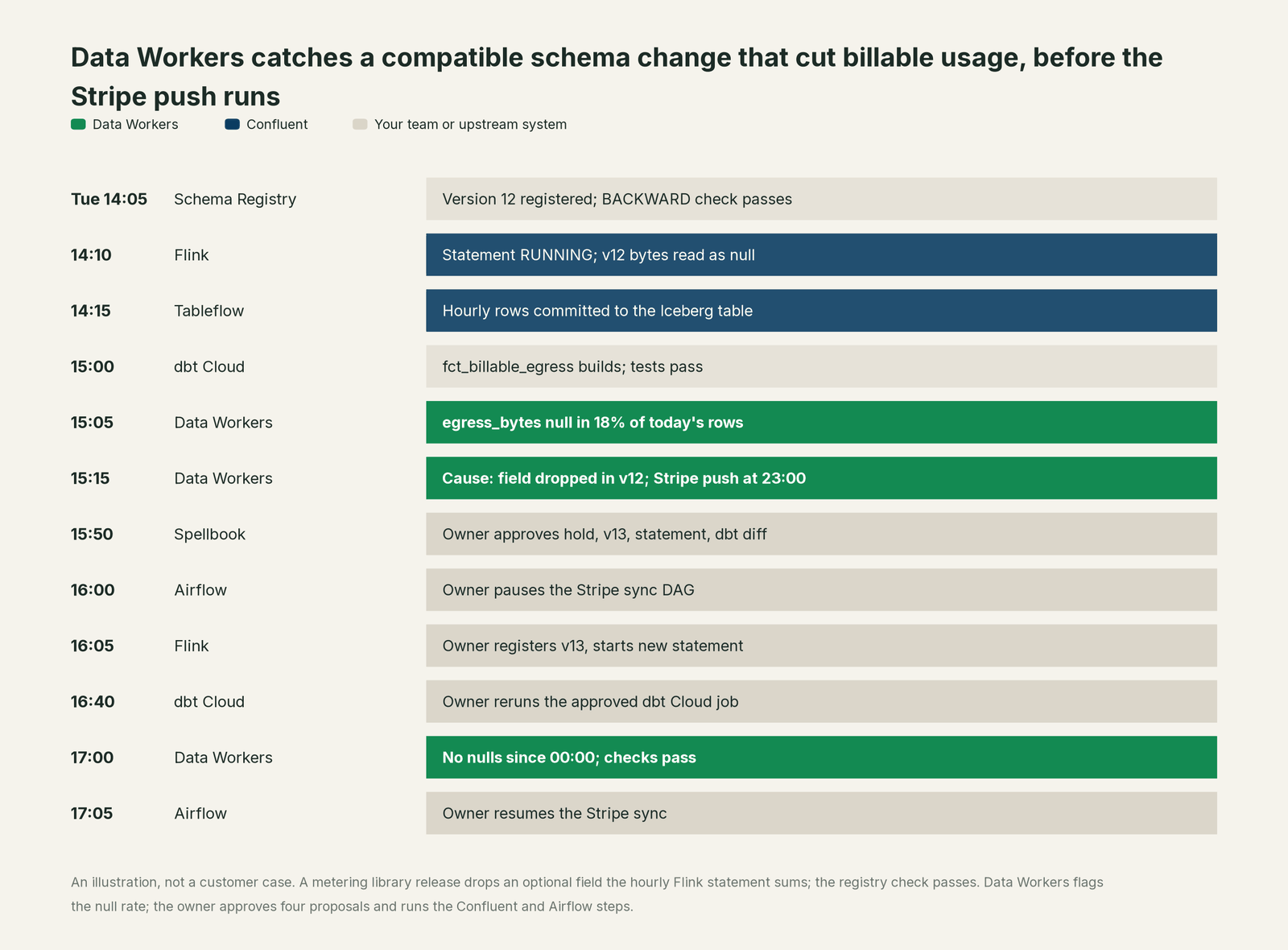
Every part of Confluent did its job. Under BACKWARD, consumers on the new schema can read data written with the previous one, and removing an optional field is allowed. Confluent's docs are plain about the other direction: there is no assurance that older consumers can read new data, so upgrade all consumers first. A Flink statement keeps the schema it was created with, so when the producer moved first, a two-year-old statement became that older consumer. Catching it takes knowledge outside the stream: that response_bytes is money, and that a billing push runs at 23:00.
| Job | What Confluent does | What Data Workers does |
|---|---|---|
| The move | Carries every event on Kafka with durability, ordering and low latency | Reads Kafka, Kafka Connect and Schema Registry natively, and the warehouse the stream lands in |
| The schema | Enforces each subject's compatibility rule and data contract rules | Checks what a schema version does downstream: which statements, tables, models and jobs read the field it changed |
| The processing | Runs Flink statements, connectors and Streaming Agents | Reads connector status natively and statement definitions over Confluent's MCP server, and connects them to the tables they feed |
| The tables | Tableflow materializes topics as Iceberg or Delta tables in your catalog | Checks those tables in the warehouse for nulls, volume, uniqueness and freshness |
| The fix | Applies whatever schema, statement or connector change the owner makes, in the console, the CLI or the Confluent MCP | Proposes the hold, the schema version, the corrected statement and the dbt diff to a named owner, then queues the approved downstream runs |
| The proof | Keeps statement history, audit logs and Stream Lineage | Re-checks the numbers and writes a receipt: what changed, who approved it, how it was checked, how to undo it |
Why doesn't Confluent just do this itself?
Because Confluent is built to move and process events durably at scale, and scopes its checks to the stream. A compatibility check answers one precise question about readers and writers of one subject, and answers it well. It does not ask whether a dbt model behind invoicing reads the statement's output, or whether a billing push runs tonight; those facts live in other systems.
Confluent's AI work follows the same scope, and it is careful. Confluent Intelligence brings Streaming Agents that run on Flink inside your streams, the Real-Time Context Engine (GA), anomaly detection with IBM Granite and Google TimesFM models, and the Confluent Assistant (Early Access), which restarts or reconfigures a connector only "with explicit user confirmation before any change is executed". The fully managed Confluent MCP server is mostly read-only; its write tools restart a connector, update its configuration, or create or delete a Flink SQL statement, and before any change it asks your MCP client to confirm the action with you. All of it operates Confluent's own estate, which is exactly where a streaming vendor should act.
Owning whether the numbers are right across a registry, a statement, a Tableflow table, Snowflake, dbt Cloud, Airflow and Stripe is a different product with a different liability: a context graph from topic to dashboard, blast-radius scoping, named approvals, a recorded undo and receipts an auditor can read. That is Data Workers. More in is it safe to let AI agents change production data.
Every tool owns a slice. Data Workers covers the whole lifecycle
Confluent owns moving the business's events in real time. Each point tool adds another console, contract and handoff. Data Workers covers the whole lifecycle with one context, one approval flow and one audit trail, and builds on the Confluent streams already there.
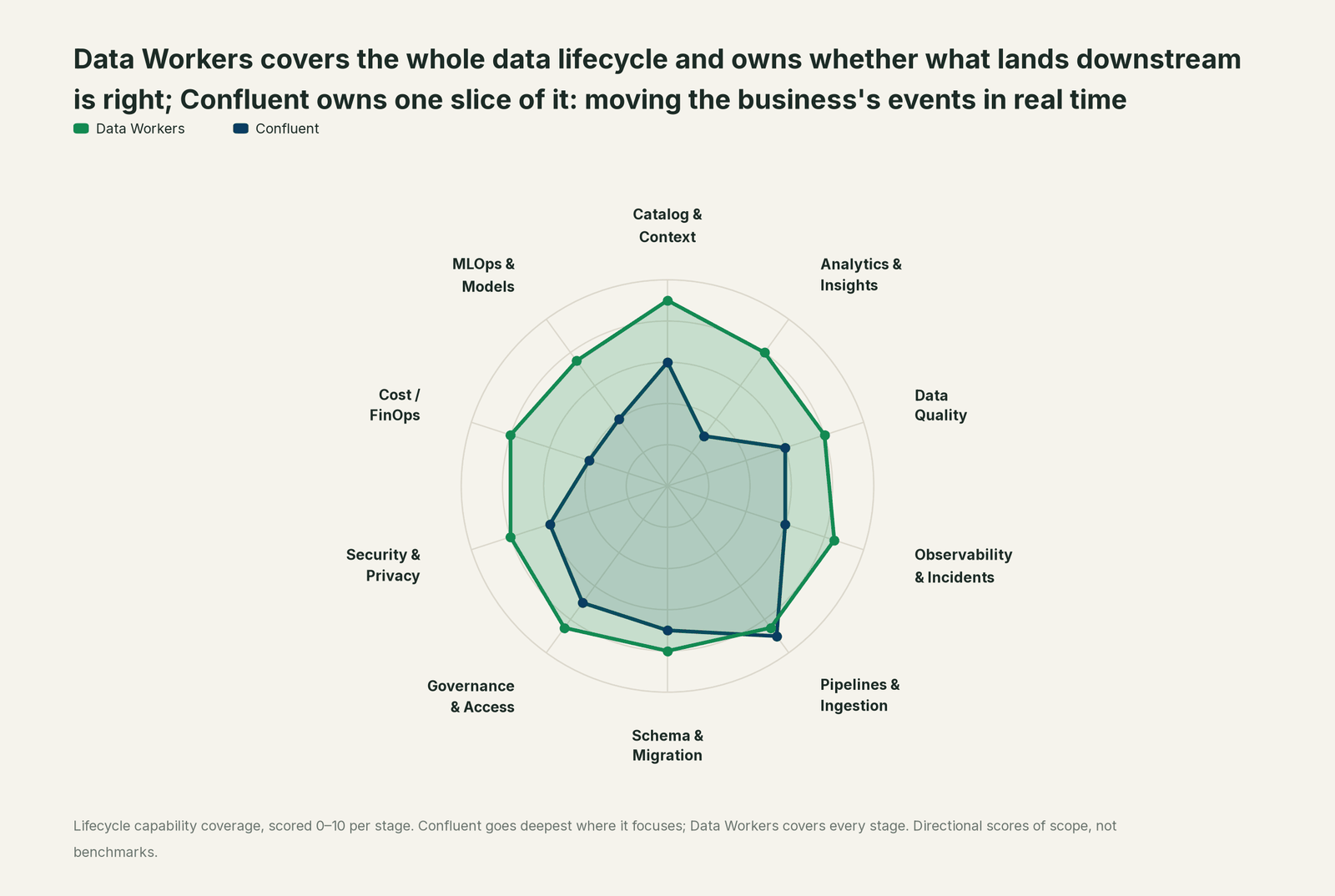
| Stage | Data Workers | Confluent | Why we scored it this way |
|---|---|---|---|
| Catalog & Context | 9 | 6 | Stream Catalog and Stream Lineage describe topics, schemas and their flow. Data Workers keeps one governed context graph from the topic to the warehouse table, the dbt model and the dashboard. |
| Analytics & Insights | 8 | 3 | Not Confluent's job: it moves and processes events, while business numbers live in BI. Data Workers answers data questions from governed definitions with lineage behind every number. |
| Data Quality | 8 | 6 | Data contracts and Schema Registry rules guard what producers write. Data Workers checks the tables the stream lands in, so a compatible change that empties a column still raises an incident. |
| Observability & Incidents | 8.5 | 6 | Flink statement status, connector status and Tableflow alerts show what Confluent runs. Data Workers diagnoses the data incident across systems, proposes the fix and verifies it. |
| Pipelines & Ingestion | 8.5 | 9 | Confluent's home stage: Kafka on Kora, 120+ pre-built connectors, Flink and Tableflow. Data Workers plans the reprocessing and queues the downstream reruns for the owner. |
| Schema & Migration | 8 | 7 | Schema Registry compatibility rules and Tableflow schema evolution keep each topic consistent. Data Workers traces a schema version through the statement, the table and every model that reads it. |
| Governance & Access | 8.5 | 7 | RBAC, audit logs and Stream Governance control who touches the stream. Data Workers routes every data change to a named approver and records the decision. |
| Security & Privacy | 8 | 6 | Encryption, private networking and BYOK protect the stream and Tableflow tables. Data Workers leaves a receipt on every data change. |
| Cost / FinOps | 8 | 4 | Cluster, CFU and Tableflow pricing cover the stream; warehouse spend sits in the warehouse. Data Workers traces Snowflake credits to the dbt model behind them. |
| MLOps & Models | 7.5 | 4 | Streaming Agents and the Real-Time Context Engine feed AI on live events. Data Workers keeps the data under models and agents healthy. |
How Confluent and Data Workers work together
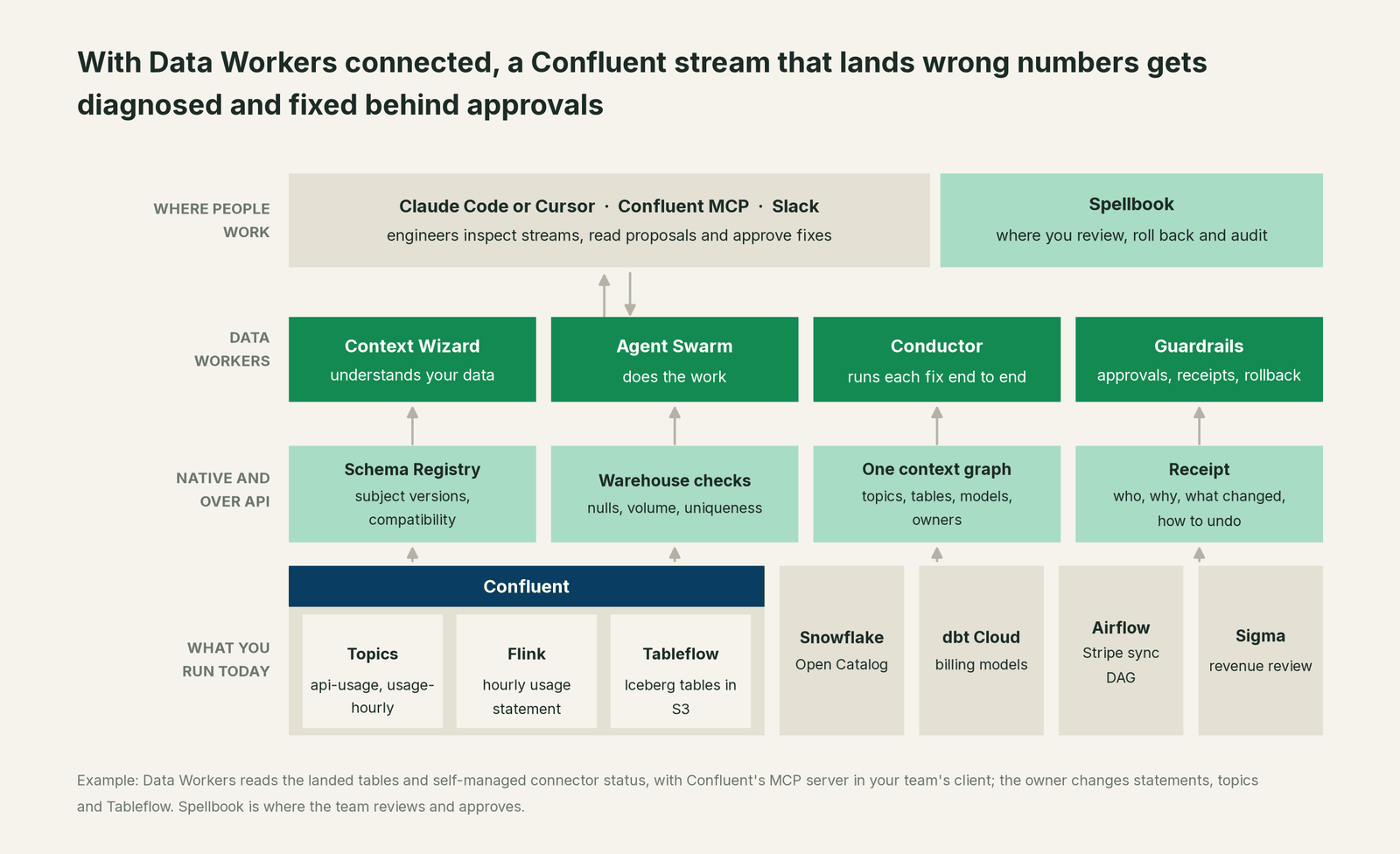
Kafka, Kafka Connect and Schema Registry connect natively. Point Data Workers at the Connect and registry endpoints your platform team runs: it reads connector and task status with get_connector_status, reads each subject's latest version, and checks a proposed schema against the subject's rule before anyone registers it. A new schema version is registered with register_stream_schema only after a named approval, in the stricter class reserved for changes to the live data stack. On Confluent Cloud, statements, Tableflow, subjects and connectors also reach Data Workers through Confluent's APIs or managed MCP server today.
What stays with your team is clear, by design. Data Workers does not restart connectors, reset offsets, change topics, partitions or retention, edit Flink statements or change Tableflow settings. The owner does, in the console, the CLI or the Confluent MCP after its confirmation step; Data Workers proposes the steps in order, scopes what they touch and verifies afterwards. Consumer lag comes from the monitoring you already run, such as Confluent's Metrics API into Datadog, a native read. Snowflake, dbt Cloud, Airflow and Slack connect natively too, among 50+ connectors. Stripe connects over its API, and Data Workers never pushes anything to Stripe: the billing team's DAG does.
Engineers run Confluent's MCP server and the Data Workers agents side by side: the Confluent server lists subjects, statements and Tableflow topics and makes the owner's changes; Data Workers answers "what did this stream do to the numbers, and what's the fix". The Data Workers side follows the documented client setup: clone the open-source repo and add each agent's start-agent.sh entry.
# Example: Confluent's open-source MCP server plus Data Workers agents in Claude Code
# Confluent MCP, limited to read tools for this session
claude mcp add confluent -- npx @confluentinc/mcp-confluent --config ./config.yaml \
  --allow-tools list-schemas,list-flink-statements,describe-flink-table,list-tableflow-topics,get-connector-status

# Data Workers agents, from a clone of the open-source repo
claude mcp add --scope user dw-connectors -- "$(pwd)/start-agent.sh" dw-connectors
claude mcp add --scope user dw-schema -- "$(pwd)/start-agent.sh" dw-schema
claude mcp add --scope user dw-catalog -- "$(pwd)/start-agent.sh" dw-context-catalog
claude mcp add --scope user dw-quality -- "$(pwd)/start-agent.sh" dw-quality
claude mcp add --scope user dw-incidents -- "$(pwd)/start-agent.sh" dw-incidents
List the tools with your client's own command (/mcp in Claude Code). In this incident: run_quality_check (dw-quality) runs the null, volume and uniqueness checks on Snowflake; diagnose_incident and get_incident_history (dw-incidents) name the cause and show whether this feed broke before; blast_radius_analysis and trace_cross_platform_lineage (dw-context-catalog) map what the empty field reached; assess_impact (dw-schema) sizes the change downstream; remediate re-checks the assertions and escalates any failure to a person. Teams on Confluent's fully managed MCP server add its global and regional endpoints instead.
In production the agents run in your infrastructure and hold the warehouse credentials and model key; the hosted Conductor sees workflow metadata only. More in where does our data go.
One incident, L0 to L4, set per domain:

- •L0 manual. On Thursday a customer says an invoice looks light. Finding the field takes a day, after two days of short bills.
- •L1 observe. Data Workers flags the null rate at 15:05 with cause and blast radius. Nothing changes.
- •L2 propose. Data Workers proposes the four changes. Nothing reaches production until the named owner approves; an unanswered request expires and escalates, never auto-grants.
- •L3 act reversibly. For a class with a clean record, Data Workers carries out reversible steps in the domain you open, such as queueing approved rebuilds, and sends any failed check to a person. Statements, topics and Tableflow stay with the owner.
- •L4 autonomous. For a scoped domain, producer teams send schema changes through Data Workers before registering them. It checks each against the registry rule and everything that reads the fields it touches, so the dropped field is flagged before the deploy.
Who sets those levels: who owns the agents, how approvals work for AI data agents and autonomy levels L0 to L4 explained.
What changes for your team
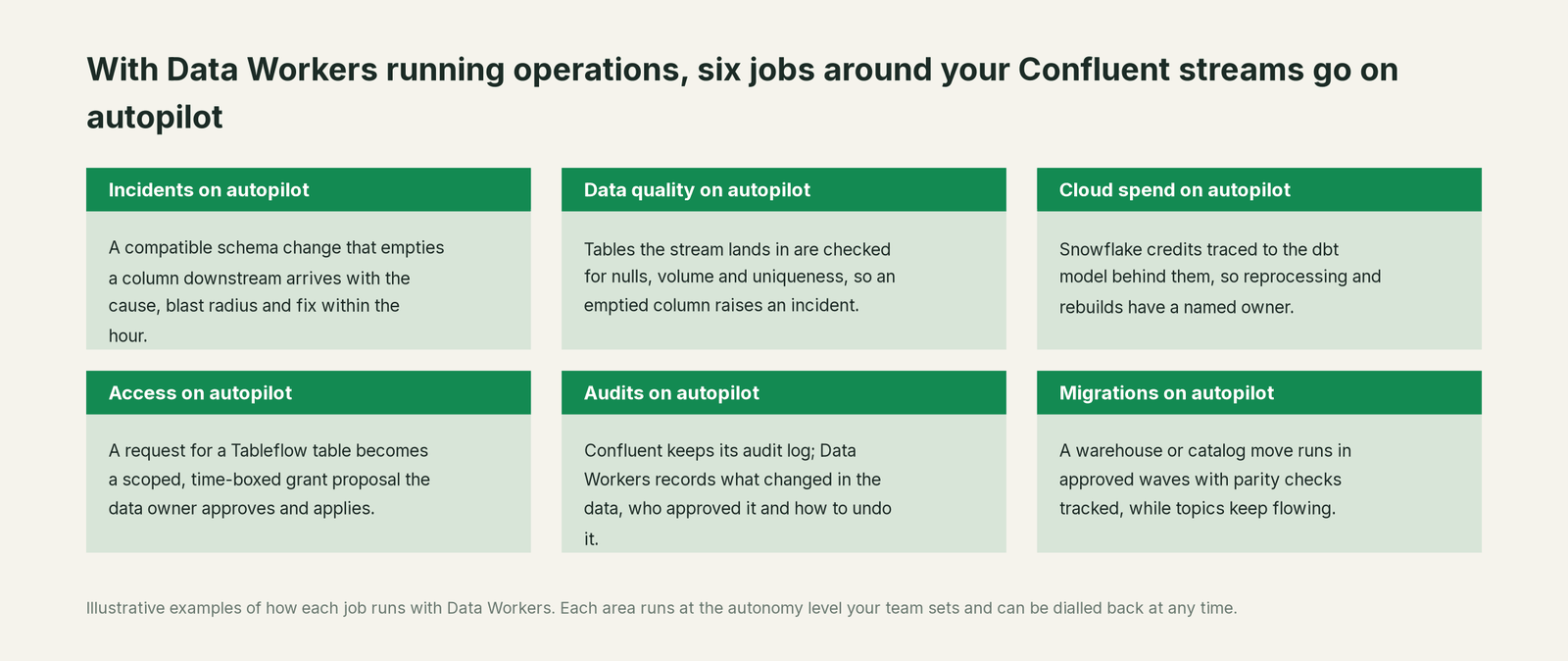
- •Producers and consumers share one record. Gateway, streaming platform and billing data teams see the same incident and receipt in Spellbook Data Catalog (in preview).
- •Schema reviews include downstream. A new subject version arrives with everything that reads the fields it touches, so "compatible" and "safe" are checked together, by the Schema Evolution agent.
- •Jobs that send data out get a guard. When a billing push or partner feed reads a table that just went wrong, the hold is proposed before it runs.
- •Reprocessing has a plan. A schema version, a corrected statement, its start offset and the rebuilds after it arrive as one approved sequence with a recorded undo.
Related reading: Confluent Schema Registry alternatives, top Kafka topic governance tools, real-time data quality monitoring for streams and inside the real-time Streaming agent.
Keep Confluent, or consolidate?
Keep Confluent if you love it; Data Workers works with it from day one. Many teams consolidate once Data Workers runs that slice too.
For almost every Confluent team the answer is keep it: managed Kafka, Flink and Tableflow from the people who built Kafka are hard to replace, and IBM adds watsonx.data, IBM MQ, webMethods and IBM Z integrations. What teams consolidate is the tooling around the landed data: a separate observability tool, hand-written checks on Tableflow tables, and "redeploy and eyeball the dashboard" runbooks. Neighbours: you're on Apache Kafka, you're on Apache Flink, you're on Redpanda and you're on dbt; Data Workers integrations lists what connects natively.
Building it yourself on the Confluent MCP and a coding agent? Read build it ourselves with Claude Code and MCP servers: listing statements from a chat is easy; the context graph, approvals, undo and receipts are the work.
The case for your CFO
The outcome. When a change on the stream quietly cuts the numbers behind billing or revenue, it is caught within the hour and corrected before an invoice goes out, with a record of how it was checked.
The risk story. At L1 agents only read. At L2 a named person approves each change; an unanswered request expires and escalates. L3 covers reversible changes in domains you open. Topics, statements, connectors and Tableflow stay with the owner. No agent can promote its own work, an org-wide stop halts all autonomous dispatch, and every change carries a receipt with its blast radius and undo. Nothing migrates.
Why now. Tableflow and Streaming Agents put the stream straight into tables and agents, so a wrong number travels further before anyone sees it.
The first win. L1 on the tables behind money numbers: a dropped field becomes a diagnosed incident before the billing run.
What stays the same. Confluent, your registry rules, warehouse, dbt and on-call rota. For the numbers, see the ROI of agentic data operations.
The sentence for upstairs: "Confluent moves our events in real time; Data Workers makes sure what lands is right and gets it fixed with our approval when it isn't, before we bill or report on it."
Getting started
Start with a pilot. Pick the topics and Tableflow tables behind billing or revenue, give Data Workers read access to the warehouse schemas they land in and to your registry and Connect endpoints, with Confluent's MCP server in your team's client, and run at L1 for a few weeks. Then turn on L2 for one domain, and open L3 for a narrow class once the receipts show the agents were right. The pilot path is on the pricing page, and the pilot is credited in full against the first year.
FAQ
How does Data Workers connect to Confluent? Kafka, Kafka Connect and Schema Registry connect natively, as do the Snowflake or BigQuery tables the stream lands in. Iceberg catalogs, Databricks, Flink, Tableflow, Confluent Intelligence and Confluent Cloud's own APIs connect over those APIs or the managed MCP server today.
Our schema change passed the compatibility check. How did it break billing? BACKWARD guarantees that consumers on the new schema can read data written with the previous one, and it allows removing a field. It does not promise that a consumer still on the old schema reads new data as expected; for a removed optional field, it gets null. Confluent's guidance is to upgrade consumers first, and a Flink statement keeps the schema it started with. Data Workers finds who still reads the field.
Will Data Workers restart our connectors or change our Flink statements? No. It reads connector status, statement definitions and subject versions. Restarts, config updates, statements, topics, offsets and Tableflow settings stay with the owner. The one registry write Data Workers makes is a schema version, after a named approval.
Does Data Workers read consumer lag? Lag comes from the monitoring you already run, such as Confluent's Metrics API in Datadog or Prometheus; Datadog and OpenTelemetry are native reads. Data Workers focuses on whether what the consumers wrote is right.
How does this compare with Confluent's own Streaming Agents? They work together. Streaming Agents run business logic on events inside Flink; Data Workers operates the data estate, checking what the stream and those agents land and getting fixes approved.
Does the IBM acquisition change anything for Data Workers? No. Confluent Cloud, Confluent Platform and WarpStream keep their APIs, and Data Workers keeps one incident record across them and the rest of your estate.
Sources
- •IBM newsroom, "IBM Completes Acquisition of Confluent, Making Real Time Data the Engine of Enterprise AI and Agents" (Mar 17, 2026; $31 per share, about $11 billion), https://newsroom.ibm.com/2026-03-17-ibm-completes-acquisition-of-confluent,-making-real-time-data-the-engine-of-enterprise-ai-and-agents (checked Oct 3, 2026)
- •Confluent, press releases (Mar 17, 2026 entry), https://www.confluent.io/press-release/ (checked Oct 3, 2026)
- •Confluent, homepage (products, 120+ pre-built connectors), https://www.confluent.io/ (checked Oct 3, 2026)
- •Confluent blog, Q3 2026 Confluent Cloud launch (Aug 18, 2026), https://www.confluent.io/blog/2026-q3-confluent-cloud-launch/ (checked Oct 3, 2026)
- •Confluent blog, Q3 2026 Confluent Intelligence update (Aug 18, 2026; Real-Time Context Engine GA, Confluent Assistant EA and its confirmation quote), https://www.confluent.io/blog/2026-q3-confluent-intelligence-ai-update/ (checked Oct 3, 2026)
- •Confluent docs, managed MCP servers (write tools; client confirmation), https://docs.confluent.io/cloud/current/ai/ai-tools/managed-mcp-server.html (checked Oct 3, 2026)
- •Confluent docs, schema evolution and compatibility (BACKWARD rules; upgrade consumers first), https://docs.confluent.io/platform/current/schema-registry/fundamentals/schema-evolution.html (checked Oct 3, 2026)
- •Confluent docs, schema and statement evolution in Confluent Cloud for Apache Flink (read schema fixed at creation), https://docs.confluent.io/cloud/current/flink/concepts/schema-statement-evolution.html (checked Oct 3, 2026)
- •Confluent docs, Tableflow overview (formats, catalogs, schema evolution), https://docs.confluent.io/cloud/current/topics/tableflow/overview.html (checked Oct 3, 2026)
- •Confluent docs, Streaming Agents overview, https://docs.confluent.io/cloud/current/ai/streaming-agents/overview.html (checked Oct 3, 2026)
- •Confluent, mcp-confluent (open-source MCP server), https://github.com/confluentinc/mcp-confluent (checked Oct 3, 2026)
- •Data Workers open-source repository, https://github.com/DataWorkersProject/dataworkers-claw-community (checked Oct 3, 2026)
- •Data Workers client setup guide, https://dataworkers.io/opensource-docs/client-setup/ (checked Oct 3, 2026)