You're on Redpanda: It Streams Your Events With Kafka Compatibility. Data Workers Owns Whether What Lands Downstream Is Right
Redpanda streams your events with Kafka compatibility, Redpanda Connect and Iceberg Topics. Data Workers catches the records parked in a DLQ table, traces them and gets the fix approved.
Your streaming team runs Redpanda: a single binary that speaks the Kafka API, on Redpanda Cloud (Serverless, BYOC or Dedicated) or self-managed, with a built-in Schema Registry. Redpanda Connect pipelines, written in YAML or assembled in the new visual composer, pull webhooks, databases and SaaS tools into topics. Iceberg Topics write those topics as Apache Iceberg tables in a REST catalog such as AWS Glue, Databricks Unity Catalog or Google Lakehouse, so your warehouse reads the stream as tables. Some of you arrived from Confluent through Shadowing, and the Agentic Data Plane now governs your AI agents.
Redpanda is excellent at its job, and careful with bad records: when a record can't be translated into its Iceberg table, Redpanda parks it in a dead-letter (DLQ) table instead of dropping it. What happens next is a different job. The main table is now short, every dashboard on it is short, and a payout job reading it at 02:00 doesn't know. Data Workers watches what the stream lands, traces a short number to its cause and gets the fix approved before money moves on it.
Key takeaways
- •Redpanda keeps its job. Topics, Redpanda Connect, Iceberg Topics, Schema Registry and Shadowing stay with your streaming team. Data Workers works on what the stream lands and what reads it.
- •Parked records become an incident. When records pile up in an Iceberg DLQ table, Data Workers sees the main table come up short and lists every model, dashboard and job the gap would reach.
- •It connects where the data lands. BigQuery and Snowflake are native reads, as is a Confluent-compatible Schema Registry your team runs. Databricks, Iceberg REST catalogs, Redpanda Connect, the Admin API and the Agentic Data Plane connect over their APIs or MCP today.
- •Every fix goes through a named person. The owner approves each proposal and makes the Redpanda change.
- •It stacks with the Agentic Data Plane. ADP governs which tools agents may call; Data Workers is a team of data agents whose own changes need approvals and leave receipts.
Redpanda streams the business's events with Kafka compatibility. Data Workers owns whether what lands downstream is right.
The job downstream is to notice that a number built on Redpanda's tables is wrong, find the cause, size the damage, hold anything that pays out on it, get the fix made where it lives and prove the result. Here is one Thursday at a live-events ticketing marketplace on Redpanda BYOC in Google Cloud. This is an illustration, not a customer case.
The setup: web and app checkouts produce to checkout_events with the Schema Registry serializer. The topic is an Iceberg Topic in value_schema_id_prefix mode, written to the Google Lakehouse REST catalog and queried from BigQuery. Lakehouse table names can't contain tildes, so the team set the DLQ suffix to _dlq. dbt on BigQuery, run by Dagster, builds fct_ticket_orders hourly; the Dagster job promoter_payouts builds the organizers' settlement file at 02:00; the Looker Explore "Gross ticket sales" opens Friday's trading review.
| Time | System | What happens |
|---|---|---|
| Thu 10:55 | Redpanda Connect | The platform team retires an old relay for the box-office partner feed, about 30% of orders on an on-sale day. Its replacement, built in the visual composer, is an http_server input, a Bloblang mapping and a redpanda output to checkout_events. It has no schema_registry_encode processor, so records go out as plain JSON |
| 11:02 | Iceberg Topics | Box-office records arrive without the wire-format header (a 0x00 byte and the schema ID). Redpanda can't translate them and, by default, writes them to checkout_events_dlq. Real-time JSON consumers read them fine. Nothing is lost, and nothing alerts |
| 12:05 | dbt + BigQuery | The hourly Dagster run builds fct_ticket_orders from the main table. Every dbt test passes: the rows that are there are valid |
| 12:20 | Data Workers + BigQuery | run_quality_check reads the 11:00 hour's order count from BigQuery. Recorded with monitor_metrics, it sits 31% under its baseline while web and app checkouts are normal. Data Workers opens an incident |
| 12:35 | Data Workers | run_quality_check on checkout_events_dlq, empty at its last check, counts 18,940 rows. In Datadog, redpanda_iceberg_translation_invalid_records rose from zero at 11:02 with no monitor on it. Data Workers names the likely cause from Redpanda's documented list: records produced without the wire format. blast_radius_analysis returns fct_ticket_orders, the Looker Explore and promoter_payouts, which would underpay 212 organizers tonight |
| 12:40 | Slack | The approval request goes to the streaming platform owner, with the finance data owner copied. She opens the new pipeline and confirms: no encoder |
| 13:10 | Spellbook | She reviews three proposals: pause promoter_payouts; add schema_registry_encode with the subject checkout_events-value before the output; and a dbt diff adding stg_box_office_recovered, which parses the DLQ rows from 11:02 to the fix, unions them into staging and dedupes on order_id. She approves all three |
| 13:15 | Dagster | She pauses the promoter_payouts schedule |
| 13:30 | Redpanda Connect | She deploys the updated pipeline. New box-office records carry the wire format and land in the main table |
| 13:50 | GitHub | She merges the dbt diff |
| 13:55 | Data Workers + Dagster | Data Workers queues the approved dbt job with trigger_dagster_job; Dagster finishes it at 14:12 |
| 14:30 | Data Workers + BigQuery | It verifies: the DLQ row count has stopped growing, every hour since 11:00 is back on its baseline, and order_id is unique in fct_ticket_orders. The receipt records cause, approvals, runs, checks and the undo (revert the dbt diff; the DLQ table stays untouched) |
| 14:35 | Dagster | The owner resumes the schedule. At 02:00 organizers are paid on every ticket sold |
| Fri 09:00 | Looker | The trading review opens on the full on-sale numbers |
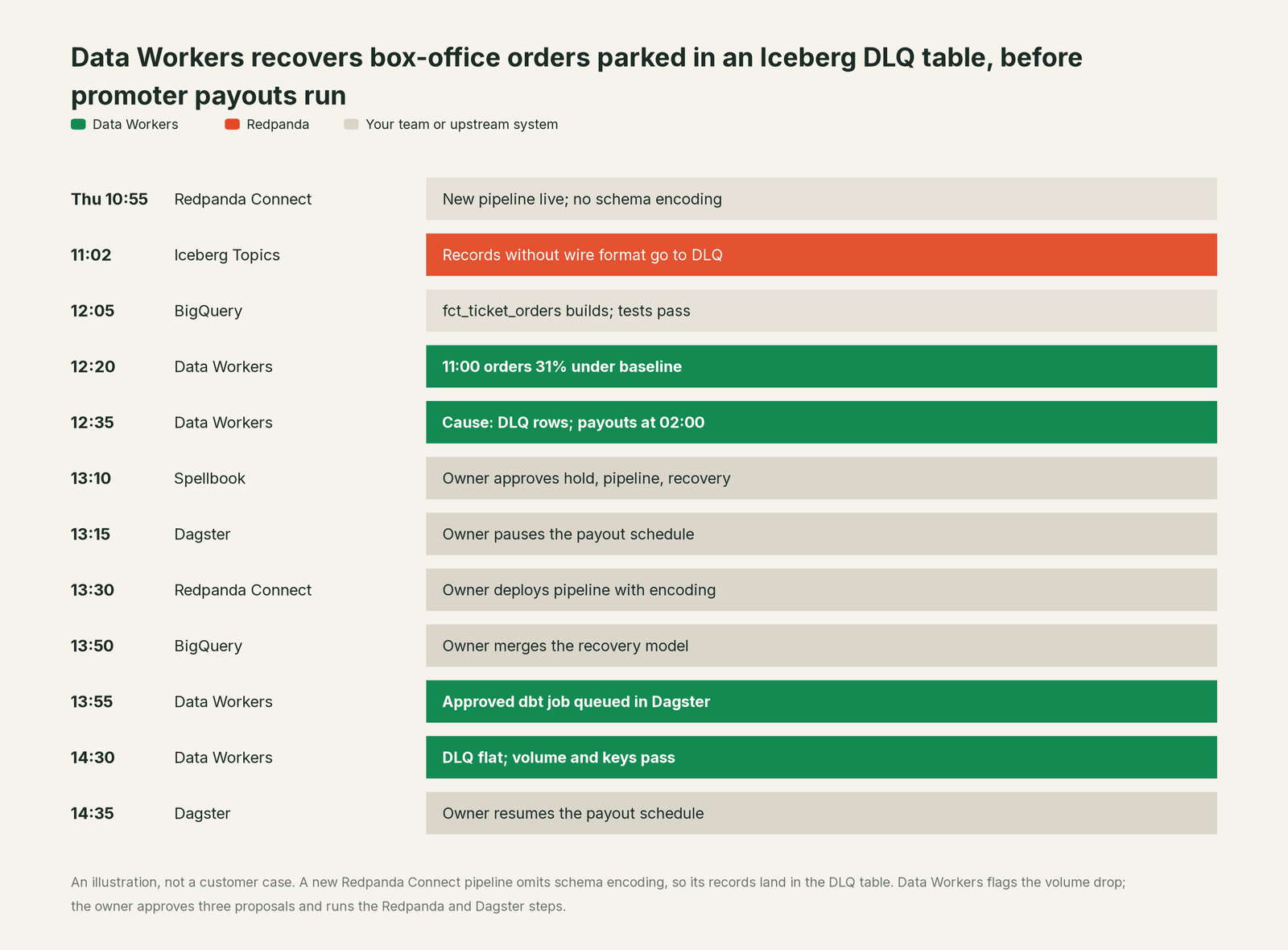
Every part of Redpanda did its job. Iceberg Topics did what the docs promise in value_schema_id_prefix mode: records without the wire format go to the DLQ table, so nothing is lost and the main table stays clean. Redpanda's guidance covers the next step: inspect the DLQ table and reprocess the records, exactly once. Knowing to do it before 02:00 takes facts outside the stream: those rows are revenue, and a payout job reads the table tonight.
| Job | What Redpanda does | What Data Workers does |
|---|---|---|
| The move | Streams every event over the Kafka API with durability and low latency, in your cloud account on BYOC | Reads the warehouse the stream lands in, and the subjects in a registry your team runs |
| The pipelines | Runs Redpanda Connect pipelines from webhooks, databases and SaaS tools into topics | Checks the tables each pipeline feeds, and reviews pipeline changes your team keeps in Git |
| The schema | Holds subjects, versions and compatibility rules, and migrates them from Confluent with Shadowing | Traces each field to every table, model and dashboard that reads it |
| The tables | Writes Iceberg Topics into your catalog and parks untranslatable records in a DLQ table | Checks the main tables for volume, uniqueness and freshness, and counts the DLQ rows beside them |
| The fix | Applies the pipeline, topic or schema change the owner makes, in Redpanda Cloud, rpk or GitOps | Proposes the hold, the pipeline change and the recovery model to a named owner, then queues the approved downstream runs |
| The proof | Keeps metrics, the Iceberg health endpoint and audit logs for the platform | Re-checks the numbers and writes a receipt: what changed, who approved it, how it was checked, how to undo it |
Why doesn't Redpanda just do this itself?
Because Redpanda is built to stream and store events with as little to operate as possible, and scopes its decisions to the stream. Parking bad records in a DLQ table, rather than blocking the topic or dropping them, is the right call for a streaming platform: producers keep flowing and nothing is lost. Whether those rows matter to a payout job three systems away is a fact Redpanda has no reason to hold.
Redpanda's AI work follows a clear line too. The Agentic Data Plane, GA on AWS since June 16, 2026, is in Redpanda's words governance infrastructure that "sits between your agents and your data, gives every agent an identity, mediates every tool call and data access, and records every action so you can replay and audit it", with managed and self-managed MCP servers, the AI Gateway, guardrails, budgets and transcripts. Redpanda SQL, GA since May 27, 2026 for BYOC on AWS, queries live topics and Iceberg history in one statement. All of it governs and serves the estate Redpanda runs, which is where a streaming vendor should act.
Owning whether the numbers are right from the pipeline to Looker is a different product with a different liability: a context graph, blast-radius scoping, named approvals, a recorded undo and receipts an auditor can read. That is Data Workers. More in is it safe to let AI agents change production data.
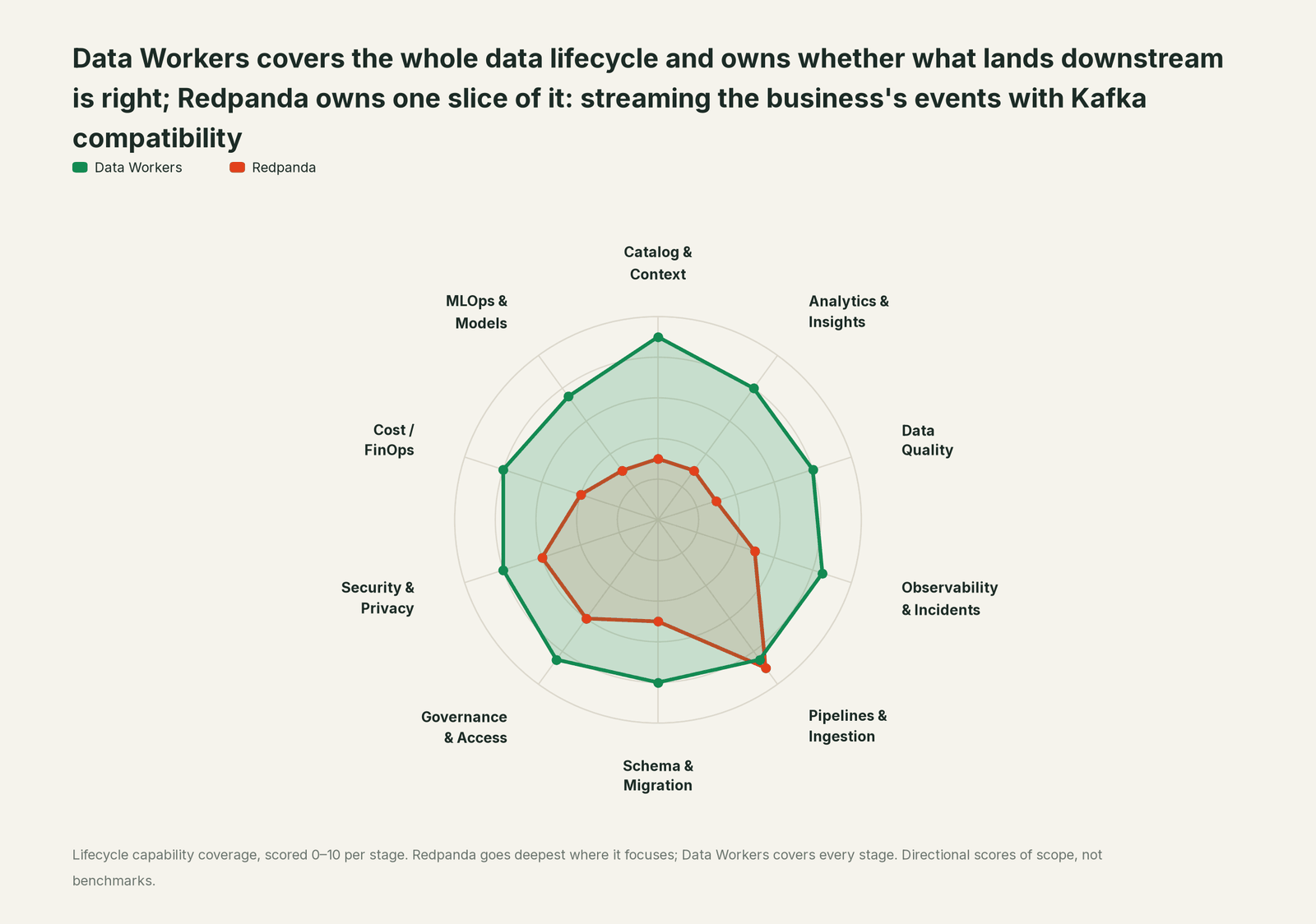
Every tool owns a slice. Data Workers covers the whole lifecycle
Each point tool adds another console, contract and handoff. Data Workers covers the whole lifecycle with one context, one approval flow and one audit trail, and builds on the Redpanda streams already there.
| Stage | Data Workers | Redpanda | Why we scored it this way |
|---|---|---|---|
| Catalog & Context | 9 | 3 | Topics, subjects and the Iceberg catalog describe the stream. Data Workers keeps one governed context graph from the table to the dbt model and the Looker Explore. |
| Analytics & Insights | 8 | 3 | Redpanda SQL queries live topics and Iceberg history. Data Workers answers data questions from governed definitions with lineage behind every number. |
| Data Quality | 8 | 3 | Schema Registry and the DLQ table keep bad records out of the main table. Data Workers checks the landed tables for volume, nulls and uniqueness, and tracks lateness against a baseline your team records. |
| Observability & Incidents | 8.5 | 5 | Broker, pipeline and Iceberg metrics plus a commit-lag health endpoint show how Redpanda runs. Data Workers diagnoses the data incident across systems and verifies the fix. |
| Pipelines & Ingestion | 8.5 | 9 | Redpanda's home stage: a Kafka-compatible single binary, Redpanda Connect and Iceberg Topics. Data Workers plans the recovery and queues the downstream reruns. |
| Schema & Migration | 8 | 5 | Schema Registry, contexts and Shadowing's schema migration keep subjects consistent. Data Workers traces a change through every table and model that reads it. |
| Governance & Access | 8.5 | 6 | ACLs, RBAC and the Agentic Data Plane's identities and policies govern people and agents. Data Workers routes every data change to a named approver. |
| Security & Privacy | 8 | 6 | BYOC keeps data in your cloud account; ADP guardrails and audit logs cover agent calls. Data Workers leaves a receipt on every data change. |
| Cost / FinOps | 8 | 4 | Serverless, BYOC and Dedicated pricing cover the stream. Data Workers traces Snowflake spend to the dbt model and reads BigQuery and AWS spend. |
| MLOps & Models | 7.5 | 3 | ADP governs agents and AI Gateway proxies model calls. Data Workers keeps the data under models and agents healthy. |
How Redpanda and Data Workers work together
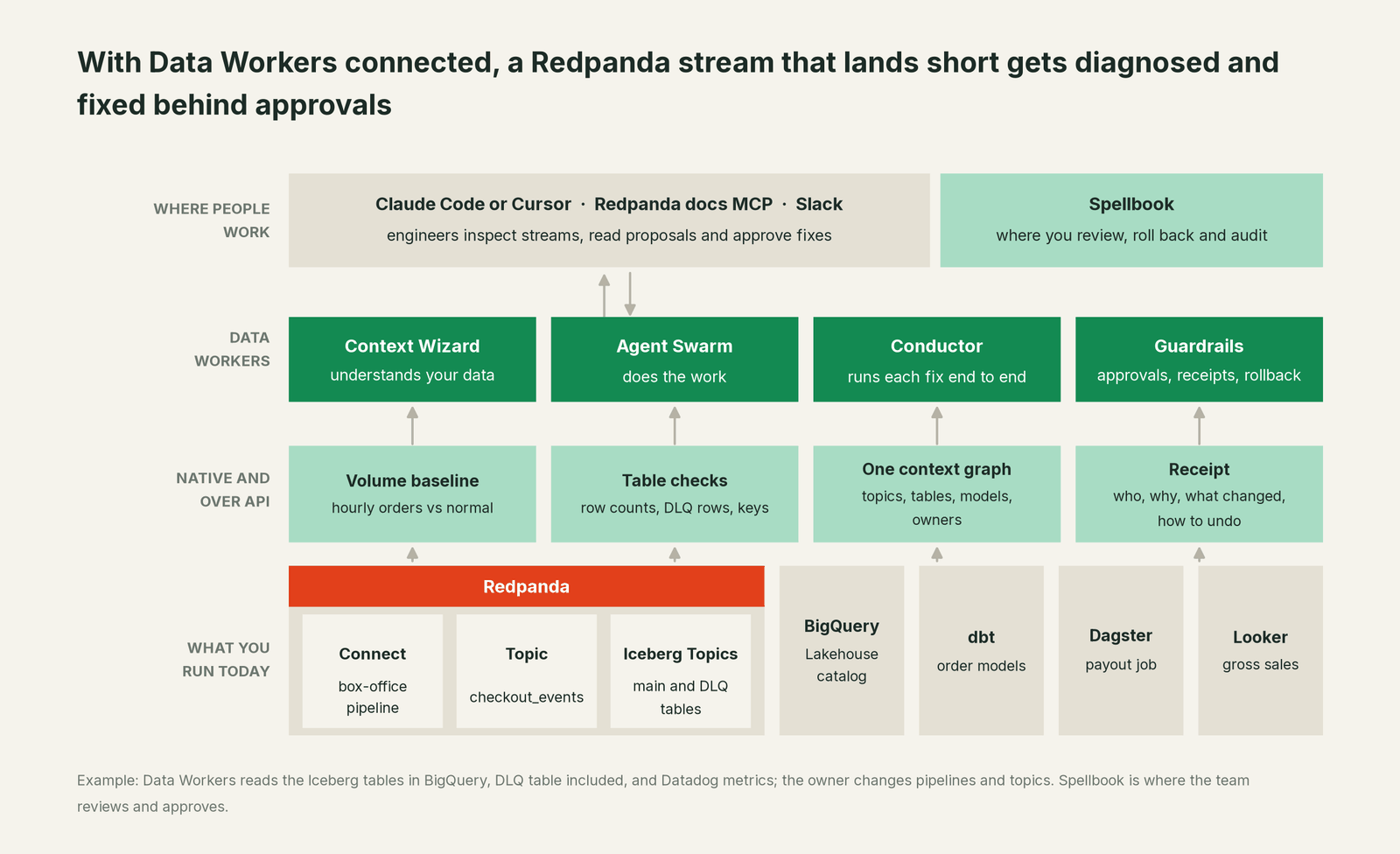
Data Workers connects where the stream lands. The Iceberg tables Redpanda writes are read natively where you query them in BigQuery or Snowflake; Databricks and Iceberg REST catalogs connect over their APIs or MCP today. Redpanda serves a Confluent-compatible Schema Registry, and Data Workers' native Schema Registry connector reads a registry endpoint your team runs; where the registry takes credentials, it connects over its API or MCP server today, in your team's client. It checks a proposed schema against the subject's rule, and registers a version with register_stream_schema only after a named approval. Redpanda Connect, the Admin API's Iceberg health endpoint and the Agentic Data Plane connect over their APIs or MCP today. Dagster, Looker (read), Datadog (read) and Slack connect natively, among 50+ connectors.
What stays with your team is clear, by design. Pipeline deploys, topic properties such as the Iceberg mode or the invalid-record action, offsets, partitions, retention and shadow links belong to the owner, in Redpanda Cloud, rpk or GitOps; Data Workers proposes the steps in order, scopes what they touch and verifies afterwards. Consumer lag and Iceberg commit lag come from the monitoring you already run, such as Redpanda's metrics in Datadog.
Redpanda's docs MCP server answers configuration questions in the editor; Data Workers answers "what did this stream do to the numbers, and what's the fix". The Data Workers side follows the documented client setup: clone the open-source repo and add each agent's start-agent.sh entry.
# Example: Redpanda's docs MCP server plus Data Workers agents in Claude Code
claude mcp add --transport http redpanda-docs https://docs.redpanda.com/mcp

# Data Workers agents, from a clone of the open-source repo
claude mcp add --scope user dw-connectors -- "$(pwd)/start-agent.sh" dw-connectors
claude mcp add --scope user dw-schema -- "$(pwd)/start-agent.sh" dw-schema
claude mcp add --scope user dw-catalog -- "$(pwd)/start-agent.sh" dw-context-catalog
claude mcp add --scope user dw-quality -- "$(pwd)/start-agent.sh" dw-quality
claude mcp add --scope user dw-incidents -- "$(pwd)/start-agent.sh" dw-incidents
List the tools with your client's own command (/mcp in Claude Code). In this incident: run_quality_check (dw-quality) reads row counts and uniqueness from BigQuery; monitor_metrics (dw-incidents) scores the hourly count against its baseline; diagnose_incident and get_incident_history name the cause and show whether this feed broke before; blast_radius_analysis and trace_cross_platform_lineage (dw-context-catalog) map what the missing orders reached; trigger_dagster_job (dw-connectors) queues the approved rebuild; remediate re-checks the assertions and escalates any failure to a person.
In production the agents run in your infrastructure and hold the warehouse credentials and model key; your data stays in your systems, and the hosted Conductor sees workflow metadata only. More in where does our data go.
One incident, L0 to L4, set per domain:

- •L0 manual. On Monday an organizer asks why their payout is light. Someone finds the DLQ table by Tuesday, after a weekend of short settlements.
- •L1 observe. Data Workers flags the volume gap at 12:20 with the cause and blast radius. Nothing changes.
- •L2 propose. Data Workers proposes the hold, the pipeline change and the recovery model. Nothing reaches production until the named owner approves; an unanswered request expires and escalates, never auto-grants.
- •L3 act reversibly. For a class with a clean record, Data Workers carries out reversible steps in the domain you open, such as queueing approved rebuilds. Pipelines and topic properties stay with the owner.
- •L4 autonomous. For a scoped domain, pipeline changes kept in Git reach Data Workers as pull requests before they go live. It checks the output against the topic's Iceberg mode and everything downstream, so a missing encoder is flagged before the first record.
Who sets those levels: who owns the agents, how approvals work for AI data agents and autonomy levels L0 to L4 explained.
What changes for your team
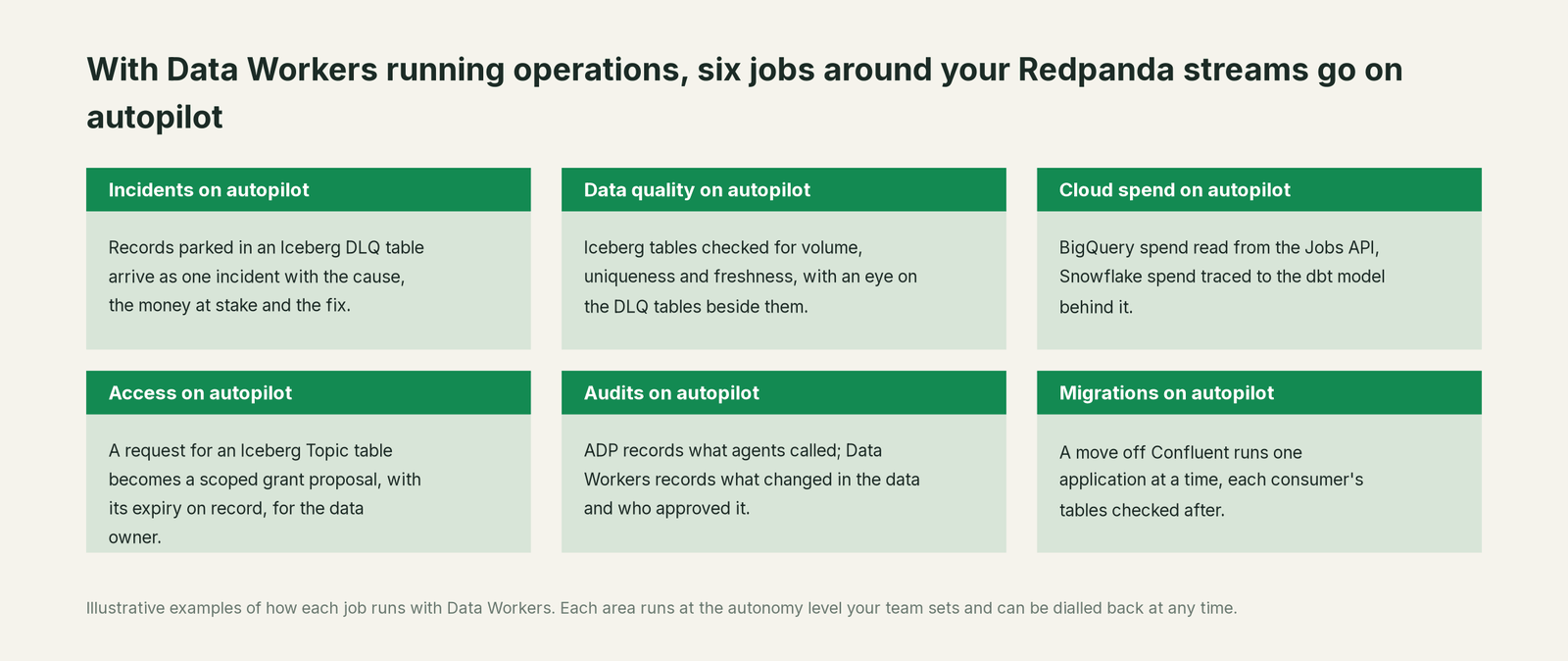
- •Producers and consumers share one record. Platform, partner integration and finance data teams see the same incident and receipt in Spellbook Data Catalog (in preview).
- •DLQ tables stop being silent. Rows piling up in a DLQ table are counted against what the main table should hold, so a parked feed becomes an incident with an owner, by the Incident Debugging agent.
- •Jobs that pay out get a guard. When a settlement, billing or partner job reads a table that just came up short, the hold is proposed before it runs.
- •Migrations off Confluent keep their numbers. While Shadowing moves one application at a time, Data Workers checks each consumer's tables after cutover, by the Schema Evolution agent and the quality checks.
Related reading: inside the real-time Streaming agent and real-time data quality monitoring for streams.
Keep Redpanda, or consolidate?
Keep Redpanda if you love it; Data Workers works with it from day one. Many teams consolidate once Data Workers runs that slice too.
For almost every Redpanda team the answer is keep it: one Kafka-compatible binary, Iceberg Topics without a separate sink and BYOC are hard to give back. What teams consolidate is the tooling around the landed data: a separate observability tool, hand-written row-count checks on Iceberg tables, and "check the DLQ table on Monday" runbooks. Neighbours: you're on Confluent, you're on Apache Kafka and you're on Dagster; Data Workers integrations lists what connects natively.
Building it yourself with a coding agent? Read build it ourselves with Claude Code and MCP servers: counting DLQ rows is easy; the context graph, approvals, undo and receipts are the work.
The case for your CFO
The outcome. When a change on the stream quietly drops a share of orders from the tables behind payouts or revenue, it is caught within the hour and recovered before money moves, with a record of how it was checked.
The risk story. At L1 agents only read. At L2 a named person approves each change; an unanswered request expires and escalates. L3 covers reversible changes in domains you open. Pipelines, topics and shadow links stay with the owner. No agent can promote its own work, an org-wide stop halts all autonomous dispatch, and every change carries a receipt with its blast radius and undo. Nothing migrates.
Why now. Iceberg Topics put the stream straight into the tables finance and agents read, so a short table reaches a payout before anyone looks at a DLQ table.
What stays the same. Redpanda, your pipelines, your warehouse, dbt, Dagster and your on-call rota. For the numbers, see the ROI of agentic data operations.
The sentence for upstairs: "Redpanda streams our events; Data Workers makes sure what lands is complete and right, and gets it fixed with our approval when it isn't, before we pay out or report on it."
Getting started
Start with a pilot. Pick the Iceberg Topics and tables behind payouts, billing or revenue, give Data Workers read access to the warehouse schemas they land in and their DLQ tables, and run at L1 for a few weeks. Then turn on L2 for one domain, and open L3 for a narrow class once the receipts show the agents were right. The pilot path is on the pricing page, and the pilot is credited in full against the first year.
FAQ
How does Data Workers connect to Redpanda? Where the stream lands: the Iceberg tables Redpanda writes are read natively in BigQuery and Snowflake, and a Confluent-compatible Schema Registry your team runs is a native read. Databricks, Iceberg REST catalogs, Redpanda Connect, the Admin API and the Agentic Data Plane connect over their APIs or MCP today.
Why did our records land in the DLQ table instead of the Iceberg table? In value_schema_id_prefix mode Redpanda needs each record in the Schema Registry wire format: a 0x00 header byte followed by the schema ID. Records without it, with an ID the registry can't find, or with types it can't map to Iceberg go to the DLQ table by default. A producer or pipeline that skips schema encoding is the usual cause.
Will Data Workers change our pipelines or topic settings? No. Pipeline deploys, topic properties, offsets and shadow links stay with the owner. Data Workers proposes the change, and the one registry write it makes is a schema version, after a named approval.
How does this relate to the Redpanda Agentic Data Plane? They do different jobs. ADP governs agents: identity, tool access, policies, budgets and transcripts. Data Workers is a team of data agents that checks what the stream lands and gets fixes approved by a named owner.
We're migrating from Confluent with Shadowing. Where does Data Workers help? Shadowing carries topic data, schemas, offsets and ACLs, and you cut over one application at a time. Data Workers checks each consumer's tables after its cutover, so a migration that kept every offset also kept every number.
Sources
- •Redpanda, homepage (Agentic Data Plane and streaming; products), https://www.redpanda.com/ (checked Oct 3, 2026)
- •Redpanda docs, What's New in Redpanda 26.2 (Shadowing schema migration, Iceberg translation control, Iceberg health endpoint; v26.2.3), https://docs.redpanda.com/streaming/current/get-started/release-notes/redpanda.md (checked Oct 3, 2026)
- •Redpanda docs, About Iceberg Topics (BYOC and BYOVPC; no backfill), https://docs.redpanda.com/cloud-data-platform/manage/iceberg/about-iceberg-topics.md (checked Oct 3, 2026)
- •Redpanda docs, Use Iceberg catalogs (Glue, Unity Catalog, Lakehouse, Snowflake Open Catalog), https://docs.redpanda.com/cloud-data-platform/manage/iceberg/use-iceberg-catalogs.md (checked Oct 3, 2026)
- •Redpanda docs, Troubleshoot Iceberg Topics (DLQ table and causes, reprocessing, metrics; modified May 26, 2026), https://docs.redpanda.com/cloud-data-platform/manage/iceberg/iceberg-troubleshooting.md (checked Oct 3, 2026)
- •Redpanda docs, Iceberg Topics with GCP Lakehouse (DLQ suffix without dots or tildes; Jun 11, 2026), https://docs.redpanda.com/cloud-data-platform/manage/iceberg/iceberg-topics-gcp-biglake.md (checked Oct 3, 2026)
- •Redpanda docs, Redpanda Connect processors (
schema_registry_encode), https://docs.redpanda.com/cloud-data-platform/develop/connect/components/processors/llms.txt (checked Oct 3, 2026) - •Redpanda docs, Agentic Data Plane overview (modified Sep 24, 2026), https://docs.redpanda.com/agentic-data-plane/get-started/adp-overview.md (checked Oct 3, 2026)
- •Redpanda blog, "What's new in the Redpanda Agentic Data Plane" (Jun 16, 2026; GA on AWS), https://www.redpanda.com/blog/governing-ai-agents-in-production-agentic-data-plane (checked Oct 3, 2026)
- •Redpanda blog, "Redpanda SQL is GA" (May 27, 2026), https://www.redpanda.com/blog/redpanda-sql-ga (checked Oct 3, 2026)
- •Redpanda blog, "Push-button migration from Confluent to Redpanda" (Aug 25, 2026), https://www.redpanda.com/blog/migrate-confluent-redpanda-shadowing (checked Oct 3, 2026)
- •Redpanda blog index (visual composer for Redpanda Connect, Jul 23, 2026), https://www.redpanda.com/blog (checked Oct 3, 2026)
- •Redpanda docs, How to use these docs (docs MCP server), https://docs.redpanda.com/home/how-to-use-these-docs.md (checked Oct 3, 2026)
- •Data Workers client setup guide, https://dataworkers.io/opensource-docs/client-setup/ (checked Oct 3, 2026)