Instrumentation QA on every release, run by agents
A client release renames an event, drops a property or ships an event nobody planned, and the damage shows up weeks later as a flat funnel or a skewed experiment. Here is how Data Workers checks every release against your tracking plan the day it ships.
Key takeaways
- •The problem today. Every client release can rename an event, drop a property or add an event nobody planned. Nothing checks the release against the tracking plan, so the break surfaces weeks later in a funnel, a cohort or an experiment readout.
- •What changes. Agents compare what each release actually sends with the tracking plan the day it ships, list what broke and which dashboards and experiments read it, and propose the fix to the event owner.
- •What stays with your people. Any change to the tracking plan or to a certified metric: a named approver signs off, and the team that shipped the release decides whether to patch it.
- •The result. Instrumentation problems are found on the release that caused them, not by a product manager asking why a chart moved.
The problem today
The tracking plan says "Checkout Started". The new Android build sends "checkout_started". The iOS build still sends the old name, and users on last month's app keep sending it for weeks. The "plan_tier" property is gone from the upgrade event because a refactor moved the call. A new onboarding feature fires six events that are in nobody's plan.
None of this fails a build. The first sign is a funnel step at zero or an experiment whose exposure counts do not add up, and then someone spends two days finding the release and the dashboards to caveat. For clickstream platform teams this is the upkeep that never ends. For usage and billing data teams it is worse, because a dropped property on a usage event changes an invoice.
Data contracts help (see contracts versus quality checks), but mobile clients keep sending old shapes long after you ship the fix.
What changes with Data Workers
Agents watch the event tables your pipeline lands in the warehouse, whether they come from Segment, Snowplow or an Amplitude export, and compare them with your tracking plan after every release. Each problem is reported with the app version that sent it and everything downstream that reads it. It is one workflow in the product and usage data teams group, and it keeps the numbers behind experiment readouts honest.
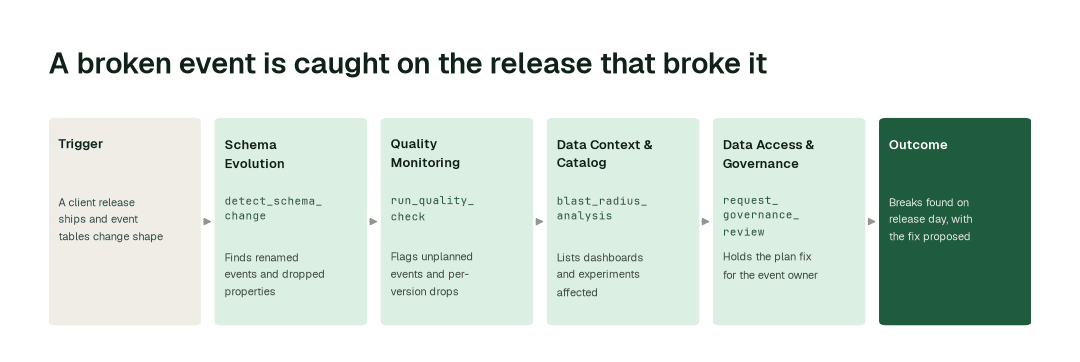
The workflow, step by step
- 1.The Schema Evolution agent calls
detect_schema_changeafter each release and finds renamed events and dropped or retyped properties in the event tables, with the app version that sent them. How it works. - 2.The Quality Monitoring agent calls
run_quality_checkand flags events that are in nobody's plan, a property that stops arriving, and a volume drop on one version only. How it works. - 3.The Data Context & Catalog agent calls
blast_radius_analysisand lists the models, dashboards and experiments that read each affected event, with the dates the data is wrong. - 4.The Data Access & Governance agent calls
request_governance_reviewand holds the proposed plan update, such as treating the old and new names as one event, for the plan owner, with the evidence attached.
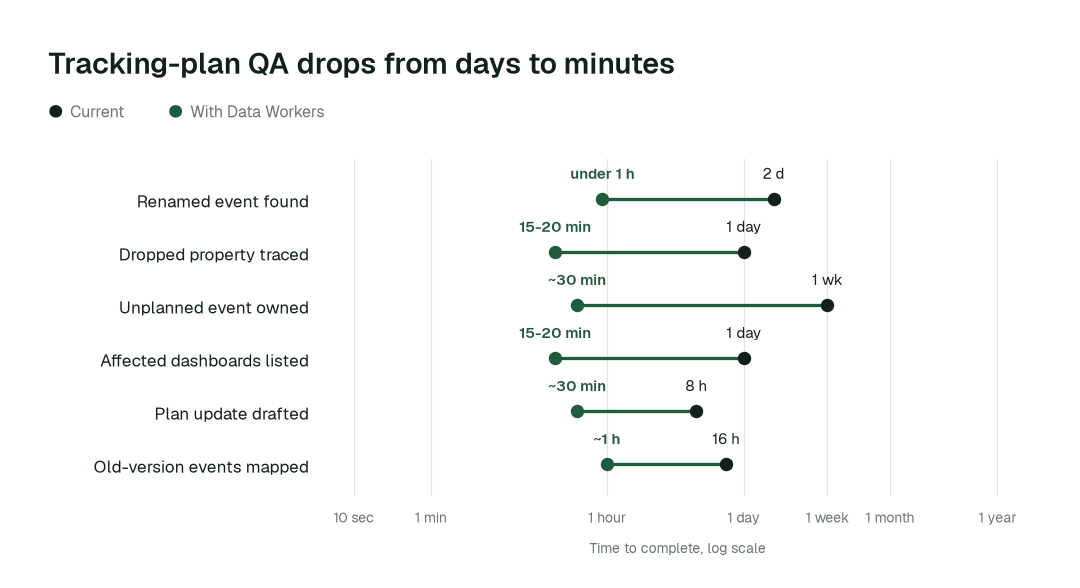
The impact metrics we move
- •Renamed event found across the plan: from about 2 days to under 1 h
- •Dropped property traced to its release: from about a day to 15-20 min
- •Unplanned event identified with an owner: from about a week to ~30 min
- •Affected dashboards and experiments listed: from about a day to 15-20 min
What goes on autopilot
- •Every release is checked the day it ships, by a routine that runs when event tables change shape, so the finding reaches the release channel before the next dashboard refresh.
- •Unplanned events are listed with the release that introduced them and a drafted description, so the plan stays complete.
- •Affected dashboards and experiments are listed with the exact window in which their data is wrong.
Where your people stay in charge
Changes to the tracking plan go to its owner, usually the Data Platform PM, because every downstream definition reads it. Anything that touches a certified metric such as active user goes to that metric's owner. Whether to patch or roll back the client release is the call of the team that shipped it. Agents find, test and propose: they never edit your tracking plan, SDK code or analytics project on their own. Everything starts at L1, observing only, and autonomy rises only on evidence.
The pilot
- •Scope. One product, one client platform (web, iOS or Android) and its warehouse event tables, checked against the tracking plan as you keep it today, at L2.
- •First week. Agents run at L1, observing only, and show the renames, dropped properties and unplanned events they would have flagged on your last few releases, with receipts.
- •By week two. The per-release check and the affected-dashboard list run on their own; every plan change and metric change stays with a named approver.
- •At day 30. We review the impact metrics above against your baseline.
- •Cost. Start with a pilot ($7,500 one-time, credited in full against the first year). Scale is from $1,000 a month and Enterprise from $3,000 a month, billed annually, with unlimited seats, no usage meter and no markup on model spend. See pricing.