You're on Amplitude: It Shows How People Use Your Product. Data Workers Owns Whether the Data Behind Those Charts Is Right
Already on Amplitude? Data Workers checks the warehouse tables behind Profiles, cohorts and flags, traces a wrong chart to its cause, proposes the fix behind a named approval and verifies it, with a receipt.
Your product teams live in Amplitude. PMs build funnels and retention charts, growth analysts define cohorts, and engineers ship features behind Experiment flags that target those cohorts. Global Agent answers questions on every page and in Slack or Teams, the Dashboard Agent reviews key dashboards on a schedule, and engineers connect Claude Code or Cursor to the Amplitude MCP server. Your data team keeps the tracking plan in Amplitude Data and feeds Amplitude from the warehouse: Profiles bring account tier and propensity scores from Snowflake or Databricks, and Aggregated Metrics bring revenue and health scores. Amplitude shows how people use your product. Data Workers owns whether the data behind those charts is right: it checks the tables Amplitude imports after every build, traces a wrong cohort to the source, model or run that caused it, proposes the fix behind a named approval and verifies it with a receipt.
Key takeaways
- •Amplitude keeps its job. Charts, cohorts, experiments, the tracking plan and Amplitude's agents stay with the people who own them today.
- •The tracking plan checks events. Data Workers checks the warehouse tables Amplitude reads. Profiles mirror the warehouse as it is, so a null in Snowflake becomes a null on every profile at the next sync.
- •The fix lands where the cause is. A wrong cohort usually starts in billing data, a dbt model or a nightly run. Data Workers proposes the fix there as a diff, behind a named approval, and queues the run.
- •Nothing written to Amplitude, by design. Data Workers connects over Amplitude's API or MCP server today and changes nothing in it; its agents never call the Amplitude MCP server.
- •Start with the tables behind Profiles. Check every table Amplitude imports after each build, then climb from L0 manual to L4 autonomous per domain.
Amplitude shows how people use your product. Data Workers owns whether the data behind those charts is right.
Product analytics used to run on events alone, guarded by the tracking plan. Now the most important properties come from the warehouse: account tier and health score live in Snowflake, built by dbt from billing and CRM data, and Amplitude imports them so a PM can split any chart by plan. Profiles "always display the most current data synced from your warehouse," in Amplitude's words. When the warehouse is wrong, every chart, cohort and flag that reads the profile is wrong too, quickly and faithfully.
Here is a Tuesday at a B2B software company running Amplitude on Snowflake, with Stripe billing data shared into Snowflake by Stripe Data Pipeline and dbt Core run by Dagster (times ET). This is an illustrative example.
| Time | System | What happens |
|---|---|---|
| Mon Sep 28, 09:00 | Stripe | Finance launches the 2026 packaging. Enterprise moves to two new annual prices, and accounts move to them at renewal. 214 accounts renew on Monday. |
| Mon 09:00 to Tue 01:00 | Stripe Data Pipeline, Snowflake | Stripe's three-hourly full loads carry the renewed subscription items, now on the new price IDs, into STRIPE.SUBSCRIPTION_ITEMS in the shared database. No column changes. |
| Tue 02:00 | Dagster, dbt Core, Snowflake | The nightly job builds dim_user_profiles, an incremental model merged on user_id because Amplitude Profiles mirror-syncs it over Snowflake change tracking. plan_tier comes from a join to the plan_tiers seed on price_id. The two new prices are not in the seed, so 1,940 users in the 214 accounts update to a null plan_tier. The run is green. |
| 02:14 | Data Workers | The null check the team registered on dim_user_profiles.plan_tier fails in run_quality_check: 1,940 nulls, against zero in every earlier run. monitor_metrics shows Enterprise-tier users, a value the team records after each build, at 6,912 against a baseline near 8,850. |
| 02:16 | Data Workers, Slack | blast_radius_analysis follows the model to the Amplitude Profiles source the team recorded in the context graph. Further notes add the "Enterprise workspaces" cohort, the admin-console-v2 feature flag that targets it, and the Enterprise adoption dashboard. Data Workers opens an incident and posts it to #data-incidents with send_slack_alert, flagging the 06:00 Profiles sync. |
| 06:00 | Amplitude Profiles | The scheduled mirror sync reads the change feed and applies 1,940 updates. Those profiles now carry no plan tier. Mirror sync keeps Amplitude in step with the warehouse, as designed. |
| 06:00 to 07:00 | Amplitude Experiment | The dynamic cohort recomputes, and its hourly sync to Experiment removes 1,940 users from the flag's targeting. Admins at 214 accounts lose the new admin console mid-week. |
| 08:30 | Dashboard Agent, Slack | The Dashboard Agent's scheduled run posts that Enterprise weekly active users fell 22% and points at the plan tier breakdown. The product lead forwards it to #data-incidents, where the incident is already open. |
| 08:40 | Data Workers | diagnose_incident with trace_cross_platform_lineage walks dim_user_profiles back to stg_stripe__subscription_items and the raw Stripe table. The dbt manifest, read natively, shows plan_tier comes from the plan_tiers seed. get_incident_history finds no earlier case on this model. |
| 08:50 | Slack | The analytics engineer confirms the two new Enterprise price IDs are missing from the seed. Finance confirms the launch date. |
| 09:05 | Data Workers, Spellbook | One plan: a diff that adds the two prices to the seed, reprocesses null-plan_tier rows on the next incremental run and adds not_null and accepted_values tests; then a Dagster run of the seed and dim_user_profiles. A note recorded at onboarding travels with it: Amplitude mirror-syncs this table, so no full refresh and no rebuild. Blast radius and undo (revert the merge, rerun) are attached. The approval request reaches the analytics engineering lead in Slack. |
| 09:20 | Spellbook, GitHub | The lead reviews the diff and blast radius in Spellbook and approves; the dbt owner merges. |
| 09:22 | Dagster | Data Workers queues the approved run through Dagster. It completes at 09:38. |
| 09:41 | Snowflake | run_quality_check finds no null plan_tier. Enterprise-tier users read 8,852, inside the baseline. Data Workers records it as the agreed source value. |
| 12:00 to 13:00 | Amplitude Profiles, Experiment | The next mirror sync applies 1,940 updates, the cohort recomputes and the hourly sync puts the admins back on the flag. |
| 13:10 | Claude Code with the Amplitude MCP server | The product lead reads the cohort's size through the Amplitude MCP server, running next to Data Workers in the same client; it is back to its Monday level. Data Workers closes the incident with the receipt (cause, diff, approver, run, checks) and a graph note that every plan-tier consumer depends on the seed covering live Stripe prices. |
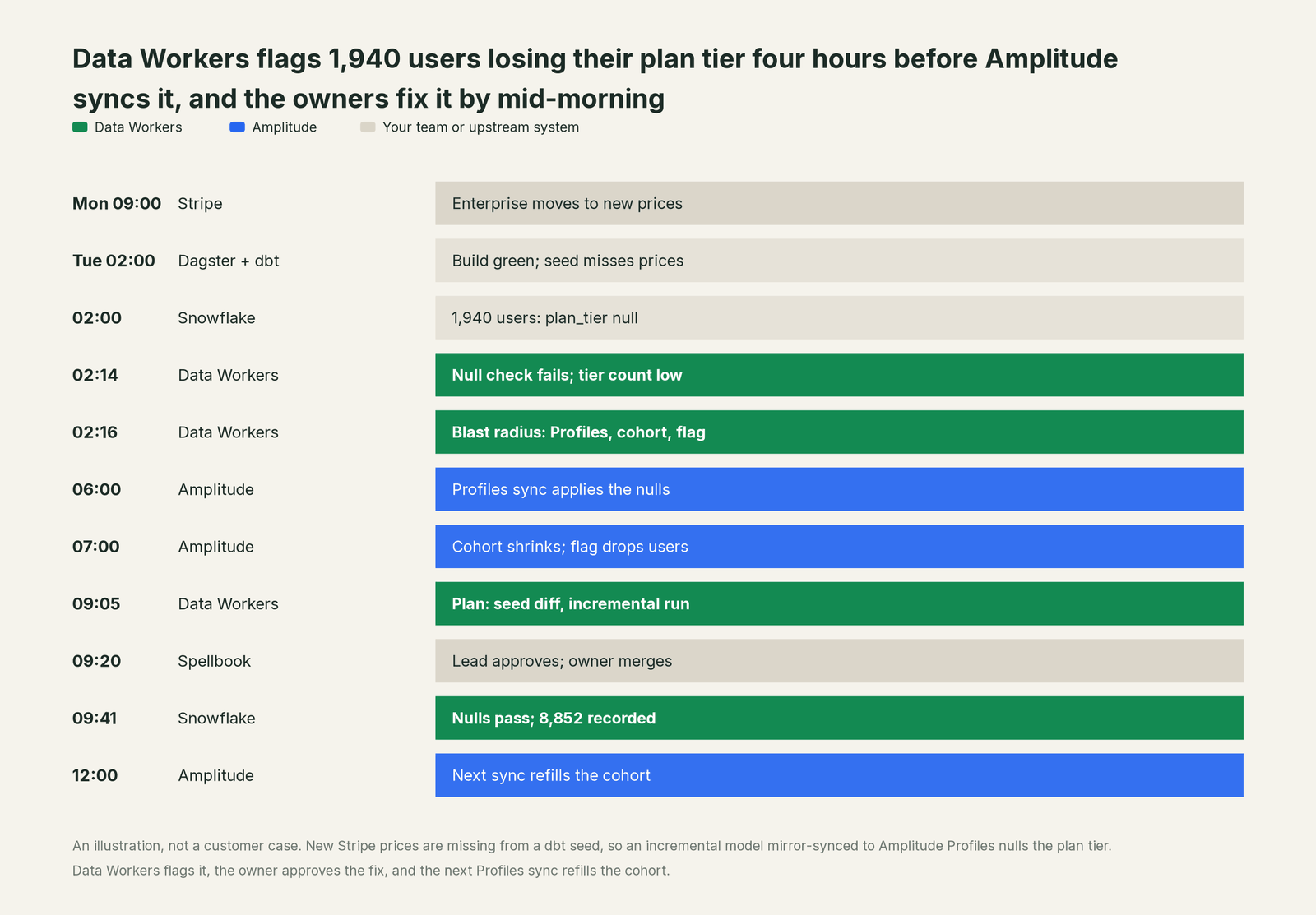
No tool failed. Finance launched the prices it meant to launch, Stripe and Snowflake landed them, dbt built what the seed said, and Amplitude mirrored the warehouse exactly as configured. The break sat in a handoff: a pricing change nobody told the seed about. Data Workers flagged it four hours before Amplitude synced it, a named person approved the fix, and the rerun respected the one rule that keeps the Profiles connection alive.
| Job | What Amplitude does | What Data Workers does |
|---|---|---|
| The question | Charts, funnels, cohorts, Global Agent and the Dashboard Agent show how people use the product | Gives the agents your team uses one governed view of each warehouse table: definition, lineage, owners and trust score |
| The definition | The tracking plan defines events and properties and validates incoming events against it | Holds the warehouse tables behind Profiles and imports to the checks your team registers and the values it records |
| The break | Mirrors whatever the warehouse sends, faithfully, and flags when a chart moves | Catches the null, duplicate key or missing rows after the build, traces them to the source, model or run, and lists every cohort and flag the change reaches |
| The fix | Owners edit cohorts, flags and the tracking plan | Proposes the upstream fix as a diff for its owner, routes it to a named approver and queues the approved run |
| The proof | The next sync and the refilled cohort show the new number | Re-checks the tables, compares the recorded value and writes a receipt with cause, diff, approver and undo |
Why doesn't Amplitude just do this itself?
Amplitude made a clear bet: put product data and product decisions in one place, and let agents do more of the analysis. Its guardrails fit that job. Amplitude Data "validates incoming data against that plan." The MCP server works "with your account permissions," writes need the Use MCP (write) permission, deletes take a two-step confirmation, and cohort syncs preview the export and ask before sending. Wave, whose Opportunities workflow is in Early Access, and the Activation Agent on the Headless Amplitude page go further: they find where the product slips and work on the product change that fixes it.
All of that acts inside Amplitude and on the product. Tuesday's break touched neither. The cause sat in billing data and a dbt seed, and mirror sync, per Amplitude's docs, turns off enrichment services including taxonomy validation so Amplitude stays in step with the warehouse. Fixing it meant a dbt change, an approval, a Dagster run and a check that the rerun would not rebuild the table. That is a different product with different liability: cross-system context, blast radius, approvals, rollback and receipts across vendors. It is the product Data Workers is, built on the Amplitude project your teams already use.
Every tool owns a slice. Data Workers covers the whole lifecycle
Amplitude owns one slice outright: showing how people use your product. Each point tool adds another console, contract and handoff. Data Workers covers the whole lifecycle with one context, one approval flow and one audit trail.
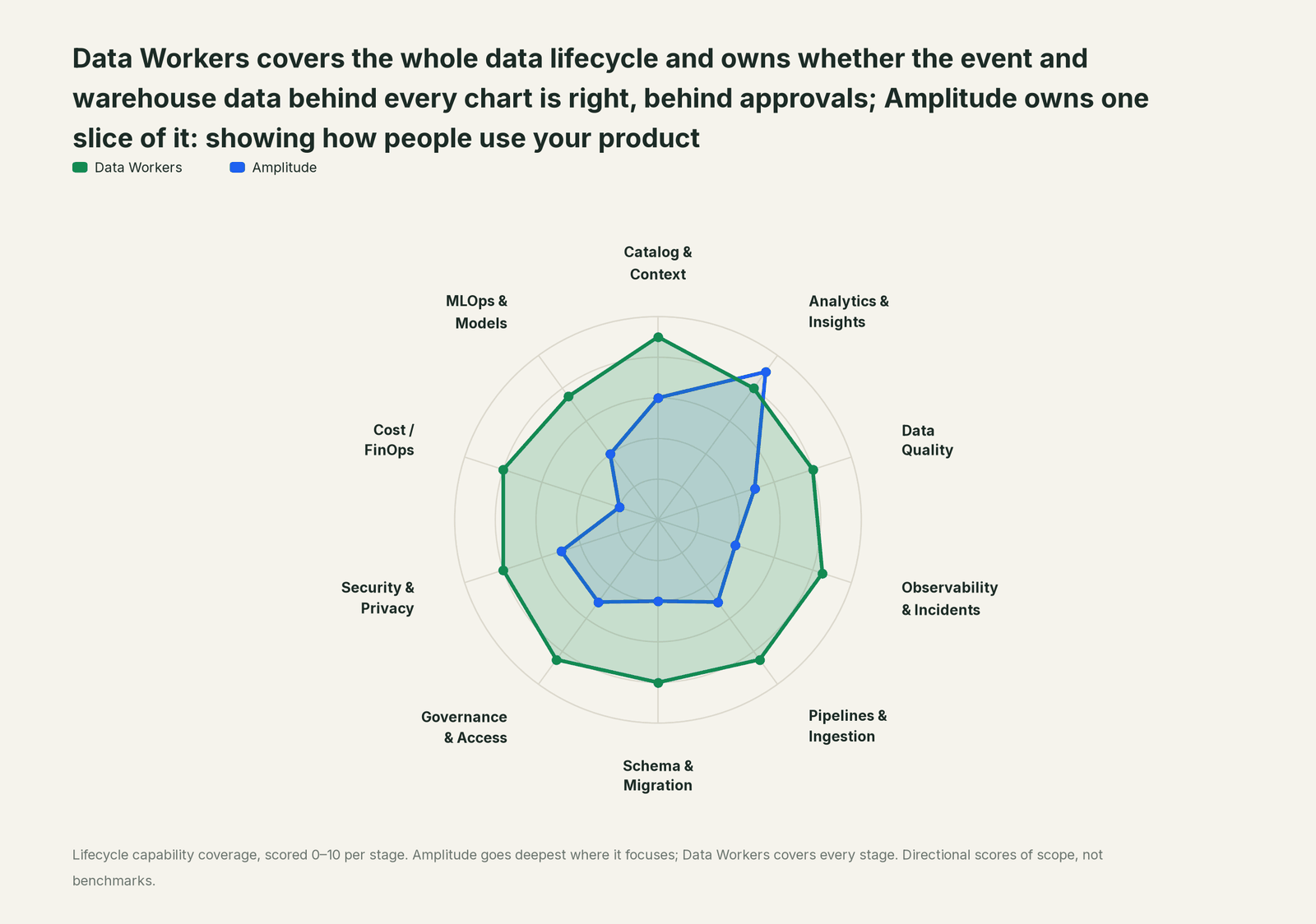
| Stage | Data Workers | Amplitude | Why we scored it this way |
|---|---|---|---|
| Catalog & Context | 9 | 6 | The tracking plan, event and property descriptions and AI Context give Amplitude's agents the product's own vocabulary. Data Workers keeps one governed context graph across every platform, joined to lineage, quality and owners. |
| Analytics & Insights | 8 | 9 | Amplitude's home stage: charts, funnels, retention, cohorts, Session Replay and experiments, with Global Agent and scheduled Specialized Agents answering product questions in Amplitude, Slack and Teams. Data Workers answers through governed definitions and checks the tables under them. |
| Data Quality | 8 | 5 | Amplitude Data validates incoming events against the tracking plan, and Data Assistant recommends fixes. Data Workers checks the warehouse tables Amplitude imports for nulls, duplicate keys and row counts, and holds headline values to a baseline. |
| Observability & Incidents | 8.5 | 4 | Chart monitors and the Dashboard Agent flag when a metric moves. Data Workers traces the move back to the source, model or run that caused it, proposes the fix and verifies it. |
| Pipelines & Ingestion | 8.5 | 5 | SDKs, the HTTP API, warehouse imports (full sync, append only, mirror sync) and exports move data in and out of Amplitude. Data Workers queues the approved dbt and orchestrator runs that build the tables those imports read. |
| Schema & Migration | 8 | 4 | Tracking-plan branches review event changes, and mirror sync accepts new nullable columns. Data Workers reviews dbt changes and their manifest diff and scopes the blast radius across models and declared consumers before merge. |
| Governance & Access | 8.5 | 5 | RBAC, Data Access Controls and a separate write permission for MCP govern who changes what in Amplitude. Data Workers routes every data change to a named approver. |
| Security & Privacy | 8 | 5 | Data Access Controls and the User Privacy API protect data inside Amplitude. Data Workers leaves a receipt on every data change and proposes masking for the owner to apply. |
| Cost / FinOps | 8 | 2 | Amplitude meters event volume and Profiles operations for its own plan. Data Workers reads Snowflake spend down to the dbt model through query tags, and BigQuery spend as an account total. |
| MLOps & Models | 7.5 | 4 | Predictions and computations score users inside Amplitude. Data Workers checks the training and feature tables in the warehouse; their owners retrain. |
How Amplitude and Data Workers work together
Your people stay where they are: charts and cohorts in Amplitude, Global Agent in Slack or Teams, Claude Code or Cursor for engineers, Slack for alerts and approval requests. Spellbook Data Catalog (in preview) is where the data team looks: each proposed fix, its blast radius, approver and rollback. Underneath, Data Context Wizard keeps one governed context graph, the Data-Agents Swarm does the work with more than 20 specialist agents, and the Autonomous Data-Conductor runs each fix end to end (detect, diagnose, fix, review, verify, remember).
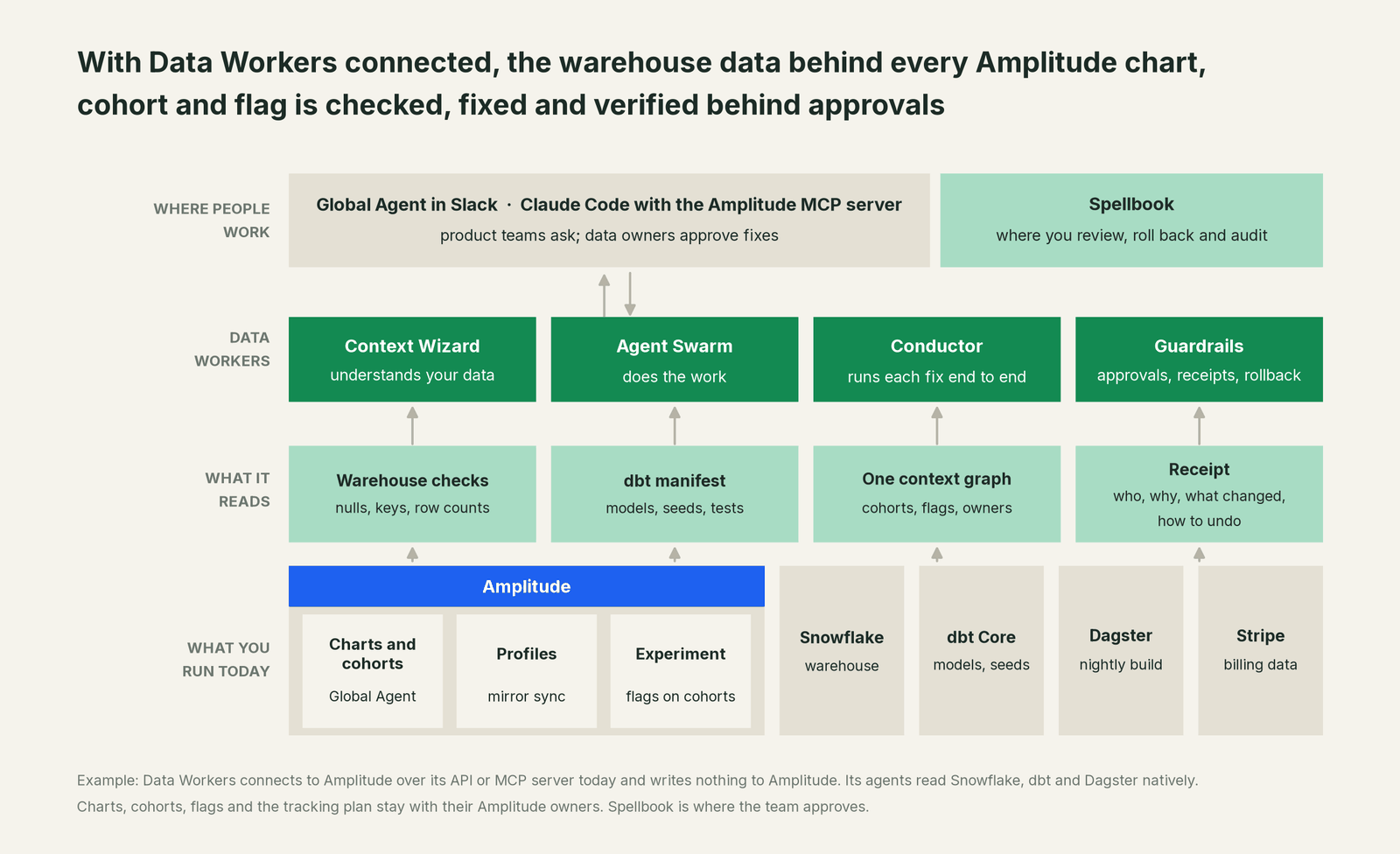
How Amplitude enters the picture. Data Workers connects to Amplitude over its API or MCP server today. The Profiles source, Aggregated Metrics tables and import jobs enter the blast radius as notes your team records in the context graph, and so do the cohorts and flags that depend on them; when a fix goes through a pull request, change review's lineage diff also reads any dbt exposures you declare. Data Workers writes nothing to Amplitude: cohorts, flags, the tracking plan and sync schedules stay with their owners. Amplitude's Snowflake integration page also describes Snowflake Native Amplitude, which queries Snowflake directly; the same checks apply, because the tables are the same.
What Data Workers checks under each import. run_quality_check runs nulls, uniqueness on id columns and minimum row counts on Snowflake and Postgres, and on BigQuery with a service-account key; get_quality_score rolls them up. monitor_metrics holds the values your team records, such as Enterprise-tier users or rows landed per build, against a baseline. explain_table returns a table's definition, lineage, documentation and trust score. trace_cross_platform_lineage and blast_radius_analysis follow a table to its source and every declared consumer; diagnose_incident, remediate and get_incident_history run and record the incident. Your data stays in your systems: the agents, warehouse credentials and model key run in your infrastructure, and the hosted Conductor sees workflow metadata only.
The mirror sync rule, remembered. Amplitude's docs say change data capture "doesn't support replacing existing tables," and if the table "drops and replaces data, the connection breaks." Record that once as a note on each mirrored table, and every plan Data Workers drafts for it carries the rule: incremental runs, nullable new columns, no rebuilds. The dbt incremental models guide covers the dbt side.
Setup over MCP today. Clone the open-source repository and add start-agent.sh entries to your client's MCP config, as the client setup docs show. The Amplitude MCP server can sit next to Data Workers for your own work; Data Workers' agents never call it. For people who should only read, leave Use MCP (write) off their Amplitude role.
// Example: .mcp.json for Claude Code. The amplitude entry is your team's own
// connection to the Amplitude MCP server; Data Workers does not call it.
{
  "mcpServers": {
    "amplitude": {
      "type": "http",
      "url": "https://mcp.amplitude.com/mcp"
    },
    "dw-context-catalog": {
      "command": "/path/to/dataworkers-claw-community/start-agent.sh",
      "args": ["dw-context-catalog"]
    },
    "dw-quality": {
      "command": "/path/to/dataworkers-claw-community/start-agent.sh",
      "args": ["dw-quality"]
    },
    "dw-incidents": {
      "command": "/path/to/dataworkers-claw-community/start-agent.sh",
      "args": ["dw-incidents"]
    }
  }
}
List the tools with your client's own command (for example /mcp in Claude Code). A PM can then ask whether everything under the Enterprise cohort is healthy and get the cohort from Amplitude and the lineage, checks and open incidents from Data Workers in one answer.
Where fixes go. Data Workers proposes the change as a diff for the owner to merge, usually a dbt model, seed or source mapping, with its blast radius and undo step; it opens the pull request itself only when your team turns on the dbt GitHub pull-request target. After approval it queues the run through your orchestrator, Dagster here. Billing and ingestion syncs, Amplitude sync schedules and flags stay with their owners.
One request, L0 to L4. The autonomy ladder is set per domain.

- •L0 manual. Connected, not acting. Analysts chase a shrunken cohort by hand.
- •L1 observe. Data Workers checks the tables behind your imports and logs what it would do.
- •L2 propose. Data Workers drafts the upstream fix with its blast radius. A named owner approves in Spellbook before anything runs.
- •L3 act reversibly. For proven classes, such as queuing the incremental rerun after an approved seed fix, Data Workers acts, verifies and records the undo.
- •L4 autonomous. For a narrow class in one domain, Data Workers fixes and verifies on its own and posts the receipt.
Approvals go to a named person; a request nobody answers expires and escalates, and never grants itself. No agent can promote its own work. Read how approvals work for AI data agents, is it safe to let AI agents change production data and where does our data go.
Around Amplitude, see You're on Segment for the event pipeline in front of it, You're on Mixpanel for its closest neighbour and You're on Dagster for the runs that build its tables.
What changes for your team
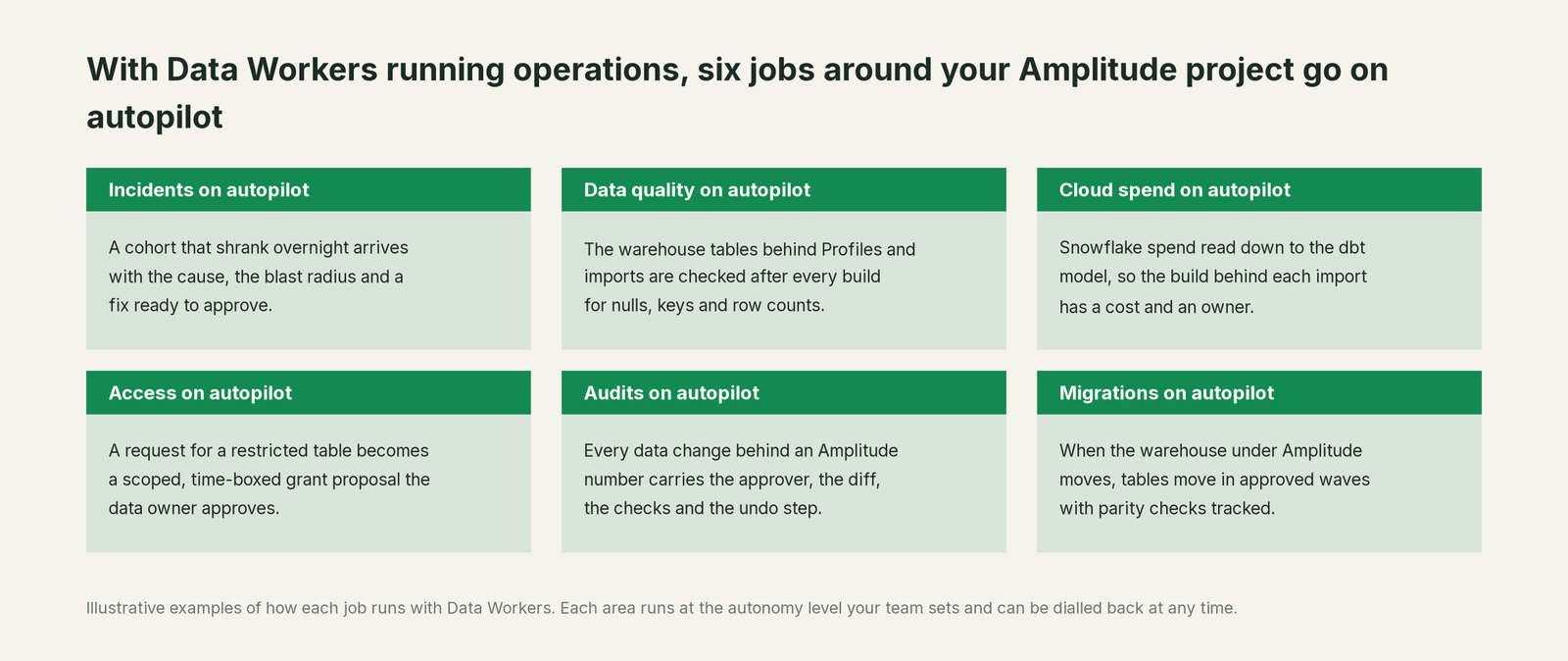
Product data teams lose real time asking whether a moved chart is the product, the tracking or the warehouse. With Data Workers next to Amplitude, these jobs run on autopilot at the level you set.
- •Incidents. A cohort that shrank overnight arrives with the cause, the blast radius and a fix ready to approve.
- •Data quality. The warehouse tables behind Profiles and imports are checked after every build for nulls, duplicate keys and row counts.
- •Cloud spend. Snowflake spend is read down to the dbt model through query tags, so the build behind each import has a cost and an owner.
- •Access. A request for a restricted table becomes a scoped, time-boxed grant proposal the data owner approves.
- •Audits. Every data change behind an Amplitude number carries the approver, the diff, the checks and the undo step.
- •Migrations. When the warehouse under Amplitude moves, tables move in approved waves with parity checks tracked.
Keep Amplitude, or consolidate?
Keep Amplitude if you love it; Data Workers works with it from day one. Many teams consolidate once Data Workers runs that slice too.
For most teams the answer is to keep Amplitude: product analytics, experiments, replays and the tracking plan belong there, and its agents are built for the questions your PMs ask. What teams consolidate is the tooling around it: a separate data-quality tool on the import tables, a weekly "do Amplitude and finance agree" spreadsheet, and the tribal knowledge of which tables must never be rebuilt. If you are weighing building this yourself on the Amplitude MCP server and your warehouse's, read build it ourselves with Claude Code and MCP servers: connecting servers is the easy part; cross-system context, approvals and rollback are the work. What is an agentic data platform covers where that work sits.
The case for your CFO
The outcome: the numbers product and growth teams act on in Amplitude stay right, and when billing or warehouse data breaks, the fix is approved before customers miss a feature.
The risk story: Data Workers changes nothing in Amplitude. It checks the warehouse tables Amplitude imports and proposes upstream fixes as diffs; nothing runs until the named owner approves. Every change is verified and leaves a receipt: what broke, what changed, who approved it and how to undo it. Autonomy is set per domain from L0 manual to L4 autonomous, and an org-wide stop halts all autonomous dispatch. There is zero migration.
Why now: Amplitude now drives the product as well as reporting on it. Cohorts built on warehouse properties decide who sees a feature and who gets a guide, so a broken table changes what paying customers see.
The first win: the tables behind your Profiles source, checked after every build, with the counts your flags depend on recorded. What stays the same: your Amplitude project, tracking plan, cohorts and flags, your Snowflake, dbt and Dagster, and your review process. For the numbers, see the ROI of agentic data operations.
The sentence to repeat upstairs: "Amplitude stays where we learn how customers use the product; Data Workers makes sure the data behind it is right, and a named owner approves every fix with a receipt."
Getting started
Start with a pilot. Pick the cohort or flag that changes what customers see, connect Data Workers read-only to Snowflake, dbt and your orchestrator, record the Profiles source and the mirror sync rule in the context graph, and let Data Workers check every table under it for a few weeks before the first fix class. The pilot path and plans are on the pricing page, and the pilot is credited in full against the first year.
FAQ
Does Data Workers edit our cohorts, flags or tracking plan? No. It writes nothing to Amplitude. Cohorts, flags, the tracking plan and sync schedules stay with your Amplitude owners.
We already govern our taxonomy in Amplitude Data. Why add this? Keep it. The tracking plan validates events as they arrive. Profiles and other mirror-synced imports arrive from the warehouse as they are, with taxonomy validation off. Data Workers checks those tables after each build and carries a fix through approval and verification.
A cohort lost a third of its users overnight. Can Data Workers tell why? Usually the cohort was faithful to the profile and the warehouse value underneath was wrong. Data Workers traces the table to the source, seed or model that changed and lists every cohort and flag recorded against it; the receipt records cause and fix.
Do Data Workers' agents use the Amplitude MCP server? No. Your team can run it side by side in the same client, for example to read a cohort's size after a fix. Data Workers relies on its own Snowflake, dbt and orchestrator connections, across 50+ connectors; what integrations Data Workers supports lists what each one reads and changes.
Will a Data Workers fix break our Profiles connection? Not if the rule is recorded. Amplitude's change data capture needs incremental models and breaks if a table is dropped and replaced. Recorded as a note on the table, the rule travels with every plan, and the owner approves before anything runs.
Sources
- •Amplitude, Documentation full corpus (generated Oct 3, 2026), https://amplitude.com/docs/llms-full.txt (checked Oct 3, 2026)
- •Amplitude, Amplitude MCP Server, https://amplitude.com/docs/amplitude-ai/amplitude-mcp (checked Oct 3, 2026)
- •Amplitude, Global Agent overview, https://amplitude.com/docs/amplitude-ai/global-agent-overview (checked Oct 3, 2026)
- •Amplitude, Global Agent in Slack, Microsoft Teams and Discord, https://amplitude.com/docs/amplitude-ai/slack-teams (checked Oct 3, 2026)
- •Amplitude, Specialized Agents overview, https://amplitude.com/docs/amplitude-ai/specialized-agents-overview (checked Oct 3, 2026)
- •Amplitude, Wave and Amplitude Opportunities (Early Access), https://amplitude.com/docs/wave (checked Oct 3, 2026)
- •Amplitude, Headless Amplitude (Activation Agent), https://amplitude.com/headless (checked Oct 3, 2026)
- •Amplitude, Overview of Amplitude Data, https://amplitude.com/docs/data/data-overview (checked Oct 3, 2026)
- •Amplitude, Profiles, https://amplitude.com/docs/data/profiles (checked Oct 3, 2026)
- •Amplitude, Snowflake Data Import (mirror sync, enrichment services, table re-creation), https://amplitude.com/docs/data/source-catalog/snowflake (checked Oct 3, 2026)
- •Amplitude, Aggregated Metrics, https://amplitude.com/docs/data/warehouse-metrics (checked Oct 3, 2026)
- •Amplitude, Experiment cohort targeting, https://amplitude.com/docs/feature-experiment/cohort-targeting (checked Oct 3, 2026)
- •Amplitude, Snowflake integration (Snowflake Native Amplitude), https://amplitude.com/integrations/snowflake (checked Oct 3, 2026)
- •Amplitude, Data governance, https://amplitude.com/data-governance (checked Oct 3, 2026)
- •Stripe, How Data Pipeline works (data share, three-hourly full loads, STRIPE schema), https://docs.stripe.com/data/access-data-in-warehouse (checked Oct 3, 2026)
- •Data Workers, Client setup, https://dataworkers.io/opensource-docs/client-setup/ (checked Oct 3, 2026)
- •Data Workers open-source repository, https://github.com/DataWorkersProject/dataworkers-claw-community (checked Oct 3, 2026)