Experiment readouts you can trust, run by agents
An A/B test ends, the metric moves, and the room argues about whether to believe it. Skewed arms, missing exposures, late events and a metric that changed mid-test surface after the ship decision, not before. Here is how Data Workers checks the data under every readout first and leaves the decision to the experiment owner.
Key takeaways
- •The problem today. A readout is only as good as the assignment, exposure and metric tables under it, and nobody checks them until the result looks odd. By then a ship decision may already be on the plan.
- •What changes. Agents check the data under every running and finished A/B test: arm sizes against the design, exposures against assignments, late events and the metric's definition.
- •What stays with your people. The result and the call. Agents never change a test result or stop a test. They flag the readout, and the experiment owner decides.
- •The result. The room argues about the feature instead of the data.
The problem today
An experiment finishes on a Thursday. Checkout conversion is up in the treatment arm and the product manager wants to ship, until a data scientist notices that treatment has 4% fewer users than control in a 50/50 test. That is a sample ratio mismatch (SRM): something other than chance decided who was counted, and the lift can no longer be taken at face value.
SRM is one of several ways a readout goes wrong. A client release logs exposure before the user has seen the variant. Assignment events arrive a day late from the mobile SDK, so the last day is half empty. A dbt model behind "conversion" is edited in week two and the metric shifts under the test. Each cause lives in a different system, so the investigation takes days and the decision is made in the meantime. The same raw events feed clickstream and product analytics, usage and billing metrics and personalization experiments, so one broken release taints all three.
What changes with Data Workers
Agents read the assignment, exposure and metric tables you already land in the warehouse, from your own assignment service or a platform such as Statsig, Eppo or GrowthBook. They check while a test runs and again before the readout, and attach what they find for the owner. It is one workflow in the product and usage data teams group, alongside instrumentation QA per release and governed product metrics.
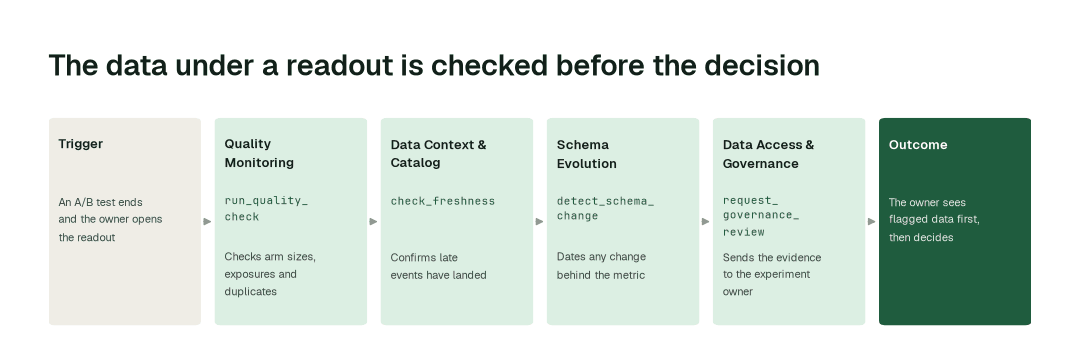
The workflow, step by step
- 1.The Quality Monitoring agent calls
run_quality_checkon the assignment and exposure tables: arm sizes against the split the design specified, exposures with no matching assignment, users in more than one arm and duplicate exposure events. How it works. - 2.The Data Context & Catalog agent calls
check_freshnessand reports whether late-arriving events have landed for the readout window, so a Monday readout is not built on a Sunday still filling in. - 3.The Schema Evolution agent calls
detect_schema_changeand catches a changed column or a retired event behind the metric and dates it against the day the test started. How it works. - 4.The Data Access & Governance agent calls
request_governance_reviewand sends the evidence to the experiment owner as a named approver: what failed, which windows or segments are affected and what a clean rerun would need.
The impact metrics we move
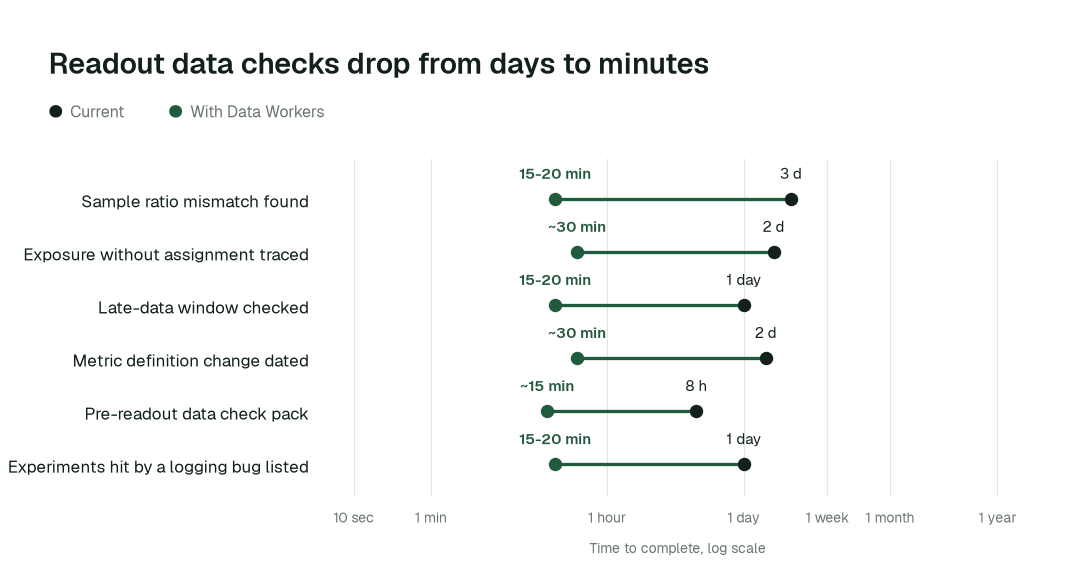
- •Sample ratio mismatch found: from about 3 days to 15-20 min
- •Exposure without assignment traced to its release: from about 2 days to ~30 min
- •Late-data window checked before a readout: from about a day to 15-20 min
- •Metric definition change found against the test start: from about 40 h to ~30 min
What goes on autopilot
- •Every running test is checked on a schedule, so a skewed arm is flagged on day two of a four-week test, not on day twenty-eight. How it works.
- •Metric definitions are compared with the governed definition the test started on, so a change is dated and listed with the tests it touched. If your metrics live in dbt, see how this works with the dbt Semantic Layer.
- •When a logging bug is found, the affected experiments are listed with the exact windows, so owners annotate the right tests and no others. The event data behind tools like Amplitude is checked once, upstream of all of them.
Where your people stay in charge
Agents never change a test result, drop users from an analysis, rerun a readout with different filters or stop an experiment. They flag, with evidence, and the experiment owner decides whether to rerun, exclude a window, accept the risk or ship anyway. A certified metric definition changes only with its named owner's approval, and a metric is never quietly restated while a test runs. Everything starts at L1, observing only, and autonomy rises only on evidence.
The pilot
- •Scope. Assignment, exposure and the headline metric tables for one product area's experiments, with the experiment owner as named approver, at L2.
- •First week. Agents run at L1, observing only, and run over your last few finished tests to show the flags they would have raised, with receipts.
- •By week two. Scheduled checks and the pre-readout data check run on their own; every rerun, exclusion and ship decision stays with the owner.
- •At day 30. We review the impact metrics against your baseline, targeting:
- •Sample ratio mismatch found: from about 3 days to 15-20 min
- •Exposure without assignment traced to its release: from about 2 days to ~30 min
- •Late-data window checked before a readout: from about a day to 15-20 min
- •Cost. Start with a pilot ($7,500 one-time, credited in full against the first year). Scale is from $1,000 a month and Enterprise from $3,000 a month, billed annually, with unlimited seats, no usage meter and no markup on model spend. See pricing.