Detection data quality, run by agents
A detection is only as good as the log source behind it. When a source goes quiet, a parser breaks or a field is renamed, the rule stays enabled and simply stops firing, and nobody sees a failure. Here is how Data Workers watches every source and pages the detection engineer first.
Key takeaways
- •The problem today. A detection fails silently when its log source goes quiet, a parser breaks or a vendor renames a field. The rule stays enabled, so the gap shows up in an incident review or an audit.
- •What changes. Agents watch freshness, volume and schema per source, name the detections that read each one, and page the detection engineer before coverage drops.
- •What stays with your people. Any change to a parser, a field mapping or a detection input: detection engineering approves it.
- •The result. Telemetry quality is something the team can show, source by source.
The problem today
A detection engineer writes a rule against a source-address field and ships it. Months later a firewall update renames the field, or a collector is moved and stops forwarding, or a parser change turns a number into text. Nothing errors. The rule runs against nothing, and an empty result looks like a quiet week.
Quality tools built for analytics tables rarely cover this: they watch the tables the business reads, not the endpoint, identity and network feeds that detections read. Teams fill the gap with a spreadsheet of sources and owners, a few "no events in 24 hours" alerts, and a purple-team exercise that finds the blind spots afterwards. The wider picture is in the security and observability telemetry playbook.
What changes with Data Workers
The same checks apply to every source: has it arrived, is it the usual size for this hour and day, and does it still have the fields the detections need. The agents learn each source's normal behaviour, so a weekend lull is not an alert and a halved feed is. Each source is tied to the detections that depend on it: lineage supplies the dependency where detections run on your lake or warehouse tables, and your detection engineers confirm the list once for rules that live only in the SIEM.
It is the telemetry-side counterpart to the checks in the data platform and fleet data playbook, and one workflow in the data platform teams group. For volume and cost on the same sources, see SIEM cost control.
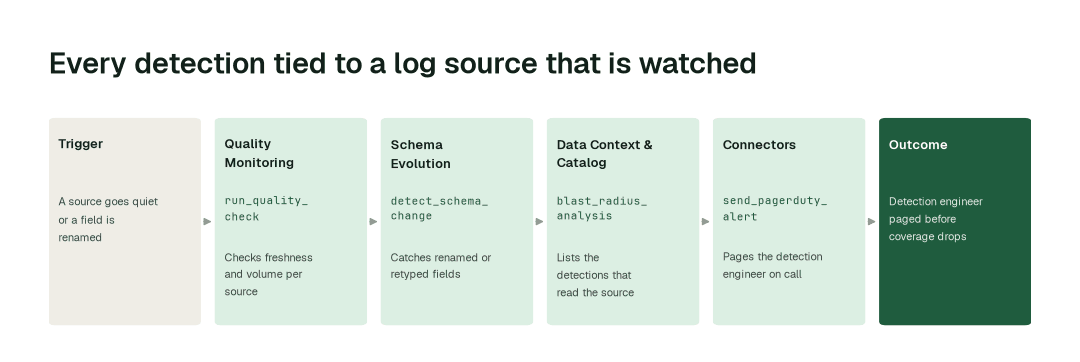
The workflow, step by step
- 1.The Quality Monitoring agent calls
run_quality_checkon each source's freshness and volume, and compares them with that source's own normal. A collector that stops forwarding, or a feed that halves, is caught within minutes. How it works. - 2.The Schema Evolution agent calls
detect_schema_changeand catches renamed, retyped or removed fields, before a rule depends on the old shape. How it works. - 3.The Data Context & Catalog agent calls
blast_radius_analysisand lists the detections, hunts and dashboards that read the affected source. - 4.The Connectors agent calls
send_pagerduty_alert(orsend_slack_alert) and pages the detection engineer on call with the source, cause and detections at risk. The Autonomous Data-Conductor holds any parser or mapping fix as a proposal until detection engineering approves it.
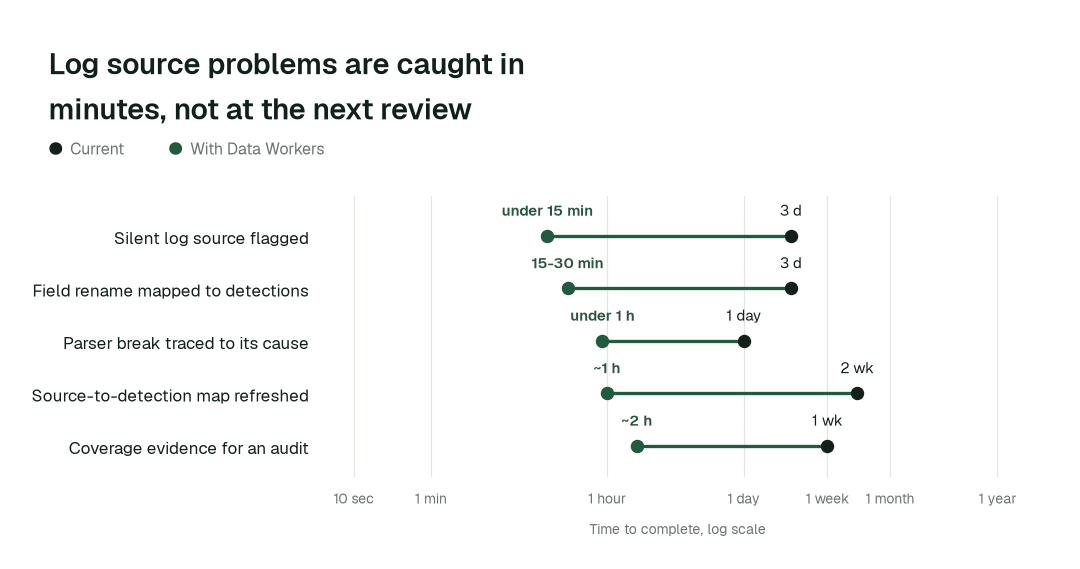
The impact metrics we move
- •Silent log source flagged: from about 3 days to under 15 min
- •Field rename mapped to affected detections: from about 3 days to 15-30 min
- •Parser break traced to its cause: from about a day to under 1 h
- •Source-to-detection map refreshed: from about 2 weeks to ~1 h
- •Coverage evidence for an audit or exercise: from about a week to ~2 h
What goes on autopilot
- •Every source is checked on a schedule and when it changes, so a quiet feed is a page the day it goes quiet, not a finding in the next review. Freshness SLAs set the bar per source.
- •Each source's health history is kept, so an auditor or purple team can see what was healthy and when.
- •The source-to-detection list stays current as sources, parsers and rules are added.
Where your people stay in charge
Parser changes, field mappings and anything else a detection reads go to a named approver, the detection engineering lead, because a wrong mapping blinds a rule as surely as a broken feed. Agents find, diagnose and propose; they do not edit a detection rule or decide that a quiet source is acceptable. Everything starts at L1, observing only, and autonomy rises only on evidence. This sits beside your SIEM, as in You're on Splunk; the field guide for security data teams covers the wider practice.
The pilot
- •Scope. Freshness, volume and schema checks on your twenty most important sources, with the detections that depend on them, at L2.
- •First week. Agents run at L1, observing only, and show the quiet sources and unmapped dependencies they would have flagged, with receipts.
- •By week two. Source checks and paging run on their own; every parser, mapping and detection-input change stays with a named approver.
- •At day 30. We review the impact metrics against your baseline, targeting:
- •Silent log source flagged: from about 3 days to under 15 min
- •Field rename mapped to affected detections: from about 3 days to 15-30 min
- •Cost. Start with a pilot ($7,500 one-time, credited in full against the first year). Scale is from $1,000 a month and Enterprise from $3,000 a month, billed annually, with unlimited seats, no usage meter and no markup on model spend. See pricing.