You're on Splunk: It Finds the Log Line. Data Workers Fixes the Data Behind It
Splunk finds the pipeline error in your logs and ITSI opens the episode. Data Workers fixes the data behind it with approval, verifies it and leaves a receipt.
Your company runs on Splunk, a Cisco company. Every Spark driver and job runner sends its logs to an index, and people find answers in SPL. The SOC lives in Enterprise Security with SOAR and an agent that triages alerts. IT operations models services and KPIs in ITSI, where Event iQ groups related alerts into episodes. SREs work in Observability Cloud, where the AI SRE correlates alerts and builds a remediation plan, and the Splunk AI Assistant turns plain questions into SPL. The MCP Server for Splunk Platform, at version 2.0 since September 2, 2026, lets Claude and Cursor search all of it. Splunk is where logs, security events and observability data are searched and alerts fire. Data Workers is where data incidents get diagnosed, fixed and verified.
Splunk will show you the exact log line: 9,312 malformed records on the amount column at 01:00. The Iceberg table those records landed in and the treasury report that reads it live in other systems. Data Workers works there: it finds the wrong rows, repairs them with a named approver, checks the totals and leaves a receipt the on-call links when the episode closes.
Key takeaways
- •Splunk keeps its job. Search, alerts, ITSI, Enterprise Security, Observability Cloud, your SPL and dashboards stay where they are.
- •A successful job can write wrong data. A Spark job that nulls bad values still exits green. Splunk sees the error lines; Data Workers fixes the table they describe.
- •Two MCP servers, one client. The Splunk MCP server answers what fired and what the logs say; it is built to search and read. Data Workers runs beside it and does the data work through approvals.
- •Logs are the evidence; the receipt is the proof. Every data change records cause, diff, approver, what it touched, how it was verified and how to undo it.
- •Autonomy per domain. Each domain climbs from L0 manual to L4 autonomous at your pace.
Splunk is the smoke alarm. Data Workers is the crew.
Splunk sees the symptom in your infrastructure. Data Workers fixes the data behind it and proves the fix. Here is a Thursday night across a card processor's settlement file, AWS Step Functions, Spark on Amazon EMR, S3 and Iceberg, the Glue Data Catalog, Splunk, Athena and Looker Studio. This is an illustrative example.
| Time | System | What happens |
|---|---|---|
| Wed 23:10 | Processor file | The card processor's nightly settlement file lands in S3. A format change on their side now quotes amount with thousands separators ("1,204.50") |
| Thu 01:00 | Step Functions + EMR | The settlements_ingest state machine runs the Spark job. Spark cannot parse 9,312 amounts against the Glue schema, writes them as nulls into the Iceberg table finance.settlements and logs each malformed record. The job succeeds |
| 01:22 | Splunk ITSI | The Spark logs land in the emr_spark index. The "malformed records per run" KPI on the Payments Lakehouse service goes critical and Event iQ opens an episode for the platform on-call |
| 01:28 | Splunk AI Assistant | The on-call asks for the errors in plain English; the assistant writes the SPL and the search shows the malformed amount values. Step Functions and EMR look healthy |
| 01:34 | Data Workers | Reads the episode's fired alert and the log lines over the Splunk MCP server, matches the malformed values to a separator change in the processor's file and counts 9,312 malformed records, one per null amount in the Thursday partition |
| 01:38 | Data Workers | Maps the blast radius through lineage: the Athena view finance.v_daily_settlements, the Looker Studio "Treasury cash position" report and the 06:00 bank reconciliation export |
| 01:43 | Spellbook | Data Workers proposes the fix to the finance data owner: a diff to the Spark job that parses separators and fails the run when malformed records pass a threshold, plus a rerun of the partition, with the table owner's pre-rerun Iceberg snapshot named as the undo |
| 02:05 | Spellbook | The finance data owner, on call for the settlement models this week, merges the diff and approves the rerun |
| 02:08 | Step Functions + EMR | Data Workers queues the rerun of settlements_ingest through Step Functions |
| 02:31 | Splunk + Athena | Data Workers verifies: the rerun logs zero malformed records, and the owner's Athena check shows zero null amounts, 41,870 rows and a partition total that matches the processor's control total |
| 02:36 | Splunk ITSI | The on-call closes the episode with the Spellbook receipt linked in the episode comment |
| 07:00 | Looker Studio | Treasury opens the cash position report on the right numbers |
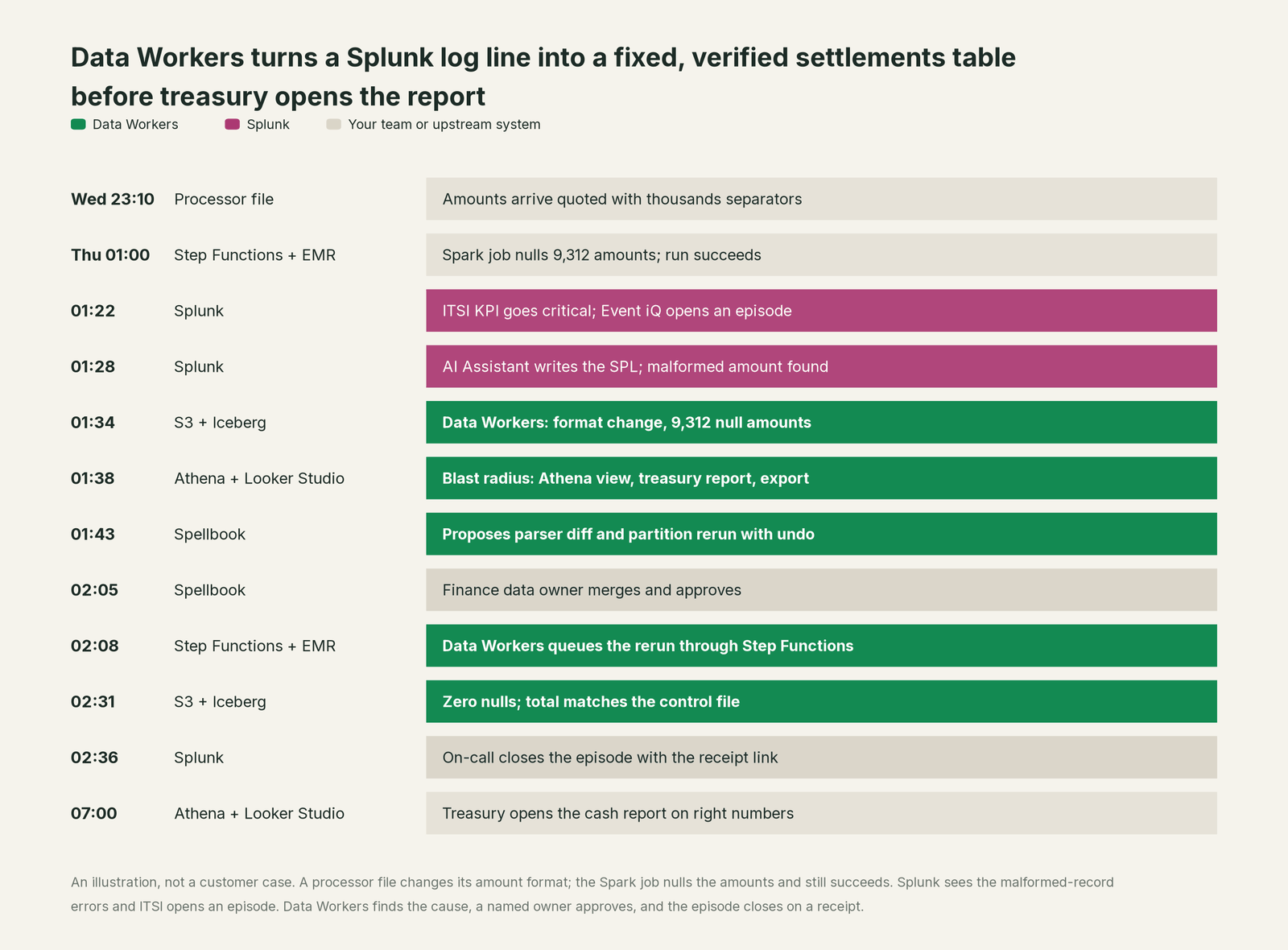
Splunk did everything it was built to do: the KPI caught the spike at 01:22, Event iQ grouped the alerts into one episode for one person, and the AI Assistant found the line that mattered. The incident it described lived in the lakehouse. Without Data Workers, the on-call hands a log search to a data engineer at breakfast and treasury reads a cash position short by every settlement over 1,000. With it, the table was fixed and verified before 03:00.
| Job | What Splunk does | What Data Workers does |
|---|---|---|
| Detection | Saved searches, ITSI KPIs and Observability Cloud detectors watch logs, metrics and traces | Checks the data itself: null rates, load lag against its baseline, totals against control files |
| Coordination | Event iQ groups related alerts into an episode with an owner; the AI SRE correlates alerts into one incident | Picks up the episode's evidence and routes the data fix to the named owner of the affected models |
| Investigation | SPL, the AI Assistant and AI-generated episode summaries find the log line and the change behind it | Traces the break into the data: which rows, which tables, which views and reports, which owners |
| The fix | The AI SRE builds a step-by-step remediation plan for the team to review, approve and execute | Proposes the data change (a job diff for the owner to merge, a rerun or backfill with its undo recorded) and queues it through the orchestrator after approval |
| Verification | The KPI recovers and the episode closes | Checks the numbers: nulls gone, row counts and totals match the source, load lag back on its baseline |
| The record | Logs, notable events and episode history | A receipt for the data change: cause, diff, approver, what it touched, how it was verified, how to undo it |
Why doesn't Splunk just do this itself?
Because Splunk is built to search and correlate machine data at enormous scale, and its AI follows that design on purpose. The AI SRE "generates guided, step-by-step remediation plans" and relies on your engineers "to review, approve, and execute the final steps". Enterprise Security lets SOC teams "gradually increase AI's role", from automated actions to suggestions that need approval. The MCP Server for Splunk Platform is built for search: its tool reference lists 33 tools that run searches, list alerts and explain or generate SPL, from splunk_run_query and splunk_list_fired_alerts to saia_generate_spl and the Observability o11y_ tools, and its rest command "cannot create, update, or delete anything in your Splunk environment". Splunk roles map to MCP tools since version 1.3.0, with OAuth 2.1 sign-in since 1.1.0.
That is the right line for the platform that holds your security and operations record: Splunk's job is to be the trusted, unaltered evidence. A data fix is a different job with a different liability. The bad partition gets rewritten in a production Iceberg table after the finance owner approves, with the prior snapshot kept as the undo. Lineage has to show every view, report and export that reads the table. Someone checks the totals against the processor's control file and writes a receipt an auditor can read. None of those systems belong to Splunk, and none of that work is search. Data Workers is built for that job.
Federated Search makes the point sharper. Splunk positions its platform as the Cisco Data Fabric, powered by Splunk, and Federated Search queries Amazon S3, Iceberg, Delta Lake and Snowflake in place with SPL2, so an analyst can read the settlements table without ingesting it. Reading the table and repairing it are different products, and Splunk chose the first.
Every tool owns a slice. Data Workers covers the whole lifecycle
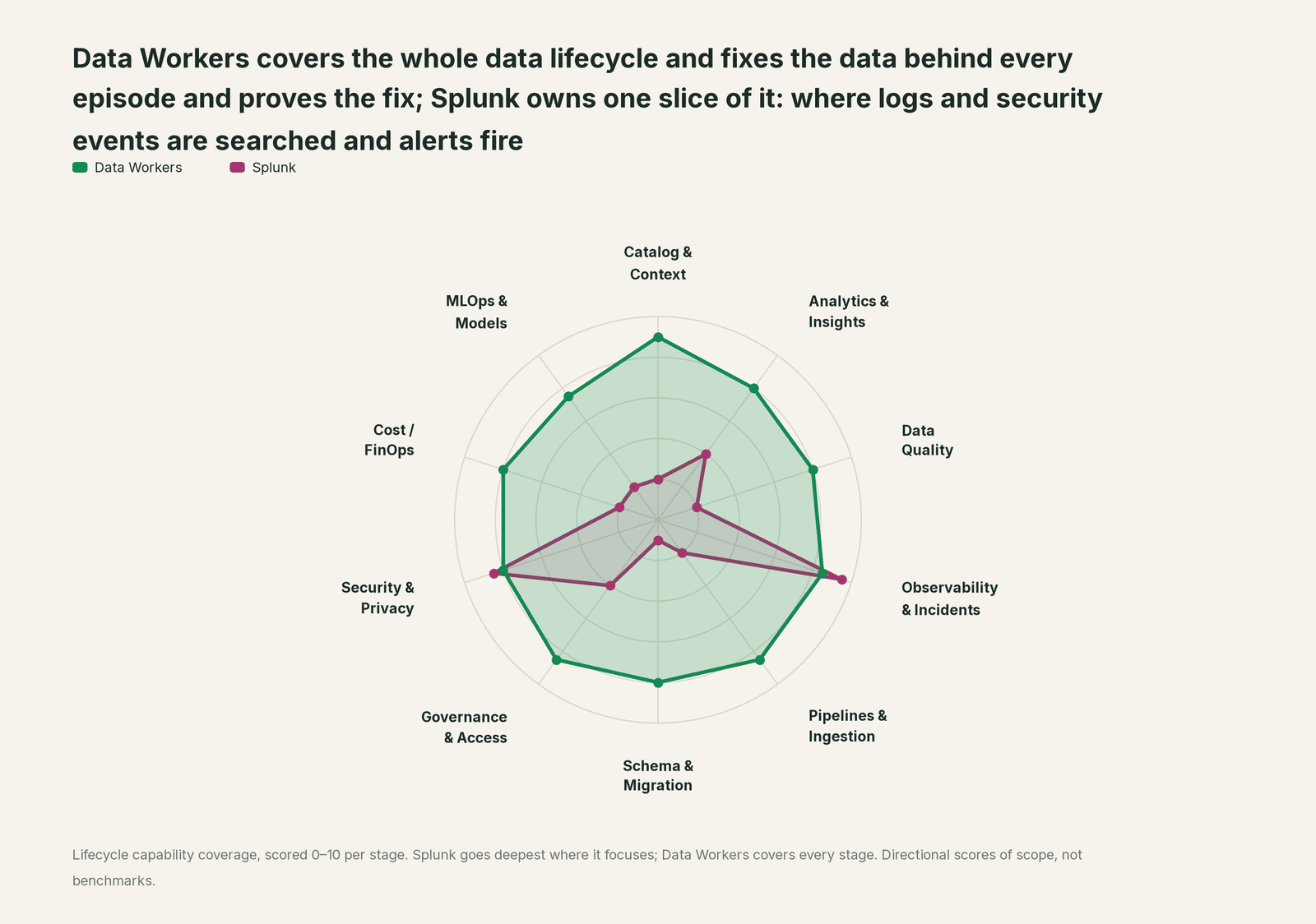
Splunk owns its slice and owns it well. Each point tool adds another console, another contract and another handoff. Data Workers covers the whole lifecycle with one context, one approval flow and one audit trail, and builds on Splunk where your engineers and analysts already look.
| Stage | Data Workers | Splunk | Why we scored it this way |
|---|---|---|---|
| Catalog & Context | 9 | 2 | Indexes, sourcetypes and knowledge objects describe machine data, not tables, owners or business definitions. Data Workers keeps one governed context graph of definitions, owners, lineage, quality and usage across every platform. |
| Analytics & Insights | 8 | 4 | SPL, dashboards and the AI Assistant answer questions about logs, metrics and events, and Federated Search reads S3, Snowflake and Iceberg in place. Data Workers answers business data questions from governed definitions with lineage behind every number. |
| Data Quality | 8 | 2 | A saved search can count malformed records if someone writes it. Data Workers holds the tables themselves to baselines the team records and drafts the owner's checks. |
| Observability & Incidents | 8.5 | 9.5 | Splunk's home stage: saved searches and alerts, ITSI KPIs and episodes, Observability Cloud detectors and the AI SRE's correlated incidents. Data Workers diagnoses the data incident across lineage, fixes it with approval and verifies it. |
| Pipelines & Ingestion | 8.5 | 2 | Splunk ingests and routes machine data at scale, and that is telemetry, not your data pipelines. Data Workers repairs the data pipeline itself: reruns and backfills, with approvals. |
| Schema & Migration | 8 | 1 | Field extractions adapt to new log formats; table schemas are out of scope. Data Workers catches schema changes, scores their blast radius and plans migrations in waves. |
| Governance & Access | 8.5 | 4 | Roles, index access and RBAC mapped to MCP tools govern who searches what in Splunk. Data Workers runs the warehouse access request queue with time-bound, approved grants. |
| Security & Privacy | 8 | 8.5 | Splunk's second home stage: Enterprise Security, SOAR, UEBA and an alert-triage agent run the SOC. Data Workers' pull request review flags new columns whose names or annotations look sensitive, and leaves a receipt on every data change. |
| Cost / FinOps | 8 | 2 | Splunk shows its own license and workload usage. Data Workers reads AWS spend by service from Cost Explorer and attributes Snowflake spend down to the dbt model. |
| MLOps & Models | 7.5 | 2 | Agent Observability watches AI agents, models and their costs. Data Workers keeps the data under your models fresh and correct. |
For the split between watching systems and fixing data, read Data Workers vs data observability and what is an agentic data platform.
How Splunk and Data Workers work together
Splunk stays on top, where episodes open and engineers search. Spellbook Data Catalog (in preview) is where the data team reviews, approves and rolls back changes. Between them, Data Context Wizard keeps one governed context graph across S3, the lake tables and the jobs, the Data-Agents Swarm does the work with 20+ specialist agents, the Autonomous Data-Conductor runs each fix end to end (detect, diagnose, fix, review, verify, remember), and per-domain guardrails hold approvals, receipts and rollback.
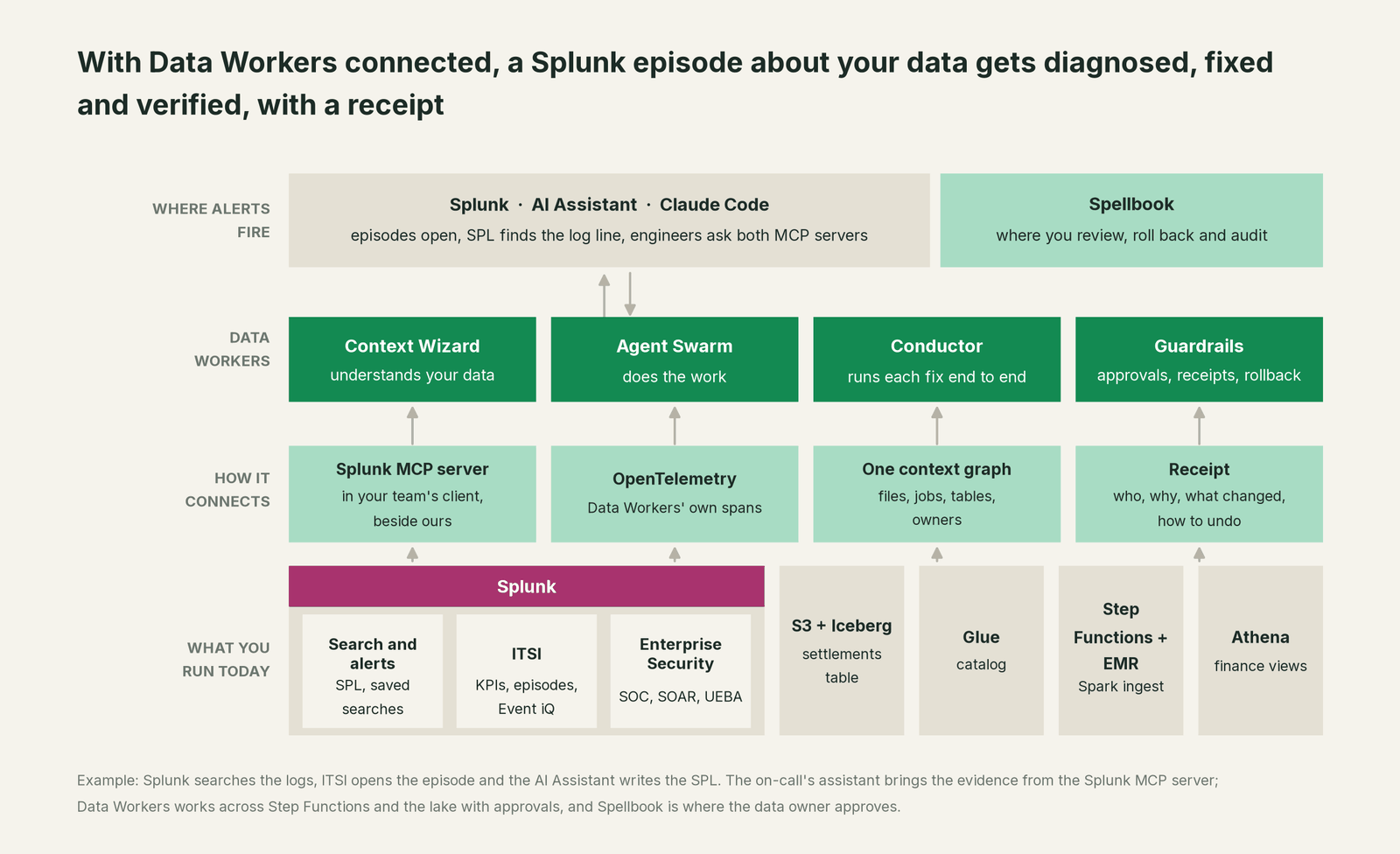
Data Workers to Splunk. Splunk connects over its REST API or the Splunk MCP server today: your team's assistant reads fired alerts, search results and the log lines behind an episode, side by side with Data Workers.
The data work. diagnose_incident and get_root_cause work through the evidence, trace_cross_platform_lineage and blast_radius_analysis map everything downstream, and get_incident_history checks whether the same processor has broken the file before. Fixes run through remediate (playbooks such as backfill_data), verification uses the monitor_metrics baseline and the owner's test, and every step lands in get_audit_trail. Step Functions is native. The Glue Data Catalog, Iceberg, EMR, Athena and Looker Studio connect over their APIs today.
Side by side in one client. Add Data Workers beside the Splunk MCP server. Every Data Workers agent is an MCP server; the client setup guide documents the path: clone the open-source repo and add one start-agent.sh entry per agent.
# Example: Splunk MCP server plus Data Workers in Claude Code
# Splunk's documented command; copy the endpoint and OAuth client from your MCP Server app
claude mcp add --transport http --callback-port <callback-port> \
  --client-id <client-id> --client-secret splunk-mcp <mcp-endpoint>
# then run /mcp in Claude Code to sign in through your browser

# Data Workers agents over stdio, from a clone of the open-source repo
claude mcp add --scope user dw-catalog -- "$(pwd)/start-agent.sh" dw-context-catalog
claude mcp add --scope user dw-incidents -- "$(pwd)/start-agent.sh" dw-incidents
claude mcp add --scope user dw-quality -- "$(pwd)/start-agent.sh" dw-quality
Ask "why are Thursday's settlements short?" and the client calls both: Splunk returns the fired alert and the log lines; Data Workers returns the null rows, the blast radius and a proposed fix. Splunk roles govern its tools; Data Workers' guardrail decides whether a data change may run in that domain, with a named approver. For a shared endpoint, the Data Workers remote server serves /mcp with an API key (bearer) or OAuth tokens from your identity provider, verified through JWKS.
One episode, L0 to L4. The same settlement incident at each level of the autonomy ladder, set per domain.

- •L0 manual. The on-call hands the SPL search to a data engineer, who reruns the job by hand.
- •L1 observe. Data Workers reports the null count and blast radius for the episode. No data changes.
- •L2 propose. Data Workers proposes the parser diff and the partition rerun; nothing runs until the finance data owner approves in Spellbook.
- •L3 act reversibly. For change classes with a proven record, such as rerunning a partition from a file still in S3, Data Workers queues the rerun with the table owner's prior snapshot named as the undo, verifies it and records the receipt.
- •L4 autonomous. In a scoped domain such as settlements, every malformed-record episode triggers the same check, and a verified rerun lands before treasury opens the report.
For the safety model, read is it safe to let AI agents change production data, how approvals work and autonomy levels L0 to L4. On where data lives: the agents run in your infrastructure, your data stays in your systems, and the hosted Conductor sees workflow metadata only.
What changes for your team
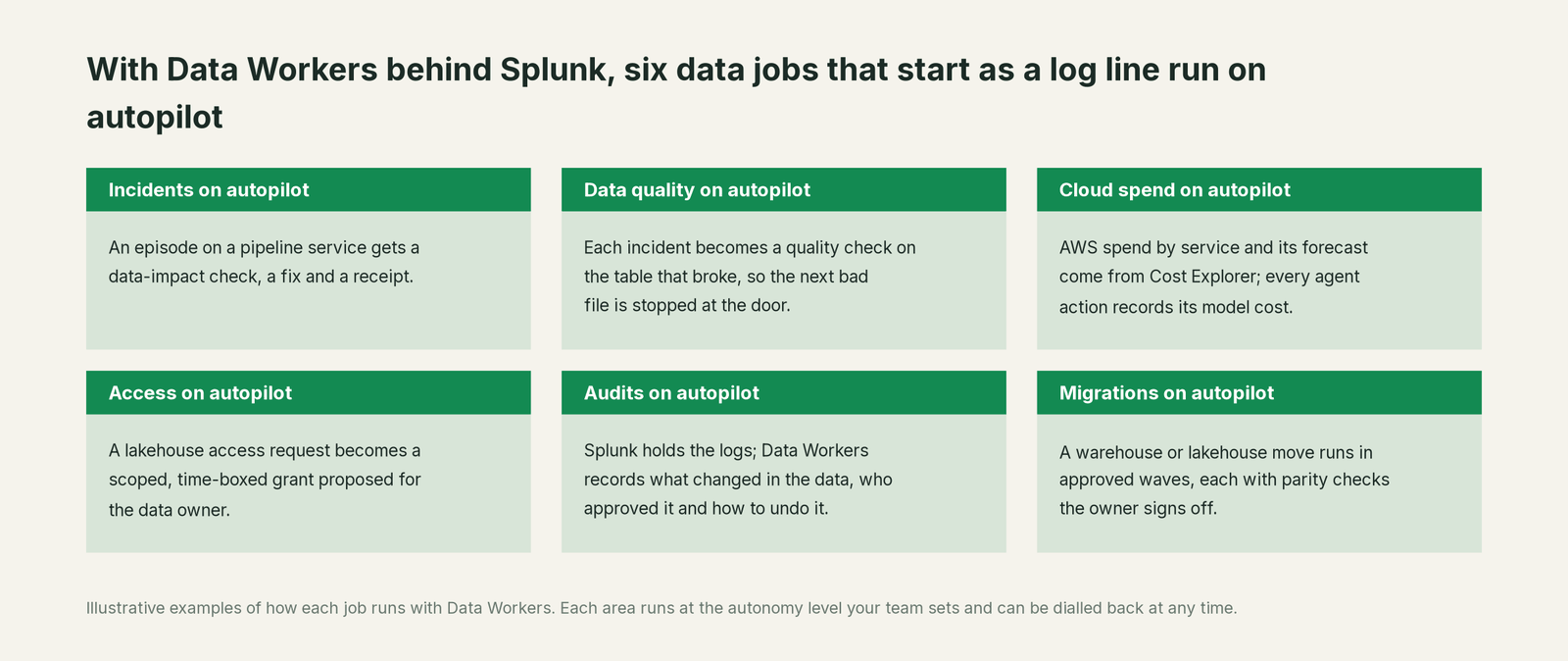
- •Incidents. An episode on a pipeline service gets a data-impact check, a fix and a receipt.
- •Data quality. Each incident becomes a quality check on the table that broke, so the next bad file is stopped at the door.
- •Cloud spend. AWS spend by service and its forecast come from Cost Explorer, and every agent action records its own model cost.
- •Access. A lakehouse access request becomes a scoped, time-boxed grant proposed for the data owner, with its expiry on record.
- •Audits. Splunk holds the logs; Data Workers records what changed in the data, who approved it and how to undo it.
- •Migrations. A warehouse or lakehouse move runs in approved waves, each with parity checks the owner signs off.
The platform on-call changes most: the log search stops being a handoff. See the data incident response playbook, data reliability engineering, root cause analysis with the incidents agent and who owns the agents.
Keep Splunk, or consolidate?
Keep Splunk if you love it; Data Workers works with it from day one. Many teams consolidate once Data Workers runs that slice too.
For Splunk customers the answer is almost always to keep it: the SOC, IT operations and years of indexed evidence run there. What teams consolidate is the stack around the lakehouse: a separate data observability contract, a data-quality tool, a stale catalog and scripts that check yesterday's load. Building on the Splunk MCP server with a coding agent instead? The MCP calls are the easy part; the context graph, approvals and rollback are the work. Across the incident stack, see you're on Datadog, you're on New Relic and you're on PagerDuty, and the full list in Data Workers integrations.
The case for your CFO
The outcome: you already pay Splunk to see every error in your estate. Data Workers makes sure the business numbers behind those errors are right before anyone reads them, so a 01:00 parsing error does not become a wrong cash position at 07:00.
The risk story is plain. Autonomy is set per domain: at L1 Data Workers changes no data; at L2 it changes nothing until a named person approves; at L3 it applies changes it can undo. An unanswered approval request expires and escalates, never auto-grants. No agent can promote its own work. Every change carries a receipt. An org-wide stop halts all autonomous dispatch. Zero migration: Splunk, Step Functions, EMR, S3, Glue and Athena stay where they are.
Why now: Splunk's AI Assistant and AI SRE find the cause of an alert faster than ever, so the slow part has moved to the data the incident left behind. The first win is read-only: every episode on a pipeline service gets a data-impact check and a blast radius. What stays the same: your SPL, saved searches, ITSI services, Splunk roles, lakehouse permissions and code review. For the numbers, see the ROI of agentic data operations.
The sentence to repeat upstairs: "Splunk shows us what went wrong; Data Workers fixes the data, proves it and leaves a receipt for every change."
Getting started
Start with a pilot. Pick one domain whose pipeline logs already feed Splunk, such as the settlement files behind the treasury report, connect Data Workers to Splunk, Glue, Iceberg and Step Functions, and run at L1 so every episode on that service gets a data-impact check. Then turn on the first write class at L2, such as partition reruns with owner approval. The pilot path and plans are on the pricing page, and the pilot is credited in full against the first year.
FAQ
Does Data Workers have a Splunk connector? Splunk connects over its REST API or the Splunk MCP server today: your team's assistant reads fired alerts, search results and the log lines behind an episode, side by side with Data Workers. Its export_otel_spans tool exports its own agent activity as OpenTelemetry spans, which OpenTelemetry-native Observability Cloud ingests.
Can the Splunk MCP server change data? It is built to search. Its 33 tools run searches, list alerts and explain or generate SPL, and its rest command is read-only. Version 2.0, released September 2, 2026, added six tools for alerts, firing details and throttling. Data Workers makes the changes in your data systems, with approval.
How is this different from Splunk's AI SRE? The AI SRE correlates alerts, finds the probable root cause from metrics, logs and traces, and builds a step-by-step remediation plan your engineers review, approve and execute. Data Workers works on the data: which rows are wrong, which reports read them, the fix with its undo, the approval and the verification.
Can Splunk alert on bad data directly? It alerts on anything you can search, so a team that logs malformed records gets alerts on them. Data Workers checks the tables themselves, catches the problem even when no log line mentions it, then fixes and verifies.
Will Data Workers change anything in Splunk? No. Splunk stays the unaltered record. The on-call links the Data Workers receipt on the episode; the receipt lives in Spellbook and the audit trail. Its only optional output is its own agent activity, sent as OpenTelemetry spans.
Sources
- •Splunk, AI SRE (agentic teammate; guided, step-by-step remediation plans; engineers review, approve and execute; no availability label on the page), https://www.splunk.com/en_us/products/ai-sre.html (checked Oct 2, 2026)
- •Splunk, Splunk AI Assistant (Agent Mode; Cloud Platform and Enterprise; Observability Cloud), https://www.splunk.com/en_us/products/splunk-ai-assistant.html (checked Oct 2, 2026)
- •Splunk, Enterprise Security (progressive autonomy; triaging agent; AI Assistant in controlled availability; SOAR, UEBA), https://www.splunk.com/en_us/products/enterprise-security.html (checked Oct 2, 2026)
- •Splunk, IT Service Intelligence (Event iQ episodes, AI-generated episode summaries), https://www.splunk.com/en_us/products/it-service-intelligence.html (checked Oct 2, 2026)
- •Splunk, Observability Cloud (OpenTelemetry-native, AI SRE, Agent Observability), https://www.splunk.com/en_us/products/observability-cloud.html (checked Oct 2, 2026)
- •Splunk, Federated Search (Amazon S3, Snowflake, Delta Lake, Iceberg, Azure Blob; SPL2), https://www.splunk.com/en_us/products/federated-search.html (checked Oct 2, 2026)
- •Splunk, Turn Operational Data into Your Security Superpower ("Cisco Data Fabric, powered by Splunk"), https://www.splunk.com/en_us/form/turn-operational-data-into-your-security-superpower.html (checked Oct 2, 2026)
- •Splunk Help, About MCP Server for Splunk Platform (updated Sep 1, 2026), https://help.splunk.com/en/splunk-enterprise/mcp-server-for-splunk-platform/2.0/about-mcp-server-for-splunk-platform (checked Oct 2, 2026)
- •Splunk Help, MCP Server release notes (v2.0.0 Sep 2, 2026; v1.3.0 Jul 22, 2026; v1.1.0 Apr 1, 2026), https://help.splunk.com/en/splunk-enterprise/mcp-server-for-splunk-platform/2.0/mcp-server-release-notes (checked Oct 2, 2026)
- •Splunk Help, MCP Server tools (33 tools: search, alerts, SPL generation, Observability), https://help.splunk.com/en/splunk-enterprise/mcp-server-for-splunk-platform/2.0/mcp-server-tools (checked Oct 2, 2026)
- •Splunk Help, REST command support (read-only), https://help.splunk.com/en/splunk-enterprise/mcp-server-for-splunk-platform/2.0/mcp-server-rest-command-support (checked Oct 2, 2026)
- •Splunk Help, Connect Claude to the Splunk MCP server, https://help.splunk.com/en/splunk-enterprise/mcp-server-for-splunk-platform/2.0/connect-claude-to-splunk-mcp-server (checked Oct 2, 2026)
- •Data Workers open-source repository, https://github.com/DataWorkersProject/dataworkers-claw-community (checked Oct 2, 2026)
- •Data Workers client setup guide, https://dataworkers.io/opensource-docs/client-setup/ (checked Oct 2, 2026)