Agentic headcount planning: a guide for workforce planning teams
Going fully agentic and autonomous does not mean putting a chatbot on the headcount plan. For workforce planning data teams, it means climbing from agents that assist, to agents that run the routine work under your controls, to a planning data back office that largely runs itself: HR and finance headcount reconciled every morning, reorgs and cost-centre moves remapped the day they happen, scenario models refreshed on current actuals and every variance explained before the review. Plans, scenario sign-off and anything about an individual stay with a named owner. This is what that climb looks like, step by step.
Key takeaways
- •Who this is for. The workforce planning data team that sits between HR, finance FP&A and the business leaders: approved headcount plans, position data, open requisitions, cost per head, scenario models and capacity-versus-demand models.
- •The problem today. HR's headcount and finance's headcount disagree every month, position IDs and employee IDs never quite line up, reorgs and cost-centre moves land mid-quarter, scenario models are built from stale actuals and the plan-versus-actual variance takes a week to explain.
- •What changes. HR and finance headcount are tied every morning and each gap is traced to the record or rule behind it, hierarchy changes are remapped with prior periods restated, scenario inputs are refreshed from current actuals and variances arrive explained.
- •What stays with your people. The approved plan, scenario sign-off and anything about an individual, compensation above all: a named owner approves each one, and no agent writes to the plan or touches a person's pay.
- •The result. A planning team that spends its week on scenarios and capacity questions instead of arguing about which headcount is right.
The PRD for agentic workforce planning data teams
This is the requirements document we would write with you for your team. Everything below expands on it.
| Who | Strategic workforce planning, headcount planning, capacity planning, people finance and FP&A headcount teams |
| The job | One agreed headcount every morning, and scenarios built on actuals that are current. |
| Environment | Workday, SuccessFactors or another HRIS; the general ledger and payroll; an ATS for open requisitions; Anaplan, Workday Adaptive Planning, Pigment or the spreadsheets that still hold the model; Snowflake or Databricks; dbt; Airflow; Tableau or Looker. |
| Constraints | The approved plan, scenario sign-off and individual-level data always go to a named owner. Compensation data is held to the roles allowed to see it. |
| Success is measured by | HR to finance headcount tie-out: from about 2 days to 15-20 min; plan-versus-actual variance pack: from about a week to about an hour; scenario refresh on current actuals: from about 3 days to about an hour; catalog and docs upkeep closed autonomously 88% of the time. |
| Owned by | The Head of Workforce Planning or Director of People Finance, with the HR and finance data owners as named approvers. |
| Pilot scope | Daily headcount tie-out and the monthly variance pack for one business unit, at L1 then L2. |
What going fully agentic and autonomous means for workforce planning data teams
- •Put your data pipeline on autopilot. HRIS, ledger, payroll and requisition feeds are checked on every load and changes to fields or hierarchies are mapped before the next refresh, so a Friday reorg stops breaking the Monday plan.
- •Run the data back office without the busywork. The work that fills the close of every month moves to agents: tying HR to finance, matching positions to people, refreshing actuals in the scenario models and drafting the first explanation of every variance.
- •Scale data without scaling headcount. A new business unit, a new country or a new scenario is added in hours, so the planning estate grows without the team having to.
- •Get the plumbing off your plate. A planning team that ships capacity and scenario products instead of reconciling two headcounts by hand.
Who this is for
The team that owns workforce planning as a data domain. At a software or services company it sits in People Analytics, People Finance or FP&A, with a dotted line to a central data organization, running the planning marts on Snowflake or Databricks with dbt and Airflow and feeding a planning platform. At a bank, a retailer or a manufacturer it plans branches, stores or plants against demand and has the same disagreement between the HR system and the ledger. The HRIS itself, and the integrations that feed it, belong to the HR data platform team; this team is the main consumer of that data and the one that gets blamed when it is wrong. If your business sells labor-market or workforce data to others, that is a different job, covered in people and labor-market data.
The titles: Head of Strategic Workforce Planning, Director of Workforce Planning, Director of People Finance, Workforce Planning Manager, FP&A Headcount Lead, Capacity Planning Manager, Workforce Analytics Lead, and the analysts and analytics engineers who report to them. These leaders answer to the CHRO and the CFO for the plan, and to the business leaders who live inside it.
The product you ship
- •The approved headcount plan: headcount and cost by position, cost centre, level and month, versioned so every revision can be compared with the one before.
- •Position and requisition data: the position, whether it is filled, open, frozen or approved but not yet posted, and the link from position to employee. The planning side of workforce plan inputs.
- •Cost per head: rate cards and fully loaded cost by role, level and location, kept apart from any individual's pay.
- •Scenario models: hiring pace, attrition, mix and location what-ifs, built on current actuals. The attrition and hiring assumptions come from headcount and attrition data and the recruiting funnel.
- •Capacity versus demand: supply by skill and location against the demand a business unit asks for, including the hourly view in workforce and staffing data.
- •Plan versus actual: the monthly variance pack, with each move traced to a hire, an exit, a transfer, a rate or a timing difference.
- •Pay-sensitive views: compa-ratio and pay-range inputs for the plan, governed alongside compensation and pay equity data.
Where the week goes
- •Two headcounts. HR counts employees, finance counts positions and cost centres, and the monthly review opens with an argument about which is right.
- •Position IDs are not employee IDs. Vacancies, backfills, dual-hat roles, contractors and employees on leave all fall through the join.
- •Reorgs land mid-quarter. Cost-centre moves, new org levels and renamed departments change the hierarchy under a plan that was approved last month.
- •Scenarios run on stale actuals. The model was loaded last month, the hiring since then is in the ATS and the exits are in the HRIS.
- •Variance takes a week. Someone has to trace every move in cost per head or headcount to the records behind it, in a spreadsheet.
- •Definitions are contested. HR, finance and the business each hold a version of headcount, FTE, attrition and vacancy.
- •Compensation is sensitive. The people who build the plan need cost per head, not a named person's salary, and the extracts rarely make that distinction.
Add it up and upkeep is most of the team's week. Here is how a typical week splits today, and once agents own the back office:
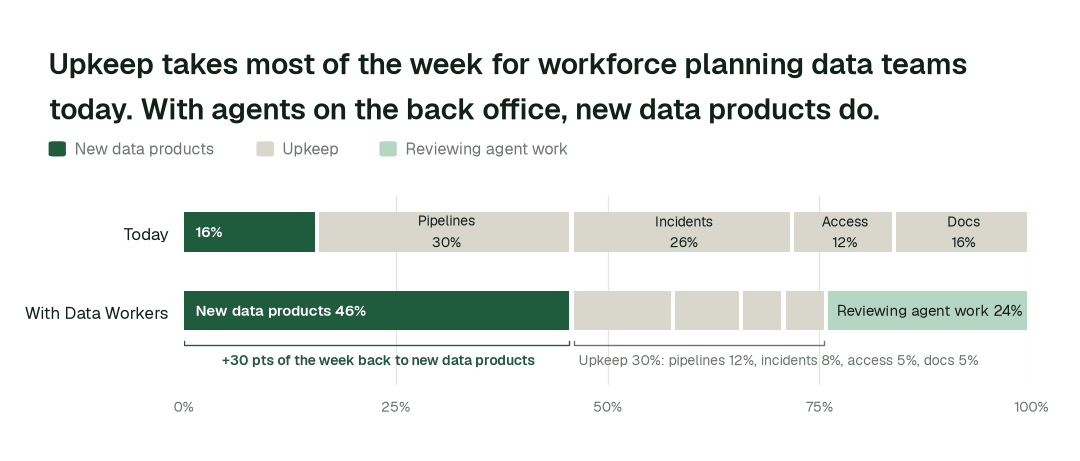
Time spent on new data products moves from 16% of the week to 46%. Most of the rest becomes review: people steer and approve agent work instead of doing it by hand.
Then and now
| Work | Today | With Data Workers |
|---|---|---|
| HR to finance headcount | Argued about at the monthly review | Tied every morning, gaps traced |
| Position to employee match | Vacancies and backfills fall through | Matched on every load, exceptions listed |
| Reorg or cost-centre move | Plan breaks, history overwritten | Versioned, prior periods restated |
| Scenario inputs | Loaded last month | Refreshed from current actuals |
| Plan versus actual | A week in spreadsheets | Variance drafted and linked to records |
| Compensation in extracts | Whole columns passed around | Held to the roles allowed to see it |
These are the impact metrics we move for workforce planning data teams:
- •HR to finance headcount tie-out: from about 2 days to 15-20 min
- •Plan-versus-actual variance pack: from about a week to about an hour
- •Scenario refresh on current actuals: from about 3 days to about an hour
Across the routine work in this domain:
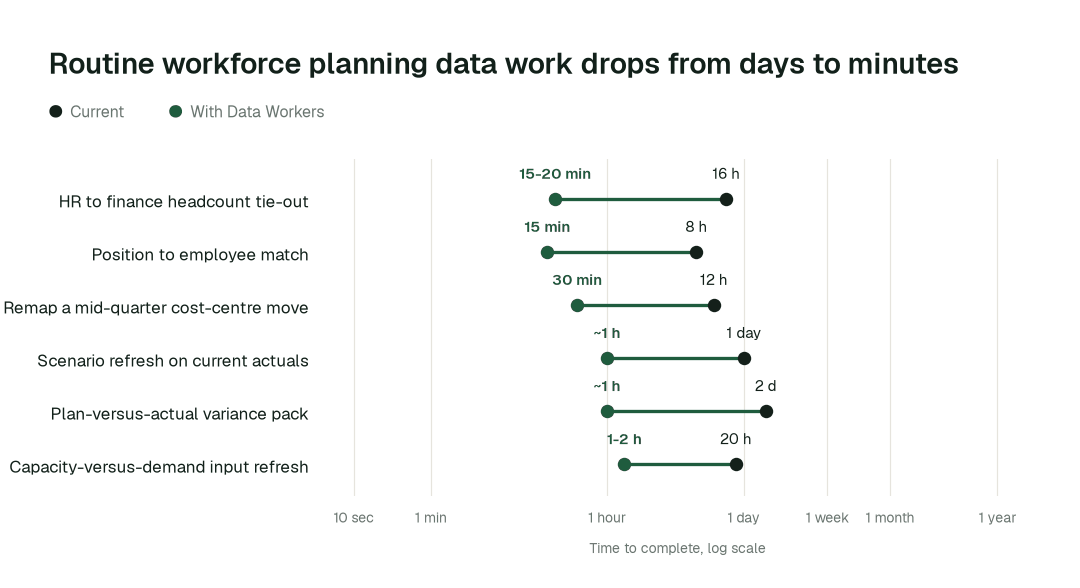
The biggest change is the plan-versus-actual variance pack: from about a week to about an hour. Work that waited in queues finishes in minutes or hours, because agents detect, trace and verify in one pass.
Use cases, in depth
One headcount, every morning
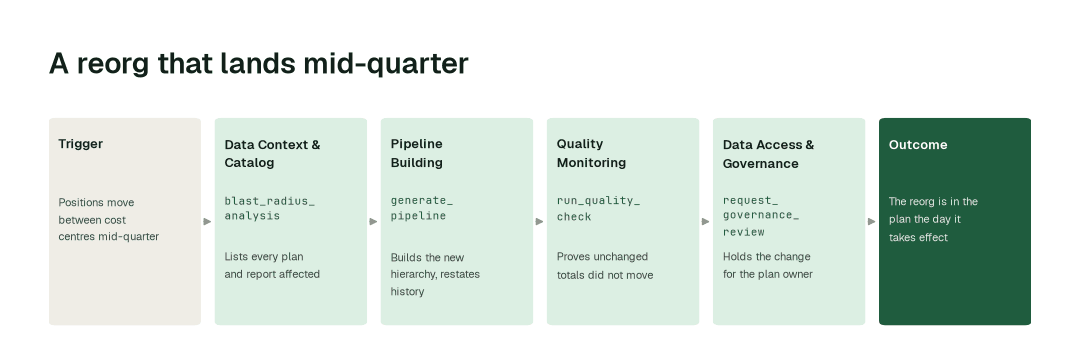
Today. HR's headcount and finance's headcount disagree every month. The gap is made of vacancies counted one way, contractors counted the other, a transfer booked in different periods and a position ID with no employee behind it.
With Data Workers. Agents confirm that the HRIS, ledger, payroll and requisition loads landed, tie headcount by position and cost centre across the two sides, trace each gap to the record or rule behind it and hold any change to the agreed definition for the plan owner.
What changes. The monthly review opens with one number and a short list of explained exceptions. The longer guide is workforce plan inputs.
A reorg that lands mid-quarter
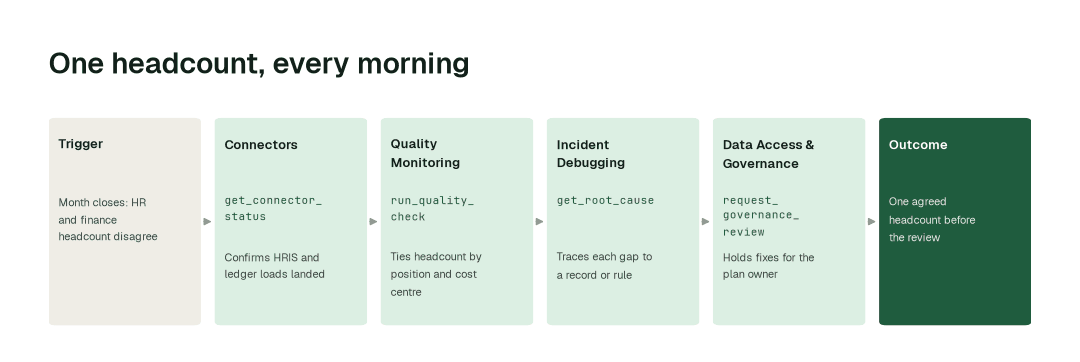
Today. Positions move between cost centres, a new org level appears and a department is renamed. The approved plan, the actuals and every scenario downstream now sit on different hierarchies, and the comparison with last quarter no longer ties.
With Data Workers. The Data Context & Catalog agent lists every plan, model and report that depends on the changed hierarchy, the Pipeline Building agent builds the new version beside the old one with prior periods restated, and Quality Monitoring proves the totals that should not move have not moved.
What changes. The reorg is in the plan on the day it takes effect, and last quarter is still comparable. Attrition and hiring numbers by the new structure follow from headcount and attrition data.
Plan versus actual, explained before the review
Today. The variance pack is a week of tracing: a cost-per-head move is a hire at a higher level, a delayed start, an exit not yet backfilled or a rate change, and each answer lives in a different system.
With Data Workers. Agents refresh actuals in the scenario inputs on every load, compute the variance by position and cost centre, trace each material move to the hire, exit, transfer or rate behind it and draft the explanation with the records linked.
What changes. The analyst reviews and edits an explanation instead of building one, and the forecast refresh in FP&A and forecasting data starts from current actuals. Headcount cost tied to the ledger is the same discipline as budget and expenditure data.
Use-case guides for workforce planning data teams
Each guide has the workflow, the agents and tools involved, the impact metrics and a one-business-unit pilot scope.
- •Workforce plan inputs: positions, requisitions, cost per head and approved plan versions kept consistent and tied to HR and finance.
- •Headcount and attrition data: headcount, exits and transfers computed once from governed definitions.
- •Recruiting funnel data: requisition and hiring-pace data that the scenarios can trust.
- •Compensation and pay equity data: pay-sensitive inputs held to the roles allowed to see them.
- •FP&A and forecasting data: planning inputs kept fresh and reconciled to actuals.
- •Workforce and staffing data: staffing, timekeeping and census data aligned for capacity questions.
- •Budget and expenditure data: obligations, outlays and budgets reconciled.
Agents working together: Day three of the month
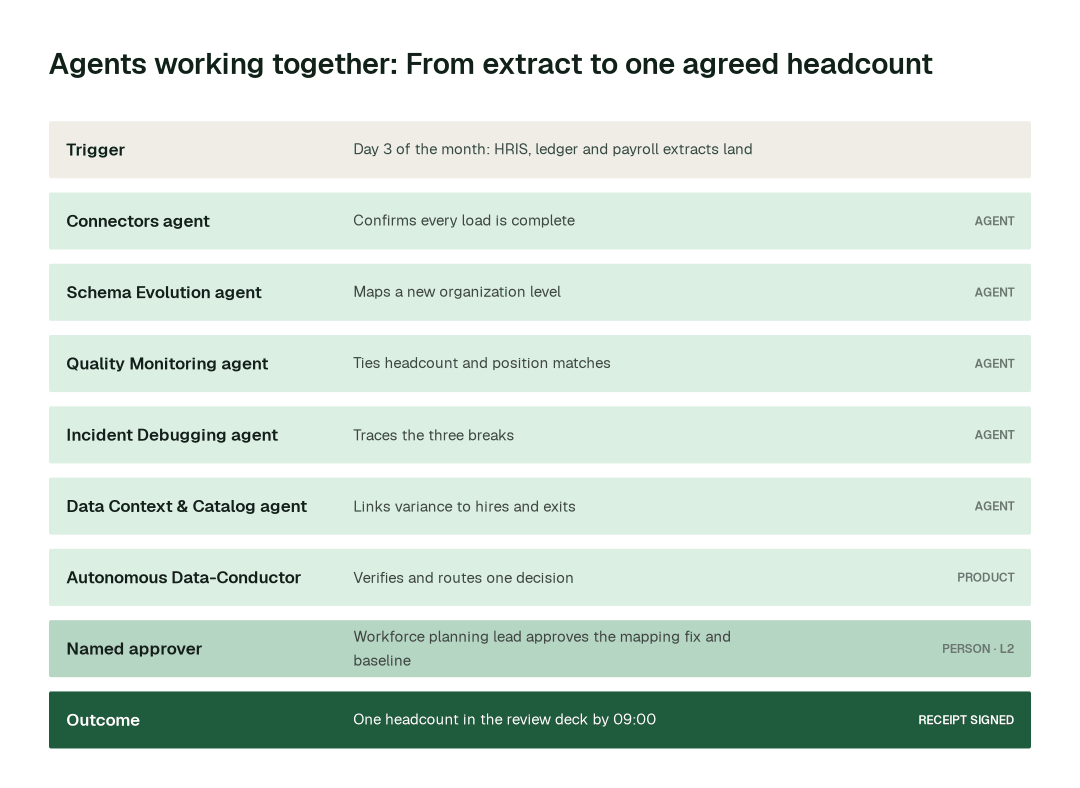
Every workforce planning lead knows the third working day. The HRIS and the ledger have both closed the month, the plan owners are waiting for the headcount slide, and the two systems are off by a number nobody can yet explain. This is the same morning run by Data Workers.
The setup
The planning marts run on Snowflake and dbt under Airflow, fed by the HRIS, the ledger, payroll and the applicant tracking system. They feed the monthly review, the scenario models in the planning platform and the capacity view. Autonomy in Autopilot:
- •Landing, tie-out checks and documentation upkeep: L2 today; a candidate for L3 on evidence.
- •Position-to-employee fixes, hierarchy remaps and variance drafts: L2, reviewed by the HR or finance data owner.
- •The approved plan, scenario sign-off and anything about an individual: L2 at most, held for a named owner. No agent writes to the plan.
The team scheduled one mission the week before: "Tie HR and finance headcount by position and cost centre by 08:00 on day three."
06:00: the extracts land
The Airflow run finishes. The HRIS snapshot, the ledger actuals, the payroll file and the requisition export are loaded. The HRIS export carries one new organization level that the model has never seen.
06:04: confirm what landed
Connectors agent checks each source and confirms the loads are complete and on time. The payroll file for one country arrived late and is flagged before anything downstream reads it.
Schema Evolution agent sees the new organization level, maps it into the model and validates compatibility with the existing marts.
06:20: tie it out
Quality Monitoring agent runs the checks the review depends on:
- •Headcount by cost centre ties between the HRIS and the ledger.
- •Every filled position maps to exactly one employee, and every employee to a position.
- •Open requisitions map to approved, unfilled positions.
- •Payroll headcount agrees with the HRIS for every country that has reported.
Three things do not tie: a cost centre that is off by eleven heads, a position with two employees and an approved requisition with no position.
06:40: trace the breaks
Incident Debugging agent traces the eleven-head gap to a department renamed in the HRIS the previous Friday, which the ledger mapping still carries under the old name. It traces the doubled position to a backfill hired before the leaver's exit date, and the orphan requisition to a position that was frozen after approval. The first is a mapping fault; the other two are real events, so it writes them up with the records involved.
07:05: link the variance
Data Context & Catalog agent links each material plan-versus-actual move to the hires, exits, transfers and rate changes behind it, using the governed definitions of headcount, FTE and vacancy, so the reviewer can click from a variance to the records.
07:30: hold what needs a person
Data Access & Governance agent assembles the proposed mapping fix, the evidence and the lineage, and requests review. The Autonomous Data-Conductor checks that the tie-out holds after the remap and routes one decision to the workforce planning lead: the department mapping, the two position exceptions and the refreshed baseline.
08:10: approved
The workforce planning lead approves the mapping, asks the HR data owner to correct the frozen position in the HRIS, and releases the refreshed baseline to the scenario models. Nothing is written to the plan by an agent. The planning platform is updated by its owners, through your existing workflow.
09:00: the team starts the day
The review deck shows one headcount, three explained exceptions and a variance pack drafted for the biggest cost centres. The scenarios run on this month's actuals. Nobody reconciled two headcounts in a spreadsheet.
What stays behind
- •Daily tie-out tests for headcount by position and cost centre, so the next month starts the same way.
- •A receipt for every change: who proposed it, who approved it and how to roll it back.
- •Updated Spellbook Data Catalog pages for every affected planning data product.
- •A reusable mission. The following month runs the same way, and the team can move the routine parts to L3.
Minute by minute
This is an illustrative example. The planning marts run on Snowflake and dbt under Airflow, fed by the HRIS, the ledger, payroll and the ATS. The approved plan and anything about an individual are held for a named owner.
| Time | Who | What happens |
|---|---|---|
| 06:00 | Airflow | HRIS, ledger, payroll and requisition extracts land |
| 06:04 | Connectors agent | get_connector_status confirms loads; one late payroll file flagged |
| 06:10 | Schema Evolution agent | detect_schema_change maps the new organization level |
| 06:20 | Quality Monitoring agent | run_quality_check ties headcount; three items do not tie |
| 06:40 | Incident Debugging agent | get_root_cause traces a renamed department and two position events |
| 07:05 | Data Context & Catalog agent | trace_cross_platform_lineage links variance to records |
| 07:30 | Data Access & Governance agent | request_governance_review holds the mapping fix and baseline |
| 08:10 | Workforce planning lead | Approves the mapping; the HR data owner corrects the position |
| 09:00 | Review deck | One headcount, three explained exceptions |
The agents on the job
| Agent | What it does for a workforce planning data team | Tools it calls |
|---|---|---|
| Connectors and Data Ingestion | Land HRIS, ledger, payroll, ATS and planning-platform exports and confirm every load is complete and on time | get_connector_status, trigger_airflow_dag, get_dbt_run_history |
| Schema Evolution | Detects new fields, org levels and renamed values at the boundary and maps them into the marts | detect_schema_change, validate_schema_compatibility, generate_migration, rollback_migration |
| Pipeline Building | Builds and versions the position, hierarchy, cost-per-head and scenario-input models in dbt, with tests | generate_pipeline, validate_pipeline, deploy_pipeline |
| Quality Monitoring | Ties HR to finance, positions to employees and requisitions to approved positions every day | run_quality_check, get_anomalies, set_sla, create_quality_tests_for_pipeline |
| Incident Debugging | Traces a headcount gap or a variance to the record, rule or change behind it | diagnose_incident, get_root_cause, get_incident_history |
| Data Access & Governance | Holds compensation and individual-level fields to the roles allowed to see them, holds plan-affecting changes for review and logs every grant | check_policy, provision_access, request_governance_review, generate_audit_report |
| Data Context & Catalog | Keeps one governed definition per metric and links every reported figure to its sources | trace_cross_platform_lineage, blast_radius_analysis, define_business_rule, resolve_metric |
| Cost Savings & Data Cleanup | Retires duplicate plan snapshots, stale scenario copies and abandoned analyst extracts | get_snowflake_usage, get_cost_enrichment, detect_dead_assets |
Data Context Wizard holds one governed definition of headcount, FTE, vacancy, attrition, cost per head and each level of the org hierarchy. The planning platform's feeds, the review deck and every AI assistant the business uses answer from the same definitions, so HR and finance stop disagreeing about what is being counted. Autonomous Data-Conductor verifies the numbers that matter before the review and before a scenario refresh. Spellbook Data Catalog makes each planning data product discoverable for planners, HR business partners and finance, in plain English.
What goes on autopilot
Once a domain has earned it, this work runs on its own, and each item removes a problem your team deals with today:
- •HR to finance headcount is tied every morning, so the monthly review opens with one number.
- •Hierarchy and field changes are mapped when they happen, so a reorg no longer breaks the plan mid-quarter.
- •Actuals are refreshed into the scenario inputs on every load, so a what-if is never built on last month.
- •Variances are computed and linked to their records daily, so there is no week of tracing before the review.
Where your people stay in charge
Agents never get blanket access. Each domain has its own autonomy level, set by you, and it only rises when the receipts show the agents are reliable. Everything starts at L1, observing only; reversible upkeep such as reruns, staging fixes, documentation and cleanup is usually first to run on its own.
- •The approved plan and each revision of it go to a named owner: the workforce planning lead, with finance and HR sign-off where your process requires it.
- •Scenario sign-off stays with people. Agents refresh the inputs and show what moved; the choice of which scenario the business plans against is a leadership decision.
- •Anything about an individual stays with people and the roles allowed to see it: named-employee actions, and compensation above all. Pay shapes careers and is regulated; agents work with cost per head, position-level and aggregate data, not with a person's salary.
- •Definition changes, such as what counts as headcount or a vacancy, are proposed with the before-and-after numbers and approved by the HR and finance data owners together.
Once a deployment has matured, here is how that ladder plays out across task classes:
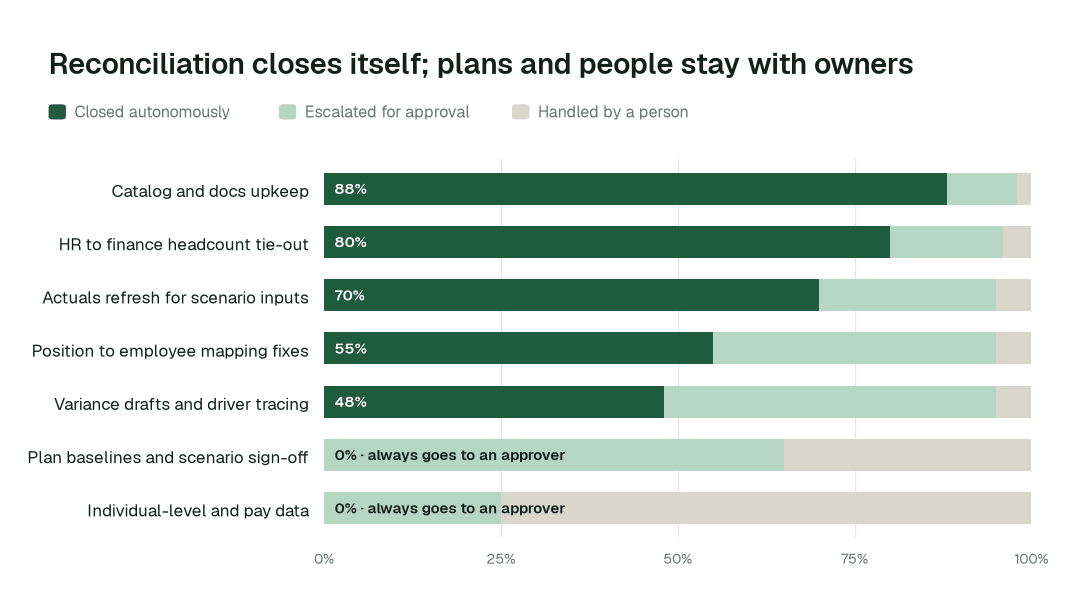
Catalog and docs upkeep closes autonomously 88% of the time. For plan baselines and scenario sign-off, autonomous closure is 0% by design: every change is prepared as a proposal with the supporting records and approved by a named person.
What happens when an agent is wrong
- •At L2 propose, nothing changes until a named person approves. The proposal shows the full diff, the plans and reports affected and how to roll it back. Unanswered requests expire and escalate.
- •L3 and L4 are where a domain can go next, on its own review record: acting on its own, with a rollback point on every change. Only the domain's owner raises its level, and if people start reverting the agents' changes, the domain pauses itself. See how an agent's change is rolled back.
- •No agent approves or promotes its own work. Autonomy only grows on evidence, domain by domain, and repeated reverts pause the domain.
- •One org-wide stop halts all autonomous dispatch, and every action lands in a tamper-evident audit trail you can export with
generate_audit_report.
How it fits your stack
Data Workers connects to what you already run: Workday, SuccessFactors or another HRIS; the ledger and payroll; your applicant tracking system; Anaplan, Workday Adaptive Planning, Pigment or the spreadsheets that hold the model; Snowflake or Databricks; dbt; Airflow; Tableau or Looker. Each agent is an MCP server, so the same agents work inside Claude Code, Cursor or Codex and in Slack through Spellbook. Nothing migrates.
- •Runs in your infrastructure with your credentials and your model key. The hosted Autonomous Data-Conductor sees workflow metadata only, never rows. The VPC and air-gapped options matter when employee data cannot leave your network.
- •Uses the access you already govern. Agents act under scoped service identities and your existing roles; every grant goes through
provision_accessand is logged. If you run Okta as the identity source, it stays that. - •Proposes changes as diffs in your dbt project, orchestrator and warehouse, with blast radius, tests and a rollback point, and applies them only at the autonomy level you set for that domain.
- •Works from exports and tables. The agents attach to the warehouse and orchestrator your planning platform already loads from and publishes to. They do not write into the planning model.
- •Open-source core. The Apache-2.0 community edition ships 11 agents and 160+ MCP tools, so your engineers (and your privacy team's technologists) can read exactly what the agents call.
Governance and regulation
Workforce planning data is employee data. Headcount by position is low risk; anything that identifies a person, and compensation most of all, is personal data under privacy law and sensitive inside the company. Data Workers keeps access scoped with provision_access, holds compensation and individual-level fields to the roles allowed to see them with check_policy, finds personal data in new extracts with scan_pii so it is tagged before anyone builds on it, and holds every plan-affecting change for a named approver. For data governance leads, what changes in their week covers the access and definition side in more detail.
Two public texts matter to this team. The General Data Protection Regulation governs employee personal data for anyone in the EU. The EU Pay Transparency Directive sets requirements on pay information and reporting that touch the compensation inputs to a plan; the compensation side is covered in compensation and pay equity data. Both are in the sources.
Data Workers doesn't make you compliant; your controls, people and assessors do. It supplies controls and evidence wherever agents touch data. Not legal advice.
The alternatives workforce planning data teams weigh
Build it yourselves. A strong team can wire a coding agent to MCP servers for the warehouse and dbt. The work is everything around it: routing each change to the right HR or finance owner, blast radius, rollback, receipts, and current context about every other system.
Planning platforms and HR analytics. Anaplan, Workday Adaptive Planning, Pigment and the reporting inside your HRIS run the model, the workflow and the dashboards. They depend on the data feeding them. Data Workers keeps that data right underneath them, traces a wrong number to its cause and leaves the receipt. The finance side of the same problem is covered for finance data teams.
Platform-native agents. The warehouse vendors ship agents that work well inside their own platform. Workforce planning crosses the HRIS, the ledger, the orchestrator, the warehouse and the planning tool, and Data Workers works across all of them.
In this space specifically. Spreadsheets and analyst-owned macros are the incumbent. Agents replace the repetitive tie-out inside them and leave the plan, the scenario choice and every decision about a person with the people who own them.
The case for your CTO
What this replaces. The monthly argument over two headcounts, hand-remapped hierarchies after a reorg, scenarios loaded from last month's actuals and a week of variance tracing.
What your team gets back. A planning team that ships scenario and capacity products instead of reconciling HR to finance and answering "which headcount is right".
Integration effort. Connecting is configuration, not a migration. The agents attach over MCP to the warehouse, orchestrator, dbt project and extracts you already run, under the roles you already govern, inside your own infrastructure. Your engineers can read every tool the agents call in the open-source core.
Risk and control. Autonomy is set per domain. Everything starts at L1, observing only; reversible work moves up only when the receipts justify it; the approved plan, scenario sign-off and individual-level data stay with a named owner; and one org-wide stop halts all autonomous work.
Why now. Leaders now ask planning questions of AI assistants as well as of analysts, and an assistant that reads two disagreeing headcounts gives two disagreeing answers.
The first win. Daily headcount tie-out and the monthly variance pack for one business unit. The pilot below lays out the scope, what you see each week and the cost.
The climb: from assisted to autonomous to agentic
Our thesis is that the data platform climbs the way analytics did, in stages, and that the hard part of data work was never knowing what to do but doing it. For workforce planning data teams, the climb looks like this:
- •Assisted. Agents work alongside your team. They read the whole stack, show what needs doing and propose every fix with a receipt; the plan, scenario sign-off and anything about an individual always go to a named owner.
- •Autonomous, under your governance. Routine work runs on its own: HR and finance headcount are tied every morning, hierarchy changes are mapped when they happen and scenario inputs are refreshed from current actuals. Your team governs the agents instead of doing the upkeep.
- •The agentic enterprise. A planning team that ships scenario and capacity products instead of reconciling two headcounts. People set direction, and the platform carries it out.
You choose the altitude, every step is visible and reversible, and the pilot below is the first rung.
The pilot: how workforce planning data teams start
The pilot is how your team proves the value on its own data before committing.
- •What we connect. Your HRIS, ledger, payroll and requisition extracts, Snowflake or Databricks, dbt, Airflow and the BI tools planners read, over MCP, inside your infrastructure. Nothing migrates.
- •Scope. Daily headcount tie-out and the monthly variance pack for one business unit.
- •First week. Agents run at L1 across the scoped unit. They map every pipeline, definition and lineage path and show the fixes they would have made, with receipts, so your team sees the value before anything changes.
- •By week two. Daily HR-to-finance tie-out and hierarchy remapping start running on reversible work. The approved plan, scenario sign-off and anything about an individual stay at L2 with a named owner.
- •At day 30. We review the impact metrics against your baseline:
- •HR to finance headcount tie-out: from about 2 days to 15-20 min
- •Plan-versus-actual variance pack: from about a week to about an hour
- •Scenario refresh on current actuals: from about 3 days to about an hour
- •the share of catalog and docs upkeep closed autonomously, targeting 88% as the deployment matures
- •What you decide. Whether to expand to the next business unit or the next process. The pilot fee is credited in full against the first year.
- •Cost. Start with a pilot ($7,500 one-time, credited in full against the first year). Scale is from $1,000 a month and Enterprise from $3,000 a month, billed annually, with unlimited seats, no usage meter and no markup on model spend. See pricing.
The pilot is the start of a longer curve:
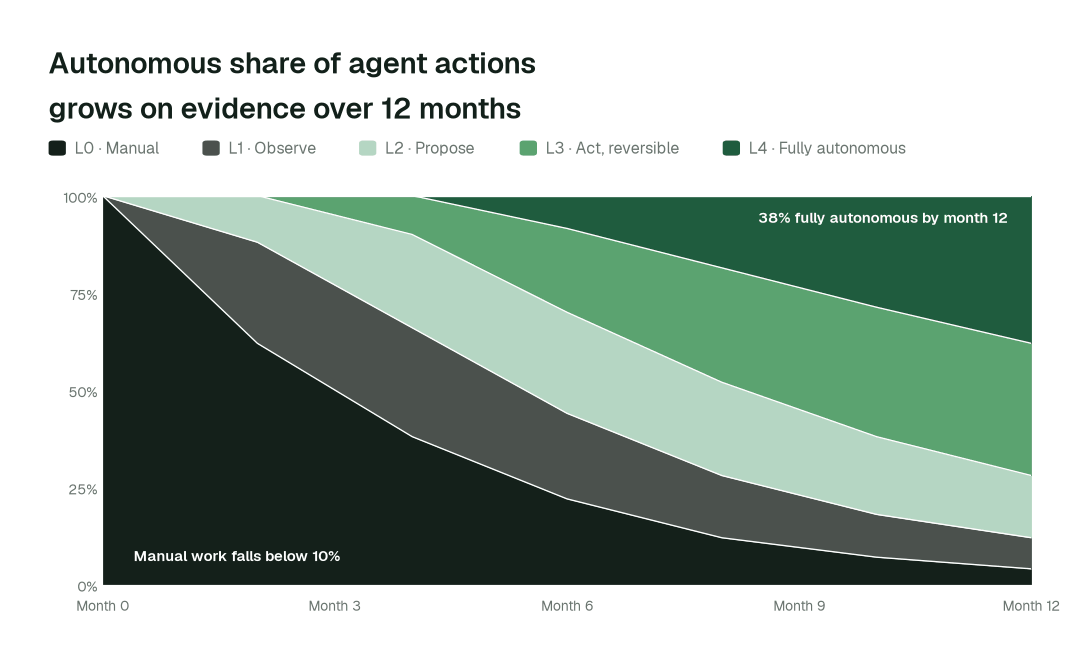
By month 12, more than 38% of agent actions run fully autonomously and manual work falls below 10%, while the plan, scenario sign-off and individual-level data stay with a named owner.
FAQ
Does it work with Anaplan, Workday Adaptive Planning and Pigment? Yes, through the exports, replicas or warehouse tables you already load and publish; the agents attach to the warehouse and orchestrator, not inside the planning model.
Will agents change the headcount plan? No. Plan versions are prepared as proposals with the supporting records, and a named person publishes them through your existing workflow.
Do agents see individual salaries? Only where a role you define is allowed to. Planning runs on position-level cost per head and aggregates, and compensation fields are held to the roles that may see them.
How do you handle position IDs and employee IDs? The Quality Monitoring agent checks every load for positions with no employee, employees with no position and requisitions with no approved position, and lists the exceptions with the records behind them. Fixes in the HRIS go to its owner.
Where do the agents run? In your infrastructure, with your credentials and model key. The hosted Conductor sees workflow metadata only.
Do we have to migrate anything? No. Your HRIS, planning platform, warehouse, dbt project, orchestrator and BI stay where they are.
Where do the other people data teams fit? See the group page for people data teams.
Sources
- •Data Workers pricing: https://dataworkers.io/pricing/
- •European Union, Regulation (EU) 2016/679 (General Data Protection Regulation): https://eur-lex.europa.eu/eli/reg/2016/679/oj
- •European Union, Directive (EU) 2023/970 on pay transparency: https://eur-lex.europa.eu/eli/dir/2023/970/oj