Workforce planning data, run by agents
A headcount plan is only as good as the positions, requisitions, actuals and cost per FTE it runs on, and those sit in three systems that never quite agree. Here is how Data Workers keeps the inputs reconciled, and never writes into the plan itself.
Key takeaways
- •The problem today. The headcount plan is built from positions in the HRIS, approved requisitions, actuals in the ledger and a rate card for cost per FTE. Each is right in its own system and wrong against the others.
- •What changes. Agents check every load, tie positions to people and actuals to the ledger, and trace each break to the record or rule behind it, so the planning team receives inputs that have already been reconciled.
- •What stays with your people. The plan, its versions and every change to a headcount definition: a named owner approves each one. Agents never write into the planning model.
- •The result. Planners spend the cycle on scenarios, not on proving which headcount is right.
The problem today
Position management is where a headcount plan quietly goes wrong. A position can be filled, open, frozen, approved but not yet posted, or held by two people during a handover. The HRIS counts employees, finance counts positions, and the planning tool holds a third copy loaded last month. A backfill hired before the leaver's exit date or a requisition approved against a position later frozen moves the plan by a few heads, and nobody finds out until the review.
Cost per FTE has the same problem: the rate card lives in a spreadsheet, and a reorg that moves a cost centre breaks the comparison with last quarter.
The four inputs, and what each must tie to
- •Positions. Every filled position maps to exactly one employee, every employee to a position, and vacancies are listed as vacancies.
- •Approved requisitions. Each maps to an approved, unfilled position, so hiring pace is not counted against a position that no longer exists.
- •Actuals. Headcount and cost by cost centre agree with the ledger and payroll for every country that has reported.
- •Cost per FTE. Rate cards by role, level and location, kept apart from any named person's pay.
What changes with Data Workers
Agents check the inputs on every load, not at the start of the planning cycle, and show the record or rule behind each break. The planning platform, whether Anaplan, Workday Adaptive Planning, Pigment or a spreadsheet, is loaded by its owners from a reconciled set. For the wider version of this problem, see how workforce planning data teams run the whole function, and how the HR data platform team owns the source feeds.
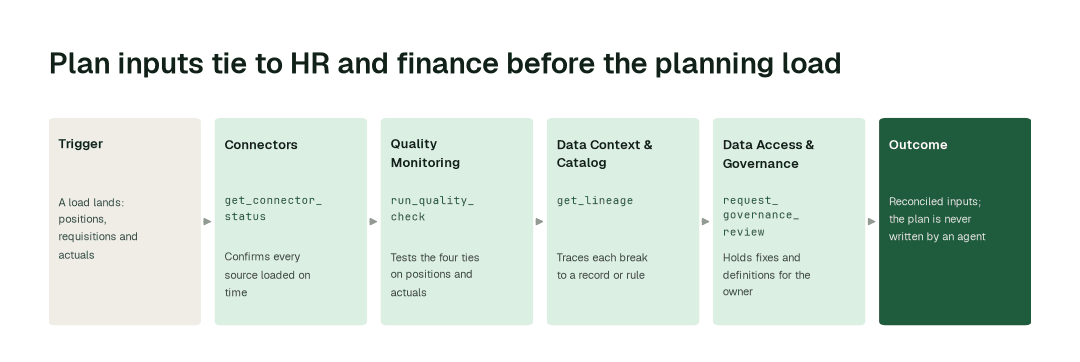
The workflow, step by step
- 1.The Connectors agent calls
get_connector_statusand confirms the HRIS, ledger, payroll and requisition loads landed, and flags a late file before anything reads it. - 2.The Quality Monitoring agent calls
run_quality_checkand tests the four ties above: position to employee, requisition to position, actuals to ledger, rate card to role and level. - 3.The Data Context & Catalog agent calls
get_lineageand traces each break to the source record or mapping rule, so a renamed department and a real backfill are not confused. - 4.The Data Access & Governance agent calls
request_governance_reviewand sends the proposed fixes, the evidence and the refreshed input set to the named owner.
When a hierarchy changes, the Data Change Review Agent shows what the change does to the data before it merges. The Data Context Wizard marks which table is the record for each input, the idea behind canonical tables.
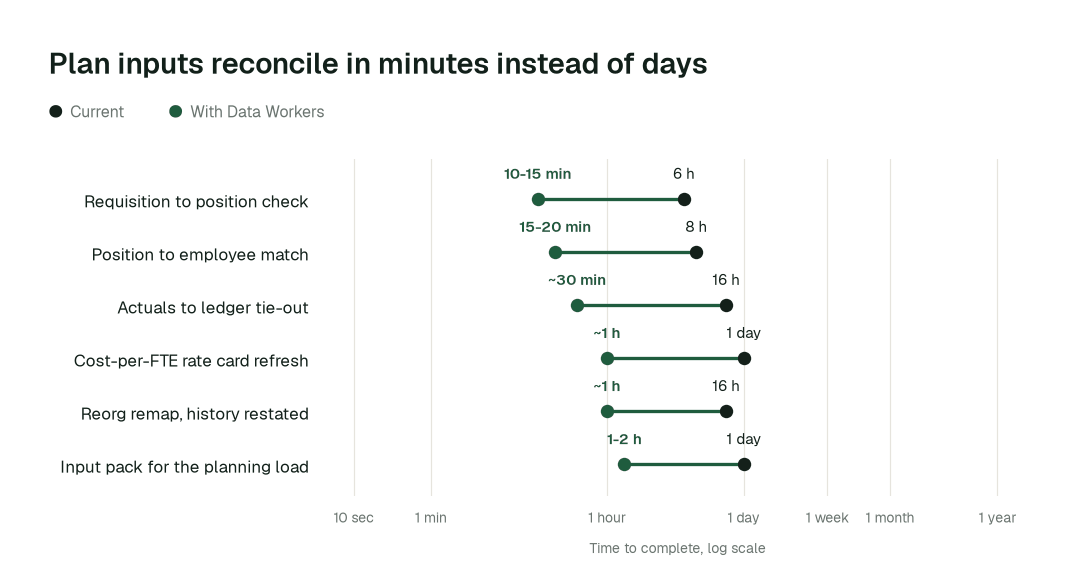
The impact metrics we move
- •Position-to-employee match after a load: from about a day to 15-20 min
- •Actuals-to-ledger tie-out by cost centre: from about 2 days to about 30 min
- •Cost-per-FTE rate card refresh: from about 3 days to about an hour
What goes on autopilot
- •Every load is tied on arrival, so a doubled position or an orphan requisition shows up the morning after it appears, not at the review.
- •Hierarchy and cost-centre changes are remapped beside the old version, with history restated and the unchanged totals proved unchanged.
- •Actuals in the scenario inputs are refreshed from the latest close, so the forecast starts from this month, as in FP&A and forecasting data.
- •Open breaks come with a first explanation, the discipline of data reconciliation applied to people data.
Where your people stay in charge
The plan, each plan version and every change to a definition of headcount, FTE or vacancy go to a named owner, because the business plans, budgets and hiring decisions move on them. The HR or finance data owner approves each proposed mapping fix, or corrects the record at its source. Rate cards carry roles, not individuals: any request to see an individual's pay goes to a named approver, and agents read the planning model but never write into it. Everything starts at L1, observing only, and autonomy rises only on evidence. Hourly staffing questions are in workforce and staffing data; more people-data guides sit with the people data teams.
The pilot
- •Scope. Position-to-employee match and the actuals tie-out for one business unit at L2.
- •First week. Agents run at L1, observing only, and list the breaks they would have fixed, with the records behind each.
- •By week two. The routine tie-outs run on their own; definition changes and anything about an individual stay with a named approver.
- •At day 30. We review the impact metrics against your baseline:
- •Position-to-employee match after a load: from about a day to 15-20 min
- •Actuals-to-ledger tie-out by cost centre: from about 2 days to about 30 min
- •Cost-per-FTE rate card refresh: from about 3 days to about an hour
- •Cost. Start with a pilot ($7,500 one-time, credited in full against the first year). Scale is from $1,000 a month and Enterprise from $3,000 a month, billed annually, with unlimited seats, no usage meter and no markup on model spend. See pricing.