Best practices for agentic workforce planning data: a field guide for workforce planning teams
Most workforce planning teams know how to reconcile HR and finance headcount; they just do it by hand, once a month, under deadline. This field guide covers seven practices for doing it every morning instead: tying headcount daily, matching positions to people, versioning reorgs, refreshing scenarios on current actuals, drafting variances early, governing definitions and holding the plan and anyone's pay for a named owner. Each shows the old world, the new world, which agent does what with public tools, and where a person signs.
Ask a head of workforce planning about the third working day of the month and the answer is a slide with two numbers on it. HR counts employees. Finance counts positions and cost centres. A department renamed in the HRIS on Friday has moved eleven heads out of the ledger's view, a backfill was hired before the leaver's exit date so one position holds two people, and a requisition is open against a position that was frozen after approval. The scenario model was loaded last month, and the variance pack will take a week because every move has to be traced by hand.
The mandate is to give the CHRO and the CFO one headcount, scenarios that react to hiring and attrition as they happen, and capacity views that business leaders can plan against. Leaders are also asking planning questions of AI assistants, and an assistant reading two disagreeing headcounts gives two disagreeing answers, to everyone, at once.
Our view: the work that keeps planning data correct is repeatable, and agents should own it. The approved plan, the choice of scenario and anything about an individual stay with the people accountable for them. Everything around those decisions can run on its own.
The old world
It is day three of the month, and the plan owners are waiting for the headcount slide. An analyst starts the tie-out in a spreadsheet at 09:00, and by noon the totals are off by eleven in one cost centre. It takes until mid-afternoon to find that a department was renamed and the ledger mapping still carries the old name. The doubled position and the orphan requisition are explained by email, HR and finance agree on a number at 17:00, and the scenario models still run on last month's actuals. The variance pack fills the rest of the week.
The new world
Same morning with Data Workers. The new organization level in the HRIS export was mapped before the extract was read. At 06:20 the Quality Monitoring agent tied headcount by cost centre and found three breaks. The Incident Debugging agent traced the eleven-head gap to the renamed department, and the other two to a backfill and a frozen position, which are real events and were written up with their records. The Autonomous Data-Conductor routed one decision to the workforce planning lead, who approved the mapping by 08:10. The planning platform was then updated by its owners through your existing workflow. The team spends the day on the capacity question the business asked last week.
Here is that morning as a chain of hand-offs between agents:
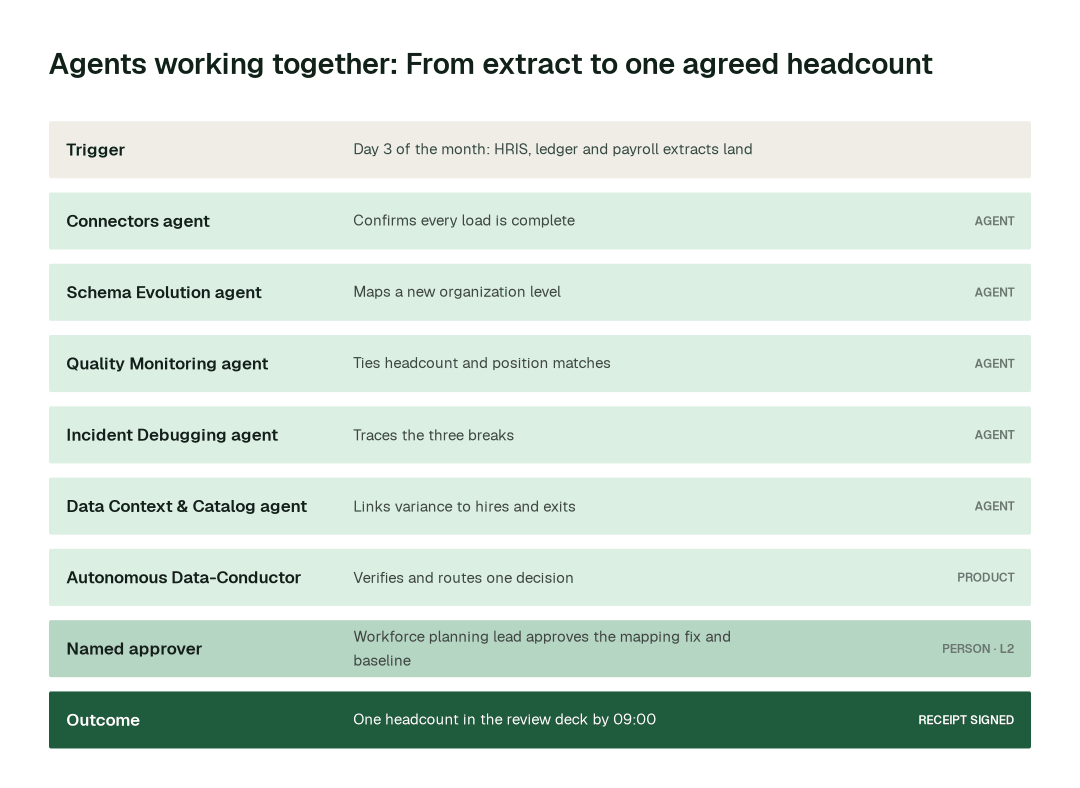
The full playbook walks through this scenario and the use cases behind it, and the group page for people data teams shows how this team sits next to its neighbours. The seven practices behind that morning, at a glance:
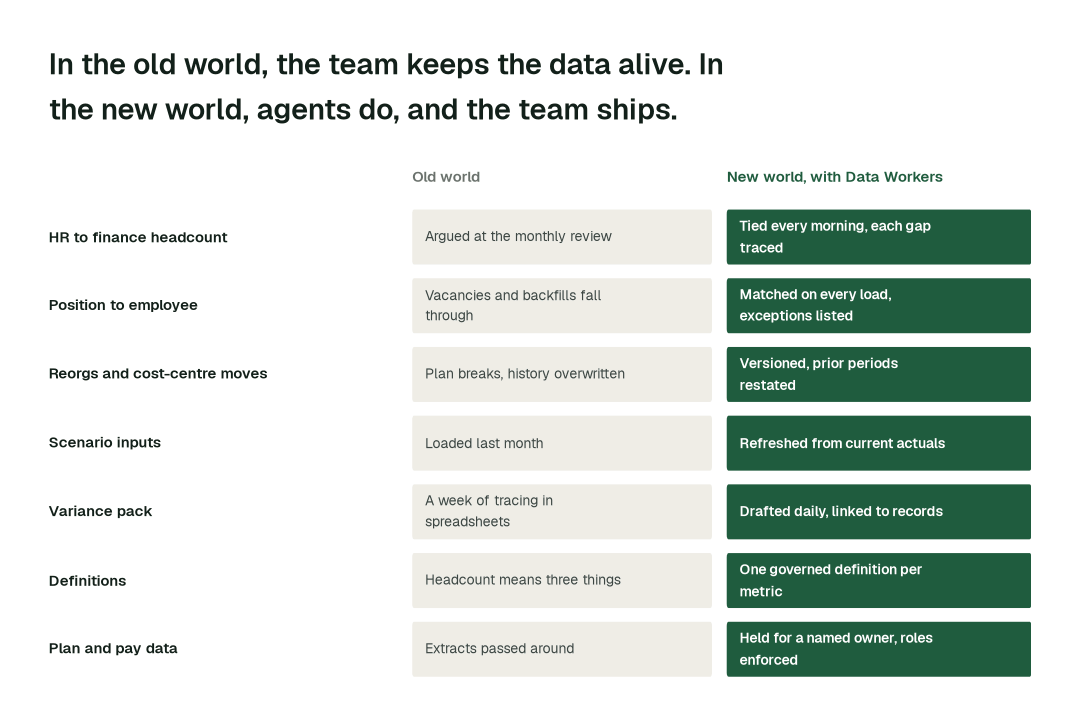
The practices, one by one
1. Tie HR to finance headcount every morning
Done monthly, a tie-out finds a disagreement when the argument is most expensive. Done daily, the gap is small and recent.
Why it's harder than it looks: The two systems do not count the same thing. HR counts people, finance counts approved positions against cost centres, and the gap is made of vacancies counted one way, contractors counted the other, transfers booked in different periods and mapping tables that lag the HRIS. A raw difference tells the reviewer nothing. The useful output is a short list of causes, each with its records.
- 1.After the overnight run, the Connectors agent calls
get_connector_statusandget_dbt_run_historyto confirm the HRIS, ledger, payroll and requisition loads landed complete and on time. - 2.The Quality Monitoring agent writes the tie-out tests once per cut (position, cost centre, country) with
create_quality_tests_for_pipeline, runs them withrun_quality_checkand holds a deadline for the tie withset_sla. - 3.The Incident Debugging agent calls
get_root_causefor every break and sorts it into a mapping fault, which goes through the normal change route, or a real event, which is written up and never adjusted by an agent. - 4.The workforce planning lead approves the mapping fix; the HR data owner corrects any record that is wrong in the HRIS.
The workflow is in workforce plan inputs.
2. Match positions to employees on every load
The position-to-person link is the join everything else rides on; when it leaks, headcount, cost per head and attrition leak with it.
Why it's harder than it looks: Position IDs and employee IDs were never designed to match one to one. Vacancies have no person, backfills overlap the leaver, dual-hat roles have two, contractors and people on leave sit outside the normal flow, and a position can be frozen after its requisition was approved. A simple join passes while being wrong.
- 1.On each load, the Quality Monitoring agent runs
run_quality_checkfor the rules that matter: every filled position maps to exactly one employee, every employee to a position, and every open requisition to an approved, unfilled position. - 2.
get_anomaliesseparates a new exception from one the team already knows, so the list the reviewer sees is short. - 3.Each exception goes to the HR data owner with the records attached. The HR data owner decides and corrects the HRIS; no agent writes to it.
Hiring pace and exits feed the same join; the downstream view is headcount and attrition data. Across the routine work these practices cover, here is the difference in elapsed time:
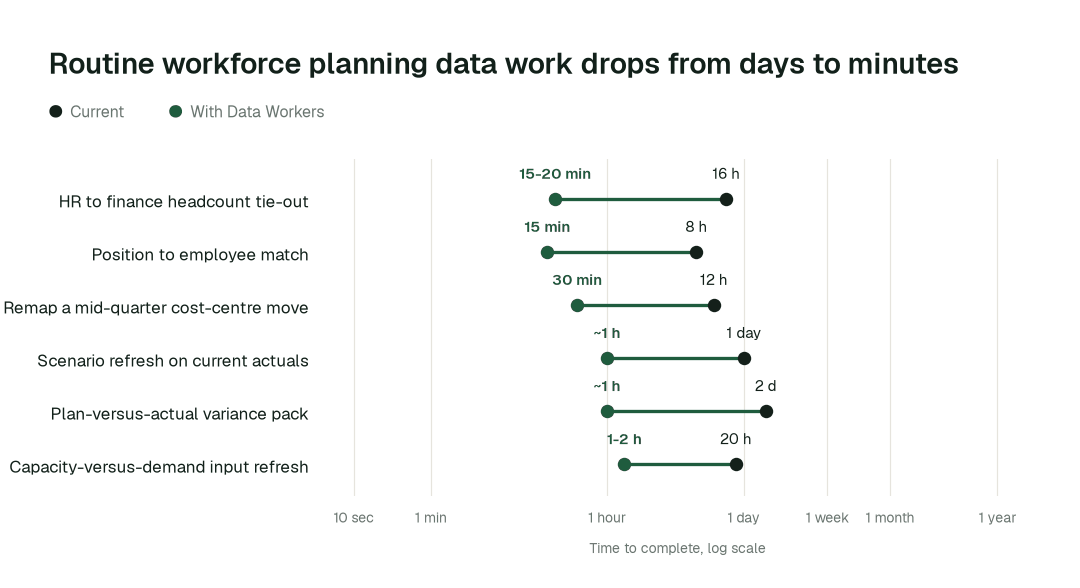
The biggest change is the plan-versus-actual variance pack: from about a week to about an hour.
3. Version the hierarchy, and restate prior periods when a reorg lands
Cost-centre moves, a new org level and a renamed department will arrive mid-quarter. The plan has to absorb them without losing the ability to compare with last quarter.
Why it's harder than it looks: A reorg is a business event, not a schema event, so no ticket arrives. The plan approved last month, the actuals and every scenario downstream now sit on different hierarchies. The usual fix overwrites the dimension, which quietly changes history.
- 1.The Schema Evolution agent runs
detect_schema_changeon each HRIS and ledger extract andassess_impacton what it finds. - 2.The Data Context & Catalog agent runs
blast_radius_analysisto list every plan, model and report that reads the changed hierarchy. - 3.The Pipeline Building agent builds the new version beside the old with
generate_pipelineandvalidate_pipeline, with prior periods restated. The Schema Evolution agent keeps a rollback plan ready withgenerate_migrationandrollback_migration. - 4.Quality Monitoring re-runs
run_quality_checkto prove that the totals which should not move have not moved. - 5.The workforce planning lead, with the finance partner for the affected cost centres, approves the diff before
deploy_pipelinereaches the orchestrator.
4. Refresh scenario and capacity inputs from current actuals, and show what moved
A what-if built on last month's actuals answers a question the business is no longer asking.
Why it's harder than it looks: Hires land in the ATS and exits in the HRIS, on different clocks, and the model lives in Anaplan, Workday Adaptive Planning, Pigment or a spreadsheet, not in the warehouse. Refreshing silently changes a baseline someone has already presented, so people need to see what moved.
- 1.The Data Context & Catalog agent calls
check_freshnesson every input table, and the Connectors agent confirms the ATS, HRIS and ledger loads withget_connector_status. - 2.The Connectors agent calls
trigger_airflow_dagto run the scenario-input build on your orchestrator, under the autonomy level you set for that domain. - 3.Quality Monitoring compares the new inputs with the previous baseline using
run_quality_checkand lists what moved withget_anomalies: hires, exits, transfers and rate changes. - 4.The refreshed baseline is released as a proposal. The planning lead releases it to the models, and which scenario the business plans against remains a leadership decision.
Capacity by skill and location uses the same refresh; see workforce and staffing data and, for the forecast that follows, FP&A and forecasting data.
5. Draft the variance explanation before the review starts
An explanation computed as the month runs is evidence; the reviewer can click from a number to the records.
Why it's harder than it looks: A cost-per-head move can be a hire at a higher level, a delayed start, an exit not yet backfilled or a rate change, and each answer is in a different system.
- 1.The Quality Monitoring agent uses
get_anomaliesto separate material moves from noise as the month runs. - 2.The Incident Debugging agent names the driver with
get_root_cause: volume, mix, timing, rate or a mapping change. - 3.The Data Context & Catalog agent links each move to the hire, exit, transfer or rate behind it with
trace_cross_platform_lineage. - 4.The analyst reviews a drafted explanation with the records attached, edits it and signs. The workforce planning lead approves the pack.
6. Govern one definition of headcount before AI reads it
HR, finance and the business each hold a reasonable but different version of headcount, FTE, vacancy and attrition.
Why it's harder than it looks: What works is one governed definition per metric, with its owner, so dashboards, models and AI assistants answer from the same place.
- 1.The Data Context & Catalog agent records each definition with
define_business_ruleand marks the authoritative table withmark_authoritative. - 2.Planners, analysts and assistants get answers through
resolve_metric, so a question about headcount or attrition returns the governed definition and its source. - 3.
generate_documentationwrites the plain-English page for each planning data product, with owner and lineage. - 4.A change to a definition arrives as a proposal that shows every report it would move, with before-and-after numbers. The HR and finance data owners approve it together.
For the people-data view of the same discipline, see HR data platform teams.
7. Hold the plan, scenario sign-off and anything about a person for a named owner
The approved plan commits money, and compensation shapes careers.
Why it's harder than it looks: There are two failure modes. Either everything waits for review and the benefit disappears, or a change goes straight through and is reversed after a complaint. The workable rule separates reversible upkeep (reruns, remaps, documentation) from work that shapes the plan or touches an individual. Planners need cost per head, not a named person's salary, and extracts rarely draw that line.
- 1.The Data Access & Governance agent finds personal data in new extracts with
scan_piiand holds compensation and individual-level fields to the roles allowed to see them withcheck_policyandenforce_rbac. - 2.Every grant goes through
provision_accessand is logged. Planning runs on position-level cost per head and aggregates. - 3.For any change that affects the plan, the agent assembles the proposal with its evidence, lineage and the plans affected, and calls
request_governance_review. - 4.The Autonomous Data-Conductor checks that the downstream numbers still hold and routes one decision to the named owner. The workforce planning lead, with finance and HR where your process requires, approves or declines; unanswered requests expire and escalate. A person publishes the plan through your existing workflow.
Two public texts apply to employee data: the General Data Protection Regulation and the EU Pay Transparency Directive. Data Workers does not make you compliant; it supplies the controls and the evidence. Pay-sensitive inputs are covered in compensation and pay equity data. See how approvals work for AI data agents and how to roll back an agent's change. By task class, the balance looks like this:
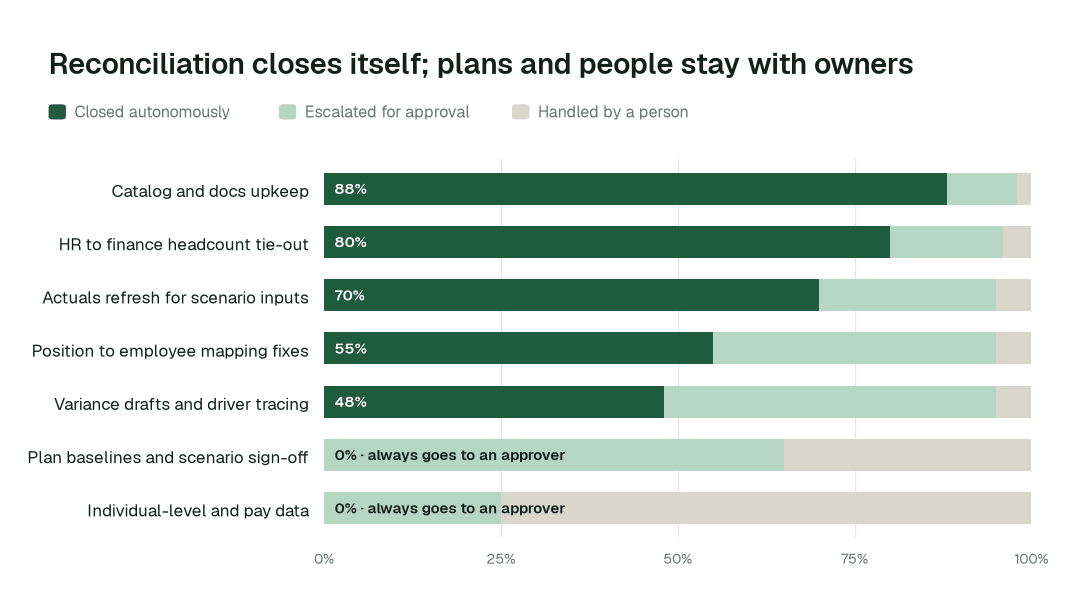
For plan baselines and scenario sign-off, autonomous closure is 0% by design.
Designing the autonomy ladder
Autonomy is set per task class, not per tool. L0 is manual, L1 observes, L2 proposes, L3 acts reversibly and L4 runs on its own (the levels in full). Every deployment starts at L1. L0 to L2 run today. L3 and L4 are where a domain can go on evidence, never on a date, and a class that shapes the plan or touches an individual stops at L2.
| Task class | L0 | L1 | L2 | L3 | L4 |
|---|---|---|---|---|---|
| Load and tie-out checks | Today | Today | Today | On evidence | On evidence |
| Catalog and docs upkeep | Today | Today | Today | On evidence | On evidence |
| Position-to-employee exceptions | Today | Today | Today, HR data owner reviews | On evidence | Not set |
| Hierarchy remaps after a reorg | Today | Today | Today, planning lead approves | On evidence | Not set |
| Scenario input refresh | Today | Today | Today | On evidence | Not set |
| Variance drafts and driver tracing | Today | Today | Today, analyst reviews | Not set | Not set |
| Approved plan and scenario sign-off | Today | Today | Ceiling | Never | Never |
| Individual-level and pay data | Today | Today | Ceiling | Never | Never |
"On evidence" means the receipts for that class are clean and the domain owner chooses to raise the level.
The operating model: who owns what
Agents change who does the work, not who is accountable:
| Role | Owns | What the agents take off their plate |
|---|---|---|
| Head of Workforce Planning or Director of People Finance | Standards, autonomy per domain, which business unit goes next | Assembling status, chasing owners, rebuilding the headcount slide |
| HR and finance data owners | Position data, hierarchy, definitions, the approved plan | Preparing the diff, blast radius and rollback plan for every proposal |
| Workforce planning analysts | Scenarios, capacity models, variance commentary | Tracing each move to its records and refreshing actuals |
| Analytics engineers | Reviewing agent proposals and building new planning products | Mapping HRIS and ledger changes, writing tie-out tests |
The swarm behind the practices
Each practice is a hand-off between specialists, under the autonomy you set per domain.
| Agent | Public tools it calls | What it does for workforce planning data |
|---|---|---|
| Connectors | get_connector_status, get_dbt_run_history, trigger_airflow_dag | Lands HRIS, ledger, payroll and ATS extracts and confirms every load |
| Schema Evolution | detect_schema_change, generate_migration, rollback_migration | Maps new fields, org levels and renamed values |
| Pipeline Building | generate_pipeline, validate_pipeline, deploy_pipeline | Builds versioned position, hierarchy and cost-per-head models with tests |
| Quality Monitoring | run_quality_check, get_anomalies, set_sla | Ties HR to finance, positions to employees, requisitions to positions |
| Incident Debugging | get_root_cause, get_incident_history | Traces a gap or a variance to the record or rule behind it |
| Data Context & Catalog | trace_cross_platform_lineage, define_business_rule, resolve_metric | One governed definition per metric, figures linked to sources |
| Data Access & Governance | check_policy, scan_pii, request_governance_review | Holds pay and individual fields to allowed roles, holds plan changes for review |
Data Context Wizard holds one governed definition of headcount, FTE, vacancy and attrition. Autonomous Data-Conductor verifies the numbers that matter before the review. Spellbook Data Catalog (in preview) makes each planning data product discoverable in plain English.
What disappears
The clearest sign the practices are working is what stops happening:
- •The monthly argument over which headcount is right.
- •The position with two people in it that nobody can find.
- •The plan that breaks the week of a reorg.
- •Scenarios built on last month's actuals.
- •A week of tracing before every variance review.
- •Salary columns passed around in extracts that only needed cost per head.
Bad data is caught where it enters, and fixes are rerun, verified and explained before the planner opens the deck. Every action leaves a signed receipt, so the team can see what happened and reverse anything reversible.
A Head of Workforce Planning's scorecard
These are targets, set against a baseline you measure first:
- •HR to finance headcount tie-out: from about 2 days to 15-20 min
- •Plan-versus-actual variance pack: from about a week to about an hour
- •Scenario refresh on current actuals: from about 3 days to about an hour
- •Catalog and docs upkeep closed autonomously: targeting 88% as the deployment matures
- •Plan changes and pay-data reads with a named approver or allowed role on record: 100%
The climb: from assisted to autonomous to agentic
Our thesis is that the data platform climbs the way analytics did, in stages,. For workforce planning data teams, the climb looks like this:
- •Assisted. Agents work alongside your team. They read the whole stack, show what needs doing and propose every fix with a receipt; the plan, scenario sign-off and anything about an individual always go to a named owner.
- •Autonomous, under your governance. Routine work runs on its own: HR and finance headcount are tied every morning, hierarchy changes are mapped when they happen and scenario inputs are refreshed from current actuals. Your team governs the agents instead of doing the upkeep.
- •The agentic enterprise. A planning team that ships scenario and capacity products instead of reconciling two headcounts. People set direction, and the platform carries it out.
You choose the altitude, and the pilot below is the first rung.
The pilot: how workforce planning data teams start
- •What we connect. Your HRIS, ledger, payroll and requisition extracts, Snowflake or Databricks, dbt, Airflow and the BI tools planners read, over MCP, inside your infrastructure. Nothing migrates.
- •Scope. Daily headcount tie-out and the monthly variance pack for one business unit.
- •First week. Agents run at L1 across the scoped unit. They map every pipeline, definition and lineage path and show the fixes they would have made, so your team sees the value before anything changes.
- •By week two. Daily HR-to-finance tie-out and hierarchy remapping start running on reversible work. The approved plan, scenario sign-off and anything about an individual stay at L2 with a named owner.
- •At day 30. We review the impact metrics against your baseline:
- •HR to finance headcount tie-out: from about 2 days to 15-20 min
- •Plan-versus-actual variance pack: from about a week to about an hour
- •Scenario refresh on current actuals: from about 3 days to about an hour
- •What you decide. Whether to expand to the next business unit.
- •The guarantee. In a 90-day pilot, ten engineering hours per data engineer per week are recovered against a baseline both sides sign on day one, or the $7,500 fee is refunded.
- •Cost. Start with a pilot ($7,500 one-time, credited in full against the first year). Scale is from $1,000 a month and Enterprise from $3,000 a month, billed annually, with unlimited seats, no usage meter and no markup on model spend. See pricing.
The pilot is the start of a longer curve:
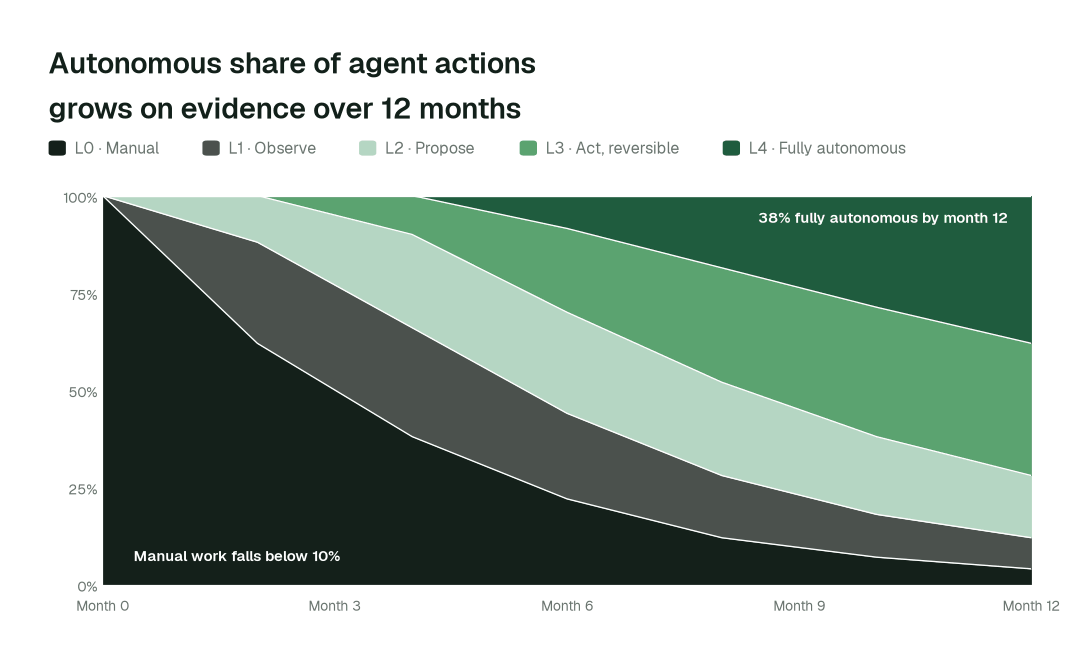
By month 12, more than 38% of agent actions run fully autonomously and manual work falls below 10%, while the plan, scenario sign-off and individual-level data stay with a named owner.