You're on Tecton: Tecton Computes and Serves the Features. Data Workers Makes Sure the Source Data Behind Them Is Right
Running Tecton now that it is joining Databricks? Keep it. Tecton computes and serves your features; Data Workers makes sure the batch sources behind them are right, behind approvals.
Your fraud, risk and personalization models read their features from Tecton. Feature views define batch, stream and real-time features; materialization fills the offline store for training and the online store for serving; get_features_for_events builds point-in-time correct training sets. Stream Feature Views reach sub-second freshness from Kafka or Kinesis and lean on a batch source, usually a log table that mirrors the stream, for backfills and training data. Databricks announced on August 22, 2025 that Tecton was joining Databricks; tecton.ai now redirects to databricks.com, Databricks Feature Store ships its own Feature Views and Stream Feature Views, and Tecton SDK 1.2 is supported until January 17, 2027. Tecton computes and serves the features very well. Data Workers owns the other question: whether the source data behind them is right, and getting it fixed through its owner, behind approvals, with a receipt.
Tecton's own checks are built around its output. Data Quality Metrics and the default expectations (both in public preview, on Databricks and EMR) confirm that a materialization job produced rows and that a feature is not entirely null or zero. A batch source that quietly carries a day twice passes every one of them.
Key takeaways
- •Tecton keeps its job. Feature views, materialization, both stores, feature services and the Tecton MCP server stay where they are. Data Workers works with Tecton from day one, before and after any move to Databricks Feature Store.
- •Data Workers watches the batch sources. Uniqueness and null checks on Snowflake, row-count baselines your DAGs post, and dbt manifest lineage catch a bad source table before a materialization job turns it into training data.
- •Feature views and models join the graph as notes. Record each production feature view and model once with its source tables in the Context Wizard graph, and blast radius reaches them from any upstream dbt model.
- •Fixes go to data owners. Data Workers proposes the dbt change as a diff, queues the rerun through Airflow after a named person approves, and re-checks. The ML platform owner re-materializes in Tecton and decides on the retrain.
- •Every fix leaves a receipt with trigger, evidence, diff, approver, checks and undo path, ready for model risk review.
Tecton computes and serves the features. Data Workers makes sure the source data behind them is right.
Tecton answers which features exist, how they are computed and what the model sees. Data Workers answers what changed in the tables behind them, what it reaches, who owns the fix and whether it held. Here is a Stream Feature View whose batch source goes wrong while its stream stays right.
A card issuer scores every authorization with a fraud model, card_fraud, served from a Tecton feature service. Its key features come from a Stream Feature View, card_auth_counts, on Spark: the online store updates from a Kinesis stream, and the offline store is materialized nightly from the batch source risk.card_auth_log in Snowflake, an incremental dbt model that appends stg_card_auths, the day's authorizations loaded from S3 by Snowpipe. An Airflow 2 DAG, risk_nightly, runs the dbt build at 00:30. Training sets are built Thursdays at 09:00. The team recorded card_fraud, the feature view and both source tables as notes in Data Workers' context graph, set a uniqueness check on auth_id and a stricter null threshold on card_id (the default passes up to 10% nulls), and has the DAG post the day's row count to monitor_metrics. Data Workers does not read S3 replication or Snowpipe; the owners supply that part. This is an illustration, not a customer case.
| Time | System | What happens |
|---|---|---|
| Wed 22:10 | S3 and Snowflake | A storage engineer changes a bucket replication rule. It re-copies Wednesday's authorization files under a new prefix, and Snowpipe loads them a second time |
| Thu 00:30 | Airflow and dbt | risk_nightly runs dbt build. stg_card_auths holds every Wednesday authorization twice, and the incremental model appends both copies to risk.card_auth_log. Every dbt test passes |
| 00:48 | Snowflake and Data Workers | run_quality_check on stg_card_auths: nulls and row floor pass, but the auth_id distinct ratio reads 0.51 against the 0.99 threshold. The posted row count arrives at 2.0x its 28-day baseline and monitor_metrics flags it. An incident opens |
| 00:52 | Slack and Spellbook | Data Workers posts the finding to data on-call and the ML platform owner. trace_cross_platform_lineage over the dbt manifest shows stg_card_auths feeding risk.card_auth_log; blast_radius_analysis reaches card_auth_counts and card_fraud through the team's context-graph notes, which also show the online path reads Kinesis. Serving is safe; the offline store and Thursday's training set are not. It recommends holding the build |
| 01:30 | Tecton | The scheduled offline materialization for card_auth_counts writes Wednesday's 24-hour counts, doubled. Online values stay right. Training and serving now disagree for one day |
| 07:40 | Tecton and Slack | The ML platform owner reads the card, sees Wednesday's row count at twice the prior week on the feature view's Data Quality Metrics tab, and holds the 09:00 training set build |
| 08:05 | GitHub and dbt | The data owner finds the duplicate prefix in the raw table's load metadata and asks the storage engineer to revert the rule. Data Workers proposes the fix as a diff: stg_card_auths keeps one row per auth_id, and the incremental model rebuilds a three-day lookback |
| 08:35 | Spellbook and Airflow | The owner merges and approves the rerun in Spellbook. Data Workers queues risk_nightly through Airflow and reads the run status |
| 09:10 | Snowflake and Spellbook | The auth_id distinct ratio reads 1.00 and the posted row count is back inside its baseline. Data Workers writes the receipt: alert, checks, lineage, diff, approver, rerun, before and after, undo path. The approved fact "card authorizations load once per auth_id" lands in the graph |
| 09:30 | Tecton | The ML platform owner runs trigger_materialization_job for Wednesday with offline=True and overwrite=True, which deletes and rewrites that period in the offline store, then releases the training set build and the retrain |
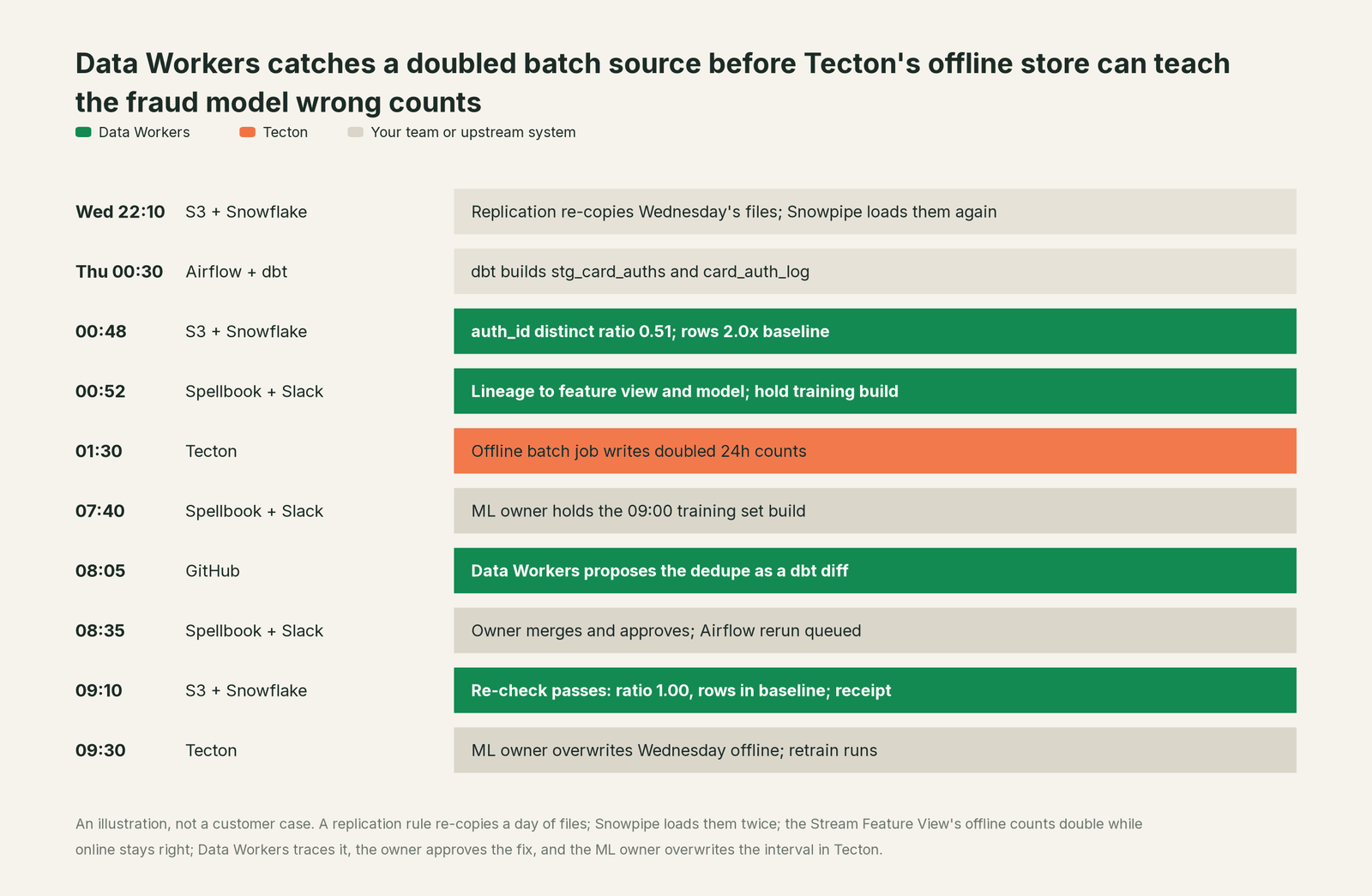
Every tool did its job; the problem lived between them, in a table only the offline store reads. That skew is the hardest to see, because serving looks perfect and the damage waits for the next training set. Data Workers watched the source, traced the reach, routed the fix to its owner and left every feature store decision to the ML owner.
| Job | What Tecton does | What Data Workers does |
|---|---|---|
| The definition | Feature views, entities and services, applied with tecton apply | Holds the feature view as a graph note joined to its source tables, dbt models and owners |
| The compute | Batch, stream and real-time materialization on Spark or Rift | Queues reruns of the DAGs that build the source tables, after approval |
| The signal | Materialization status, stream freshness and Data Quality Metrics on its output | Key uniqueness, nulls, row floors and posted baselines on the source table |
| The cause | What each job wrote and when | Traces the change through the dbt manifest to the feature views and models it reaches |
| The fix | The owner re-materializes the interval and retrains | Proposes the dbt diff; re-checks the table after the rerun |
| The proof | Job history and metrics per materialization interval | A receipt per fix: evidence, approver, checks, before and after, undo path |
Why doesn't Tecton just do this itself?
Because Tecton is built to be the trusted layer between data and models, and its design keeps it neutral about where the data comes from. A batch source is a table or a query; Tecton reads it, computes what the definition describes, keeps training and serving consistent and serves in milliseconds. Its checks look at what each materialization job produced, the right scope for a feature platform. Its MCP server, Tecton's Co-Pilot for Cursor and Claude Code, searches docs, examples and the SDK reference, queries the Metrics API and, with an API key, reads online feature services. Every tool it lists reads.
Fixing a source table is a different product with a different liability: warehouse credentials, lineage across another team's dbt models, a named approver, rollback and proof the fix held. A feature store that rewrote the payments team's staging models would stop being the neutral layer every model team relies on. Data Workers is the product on the other side of that line.
Every tool owns a slice. Data Workers covers the whole lifecycle
Each point tool adds another console, another contract and another handoff. Data Workers covers the whole lifecycle with one context, one approval flow and one audit trail, and builds on the tools already there.
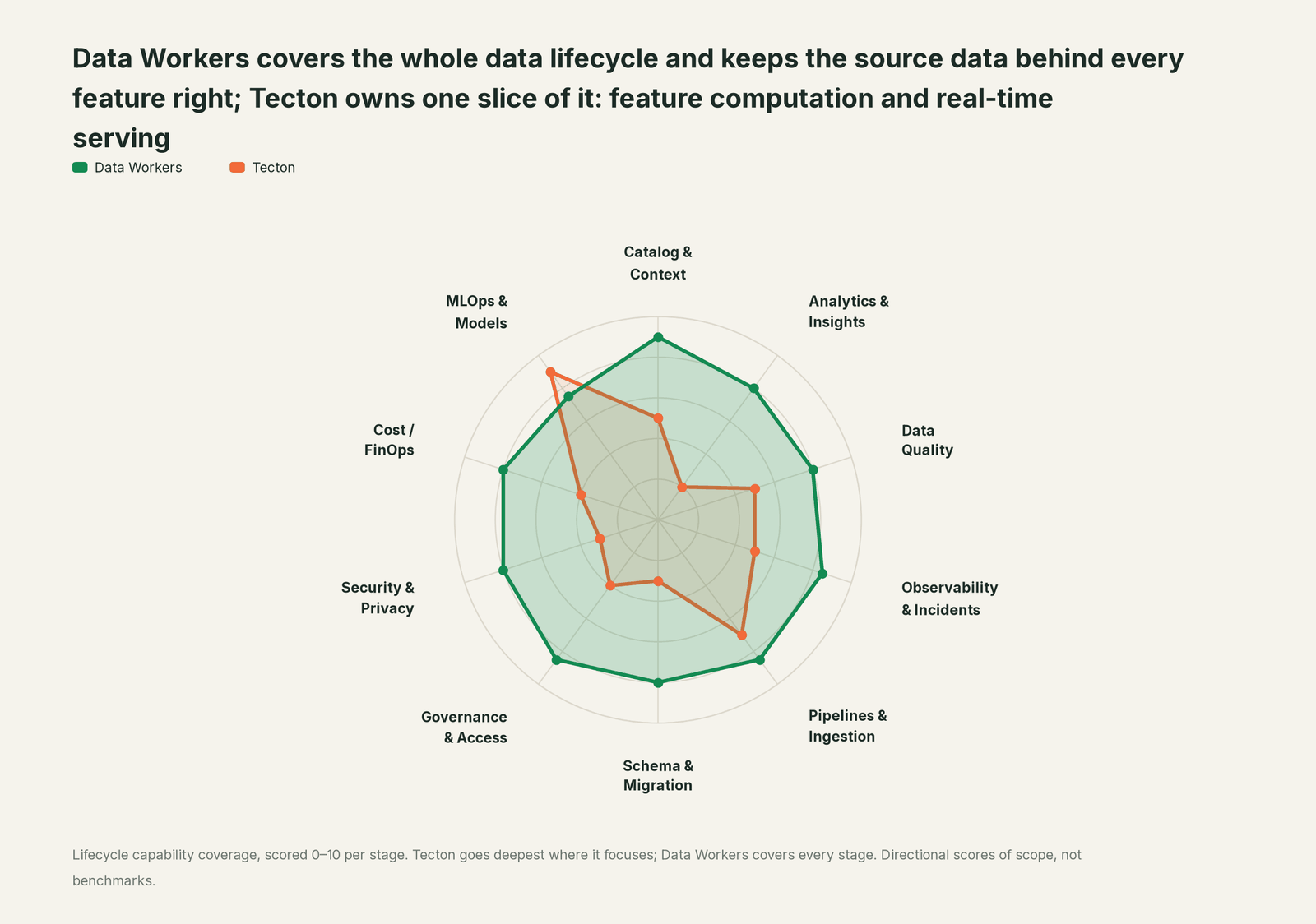
Tecton's home stage is MLOps & Models, where it leads by design.
| Stage | Data Workers | Tecton | Why we scored it this way |
|---|---|---|---|
| Catalog & Context | 9 | 5 | Tecton registers feature views, services and entities for discovery and reuse. Data Workers joins tables, lineage, quality, owners and registered models in one governed graph. |
| Analytics & Insights | 8 | 2 | Tecton serves features to models; it is not an analytics tool. Data Workers answers questions about the data from governed context. |
| Data Quality | 8 | 5 | Tecton's Data Quality Metrics and default expectations (public preview) check its own output. Data Workers checks the source tables: nulls, keys, row floors and baselines. |
| Observability & Incidents | 8.5 | 5 | Tecton monitors materialization jobs and stream freshness. Data Workers detects, diagnoses, fixes and verifies data incidents, with a receipt for each. |
| Pipelines & Ingestion | 8.5 | 7 | Tecton runs batch, stream and real-time feature pipelines. Data Workers queues reruns of the pipelines that feed it through your orchestrator after approval. |
| Schema & Migration | 8 | 3 | Tecton plans and applies feature repo changes. Data Workers shows a dbt change's reach and writes migrations with rollback for the owner. |
| Governance & Access | 8.5 | 4 | Tecton controls access to workspaces and services. Data Workers routes each data change to a named approver and keeps the record. |
| Security & Privacy | 8 | 3 | Tecton secures its serving path and API keys. Data Workers flags privacy risk in pull request review and proposes masking for data owners to apply. |
| Cost / FinOps | 8 | 4 | Tecton documents materialization cost controls. Data Workers attributes Snowflake spend to dbt models through query tags. |
| MLOps & Models | 7.5 | 9 | Tecton's home stage: point-in-time training data and millisecond serving. Data Workers keeps the source tables behind each feature right. |
Scores are directional measures of scope, not benchmarks.
How Tecton and Data Workers work together
Your people stay in the feature repository, dbt, Airflow and Claude Code, Cursor or GitHub Copilot. Spellbook Data Catalog (in preview) is where the data team looks: each finding, proposed change, blast radius, approver and rollback, with approval requests reaching people in Slack or email. Underneath, Data Context Wizard keeps one governed context graph, the Data-Agents Swarm does the work with 20+ specialist agents, and the Autonomous Data-Conductor runs each fix behind per-domain guardrails.
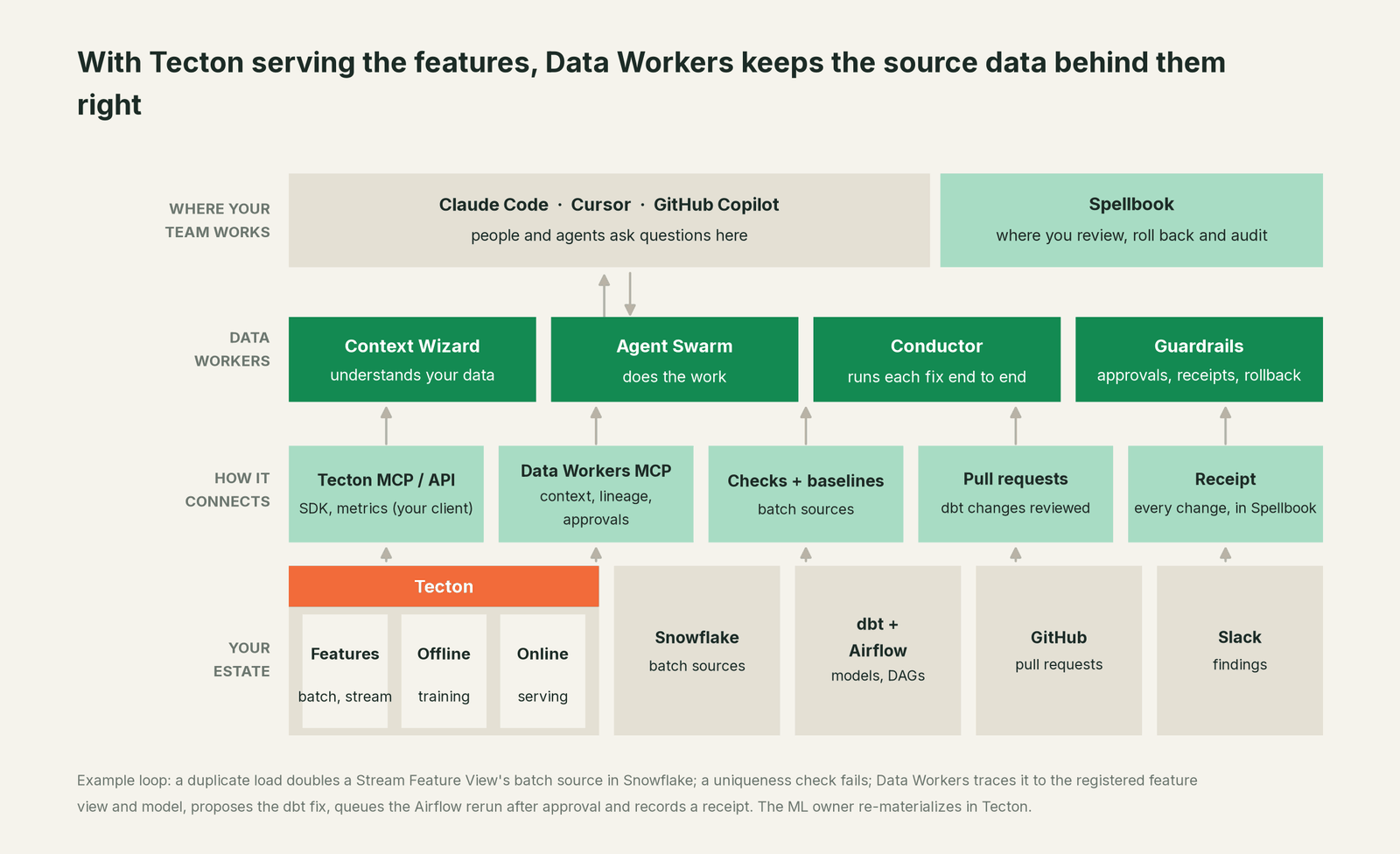
Where Tecton fits. Tecton stays the system of record for feature definitions, materialization and serving, and Data Workers connects to it over its HTTP API or MCP server today. Data Workers reads natively what sits under the features: Snowflake checks, the dbt manifest, GitHub pull requests and Airflow runs, among 50+ connectors. Your team, or its coding agent, records each production feature view and model with its batch sources once, and lineage and blast radius reach them from then on. See Inside the MLOps & Models Agent.
What Data Workers writes. To Tecton, nothing. dbt fixes go to the model owner as a diff to merge, and Data Workers opens the pull request when your team turns on the GitHub pull-request target. Reruns are queued through your orchestrator after approval; cleanups such as removing duplicate raw rows are proposed for the owner to apply.
Setup today. Clone the open-source repository and add start-agent.sh entries to your client config, as the client setup docs show. Your client can run the Tecton MCP server next to them; Data Workers' agents never call it.
// Example: .mcp.json for Claude Code, in your Tecton feature repository
{
  "mcpServers": {
    "dw-context-catalog": {
      "command": "/path/to/dataworkers-claw-community/start-agent.sh",
      "args": ["dw-context-catalog"]
    },
    "dw-quality": {
      "command": "/path/to/dataworkers-claw-community/start-agent.sh",
      "args": ["dw-quality"]
    },
    "dw-incidents": {
      "command": "/path/to/dataworkers-claw-community/start-agent.sh",
      "args": ["dw-incidents"]
    },
    "tecton": {
      "command": "uv",
      "args": ["--directory", "/path/to/tecton-mcp", "run", "mcp", "run", "src/tecton_mcp/mcp_server/server.py"]
    }
  }
}
List the tools with /mcp in Claude Code, then ask "which dbt models feed risk.card_auth_log, and what else reads stg_card_auths?"
One request, L0 to L4. The ladder is set per domain.

- •L0 manual. The team finds the skew when a retrained model underperforms.
- •L1 observe. Data Workers flags each failed check or baseline break on a batch source with its blast radius and owners, and logs what each action would have needed.
- •L2 propose. It drafts the dbt diff and rerun plan; owners approve before anything runs.
- •L3 act reversibly. For proven classes, such as queuing the rerun after a fix merges, it acts, verifies and records. Code still arrives as diffs.
- •L4 autonomous. For a scoped, trusted class in one domain, it runs the loop end to end and posts the receipt. Materialization and retraining stay with the ML owner at every level.
More on safety, approvals, the autonomy levels and where your data goes.
What changes for your team
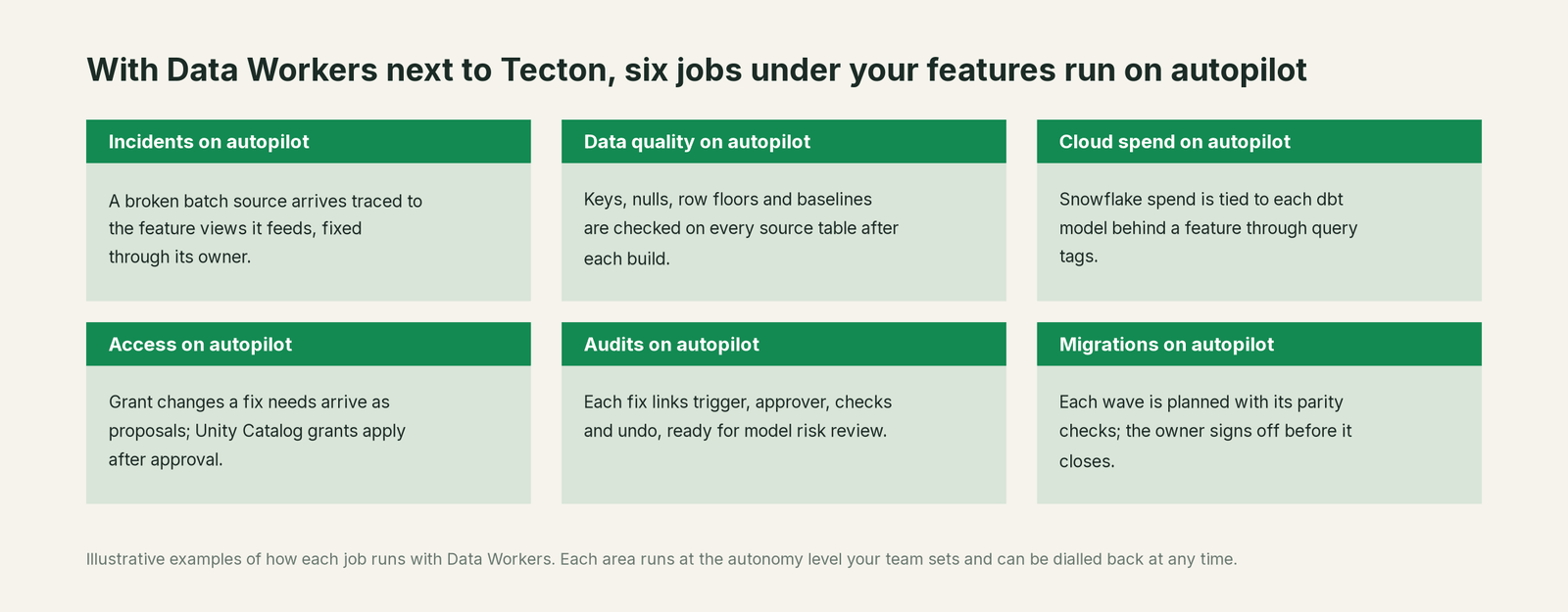
Teams on Tecton already solved training-serving consistency. What still costs them time is the data under the features: the unexplained row count, the morning in another team's dbt repo. With Data Workers, those jobs run on autopilot at the level you set.
- •Incidents. A broken batch source arrives traced to the feature views it feeds, fixed through its owner and recorded.
- •Data quality. Key uniqueness, nulls (at the thresholds your team sets), row floors and baselines on every source table after each build.
- •Cloud spend. Snowflake spend tied to each dbt model behind a feature through query tags.
- •Access. Grant changes a fix needs arrive as proposals; Unity Catalog grants apply after approval.
- •Audits. Each fix links trigger, approver, checks and undo path, ready for model risk review.
- •Migrations. Each wave is planned with its parity checks, and the owner signs off before it closes.
The ML engineers guide covers the role. Running other ML tools? See You're on Feast, You're on MLflow and You're on Amazon SageMaker.
Keep Tecton, or consolidate?
Keep Tecton if you love it; Data Workers works with it from day one. Many teams consolidate once Data Workers runs that slice too.
With Tecton joining Databricks, the feature store call is the one most teams are weighing: stay on Tecton through SDK 1.2's support window, or move to Databricks Feature Store, where Feature Views (public preview) and Stream Feature Views with Real-time mode write to a Lakebase-backed online store. Data Workers makes either path safer, because the batch sources stay checked and traced whichever feature store reads them, and for a migration it plans each wave with source-table checks and the owner's sign-off. What teams consolidate is the glue: row-count asserts in notebooks and spreadsheets mapping feature views to dbt models. For background, see Feast vs Tecton, data lineage for ML features and data quality for ML. On Databricks, see the Data Workers on Databricks guide and Agent Bricks vs the Data-Agents Swarm. Building this layer yourself? Read build it ourselves with Claude Code and MCP servers: running a check is the easy part; approvals, rollback and receipts are the work.
The case for your CFO
The outcome: fraud and risk models train on the same truth they serve on, and an upstream load that breaks it is caught before a materialization job turns it into training data.
The risk story: Data Workers changes nothing in Tecton. dbt fixes arrive as diffs your engineers merge; reruns run only after a named approver says yes; materialization and retraining stay with the ML platform owner. Each action leaves a receipt with trigger, evidence, diff, approver, checks and undo path. Unanswered requests expire and escalate, never auto-grant, and no agent can promote its own work. Autonomy is set per domain from L0 manual to L4 autonomous, and an org-wide stop halts all autonomous dispatch. The agents run in your infrastructure; your data stays in your systems, and the hosted Conductor sees workflow metadata only. Zero migration.
Why now: the feature store roadmap is moving with Databricks, so the thing worth holding steady is the source tables every option reads. The first win: two feature services with their sources checked and traced, read-only, while the team reviews what the findings would have caught. What stays the same: Tecton, your feature repository, your training workflow and your owners. Start with a pilot; the path is on the pricing page, and the pilot is credited in full against the first year. See the ROI guide.
The sentence to repeat upstairs: "Tecton serves every feature our models use; Data Workers makes sure the data behind each one is right, with an approval and a receipt for every fix, whichever feature store we run next year."
Getting started
Start with a pilot. Pick two feature services, such as card fraud and credit risk, record their feature views, models and batch sources in the context graph, connect Data Workers read-only to Snowflake, the dbt project, pull requests and Airflow runs, set uniqueness and null thresholds on key columns, post row-count baselines after every build, and review its findings before you turn on the first fix class. Plans are on the pricing page, and the pilot is credited in full against the first year. See Data Workers integrations for the connector list.
FAQ
Has Databricks acquired Tecton? Databricks announced on August 22, 2025 that Tecton is joining Databricks. As of October 3, 2026, tecton.ai redirects to databricks.com, docs.tecton.ai is live, and Tecton SDK 1.2 is supported until January 17, 2027. Check your own contract with your account team.
Does Data Workers read our Tecton feature views or materialization jobs? Tecton stays the system of record for those, and Data Workers connects over its HTTP API or MCP server today. Your team records each production feature view and model in the context graph with its batch sources; Data Workers works on those tables.
Can Data Workers re-materialize features or rebuild a training set? Those belong to the ML platform owner. Data Workers can recommend holding a training set build while a source table is wrong; the hold is the owner's call.
Does Data Workers detect feature drift? That stays with Tecton's metrics and your model monitoring. Data Workers checks the source tables and traces a change to its cause when a feature moves.
Our batch sources live on Databricks. Does this still work? Yes. Data Workers reads the dbt manifest and your orchestrator's runs, keeps the baselines your jobs post, and applies Unity Catalog grants after approval; the owner runs table checks in Databricks. Snowflake and Postgres tables get its quality checks directly.
Where does our data go? The agents run in your infrastructure and hold the credentials. Your data stays in your systems; the hosted Conductor sees workflow metadata only, never rows, credentials or model keys.
Sources
- •Databricks blog, "Tecton is Joining Databricks to Power Real-Time Data for Personalized AI Agents" (Aug 22, 2025), https://www.databricks.com/blog/tecton-joining-databricks-power-real-time-data-personalized-ai-agents (checked Oct 3, 2026)
- •tecton.ai home page, HTTP 301 to databricks.com, https://www.tecton.ai/ (checked Oct 3, 2026)
- •Tecton docs, Releases and Upgrades (SDK 1.2 released Jul 17, 2025, end of support Jan 17, 2027), https://docs.tecton.ai/docs/release-notes (checked Oct 3, 2026)
- •Tecton docs, Stream Feature View (batch sources for Stream Feature Views), https://docs.tecton.ai/docs/defining-features/feature-views/stream-feature-view (checked Oct 3, 2026)
- •Tecton docs, Data Quality Metrics (public preview), https://docs.tecton.ai/docs/monitoring/data-quality-metrics (checked Oct 3, 2026)
- •Tecton docs, Data Quality Validations (public preview, default expectations), https://docs.tecton.ai/docs/monitoring/data-quality-validation (checked Oct 3, 2026)
- •Tecton docs, Materialization monitoring, https://docs.tecton.ai/docs/monitoring/materialization (checked Oct 3, 2026)
- •Tecton docs, Manually Trigger Materialization (overwrite), https://docs.tecton.ai/docs/materializing-features/manually-triggering-materialization (checked Oct 3, 2026)
- •Tecton docs, Constructing training data (
get_features_for_events), https://docs.tecton.ai/docs/reading-feature-data/reading-feature-data-for-training/constructing-training-data (checked Oct 3, 2026) - •Tecton MCP Server and Cursor Rules (repository created May 8, 2025), https://github.com/tecton-ai/tecton-mcp (checked Oct 3, 2026)
- •Databricks docs, Databricks Feature Store (updated Sep 11, 2026), https://docs.databricks.com/aws/en/machine-learning/feature-store/ (checked Oct 3, 2026)
- •Databricks blog, how Databricks Feature Store serves features with sub-second freshness (Aug 17, 2026), https://www.databricks.com/blog/how-databricks-feature-store-serves-features-sub-second-freshness (checked Oct 3, 2026)
- •Data Workers, Client setup (open-source docs), https://dataworkers.io/opensource-docs/client-setup/ (checked Oct 3, 2026)
- •Data Workers open-source repository, agent tools and start-agent.sh, https://github.com/DataWorkersProject/dataworkers-claw-community (checked Oct 3, 2026)
- •Data Workers pricing, pilot and hosted Conductor, https://dataworkers.io/pricing/ (checked Oct 3, 2026)