You're on RelationalAI: Keep the Snowflake Data Under Your Semantic Model True, So Every Solve Is Right
Already on RelationalAI in Snowflake? Data Workers brings your PyRel model in as governed context and keeps the tables under it true, with approvals and receipts.
Your team models the business in PyRel: distribution centers, SKUs and lanes are concepts, which DC stocks which SKU is a relationship, and reorder points are rules. The RelationalAI Native App runs inside your Snowflake account, and data streams keep the model in step with your tables through Snowflake change tracking. Reasoners do the hard part: rules derive facts, graph reasoning finds bottlenecks, the solver picks the cheapest transfer plan that meets demand, and predictive reasoning trains graph neural networks. Engineers write PyRel with RelationalAI Agent Skills in Claude Code, Cursor or CoCo; planners ask a Cortex agent in CoWork. RelationalAI is where your business logic reasons. Data Workers is the crew that keeps the tables and definitions under it true: Data Context Wizard brings the model in as context with provenance, and when a source breaks or a definition drifts, Data Workers proposes and carries the fix with approvals and a receipt.
A model's answers are only as right as the tables under it. A renamed column, a rebuild that drops change tracking or a second definition of "available stock" all reach the model through Snowflake, and the solver optimizes whatever it was given.
Key takeaways
- •RelationalAI keeps its job. PyRel, the Native App, the reasoners, Agent Skills and your deployed outputs stay as they are. Data Workers works next to them from day one.
- •The model becomes governed context. Data Context Wizard records its concepts, rules and source tables next to lineage, quality, usage and a named owner.
- •Sources are watched before the solve. Schema changes, table rebuilds, stalled data streams and freshness gaps are caught, traced to the model and fixed before the reasoners run.
- •Writes stay with their owners. Approved fixes land in dbt and your pipelines. Changes to the model or its data streams go to the model owner as a proposal, by design.
- •Start with a pilot. One model, read-only, with its sources watched; then one fix class in one domain, on the ladder from L0 manual to L4 autonomous.
RelationalAI is where your business logic reasons. Data Workers is the crew that keeps the data under it true.
RelationalAI ships fast. PyRel 1.33.0 (September 29, 2026) adds Python 3.14 and applies your Snowflake masking and projection policies to deployed outputs, on top of 1.32.0's row access policies. Native App 2026.9.26 (September 30, 2026) fixes incremental maintenance and predictive reasoner bugs. Requirements written with Model.require encode "data quality checks and business rules as part of your semantic model". In public preview: model deployment (outputs as Snowflake tables, views or dynamic tables, with branch, pull and merge), graph reasoning, and prescriptive reasoning by request (LP, MILP, NLP and constraint problems with HiGHS, Gurobi, Ipopt or MiniZinc). Agent Skills give coding agents /rai- workflows from setup to deployment and data-stream health.
Outside the model sits everything that decides whether it is right: operational databases, CDC, dbt, the orchestrator and other teams' definitions. Data Workers covers that side.
Here is a night with Data Workers next to a replenishment model. This is an illustration, not a customer case. A dbt change merged that afternoon switched DC_STOCK from an incremental model to a table, to fix a duplicate-row bug. dbt's Snowflake docs note that create or replace on a table model "destroys Snowflake's change tracking history" while "your dbt run still reports success", and Snowflake's docs say recreating a table makes any stream on it stale.
| Time | System | What happens |
|---|---|---|
| 23:50 | Postgres, Debezium | Stock movements from the inventory service stream through Kafka into Snowflake, as every night |
| 00:30 | Dagster, dbt | The nightly run rebuilds ANALYTICS.DC_STOCK with CREATE OR REPLACE; the run and its tests pass |
| 00:34 | Snowflake | Data Workers sees the rebuild in query history and flags that change tracking on DC_STOCK is now off |
| 00:40 | RelationalAI | Data Workers reads the model's data stream on DC_STOCK in relationalai.api.data_streams: it has stopped advancing, so the model still holds yesterday's stock |
| 00:45 | Data Workers | It opens an incident ahead of the 04:00 solve, with the cause, the blast radius (one dbt model, one data stream, the ReplenishmentPlan model, its transfer-order output and the planners' CoWork agent) and both owners named |
| 01:05 | dbt | Data Workers proposes a diff that keeps the dedupe fix as an incremental merge on (dc_id, sku), plus a post-hook that sets change tracking on |
| 01:40 | Spellbook | The analytics engineering on-call reviews the diff and approves; dbt CI passes; Dagster reruns the model |
| 02:10 | RelationalAI | The model owner approves Data Workers' proposal and deletes the stream, as RelationalAI's docs advise, so PyRel recreates it with a fresh state |
| 03:20 | Snowflake | Data Workers verifies the stream is active and synced and that stock totals in DC_STOCK match the source, then writes the receipt |
| 04:00 | RelationalAI | The solve runs on current stock |
| 07:30 | CoWork | A planner asks which DCs need transfers today; the answer is right |
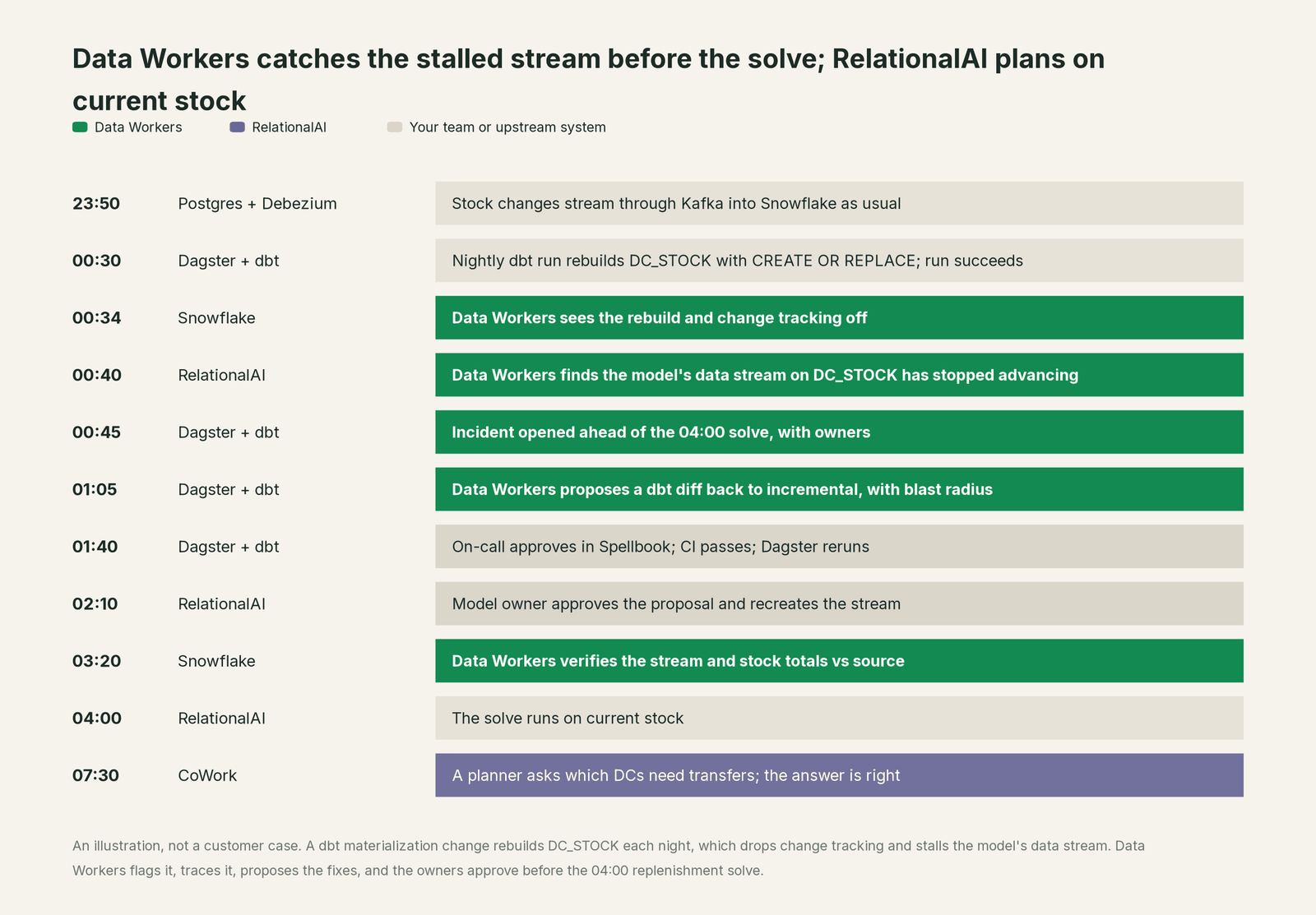
Without that check, the solver would have planned transfers on yesterday's stock. Every system did what it was asked; the fix was upstream, in systems the model doesn't run, and it went through two owners' approvals.
| Job | What RelationalAI does | What Data Workers does |
|---|---|---|
| The model | Holds concepts, relationships and rules in PyRel, evaluated in your Snowflake account | Reads the model as context and joins it to Snowflake lineage, quality, usage and owners |
| The questions | Answers decision questions with rules, graph, prescriptive and predictive reasoning | Makes sure the tables and definitions behind those answers are correct and current |
| The feed | Keeps the model in sync with source tables through data streams | Watches the tables and streams that feed the model and catches breaks before the solve |
| The break | Reasons over the data it is given | Detects the upstream change and traces it across Postgres, Debezium, dbt and Dagster to the model |
| The fix | Runs the PyRel and stream changes your model owner makes | Proposes the change with its blast radius, routes it to named owners, lands it in dbt and your pipelines |
| The proof | Holds the model and its deployed outputs | Verifies the stream and the source totals after the rerun and writes a receipt with cause, diff, approver and rollback |
| The meaning | Holds the business rules the model reasons with | Keeps definitions consistent across the model, semantic views, dbt and the catalog, with conflicts routed to an owner |
Why doesn't RelationalAI just do this itself?
Because RelationalAI built a reasoning engine for the hardest part of its job: turning business logic into decisions over Snowflake data, inside the customer's account. The tables it reads are built by other tools and teams, and changing Postgres, Debezium, dbt and Dagster is a different product with a different liability.
RelationalAI's design draws that line sensibly. Installing the app "does not grant blanket access to existing tables or views"; administrators prepare data sources, and Snowflake checks object privileges on every access. When a quarantined stream's one automatic recovery fails, the docs hand it to the administrator: read the errors, fix the source, resume or recreate the stream. Model deployment throws an error rather than override an object that doesn't carry its relationalai_managed tag. That is the right design for an app that runs inside many customers' accounts and must never surprise a Snowflake admin.
Data Workers is the product on the other side of that line: it knows what a change will touch across systems, routes it to the owner, applies it reversibly, verifies the result and keeps the record.
Every tool owns a slice. Data Workers covers the whole lifecycle
RelationalAI owns one slice outright: reasoning over a semantic model of Snowflake data. Each point tool adds another console, contract and handoff. Data Workers covers the whole lifecycle with one context, one approval flow and one audit trail, and builds on the model you already run.
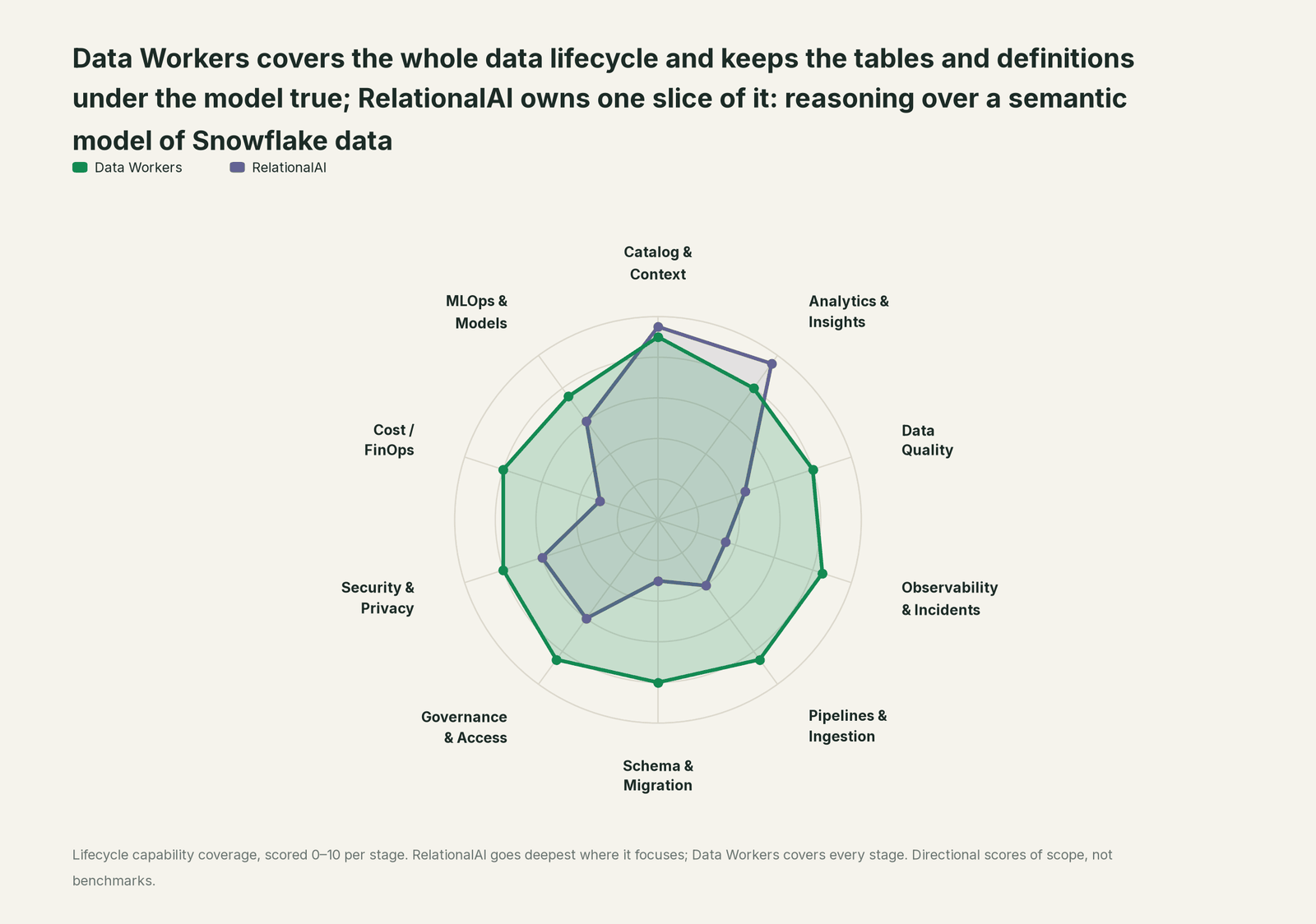
| Stage | Data Workers | RelationalAI | Why we scored it this way |
|---|---|---|---|
| Catalog & Context | 9 | 9.5 | RelationalAI's home stage: a PyRel semantic model of concepts, relationships and business rules over Snowflake tables. Data Workers brings that model in as context with provenance, next to lineage, quality and usage. |
| Analytics & Insights | 8 | 9.5 | RelationalAI's other home stage: rules, graph, prescriptive and predictive reasoning answer decision questions inside Snowflake. Data Workers' Insights agent answers through governed metric definitions. |
| Data Quality | 8 | 4.5 | Requirements in the model encode must-be-true rules and fail when they don't hold. Data Workers checks the tables that feed the model and repairs breaks before a solve. |
| Observability & Incidents | 8.5 | 3.5 | Stream status, quarantine, the rai debugger and the rai-health skill cover the app's own runs. Data Workers detects an upstream break, traces it across systems, fixes it and verifies after the rerun. |
| Pipelines & Ingestion | 8.5 | 4 | Data streams keep the model in sync with source tables through Snowflake change tracking. Data Workers builds, reruns and backfills the pipelines that fill those tables, with approvals. |
| Schema & Migration | 8 | 3 | Branch, pull and merge for deployed models are in public preview. Data Workers detects upstream schema and DDL changes and assesses their impact on every model and stream before they land. |
| Governance & Access | 8.5 | 6 | Strong in Snowflake: app roles, the primary role's grants, and row, masking and projection policies on deployed outputs. Data Workers proposes and applies grants across your data platforms by policy. |
| Security & Privacy | 8 | 6 | Strong by design: the app runs inside your Snowflake account and data never leaves it. Data Workers flags sensitive column names in pull request review and proposes masking for the owner. |
| Cost / FinOps | 8 | 3 | Cost guidance and auto-suspend cover its own reasoners and CDC engine. Data Workers traces Snowflake credits to the dbt model behind them and drafts the fix for its owner. |
| MLOps & Models | 7.5 | 6 | Predictive reasoning trains graph neural networks on the model. Data Workers keeps the data under your models healthy and connects to MLflow and W&B. |
How RelationalAI and Data Workers work together
Engineers and agents stay where they are: Claude Code, Cursor or CoCo with Agent Skills, and CoWork for planners, where RelationalAI's own template packages a model as a Cortex agent. Spellbook Data Catalog (in preview) is where the data team looks: each proposed change, its blast radius, approver and rollback. Between them, Data Context Wizard keeps one governed context graph, the Data-Agents Swarm does the work with more than 20 specialist agents, the Autonomous Data-Conductor runs each fix end to end (detect, diagnose, fix, review, verify, remember), and per-domain guardrails hold approvals, receipts and rollback.
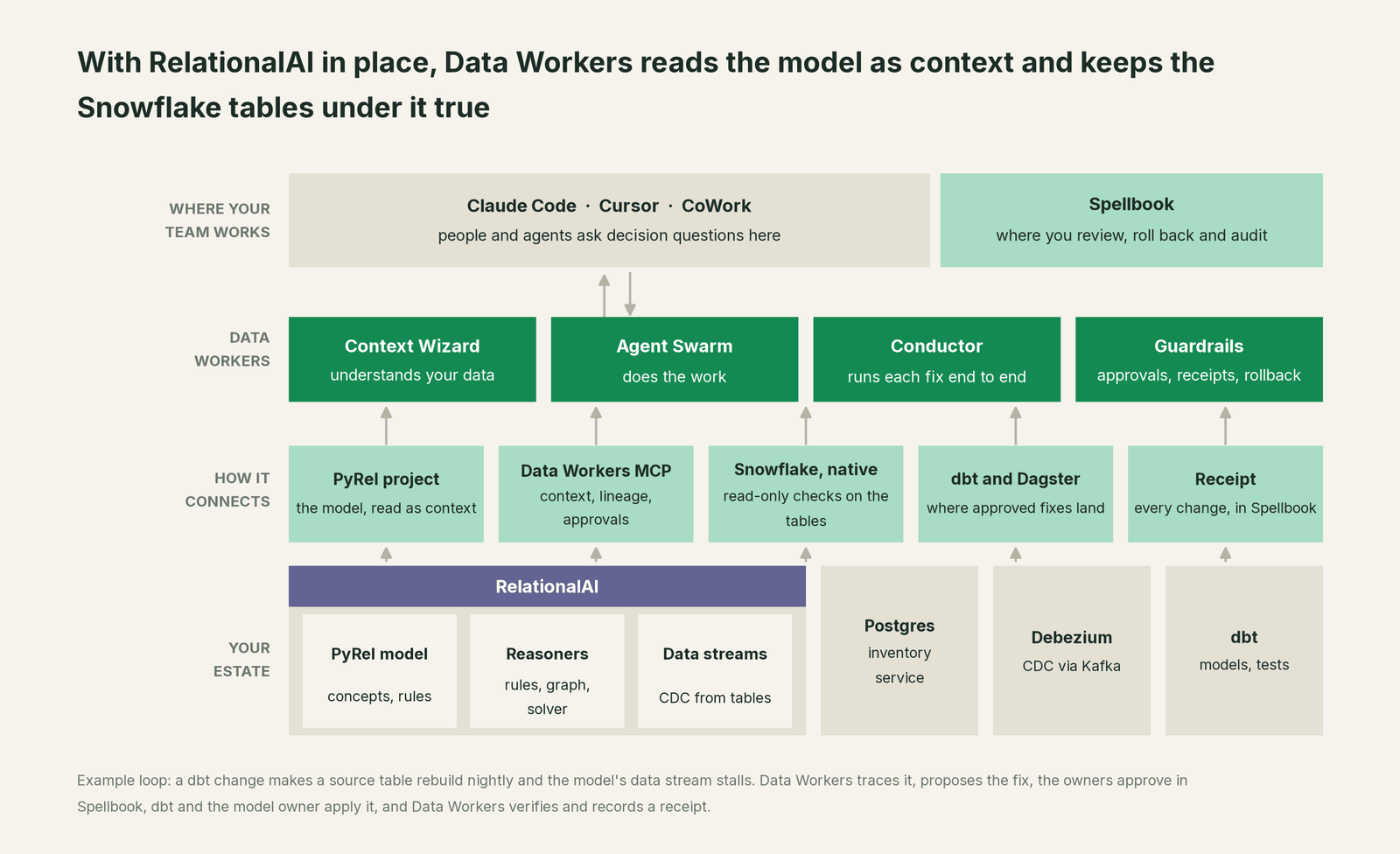
What Context Wizard does with your model. It records the model's concepts, rules and the Snowflake tables each concept reads, with provenance and an owner, and joins them to lineage, so DC.available_stock traces back through DC_STOCK, dbt and Debezium to Postgres. It scores trust with quality, freshness and usage, and serves one governed view to every agent through tools like explain_table. When the model's rule for "available stock" disagrees with a semantic view, the conflict goes to a named owner. It is the same Context Wizard as in Data Workers on Snowflake, with RelationalAI as one more first-class source.
Setup over MCP today. Data Workers connects to RelationalAI through Snowflake. Its Snowflake connector reads table metadata, DDL and query history, and Snowflake's managed MCP server, with a SYSTEM_EXECUTE_SQL tool set to read_only: true, lets agents read the model's sources, deployed outputs and the app's relationalai.api.data_streams view under a least-privilege role (stream status needs the cdc_admin application role). Add Data Workers' agents from the open-source repository with start-agent.sh entries, per the client setup docs. Example for Claude Code's .mcp.json (values are placeholders):
{
  "mcpServers": {
    "snowflake": {
      "type": "http",
      "url": "https://<account_url>/api/v2/databases/DW_META/schemas/MCP/mcp-servers/RAI_READER",
      "headers": { "Authorization": "Bearer ${SNOWFLAKE_PAT}" }
    },
    "dw-context-catalog": { "command": "/path/to/dataworkers-claw-community/start-agent.sh", "args": ["dw-context-catalog"] },
    "dw-schema": { "command": "/path/to/dataworkers-claw-community/start-agent.sh", "args": ["dw-schema"] },
    "dw-quality": { "command": "/path/to/dataworkers-claw-community/start-agent.sh", "args": ["dw-quality"] }
  }
}
Agent Skills install in the same client (npx skills add RelationalAI/rai-agent-skills --skill '*'). List the tools with /mcp, then ask "what feeds the ReplenishmentPlan model, and is it healthy tonight?" The answer brings lineage from trace_cross_platform_lineage, run_quality_check results on DC_STOCK, the stream status and the impact from blast_radius_analysis.
Where writes go. Fixes land where your team already reviews change: a dbt diff for the owner to merge, a Dagster job or an ingestion setting. Changes to the PyRel model or its streams go to the model owner as a proposal with evidence, made with RelationalAI's own tools, by design.
One request, L0 to L4. Autonomy is set per domain.

- •L0 manual. Connected, not acting; an engineer traces a bad solve by hand.
- •L1 observe. Watches the tables and streams that feed the model and flags breaks before the solve, with cause and owners.
- •L2 propose. Drafts the dbt diff or pipeline change with its blast radius; owners approve in Spellbook.
- •L3 act reversibly. Reruns a failed load for the affected partitions, verifies source totals and can roll it back.
- •L4 autonomous. Fixes a scoped class like late loads into one model's sources on its own and posts the receipt.
The safety model is in is it safe to let AI agents change production data. The same pattern holds for every source of meaning: see the hub, bring your own context, and the guides for teams on timbr, Snowflake semantic views and Snowflake Horizon Context. For grounding tradeoffs, read semantic layer vs knowledge graph for LLM grounding and what is a context graph.
What changes for your team
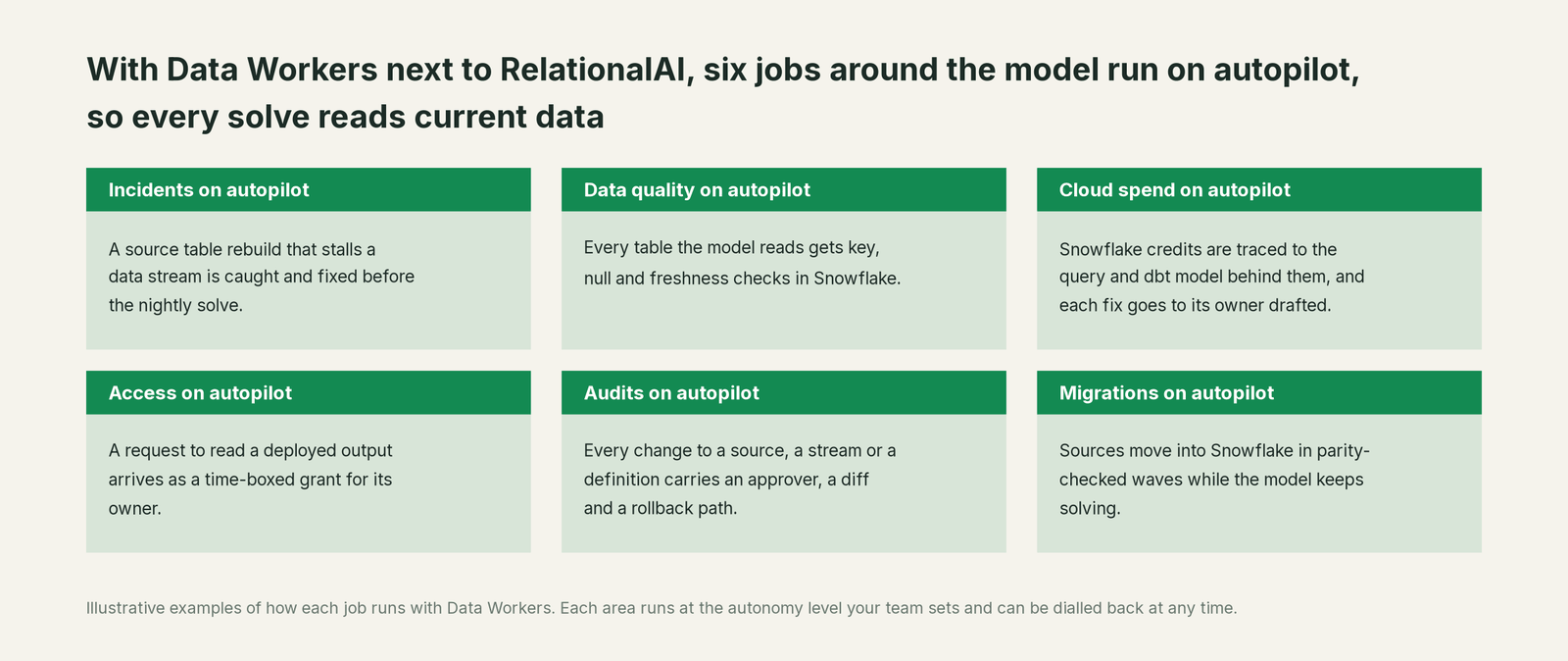
Decision-science teams lose much of the week to work that isn't modeling: explaining a strange plan, chasing a stalled stream, rebuilding after a bad load. With Data Workers next to RelationalAI, those jobs run on autopilot at the level you set.
- •Incidents. A rebuild that stalls a data stream, or a schema change that empties a concept, is fixed before the nightly solve.
- •Data quality. Every table the model reads gets key, null, range and freshness checks, upstream of the model's own requirements.
- •Cloud spend. Snowflake credits are traced to the query and dbt model behind them, and each fix goes to its owner drafted.
- •Access. A request to read a deployed output arrives as a time-boxed grant proposal for its owner.
- •Audits. Every change to a source, a stream or a definition carries an approver, a diff, the verification and a rollback path.
- •Migrations. Sources move into Snowflake in parity-checked waves while the model keeps solving.
The modeling team gets its week back for new decision problems.
Keep RelationalAI, or consolidate?
Keep RelationalAI if you love it; Data Workers works with it from day one. Many teams consolidate once Data Workers runs that slice too.
Most teams keep it: the model, the reasoners and the decision workflows belong there. What they consolidate is the tooling around it: a separate quality tool for its source tables, a script that checks stream health before a solve, a spreadsheet mapping concepts to dbt models and owners. If you are weighing building this layer yourself on Snowflake's MCP server and Agent Skills, read build it ourselves with Claude Code and MCP servers: the connection is the easy part; cross-system context, approvals and rollback are where the work is.
The case for your CFO
The outcome: the decisions the company makes with RelationalAI, such as transfers, allocations and schedules, rest on current, correct data every time a reasoner runs. A plan built on yesterday's stock costs real money in freight and stockouts.
The risk story is plain. Agents read Snowflake with a read-only SQL tool and a least-privilege role. Every change Data Workers proposes shows its blast radius, goes to a named approver, lands through your existing pipelines, is verified after the rerun and leaves a receipt: who approved it, what it touched and how to undo it. The model itself stays with its owner. Autonomy is set per domain from L0 manual to L4 autonomous and can be dialled back at any time. There is zero migration: RelationalAI, Snowflake, dbt and your pipelines stay where they are.
Why now: planners and agents ask the model questions directly through CoWork and coding agents, so a bad source reaches every answer within hours. The first win is one model with its sources and streams watched, read-only, so the next upstream change is caught before the solve. What stays the same: your PyRel code, reasoners, Snowflake roles and policies, and review process. For the numbers, see the ROI of agentic data operations.
The sentence to repeat upstairs: "Our decisions are only as good as the data under the model; Data Workers keeps that data and its meaning right, and fixes it with an approval and a receipt."
Getting started
Start with a pilot. Pick one RelationalAI model planners rely on, such as replenishment, connect Snowflake's managed MCP server read-only next to Data Workers, and let it watch the model's sources and streams before you enable the first fix class. The pilot path and plans are on the pricing page, and the pilot is credited in full against the first year.
FAQ
Does Data Workers change our PyRel model or the RelationalAI app? No. It reads them as context. Fixes land in dbt and your pipelines after approval; model or stream changes go to the model owner as proposals.
How does Data Workers know which tables feed the model? Context Wizard records each concept's source tables and joins them to lineage across dbt, ingestion and source systems; trace_cross_platform_lineage follows a concept back to its database column.
Can Data Workers see a stalled or quarantined data stream? Yes. Through Snowflake's managed MCP server with a read-only SQL tool, it reads relationalai.api.data_streams under a role your admin grants, and checks the source tables' change tracking and recent DDL.
We already use RelationalAI Agent Skills. Does that overlap? They work together: Agent Skills help your coding agent write, deploy and debug PyRel; Data Workers keeps the data under the model correct.
What happens when the model's rule and a semantic view disagree? Context Wizard routes it to a named owner; agents see both candidates until the owner decides, and the decision is recorded.
Does any data leave our Snowflake account? RelationalAI runs inside your account, and Data Workers reads metadata and query results through the roles you grant. See where does our data go.
Sources
- •RelationalAI, Get started with RelationalAI, https://docs.relational.ai/get-started/ (checked Oct 2, 2026)
- •RelationalAI, Set up RelationalAI in Snowflake, https://docs.relational.ai/get-started/set-up-relationalai-in-snowflake/ (checked Oct 2, 2026)
- •RelationalAI, PyRel overview, https://docs.relational.ai/build/guides/ (checked Oct 2, 2026)
- •RelationalAI, Prescriptive reasoning, https://docs.relational.ai/build/guides/reasoning/prescriptive/ (checked Oct 2, 2026)
- •RelationalAI, Define requirements, https://docs.relational.ai/build/guides/modeling/define-requirements/ (checked Oct 2, 2026)
- •RelationalAI, Deploy a model (preview), https://docs.relational.ai/build/guides/modeling/deploy-a-model/ (checked Oct 2, 2026)
- •RelationalAI, Preview features, https://docs.relational.ai/release-notes/preview-features/ (checked Oct 2, 2026)
- •RelationalAI, Release notes index, https://docs.relational.ai/release-notes/ (checked Oct 2, 2026)
- •RelationalAI, Python package and CLI 1.33.0 (Sep 29, 2026), https://docs.relational.ai/release-notes/python/1.33.0/ (checked Oct 2, 2026)
- •RelationalAI, Python package and CLI 1.32.0 (Sep 22, 2026), https://docs.relational.ai/release-notes/python/1.32.0/ (checked Oct 2, 2026)
- •RelationalAI, Native App 2026.9.26-0821a55 (Sep 30, 2026), https://docs.relational.ai/release-notes/native-app/2026.9.26-0821a55/ (checked Oct 2, 2026)
- •RelationalAI, Install skill files (Agent Skills), https://docs.relational.ai/build/agents/skills/ (checked Oct 2, 2026)
- •RelationalAI, Agent Skills repository (last push Sep 30, 2026), https://github.com/RelationalAI/rai-agent-skills (checked Oct 2, 2026)
- •RelationalAI, Connect to the docs (docs SKILL.md or Context7 MCP server), https://docs.relational.ai/build/agents/documentation/ (checked Oct 2, 2026)
- •RelationalAI, Snowflake Intelligence agent template, https://docs.relational.ai/build/templates/rai-agent-scaffold/ (checked Oct 2, 2026)
- •RelationalAI, Manage data sources, https://docs.relational.ai/manage/data/ (checked Oct 2, 2026)
- •RelationalAI, Manage data streams, https://docs.relational.ai/manage/data/manage/ (checked Oct 2, 2026)
- •RelationalAI, Fix data stream issues, https://docs.relational.ai/manage/data/fix/ (checked Oct 2, 2026)
- •RelationalAI, Understand and optimize costs, https://docs.relational.ai/manage/app/costs/ (checked Oct 2, 2026)
- •Snowflake, Introduction to streams, https://docs.snowflake.com/en/user-guide/streams-intro (checked Oct 2, 2026)
- •Snowflake, Snowflake-managed MCP server, https://docs.snowflake.com/en/user-guide/snowflake-cortex/cortex-agents-mcp (checked Oct 2, 2026)
- •dbt, Snowflake configurations, https://docs.getdbt.com/reference/resource-configs/snowflake-configs (checked Oct 2, 2026)
- •Data Workers, Client setup (open-source docs), https://dataworkers.io/opensource-docs/client-setup/ (checked Oct 2, 2026)
- •Data Workers open-source repository, agent tools and start-agent.sh, https://github.com/DataWorkersProject/dataworkers-claw-community (checked Oct 2, 2026)