You're on Palantir Ontology: Bring It to Every Agent, and Keep It True to the Data Underneath
The Palantir Ontology holds your business meaning. Data Context Wizard takes it in from your team's assistant over Ontology MCP, with provenance, keeps it true against the warehouses that feed Foundry, and fixes mismatches with approvals.
Your business already speaks Ontology. A Supplier is an object type with properties and a primary key. It links to Purchase Orders, Plants and Contracts through link types. Planners change real business state through action types, with rules, submission criteria and permissions, and every edit lands in the action log. AIP Logic functions read those objects and stage edits for human review, and since June 2026 Ontology MCP serves the same object types, action types and query functions to any MCP-compatible agent. The Palantir Ontology is where your meaning lives. Data Context Wizard is where every agent reads it, next to lineage, quality and usage, with a named owner on every fact.
That meaning sits on top of data. Many object types are backed by virtual tables on Snowflake, Databricks or BigQuery, built by dbt models and scheduled by Airflow. When a key changes or a column drifts in those systems, the Ontology still describes the business correctly, but the objects it serves stop matching it. Data Workers is the agentic data platform that keeps the two in step: it brings the Ontology in as a first-class source with provenance, checks it against the warehouses that feed Foundry, and acts on mismatches through approvals and receipts.
Key takeaways
- •The Ontology keeps its job. Object types, link types, action types, Ontology Manager, AIP Logic and Ontology MCP stay exactly as they are. Ontology changes stay in Foundry with the Ontology owner, by design.
- •Bring your own context. Your team's assistant reads object types, keys and link types over Palantir's MCP servers (Ontology MCP for objects and query functions, Palantir MCP's view tools for type definitions) and hands them to Data Context Wizard, which records each fact with its source, owner and observation time. The Ontology stays yours; Data Workers never copies your objects.
- •Meaning joined to the data under it. Each object type is tied to the warehouse table, dbt model and DAG run behind it, with quality, freshness and usage on the same page.
- •Mismatches become approved fixes. When a key, a link join or a column drifts upstream, Data Workers traces the blast radius to the object types and AIP Logic functions that depend on it, proposes the fix, and a named owner approves it in Spellbook.
- •One request, five levels. Autonomy is set per domain on the ladder L0 manual, L1 observe, L2 propose, L3 act reversibly, L4 autonomous.
Palantir Ontology is where the meaning lives. Data Workers keeps it true.
The Ontology is built to describe the business and to act on it. Palantir's own docs put it plainly: the Ontology "sits on top of the digital assets integrated into the Palantir platform (datasets, virtual tables, and models)". That layering is exactly why the assets underneath deserve their own crew. Here is a Tuesday night with Data Workers watching the tables behind a Supplier object type. This is an illustration, not a customer case.
| Time | System | What happens |
|---|---|---|
| Tue 16:10 | GitHub + dbt | An analytics engineer merges a change to dim_supplier that consolidates suppliers after an ERP merge. 1,140 subsidiaries now carry their parent's supplier_id |
| 02:00 | Airflow | The nightly DAG run builds dim_supplier in Snowflake with the new keys |
| 02:14 | Data Workers | Schema and key-change detection flags the change. Data Context Wizard knows, from the Ontology definitions your team's assistant handed it over MCP, that supplier_id is the primary key of the Supplier object type and the join key of its link to Purchase Orders. Blast radius: 3,870 open purchase orders would lose their supplier link, and the AIP Logic late-delivery triage function reads that link |
| 02:20 | GitHub + dbt | Data Workers proposes a dbt change that keeps the Ontology's key stable, adds a parent_supplier_id column for the consolidation, and adds a uniqueness and relationship test, with a row-level preview |
| 07:30 | Spellbook | The model owner approves. The Supplier object type's owner, named in the context graph, is told what changed and why |
| 08:05 | Snowflake | The rerun builds the fixed model. Data Workers verifies keys are unique and every open purchase order still resolves to its supplier |
| 08:40 | Foundry Ontology | The virtual table reads the corrected table. Supplier objects and their links are intact |
| 09:15 | AIP Logic | The triage function runs on correct links and stages its escalations for a planner's review, as designed |
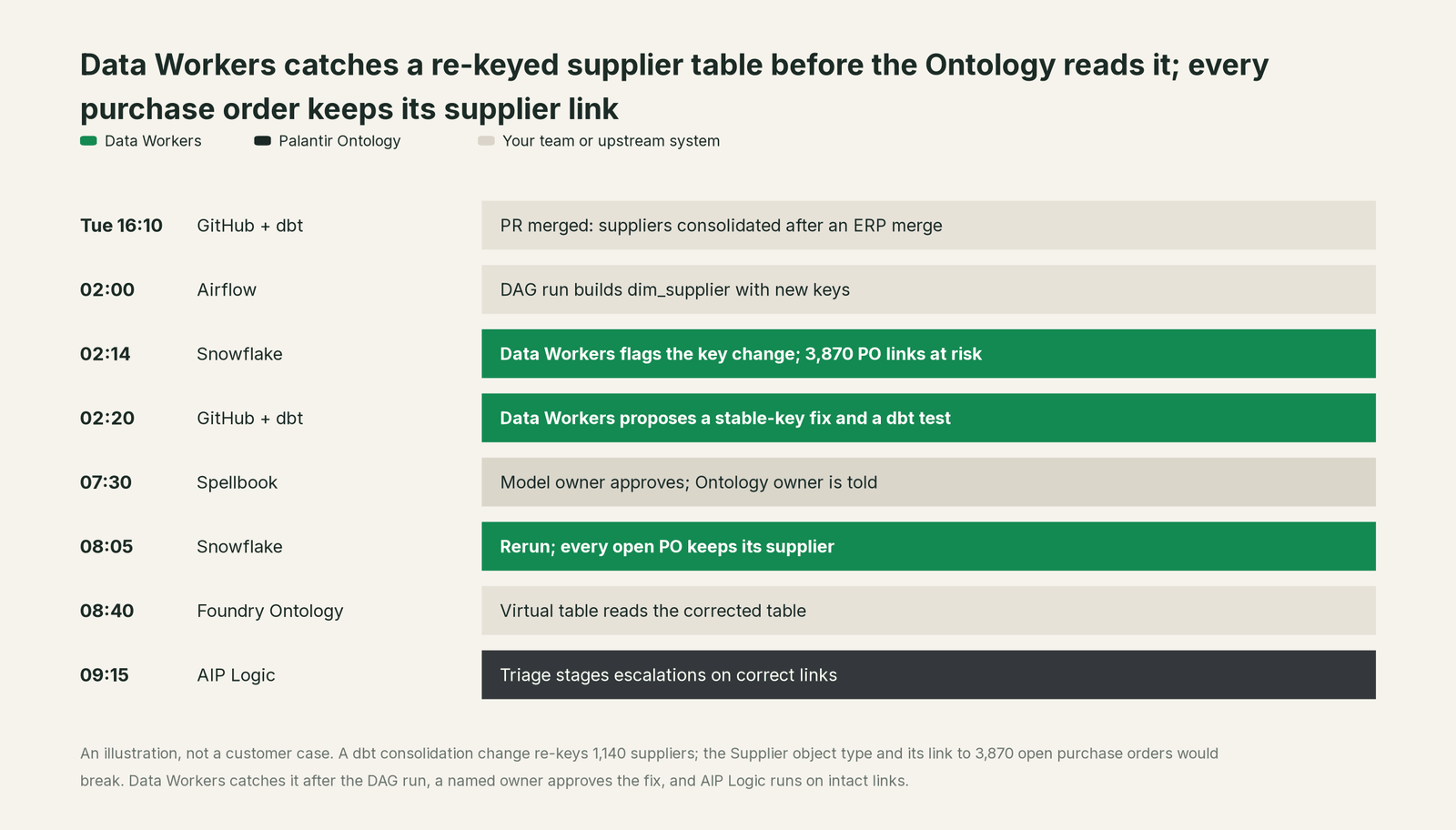
The Ontology did nothing wrong. It held the right meaning all night. What changed is that Data Workers knew that meaning and the warehouse beneath it at the same time, caught the mismatch at 02:14, and routed the fix through one approval with one receipt. If the Ontology owner later wants to model the parent relationship as a new link type, that change happens in Ontology Manager, where it belongs.
| Job | What Palantir Ontology does | What Data Workers does |
|---|---|---|
| The meaning | Models the business as object types, properties, link types and interfaces | Brings that model in as a source with provenance, alongside dbt, warehouse and BI definitions |
| The agent surface | Ontology MCP serves object types, action types and query functions to MCP agents, within application restrictions | Gives every agent one governed view: the Ontology's meaning plus lineage, quality, usage and an owner per fact |
| The data under it | Reads datasets, virtual tables and restricted views as backing datasources | Watches the warehouse tables, dbt models and DAG runs behind them for key, schema and freshness breaks |
| The change | Action types change business state with rules, permissions and an action log | Changes the data platform underneath: proposes the fix with its blast radius and routes it to a named approver |
| The AI | AIP Logic functions apply edits or stage them for human review | Makes sure the objects those functions read match the tables beneath them |
| The proof | The action log records every edit to objects and links | A receipt records what changed underneath, who approved it, and how to undo it |
Why doesn't Palantir just do this itself?
Because Palantir built the Ontology to model and act on business objects inside Foundry, and its design choices are right for that job. Writes go through governed action types with rules, submission criteria and permissions. Ontology MCP exposes exactly those, "predefined actions" within the application restrictions you configure, and Palantir MCP builds and modifies ontology types through proposals a person approves but, in Palantir's words, "cannot write ontology data". That is a careful, well-drawn boundary for a system that changes real business state.
Reconciling the Ontology with definitions held in systems Foundry doesn't host is a different product. A fix to dim_supplier has to know which object types, link types, AIP Logic functions, dbt exposures and BI dashboards read that table. It needs the dbt model owner's approval, a rollback path, a verification that compares keys and links before and after, and a receipt that ties the change to its cause. Someone also has to own the liability for changing code and warehouses that Palantir doesn't run. Palantir's sensible line is to govern what happens inside the Ontology and leave the warehouses, dbt projects and DAGs to the team that owns them. Keeping the Ontology true to that layer, with approvals and receipts, is the product Data Workers is.
Focus matters too. An Ontology builder should be modeling the business, deciding which actions planners can take and which edits AIP Logic stages for review. Tracking which dbt merge re-keyed which object type's backing table shouldn't be part of that job.
Every tool owns a slice. Data Workers covers the whole lifecycle
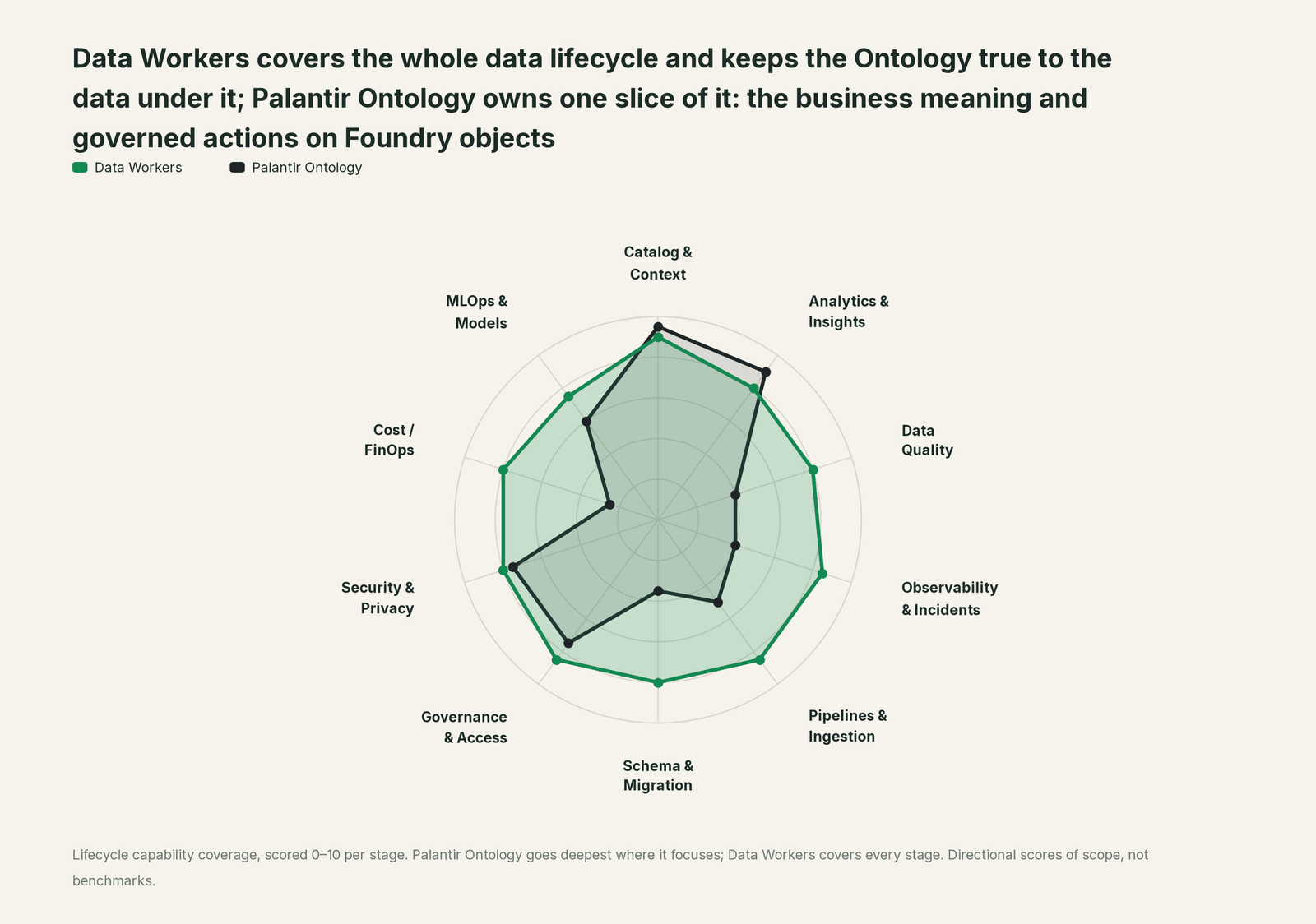
The Palantir Ontology owns one slice of the data lifecycle, and it owns it better than anyone: business meaning and governed actions on Foundry objects. It leads on Catalog & Context and on Analytics & Insights, its home stages. Each point tool adds another console, another contract and another handoff. Data Workers covers the whole lifecycle with one context, one approval flow and one audit trail, and builds on the Ontology where your business already runs.
| Stage | Data Workers | Palantir Ontology | Why we scored it this way |
|---|---|---|---|
| Catalog & Context | 9 | 9.5 | Home stage: object types, properties, link types, interfaces and action types model the business, and Ontology MCP (GA, June 2026) serves them to any MCP agent. Data Workers reads the Ontology as a source and joins it to lineage, quality and usage across every platform. |
| Analytics & Insights | 8 | 9 | Second home stage: Workshop, Object Explorer, AIP Analyst and AIP Logic turn objects into answers and decisions. Data Workers answers from governed definitions with lineage behind every number. |
| Data Quality | 8 | 4 | Foundry health checks and monitoring views watch datasets, schedules and tables inside Foundry. Data Workers writes, runs and repairs quality checks and dbt tests on the warehouse tables that back object types. |
| Observability & Incidents | 8.5 | 4 | The action log records every edit to objects and links. Data Workers detects data breaks upstream of the Ontology, traces them across systems, fixes and verifies them. |
| Pipelines & Ingestion | 8.5 | 5 | Object types read datasets, virtual tables and restricted views, and Pipeline Builder builds inside Foundry. Data Workers builds, reruns and backfills the dbt and Airflow pipelines that feed those tables. |
| Schema & Migration | 8 | 3.5 | Ontology Manager and branching proposals govern changes to types inside Foundry. Data Workers catches schema and key changes in the dbt manifest and in review before they reach an object type, and plans migrations in parity-checked waves. |
| Governance & Access | 8.5 | 7.5 | Strong inside Foundry: action type permissions, submission criteria and application restrictions on Ontology MCP. Data Workers proposes least-privilege grants on the warehouses beneath it. |
| Security & Privacy | 8 | 7.5 | Markings and object and property security policies, now testable in Ontology Manager. Data Workers scrubs PII before storing facts and leaves a receipt on every data change. |
| Cost / FinOps | 8 | 2.5 | Foundry usage is metered and shown by project. Data Workers traces Snowflake credits to the dbt model behind them and drafts the fix for its owner. |
| MLOps & Models | 7.5 | 6 | Models sit in the Ontology next to objects, and AIP Evals and AIP Evolve improve AI workflows. Data Workers keeps the data under those models healthy and connects to MLflow and W&B. |
These are directional scores of scope, not benchmarks. The platform-level comparison, with AI FDE, virtual tables and cost, is in Data Workers on Palantir; this page stays on the Ontology.
How the Ontology and Data Workers work together
Foundry stays on top, where people decide on objects in Workshop, AIP Analyst and AIP Logic. Your engineers' coding agent, Claude Code or Cursor, calls Data Workers tools. Spellbook Data Catalog (in preview) is where people look: each proposed change, who approved it, what it touched and how to roll it back. Between them, Data Context Wizard keeps one governed context graph with the Ontology inside it, the Data-Agents Swarm does the work with 20+ specialist agents, the Autonomous Data-Conductor runs each fix end to end (detect, diagnose, fix, review, verify, remember), and per-domain guardrails hold approvals, receipts and rollback.
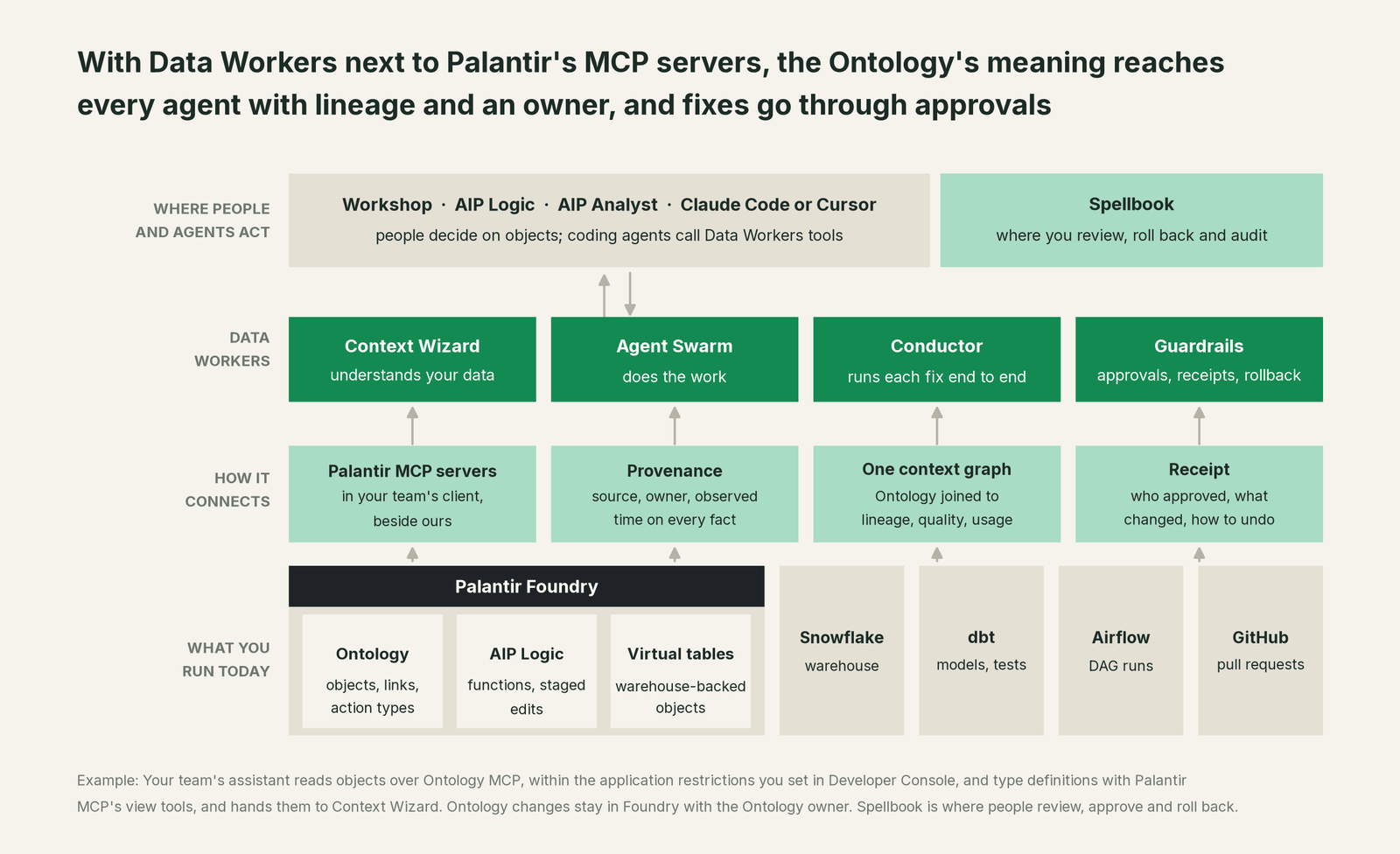
Bring your own context, step by step. Data Workers connects to the Ontology over Palantir's MCP servers today: Ontology MCP for objects and query functions, and Palantir MCP's read-only view tools for type definitions such as keys and link types.
- •In Developer Console, open the application you use for agent access, turn on its MCP page, and set application restrictions to the object types and query functions Data Workers may read. Start without action types.
- •Have a platform administrator enable Palantir MCP for your data team in Control Panel, and use its view tools (
view_foundry_object_type,view_foundry_link_type) so type definitions are read, never changed. - •Add Ontology MCP, Palantir MCP and the Data Workers agents to your coding agent's MCP config. The Data Workers agents run from the open-source repository as the client setup guide documents: clone the repo, then one
start-agent.shentry per agent. - •Ask the agent to read the Supplier object type and record its keys, links and owner in Data Context Wizard. Each fact lands with its source (the Ontology), its author, a confidence and an observation time. An agent cannot promote a fact to authoritative; a named person does that, and
mark_authoritativerecords who and why. - •Tie each object type to the table behind it:
trace_cross_platform_lineagefollows the warehouse table back through dbt and Airflow,explain_tableshows definition, owners and trust score on one page, andget_quality_scoreadds the quality score. - •Turn on watching for the tables behind your most-used object types with
run_quality_check,get_quality_scoreand the load-lag baselines the team records withmonitor_metrics.
Example: .mcp.json in your project root (Claude Code)
{
  "mcpServers": {
    "dw-context-catalog": {
      "command": "/path/to/dataworkers-claw-community/start-agent.sh",
      "args": ["dw-context-catalog"]
    },
    "dw-schema": {
      "command": "/path/to/dataworkers-claw-community/start-agent.sh",
      "args": ["dw-schema"]
    },
    "dw-quality": {
      "command": "/path/to/dataworkers-claw-community/start-agent.sh",
      "args": ["dw-quality"]
    },
    "dw-incidents": {
      "command": "/path/to/dataworkers-claw-community/start-agent.sh",
      "args": ["dw-incidents"]
    },
    "palantir-mcp": {
      "command": "npx",
      "args": ["-y", "palantir-mcp", "--foundry-api-url", "https://<your-foundry-hostname>"],
      "env": { "FOUNDRY_TOKEN": "<your Foundry user token>" }
    },
    "palantir-ontology": {
      "type": "http",
      "url": "<connection URL from your application's MCP page in Developer Console>"
    }
  }
}
Ontology MCP uses the OAuth 2.0 client of your Developer Console application, and the exact connection details for your agent framework are shown on the application's MCP page. Palantir MCP's install steps for each client are in MCP Hub. List the tools in your client with its own command, such as /mcp in Claude Code.
One request end to end, L0 to L4. The request: "Why does Supplier 4417 show no open purchase orders this morning?" Autonomy is set per domain.

- •L0 manual. A planner files a ticket. A data engineer opens Ontology Manager, then Snowflake, then the dbt repo, and finds the re-keyed table by hand.
- •L1 observe. The coding agent calls
search_across_platformsandtrace_cross_platform_lineage. The answer: the Supplier object's backing table was re-keyed by last night's dbt merge, with lineage from the PR to the link type and the AIP Logic function that reads it. - •L2 propose.
diagnose_incidentnames the cause, andblast_radius_analysisandassess_impactlist every object type, link and dashboard affected. Data Workers proposes the dbt fix. Nothing reaches production until the model owner approves in Spellbook and CI passes. - •L3 act reversibly. For change classes with a proven record, such as rerunning the dbt build for affected partitions,
remediateapplies the change, verifies keys and links, and can roll it back. The receipt is linked in the answer. - •L4 autonomous. For a scoped domain like supplier key integrity, Data Workers fixes overnight, and the first planner to open a Workshop app reads intact links.
For the full safety model, read is it safe to let AI agents change production data; for where data and credentials live, read where does our data go. The same pattern runs across the bring your own context guides: if your meaning lives in Microsoft's ontology, read you're on Fabric IQ; if it lives in a graph database, read you're on Neo4j. If you want the open-source angle on the Ontology itself, see Palantir Ontology Open Source Alternative.
What changes for your team
The Ontology gave the business one language for its operations. Data Workers gives the data team a crew that keeps the tables under that language right, so mismatches stop arriving as planner tickets.
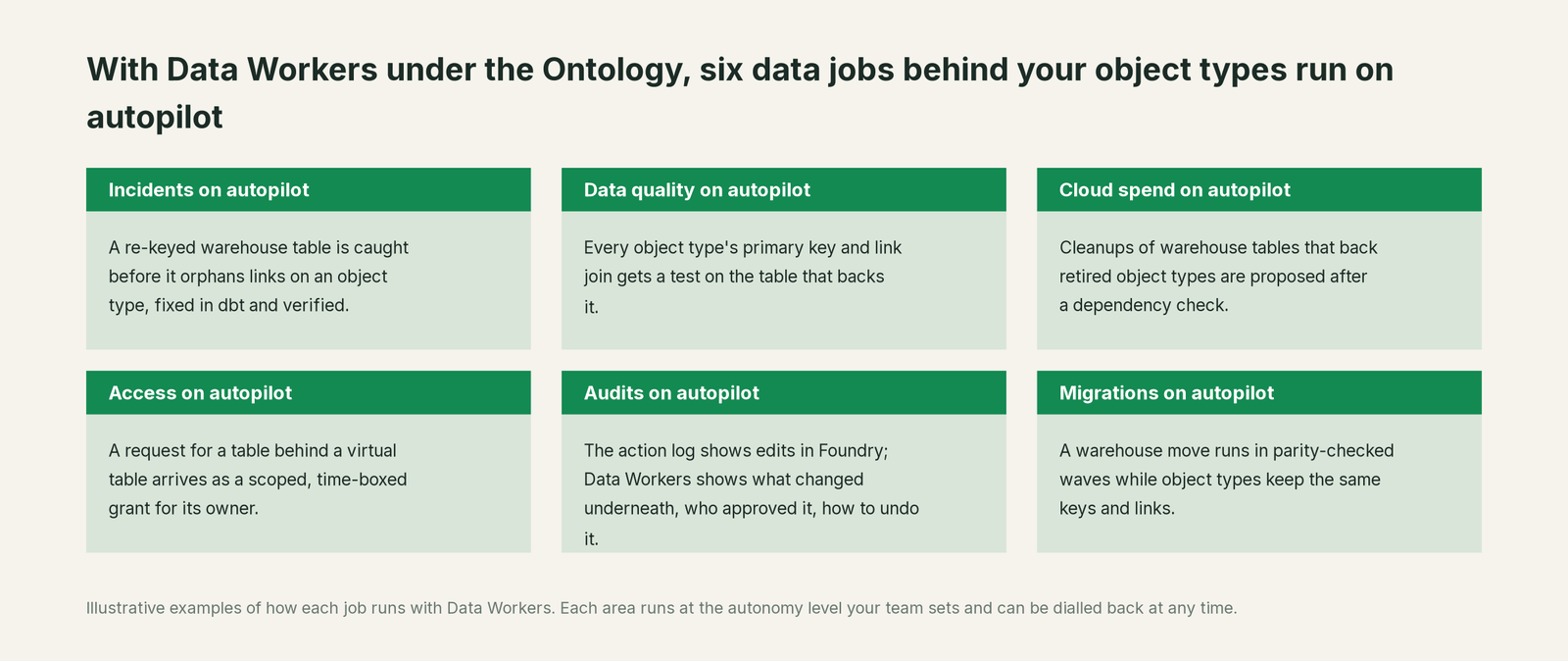
- •Incidents. A re-keyed or drifted warehouse table is caught before it orphans links on an object type, fixed in dbt and verified.
- •Data quality. Every object type's primary key and link join gets a test on the table that backs it.
- •Cloud spend. Cleanups of warehouse tables that back retired object types are proposed to the owner after a dependency check.
- •Access. A request for a table behind a virtual table arrives as a scoped, time-boxed grant proposal for its owner.
- •Audits. The action log shows edits in Foundry. Data Workers shows the other half: what changed underneath, who approved it, why, and how to undo it.
- •Migrations. A warehouse move runs in approved, parity-checked waves while object types keep the same keys and links.
Keep the Ontology, or consolidate?
Keep Palantir Ontology if you love it; Data Workers works with it from day one. Many teams consolidate once Data Workers runs that slice too.
For Foundry customers the answer is to keep it. The Ontology is where decisions run, and its action types, security policies and AIP Logic are built for that. What teams consolidate is the stack around the warehouse: the spreadsheet that maps object types to tables, a separate observability tool, a data-quality tool, a catalog nobody keeps current, and the scripts each team wrote to watch its own tables. If you are weighing whether to build that layer yourself on Ontology MCP, read build it ourselves with Claude Code and MCP servers first: the MCP connection is the easy part, and the context graph, approvals and rollback are where the work is.
The case for your CFO
The outcome: the company invested in the Ontology so that decisions run on one trusted model of the business. Data Workers makes sure the data behind that model stays correct, every morning, without engineers carrying each fix by hand. When a planner reallocates stock or an AIP Logic function stages an escalation, it acts on objects backed by warehouse tables, and those tables now have an owner, a watch and a verified fix path.
The risk story is plain. Palantir governs what happens inside the Ontology. Data Workers governs changes to the data underneath: autonomy per domain on the ladder from L0 manual to L4 autonomous, each change scoped for blast radius, routed to a named approver, applied reversibly, verified and recorded in a receipt with who approved it, what it touched and how to undo it. No agent approves its own work. It reads the Ontology under the application restrictions you set in Developer Console. Zero migration: Foundry, the Ontology, Snowflake, dbt and Airflow stay where they are.
Why now: Ontology MCP opened the Ontology to outside agents in June 2026, and AIP Logic can apply edits automatically. Agents now act on objects without a person checking the table first. The first win is key and link integrity on the tables behind your five most-used object types, in propose mode. What stays the same: Ontology Manager, action types, markings, warehouse permissions and your dbt review process. For the numbers, see the ROI of agentic data operations. Start with a pilot (pricing); the pilot is credited in full against the first year.
The sentence to repeat upstairs: "The Ontology is how our business decides; Data Workers keeps the data under it true, and fixes it with an approval and a receipt when it isn't."
Getting started
Start with a pilot. Pick the five object types your planners open most, connect Data Workers to them over Ontology MCP with read-only application restrictions, tie each one to its warehouse table, dbt model and DAG, and turn on key checks, dbt manifest schema-change checks and lateness baselines in propose mode. Run it for a few weeks, then enable the first reversible write class in one domain. The pilot path and plans are on the pricing page, and the pilot is credited in full against the first year.
FAQ
Does Data Workers copy our Ontology or our objects? No. Data Context Wizard records facts about the Ontology (object types, keys, link types, owners) with provenance, and joins them to lineage, quality and usage. Your objects stay in Foundry, and the Ontology stays yours.
Can Data Workers change the Ontology? Ontology changes stay in Foundry with the Ontology owner, by design. Data Workers changes the data platform underneath, such as dbt models and warehouse tables, through approvals and receipts, and tells the object type's owner what changed and why.
Should we expose action types to Data Workers over Ontology MCP? Start without them. Read access to object types and query functions over Ontology MCP, plus Palantir MCP's view tools for type definitions, is enough to keep the Ontology true to the tables beneath it. Application restrictions in Developer Console decide exactly what any MCP client can reach.
How is this different from Foundry health checks? Health checks and monitoring views watch datasets, schedules and tables inside Foundry. Data Workers watches the dbt models, DAG runs and warehouse tables that produce them, knows which object types and links depend on each one, and fixes the cause where it happened.
What if the Ontology and our dbt definitions disagree? Data Context Wizard keeps both, each with its source and owner, and routes the conflict to a named person. Nothing becomes the authoritative answer without that approval.
Does this work alongside AIP Logic and AI FDE? Yes. AIP Logic and AI FDE work inside Foundry. Data Workers works on the warehouses, dbt projects and pipelines beneath it, so the objects they read stay correct. For the platform-level picture, read Data Workers on Palantir and the Palantir data leaders guide.
Sources
- •Palantir, Ontology overview (object types, link types, action types, functions, interfaces), https://www.palantir.com/docs/foundry/ontology/overview (checked Oct 2, 2026)
- •Palantir, Object types overview (backing datasources: datasets, virtual tables, restricted views), https://www.palantir.com/docs/foundry/object-link-types/object-types-overview (checked Oct 2, 2026)
- •Palantir, Action types overview (rules, submission criteria, permissions, side effects, action log), https://www.palantir.com/docs/foundry/action-types/overview (checked Oct 2, 2026)
- •Palantir, AIP Logic overview, https://www.palantir.com/docs/foundry/logic/overview (checked Oct 2, 2026)
- •Palantir, Ontology MCP overview and getting started (application restrictions, Developer Console), https://www.palantir.com/docs/foundry/ontology-mcp/overview (checked Oct 2, 2026)
- •Palantir, Palantir MCP overview, https://www.palantir.com/docs/foundry/palantir-mcp/overview (checked Oct 2, 2026)
- •Palantir, Palantir MCP available tools, installation and data governance (view tools; proposal review for ontology changes), https://www.palantir.com/docs/foundry/palantir-mcp/available-tools (checked Oct 2, 2026)
- •Palantir, Ontology MCP sample architecture and authentication (SQL tool over object types, action tools, query functions; OAuth 2.0), https://www.palantir.com/docs/foundry/ontology-mcp/sample-architecture (checked Oct 2, 2026)
- •Palantir, Health checks overview (datasets, schedules, tables; monitoring views), https://www.palantir.com/docs/foundry/data-health/overview (checked Oct 2, 2026)
- •Palantir, Announcements June 2026 (Ontology MCP and Palantir MCP generally available, Jun 25, 2026; Ontology Manager security testing, Jun 30, 2026), https://www.palantir.com/docs/foundry/announcements/2026-06 (checked Oct 2, 2026)
- •Palantir, Announcements September 2026 (AIP Evolve, Sep 8; branching proposal Changes tab, Sep 17), https://www.palantir.com/docs/foundry/announcements/2026-09 (checked Oct 2, 2026)
- •Data Workers open-source repository (tool registrations in dw-context-catalog, dw-schema, dw-quality, dw-incidents) and client setup guide, https://dataworkers.io/opensource-docs/client-setup/ (checked Oct 2, 2026)