You're on Materialize: It Keeps Your SQL Views Fresh as the Data Changes. Data Workers Owns Whether What Those Views Serve Is Right
Materialize keeps SQL views fresh and serves them to agents over its MCP server. Data Workers catches a view that is fresh but wrong, traces the cause and gets the fix approved.
Your platform team runs Materialize, which now calls itself "the live context layer for agents and apps". Sources pull change data from PostgreSQL, MySQL and SQL Server, events from Kafka or Redpanda, and webhooks from tools like Segment and Stripe. Materialized views and indexes keep SQL results current to the second, clusters isolate the work, and sinks push results to Kafka or to Iceberg tables in S3 Tables or Unity Catalog. You run Cloud or Self-Managed and ship SQL with dbt-materialize and its blue/green macros. Since May, the built-in materialize-agent MCP server has served your curated data products to agents, with your column comments telling them what each field means.
Materialize is excellent at its job: every view is consistent with its inputs at every moment. That is why one class of incident is so quiet. When an upstream change alters what the inputs mean, the view stays fresh, complete and consistent, and wrong. Every agent, service and report reading it gets the wrong answer within a second. Data Workers watches both sides of the views, the database they mirror and the tables their sinks land in, traces a wrong number to its cause and gets the fix approved before money moves on it.
Key takeaways
- •Materialize keeps its job. Sources, views, clusters, sinks and the MCP servers stay with your platform team. Data Workers works on what the views mean and what reads them.
- •Fresh but wrong becomes an incident. When an upstream column changes what a view should count, Data Workers ties the schema change to the anomaly downstream and lists every agent, flow and report the number reaches.
- •It reads the systems around Materialize natively. The upstream PostgreSQL schema, the dbt-materialize manifest, Snowflake where the Iceberg sink lands, Prefect, Looker and Slack. Materialize's own MCP servers sit next to Data Workers in your team's MCP client.
- •Every fix goes through a named person. The owner approves each proposal and makes the Materialize change, through your own blue/green deploy.
- •It stacks with Materialize's MCP server.
materialize-agentserves live data products to agents; Data Workers keeps the sources and definitions under those products right.
Materialize keeps your SQL views fresh as the data changes. Data Workers owns whether what those views serve is right.
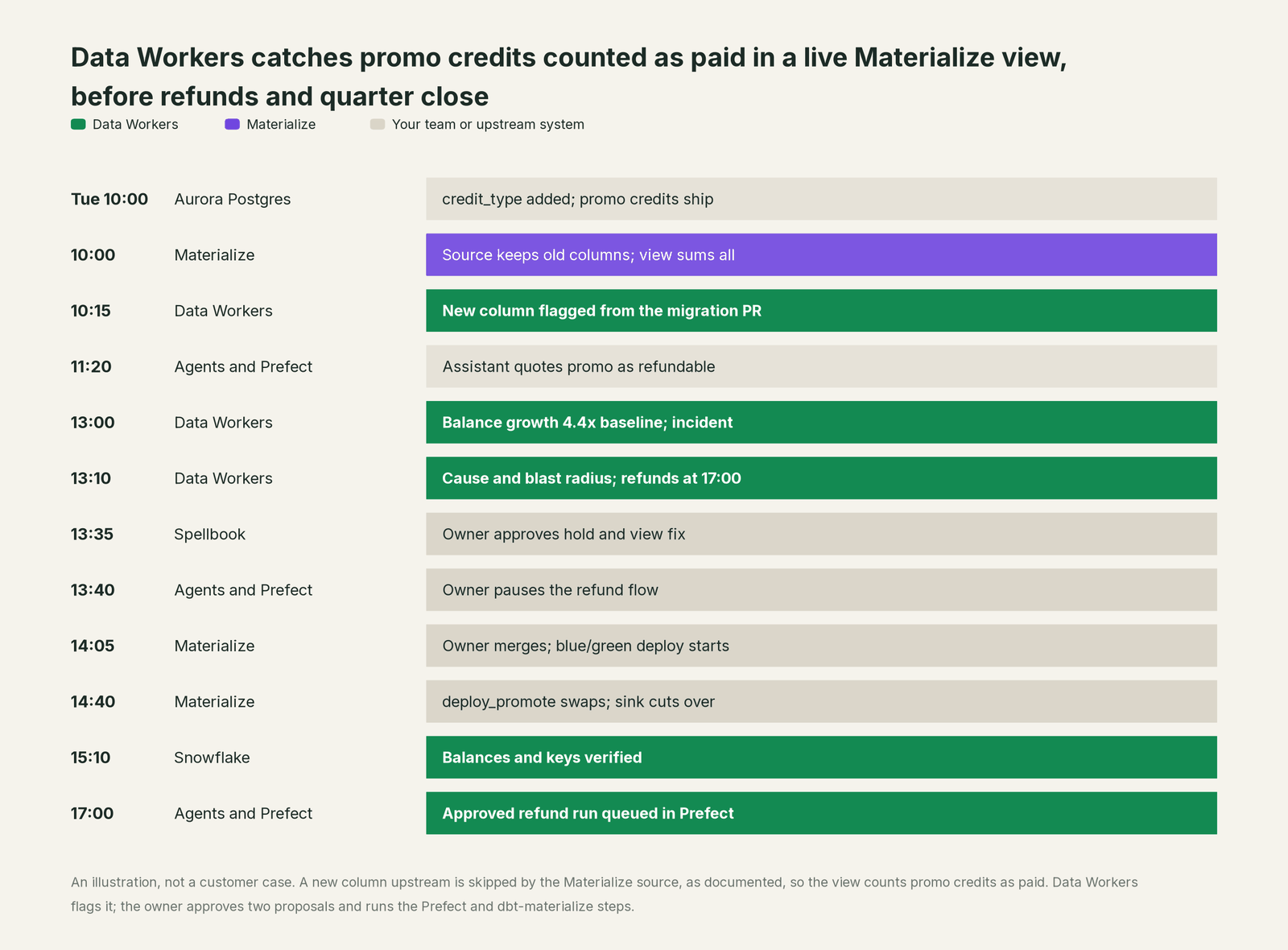
The job on top of Materialize is to notice that a live view now means something else, find the cause, size the damage, hold anything that pays out on it, get the fix made where it lives and prove the result. Here is one Tuesday at a developer platform that sells prepaid API credits, the day before quarter end. This is an illustration, not a customer case.
The setup: the billing database is Aurora PostgreSQL. A Materialize Cloud Postgres source mirrors billing.credit_ledger, and the materialized view account_balances sums it per account into prepaid_balance_usd, documented in its column comment as "paid credit remaining, refundable on cancellation". An indexed view over it is the data product mcp.account_balance, which the support team's assistant reads through materialize-agent. The Prefect flow cancellation_refunds reads account_balances over the Postgres wire protocol at 17:00 and refunds cancelled accounts. An Iceberg sink writes the balances to S3 Tables, Snowflake reads them, and the dbt model fct_deferred_revenue feeds the Looker Explore finance uses to close the quarter.
| Time | System | What happens |
|---|---|---|
| Tue 10:00 | Aurora PostgreSQL | The growth team launches a $50 signup bonus. Their migration adds credit_type (default paid) to billing.credit_ledger, and bonus credits are inserted as promo |
| 10:00 | Materialize | As documented, when a column is added upstream "Materialize keeps ingesting the existing columns". The mirrored table has no credit_type, so account_balances adds every bonus to prepaid_balance_usd. The view is fresh to the second and nothing errors |
| 10:15 | Data Workers + GitHub | The growth team's merged migration pull request shows a new, non-breaking column on credit_ledger. assess_impact finds no dbt model reading it. Data Workers logs it to the timeline |
| 11:20 | materialize-agent | A new user asks support whether their balance is refundable. The assistant reads mcp.account_balance, follows the column comment and answers yes. The user cancels |
| 13:00 | Data Workers + Snowflake | run_quality_check on the sink table passes: row count above its minimum, account_id unique. But hourly growth in total prepaid balance, recorded with monitor_metrics, is 4.4 times its baseline while paid top-ups are normal. Data Workers opens an incident |
| 13:10 | Data Workers | diagnose_incident ties the jump to the 10:00 column: in the Snowflake sink table, 1,212 accounts gained exactly $50 since then. trace_cross_platform_lineage follows the dbt-materialize manifest from the source table to account_balances, the data product and the sink. blast_radius_analysis adds fct_deferred_revenue, the Looker Explore and cancellation_refunds, which the payments team recorded in the context graph as a reader. At 17:00 it would refund $1,150 of bonus credit as cash to 23 accounts |
| 13:15 | Slack | send_slack_alert reaches the billing platform owner, with the finance data owner copied |
| 13:35 | Spellbook | She reviews two proposals: pause cancellation_refunds; and a change set that mirrors the ledger again in a new schema with credit_type, keeps prepaid_balance_usd to paid credit, adds a promo_balances view and corrects the column comment, shipped as a dbt-materialize diff. She approves both |
| 13:40 | Prefect | She pauses the deployment's schedule |
| 13:50 | Materialize | She creates billing_v2.credit_ledger from the source; the snapshot finishes at 14:00 |
| 14:05 | GitHub + CI | She merges the diff. CI runs deploy_init and deploy_await while the green cluster hydrates |
| 14:40 | Materialize | deploy_promote swaps the environments in one atomic step, and the Iceberg sink cuts over to the new definition |
| 15:10 | Data Workers + Snowflake | It verifies: balance growth is back on its baseline, the Snowflake total fell by $84,500, exactly $50 on each of 1,690 accounts, and row count and account_id uniqueness still pass. The receipt records cause, approvals, deploy, checks and the undo (revert the diff and redeploy; the old source table stays until cleanup) |
| 17:00 | Prefect | On the owner's approval, Data Workers queues the cancellation_refunds run through Prefect, and she resumes the schedule. The 23 accounts get their paid credit back, and no bonus |
| Wed 09:00 | Looker | Finance closes the quarter with deferred revenue that excludes promotional credit |
Every part of Materialize did its job. Ignoring a column it wasn't asked to ingest is the safe default, and its docs describe the next step: create a new table to pick up the column. Knowing that step was urgent took facts outside Materialize: the new column split credit into two kinds, one view treats all of it as cash, and a refund flow reads that view at 17:00.
| Job | What Materialize does | What Data Workers does |
|---|---|---|
| The sources | Ingests CDC from Postgres, MySQL and SQL Server, plus Kafka and webhooks, with source versioning for column changes | Reads upstream schema changes from migration pull requests and the dbt manifest, and asks what they mean for the views that read it |
| The views | Keeps materialized views and indexes consistent with their inputs at every moment | Checks that the inputs still mean what the views assume, against baselines on the tables the sinks land |
| Agent access | Serves curated data products over materialize-agent, with comments, roles and OAuth | Proposes fixes to the definitions and comments behind those products, and dates the window a wrong product was served |
| The sinks | Writes results to Kafka and Iceberg with exactly-once delivery | Checks the landed tables in Snowflake for volume, keys and freshness, and follows them to models and dashboards |
| The fix | Runs the source table, view and blue/green deploy the owner makes | Proposes the hold and the change set to a named owner, in order, with the blast radius |
| The proof | Exposes freshness lag, source and sink status in its system catalog | Re-checks the landed numbers and writes a receipt: what changed, who approved it, how it was checked, how to undo it |
Why doesn't Materialize just do this itself?
Because Materialize is built to compute and serve fresh results correctly from the inputs it is given, scoped to the SQL you wrote. Incremental view maintenance keeps a view equal to its definition. Whether the definition still matches the business after an upstream release is a fact about the billing team's intent, the refund policy and the finance close, none of which Materialize has reason to hold.
Materialize's AI work follows the same clear line. The materialize-agent MCP server, in Public Preview since v26.24 (May 14, 2026), gives agents get_data_products, get_data_product_details, read_data_product and a read-only query tool, with OAuth sign-in since v26.30. The materialize-developer server answers system catalog questions read-only, and agent skills, renamed to the mz- prefix in v26.44.1 (mz-health-check, mz-debug-freshness), help coding agents diagnose lag. All of it reads and serves the estate Materialize runs, and stays read-only by design, which is right for a database vendor.
Owning whether the numbers are right from the billing database to the quarter close is a different product with a different liability: a context graph across systems, blast-radius scoping, named approvals, a recorded undo and receipts an auditor can read. That is Data Workers. More in is it safe to let AI agents change production data.
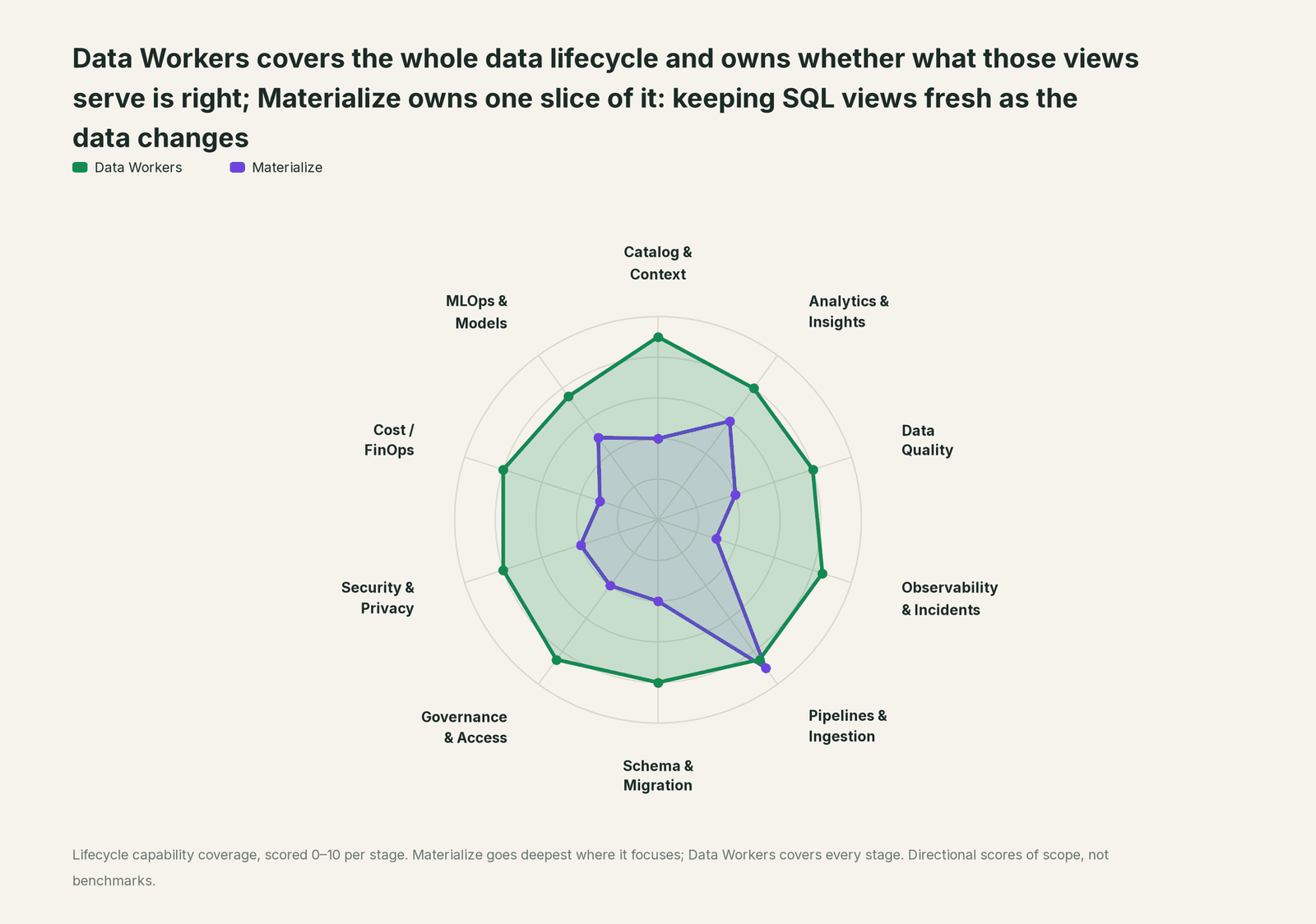
Every tool owns a slice. Data Workers covers the whole lifecycle
Each point tool adds another console, contract and handoff. Data Workers covers the whole lifecycle with one context, one approval flow and one audit trail, and builds on the Materialize views already there.
| Stage | Data Workers | Materialize | Why we scored it this way |
|---|---|---|---|
| Catalog & Context | 9 | 4 | Data products with column comments describe each view to agents. Data Workers keeps one governed context graph from the source table to the view, the sink and the dashboard. |
| Analytics & Insights | 8 | 6 | Indexed views answer live queries in milliseconds over SQL and MCP. Data Workers answers data questions from governed definitions with lineage behind every number. |
| Data Quality | 8 | 4 | Views stay consistent with their inputs at every moment. Data Workers checks that the inputs still mean what the views assume, and checks the landed tables for volume and keys, and tracks lateness against a baseline your team records. |
| Observability & Incidents | 8.5 | 3 | Source and sink statuses, freshness lag and a health-check skill show how Materialize runs. Data Workers diagnoses the data incident across systems and verifies the fix. |
| Pipelines & Ingestion | 8.5 | 9 | Materialize's home stage: CDC sources, incrementally maintained views and sinks to Kafka and Iceberg. Data Workers plans the source and view changes for the owner. |
| Schema & Migration | 8 | 4 | Source versioning absorbs added and dropped columns without downtime. Data Workers notices when an added column changes what an existing view means. |
| Governance & Access | 8.5 | 4 | RBAC, SCIM group-to-role mapping and least-privilege agent roles govern who reads what. Data Workers routes every data change to a named approver. |
| Security & Privacy | 8 | 4 | SSO, roles and restricted agent access protect the views. Data Workers leaves a receipt on every data change. |
| Cost / FinOps | 8 | 3 | Cluster sizing and hydration history help right-size compute. Data Workers attributes Snowflake spend to the dbt model through query tags and reads BigQuery and AWS spend. |
| MLOps & Models | 7.5 | 5 | Fresh views and embeddings feed agents and online features. Data Workers keeps the data under models and agents healthy. |
How Materialize and Data Workers work together
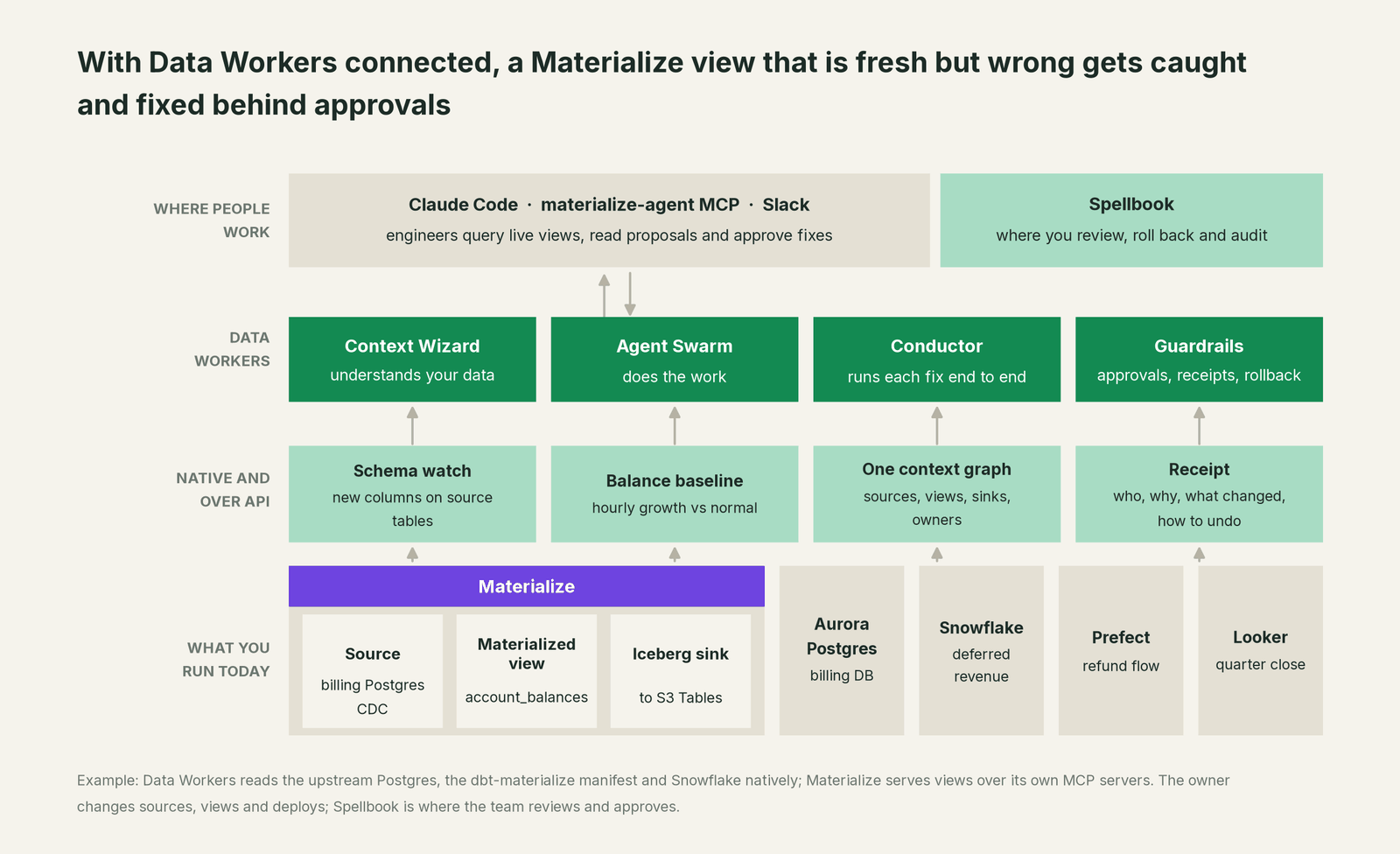
Data Workers reads the systems around Materialize natively: the upstream PostgreSQL databases its sources mirror, the dbt-materialize manifest (sources, materialized views and sinks arrive as lineage), the Iceberg tables its sinks land in Snowflake, and Kafka topics on either side. Prefect, Looker (read) and Slack connect natively too, among 50+ connectors. The views themselves are served by Materialize's MCP servers and SQL endpoint to your services and your team's MCP client.
By design, sources, tables from sources, views, indexes, clusters, sinks, data product grants and comments, and every deploy belong to the owner, in SQL, dbt-materialize or Terraform. Data Workers proposes the change as a diff for the owner to merge, scopes what it touches and verifies afterwards. Freshness lag and source health come from Materialize's own system catalog and the monitoring you already run.
Both MCP servers sit next to Data Workers in the same client: Materialize answers "what does this view return now", Data Workers "is it still right, and what's the fix". The Data Workers side follows the documented client setup: clone the open-source repo and add each agent's start-agent.sh entry.
# Example: Materialize's agent MCP server plus Data Workers agents in Claude Code
claude mcp add --transport http "materialize-agent" "<baseURL>/api/mcp/agent"

# Data Workers agents, from a clone of the open-source repo
claude mcp add --scope user dw-connectors -- "$(pwd)/start-agent.sh" dw-connectors
claude mcp add --scope user dw-schema -- "$(pwd)/start-agent.sh" dw-schema
claude mcp add --scope user dw-catalog -- "$(pwd)/start-agent.sh" dw-context-catalog
claude mcp add --scope user dw-quality -- "$(pwd)/start-agent.sh" dw-quality
claude mcp add --scope user dw-incidents -- "$(pwd)/start-agent.sh" dw-incidents
List the tools with your client's own command (/mcp in Claude Code). In this incident: assess_impact (dw-schema) finds the new column's readers; run_quality_check (dw-quality) checks row count and account_id uniqueness in Snowflake; monitor_metrics and diagnose_incident (dw-incidents) score balance growth against its baseline and name the cause; trace_cross_platform_lineage and blast_radius_analysis (dw-context-catalog) map what the view reached; send_slack_alert and trigger_prefect_flow (dw-connectors) reach the owner and queue the approved run; remediate re-checks the assertions after the fix and escalates any failure to a person.
In production the agents run in your infrastructure and hold the database credentials and model key; your data stays in your systems, and the hosted Conductor sees workflow metadata only. More in where does our data go.
One incident, L0 to L4, set per domain:

- •L0 manual. Finance finds the gap after the quarter closed and the refunds went out.
- •L1 observe. Data Workers flags the anomaly at 13:00 with the cause and blast radius. Nothing changes.
- •L2 propose. Data Workers proposes the hold and the change set. Nothing reaches production until the named owner approves; an unanswered request expires and escalates, never auto-grants.
- •L3 act reversibly. For a class with a clean record, Data Workers carries out reversible steps in the domain you open, such as queuing an approved flow rerun. Sources, views and deploys stay with the owner.
- •L4 autonomous. For a scoped domain, migrations on databases Materialize mirrors reach Data Workers for review before they ship. It checks each new column against the views that read the table, so the promo split is flagged before the first bonus is issued.
Who sets those levels: who owns the agents, how approvals work for AI data agents and autonomy levels L0 to L4 explained.
What changes for your team
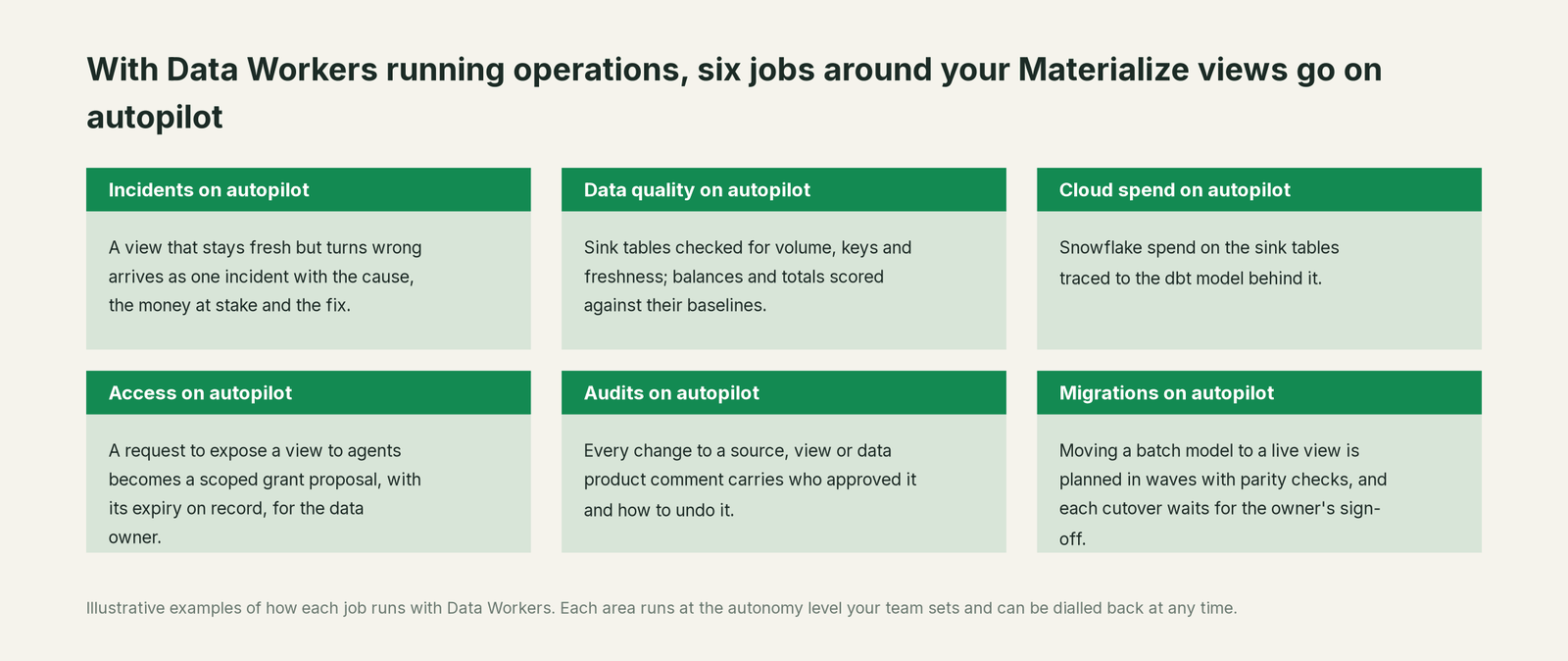
- •Producers and consumers share one record. Billing, platform and finance data teams see the same incident and receipt in Spellbook Data Catalog (in preview).
- •Upstream migrations get a second reader. A new column on a mirrored table is checked against every view that reads the table, by the Schema Evolution agent.
- •Fresh stops meaning right by default. The tables the views feed are scored against baselines even when every freshness check passes, so a quiet change in meaning becomes an incident with an owner, by the Incident Debugging agent.
- •Agent answers have a paper trail. When a data product was wrong, the receipt names the definition, the comment and the window, so support knows which answers to revisit.
Related reading: real-time data pipelines for AI agents, real-time data quality monitoring for streams and inside the real-time Streaming agent.
Keep Materialize, or consolidate?
Keep Materialize if you love it; Data Workers works with it from day one. Many teams consolidate once Data Workers runs that slice too.
For almost every Materialize team the answer is keep it: consistent views served in milliseconds are hard to give back. What teams consolidate is the tooling around the views: a separate observability tool, hand-written reconciliation queries and "check the balances after every billing release" runbooks. Neighbours: you're on Apache Kafka, you're on Confluent and you're on Prefect; Data Workers integrations lists what connects natively, and Data Workers vs data observability explains why freshness checks alone miss this class.
Building it yourself with a coding agent and Materialize's skills? Read build it ourselves with Claude Code and MCP servers: querying a view is easy; the context graph, approvals, undo and receipts are the work.
The case for your CFO
The outcome. When an upstream release quietly changes what a live balance, price or inventory view means, it is caught within hours and corrected before refunds, payouts or the close run on it, with a record.
The risk story. At L1 agents only read. At L2 a named person approves each change; an unanswered request expires and escalates. L3 covers reversible changes in domains you open. Sources, views and deploys stay with the owner. No agent can promote its own work, an org-wide stop halts all autonomous dispatch, and every change carries a receipt with its blast radius and undo. Nothing migrates.
Why now. Materialize now serves views straight to agents and services, so a wrong number reaches customers and money in a second, not after the next batch run.
The first win. Pick the views that drive money: balances, refunds, payouts, prices. A pilot at L1 shows within weeks what the agents would have caught.
What stays the same. Materialize, your sources and views, dbt-materialize, your blue/green deploys, Prefect, Snowflake and your on-call rota. For the numbers, see the ROI of agentic data operations.
The sentence for upstairs: "Materialize keeps our numbers live; Data Workers makes sure they are right, and gets them fixed with our approval when they aren't, before we refund, pay out or report on them."
Getting started
Start with a pilot. Pick the materialized views behind refunds, billing or revenue, give Data Workers read access to the upstream databases, the dbt-materialize project and the tables your sinks land in, and run at L1 for a few weeks. Then turn on L2 for one domain, and open L3 for a narrow class once the receipts show the agents were right. The pilot path is on the pricing page, and the pilot is credited in full against the first year.
FAQ
Does Data Workers query Materialize directly? No, by design. Data Workers reads the systems on either side natively: the upstream PostgreSQL schema where changes start, the dbt-materialize manifest for lineage, and the tables your sinks land in Snowflake or BigQuery. Materialize serves the views over its own MCP servers and Postgres-compatible SQL endpoint to your services and to your team's MCP client, next to Data Workers.
Why didn't Materialize pick up the new column? For PostgreSQL, MySQL and SQL Server sources, adding a column upstream is handled automatically: Materialize keeps ingesting the existing columns. To use the new column, you create a new table from the source, then point views at it.
Will Data Workers change our sources, views or data products? No. Sources, views, indexes, sinks, grants, comments and deploys stay with the owner. Data Workers proposes the change as a diff, and your team ships it through your own process, such as dbt-materialize blue/green.
How does this relate to the materialize-agent MCP server? They do different jobs. materialize-agent serves fresh data products to agents, read-only. Data Workers checks that what those products say is right and gets fixes approved by a named owner.
Does this work on Self-Managed Materialize? Yes. Data Workers reads the same upstream databases, dbt project and sink tables either way, and both MCP servers run on Self-Managed, with OAuth through your SSO.
Sources
- •Materialize, homepage ("The live context layer for agents and apps"), https://materialize.com/ (checked Oct 3, 2026)
- •Materialize docs, Releases (v26.44.1, Cloud Sep 30 and Self-Managed Oct 1, 2026; v26.43.0, Sep 23, 2026; v26.30.1, Jun 25, 2026; v26.27.0, Jun 4, 2026; v26.24.0, May 14, 2026), https://materialize.com/docs/markdown-docs/releases/index.md (checked Oct 3, 2026)
- •Materialize docs, MCP Server for Agents (Public Preview; OAuth and token-based), https://materialize.com/docs/markdown-docs/developer-tools/mcp-server/mcp-agent/index.md (checked Oct 3, 2026)
- •Materialize docs, Agent MCP server tools, https://materialize.com/docs/markdown-docs/developer-tools/mcp-server/mcp-agent-tools/index.md (checked Oct 3, 2026)
- •Materialize docs, Developer MCP server tools, https://materialize.com/docs/markdown-docs/developer-tools/mcp-server/mcp-developer-tools/index.md (checked Oct 3, 2026)
- •Materialize docs, PostgreSQL source (upstream schema changes), https://materialize.com/docs/markdown-docs/ingest-data/postgres/index.md (checked Oct 3, 2026)
- •Materialize docs, Handle upstream schema changes (PostgreSQL; Public Preview), https://materialize.com/docs/markdown-docs/ingest-data/postgres/source-versioning/index.md (checked Oct 3, 2026)
- •Materialize docs, Use dbt to manage Materialize (blue/green macros, sinks), https://materialize.com/docs/markdown-docs/developer-tools/dbt/index.md (checked Oct 3, 2026)
- •Materialize docs, Apache Iceberg sinks (Public Preview), https://materialize.com/docs/markdown-docs/export-data/iceberg/index.md (checked Oct 3, 2026)
- •Materialize docs, Consume from Snowflake on AWS S3 Tables, https://materialize.com/docs/markdown-docs/export-data/iceberg-aws-snowflake/index.md (checked Oct 3, 2026)
- •Materialize docs, Materialize Emulator, https://materialize.com/docs/markdown-docs/developer-tools/install-materialize-emulator/index.md (checked Oct 3, 2026)
- •Materialize docs, Agent Skills (
mz-names), https://materialize.com/docs/markdown-docs/developer-tools/mcp-server/coding-agent-skills/index.md (checked Oct 3, 2026) - •Data Workers client setup guide, https://dataworkers.io/opensource-docs/client-setup/ (checked Oct 3, 2026)