You're on Linear: Keep Planning and Triage There, Let Data Workers Do the Data Work Behind Each Issue
Linear is where your data team plans, triages and ships. Data Workers diagnoses, fixes and verifies the data behind each issue, and the issue closes with a receipt.
Your data team runs on Linear. There is a Data team with its own Triage inbox, fed by Asks from Slack, by Sentry and by anyone who thinks a number looks off. Work moves through cycles, projects roll up into initiatives, and the product engineers you depend on ship from the same workspace. Linear Agent is on by default in every workspace: it creates and updates issues, answers questions about your work, and takes delegated coding sessions that end in a pull request. Loops run recurring agent work on a schedule or an event, Triage Intelligence suggests the team, assignee and labels for each new issue, and Cursor, Codex, Devin, Factory and GitHub Copilot take delegated issues while a person stays the owner. Linear is where the data team plans, triages and ships its work. Data Workers does the data operations work behind those issues.
An issue says "Signups chart flat since Monday". Behind it sit an app database, an orchestrator, a dbt project, a warehouse and a dashboard, and someone has to find which one changed, fix it without breaking the others, check the number and say so on the issue. Data Workers does that, from cause to receipt, and connects to Linear over its API or MCP today.
Key takeaways
- •Linear stays where the work lives. Triage, cycles, projects, initiatives and your workflow states stay exactly as they are.
- •Data issues arrive diagnosed. Data Workers finds the cause, the blast radius and a proposed fix, often before anyone files the issue.
- •Coding agents write code; Data Workers runs the data. Linear Agent and the agents you delegate to end in a pull request. Data Workers queues the rerun, verifies the tables and the dashboard, and writes the receipt.
- •Done means verified. The issue links a receipt: what changed, who approved it, how it was checked and how to undo it.
- •Connected today over Linear's GraphQL API and its hosted MCP server, and Linear Agent can call Data Workers as a custom MCP server. Autonomy is set per domain from L0 manual to L4 autonomous.
Linear tracks the work. Data Workers does the data work.
Linear makes work visible: who owns it, which cycle it is in, what shipped. A data incident needs exactly that around it, while the diagnosis and repair happen in the data systems. Here is a Monday and Tuesday with both in place. This is an illustrative example.
| Time | System | What happens |
|---|---|---|
| Mon 15:12 | Linear | ENG-2207 "Passkey sign-up" moves to Done in the Growth team's cycle; the pull request is merged and deployed |
| 15:31 | Postgres (app database) | The first new users land in users with signup_method = 'passkey', a value no model downstream has seen |
| Tue 01:00 | Dagster | The product_nightly job starts: it syncs users from Postgres into Snowflake, then materializes the dbt assets |
| 01:18 | dbt on Snowflake | The accepted_values test on stg_users.signup_method fails on 1,140 rows; fct_signups and five downstream assets are not materialized |
| 01:19 | Dagster | The run is marked Failed. Data Workers catches the failed run and traces lineage from the failed step back to the Postgres table |
| 01:26 | Spellbook | Data Workers names the cause (a new signup method, first seen Monday 15:31), maps the blast radius (fct_signups, five assets, the Metabase "Growth weekly" dashboard) and proposes a dbt diff: add passkey to the accepted values and map it to the "email" channel in int_signups_by_channel. Nobody is paged: the dashboard is read at 09:00 |
| 08:47 | Metabase | The growth PM opens "Growth weekly": signups are flat since Monday |
| 08:49 | Linear | Her Slack message becomes DATA-311 in the Data team's Triage through Asks; Triage Intelligence suggests the Analytics team and the on-call analytics engineer |
| 08:53 | Linear | Data Workers' diagnosis is added to DATA-311 as a comment over Linear's API, with the cause, the blast radius, a link to the proposal in Spellbook and a pointer to ENG-2207 |
| 09:05 | Spellbook | The analytics engineer who owns the signups models, the named approver, reviews the diff and the blast radius, approves and merges it |
| 09:07 | Dagster | Data Workers queues the rerun of product_nightly from the failed step |
| 09:31 | dbt on Snowflake | The assets materialize; the owner reports the dbt tests passing, and Data Workers verifies daily signups against the count of users created in Postgres for Monday and Tuesday |
| 09:34 | Linear | The receipt link lands on DATA-311; the owner moves it to Done and asks Linear Agent to file a follow-up in the Growth team: tell the data team before adding a signup method |
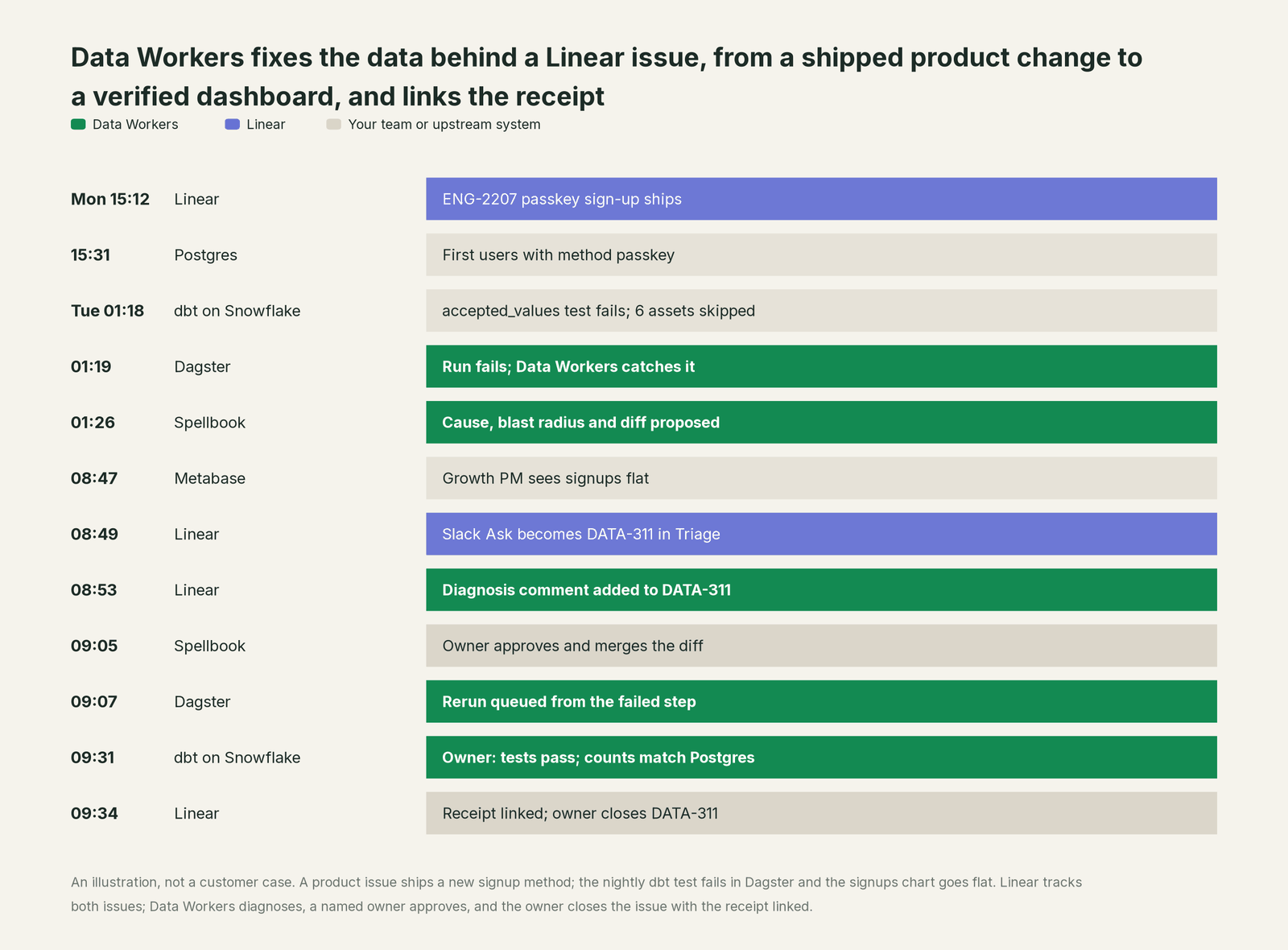
Every system did its job: Linear shipped the change on schedule, the dbt test refused an unknown value, Dagster reported the failure and Triage routed the complaint to the right team. The gap was between them, a product issue in one team breaking a data asset in another. With Data Workers, the cause was known seven hours before the complaint, the fix waited for one approval from the owner of the models, and DATA-311 closed with proof instead of "should be fixed now".
| Job | What Linear does | What Data Workers does |
|---|---|---|
| The intake | Triage collects issues from Asks, Sentry, integrations and people; Triage Intelligence suggests team, assignee, labels and duplicates | Catches the break in the data, often before an issue exists, and has the cause ready when it arrives |
| The context | Issues, projects, cycles and the history of what shipped and who owns it | One governed context graph of tables, models, assets, owners, lineage and past incidents |
| The diagnosis | Linear Agent answers questions about the workspace and, through connected MCP servers, investigates beyond it | Traces the break across Postgres, Dagster, dbt, Snowflake and Metabase and names the cause |
| The code | Linear Agent coding sessions and delegated agents write code and open a pull request for review | Proposes the dbt change as a diff for the owner to merge, with its blast radius |
| The fix | Records the issue's status, assignee and linked pull requests | Queues the rerun through Dagster once the diff is merged, then verifies tables and dashboard |
| The close | The owner moves the issue to Done | Writes the receipt, links it to the issue and remembers the incident for next time |
Why doesn't Linear just do this itself?
Because Linear is built for software teams to plan and ship product, and that focus is why teams love it. Linear Agent "turns your workspace context into action", and in its coding sessions it "works in a secure cloud environment to write and test the code before opening a pull request for review". Since July Linear has added Loops (July 20), browser testing and new pricing for coding sessions (August 20), Loops for product management (September 14) and new coding-agent controls such as adaptive model routing and admin-chosen open-weight models (September 24). Each one makes the work in Linear, and the code behind it, move faster.
The cause of a data incident sits elsewhere: in the app database, the orchestrator, the dbt project, the warehouse and the dashboards that read the table that broke. Fixing it means changing those systems and carrying the liability: blast radius across lineage, a named data approver, a rerun that doesn't double-load, verification against the source, rollback and a receipt. A pull request is one input to that. The rest is the product Data Workers is, and it reports back to the issue.
Every tool owns a slice. Data Workers covers the whole lifecycle
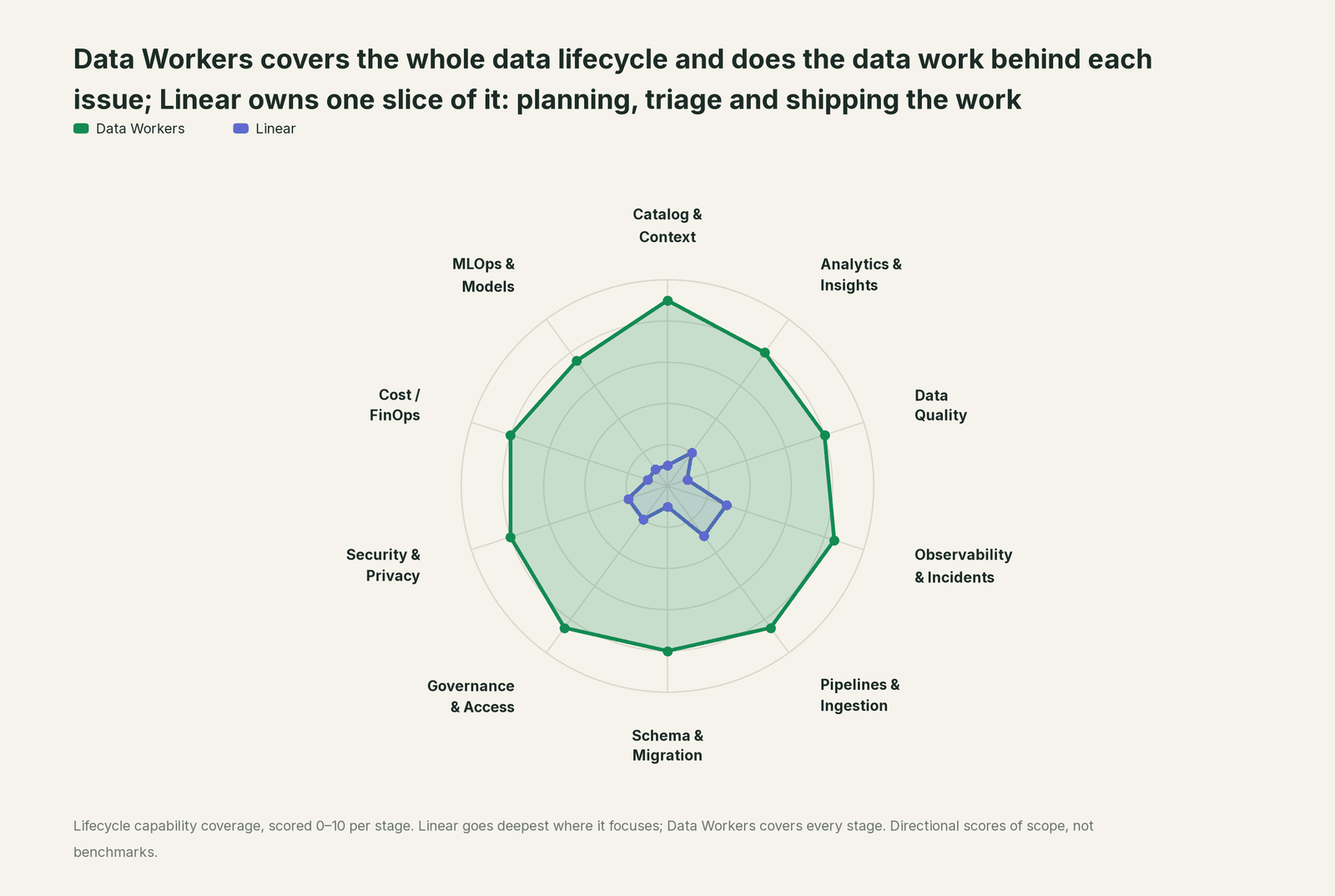
Linear owns one slice deeply: planning, triaging and shipping the work. That job sits outside the ten stages of the data lifecycle, so we scored it from its docs rather than inventing a home stage. Each point tool adds another console, contract and handoff. Data Workers covers the whole lifecycle with one context, one approval flow and one audit trail, and reports into Linear where your team already plans.
| Stage | Data Workers | Linear | Why we scored it this way |
|---|---|---|---|
| Catalog & Context | 9 | 1 | Linear's job, planning and tracking work, sits outside the data lifecycle; it knows issues, projects and teams, not tables. Data Workers keeps one governed context graph of tables, models, owners and lineage. |
| Analytics & Insights | 8 | 2 | Insights and dashboards cover issues, cycles and throughput, and Linear Agent answers questions about the workspace. Data Workers answers data questions from governed definitions with lineage behind every number. |
| Data Quality | 8 | 1 | Not a work tracker's job: a failed check arrives as an issue. Data Workers writes and runs quality checks and adds one after every incident. |
| Observability & Incidents | 8.5 | 3 | Triage, Triage Intelligence and Asks route incoming problems to the right team fast. Detection and diagnosis of data incidents happen elsewhere. Data Workers diagnoses, fixes and verifies them. |
| Pipelines & Ingestion | 8.5 | 3 | Linear Agent coding sessions and delegated coding agents write and test code, ending in a pull request for review. Data Workers runs and repairs the pipelines themselves, with approvals. |
| Schema & Migration | 8 | 1 | Not a work tracker's job: schemas and models sit in the warehouse and the dbt project. Data Workers catches schema changes and plans migrations with rollback. |
| Governance & Access | 8.5 | 2 | Workspace permissions, team access for agents and admin model controls govern Linear itself. Data Workers routes every data change to a named owner with blast radius and rollback. |
| Security & Privacy | 8 | 2 | Linear secures its own workspace: SAML, private teams and Okta-managed MCP access, plus a read-only MCP endpoint. Data Workers leaves a receipt on every data change and proposes masking for the owner to apply. |
| Cost / FinOps | 8 | 1 | Not a work tracker's job. Data Workers attributes Snowflake spend to the dbt model behind it and drafts warehouse settings for the owner to apply. |
| MLOps & Models | 7.5 | 1 | Not a work tracker's job. Data Workers keeps the data under your models healthy. |
Linear's real strength is coordination and the record of work: who owns an issue, what shipped, what is next. That is where Data Workers reports, not a stage it competes on.
How Linear and Data Workers work together
Linear stays on top, where the data team plans, triages and ships. Spellbook Data Catalog (in preview) is where the data team looks: each proposed change, who approved it, what it touched and how to roll it back. Between them, Data Context Wizard keeps one governed context graph across Postgres, Dagster, dbt, Snowflake and your dashboards, the Data-Agents Swarm does the work with more than 20 specialist agents, and the Autonomous Data-Conductor runs each incident end to end: detect, diagnose, fix, review, verify, remember.
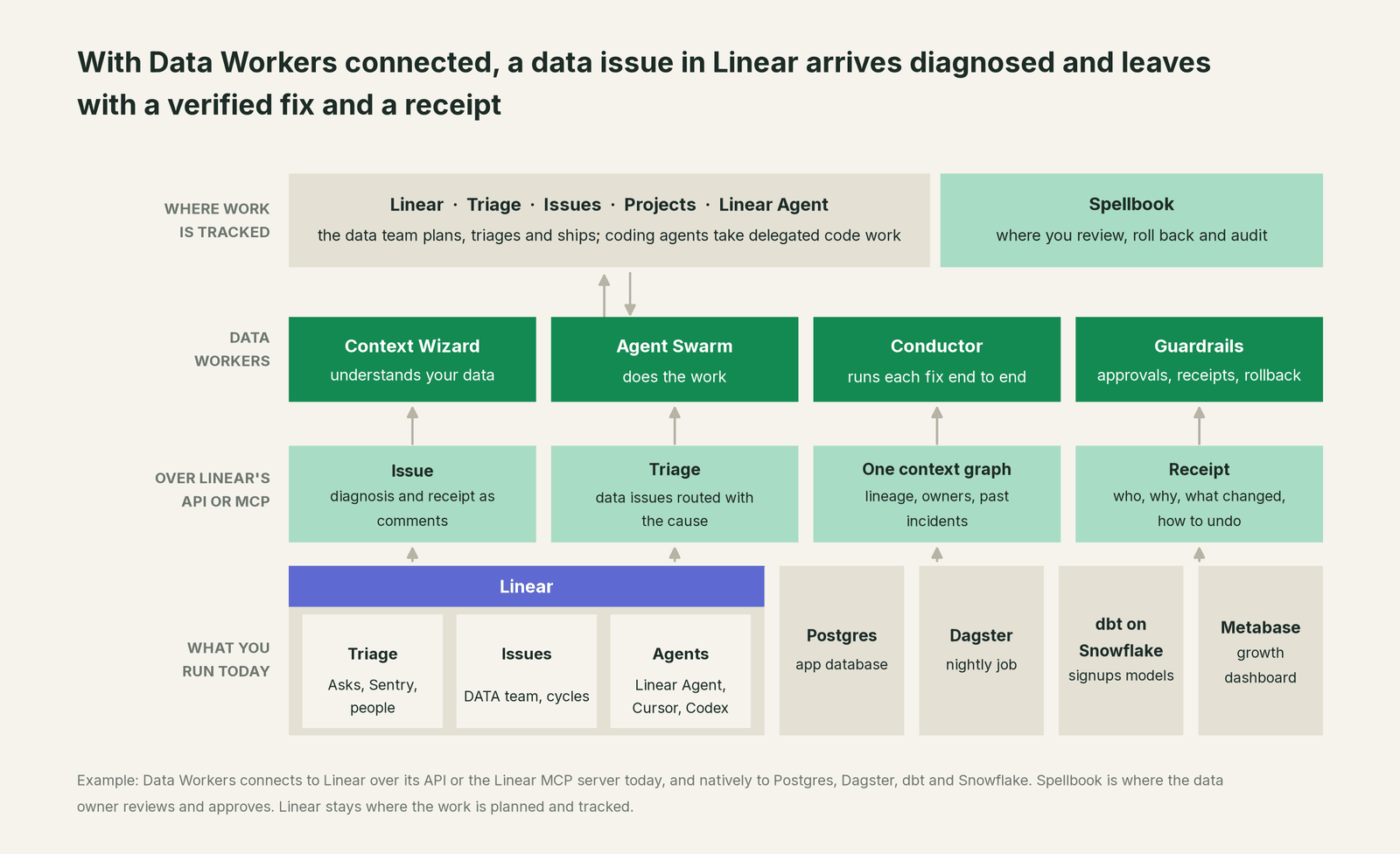
Linear, over its API or MCP today. Linear hosts an MCP server at https://mcp.linear.app/mcp (Streamable HTTP; OAuth 2.1, a bearer token or an API key) with tools for finding, creating and updating issues, projects and comments; its read-only endpoint, https://mcp.linear.app/mcp/readonly, "only ever exposes read tools". Teams wire it three ways. Inside Linear, a workspace admin adds the Data Workers remote endpoint to Linear Agent as a custom MCP server with an API key in the authentication header, so @Linear in a comment, or a Loop on the Data team's Triage, asks Data Workers for the diagnosis. In an assistant session such as Claude Code or Cursor, the Linear MCP server and the Data Workers agents sit side by side. For an always-on path, a small workflow your team owns listens to Linear webhooks and uses the GraphQL API to post the diagnosis and receipt link. Workflow states stay with your people by design: the owner moves the issue to Done with the receipt in front of them.
The data systems, natively. Postgres, Snowflake, dbt and Dagster are native connectors: Data Workers reads the failed run, traces lineage and queues reruns through Dagster after the fix is approved. Metabase connects over its API today, so the dashboard check reads the numbers your growth team sees.
Setup. Every Data Workers agent is an MCP server; the client setup guide documents the path (clone the repo, one start-agent.sh entry per agent). In Claude Code, an analytics engineer can start at L1 with Linear's read-only endpoint:
# Example: Linear's MCP server (read-only for L1) plus Data Workers agents in Claude Code
claude mcp add --transport http linear https://mcp.linear.app/mcp/readonly

# Data Workers agents, from a clone of the open-source repo
claude mcp add --scope user dw-incidents -- "$(pwd)/start-agent.sh" dw-incidents
claude mcp add --scope user dw-catalog -- "$(pwd)/start-agent.sh" dw-context-catalog
claude mcp add --scope user dw-quality -- "$(pwd)/start-agent.sh" dw-quality
claude mcp add --scope user dw-schema -- "$(pwd)/start-agent.sh" dw-schema
Switch to https://mcp.linear.app/mcp at L2, when comments on the issue are part of the flow. List the tools with /mcp. In production the remote endpoint serves /mcp and takes an API key (bearer) or OAuth tokens from your identity provider, verified through JWKS. The agents run in your infrastructure and hold the warehouse credentials; your data stays in your systems, and the hosted Conductor sees workflow metadata only.
In the loop: diagnose_incident and get_root_cause find the cause, trace_cross_platform_lineage follows it back to Postgres, blast_radius_analysis maps what it touches, run_quality_check verifies the fix, get_audit_trail keeps the record, and get_incident_history means the next new signup method starts from this one.
One issue, L0 to L4, set per domain. The issue: "Signups chart flat since Monday."

- •L0 manual. An engineer opens Dagster, reads the dbt log, queries Postgres, finds ENG-2207 and fixes it before lunch.
- •L1 observe. Data Workers names the cause and blast radius on DATA-311. Nothing changes; the engineer starts from the answer.
- •L2 propose. Data Workers proposes the dbt diff and the rerun. Nothing changes until the named owner says yes; an unanswered request expires and escalates, never grants itself.
- •L3 act reversibly. For change classes with a clean record, such as rerunning a job after an approved model change, Data Workers queues the rerun, verifies it and writes the receipt.
- •L4 autonomous. For a scoped domain such as the growth models, Data Workers runs that change class end to end and the team reviews the receipts.
More: how approvals work for AI data agents, is it safe to let AI agents change production data, where does our data go, Data Workers with your coding agents, and the sibling guides you're on Jira, you're on Jira Service Management and you're on incident.io.
What changes for your team
Data issues arrive diagnosed and leave with proof.
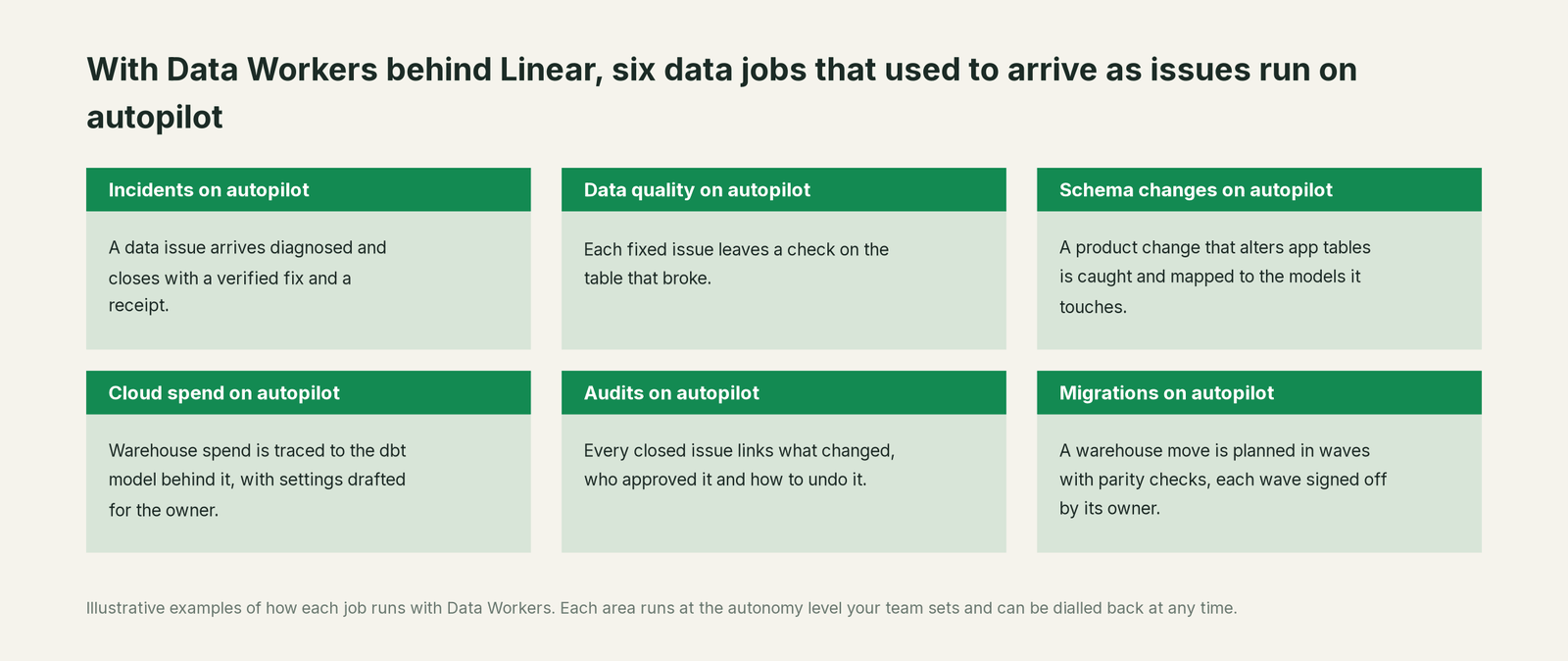
The data team keeps its cycles, projects and Triage rotation. The on-call analytics engineer reviews proposals instead of doing archaeology on every issue. When a shipped product issue breaks a data asset, the follow-up lands in the product team with the cause written down. Every closed data issue links what changed, who approved it and how to undo it, so the next person with the same symptom starts from a record.
Keep Linear, or consolidate?
Keep Linear if you love it; Data Workers works with it from day one. Many teams consolidate once Data Workers runs that slice too.
For Linear, the answer is keep it: it is where the whole product organization plans, and the data team's work belongs next to the engineering work it depends on. What teams consolidate is the stack around the warehouse: a separate observability tool, a quality tool, a stale catalog and homegrown checks posting to a channel nobody reads. See Data Workers vs data observability and Data Workers integrations. Tempted to point a coding agent at the warehouse from a Linear issue? Read build it ourselves with Claude Code and MCP servers first: the API call is the easy part; the context graph, approvals, rollback and receipts are the work. The data incident response playbook covers the same ground from the incident side.
The case for your CFO
The outcome: the numbers the company steers by stay right while product ships fast. A product change that breaks a growth metric is diagnosed before anyone opens the dashboard and corrected the same morning, under approvals the data team controls, with a record of why.
The risk story is plain. Linear keeps governing the work. Data Workers governs changes to the data: autonomy per domain from L0 manual to L4 autonomous, every change routed to a named approver, applied reversibly, verified and recorded with who approved it, what it touched and how to undo it. No agent can promote its own work, and an org-wide stop halts all autonomous dispatch. Your data stays in your systems; the hosted Conductor sees workflow metadata only. Zero migration: Linear, Postgres, Dagster, dbt, Snowflake and Metabase stay where they are.
Why now: Linear is putting agents into every workspace and opening it to MCP, and your engineers already delegate code to them. The open question is which agent may change production data, under whose approval, with what receipt. The first win is L1 on one domain: every data issue arrives with its cause and blast radius. For the numbers, see the ROI of agentic data operations.
The sentence to repeat upstairs: "Linear keeps our plan; Data Workers does the data work behind our issues, with an approval and a receipt on every fix."
Getting started
Start with a pilot. Pick one domain, such as the growth models, connect Data Workers to Postgres, Dagster, dbt and Snowflake and to Linear over MCP, and let every data issue in that domain arrive with its cause at L1. Then move it to L2 propose, so fixes come with blast radius and rollback for the owner to approve. Plans are on the pricing page, and the pilot is credited in full against the first year.
FAQ
How does Data Workers connect to Linear? Over Linear's GraphQL API and MCP today: as a custom MCP server inside Linear Agent, side by side with the Linear MCP server in an assistant session, or through a small webhook-and-API workflow. The repair happens where the data breaks, through native connectors to Postgres, Snowflake, Databricks, BigQuery, dbt, Dagster, Airflow and more.
Who moves the issue to Done? Your people, by design. Workflow states, cycles and assignees stay with the team that owns the work. Data Workers supplies the diagnosis and the receipt, so the owner closes the issue with the proof in front of them.
We already delegate issues to Linear Agent, Cursor or Codex. Why add Data Workers? Those agents write code and open a pull request for review, and they do it well. A data incident also needs the cause traced across lineage, the blast radius, a named data approver, a rerun through the orchestrator, verification against the source and a receipt. Data Workers does that part; your coding agents keep the code.
Should we give Data Workers write access to Linear? Start with the read-only endpoint, or the read OAuth scope, for L1. Move to read-write when comments on issues are part of the flow. When Linear Agent calls Data Workers as a custom MCP server, Linear Agent posts the comment itself. Data Workers never needs admin access to Linear.
Can a Loop or Triage Intelligence handle data issues on its own? They route and organize well: Triage Intelligence suggests the team, assignee and labels as each issue arrives, and a Loop can investigate a new Triage issue in your codebase and through connected MCP servers. Connect Data Workers as one of those servers and the Loop gets the data diagnosis; Data Workers then carries the fix through approval, rerun and verification, and the issue leaves with a receipt.
What does the receipt contain? What broke, the cause, the blast radius, the change and its diff, who approved it and when, how it was verified, and how to undo it. It lives in Spellbook and the audit trail, and the link sits on the Linear issue.
Sources
- •Linear, Changelog (Introducing Loops, Jul 20, 2026; Coding sessions on mobile, Jul 30, 2026; GitHub Copilot integration, Jul 30, 2026; Team initiatives and Okta-managed MCP authorization, Aug 13, 2026; Coding sessions: environments, browser use, and updated pricing, Aug 20, 2026; Loops for product management, Sep 14, 2026; New controls for Linear coding agent, Sep 24, 2026), https://linear.app/changelog (checked Oct 2, 2026)
- •Linear Docs, Linear Agent, https://linear.app/docs/linear-agent (checked Oct 2, 2026)
- •Linear Docs, Connect MCP Servers to Linear Agent (custom servers by URL, OAuth or authentication headers), https://linear.app/docs/connect-mcp-servers (checked Oct 2, 2026)
- •Linear Docs, Loops, https://linear.app/docs/loops (checked Oct 2, 2026)
- •Linear Docs, Agents in Linear (delegation, primary assignee, admin controls), https://linear.app/docs/agents-in-linear (checked Oct 2, 2026)
- •Linear, Linear for Agents (Cursor, Codex, Devin, Factory, Sentry and other agents), https://linear.app/agents (checked Oct 2, 2026)
- •Linear Docs, Triage Intelligence (Business and Enterprise), https://linear.app/docs/triage-intelligence (checked Oct 2, 2026)
- •Linear Docs, MCP server (read-write and read-only endpoints, authentication), https://linear.app/docs/mcp (checked Oct 2, 2026)
- •Data Workers open-source repository (incident, context, schema, quality and audit tools), https://github.com/DataWorkersProject/dataworkers-claw-community (checked Oct 2, 2026)
- •Data Workers client setup guide, https://dataworkers.io/opensource-docs/client-setup/ (checked Oct 2, 2026)