How does Data Workers work with the coding agents we already use?
Your coding agents call Data Workers' agents as MCP servers, so they see lineage, blast radius, quality and incidents before changing a model. Turn on the GitHub pull-request target and Data Workers' own changes arrive as pull requests your engineers review.
Claude Code, Cursor, Codex, GitHub Copilot, Gemini CLI, Devin Desktop (formerly Windsurf) and other MCP clients call Data Workers' agents as MCP servers, so an engineer's coding agent sees lineage, blast radius, quality and open incidents before it changes a model. When your team turns on Data Workers' GitHub pull-request target, its own changes arrive as normal pull requests that the same engineers review, so nothing about how your team ships code changes.
The split is simple. Coding agents write the code. Data Workers, the agentic data platform, keeps production true: it detects problems, fixes them through approvals, verifies the result and leaves a receipt.
Key takeaways
- •Your engineers keep their coding agent. Every Data Workers agent is a standard MCP server, so one install serves Claude Code, Cursor, Codex, Copilot, Gemini CLI and Devin Desktop. Only the config file differs.
- •Context comes before the change. Before an edit, the coding agent can call
blast_radius_analysis,trace_cross_platform_lineage,get_quality_scoreandget_incident_history, and learn who reads a column, who owns it and what is already broken. - •Data Workers' changes look like everyone else's. Turn on the GitHub pull-request target and an approved Data Workers change to your dbt project opens as a pull request, so your normal review, CI and branch protection apply.
- •Two locks on every write. The coding agent's own approval prompt decides whether it may call a tool. Data Workers' guardrail, set per domain from L0 manual to L4 autonomous, decides whether a change may run.
- •One data layer for every engineer. Instead of each engineer wiring personal warehouse credentials into their editor, every coding agent reaches the same context, approval flow and audit trail.
How it works
Data Workers sits underneath the coding agents, as MCP servers, and above your warehouses. Engineers stay in their editor or terminal. Data owners look at Spellbook Data Catalog (in preview), where they review proposals, roll changes back and read the audit trail.
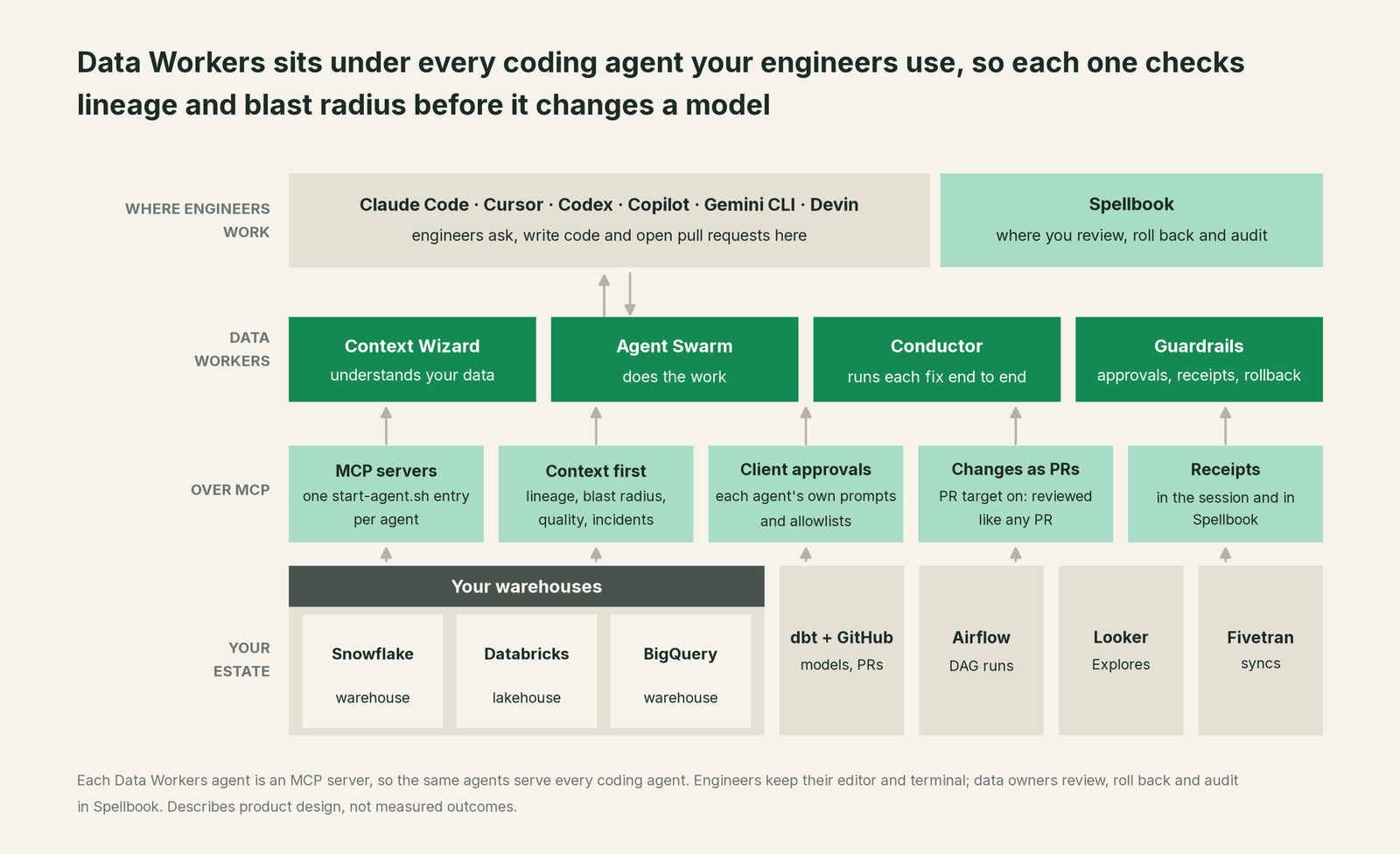
Four parts carry the work. Data Context Wizard builds one governed graph of lineage, owners, freshness and usage across Snowflake, Databricks, BigQuery, dbt, Airflow and BI. The Data-Agents Swarm holds more than 20 specialist agents, each an MCP server. The Autonomous Data-Conductor runs each fix end to end: detect, diagnose, fix, review, verify, remember. Guardrails hold the approvals, receipts and rollback.
Here is what a coding agent gets from the public tools, by question:
| The engineer's question | Data Workers tool | Agent |
|---|---|---|
| What reads this column, and who owns it? | blast_radius_analysis, trace_cross_platform_lineage | dw-context-catalog |
| What is this table, and can I trust it? | explain_table | dw-context-catalog |
| Will this schema change break anything? | assess_impact, check_compatibility | dw-schema |
| Is the data in this model healthy? | get_quality_score, run_quality_check | dw-quality |
| Is something already broken here? | get_incident_history, diagnose_incident | dw-incidents |
The coding agent stays the best place to write and refactor pipeline code. That is the one stage where a coding agent leads, and it is the stage your engineers already use it for. Everything around that code, from lineage and quality to incidents, access, cost and audit, is where Data Workers does the work.
Setup: the same agents in every client
Setup follows our client setup docs. Clone the open-source core (dataworkers-claw-community, Apache 2.0), install it, and add one start-agent.sh entry per agent to the client's MCP config. The core runs on a built-in sample estate, so engineers can try every tool from day one; in a Data Workers deployment, the same agents point at your estate and carry the approvals and receipts.
# Example: install once, then register agents in Claude Code and Codex
git clone https://github.com/DataWorkersProject/dataworkers-claw-community.git
cd dataworkers-claw-community && npm install --ignore-optional
claude mcp add --scope user dw-catalog -- "$(pwd)/start-agent.sh" dw-context-catalog
codex mcp add dw-incidents -- "$(pwd)/start-agent.sh" dw-incidents| Coding agent | Where the Data Workers entries go | Its own gate |
|---|---|---|
| Claude Code | claude mcp add, or a project .mcp.json | Each person approves project servers; managed MCP settings for admins |
| Cursor | .cursor/mcp.json, or Cursor Settings | Approval before MCP tool use by default; MCP Allowlist on Enterprise |
| Codex | ~/.codex/config.toml, or codex mcp add | Per-tool approval_mode; requirements.toml allowlist |
| GitHub Copilot | .vscode/mcp.json for agent mode; repository MCP settings for the cloud agent | VS Code confirms tool calls; the cloud agent runs its allowlisted tools without asking, so list the read tools |
| Gemini CLI | mcpServers in .gemini/settings.json | Policy rules with ask_user; trust off by default |
| Devin Desktop | .devin/mcp_config.json | Prompts before every MCP tool call until a rule allows it |
For a shared deployment, Data Workers also serves the agents over Streamable HTTP. Engineers authenticate with an API key or with OAuth through your own identity provider, such as Okta or Entra, and Data Workers verifies those tokens against your provider's keys (JWKS). Your data stays in your systems: the agents run in your infrastructure on every tier, and the hosted Conductor sees workflow metadata only.
The per-tool pages go deeper: You're on Claude, You're on Cursor and You're on GitHub Copilot, plus You're on Codex, Gemini CLI and Windsurf. For side-by-side wiring of the three most common agents, read Data Workers + Claude Code, Cursor and Codex.
One worked example: a column rename in Claude Code
This is an illustration, not a customer case. An analytics engineer asks Claude Code to rename amount to amount_usd in the dbt model stg_payments. The repository's instructions say to check blast radius before editing a model, so Claude Code calls Data Workers first.
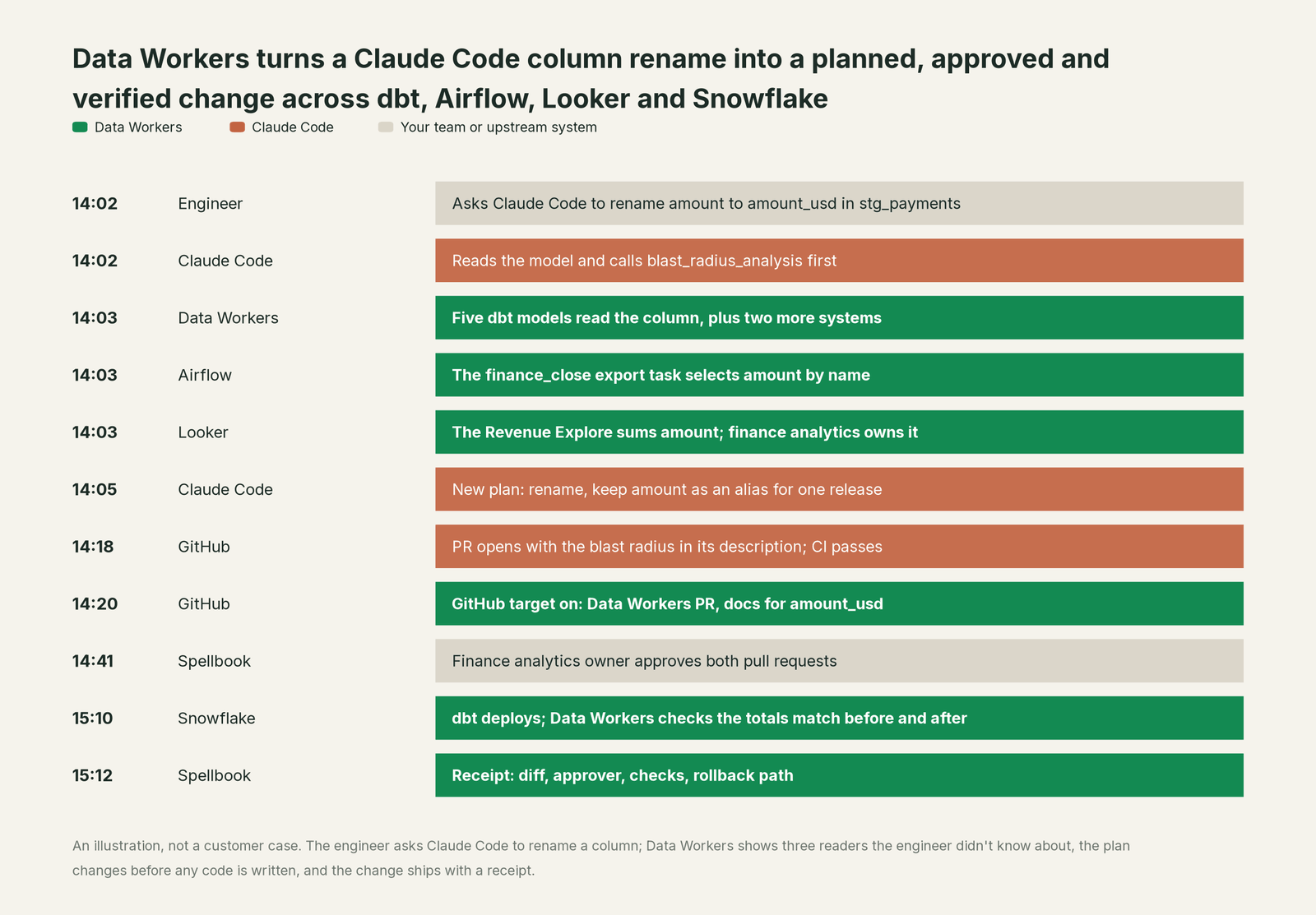
Data Workers answers in the session within the first minute. Five dbt models read the column. So does the finance_close export task in Airflow, which selects amount by name, and the Revenue Explore in Looker, which sums it. Finance analytics owns both. None of that was in the dbt project the engineer had open.
The plan changes before any code is written. Claude Code renames the column, keeps amount as an alias for one release so the export and the Explore keep working, and opens a pull request with the blast radius in its description. This team has turned on the GitHub pull-request target, so Data Workers opens its own pull request with the updated column documentation for amount_usd. The finance analytics owner approves both, the same way they approve any pull request. After dbt deploys to Snowflake, Data Workers checks that the Explore totals match before and after, and records the receipt: the diff, the approver, the checks and the rollback path.
Without that context, the rename would have shipped green in CI and broken the month-end export. With it, the engineer spent the same afternoon and shipped a safer change.
Autonomy, set per domain
The coding agent decides whether it may call a tool. Data Workers decides whether a change may run, on one ladder, set per domain.

At L0 manual, engineers investigate by hand. At L1 observe, the coding agent reads lineage, blast radius and incidents and changes nothing. At L2 propose, Data Workers proposes fixes as diffs for an owner to approve and merge. At L3 act reversibly, Data Workers applies changes it can undo, such as a backfill with rollback ready. At L4 autonomous, a trusted class of fix in one domain runs end to end and the receipt arrives for review. Turning one lock up never turns the other down. The safety page covers what an agent can and can't do at each level.
The alternatives buyers weigh
A coding agent plus vendor MCP servers. Many teams start here, and it works for reads. The Snowflake-managed MCP server (generally available) runs under role-based access control; Databricks managed MCP servers (Public Preview) are governed by Unity Catalog; dbt's remote MCP server is built for consumption, and its self-hosted server can run dbt build and dbt run, with a README warning that they could modify your models and warehouse objects. Each is governed for its own platform, by design. A change that spans dbt, Airflow and Looker still needs one graph, an owner's approval and a record. The build-vs-buy page prices that path.
Platform-native coding agents. Snowflake CoCo (formerly Cortex Code) is generally available in Snowsight and as CoCo Desktop, works within Snowflake's role-based access control, and shows a diff view before changes apply. Databricks Genie Code runs in Agent mode, asks for approval before it uses a tool, and offers an auto-approve mode in which an AI classifier checks each action against the request. Both are excellent inside their platform. Data Workers works across them and across the tools around them.
Observability and catalogs. They raise the alarm and hold the inventory. Data Workers reads their signals and closes the loop with a fix; see how Data Workers differs from data observability and the integrations page.
The MCP spec's own guidance. The specification says there "SHOULD always be a human in the loop with the ability to deny tool invocations." Coding agents supply the prompt. Data Workers supplies the owner, the blast radius and the receipt behind it.
The case for your CFO
The outcome is fewer data incidents caused by well-meant code changes, without asking engineers to change tools. Your company already pays for coding agents, and engineers already use them to edit dbt models and pipelines. Data Workers makes each of those edits aware of what it touches, and makes every data change it proposes reviewable, approved and reversible.
The risk story is short. Coding agents gate tool calls with their own approval settings. Data Workers adds a named owner's approval for anything irreversible, a receipt on every change with its blast radius, checks and rollback path, and autonomy set per domain that rises only when the record earns it. Zero migration: your coding agents, repositories, warehouses, dbt project and BI tools stay as they are.
Why now: coding agents are already touching production code paths every day. The question is whether they do it with lineage and an approval trail.
The first win is blast-radius checks on every dbt pull request, followed by cross-system incident triage, both inside the pilot. Start with a pilot: $7,500 one-time, and the pilot is credited in full against the first year. After it, Scale starts from $1,000/month and Enterprise from $3,000/month, billed annually, with unlimited seats, no usage meter, no markup on model spend and your own model. See pricing, the ROI calculator and the ROI page.
The sentence to repeat upstairs: "Our engineers keep the coding agents we already pay for, and every data change they make now checks its impact first and leaves a receipt."
FAQ
Do we have to standardize on one coding agent? No. Every Data Workers agent is a standard MCP server, so engineers on Claude Code, Cursor, Codex, Copilot, Gemini CLI and Devin Desktop all reach the same agents, context and audit trail. The assistants hub maps every assistant and coding agent we cover.
Will the coding agent change production data on its own? Only what both locks allow. The coding agent's approval settings decide which tools it may call, and Data Workers' guardrail decides whether a change may run in that domain. Approvals go to a named person, and an unanswered request expires and escalates; it never auto-grants.
How do Data Workers' own changes reach our repository? As pull requests, once your team turns on the GitHub pull-request target with a token scoped to your dbt repository. Each change is approved in Data Workers first, then reviewed and merged through your normal process, with CI and branch protection unchanged. Until you turn it on, approved changes are written to your local dbt project for your engineers to commit.
Does each engineer need warehouse credentials in their editor? In a shared deployment, no. The agents hold the warehouse credentials in your infrastructure, and engineers connect to them over MCP with their own identity.
Which tools should we allow without a prompt? Most teams pre-approve the read tools, such as blast_radius_analysis, trace_cross_platform_lineage and get_quality_score, and keep anything that changes data, such as remediate, on ask.
Where does our data go? Your data stays in your systems. The agents run in your infrastructure on every tier with your own model key, and the hosted Conductor sees workflow metadata only. The security and deployment page has the detail.
Sources
- •Data Workers, Client Setup: every agent is a standard MCP stdio server; config locations for Claude Code, Cursor, OpenCode and Codex CLI; setup notes for GitHub Copilot and Gemini CLI in the repository. Checked October 2, 2026.
- •Data Workers, open-source core (Apache 2.0): registrations for
blast_radius_analysis,trace_cross_platform_lineage,explain_table,assess_impact,check_compatibility,get_quality_score,run_quality_check,get_incident_history,diagnose_incidentandremediate. Checked October 2, 2026. - •Data Workers, pricing: agents work in your coding agent on every tier; bring your own model or coding agent. Checked October 2, 2026.
- •Anthropic, Connect Claude Code to tools via MCP and managed MCP. Checked October 2, 2026.
- •Cursor, Model Context Protocol: config locations, approvals, MCP Allowlist. Checked October 2, 2026.
- •OpenAI, Codex MCP:
codex mcp add,config.toml, per-tool approval modes. Checked October 2, 2026. - •GitHub, Extending Copilot Chat with MCP servers and MCP and Copilot cloud agent. Checked October 2, 2026.
- •Google, MCP servers with Gemini CLI and policy engine. Checked October 2, 2026.
- •Cognition, Windsurf is now Devin Desktop (June 2, 2026) and Devin Local Agent. Checked October 2, 2026.
- •Snowflake, Overview of Snowflake CoCo: GA in Snowsight and CoCo Desktop, RBAC, diff view. Checked October 2, 2026.
- •Snowflake, Snowflake-managed MCP server: generally available, RBAC. Checked October 2, 2026.
- •Databricks, Genie Code Agent mode: approval before tool use, auto-approve classifier (last updated September 25, 2026) and managed MCP servers (Public Preview). Checked October 2, 2026.
- •dbt Labs, dbt MCP server and dbt-mcp on GitHub: remote server for consumption; CLI tools can modify models and warehouse objects. Checked October 2, 2026.
- •Model Context Protocol, Specification 2025-11-25: Tools: human in the loop. Checked October 2, 2026.