You're on Qdrant: Keep the Payloads Your Filters Trust True, From the Source Table to the Retrieved Chunk
Already on Qdrant? Data Workers traces each payload field back to its source table, catches permission and freshness drift, and proposes the fix with approvals.
Your team runs retrieval on Qdrant. Support tickets, contracts and product docs are chunked, embedded and upserted as points into collections on Qdrant Cloud or your own cluster. Each point carries a payload: tenant_id, team, region, doc_type, updated_at. The payload is what makes Qdrant more than a similarity engine. A must filter on tenant_id keeps one customer's chunks away from another's, a keyword index with is_tenant co-locates each tenant's vectors, a datetime range on updated_at keeps stale answers out, and a team match decides which agent may see which ticket. Cloud Inference or FastEmbed turns text into vectors, mcp-server-qdrant lets Claude Code, Cursor or VS Code search what you stored, and Qdrant's Agent Skills coach coding assistants. Qdrant is where your retrieval lives. Data Workers keeps what the filters trust true: Data Context Wizard traces each payload field back to the column it was copied from, joins it to lineage, quality and usage, and when a source changes, Data Workers proposes and carries the fix with approvals and a receipt.
Most payload fields don't start in Qdrant. An embedding job copies them from upstream tables. When the source changes, the payload stays as it was, and every filter keeps working on the old truth. That seam is the job this guide covers.
Key takeaways
- •Qdrant keeps its job. Collections, filters, multitenancy, Cloud Inference and your embedding jobs stay as they are.
- •Payload fields become governed context. Data Context Wizard records which column feeds each payload field, so
teamin a collection traces back through dbt, the warehouse and CDC to the database row that set it. - •Permission and freshness drift is caught at the source. A moved account, a new table or a frozen column is flagged before the next sync, with the collection and filters it reaches.
- •Writes stay gated. Agents read Qdrant with a read-only key or
QDRANT_READ_ONLY=true. Approved fixes land in dbt and in your own embedding job, which updates the payload itself, with a blast radius, an approver and a rollback path. - •Start with a pilot. One collection, read-only, with its payload sources watched; then one fix class in one domain, on the ladder from L0 manual to L4 autonomous.
Qdrant holds the vectors and the filters. Data Workers keeps the payloads true.
Qdrant is a superb engine for filtered vector search. Its filters combine must, should and must_not clauses with match, range, datetime range, is_empty and nested conditions, and its docs advise: "For performant filtering, create payload indexes for the fields you plan to filter on." Multitenancy is first-class: partition by payload with an is_tenant index, shard per tenant, or, since v1.16, tier the two. Security is layered: admin and read-only API keys, plus JWT access per collection with r or rw rights and a value_exists claim checked against stored data. Payloads can be set on every point that matches a filter, without touching vectors, so a wrong field is a cheap fix once you know it is wrong.
Knowing it is wrong is the hard part, because the truth lives outside the collection: in the application database, in CDC, in the warehouse and dbt models, and in the job that copies fields into payloads. Data Workers covers that side with one context, one approval flow and one audit trail.
Here is a morning with Data Workers next to a support copilot on Qdrant. This is an illustration, not a customer case.
| Time | System | What happens |
|---|---|---|
| 09:00 | Postgres | A release realigns territories and moves 1,900 accounts from the EMEA support team to a new DACH team. The app now writes assignments to a new account_teams table; the legacy accounts.owner_team column stops updating |
| 09:05 | Debezium | The Postgres connector streams the change events to Kafka, and a new topic, crm.public.account_teams, appears |
| 09:15 | Kafka Connect | The BigQuery sink lands the new topic as a raw table |
| 09:30 | dbt | dim_account_access still reads owner_team from accounts; its unique and not_null tests pass |
| 09:35 | Data Workers | It sees the new CDC table and finds owner_team disagrees with account_teams on the 1,900 accounts |
| 09:40 | Dagster | Data Workers traces lineage into the support_ticket_points asset, which copies owner_team into the team payload of the support_tickets collection |
| 09:45 | Qdrant Cloud | The on-call's assistant reads the payload schema and samples points over the Qdrant MCP server with a read-only key, and hands Data Workers the result: tickets for the 1,900 accounts still carry team: emea, and the copilot filters on team |
| 10:15 | dbt | Data Workers proposes a diff that takes the team from account_teams, plus a Dagster backfill that sets team by filter on the affected accounts' points. Blast radius: one dbt model, one asset, one collection, one app |
| 11:00 | Spellbook | The collection owner and the security lead review the diff and the impact and approve |
| 11:20 | Dagster | The backfill run sets the payload by filter; no vector is re-embedded |
| 11:35 | Data Workers | The assistant samples the collection again; Data Workers checks that team agrees with account_teams and writes the receipt |
| 13:00 | Support copilot | A DACH agent asks about an open escalation; the answer comes from their own team's tickets, and EMEA agents no longer retrieve them |
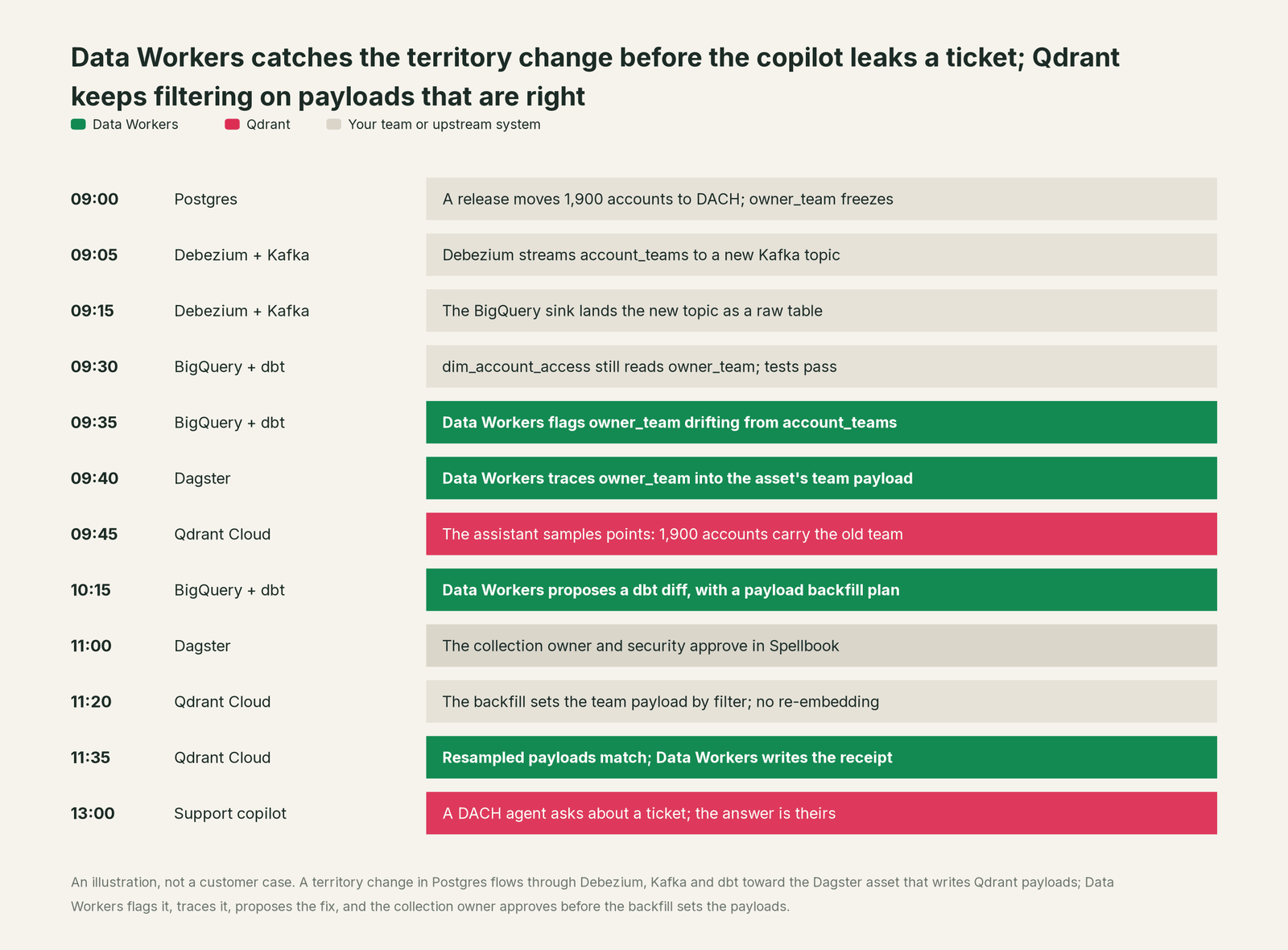
Without that check, the copilot would have kept serving DACH tickets to the EMEA team, and nothing in Qdrant would have looked wrong: the filter matched and the payload was well formed. Qdrant did exactly what it was asked. The fix was upstream, in systems Qdrant doesn't run, and it went through an owner's approval first.
| Job | What Qdrant does | What Data Workers does |
|---|---|---|
| The vectors | Stores points, indexes them and serves fast similarity search over REST, gRPC and MCP | Reads collection and payload schemas as context and joins them to lineage, quality, usage and owners |
| The filters | Applies must, should and must_not on indexed payload fields, including tenants and datetimes | Makes sure the values those filters trust match the source of truth today |
| The feed | Accepts upserts, embeds with Cloud Inference or FastEmbed | Watches the tables and columns the embedding job copies into payloads and catches breaks before the sync |
| The break | Filters on what it is given | Detects the upstream change and traces it across Postgres, Debezium, Kafka, BigQuery, dbt and Dagster to the collection and the app |
| The fix | Sets payload by filter when your job asks | Proposes the model change and the backfill with its blast radius, routes it to a named owner, lands it in dbt and the embedding job |
| The proof | Holds the collection state after the update | Samples points after the backfill, re-runs its checks on the payload values and writes a receipt with the cause, diff, approver and rollback |
| The meaning | Holds whatever the payload says team or region means | Keeps those definitions consistent across the collection, the semantic layer and the catalog, with conflicts routed to an owner |
Why doesn't Qdrant just do this itself?
Because Qdrant built a search engine for the hardest part of its job: fast, filtered retrieval at scale, for any domain. It stores the payload you send; it doesn't own the database that assigns territories, the CDC stream, the dbt model or the job that copies one into the other. Watching and changing those systems is a different product with a different liability.
Qdrant's own design draws that line sensibly. Payloads are flexible JSON, so any team can carry whatever fields its app needs. Access is enforced on the data Qdrant holds, through keys and JWT claims scoped to collections. The official MCP server is described as a server "for keeping and retrieving memories", with two tools, qdrant-store and qdrant-find, and a QDRANT_READ_ONLY setting that disables the store tool. That is the right design for an engine that serves many apps and agents.
Data Workers is the product on the other side of that line. It knows which column each payload field came from, what a change will touch, who owns it and how to apply the fix reversibly through your pipelines, then verifies the result and keeps the record.
Every tool owns a slice. Data Workers covers the whole lifecycle
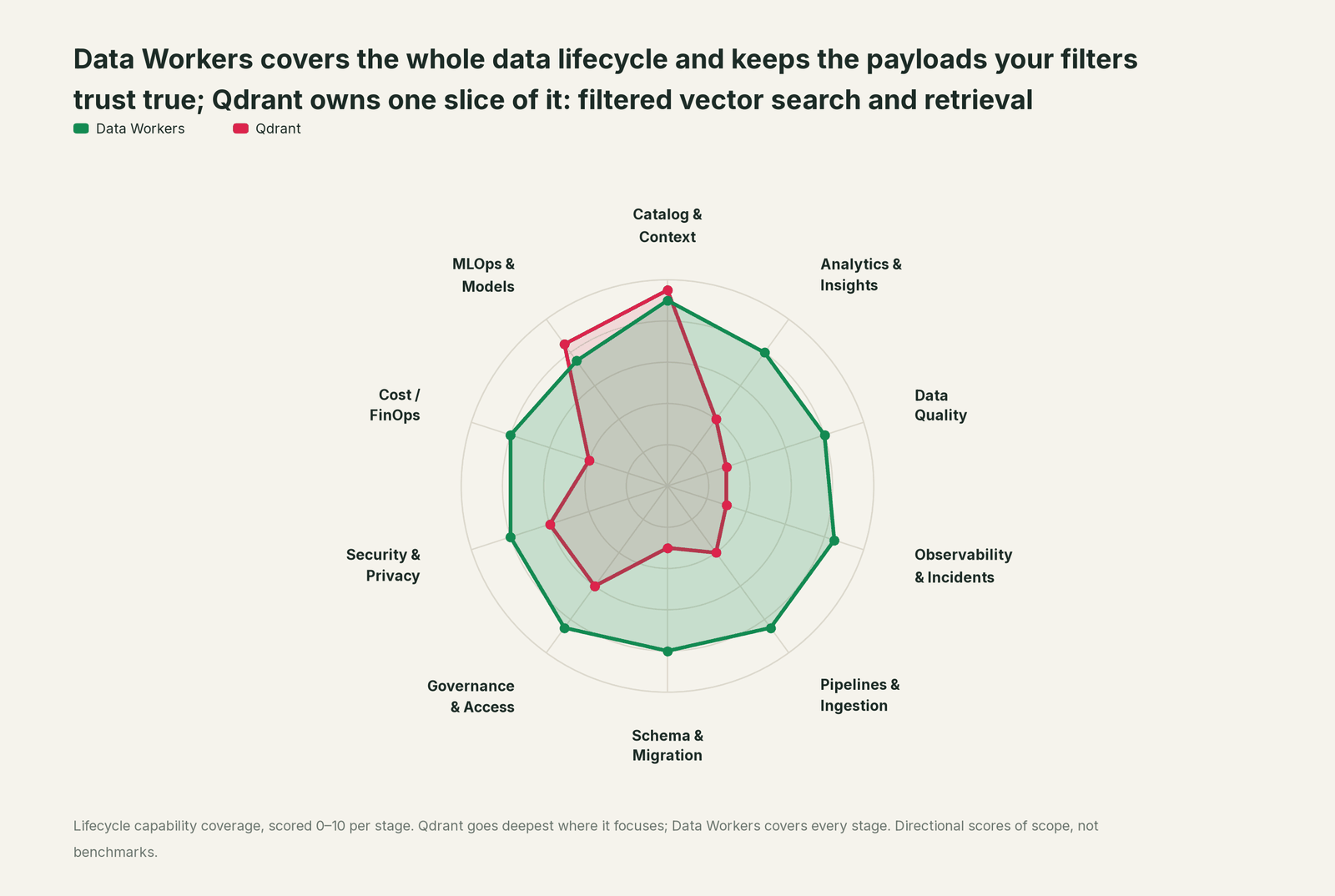
Qdrant owns one slice of the data lifecycle, and owns it outright: filtered vector search and retrieval, with the embeddings that feed it. Each point tool adds another console, contract and handoff. Data Workers covers the whole lifecycle with one context, one approval flow and one audit trail, and builds on the collections you already run.
| Stage | Data Workers | Qdrant | Why we scored it this way |
|---|---|---|---|
| Catalog & Context | 9 | 9.5 | Qdrant's home stage: fast vector search with rich payload filters, served to agents over REST, gRPC and the Qdrant MCP server. Data Workers brings each collection's payload fields in as context, traced to the columns they came from. |
| Analytics & Insights | 8 | 4 | Qdrant ranks and filters results for the application that asks. Data Workers' Insights agent answers through governed metric definitions. |
| Data Quality | 8 | 3 | Payload indexes make filters fast and typed. Data Workers checks the tables the embedding job copies payloads from and catches wrong values before they land. |
| Observability & Incidents | 8.5 | 3 | Qdrant reports on the health of the cluster itself. Data Workers detects a bad payload source, traces it across systems, fixes it and verifies the collection after the backfill. |
| Pipelines & Ingestion | 8.5 | 4 | Upsert APIs, FastEmbed and Cloud Inference make loading simple. Data Workers builds, reruns and backfills the embedding jobs behind those loads with approvals. |
| Schema & Migration | 8 | 3 | Payloads are flexible JSON by design, with indexes where you want them. Data Workers detects upstream schema changes and shows which payload fields they reach. |
| Governance & Access | 8.5 | 6 | Strong over its own collections: read-only API keys and JWT access per collection, with tokens that can be checked against stored data. Data Workers proposes and applies grants across your data platforms by policy. |
| Security & Privacy | 8 | 6 | Strong for its own estate: API keys, JWT RBAC and tenant isolation by payload or shard. Data Workers flags sensitive column names in pull request review and proposes masking for the owner. |
| Cost / FinOps | 8 | 4 | Quantization, including TurboQuant, and tiered tenants keep vector storage lean. Data Workers traces Snowflake credits to the dbt model behind them and drafts the fix for its owner. |
| MLOps & Models | 7.5 | 8.5 | Qdrant's other home stage: Cloud Inference and FastEmbed generate dense, sparse and image embeddings. Data Workers keeps the data under your models healthy and connects to MLflow and W&B. |
How Qdrant and Data Workers work together
Engineers stay in Claude Code, Cursor or VS Code; everyone else stays in your copilot. Spellbook Data Catalog (in preview) is where the data team looks: each proposed change, its blast radius, its approver and its rollback. Between them, Data Context Wizard keeps one governed context graph, the Data-Agents Swarm does the work with more than 20 specialist agents, the Autonomous Data-Conductor runs each fix end to end (detect, diagnose, fix, review, verify, remember), and per-domain guardrails hold approvals, receipts and rollback.
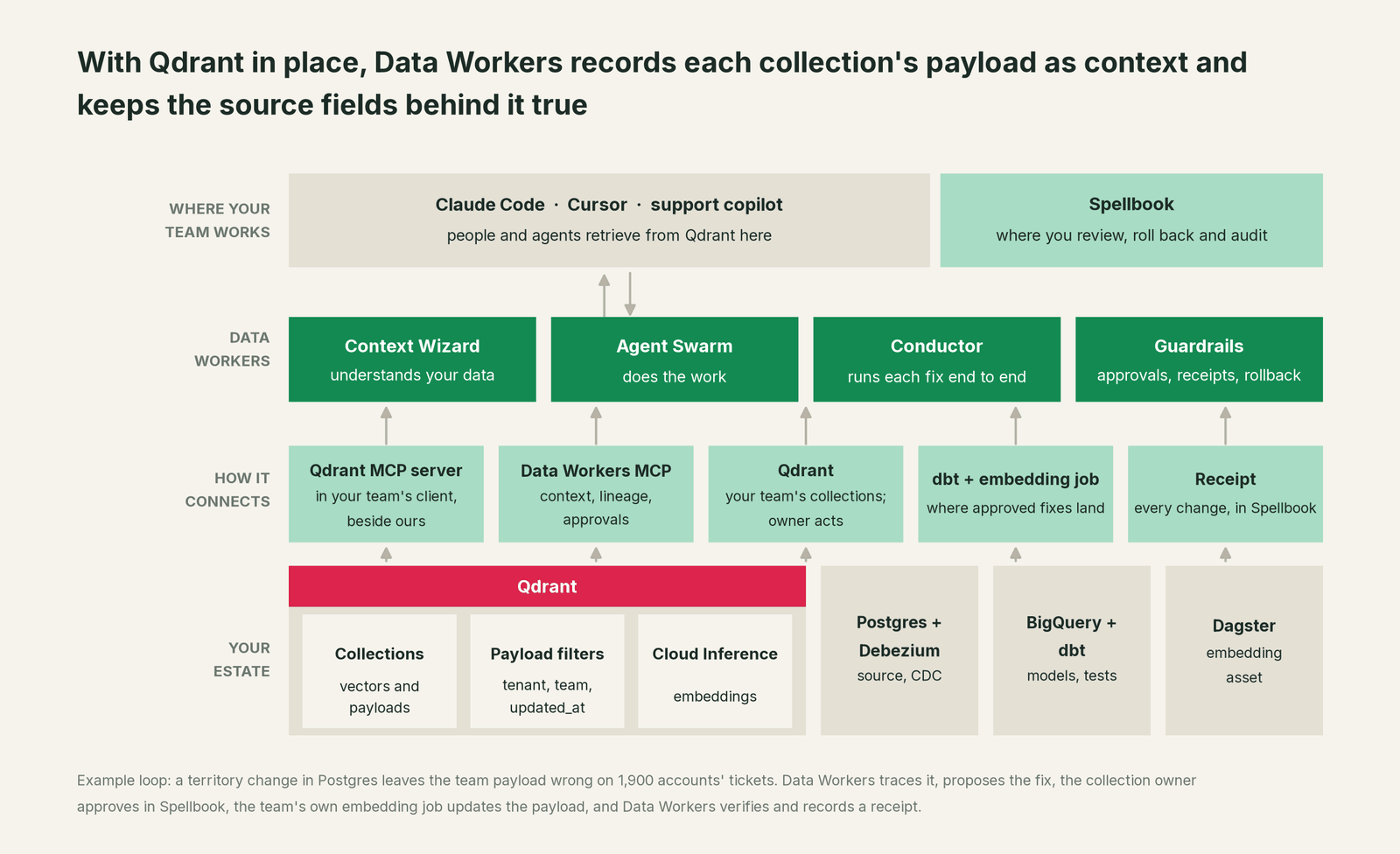
What Context Wizard does with your collections. It records each collection's payload schema and indexes, as your team's assistant reads them over the Qdrant MCP server, and which column the embedding job copies into each field, with provenance and an owner. It joins that to lineage, so team in support_tickets traces back through dim_account_access, BigQuery and the Debezium topic to the Postgres table that set it. It scores trust with quality, freshness and usage, and serves one governed view to every agent through tools like explain_table (definition, lineage, trust score) and trace_cross_platform_lineage; get_quality_score on dw-quality returns the quality score; check_policy tests a proposed change against your access policies.
Setup over MCP and the REST API today. Qdrant connects over its REST API and MCP server today, in your team's client alongside Data Workers' agents, which never call it. Data Workers' agents are MCP servers from the open-source repository: clone it and add start-agent.sh entries to your client config, as the client setup docs show. Give your team's assistant a read-only API key and set QDRANT_READ_ONLY=true, so nothing can store to the collection from the chat. qdrant-find embeds queries with FastEmbed and searches the named vector its model writes (for example fast-all-minilm-l6-v2), so point it at a collection built that way; your team reads other collections over the REST API.
// Example: .mcp.json for Claude Code (Cursor uses the same mcpServers shape)
{
  "mcpServers": {
    "qdrant": {
      "command": "uvx",
      "args": ["mcp-server-qdrant"],
      "env": {
        "QDRANT_URL": "https://<your-cluster>.cloud.qdrant.io:6333",
        "QDRANT_API_KEY": "<read-only key from your secret store>",
        "COLLECTION_NAME": "support_tickets",
        "EMBEDDING_MODEL": "sentence-transformers/all-MiniLM-L6-v2",
        "QDRANT_READ_ONLY": "true"
      }
    },
    "dw-context-catalog": {
      "command": "/path/to/dataworkers-claw-community/start-agent.sh",
      "args": ["dw-context-catalog"]
    },
    "dw-schema": {
      "command": "/path/to/dataworkers-claw-community/start-agent.sh",
      "args": ["dw-schema"]
    },
    "dw-quality": {
      "command": "/path/to/dataworkers-claw-community/start-agent.sh",
      "args": ["dw-quality"]
    }
  }
}
List the tools in your client with its own command (for example /mcp in Claude Code). An engineer can then ask "where does the team payload in support_tickets come from, and is it right today?" and get relevant chunks from qdrant-find, the lineage from trace_cross_platform_lineage, and the latest run_quality_check results on dim_account_access, in one answer.
Where writes go. Fixes land where your team already reviews change: a dbt diff for the owner to merge, an embedding-asset change, a backfill your orchestrator runs. Your job writes to Qdrant with its own rw key after the owner approves.
One request, L0 to L4. The autonomy ladder is set per domain.

- •L0 manual. Connected, not acting. Your engineer traces the field by hand.
- •L1 observe. Data Workers watches the columns behind each payload field and flags drift before the next sync. Nothing changes.
- •L2 propose. Data Workers drafts the dbt or embedding-job diff and the backfill plan with its blast radius. The collection owner approves in Spellbook.
- •L3 act reversibly. For proven classes, such as rerunning a late sync, Data Workers queues the job, checks the source columns and can roll it back.
- •L4 autonomous. For a scoped class like refreshing
updated_atafter a late load, Data Workers fixes, verifies and posts the receipt.
For the safety model behind each step, read is it safe to let AI agents change production data, and for where data and credentials live, read where does our data go.
The same pattern holds for every source of meaning. See the hub, bring your own context, and the guides for teams on Pinecone, Weaviate and Chroma. Our explainer on vector databases for data engineers covers where vector stores sit in a data stack, and what is a context graph covers the idea behind Context Wizard.
What changes for your team
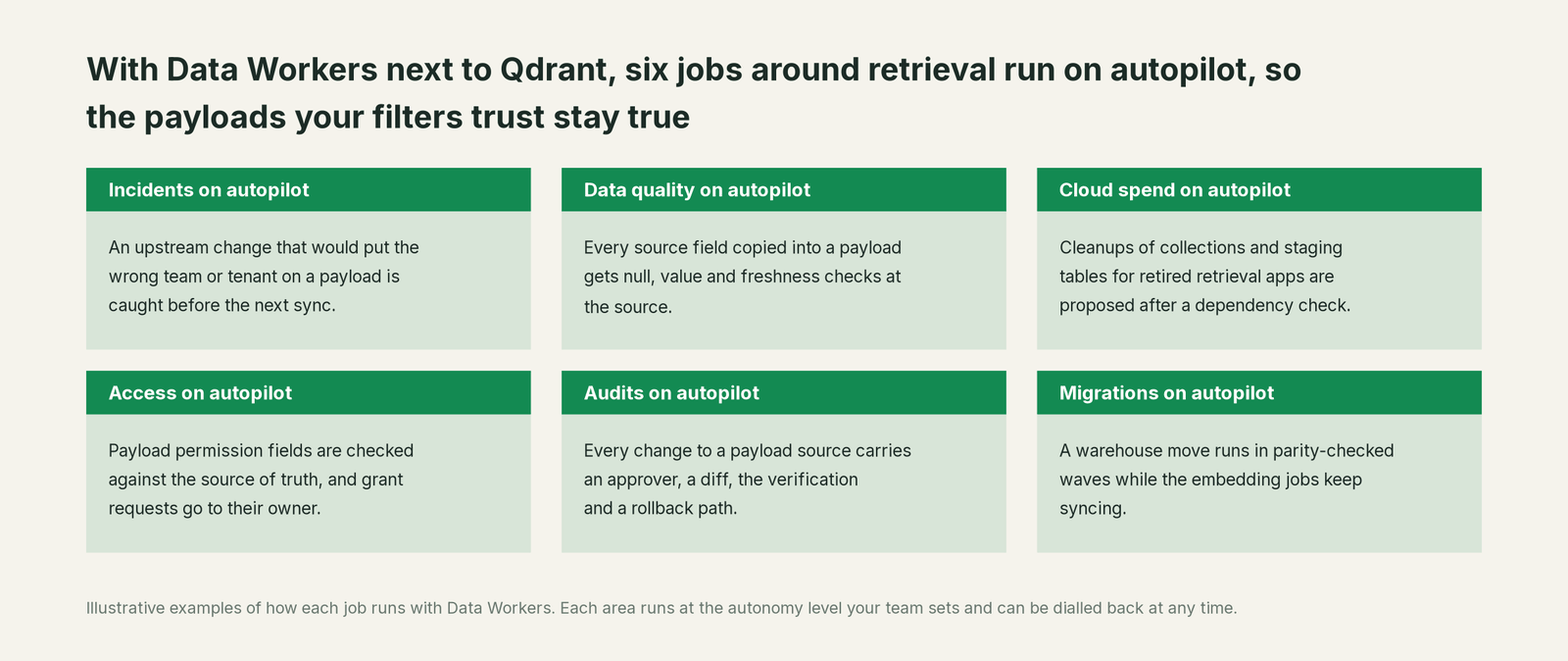
Retrieval teams lose much of the week to chasing why a user saw a chunk they shouldn't have and re-running embedding jobs after a bad sync. With Data Workers next to Qdrant, those jobs run on autopilot at the level you set.
- •Incidents. An upstream change that would put the wrong team, tenant or region on a payload is caught, traced and fixed before the next sync.
- •Data quality. Every column copied into a payload gets null and value checks at the source and a load-lag baseline, so a datetime filter on
updated_atmeans what it says. - •Cloud spend. Cleanups of collections and staging tables built for retired apps are proposed to the owner after a dependency check.
- •Access. Payload permission fields are checked against the system that owns them, and a request to widen retrieval arrives as a time-boxed proposal for its owner.
- •Audits. Every change carries an approver, a diff, the verification and a rollback path, so "why could this agent see that ticket?" has an answer.
- •Migrations. When the warehouse under the collections moves, the embedding jobs move in parity-checked waves while the collections keep syncing.
The retrieval team gets its week back for chunking, ranking and hybrid search.
Keep Qdrant, or consolidate?
Keep Qdrant if you love it; Data Workers works with it from day one. Many teams consolidate once Data Workers runs that slice too.
For most teams, the answer is to keep it: the collections, filters, tenant design and embeddings belong there. What teams consolidate is the tooling around the collections: a script that diffs payloads against the warehouse, a spreadsheet of field sources, a separate quality tool. If you are weighing building this layer yourself on top of mcp-server-qdrant, read build it ourselves with Claude Code and MCP servers: the connection is the easy part; the cross-system lineage, approvals and rollback are where the work is.
The case for your CFO
The outcome: the retrieval apps the company paid to build show each person the right answers, and only the answers they are allowed to see. Copilots, contract search and agent memory rest on payload fields copied from upstream tables; Data Workers keeps those fields right.
The risk story is plain. Your team's assistant reads Qdrant read-only, and Data Workers' agents never call it. Every change Data Workers proposes shows its blast radius, goes to a named approver, lands through the jobs your team already runs, is verified after the backfill and leaves a receipt: who approved it, what it touched and how to undo it. Autonomy is set per domain from L0 manual to L4 autonomous and can be dialled back at any time. There is zero migration: Qdrant, the warehouse, dbt and your embedding jobs stay where they are.
Why now: agents retrieve from these collections directly, so a stale permission field reaches everyone who asks. The first win is one collection with its payload sources watched, so the next territory change is caught before the sync, not after the answer. What stays the same: your collections, your filters, your Qdrant plan, your permissions and your review process. For the numbers, see the ROI of agentic data operations.
The sentence to repeat upstairs: "Our filters are only as good as the fields we copy into them; Data Workers keeps those fields true, and fixes them with an approval and a receipt."
Getting started
Start with a pilot. Pick one collection agents already rely on, such as support tickets, connect the Qdrant MCP server read-only next to Data Workers and let it watch the columns behind its payload filters for a few weeks before enabling the first fix class. The pilot path and plans are on the pricing page, and the pilot is credited in full against the first year.
FAQ
Does Data Workers write to our Qdrant collections? Your team's assistant reads with a read-only API key and QDRANT_READ_ONLY=true; Data Workers' agents never call the Qdrant MCP server. Approved fixes land in dbt and the embedding job, and your job writes to Qdrant with its own key, as it does today, after the collection owner approves in Spellbook.
Do we have to re-embed when a payload field is wrong? No. Qdrant sets payload fields on every point that matches a filter and leaves the vectors alone, so the backfill Data Workers proposes changes only the field that drifted, on only the points it reached.
We use JWT access with `value_exists` claims. Does that change anything? It makes the source of those values matter more. Data Workers checks the source columns behind the fields your tokens and filters depend on, so a revoked user or a moved account is reflected in the collection before a token or filter trusts the old value.
How does lineage reach from a payload field back to the source? Context Wizard records which table and column the embedding job copies into each payload field, and joins that to lineage across dbt, the warehouse, CDC and the source database. trace_cross_platform_lineage follows team in a collection back to the row that set it.
What about freshness filters on `updated_at`? Data Workers tracks load lag against the baseline your team records with monitor_metrics and flags a late or stalled sync, so a datetime range filter excludes what is truly old and not what simply missed a run.
Sources
- •Qdrant, Documentation overview, https://qdrant.tech/documentation/ (checked Oct 2, 2026)
- •Qdrant, Filtering, https://qdrant.tech/documentation/concepts/filtering/ (checked Oct 2, 2026)
- •Qdrant, Payload (set, overwrite and delete payload, by point IDs or by filter), https://qdrant.tech/documentation/manage-data/payload/ (checked Oct 2, 2026)
- •Qdrant, Multitenancy (partition by payload, is_tenant since v1.11.0, tiered multitenancy since v1.16.0), https://qdrant.tech/documentation/manage-data/multitenancy/ (checked Oct 2, 2026)
- •Qdrant, Security (API keys, read-only keys since v1.7.0, granular JWT access since v1.9.0, value_exists), https://qdrant.tech/documentation/security/ (checked Oct 2, 2026)
- •Qdrant, Cloud Inference, https://qdrant.tech/documentation/inference/cloud-inference/ (checked Oct 2, 2026)
- •Qdrant, FastEmbed, https://qdrant.tech/documentation/fastembed/ (checked Oct 2, 2026)
- •Qdrant, Agent Skills, https://qdrant.tech/documentation/agentic-tools/skills/ (checked Oct 2, 2026)
- •Qdrant, Releases (v1.16.0 Nov 17, 2025; v1.18.0 May 11, 2026, TurboQuant; v1.19.0 Aug 5, 2026; v1.19.1 Sept 4, 2026), https://github.com/qdrant/qdrant/releases (checked Oct 2, 2026)
- •Qdrant, mcp-server-qdrant README (qdrant-store, qdrant-find, QDRANT_READ_ONLY, FastEmbed only), https://github.com/qdrant/mcp-server-qdrant (checked Oct 2, 2026)
- •Qdrant, mcp-server-qdrant releases (v0.8.1 Dec 10, 2025), https://github.com/qdrant/mcp-server-qdrant/releases (checked Oct 2, 2026)
- •Data Workers, Client setup (open-source docs), https://dataworkers.io/opensource-docs/client-setup/ (checked Oct 2, 2026)
- •Data Workers open-source repository, agent tools and start-agent.sh, https://github.com/DataWorkersProject/dataworkers-claw-community (checked Oct 2, 2026)