You're on Weaviate: Keep Every Tenant and Collection True, From the Warehouse Feed to the Query Agent Answer
Already on Weaviate? Data Workers records your collections as governed context, traces each tenant back to the warehouse and fixes feed breaks with approvals and receipts.
Your team runs search on Weaviate. Docs, contracts and catalog records live in collections, and hybrid search blends vector similarity with BM25 keyword matching on every query. Multi-tenancy gives each customer its own tenant inside a shared collection, and RBAC scopes roles down to the collection and the tenant. The Query Agent, generally available on Weaviate Cloud since September 2025, turns a plain question into the right searches, filters and aggregations. The built-in Weaviate MCP server, released in preview with Weaviate v1.38 in June 2026, lets Claude Code, Cursor or VS Code read the schema, list tenants and run hybrid searches. Weaviate is where your agents search. Data Workers is where every collection's sources, tenants and meaning are kept true: when a feed or a tenant mapping drifts, Data Workers proposes and carries the fix with approvals and a receipt.
The tenant an object lands in is usually decided upstream, by a mapping table a load job reads every night. When that mapping changes for a business reason, Weaviate does exactly what it is told. This guide is about that seam.
Key takeaways
- •Weaviate keeps its job. Collections, hybrid search, multi-tenancy, RBAC and the Query Agent stay as they are. Data Workers works next to them from day one.
- •Each collection becomes governed context. Your team's assistant brings collection configs and tenant lists in from the Weaviate MCP server, and Data Context Wizard records which tables, documents and mappings feed each one, with a named owner.
- •Tenant contents are checked against entitlements upstream. A warehouse change that would load one customer's objects into another customer's tenant is caught before the load runs.
- •Writes stay gated. Your team's assistant reads Weaviate with a viewer API key, side by side with Data Workers. Approved fixes land in dbt and your own load job, with a blast radius, an approver and a rollback path.
- •Start with a pilot. One multi-tenant collection, read-only, with its feeds and tenant map watched; then one fix class in one domain, on the ladder from L0 manual to L4 autonomous.
Weaviate is where your agents search. Data Workers keeps every tenant true.
Weaviate is built for retrieval that is both relevant and correctly scoped. Tenants can be ACTIVE, INACTIVE or OFFLOADED, so a collection can hold thousands of customers economically, and RBAC has a predefined read-only viewer role. The MCP server exposes four tools, weaviate-collections-get-config, weaviate-tenants-list, weaviate-query-hybrid and weaviate-objects-upsert, each gated by its own RBAC permissions.
Outside the database sits everything that decides whether a tenant holds the right objects: the CRM that defines who owns which account, ingestion, the model that maps accounts to tenants, the orchestrator that runs the load and the contracts that say who may see what. Data Workers covers that side with one context, one approval flow and one audit trail.
Here is an afternoon with Data Workers next to a multi-tenant contracts collection behind an in-app assistant. This is an illustration, not a customer case. The company sells software to businesses; each customer is a tenant in the CustomerDocs collection, keyed by its parent company, and the assistant uses the Query Agent to answer questions about each customer's own agreements, pricing schedules and support terms.
| Time | System | What happens |
|---|---|---|
| 13:40 | HubSpot | Revenue ops re-associates a subsidiary company under its new parent after a divestiture closes; its agreement still sits under the seller's master contract until legal assigns it |
| 14:30 | Airbyte | The HubSpot connection syncs the new company associations into BigQuery |
| 14:50 | dbt | dim_tenant_map builds with tenant = top-level parent company; its unique and not_null tests pass |
| 14:55 | Data Workers | It detects that one company changed tenant and that 1,240 documents tied to it, including pricing addenda, would move from the seller's tenant to the buyer's |
| 15:00 | Weaviate Cloud | The on-call's assistant reads the collection over the Weaviate MCP server with a viewer key and hands it to Data Workers: CustomerDocs is multi-tenant, one tenant per parent company, and both tenants are ACTIVE |
| 15:10 | Dagster | Data Workers opens an incident on the customer_docs_weaviate asset ahead of its 02:00 scheduled run, naming the cause, the 1,240 documents, both tenants and the in-app assistant downstream |
| 15:45 | dbt | Data Workers proposes a diff that maps tenants by the company holding the contract, with its blast radius: one model, one asset, one collection, two tenants |
| 16:30 | Spellbook | The data owner and the legal approver review the diff and the impact and approve; dbt CI passes |
| 02:00 | Dagster | The scheduled run materializes the asset; every document lands in the tenant of the company that holds its contract |
| 02:20 | Weaviate Cloud | The on-call's assistant runs tenant-scoped hybrid searches over the Weaviate MCP server and finds none of the seller's documents in the buyer's tenant; Data Workers matches the load counts to BigQuery and writes the receipt |
| 09:10 | Query Agent | A user at the buyer asks the assistant about their pricing terms; the answer comes only from their own agreement |
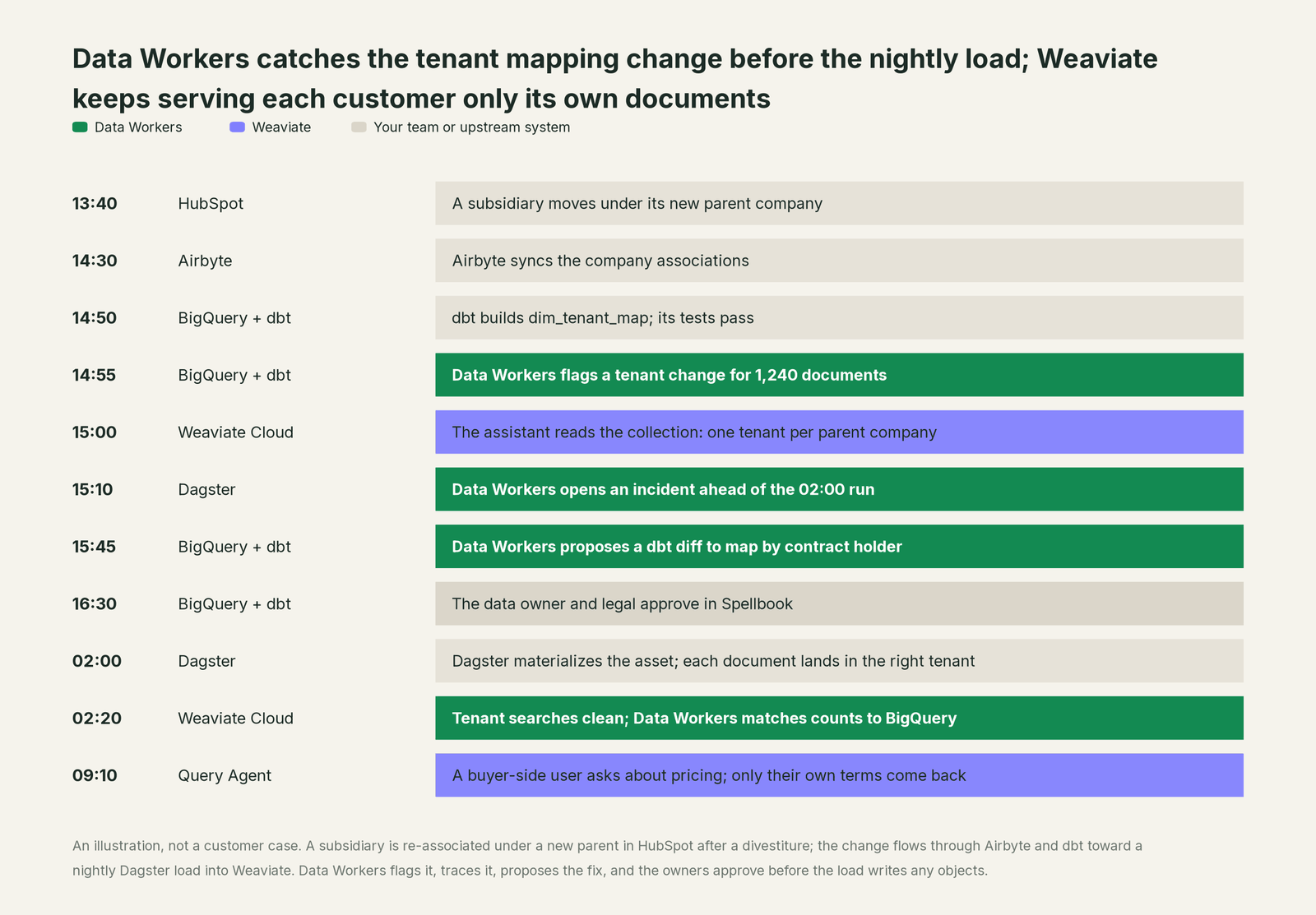
Without that check, the nightly run would have written the seller's negotiated pricing into the buyer's tenant, and the Query Agent would have answered from it, exactly as designed. Tenant isolation did its job; the wrong objects would simply have arrived. The fix was upstream, in a dbt model, and it went through two named approvers first.
| Job | What Weaviate does | What Data Workers does |
|---|---|---|
| The collections | Stores objects, vectors and inverted indexes, with hybrid search on every query | Reads each collection's config as context and joins it to the tables and documents that feed it |
| The questions | Answers through hybrid search and the Query Agent, in Ask or Search mode | Makes sure the data and definitions behind those answers are correct and current |
| The tenants | Isolates each tenant's objects and scopes roles to collections and tenants | Checks that what each tenant receives matches the entitlements and contracts upstream |
| The feed | Accepts batch imports and upserts from your load job | Watches the tables, keys and tenant map the load reads and catches breaks before it runs |
| The break | Loads what it is given, into the tenant it is given | Detects the upstream change and traces it across HubSpot, Airbyte, dbt and Dagster to the collection |
| The fix | Accepts the objects your load job writes | Proposes the change with its blast radius, routes it to named owners and lands it in dbt and the load job |
| The proof | Holds each tenant's objects after the load | Verifies tenant contents and counts after the load and writes a receipt with the cause, diff, approvers and rollback |
Why doesn't Weaviate just do this itself?
Because Weaviate built a database for the hardest part of its job: fast, relevant, correctly scoped retrieval over huge collections, for any industry and any data. Which tenant an object belongs to is a business decision made in your CRM, your contracts and your warehouse. Changing CRM associations, dbt models and orchestrator jobs is a different product with a different liability.
Weaviate's design draws that line sensibly. Its MCP server is off by default on self-hosted instances, every tool is gated by RBAC, and Weaviate Cloud offers a cluster-wide "Enable MCP Read-Only" switch, with a viewer API key to keep a single agent read-only. Deciding what should arrive belongs to the systems that know the business: the right design for a database that serves many applications and teams.
Data Workers is the product on the other side of that line: it knows what a change will touch, routes it to the owners, applies it reversibly through your pipelines, checks the result against the warehouse and keeps the record.
Every tool owns a slice. Data Workers covers the whole lifecycle
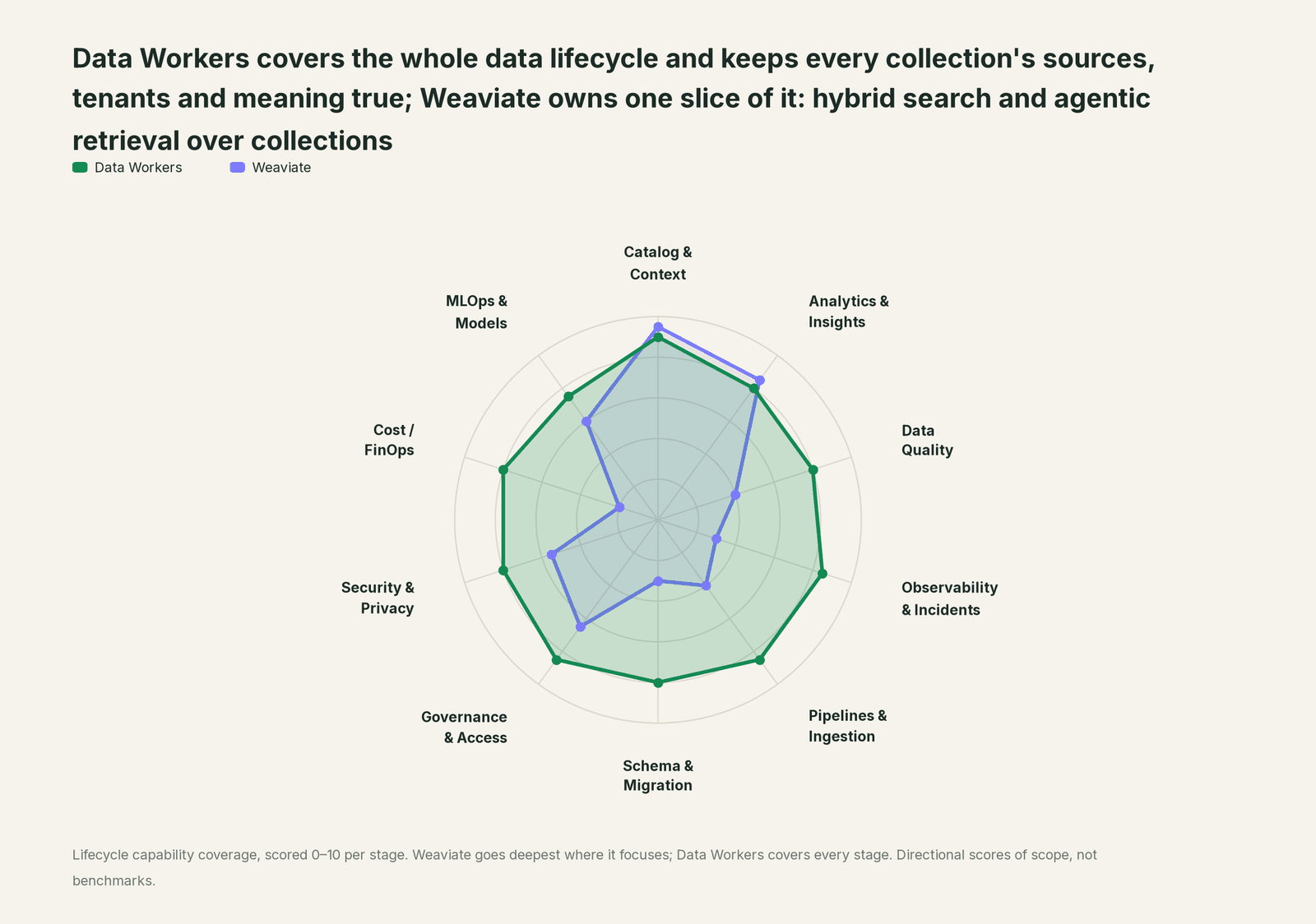
Weaviate owns one slice of the data lifecycle outright: hybrid search and agentic retrieval over collections. Each point tool adds another console, contract and handoff. Data Workers covers the whole lifecycle with one context, one approval flow and one audit trail, and builds on the Weaviate cluster you already run.
| Stage | Data Workers | Weaviate | Why we scored it this way |
|---|---|---|---|
| Catalog & Context | 9 | 9.5 | Weaviate's home stage: objects, vectors and inverted indexes in one database, hybrid search out of the box, and collections served to agents through the built-in MCP server and the Query Agent. Data Workers brings each collection in as context, next to the tables that feed it. |
| Analytics & Insights | 8 | 8.5 | Weaviate's other home stage: the Query Agent turns a natural-language question into searches, filters and aggregations across collections, in Ask or Search mode. Data Workers' Insights agent answers through governed metric definitions. |
| Data Quality | 8 | 4 | Schema properties, tokenization and filters keep objects well formed inside a collection. Data Workers checks the warehouse tables and documents that feed it and repairs the breaks before a load. |
| Observability & Incidents | 8.5 | 3 | Weaviate reports on the health of its own cluster. Data Workers detects a bad feed, traces it across systems to the collection and verifies the objects after the reload. |
| Pipelines & Ingestion | 8.5 | 4 | Batch imports, auto-tenant creation and the objects upsert tool load data in. Data Workers builds, reruns and backfills the pipelines behind those loads with approvals. |
| Schema & Migration | 8 | 3 | Collection definitions and aliases let teams change a collection without downtime. Data Workers detects upstream schema changes and assesses their impact on every load and collection before they land. |
| Governance & Access | 8.5 | 6.5 | Strong over its own data: RBAC with collection- and tenant-level permissions, a read-only viewer role, OIDC groups and MCP-specific permissions. Data Workers checks that what lands in each tenant matches the entitlements upstream. |
| Security & Privacy | 8 | 5.5 | Strong for its own estate: API keys and OIDC, per-tenant isolation and a cluster-wide MCP read-only switch on Weaviate Cloud. Data Workers flags sensitive column names in pull request review before data is embedded. |
| Cost / FinOps | 8 | 2 | Weaviate Cloud bills its own clusters and Query Agent usage. Data Workers traces Snowflake credits to the dbt model behind them and drafts the fix for its owner. |
| MLOps & Models | 7.5 | 6 | Built-in embeddings, vectorizer and reranker integrations sit next to the data. Data Workers keeps the data under your models healthy and connects to MLflow. |
How Weaviate and Data Workers work together
Your engineers and agents stay where they are: Claude Code, Cursor or VS Code for code and queries, and your own application for the Query Agent. Spellbook Data Catalog (in preview) is where the data team looks: each proposed change, its blast radius, its approvers and its rollback. Between them, Data Context Wizard keeps one governed context graph, the Data-Agents Swarm does the work with more than 20 specialist agents, the Autonomous Data-Conductor runs each fix end to end (detect, diagnose, fix, review, verify, remember), and per-domain guardrails hold approvals, receipts and rollback.
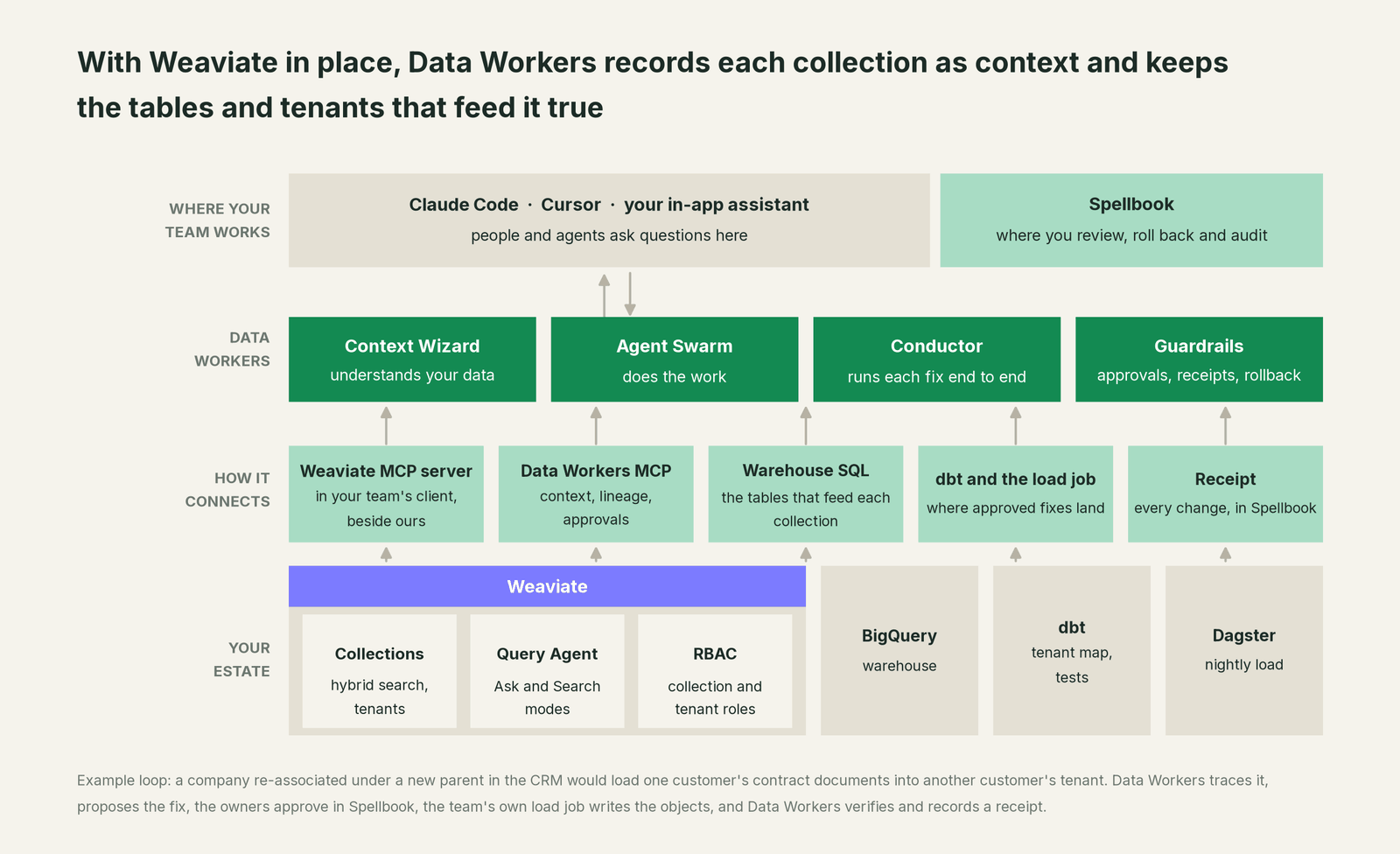
What Context Wizard does with your collections. It records each collection's configuration and tenant list, as your team's assistant reads them over the Weaviate MCP server, as context with provenance: source, time observed and owner. It joins that to warehouse lineage, so a CustomerDocs tenant traces back through dim_tenant_map and Airbyte to the HubSpot company record, scores trust with quality, freshness and usage, and serves one governed view to every agent through tools like explain_table (definition, lineage, trust score), search_across_platforms and trace_cross_platform_lineage, while get_quality_score on dw-quality returns the quality score.
Setup over MCP today. Weaviate connects over its MCP server today, in your team's client alongside Data Workers' agents, which never call it. Clone the open-source repository and add start-agent.sh entries to your client config, as the client setup docs show. On Weaviate Cloud the MCP server is always on at your cluster's REST endpoint plus /v1/mcp; on a self-hosted instance set MCP_SERVER_ENABLED=true and leave write access off. Create an API key with the viewer role, or a custom role with only read_mcp, read_collections, read_tenants and read_data, so the upsert tool is never available to it.
// Example: .mcp.json for Claude Code
{
  "mcpServers": {
    "weaviate": {
      "type": "http",
      "url": "https://<your-cluster-host>/v1/mcp",
      "headers": { "Authorization": "Bearer <viewer API key from your secret store>" }
    },
    "dw-context-catalog": {
      "command": "/path/to/dataworkers-claw-community/start-agent.sh",
      "args": ["dw-context-catalog"]
    },
    "dw-schema": {
      "command": "/path/to/dataworkers-claw-community/start-agent.sh",
      "args": ["dw-schema"]
    },
    "dw-quality": {
      "command": "/path/to/dataworkers-claw-community/start-agent.sh",
      "args": ["dw-quality"]
    },
    "dw-governance": {
      "command": "/path/to/dataworkers-claw-community/start-agent.sh",
      "args": ["dw-governance"]
    }
  }
}
List the tools with your client's own command (/mcp in Claude Code). An engineer can then ask "what feeds the CustomerDocs tenants, and did anything change today?" and get the collection config and tenants from Weaviate, lineage from trace_cross_platform_lineage, the latest run_quality_check results on dim_tenant_map, its load lag against the monitor_metrics baseline, and its change history from the dbt manifest, in one answer. Before a new source is embedded, check_policy tests a proposed tenant mapping against your access rules.
Where writes go. Fixes land where your team already reviews change: a dbt diff for the owner to merge, a change to the load job, or a new collection built behind a collection alias so the switch happens without downtime. Your load job writes the objects, as it does today, after the owners approve.
One request, L0 to L4. The autonomy ladder is set per domain.

- •L0 manual. Data Workers is connected but not acting. Your engineer traces a tenant question by hand.
- •L1 observe. Data Workers watches the tables, documents and tenant map behind each collection and flags breaks before the load, with lineage and owners. Nothing changes.
- •L2 propose. Data Workers drafts the dbt diff or the load change with its blast radius. The owners approve in Spellbook before anything runs.
- •L3 act reversibly. For proven change classes, such as rerunning a failed load for the affected tenants, Data Workers applies the change, checks the load counts against the warehouse, and can roll it back.
- •L4 autonomous. For a scoped, trusted class like a late product feed into one catalog collection, Data Workers fixes and verifies on its own and posts the receipt. Tenant mapping changes stay at L2, by design, because they decide who sees what.
For the safety model behind each step, read is it safe to let AI agents change production data, and for where data and credentials live, read where does our data go.
The same pattern holds for every vector database and every source of meaning. See the hub, bring your own context, and the guides for teams on Pinecone, Qdrant and Dagster. If you are comparing the Query Agent with Data Workers for answering data questions, Data Workers vs Weaviate Query Agent covers where each fits, and vector databases for data engineers covers the pipeline side.
What changes for your team
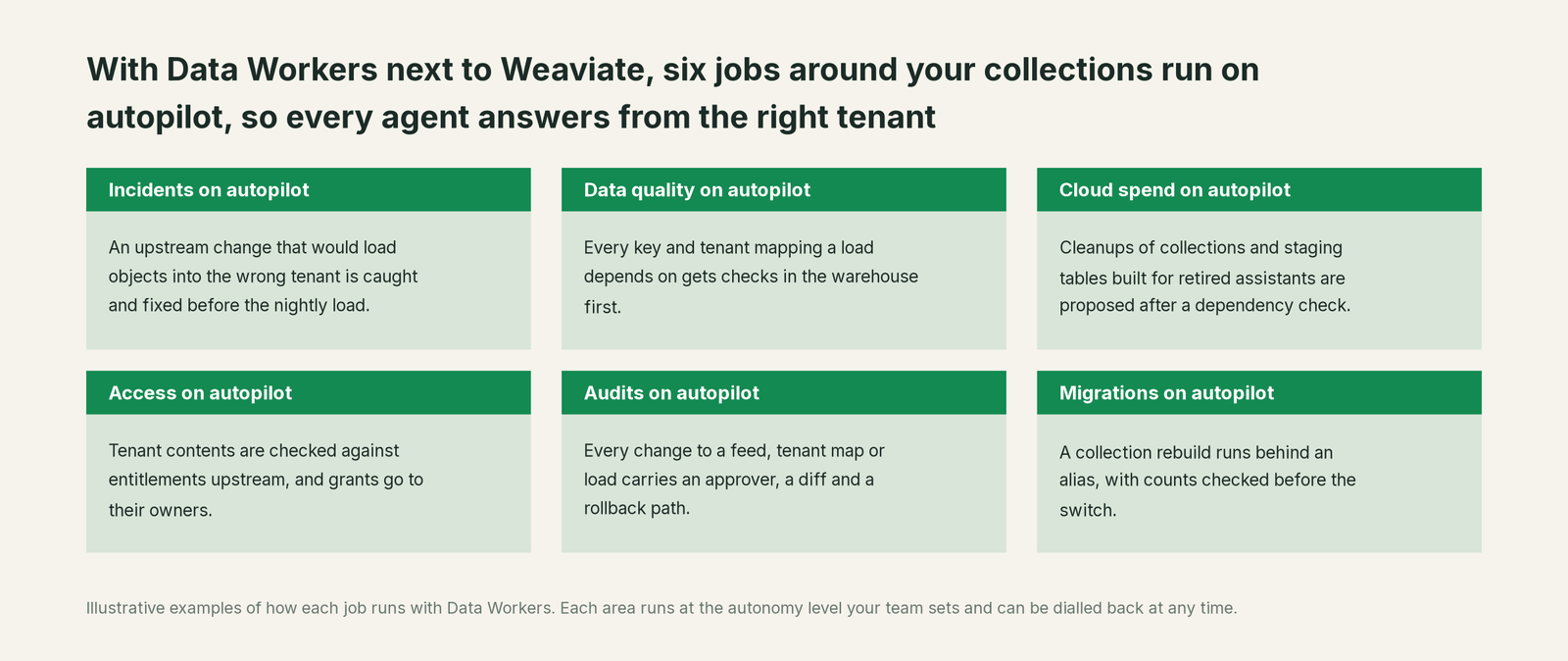
Search teams spend much of the week chasing a wrong answer back to a feed, reconciling tenant lists with the CRM and rebuilding collections after a bad load. With Data Workers next to Weaviate, those jobs run on autopilot at the level you set.
- •Incidents. An upstream change that would load objects into the wrong tenant, or leave a catalog collection a day behind its product table, is caught and fixed before the nightly load.
- •Data quality. Every key and tenant mapping a load depends on gets uniqueness, null and match-rate checks in the warehouse.
- •Cloud spend. Cleanups of collections and staging tables built for retired assistants are proposed to the owner after a dependency check.
- •Access. Tenant contents are checked against entitlements upstream, and a request for a role on a sensitive collection arrives as a time-boxed grant proposal for its owner.
- •Audits. Every change to a feed, a tenant map or a load carries approvers, a diff, the verification and a rollback path, so "why did this customer see this document?" has an answer.
- •Migrations. A collection rebuild, such as a new vectorizer, runs behind a collection alias, with counts and tenant contents checked before the switch.
The team gets its week back for relevance tuning, new collections and the agent experiences only it can build.
Keep Weaviate, or consolidate?
Keep Weaviate if you love it; Data Workers works with it from day one. Many teams consolidate once Data Workers runs that slice too.
The collections, search tuning, tenants and Query Agent experiences belong in Weaviate. What teams consolidate is the tooling around it: a data-quality tool for the feeds, a script that diffs tenant lists against the CRM, a spreadsheet mapping collections to source tables. If you are weighing building this layer yourself on the Weaviate MCP server, read build it ourselves with Claude Code and MCP servers: the connection is the easy part; the cross-system context, approvals and rollback are where the work is.
The case for your CFO
The outcome: assistants built on Weaviate give answers customers can trust, scoped to exactly what each is entitled to see.
The risk story is plain. Your team's assistant reads Weaviate with a viewer API key, so it can inspect collections and tenants and cannot write objects; Data Workers' agents never call the Weaviate MCP server. Every change it proposes shows its blast radius, goes to named approvers, lands through the pipelines your team already runs, is checked after the load and leaves a receipt: who approved it, what it touched and how to undo it. Autonomy is set per domain from L0 manual to L4 autonomous and can be dialled back at any time; changes that decide who sees what stay at approval. There is zero migration: Weaviate, the warehouse, dbt and your load jobs stay where they are.
Why now: agents answer customers directly from your collections, so a wrong tenant mapping or a stale feed reaches every user who asks, in your product, under your name. The first win is one multi-tenant collection with its feeds and tenant map watched, read-only, so the next upstream change is caught before the load instead of after a customer sees it. What stays the same: your collections, Weaviate plan, RBAC roles and review process. For the numbers, see the ROI of agentic data operations.
The sentence to repeat upstairs: "Weaviate answers from what we load into it; Data Workers makes sure each customer's tenant holds the right data, and fixes it with an approval and a receipt."
Getting started
Start with a pilot. Pick one collection that customers or employees already rely on, ideally a multi-tenant one behind the Query Agent, connect the Weaviate MCP server with a viewer key next to Data Workers, and let Data Workers watch its feeds and tenant map for a few weeks before enabling the first fix class. The pilot path and plans are on the pricing page, and the pilot is credited in full against the first year.
FAQ
Does Data Workers write to our Weaviate cluster? No. Your team's assistant connects with an API key that has the viewer role or a custom read-only role, so the weaviate-objects-upsert tool is never available to it, and Data Workers' agents never call Weaviate. Approved fixes land in dbt and your load job, which writes the objects after the owners approve in Spellbook.
Does the Query Agent respect our tenants? Yes. Your application can name the tenant for each multi-tenant collection in the Query Agent's collection configuration (QueryAgentCollectionConfig), along with the properties it may view and filters that always apply. Data Workers covers the step before that: making sure each tenant holds the objects its customer is entitled to.
What about the Transformation Agent and Personalization Agent? Weaviate lists both as sunset (product pages updated June 26, 2026) and points new builds to the Query Agent and Engram, its managed memory service on Weaviate Cloud, generally available since June 3, 2026. Data Workers works the same way whichever Weaviate services you run.
Can Data Workers catch a collection that is answering from yesterday's catalog? Yes. It tracks load lag and row counts against their monitor_metrics baselines on the tables a collection is loaded from, compares the load job's object counts with the source after each load, and flags a missed or partial load before the next question, with the owner and the fix attached.
We self-host Weaviate. Does anything change? Only the setup: enable the MCP server with MCP_SERVER_ENABLED=true, leave MCP_SERVER_WRITE_ACCESS_ENABLED off, and give your team's assistant a viewer key. Everything else works the same as on Weaviate Cloud.
Sources
- •Weaviate, LLM guide to Weaviate (recommended versions, Query Agent, Engram, MCP server), https://docs.weaviate.io/llms.txt (checked Oct 2, 2026)
- •Weaviate, Weaviate MCP server (added in v1.38; tools, permissions, Weaviate Cloud read-only switch), https://docs.weaviate.io/weaviate/configuration/mcp-server (checked Oct 2, 2026)
- •Weaviate, v1.38.0 release notes ("Secure MCP Server (Preview)", published June 5, 2026), https://github.com/weaviate/weaviate/releases/tag/v1.38.0 (checked Oct 2, 2026)
- •Weaviate, RBAC (predefined and custom roles, collection and tenant permissions, MCP permissions), https://docs.weaviate.io/weaviate/configuration/rbac (checked Oct 2, 2026)
- •Weaviate, Multi-tenancy (tenant states, auto-tenant creation), https://docs.weaviate.io/weaviate/manage-collections/multi-tenancy (checked Oct 2, 2026)
- •Weaviate, Collection aliases, https://docs.weaviate.io/weaviate/manage-collections/collection-aliases (checked Oct 2, 2026)
- •Weaviate, Query Agent introduction (Weaviate Cloud only; Ask, Search and Suggest Queries modes), https://docs.weaviate.io/query-agent (checked Oct 2, 2026)
- •Weaviate, Query Agent generally available (September 17, 2025), https://weaviate.io/blog/query-agent-generally-available (checked Oct 2, 2026)
- •Weaviate, Query Agent advanced collection configuration (tenant, view properties, additional filters), https://docs.weaviate.io/query-agent/reference/advanced_collections (checked Oct 2, 2026)
- •Weaviate, Query Agent changelog (May, July and September 2026 updates), https://docs.weaviate.io/query-agent/changelog (checked Oct 2, 2026)
- •Weaviate, Transformation Agent (sunset; updated June 26, 2026), https://weaviate.io/product/transformation-agent (checked Oct 2, 2026)
- •Weaviate, Personalization Agent (sunset; updated June 26, 2026), https://weaviate.io/product/personalization-agent (checked Oct 2, 2026)
- •Weaviate, Engram is now generally available (June 3, 2026), https://weaviate.io/blog/engram-generally-available (checked Oct 2, 2026)
- •Data Workers, Client setup (open-source docs), https://dataworkers.io/opensource-docs/client-setup/ (checked Oct 2, 2026)
- •Data Workers open-source repository, agent tools and start-agent.sh, https://github.com/DataWorkersProject/dataworkers-claw-community (checked Oct 2, 2026)