You're on Chroma: Know What Went Into Every Collection, and Keep It True as the Sources Change
Already on Chroma? Data Workers records where each collection's content came from, catches deleted or stale sources, and proposes the reload with approvals.
Chroma probably entered your stack the easy way. An engineer ran pip install chromadb, created a persistent client inside an agent app, added a few thousand help-center articles to a collection and had retrieval working by lunch. Today that collection, or a dozen like it, sits in Chroma Cloud after a chroma copy --from-local, a nightly job adds and updates documents from the warehouse, and a support agent queries it with dense, sparse, full-text and metadata filters. Engineers inspect it from Claude Code or Cursor through chroma-mcp. Chroma holds what your agents retrieve. Data Workers keeps a record of where it came from: Data Context Wizard records every collection's provenance, from source row to chunk, and when a source is deleted, renamed or goes stale, Data Workers proposes the reload and runs it through your own load job, with approvals and a receipt.
Once a prototype becomes production, teams ask: what is in this collection, and is it still true? Chroma stores exactly what it was given; the answer lives upstream.
Key takeaways
- •Chroma keeps its job. Collections, embedding functions, search, Chroma Cloud, forking and Sync stay as they are. Data Workers works next to them from day one.
- •Every collection gets a provenance record. Data Context Wizard records what feeds each collection, which job loads it, from which snapshot, and who owns it.
- •Deleted and stale sources are caught. When source rows disappear or stop updating, Data Workers finds the chunks that still carry their IDs and every agent they reach.
- •Writes stay gated. Agents read Chroma through
chroma-mcpwith its write tools denied in the client. Approved fixes land in your load job and dbt, with a blast radius, an approver and a rollback point. - •Start with a pilot. One collection, read-only, then one fix class, on the ladder from L0 manual to L4 autonomous.
Chroma holds what agents retrieve. Data Workers keeps where it came from.
Chroma is a superb store for what agents retrieve. It is open source under Apache 2.0, runs in memory, on disk, as a server or as Chroma Cloud, with the same API across all of them. Collections hold documents, embeddings and metadata; search covers dense and sparse vectors, hybrid ranking, full-text and regex. Chroma Cloud adds copy-on-write collection forking, a Search API and Chroma Sync, a managed pipeline that parses, chunks, embeds and indexes from S3, GitHub, websites and file uploads. chroma-mcp (v0.2.6) gives agents thirteen tools, from chroma_list_collections and chroma_query_documents to chroma_fork_collection, chroma_update_documents and chroma_delete_collection; it has no read-only mode, so teams gate writes in the client.
Outside the collection sits everything that decides whether its content is right: the help center where content is written, the ingestion tool, the warehouse and dbt models, and the job that turns rows into chunks. Data Workers covers that side. Here is an afternoon with Data Workers next to a support collection, an illustration, not a customer case.
| Time | System | What happens |
|---|---|---|
| 15:20 | Zendesk Guide | The policy team archives 37 articles that describe the old 30-day refund window; the new 14-day policy article is already live |
| 16:00 | Airbyte | The scheduled full-refresh sync overwrites the articles table in Snowflake; the 37 are gone |
| 16:30 | dbt | support_articles rebuilds without them; its unique and not_null tests pass |
| 16:40 | Data Workers | It sees 37 article IDs leave the model that its provenance record lists as the source of the help-center collection |
| 16:45 | Chroma Cloud | The engineer's assistant reads the collection over chroma-mcp with chroma_get_documents, filtered on the article_id metadata, and hands Data Workers the count: 412 chunks still carry those IDs |
| 17:05 | Dagster | The embedding job adds and updates, and never deletes. Data Workers proposes a diff that makes the job remove chunks whose source rows are gone, plus a one-time cleanup run, with the blast radius: one collection, one support agent, two internal assistants |
| 17:40 | Spellbook | The collection owner reviews the diff, the 412 chunk IDs and the impact, and approves; CI passes |
| 18:00 | Chroma Cloud | The job forks help-center to help-center-pre-cleanup as the rollback point |
| 18:05 | Dagster | The job deletes the 412 chunks by ID |
| 18:15 | Data Workers | The engineer's assistant re-reads the collection: zero chunks from deleted articles, and IDs match support_articles. Data Workers checks that against the source table and writes the receipt |
| 09:10 | Support agent | A customer asks how long they have to request a refund; the answer cites the 14-day policy and only that |
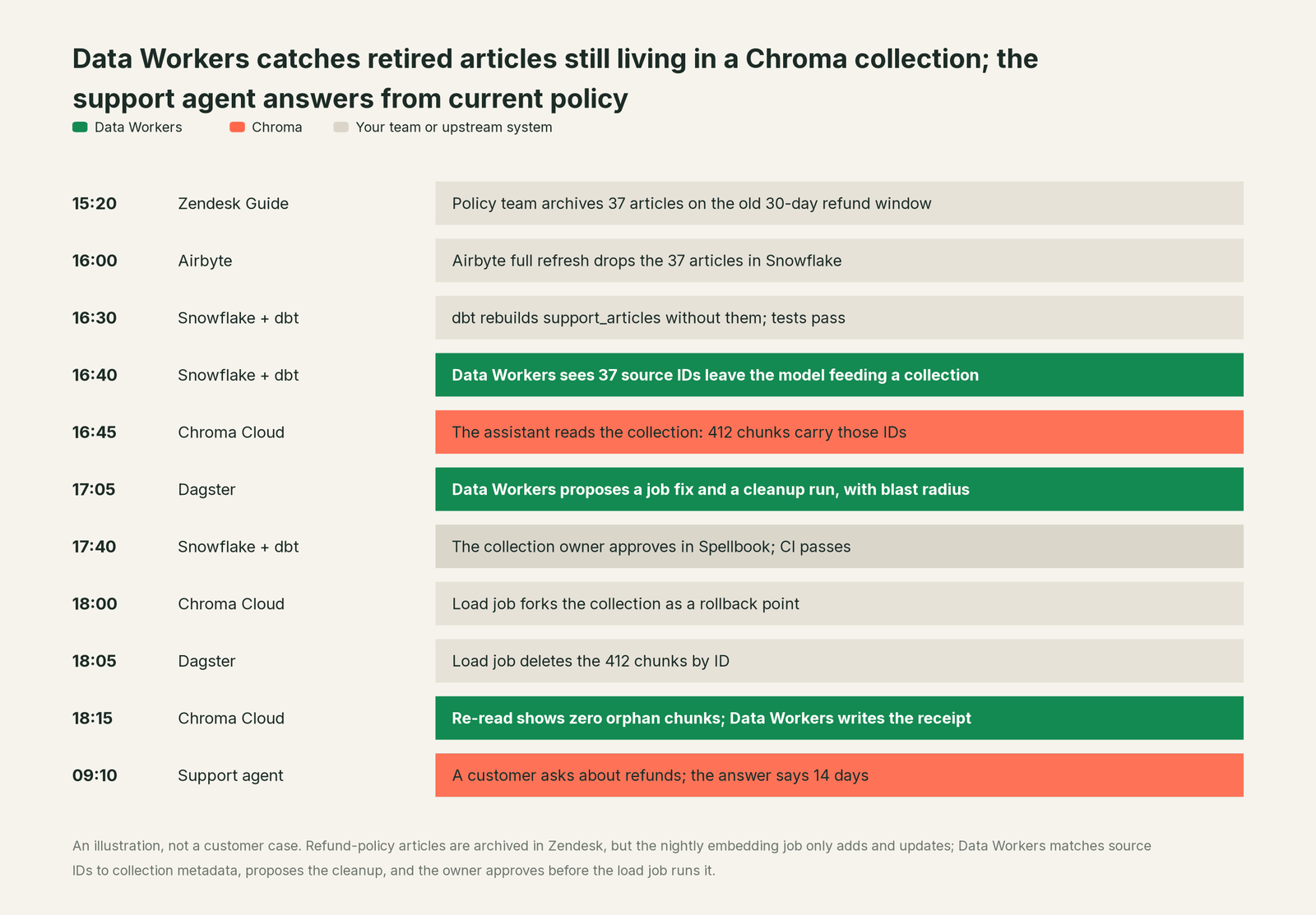
Without that check, the support agent would have kept promising a refund window the company no longer offers. Chroma did exactly what it was asked: it kept every document the job gave it. The fix was upstream, in a job your team owns, approved by the collection owner first.
| Job | What Chroma does | What Data Workers does |
|---|---|---|
| The collection | Stores documents, embeddings and metadata, with the embedding function persisted | Records what feeds it: source table or document set, load job, snapshot, owner |
| The retrieval | Serves dense, sparse, hybrid, full-text and regex search with metadata filters | Makes sure the content behind those results is current and still exists at the source |
| The feed | Accepts adds, updates and upserts from your job, or ingests through Chroma Sync | Watches the tables and documents behind each collection and catches deletes, renames and stale feeds |
| The break | Keeps what it was given | Matches source IDs to collection metadata and traces the gap across Zendesk, Airbyte, dbt and the job |
| The fix | Runs the deletes and updates your job sends | Proposes the job change and the cleanup with its blast radius, routes it to a named owner |
| The rollback | Forks a collection instantly, copy-on-write, in Chroma Cloud | Puts the fork in the plan as the rollback point and records it in the receipt |
| The proof | Holds the collection after the run | Verifies chunk counts and ID parity and writes a receipt with the cause, diff, approver and rollback |
Why doesn't Chroma just do this itself?
Because Chroma built a database for the hardest part to get fast and simple: storing embeddings and retrieving the right ones, the same way on a laptop and in a distributed cloud. It made sensible choices for that job. A collection takes whatever documents and metadata the caller sends, so it fits any source and any app. S3 Sync is designed for append-only workloads and indexes new files, which keeps it simple and predictable. Deletes are explicit calls by ID or filter, so nothing disappears unless a caller asks.
Knowing that article 4471 was archived in Zendesk an hour ago is a different product. It needs lineage from source through ingestion and dbt to the loading job, provenance and owners per collection, blast-radius scoping before a delete, routed approvals, a rollback plan and liability for changes in systems Chroma doesn't run. That is the product Data Workers is. Chroma stays the fast, simple store your agents retrieve from.
Every tool owns a slice. Data Workers covers the whole lifecycle
Chroma owns one slice of the data lifecycle, and owns it well: storing and retrieving embeddings for AI apps. Each point tool adds another console, contract and handoff. Data Workers covers the whole lifecycle with one context, one approval flow and one audit trail, and builds on the collections you already run.
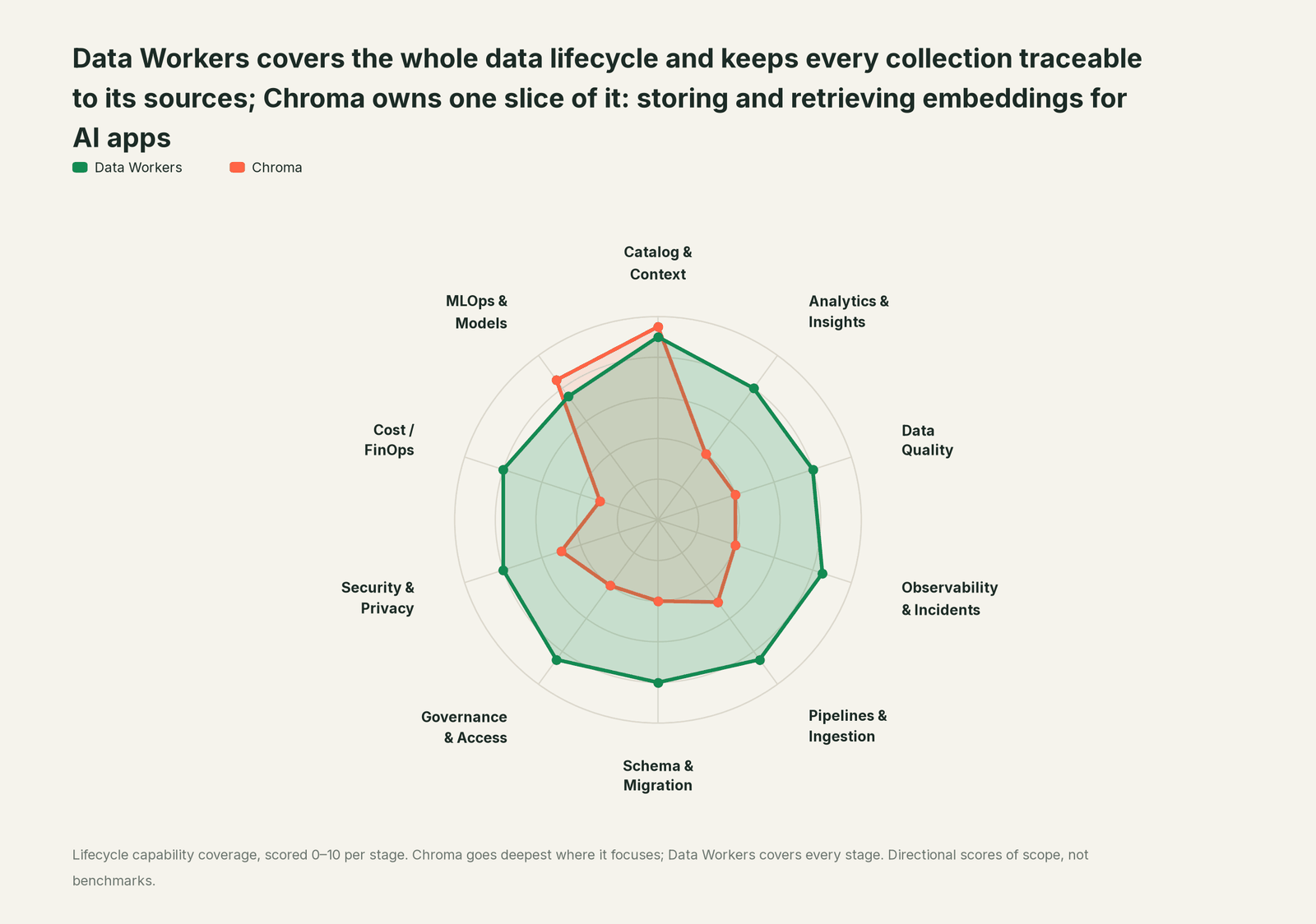
| Stage | Data Workers | Chroma | Why we scored it this way |
|---|---|---|---|
| Catalog & Context | 9 | 9.5 | Chroma's home stage: collections of documents, embeddings and metadata served to agents through dense, sparse, hybrid, full-text and regex search, and through chroma-mcp. Data Workers records where each collection's content came from, next to lineage, quality and owners. |
| Analytics & Insights | 8 | 4 | Chroma retrieves the right chunks; it leaves metrics and business questions to the warehouse and BI. Data Workers answers metric questions through governed definitions. |
| Data Quality | 8 | 4 | The Chroma Cloud dashboard lets a team look at the data in its collections. Data Workers checks the source tables behind each collection and catches deleted, stale or malformed rows before they are embedded. |
| Observability & Incidents | 8.5 | 4 | Chroma exports OpenTelemetry traces for the deployment itself. Data Workers detects a bad or stale source, traces it to every collection it feeds, fixes it and verifies the reload. |
| Pipelines & Ingestion | 8.5 | 5 | Chroma Sync parses, chunks, embeds and indexes from S3, GitHub, web crawls and file uploads in Chroma Cloud. Data Workers builds, reruns and backfills the warehouse pipelines and load jobs behind your collections with approvals. |
| Schema & Migration | 8 | 4 | Collection configuration, Schema in Chroma Cloud and chroma copy between local and Cloud cover Chroma's own side. Data Workers catches upstream schema changes in the dbt manifest diff and pull request review, and sizes their impact on every load job before they land. |
| Governance & Access | 8.5 | 4 | Tenants, databases and API keys separate teams and apps. Data Workers proposes and applies grants across the data platforms that feed your collections, by policy. |
| Security & Privacy | 8 | 5 | Chroma Cloud pins each database to the region you choose and offers customer-managed encryption keys, private networking and single-tenant or BYOC deployment. Data Workers flags sensitive column names in pull request review before data reaches an embedding job. |
| Cost / FinOps | 8 | 3 | Usage-based Chroma Cloud billing and chroma vacuum cover Chroma's own footprint. Data Workers traces Snowflake credits to the dbt model behind them and drafts the fix for its owner. |
| MLOps & Models | 7.5 | 8.5 | Chroma's second home stage: embedding functions from many providers, persisted per collection, plus agentic memory and agentic search patterns and Context-1, an open-weights search model in preview. Data Workers keeps the data under those embeddings healthy and connects to MLflow and W&B. |
How Chroma and Data Workers work together
Your engineers and agents stay where they are: Claude Code or Cursor for the job code, your agent app for retrieval. Spellbook Data Catalog (in preview) is where the data team looks: each proposed change, its blast radius, approver and rollback. Between them, Data Context Wizard keeps one governed context graph, the Data-Agents Swarm does the work with more than 20 specialist agents, the Autonomous Data-Conductor runs each fix end to end (detect, diagnose, fix, review, verify, remember), and per-domain guardrails hold approvals, receipts and rollback.
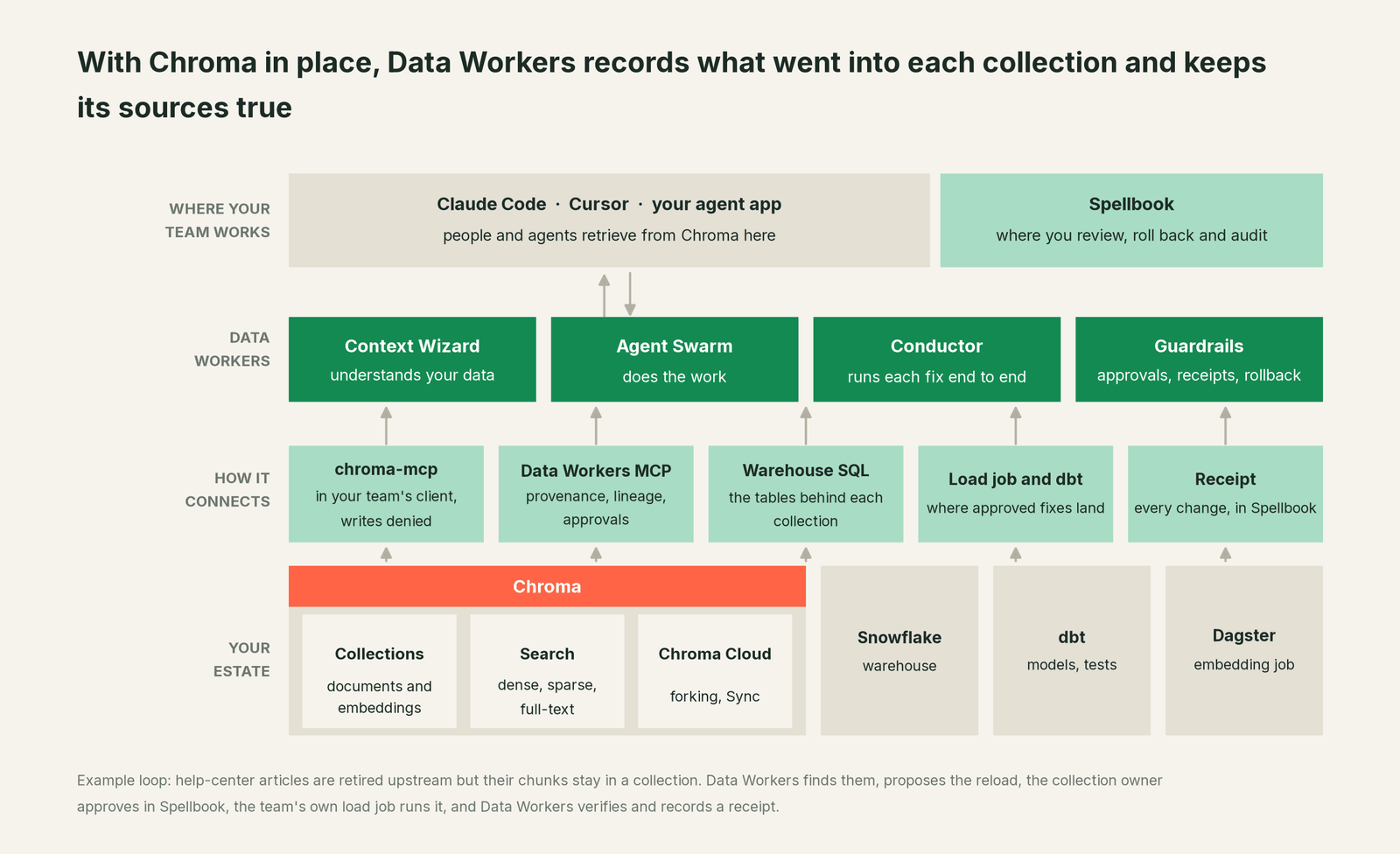
What Context Wizard does with your collections. It records each collection with provenance: the tables, dbt models or document sets that feed it, the job that writes it, the metadata key that ties a chunk to its source row, the embedding function, the last load and the owner. It joins that to warehouse lineage, so a chunk's article_id traces back through support_articles and Airbyte to Zendesk. It scores trust on quality, freshness, usage and ownership, and serves one governed view to every agent: explain_table returns the definition, lineage, documentation and trust score, and get_quality_score on dw-quality returns the quality score. Facts about a collection enter as proposals with their source attached; promoting one to authoritative takes a named person. The collection stays yours, in Chroma.
Setup over MCP today. Chroma connects over chroma-mcp today, in your team's client alongside Data Workers' agents, which never call it. Data Workers' agents are MCP servers from the open-source repository: clone it and add start-agent.sh entries to your client config, as the client setup docs show. Point chroma-mcp at Chroma Cloud, a self-hosted server or a local directory, and deny its seven write tools in the client.
// Example: .mcp.json for Claude Code (Cursor uses the same mcpServers shape)
{
  "mcpServers": {
    "chroma": {
      "command": "uvx",
      "args": ["chroma-mcp", "--client-type", "cloud", "--dotenv-path", "/path/to/.chroma_env"]
    },
    "dw-context-catalog": {
      "command": "/path/to/dataworkers-claw-community/start-agent.sh",
      "args": ["dw-context-catalog"]
    },
    "dw-quality": {
      "command": "/path/to/dataworkers-claw-community/start-agent.sh",
      "args": ["dw-quality"]
    },
    "dw-schema": {
      "command": "/path/to/dataworkers-claw-community/start-agent.sh",
      "args": ["dw-schema"]
    }
  }
}

// Example: .claude/settings.json, so chat agents can read Chroma but not change it
{
  "permissions": {
    "deny": [
      "mcp__chroma__chroma_delete_collection",
      "mcp__chroma__chroma_delete_documents",
      "mcp__chroma__chroma_modify_collection",
      "mcp__chroma__chroma_update_documents",
      "mcp__chroma__chroma_add_documents",
      "mcp__chroma__chroma_create_collection",
      "mcp__chroma__chroma_fork_collection"
    ]
  }
}
The .chroma_env file holds CHROMA_TENANT, CHROMA_DATABASE and CHROMA_API_KEY, so no key sits in the config; /mcp in Claude Code lists the tools. An engineer can then ask "what feeds the help-center collection, and is it still in step with its source?" and get a count and peek from Chroma, lineage from trace_cross_platform_lineage, run_quality_check results on support_articles, and downstream reach from blast_radius_analysis, in one answer.
Where writes go. Fixes land where your team already reviews change: a diff to the embedding job for its owner to merge, a dbt change, or a cleanup run. After the owner approves, your job calls Chroma's add, update and delete APIs as it does today. On Chroma Cloud the plan forks the collection first, so rollback is one step back to a known state, and every write stays on one path, run by a known job with a known key.
One request, L0 to L4. The autonomy ladder is set per domain.

- •L0 manual. Data Workers is connected, not acting. Your engineer compares source IDs and collection metadata by hand.
- •L1 observe. Data Workers records each collection's provenance, watches its sources and flags deleted, renamed or stale content with lineage and owners.
- •L2 propose. Data Workers opens the job change or cleanup run with its blast radius and chunk IDs; the owner approves in Spellbook first.
- •L3 act reversibly. For proven change classes, such as removing chunks whose source rows were deleted, Data Workers queues the approved job after a fork, checks the source side and can roll back.
- •L4 autonomous. For a scoped, trusted class like late feeds into one collection, Data Workers reruns, verifies and posts the receipt for review.
For the safety model behind each step, read is it safe to let AI agents change production data, and for where data and credentials live, read where does our data go.
The same pattern holds for every store of retrieved context: see the hub, bring your own context, the guides for teams on Pinecone, Weaviate and Qdrant, and our explainers on vector databases for data engineers and agentic RAG for enterprise data.
What changes for your team
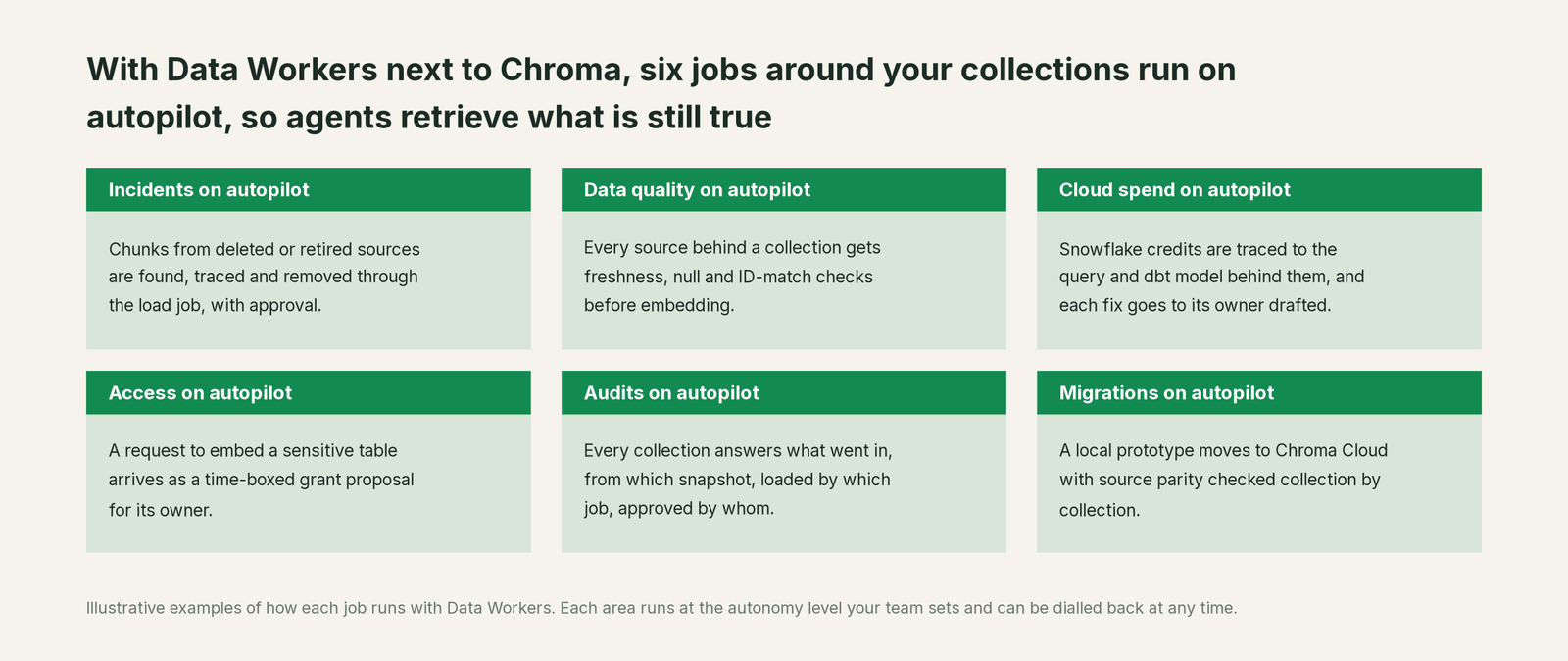
Collection owners spend much of the week outside retrieval: working out what a collection contains, diffing it against the source, rebuilding after a bad load. With Data Workers next to Chroma, those jobs run on autopilot at the level you set.
- •Incidents. Chunks from deleted or retired sources are found and removed through the load job with approval, before an agent quotes them.
- •Data quality. Every source behind a collection gets freshness, null and ID-match checks before embedding, so bad rows never become chunks.
- •Cloud spend. Snowflake credits are traced to the query and dbt model behind them, and each fix goes to its owner drafted.
- •Access. A request to embed a sensitive table arrives as a time-boxed grant proposal for its owner, with the policy that justifies it.
- •Audits. Every collection answers what went in, from which snapshot, loaded by which job and approved by whom.
- •Migrations. When a prototype moves to Chroma Cloud, each collection is checked against its sources after the copy.
The team gets its week back for chunking, retrieval quality and agent features.
Keep Chroma, or consolidate?
Keep Chroma if you love it; Data Workers works with it from day one. Many teams consolidate once Data Workers runs that slice too.
For most teams the answer is to keep it: the collections, embedding functions, search and developer experience belong there. What teams consolidate is the tooling around the collections: a script that diffs source IDs against collection metadata, a spreadsheet mapping collections to tables and owners, a separate quality tool for the feeds. Weighing building this layer yourself on chroma-mcp? Read build it ourselves with Claude Code and MCP servers: the connection is the easy part; cross-system provenance, approvals and rollback are the work.
The case for your CFO
The outcome: the AI features built on Chroma give answers the company can stand behind, because Data Workers keeps every collection traceable to its sources and in step with them.
The risk story is plain. Your team's assistant reads Chroma through chroma-mcp with its write tools denied in the client; Data Workers' agents never call it. Every change Data Workers proposes shows its blast radius, goes to a named approver, runs through the job your team owns, starts from a fork you can return to, is verified and leaves a receipt: who approved it, what it touched and how to undo it. Autonomy is set per domain from L0 manual to L4 autonomous and can be dialled back any time. Zero migration: Chroma, the warehouse, dbt and your embedding jobs stay where they are.
Why now: a collection that started as a prototype now answers customers, and every outdated source left in it is an answer the company no longer stands behind. The first win is one collection with its provenance recorded and its sources watched, read-only, so the next retired document is caught before an agent quotes it. What stays the same: your collections, embedding functions, Chroma Cloud plan, warehouse permissions and review process. For the numbers, see the ROI of agentic data operations.
The sentence to repeat upstairs: "Our AI answers are only as good as what's in the collection; Data Workers knows what went in, keeps it in step with the source, and fixes it with an approval and a receipt."
Getting started
Start with a pilot. Pick one collection agents or customers already rely on, such as the help center, connect chroma-mcp next to Data Workers with its write tools denied, record its provenance and let Data Workers watch its sources for a few weeks before enabling the first fix class. The pilot path and plans are on the pricing page, and the pilot is credited in full against the first year.
FAQ
Does Data Workers write to our Chroma collections? No. Your team's assistant reads Chroma through chroma-mcp with its write tools denied in the client, and Data Workers' agents never call it. Approved fixes land in your embedding job or dbt, and your job calls Chroma's APIs as it does today, after the owner approves in Spellbook.
How does Data Workers know which source row a chunk came from? Through the metadata your job already writes, such as an article_id on each chunk. Context Wizard records that key in the collection's provenance and joins it to warehouse lineage, so trace_cross_platform_lineage follows a chunk back to the source system. If a collection has no such key, the first proposal is the job change that adds one.
We run Chroma embedded in our app, not in Chroma Cloud. Does this still work? Yes. chroma-mcp connects to a persistent directory, a self-hosted server or Chroma Cloud. Collection forking is a Chroma Cloud feature, so on a local or self-hosted deployment the plan takes a copy of the affected chunks before the change as the rollback point.
We ingest with Chroma Sync. What changes? Nothing about Sync. Context Wizard records each Sync source, whether a bucket prefix, a repository or a site, as the provenance of the collection it builds, with an owner. S3 Sync is designed for append-only workloads, so when a source file is retired, Data Workers proposes the cleanup through the same approval and receipt path as any other fix.
Does this replace our embedding pipeline or our retrieval evaluation? No. Your job keeps chunking and embedding, and your evaluation tooling keeps scoring retrieval. Data Workers makes sure what goes in is current, owned and traceable.
What about sensitive data in collections? Data Workers' pull request review flags sensitive column names before an embedding job reads them, and a request to embed a sensitive table goes to its owner as a time-boxed grant proposal.
Sources
- •Chroma, Introduction, https://docs.trychroma.com/docs/overview/introduction (checked Oct 2, 2026)
- •Chroma, Chroma clients (in-memory, persistent, Cloud), https://docs.trychroma.com/docs/run-chroma/clients (checked Oct 2, 2026)
- •Chroma, Chroma Cloud, https://docs.trychroma.com/cloud/getting-started (checked Oct 2, 2026)
- •Chroma, Collection forking, https://docs.trychroma.com/cloud/features/collection-forking (checked Oct 2, 2026)
- •Chroma, Chroma Sync overview, https://docs.trychroma.com/cloud/sync/overview (checked Oct 2, 2026)
- •Chroma, S3 Sync, https://docs.trychroma.com/cloud/sync/s3 (checked Oct 2, 2026)
- •Chroma, Delete data, https://docs.trychroma.com/docs/collections/delete-data (checked Oct 2, 2026)
- •Chroma, Copy collections (CLI), https://docs.trychroma.com/docs/cli/copy (checked Oct 2, 2026)
- •Chroma, Observability (OpenTelemetry traces), https://docs.trychroma.com/guides/deploy/observability (checked Oct 2, 2026)
- •Chroma, Changelog (CMEK Dec 2025, private networking Jan 2026, Sync S3/GitHub/Web Mar 2026), https://www.trychroma.com/changelog (checked Oct 2, 2026)
- •Chroma, Context-1 (preview), https://www.trychroma.com/products/agent (checked Oct 2, 2026)
- •Chroma, Agentic memory guide, https://docs.trychroma.com/guides/build/agentic-memory (checked Oct 2, 2026)
- •Chroma, chroma-mcp v0.2.6 (Aug 14, 2025; server.py registers 13 tools incl. chroma_fork_collection), https://github.com/chroma-core/chroma-mcp (checked Oct 2, 2026)
- •Airbyte, Zendesk Support source (Articles stream), https://docs.airbyte.com/integrations/sources/zendesk-support (checked Oct 2, 2026)
- •Chroma, chromadb 1.5.9 release (May 5, 2026), https://github.com/chroma-core/chroma/releases (checked Oct 2, 2026)
- •Data Workers, Client setup (open-source docs), https://dataworkers.io/opensource-docs/client-setup/ (checked Oct 2, 2026)
- •Data Workers open-source repository, agent tools and start-agent.sh, https://github.com/DataWorkersProject/dataworkers-claw-community (checked Oct 2, 2026)