You're on PuppyGraph: Keep the Graph Right by Keeping the Tables and the Mapping Under It Right
Already on PuppyGraph? Data Workers brings your graph schema in as governed context, watches the tables it maps, and fixes mapping breaks with approvals.
Your team queries the warehouse and the lake as a graph, with no copy. PuppyGraph sits on Iceberg tables in Polaris, Delta tables in Databricks, Snowflake, BigQuery or Postgres, and a graph schema maps those tables to nodes and edges: Card, Account and Merchant as nodes, PAID_WITH as an edge keyed on id columns already in your tables. Analysts write openCypher or Gremlin, run PageRank, Louvain and Leiden, and get multi-hop answers over the same data the warehouse serves. PuppyGraph AI proposes a schema from your catalog and translates questions into graph queries, and the PuppyGraph MCP server lets Claude and other MCP clients read the schema and run queries. PuppyGraph is the graph view over your tables. Data Workers keeps the tables and the mapping under it right: it brings the graph schema in as context, watches the tables that feed it, catches a mapping break when an upstream column changes, and proposes the fix with approvals and a receipt.
Zero ETL is the point of PuppyGraph, and it moves the work to a new seam. The graph reads whatever the tables look like at query time, so a renamed key column in a dbt refactor shows up as a broken edge or a quiet gap in a traversal. That seam between the tables and the graph schema is the job this guide covers.
Key takeaways
- •PuppyGraph keeps its job. The graph schema, queries, algorithms, local tables and PuppyGraph AI stay as they are. Data Workers works next to them from day one.
- •The mapping becomes governed context. Data Context Wizard reads every node's id columns and every edge's
fromKeyandtoKey, and joins them to lineage, quality, usage and a named owner. - •Column changes are caught before analysts query. A rename, a dropped column or a new id format in a mapped table is traced to the exact node or edge it breaks.
- •Writes stay gated. Agents use the PuppyGraph MCP server for read-only queries, as PuppyGraph's AI integrations guide advises. Approved fixes land in dbt or as a reviewed schema change, with a blast radius, an approver and a rollback path.
- •Start with a pilot. One graph, read-only, with its tables watched; then one fix class in one domain, on the ladder from L0 manual to L4 autonomous.
PuppyGraph is the graph view over your tables. Data Workers keeps the tables and the mapping right.
PuppyGraph does something hard and does it well: it turns the relational data you already have into a graph you can traverse, without a second database or a pipeline to fill it. Its sources span cloud warehouses (Snowflake, BigQuery, Redshift), databases (Postgres, MySQL, Oracle, SQL Server) and lakes (Iceberg, Delta Lake, Hudi, Hive, with Polaris and Nessie catalogs). A node maps a table through a dataSourceGroup with its catalog, schema and table, plus id and attribute columns. An edge names its fromNodeLabel and toNodeLabel and the fromKey and toKey columns that join them. Since 1.0.0 on June 29, 2026, the releases have added cost-based planning for multi-hop traversals and the Leiden algorithm (1.10.0), identity propagation to Snowflake and Elasticsearch (1.11.0), an Auto Graph Builder action (1.12.0), and one PuppyGraph AI page plus export of the graph schema as an Apache Ossie model (1.13.0, September 30).
Everything the mapping depends on lives outside PuppyGraph: source systems, ingestion, dbt models, the orchestrator and the catalog that commits each table version. Data Workers covers that side.
Here is one night next to a fraud graph. This is an illustration, not a customer case.
| Time | System | What happens |
|---|---|---|
| 14:10 | GitHub + dbt | A refactor merged to main renames card_id to card_key in fct_payments, to match a new naming standard |
| 14:12 | Data Workers | It detects the column change in the merged models and matches it against the graph schema it holds as context |
| 14:20 | PuppyGraph | The on-call's assistant reads the schema over the PuppyGraph MCP server and hands it to Data Workers: the PAID_WITH edge keys on fct_payments.card_id, and four saved fraud queries traverse it |
| 14:35 | GitHub + dbt | Data Workers proposes a diff that keeps card_id as an alias next to card_key, with the blast radius: one model, one edge, four saved queries, two dashboards |
| 14:40 | Spellbook | It also proposes the matching schema change, toKey moving to card_key, as a reviewed diff for the graph owner to apply later |
| 15:05 | Spellbook | The graph owner reviews both and approves the dbt change; dbt CI passes |
| 02:00 | Airflow | The nightly dbt run rebuilds fct_payments with both columns |
| 02:30 | Iceberg on Polaris | The new table snapshot commits |
| 02:45 | PuppyGraph | Data Workers runs read-only count queries and finds PAID_WITH edge counts in line with yesterday |
| 02:50 | Spellbook | Data Workers writes the receipt: cause, diff, approver, verification and rollback |
| 09:00 | Fraud analysts | A three-hop card-sharing query returns the right rings |
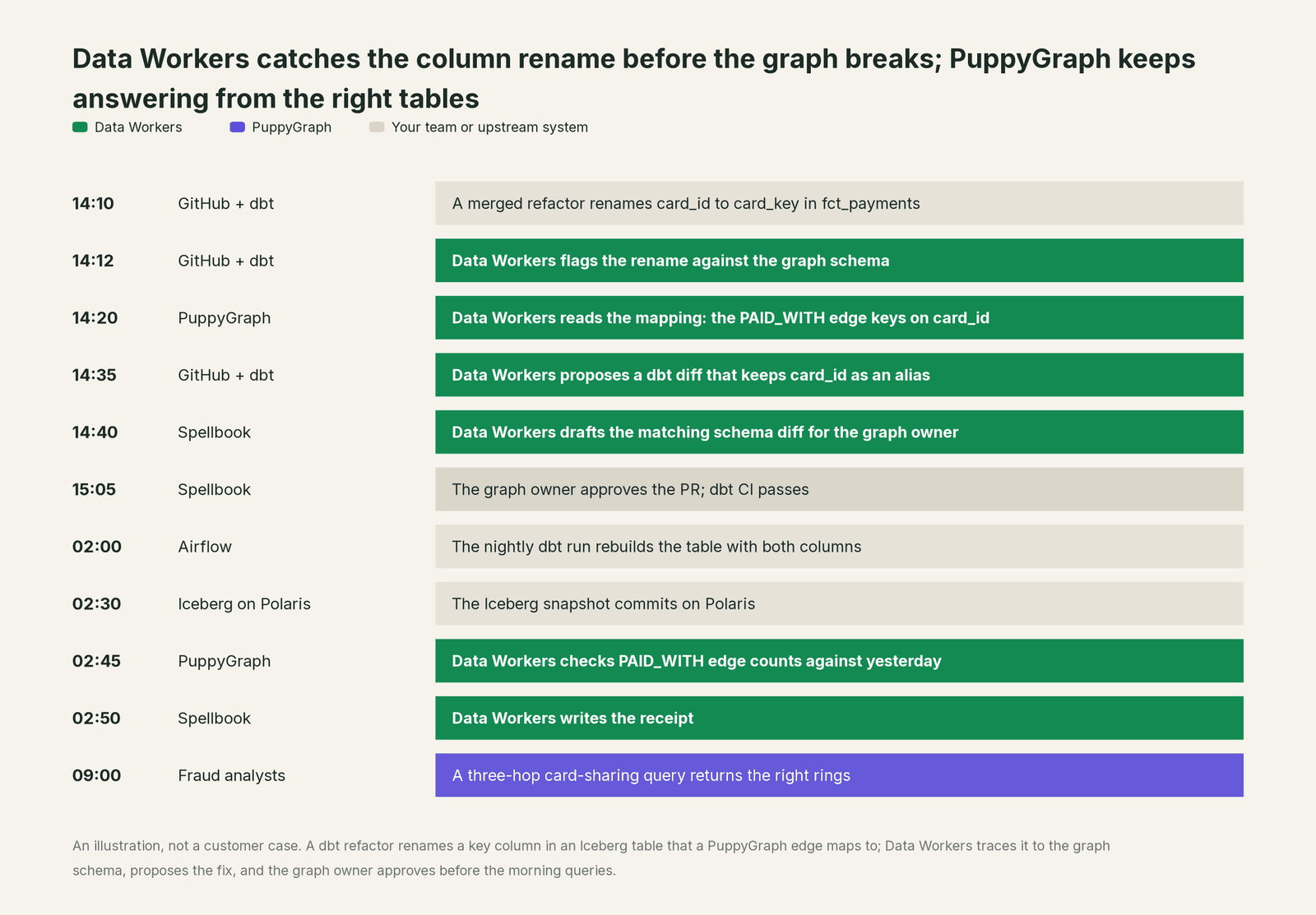
Without that check, the edge's key would have pointed at a column that no longer existed, and the morning's queries would have failed or come back short. PuppyGraph did exactly what it was designed to do: read the tables as they are. The fix was upstream, in a repository and a pipeline PuppyGraph doesn't run, and it went through an owner's approval first.
| Job | What PuppyGraph does | What Data Workers does |
|---|---|---|
| The model | Maps tables to nodes and edges in a graph schema, proposed by PuppyGraph AI or built by hand | Reads that mapping as context and joins it to lineage, quality, usage and owners |
| The questions | Answers openCypher and Gremlin traversals and runs graph algorithms over the tables in place | Makes sure the tables and definitions behind those answers are correct and current |
| The feed | Reads tables at query time, or from local tables you load | Watches the tables, columns and keys the graph maps and catches breaks before analysts query |
| The break | Reads what the tables hold | Detects the upstream change and traces it across GitHub, dbt, Airflow and the catalog to the node or edge it affects |
| The fix | Applies the schema your team uploads, or schema changes approved in PuppyGraph AI | Proposes the dbt change or the schema change with its blast radius, routes it to a named owner and lands it through your review path |
| The proof | Serves the graph from the new table version | Verifies node and edge counts over read-only queries and writes a receipt with the cause, diff, approver and rollback |
| The meaning | Holds labels, relationships and properties | Keeps definitions consistent across the graph, the semantic layer and the catalog, with conflicts routed to an owner |
Why doesn't PuppyGraph just do this itself?
Because PuppyGraph built an engine for one demanding job: run graph queries fast over tables it doesn't own, across dozens of source systems, with no copy. Not owning the tables is the design. The dbt project, the ingestion tool and the orchestrator that change those tables belong to other vendors and your data team, and changing them is a different product with a different liability.
PuppyGraph's own guidance draws that line sensibly. Its AI integrations guide gives a query tool the contract "Use this tool only for read-only graph queries" and says to keep schema and catalog mutations behind an explicit administrative approval flow. PuppyGraph AI asks for confirmation before applying schema changes, and since 1.11.0 it only offers actions the signed-in user may perform. Its five built-in roles separate GraphAdmin, who maintains schemas, from Analyst, who runs queries, and Viewer, who reads schemas without running queries. That is the right design for an engine that many teams and agents query at once.
Data Workers is the product on the other side of that line. It knows what a column change will touch across systems, routes the fix to its owner, applies it reversibly through your pipelines, verifies the graph and keeps the record.
Every tool owns a slice. Data Workers covers the whole lifecycle
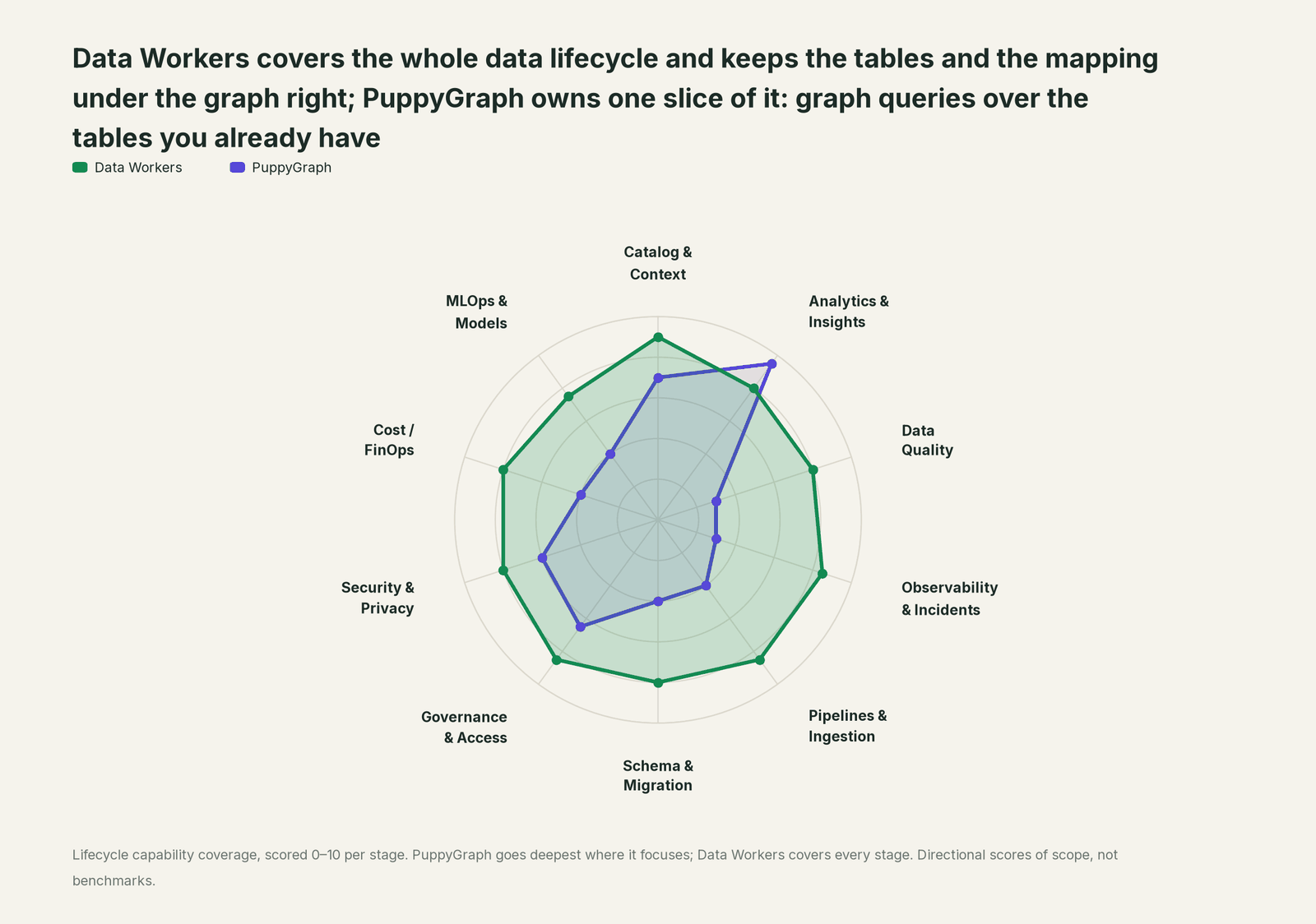
PuppyGraph owns one slice of the data lifecycle outright: graph queries and analytics over the tables you already have. Each point tool adds another console, contract and handoff. Data Workers covers the whole lifecycle with one context, one approval flow and one audit trail, and builds on the graph engine you already run.
| Stage | Data Workers | PuppyGraph | Why we scored it this way |
|---|---|---|---|
| Catalog & Context | 9 | 7 | The graph schema maps warehouse and lake tables to nodes and edges, and exports as an Apache Ossie model. Data Workers brings that mapping in as context and joins it to lineage, quality, usage and owners. |
| Analytics & Insights | 8 | 9.5 | PuppyGraph's home stage: openCypher and Gremlin traversals and graph algorithms over Iceberg, Delta and warehouse tables in place, with no copy. Data Workers' Insights agent answers through governed metric definitions. |
| Data Quality | 8 | 3 | PuppyGraph reads the tables as they are. Data Workers checks the keys every node and edge maps to and repairs breaks upstream. |
| Observability & Incidents | 8.5 | 3 | Prometheus metrics and troubleshooters cover the engine. Data Workers detects a broken feed or mapping, traces it across systems and verifies the fix. |
| Pipelines & Ingestion | 8.5 | 4 | Zero ETL by design, with local tables when speed matters. Data Workers builds, reruns and backfills the pipelines that produce the tables the graph reads. |
| Schema & Migration | 8 | 4 | Schema history tracks graph schema uploads. Data Workers detects upstream column changes and assesses their impact on every mapping before they land. |
| Governance & Access | 8.5 | 6.5 | Strong over its own graph: five built-in roles, SSO, row-level security and identity propagation to Snowflake. Data Workers proposes and applies grants across your platforms by policy. |
| Security & Privacy | 8 | 6 | Strong for its own engine: service accounts, masked catalog credentials and the warehouse's own permissions. Data Workers flags sensitive column names in pull request review and proposes masking for the owner. |
| Cost / FinOps | 8 | 4 | Querying in place avoids paying for a second copy of the data. Data Workers traces Snowflake credits to the dbt model behind them and drafts the fix for its owner. |
| MLOps & Models | 7.5 | 4 | Graph algorithms such as PageRank, Louvain and Leiden feed features. Data Workers keeps the data under your models healthy and connects to MLflow and W&B. |
How PuppyGraph and Data Workers work together
Your engineers and agents stay where they are: Claude Code or Cursor for dbt and Cypher, the PuppyGraph web UI and PuppyGraph AI for graph work. Spellbook Data Catalog (in preview) is where the data team looks: each proposed change, its blast radius, its approver and its rollback. Underneath, Data Context Wizard keeps one governed context graph, the Data-Agents Swarm does the work with 20+ specialist agents, the Autonomous Data-Conductor runs each fix end to end (detect, diagnose, fix, review, verify, remember), and per-domain guardrails hold approvals, receipts and rollback.
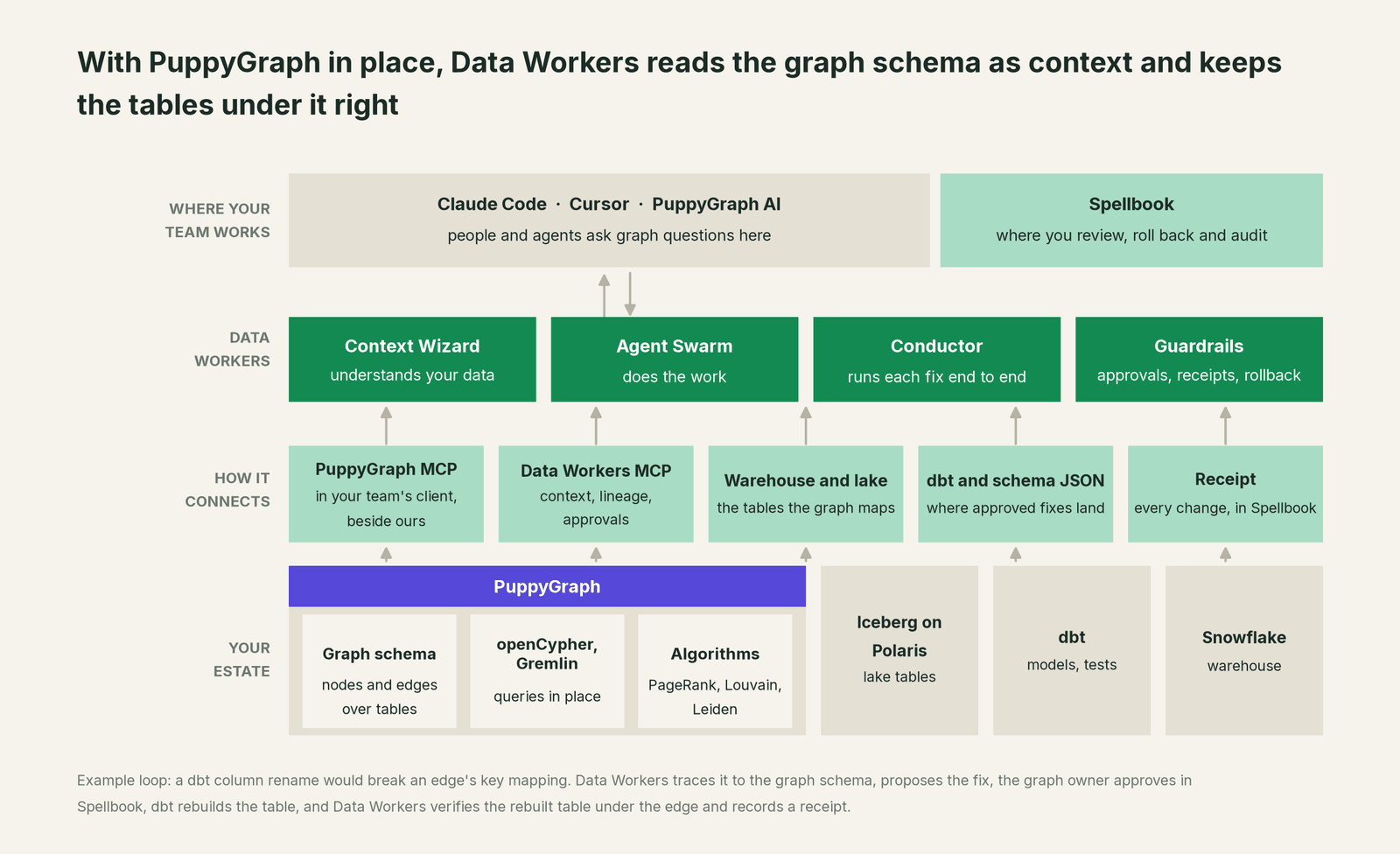
What Context Wizard does with your graph schema. Your team's assistant hands it the schema from PuppyGraph's MCP server, and it records each mapping as context with provenance: which table and columns back each node and edge, when that was observed and who owns it. It joins that to lineage, so PAID_WITH.toKey traces back through fct_payments and the dbt project to the payments source, and serves one governed view to every agent through tools like explain_table and trace_cross_platform_lineage. When the graph's idea of an "active card" disagrees with your semantic layer's, the conflict goes to a named owner.
Setup over MCP today. Data Workers connects to PuppyGraph over the PuppyGraph MCP server today, in the same client as its own agents. PuppyGraph's server is open source (Apache 2.0) and exposes three tools: puppygraph_query, puppygraph_schema and puppygraph_status. Clone it, run npm install and npm run build, point it at your instance's Bolt, Gremlin and schema endpoints, and give it a user with the Analyst role, which runs queries and reads schemas but can't change them. Data Workers' agents come from the open-source repository: clone it and add start-agent.sh entries to your client config, as the client setup docs show.
// Example: .mcp.json for Claude Code (Cursor uses the same mcpServers shape)
{
  "mcpServers": {
    "puppygraph": {
      "command": "node",
      "args": ["/path/to/puppygraph-mcp-server/build/index.js"],
      "env": {
        "PUPPYGRAPH_URL": "bolt://<your-puppygraph-host>:7687",
        "PUPPYGRAPH_USERNAME": "graph_analyst",
        "PUPPYGRAPH_PASSWORD": "<from your secret store>",
        "PUPPYGRAPH_GREMLIN_URL": "ws://<your-puppygraph-host>:8182/gremlin",
        "PUPPYGRAPH_SCHEMA_URL": "http://<your-puppygraph-host>:8081/schemajson"
      }
    },
    "dw-context-catalog": {
      "command": "/path/to/dataworkers-claw-community/start-agent.sh",
      "args": ["dw-context-catalog"]
    },
    "dw-schema": {
      "command": "/path/to/dataworkers-claw-community/start-agent.sh",
      "args": ["dw-schema"]
    },
    "dw-quality": {
      "command": "/path/to/dataworkers-claw-community/start-agent.sh",
      "args": ["dw-quality"]
    }
  }
}
List the tools in your client with its own command (for example /mcp in Claude Code). An engineer can then ask "which tables feed the PAID_WITH edge, and did anything change under them today?" and get one answer from puppygraph_schema, trace_cross_platform_lineage, the dbt manifest and get_incident_history.
Where writes go. Fixes land where your team already reviews change: a dbt diff for the table, which its owner merges, or a schema JSON diff for the graph owner to upload through the PuppyGraph web UI or the /schema endpoint, where it joins PuppyGraph's schema history. Graph changes stay with the GraphAdmin who owns them.
One request, L0 to L4. The autonomy ladder is set per domain.

- •L0 manual. Connected but not acting. Your engineer traces the broken edge by hand.
- •L1 observe. Data Workers watches the columns and keys the graph maps, flags changes and explains the cause with lineage and owners. Nothing changes.
- •L2 propose. It drafts the dbt diff or the schema diff with its blast radius. The graph owner approves in Spellbook first.
- •L3 act reversibly. For proven change classes, such as a backward-compatible alias column, it applies the change, verifies node and edge counts, and can roll it back.
- •L4 autonomous. For a scoped, trusted class like late partitions in one lake table, it fixes and verifies on its own and posts the receipt.
For the safety model behind each step, read is it safe to let AI agents change production data, and for where data and credentials live, read where does our data go.
The same pattern holds for every source of meaning: see the hub, bring your own context, and the guides for Neo4j and Stardog. For Delta tables, see Data Workers on Databricks; for the table format, Apache Iceberg explained; for grounding tradeoffs, semantic layer vs knowledge graph for LLM grounding.
What changes for your team
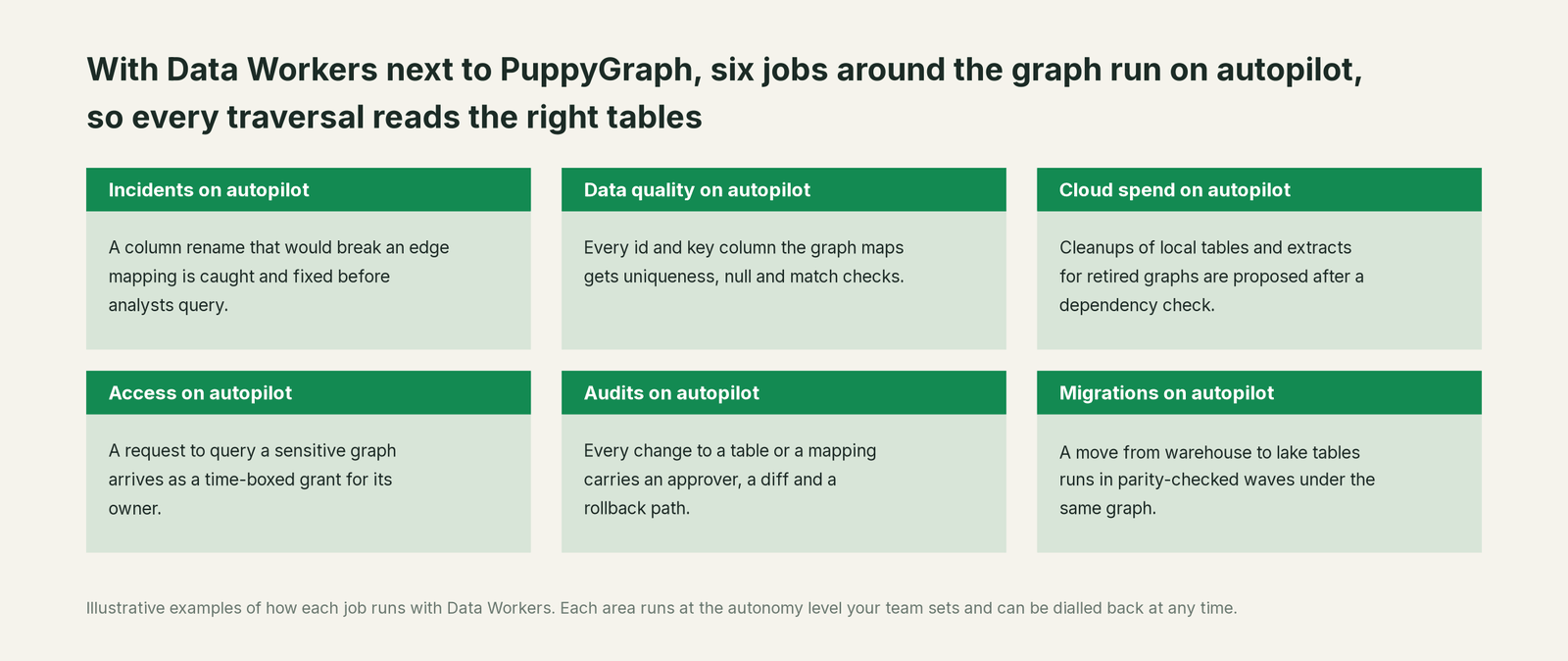
Graph teams skip the loading work but still spend part of the week chasing an edge that went quiet or checking which saved queries a refactor touched. With Data Workers next to PuppyGraph, those jobs run on autopilot at the level you set.
- •Incidents. A column rename or id-format change that would break an edge mapping is caught, traced and fixed before analysts run their queries.
- •Data quality. Every id and key column the graph maps gets uniqueness, null and match-rate checks, so a node's id stays unique and an edge's keys keep finding their nodes.
- •Cloud spend. Cleanups of local tables and extracts kept for retired graphs are proposed to the owner after a dependency check.
- •Access. A request to query a sensitive graph, such as customer or payment relationships, arrives as a time-boxed grant proposal for its owner, with the policy that justifies it.
- •Audits. Every change to a table, a mapping or a definition carries an approver, a diff, the verification and a rollback path, so "why did this edge change?" has an answer.
- •Migrations. When tables move from the warehouse to Iceberg, the move runs in parity-checked waves and the graph schema is repointed with the owner's approval.
The graph team gets its week back for new graphs and the analysis only it can do.
Keep PuppyGraph, or consolidate?
Keep PuppyGraph if you love it; Data Workers works with it from day one. Many teams consolidate once Data Workers runs that slice too.
For most teams on PuppyGraph, the answer is to keep it: the graph schema, the traversals, the algorithms and the zero-ETL design belong there. What teams consolidate is the tooling around the graph: a separate data-quality tool on the mapped tables, a script that diffs the schema JSON against the warehouse, a spreadsheet of who owns which edge. Data Workers runs those jobs with one context, one approval flow and one audit trail. If you are weighing building this layer yourself on the PuppyGraph MCP server, read build it ourselves with Claude Code and MCP servers: the connection is the easy part; cross-system context, approvals and rollback are where the work is.
The case for your CFO
The outcome: the graph analytics the company invested in give answers people can act on. Fraud rings and network risk come from traversals over live tables, and Data Workers keeps those tables and the mapping right every day.
The risk story is plain. Your team's assistant queries the graph read-only through the PuppyGraph MCP server, side by side with Data Workers, with an Analyst user that can't change the schema. Every change Data Workers proposes shows its blast radius, goes to a named approver, lands through the reviews your team already runs, is verified afterwards and leaves a receipt: who approved it, what it touched and how to undo it. Autonomy is set per domain from L0 manual to L4 autonomous. Zero migration: PuppyGraph, the warehouse, the lake and dbt stay where they are.
Why now: with no load job in between, every upstream change reaches the graph the moment it lands, and agents now ask the graph directly. The first win is one graph with its mapped tables watched, read-only, so the next column change is caught before a wrong answer. What stays the same: your graph schema, queries, PuppyGraph deployment, warehouse permissions and review process. For the numbers, see the ROI of agentic data operations. The path in is a pilot (see pricing), credited in full against the first year.
The sentence to repeat upstairs: "PuppyGraph reads our tables as a graph; Data Workers keeps the tables and the mapping right, and fixes breaks with an approval and a receipt."
Getting started
Start with a pilot. Pick one graph that analysts or agents rely on, such as the fraud graph, connect the PuppyGraph MCP server read-only next to Data Workers, and let it watch the mapped tables for a few weeks before enabling the first fix class. The pilot path and plans are on the pricing page, and the pilot is credited in full against the first year.
FAQ
Does Data Workers change our PuppyGraph schema? Data Workers reads the schema and runs read-only queries with an Analyst user. When a mapping needs to change, it drafts the schema diff with its blast radius, and your graph owner uploads it, where it lands in PuppyGraph's schema history.
PuppyGraph is zero ETL. What is there to watch? The tables. With no load in between, a renamed column or a late partition reaches the graph the moment it lands. Data Workers watches the exact columns each node and edge maps to.
Does this work with local tables? Yes. Data Workers watches the source tables your local tables load from, so a schema change or a late partition is caught before the next refresh. PuppyGraph's load status stays the record of each refresh.
How does lineage reach from an edge back to the source? Context Wizard records which table and columns back each node and edge and joins that to lineage across dbt, ingestion and sources. trace_cross_platform_lineage follows an edge key back to its source field.
Does this replace PuppyGraph AI? No. PuppyGraph AI keeps proposing schemas and translating questions into graph queries. Data Workers keeps the tables and definitions under those answers correct, and can check a proposed schema against lineage and ownership.
Sources
- •PuppyGraph, homepage ("Query your relational data as a graph. No ETL."), https://www.puppygraph.com/ (checked Oct 2, 2026)
- •PuppyGraph, documentation overview (data sources, deployment, openCypher and Gremlin), https://docs.puppygraph.com/ (checked Oct 2, 2026)
- •PuppyGraph, Building a graph (nodes, edges,
dataSourceGroup,fromKeyandtoKey), https://docs.puppygraph.com/modeling/building-a-graph/ (checked Oct 2, 2026) - •PuppyGraph, Managing the graph (schema JSON, history,
/schemaupload, local tables), https://docs.puppygraph.com/modeling/managing-the-graph/ (checked Oct 2, 2026) - •PuppyGraph, PuppyGraph AI, https://docs.puppygraph.com/ai/puppygraph-ai/ (checked Oct 2, 2026)
- •PuppyGraph, AI integrations (PuppyGraph MCP Server, three tools, read-only query contract, administrative approval for schema changes), https://docs.puppygraph.com/ai/ai-integrations/ (checked Oct 2, 2026)
- •PuppyGraph, PuppyGraph MCP Server README, https://github.com/puppygraph/puppygraph-mcp-server (checked Oct 2, 2026)
- •PuppyGraph, Releases (1.0.0 Jun 29, 2026 through 1.13.0 Sept 30, 2026), https://docs.puppygraph.com/releases/ (checked Oct 2, 2026)
- •PuppyGraph, Role-based access control, https://docs.puppygraph.com/security/rbac/ (checked Oct 2, 2026)
- •Data Workers, Client setup (open-source docs), https://dataworkers.io/opensource-docs/client-setup/ (checked Oct 2, 2026)
- •Data Workers open-source repository, agent tools and start-agent.sh, https://github.com/DataWorkersProject/dataworkers-claw-community (checked Oct 2, 2026)