You're on Keebo: It Tunes the Warehouse. Data Workers Keeps What the Warehouse Produces Right
Keebo tunes Snowflake warehouses around the clock. Data Workers checks what each change does to the models, runs and dashboards on them, behind approvals.
Your platform team turned on Keebo so nobody has to babysit Snowflake warehouse settings again. Warehouse Optimization uses what Keebo calls agentic AI to learn each warehouse's workload from performance metadata, then tunes three levers within your guardrails: warehouse size, auto-suspend and the maximum cluster count. You picked a spot on the aggressiveness slider, set backoff thresholds on query latency, queue time and queued queries, and maybe added custom rules that change a warehouse's defaults by day and time. Workload Intelligence shows spend and warehouse health, the Optimizations page charts every action Keebo takes, and the audit log records every settings change people make. Warehouse Optimization for Databricks SQL warehouses is in public beta. Keebo is the warehouse tuner. Data Workers is the keeper of what the warehouse produces: it checks whether the models, runs and dashboards on a tuned warehouse are still right and on time, and drafts the fix for a named owner when they are not.
Keebo works from metadata through a read-only Snowflake user and says it never sees query text or result data. That is a sound design, and it is why someone else has to own the other half of the question: when the warehouse got smaller, did the month-end build finish, and is the number finance opens at 8:30 one consistent month?
Key takeaways
- •Keebo keeps its job. Size, auto-suspend and cluster count stay tuned within your guardrails. Data Workers never resizes or suspends a warehouse.
- •A tuned warehouse gets a data check. Data Workers keeps lateness baselines on the marts each warehouse feeds, reads the orchestrator run and traces the models and noted dashboards downstream.
- •Fixes go to their owners, drafted. The rerun goes to the mart owner and is queued through your orchestrator after approval. The Keebo rule goes to the platform owner as a draft to apply.
- •The cost trail stays honest. Data Workers traces Snowflake credits to the query and the dbt model behind them through query tags.
- •Autonomy per domain, from L0 manual to L4 autonomous, at the pace your team sets.
Keebo is the warehouse tuner. Data Workers is the keeper of what the warehouse produces.
Here is a month-end with both in place, across Keebo, Snowflake, Prefect, dbt Core and Sigma. This is an illustrative example. The shared TRANSFORM_WH runs the nightly dbt Core build. The platform team set a 3,600-second STATEMENT_TIMEOUT_IN_SECONDS on it as a runaway guard, still a good idea. Keebo runs it at Low Cost.
| Time | System | What happens |
|---|---|---|
| Wed 23:10 | Keebo | After a quiet week, Keebo downsizes TRANSFORM_WH from Large to Medium; the Optimizations page shows the action |
| Thu 00:30 | Snowflake | The month-end invoice batch lands in the raw Stripe tables, several times a normal night's volume |
| 01:00 | Prefect | The nightly_dbt_build flow run starts dbt build against TRANSFORM_WH |
| 02:21 | dbt Core | stg_stripe_invoices, dim_customer and fct_invoices finish slowly; the fct_subscription_revenue incremental merge starts |
| 03:21 | Snowflake | The merge reaches the 3,600-second statement timeout and Snowflake cancels it |
| 03:21 | dbt Core | The model errors; its six downstream models, including mrr_daily and churn_by_cohort, never run. The Prefect flow run ends Failed |
| 03:24 | Keebo | The latency guardrail triggers a backoff, as designed, and TRANSFORM_WH returns to Large. The cancelled statement does not come back |
| 06:05 | Data Workers | monitor_metrics lag baselines the team recorded split: fct_invoices and dim_customer are current, mrr_daily and everything below fct_subscription_revenue a day behind. Data Workers reads the Failed Prefect flow run and maps the models downstream from the dbt manifest |
| 06:08 | Data Workers | Context-graph notes say the Sigma Finance Weekly workbook computes revenue per account from mrr_daily and dim_customer: fresh accounts over stale revenue will show a dip that is not real |
| 06:12 | Slack, Spellbook | Data Workers posts a hold notice about the workbook in the finance channel and asks the finance mart owner to approve a rerun of fct_subscription_revenue and its children |
| 06:15 | Snowflake | The platform owner opens the failed merge in Snowflake's query history: statement timeout, on a Medium warehouse |
| 06:20 | Spellbook | The finance mart owner approves |
| 06:21 | Prefect | Data Workers queues the approved rerun with trigger_prefect_flow (dbt build --select fct_subscription_revenue+) on the now-Large warehouse |
| 07:08 | Snowflake | The rerun finishes. run_quality_check passes on mrr_daily (nulls and row count) and the lag baselines are back in range |
| 08:30 | Sigma | The finance review opens on one consistent month |
| 10:40 | Keebo | The platform owner applies the custom rule Data Workers drafted: on the first two days of each month, 00:30 to 04:00, TRANSFORM_WH defaults to Large. The timeout stays |
| 11:40 | Data Workers | Once Snowflake's usage views catch up, the receipt adds the credits for the failed merge and the rerun, traced through the dbt query tag to fct_subscription_revenue |
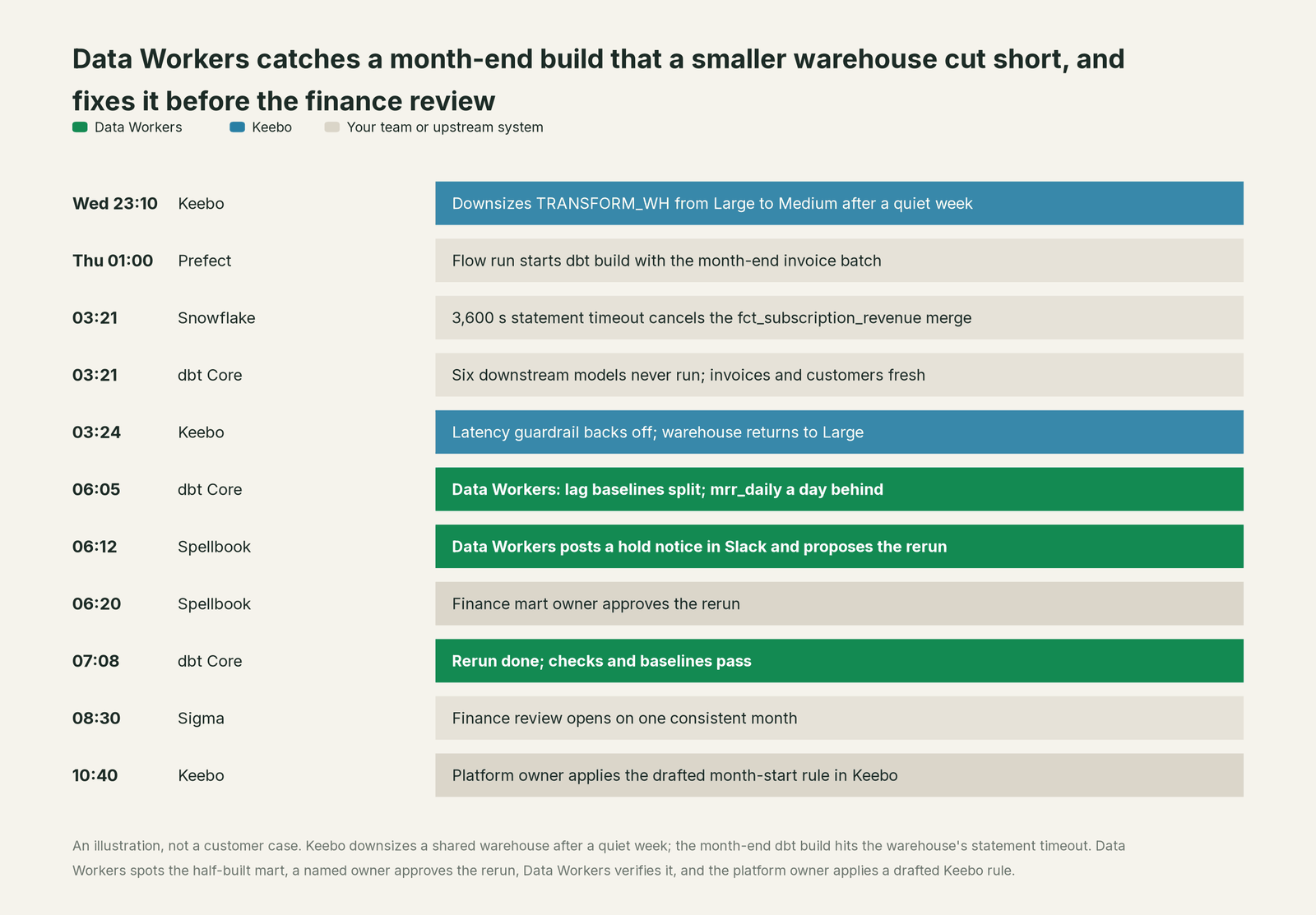
Keebo did what it was built to do. What it could not see was a fixed statement timeout and a month-end batch meeting on the same warehouse, or that the cancelled statement sat in the middle of a dbt graph whose top half had already refreshed. The half-built mart is a data problem, and it was found, fixed and verified before the finance review, with the warehouse rule changed by the person who owns it.
| Job | What Keebo does | What Data Workers does |
|---|---|---|
| Warehouse settings | Tunes size, auto-suspend and cluster count within your guardrails | Drafts the guardrail change (a custom rule or a dedicated warehouse) for the platform owner |
| Performance protection | Backs off when latency, queue time or queued queries cross your thresholds | Checks the data: which models ran, which did not, which dashboards read mixed dates |
| Visibility | Workload Intelligence shows spend, health and performance per warehouse | Traces Snowflake credits to the query and dbt model through query tags |
| The fix | Returns the warehouse to its original size | Proposes the rerun with its blast radius and queues it through Prefect after the owner approves |
| Verification | The next optimization cycle | Checks the rebuilt models and confirms the lateness baselines are back in range |
| The record | Optimizations page and audit log | A receipt: cause, approver, what it touched, how it was verified, its model cost |
Why doesn't Keebo just do this itself?
Because Keebo made a sound design choice and sticks to it. It connects through a dedicated Snowflake user and role with read-only permissions, works from performance metadata, and "does not rewrite or modify your queries; it optimizes the warehouse they run on". A tuner that stays out of the query path is easy for a security team to approve and adds no latency. Its guardrails are performance signals, the right signals for deciding how big a warehouse should be right now.
The data side needs the opposite posture. To know that mrr_daily is a day behind while dim_customer is current, you keep baselines on the tables themselves. To know the Finance Weekly workbook will show a false dip, you need dbt lineage and notes on how the workbook computes its numbers. To fix it, you need the person who owns the finance mart, an approval, a rerun through the orchestrator and a check afterwards. That work crosses Snowflake, dbt, Prefect and Sigma, carries the liability of changing production data, and needs a receipt. It is a different product, and it is the one Data Workers is.
Every tool owns a slice. Data Workers covers the whole lifecycle
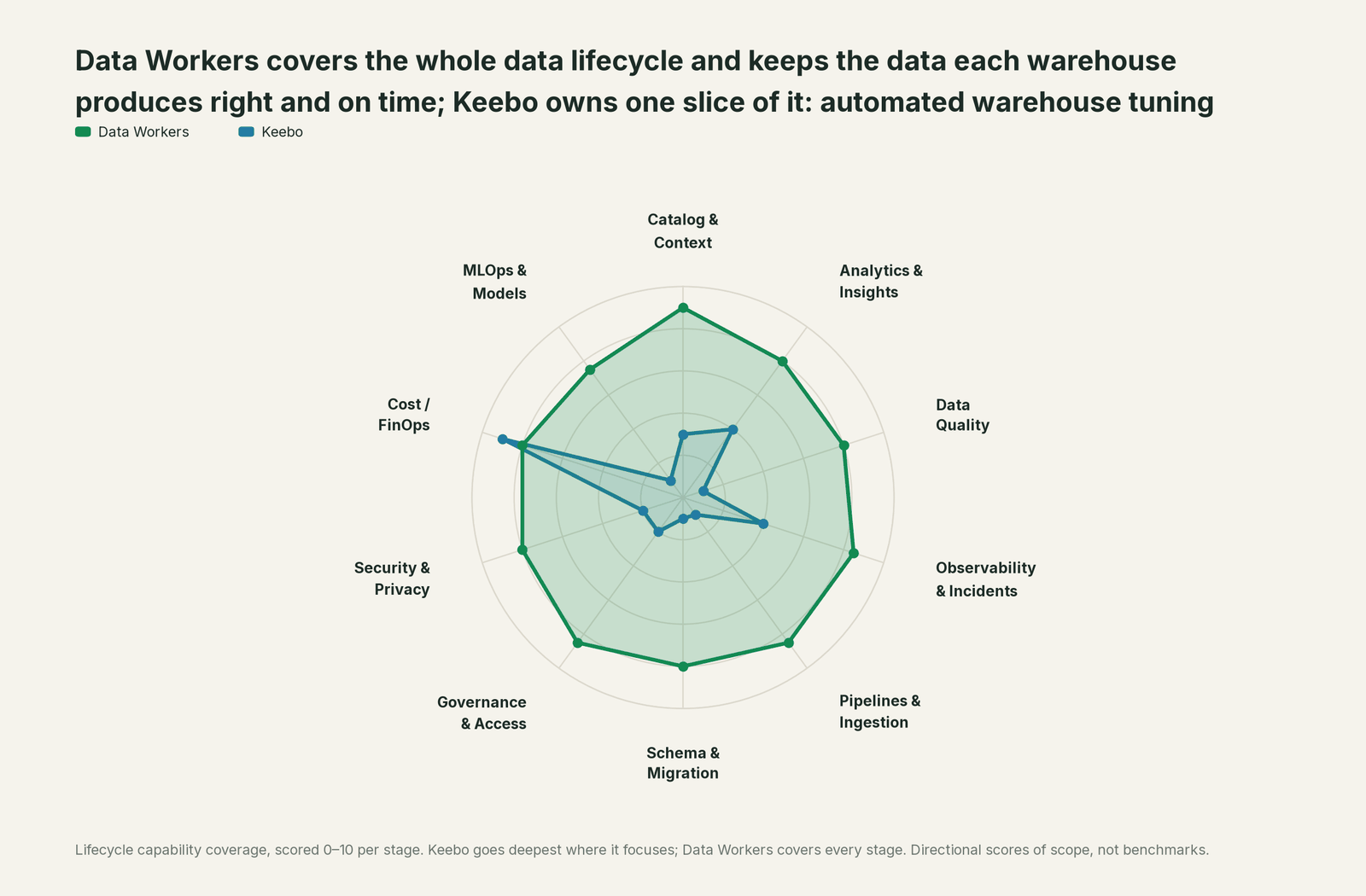
Keebo owns automated warehouse tuning and owns it well. Each point tool adds another console, another contract and another handoff. Data Workers covers the whole lifecycle with one context, one approval flow and one audit trail, and builds on Keebo where it already runs.
| Stage | Data Workers | Keebo | Why we scored it this way |
|---|---|---|---|
| Catalog & Context | 9 | 3 | Workload Intelligence reports warehouse spend and health; no catalog of tables or owners. Data Workers keeps one governed context graph of definitions, owners and lineage. |
| Analytics & Insights | 8 | 4 | Dashboards show spend, savings and warehouse performance. Data Workers answers data questions from governed definitions. |
| Data Quality | 8 | 1 | Metadata only by design; never sees result data. Data Workers runs checks on the tables and keeps baselines on the metrics the team records. |
| Observability & Incidents | 8.5 | 4 | Guardrails watch latency and queues. Data Workers turns a late or partial run into a diagnosed incident with a fix and a receipt. |
| Pipelines & Ingestion | 8.5 | 1 | Tunes the warehouse a pipeline runs on and leaves the pipeline alone. Data Workers reads the orchestrator run and queues the approved rerun. |
| Schema & Migration | 8 | 1 | Does not alter tables, clustering keys or queries. Data Workers reads dbt manifest changes and scores their blast radius. |
| Governance & Access | 8.5 | 2 | Four user roles govern who can change Keebo settings. Data Workers routes every data change to a named owner, with expiry and escalation. |
| Security & Privacy | 8 | 2 | A read-only user and metadata-only access keep Keebo out of the data. Data Workers keeps a receipt on every data change. |
| Cost / FinOps | 8 | 9 | Keebo's home stage: size, auto-suspend and cluster count tuned around the clock on Snowflake, with Databricks SQL warehouses in public beta. Data Workers traces Snowflake credits to the dbt model and drafts the fix for its owner. |
| MLOps & Models | 7.5 | 1 | No model or feature work. Data Workers keeps the tables under your models checked. |
Keebo leads where it should. Directional scores of scope, not benchmarks. For Data Workers on the warehouse itself, read Data Workers on Snowflake.
How Keebo and Data Workers work together
People ask questions in Claude Code or another MCP client and get approval requests in Slack. Spellbook Data Catalog (in preview) is where the data team looks: each proposed change, who approved it and how to roll it back. Underneath, Data Context Wizard keeps one governed context graph across Snowflake, dbt, Prefect and Sigma, the Data-Agents Swarm does the work with 20+ specialist agents, and the Autonomous Data-Conductor runs each fix end to end (detect, diagnose, fix, review, verify, remember) behind per-domain approvals, receipts and rollback.
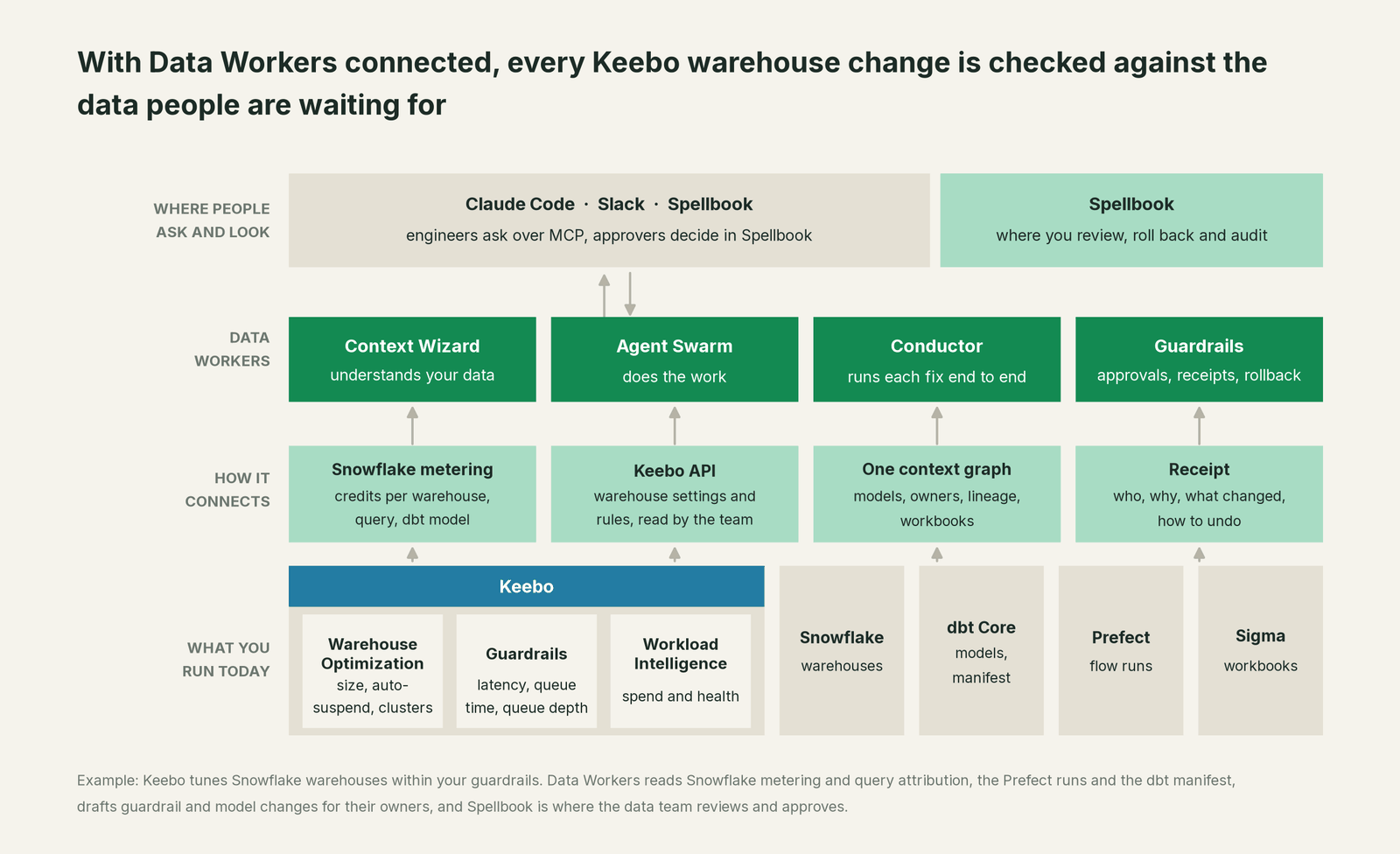
What Data Workers reads natively. With your Snowflake credentials, the Cost Savings & Data Cleanup agent reads warehouse metering and traces credits to the query and the dbt model, project and run behind them, wherever dbt sets query tags, so a Keebo change shows up per model, not only per warehouse. The orchestration agents read Prefect flow-run and task-run states (and Airflow DAG runs) and queue approved reruns with trigger_prefect_flow. The Data Context & Catalog agent maps what a model feeds with trace_cross_platform_lineage and blast_radius_analysis, from the dbt manifest and the context graph, where the team's notes record which workbooks read which models. The Data Quality agent runs run_quality_check on Snowflake tables, and monitor_metrics keeps baselines on what the team tracks, such as the lag between a mart's newest row and the clock.
Keebo, over its API. Data Workers connects to Keebo over its Public API today: OAuth2 client credentials, endpoints to read warehouses and their settings, and endpoints to update settings and default rules. Data Workers never changes Keebo settings; it drafts the rule and the platform owner applies it in Keebo.
# Example: Data Workers agents in Claude Code, from a clone of the open-source repo
# (path documented at /opensource-docs/client-setup/)
claude mcp add --scope user dw-catalog -- "$(pwd)/start-agent.sh" dw-context-catalog
claude mcp add --scope user dw-quality -- "$(pwd)/start-agent.sh" dw-quality
claude mcp add --scope user dw-incidents -- "$(pwd)/start-agent.sh" dw-incidents
claude mcp add --scope user dw-connectors -- "$(pwd)/start-agent.sh" dw-connectors

# Example: read a warehouse's Keebo settings with Keebo's documented Public API
TOKEN=$(curl -s -X POST https://auth.keebo.ai/oauth/token -H "Content-Type: application/json" \
  -d '{"client_id":"'"$KEEBO_CLIENT_ID"'","client_secret":"'"$KEEBO_CLIENT_SECRET"'","audience":"https://kwo.api.keebo.ai/v1","grant_type":"client_credentials"}' \
  | jq -r .access_token)
curl -s -H "Authorization: Bearer $TOKEN" \
  "https://kwo.api.keebo.ai/v1/accounts/$SNOWFLAKE_ACCOUNT_ID/warehouses/TRANSFORM_WH"
Ask "why is mrr_daily behind dim_customer?" and the client gets the lagging models, the failed flow run, the noted workbook and a proposed rerun from Data Workers, and the Keebo settings from the API call. For a shared endpoint, the Data Workers remote server takes an API key (bearer) or OAuth tokens from your identity provider, verified through JWKS.
One partial build, L0 to L4, set per domain.

- •L0 manual. An analyst notices the dip at 8:40 and the data team spends the morning finding the cancelled merge.
- •L1 observe. Data Workers posts the diagnosis at 06:05: which models are behind, which run failed, which workbook is affected. Nothing changes.
- •L2 propose. Data Workers proposes the rerun and drafts the Keebo rule. Nothing runs until the mart owner approves in Spellbook.
- •L3 act reversibly. For change classes with a proven record, such as rerunning failed finance models from the point of failure, Data Workers queues the rerun, verifies it and records the receipt.
- •L4 autonomous. For a scoped domain, Data Workers reruns and verifies before the business day starts; Keebo rule changes still go to the platform owner.
For the safety model, read is it safe to let AI agents change production data, how approvals work and autonomy levels L0 to L4. On where data lives: the agents run in your infrastructure with your credentials, your data stays in your systems, and the hosted Conductor sees workflow metadata only.
What changes for your team
Keebo took warehouse settings off the platform team's plate. Data Workers takes the data consequences of those settings off the data team's.
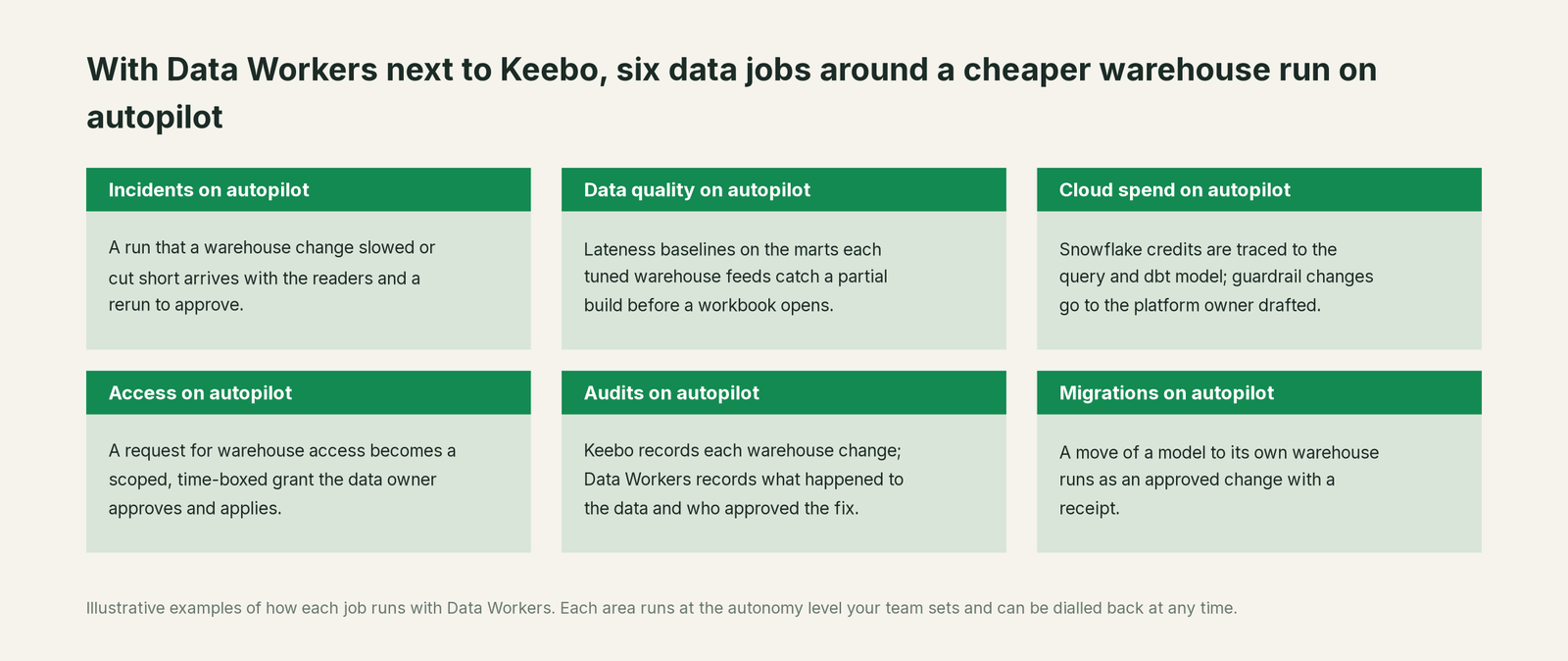
- •Incidents. A run that a warehouse change slowed or cut short arrives with the readers and a rerun to approve.
- •Data quality. Lateness baselines on the marts each tuned warehouse feeds catch a partial build before a workbook opens.
- •Cloud spend. Snowflake credits are traced to the query and dbt model; guardrail changes go to the platform owner drafted.
- •Access. A request for warehouse access becomes a scoped, time-boxed grant the data owner approves and applies, with the expiry on record.
- •Audits. Keebo records each warehouse change; Data Workers records what happened to the data and who approved the fix.
- •Migrations. Moving a heavy model to its own warehouse becomes an approved change: Data Workers drafts the warehouse settings and the dbt
snowflake_warehouseconfig as a diff, and the owners apply them.
See Data Workers for data platform engineers, Data Workers for FinOps leads and who owns the agents.
Keep Keebo, or consolidate?
Keep Keebo if you love it; Data Workers works with it from day one. Many teams consolidate once Data Workers runs that slice too.
For warehouse tuning, keep Keebo: deciding how big a warehouse should be, all day and all night, is its whole job. What teams consolidate is the work around it: the scripts that watch marts for lateness, the separate observability contract, the catalog nobody keeps current and the spreadsheet of who owns which model. The neighbours take different paths: SELECT pairs automated savings with dbt cost attribution, Espresso AI routes and rewrites queries, and Revefi runs DBA work with an agent. For a survey, see Keebo alternatives and Snowflake cost optimization with AI agents. Weighing a build? Read build it ourselves with Claude Code and MCP servers, and for every connector category, Data Workers integrations.
The case for your CFO
The outcome: you bought Keebo to spend less on Snowflake without anyone hand-tuning warehouses. Data Workers protects that decision by making sure the cheaper warehouse never costs you a wrong number. Month-end figures arrive complete, and when a tuned warehouse cuts a run short, the fix is approved and verified before the business reads the report.
The risk story is plain. At L1 Data Workers only reads; at L2 it changes nothing until a named person approves; at L3 it applies changes it can undo. An unanswered approval request expires and escalates, never auto-grants. No agent can promote its own work. Every change carries a receipt: cause, change, approver, what it touched, how it was verified and its model cost. An org-wide stop halts all autonomous dispatch. Data Workers never resizes a warehouse or edits Keebo's rules. Zero migration: Keebo, Snowflake, dbt, Prefect and Sigma stay where they are.
Why now: warehouse tuning has moved from a quarterly review to a continuous loop, so changes land overnight, before the data team hears about them. The first win is read-only: every Keebo-tuned warehouse behind the finance mart gets lateness baselines and a diagnosis when a run comes up short. For the numbers, see the ROI of agentic data operations; for pricing, why there is no usage meter.
The sentence to repeat upstairs: "Keebo cuts what the warehouse costs; Data Workers makes sure what it produces is still right, with an owner's approval on every fix."
Getting started
Start with a pilot. Pick one domain on a Keebo-tuned Snowflake warehouse, such as the finance mart behind the month-end review, connect Data Workers to Snowflake, dbt and your orchestrator, record lateness baselines on the marts that matter, and run at L1 so every partial or late build gets a diagnosis and a blast radius. Then turn on L2: reruns with the mart owner's approval and drafted Keebo rules for the platform owner. The pilot path and plans are on the pricing page, and the pilot is credited in full against the first year.
FAQ
Does Data Workers resize or suspend warehouses like Keebo? No. Warehouse settings are Keebo's job and your platform team's. Data Workers drafts a warehouse setting or a Keebo custom rule when the data needs one, and the owner applies it. It never runs a resize, a suspend or a query cancel.
Does Data Workers have a Keebo connector? Data Workers connects to Keebo over its Public API today. Its native reads are on the data side: Snowflake metering and per-query attribution, the dbt manifest, orchestrator runs and checks on the tables themselves.
Keebo backs off when performance degrades. Why isn't that enough? Backoff protects query performance from then on. It cannot bring back a statement a timeout already cancelled, or tell you that half a dbt graph refreshed and half did not. That is a data question: which models are behind, who reads them and what has to rerun.
Can Data Workers show what a Keebo change did to a model's Snowflake credits? Where dbt sets query tags, Data Workers traces credits to the query and the dbt model, project and run behind them, so you can compare a model's credits before and after a warehouse change. Keebo's dashboards report its optimization actions and savings.
We also run Databricks SQL warehouses with Keebo. What does Data Workers do there? Keebo's Databricks optimization is in public beta. Data Workers traces what a late model feeds from the dbt manifest and the context graph, queues approved reruns through your orchestrator and routes fixes to their owners; checks on the Databricks tables stay with the owner's tests.
Does Keebo or Data Workers see our data? Keebo works from performance metadata through a read-only user. Data Workers runs in your infrastructure with your credentials, reads Snowflake usage metadata and runs the checks you configure; your data stays in your systems, and the hosted Conductor sees workflow metadata only.
Sources
- •Keebo, home page (Warehouse Optimization, Workload Intelligence, agentic AI, metadata only), https://keebo.ai/ (checked Oct 3, 2026)
- •Keebo, News (CEO appointment Mar 3, 2026), https://keebo.ai/news/ (checked Oct 3, 2026)
- •Keebo, Warehouse Optimization (levers, guardrails, backoff, no query rewriting), https://keebo.ai/platform/warehouse-optimization/ (checked Oct 3, 2026)
- •Keebo, Databricks Optimization (SQL Serverless warehouses), https://keebo.ai/solutions/databricks-optimization/ (checked Oct 3, 2026)
- •Keebo Docs, Warehouse Optimization for Snowflake (read-only user and role), https://docs.keebo.ai/warehouse-optimization/snowflake/ (checked Oct 3, 2026)
- •Keebo Docs, Warehouse Optimization for Databricks (preview), https://docs.keebo.ai/warehouse-optimization/databricks/ (checked Oct 3, 2026)
- •Keebo Docs, Snowflake Optimization Fine-Tuning (aggressiveness, backoff criteria, defaults, custom rules), https://docs.keebo.ai/warehouse-optimization/snowflake-configuration (checked Oct 3, 2026)
- •Keebo Docs, Snowflake Audit Log (settings changes by users), https://docs.keebo.ai/warehouse-optimization/snowflake-audit-logs (checked Oct 3, 2026)
- •Keebo Docs, User Management (four roles), https://docs.keebo.ai/platform/user-management (checked Oct 3, 2026)
- •Keebo Docs, Release Notes (Databricks public beta; Optimizations page), https://docs.keebo.ai/product-updates/ (checked Oct 3, 2026)
- •Keebo Docs, Public API (OAuth2 client credentials, warehouse and default-rule endpoints), https://docs.keebo.ai/platform/public-api (checked Oct 3, 2026)
- •Data Workers open-source repository, https://github.com/DataWorkersProject/dataworkers-claw-community (checked Oct 3, 2026)
- •Data Workers client setup guide, https://dataworkers.io/opensource-docs/client-setup/ (checked Oct 3, 2026)
- •Data Workers pricing, https://dataworkers.io/pricing/ (checked Oct 3, 2026)