Supplier ESG data, run by agents
Questionnaire answers, CDP responses, certificates and spend sit in separate files under slightly different supplier names. Nobody can say how much of the supply chain is measured, how much is a spend-based estimate and how much is out of date. Here is how Data Workers runs it instead.
Key takeaways
- •The problem today. Questionnaire answers, CDP responses, certificates and spend sit in separate files under slightly different supplier names. Nobody can say how much of the supply chain is measured, how much is a spend-based estimate and how much is out of date.
- •What changes. Agents land every supplier file, match it to the supplier master, and keep coverage, staleness and the estimate-versus-primary flag visible for every supplier.
- •What stays with your people. Supplier outreach stays with procurement. Replacing an estimate with supplier data changes a published number, so the inventory owner approves it.
- •The result. The share of the supply chain that is measured is a number you can state, and every figure keeps the trail back to the response behind it.
The problem today
For most manufacturers and retailers, purchased goods and services is the largest part of the footprint, and it starts as a spend-based estimate. Suppliers then send better data in questionnaires, portal exports, CDP responses and PDF certificates. Each arrives on its own template, for its own reporting period and boundary, under the name the supplier uses for itself. The GHG Protocol Scope 3 Standard separates supplier-specific data from spend-based estimates, but the working files rarely do.
An analyst re-keys the response, guesses which supplier record it belongs to, swaps it into the draft and moves on. The flag that said "estimate" is lost. Three months later a certificate has lapsed, a response covers the wrong year, and the question "what share of Scope 3 is measured?" takes a week to answer. Procurement meanwhile chases the same suppliers with no view of who has already answered.
What changes with Data Workers
Agents land every supplier file as it arrives, match it to the supplier master, and check it against the spend it should explain. Each supplier carries a coverage state: measured, estimated, expired or missing. The team sees the state across the whole base, by tier and category, not as a spreadsheet someone last updated in spring. This sits under the climate and sustainability data playbook, and its inputs feed the datapoints in the regulatory disclosure data playbook. Supplier spend and the supplier master come from the operational side covered in the supply planning and inventory data playbook.
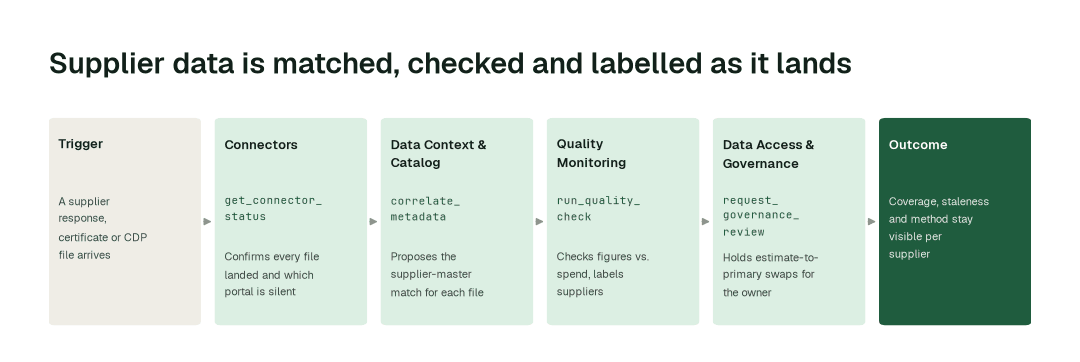
The workflow, step by step
- 1.The Connectors agent calls
get_connector_statusand confirms that every questionnaire export, CDP response file, certificate register and spend extract has landed, and which supplier portal is silent. - 2.The Data Context & Catalog agent calls
correlate_metadataand proposes the supplier-master record for each response and certificate. Ambiguous matches go to the supplier-master owner instead of being guessed. - 3.The Quality Monitoring agent calls
run_quality_checkand checks each figure against the spend it should explain, flags mismatched periods and boundaries, and marks every supplier as measured, estimated, expired or missing. - 4.The Data Access & Governance agent calls
request_governance_reviewand holds each proposed swap from estimate to supplier data for the inventory owner, with the change in the total attached.
The impact metrics we move
- •Supplier response matched to the master: from about 2 days to under 1 h
- •Coverage and staleness view by tier: from about a week to under 1 h
- •Estimate-to-primary swap proposed with its impact: from about 1 day to 2-3 h
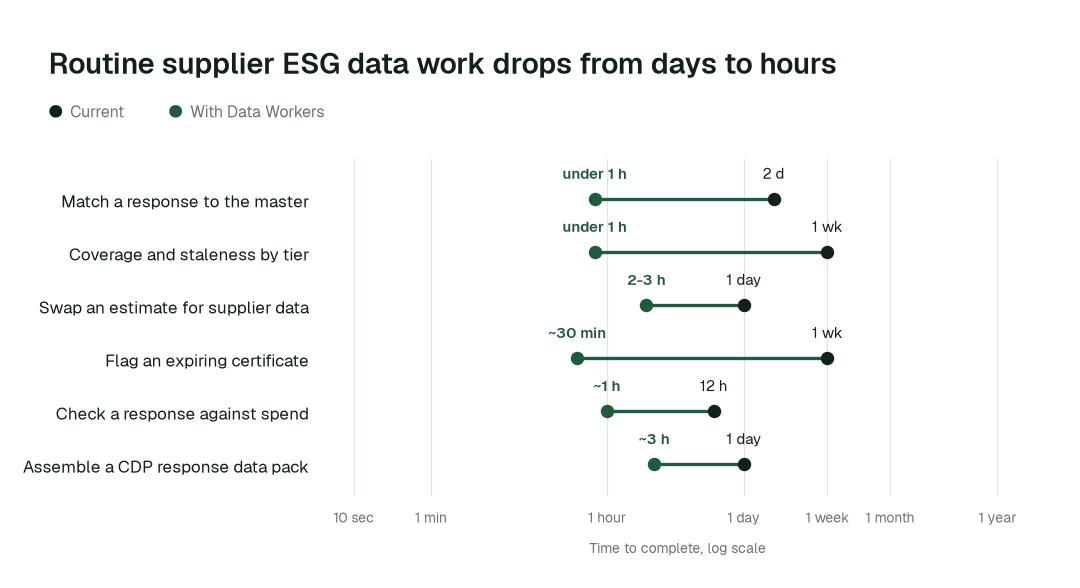
What goes on autopilot
- •Every file is landed, profiled and matched, so a new response is a candidate record the same day it arrives, not an attachment in someone's inbox.
- •Coverage and staleness are measured continuously, so an expiring certificate or a missing tier-one response is flagged before the reporting cycle, and procurement gets a ready list of who to ask.
- •Estimates stay labelled. A line is never silently relabelled as measured, and each supplier keeps its history. The staleness of supplier data is a tracked state, not a surprise, in the same way as freshness on any other feed.
- •Every figure traces to the response, certificate or spend line behind it, with a tamper-evident audit trail of who changed what.
Where your people stay in charge
Procurement owns every conversation with a supplier: the request, the reminder and the escalation. Agents prepare the list and the evidence; they do not contact suppliers. Replacing an estimate with supplier data, an uncertain supplier match and any change to a published figure go to a named approver, usually the inventory owner, with before-and-after numbers. Supplier-submitted data and spend values are scoped by role. Everything starts at L1, observing only, and autonomy rises only on evidence. The wider group of teams is on the ESG and sustainability data teams landing page. For the operational side of supplier data, see supplier performance data and spend and vendor analytics, which share the same supplier-name problem.
The pilot
- •Scope. Supplier matching, coverage and staleness for the top supplier tiers by spend, at L2.
- •First week. Agents run at L1, observing only, and show the matches, gaps and swaps they would have proposed, with receipts.
- •By week two. Landing, matching and the coverage view run on their own; any change of method stays with a named approver.
- •At day 30. We review the impact metrics against your baseline:
- •Supplier response matched to the master: from about 2 days to under 1 h
- •Coverage and staleness view by tier: from about a week to under 1 h
- •Estimate-to-primary swap proposed with its impact: from about 1 day to 2-3 h
- •Cost. Start with a pilot ($7,500 one-time, credited in full against the first year). Scale is from $1,000 a month and Enterprise from $3,000 a month, billed annually, with unlimited seats, no usage meter and no markup on model spend. See pricing.