Agentic supply planning and inventory data: a guide for supply planning data teams
This guide explains how supply planning data teams adopt agents for their data back office. It covers the shift underway, the use cases that matter most, charts of the impact, how the agents work together, and a month-by-month path to autonomy.
Key takeaways
- •Who this is for. Teams that feed demand and supply planning: ERP and WMS extracts, supplier data, inventory positions and forecast inputs.
- •The problem today. Planners ordering against wrong inventory after ERP changes, supplier files by email and hand-built S&OP packs.
- •What changes. ERP changes are detected at the boundary, so planners never see doubled or missing inventory. Inventory is tied to the ledger daily, so gaps are fixed before the plan runs.
- •What stays with your people. Planning and inventory-of-record tables: these feed financial statements, so the planning data lead approves.
- •The result. Planning meetings that start from verified numbers.
The PRD for agentic supply planning data teams
This is the requirements document we would write with you for your team. Everything below expands on it.
| Who | Supply planning, inventory, procurement and S&OP data teams at manufacturers, distributors and CPG companies |
| The job | Planning tables fresh and tied out before every S&OP cycle. |
| Environment | SAP, Oracle or NetSuite; WMS; supplier portals; Snowflake or Databricks; dbt; planning tools such as Kinaxis, o9 or Blue Yonder. |
| Constraints | Planning and inventory-of-record tables always go to a named approver. Inventory feeds financial statements. |
| Success is measured by | Inventory tie-out: from about a week to 8-15 min; Supplier file landed: from about 2 days to under 1 h; ERP change absorbed: from about a week to hours; catalog upkeep closed autonomously 88% of the time. |
| Owned by | A Head of Supply Chain Data, with domain owners as named approvers. |
| Pilot scope | Daily inventory tie-out at L2. |
What going fully agentic and autonomous means for supply planning data teams
- •Put your data pipeline on autopilot. ERP changes are detected at the boundary, so planners never see doubled or missing inventory.
- •Run the data back office without the busywork. The work that fills the week today moves to agents: planners ordering against wrong inventory after ERP changes, supplier files by email and hand-built S&OP packs.
- •Scale data without scaling headcount. Inventory is tied to the ledger daily and the S&OP pack is built and verified as a routine, so the data you manage grows without the team having to.
- •Get the plumbing off your plate. Planning meetings that start from verified numbers.
Who this is for
Teams that feed demand and supply planning: ERP and WMS extracts, supplier data, inventory positions and forecast inputs. Titles include Senior PM (Data), Supply Chain Data Lead and Planning Data Product Owner.
The shift
Planning cycles are getting shorter and AI forecasting needs cleaner inputs. Every ERP change, supplier file and master-data update can quietly skew inventory and forecasts. Agents keep the planning data fresh, mapped and tied out.
The product you ship
- •Inventory positions by location
- •Supplier lead times and fill rates
- •Forecast inputs and demand signals
- •S&OP data packs
Where the week goes
- •ERP extracts change after upgrades.
- •Supplier files arrive late.
- •Master data drifts.
- •Inventory does not tie to the ledger.
- •Planners rebuild spreadsheets.
Add it up and upkeep is most of the team's week. Here is how a typical week splits today, and once agents own the back office:
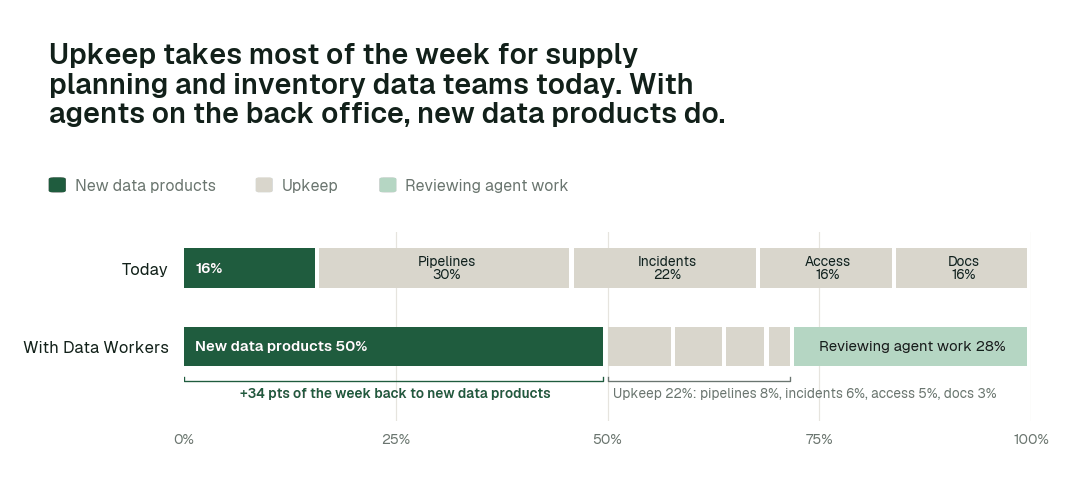
Time spent on new data products moves from 16% of the week to 50%. Most of the rest becomes review: people steer and approve agent work instead of doing it by hand.
Then and now
| Work | Today | With Data Workers |
|---|---|---|
| ERP changes | Broken extracts | Mapped on arrival |
| Supplier files | Chased by email | Landed and profiled |
| Master data | Drifts | Monitored and proposed |
| Inventory tie-out | Monthly | Daily |
| S&OP packs | Manual | Built and verified |
These are the impact metrics we move for supply planning data teams:
- •Inventory tie-out: from about a week to 8-15 min
- •Supplier file landed: from about 2 days to under 1 h
- •ERP change absorbed: from about a week to hours
Across the routine work in this domain:
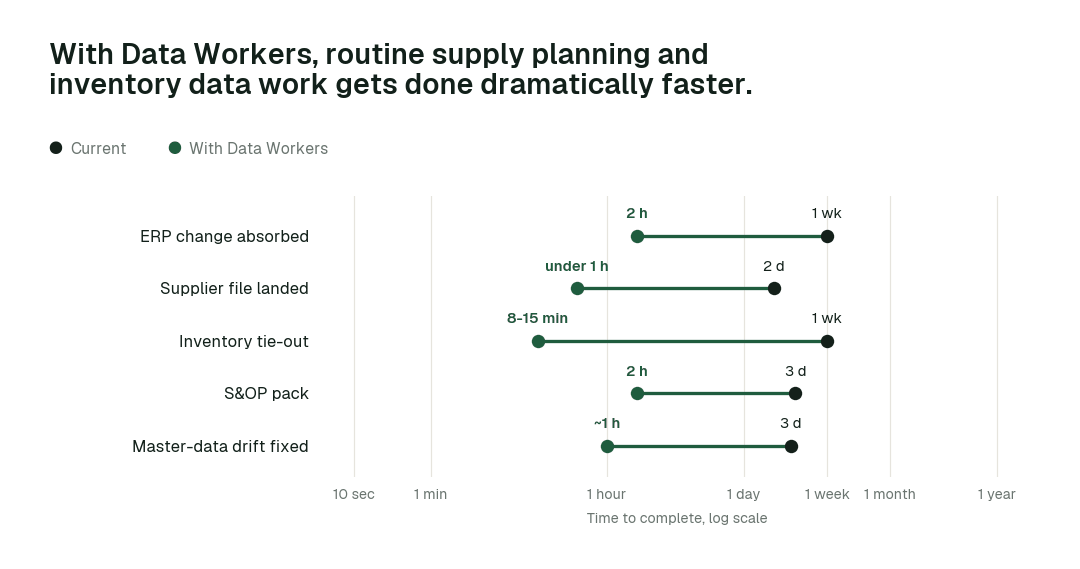
The biggest change is Inventory tie-out: from about a week to 8-15 min.
Use cases, in depth
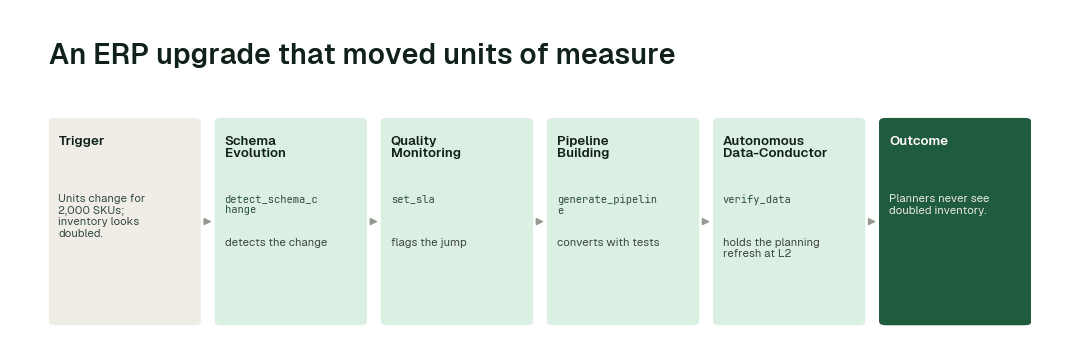
An ERP upgrade that moved units of measure
Today. Units change for 2,000 SKUs; inventory looks doubled.
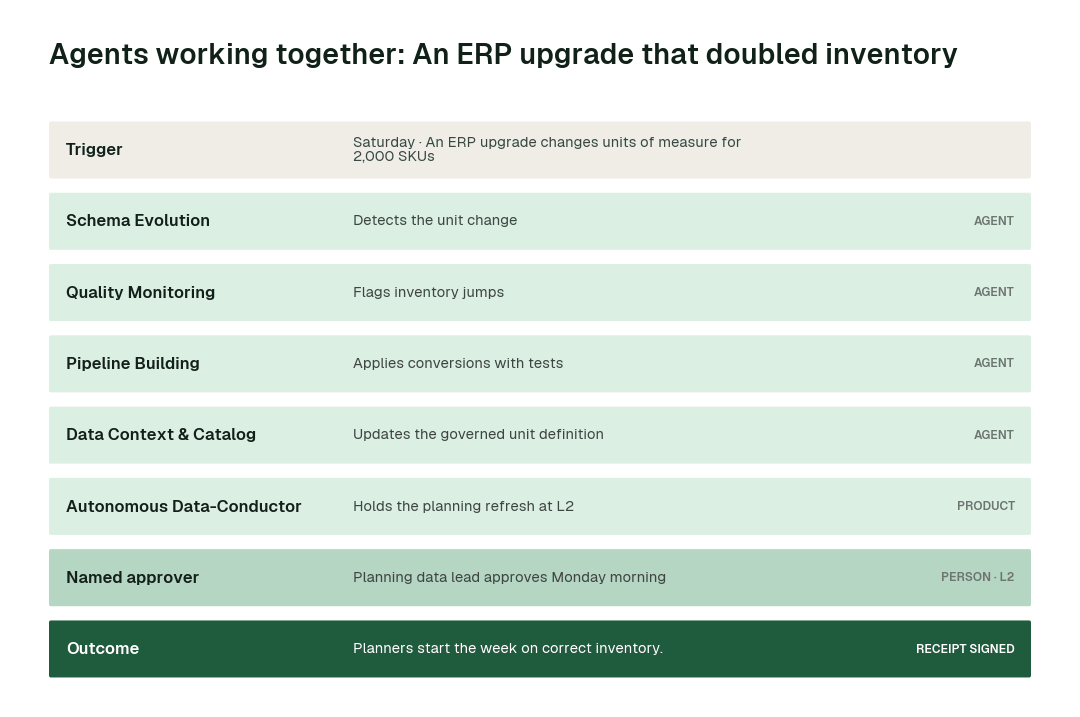
With Data Workers. Schema Evolution detects the change, Quality Monitoring flags the jump, Pipeline Building converts with tests, Conductor holds the planning refresh at L2.
What changes. Planners never see doubled inventory.
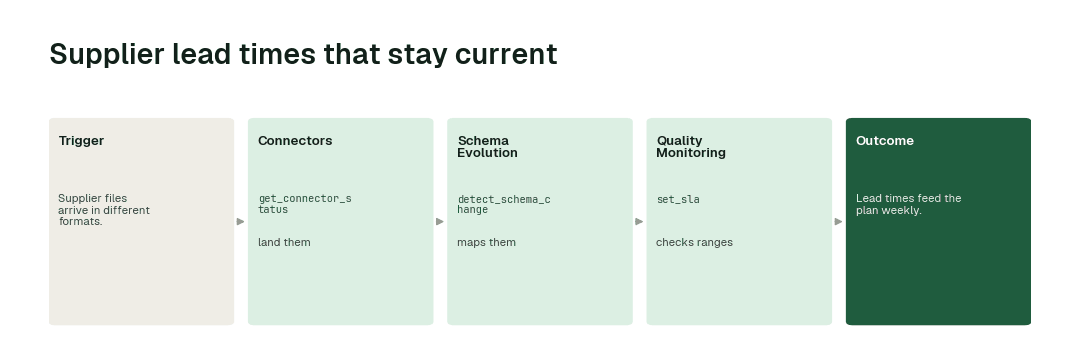
Supplier lead times that stay current
Today. Supplier files arrive in different formats.
With Data Workers. Connectors land them, Schema Evolution maps them, Quality Monitoring checks ranges.
What changes. Lead times feed the plan weekly.
An S&OP pack built and verified
Today. Analysts build the pack by hand every month.
With Data Workers. Autopilot runs it as a routine with tie-outs.
What changes. The meeting starts from verified numbers.
Agents working together: An ERP upgrade that doubled inventory
Minute by minute
Illustrative example. ERP extracts land in Snowflake nightly; planning tables refresh Monday at 06:00.
| Time | Who | What happens |
|---|---|---|
| Sat 02:00 | ERP | Upgrade changes UoM for 2,000 SKUs |
| Sat 02:30 | Schema Evolution agent | detect_schema_change and range checks flag jumps |
| Sat 03:10 | Pipeline Building agent | Conversion diff with tests proposed |
| Mon 05:30 | Spellbook Data Catalog | Planning data lead approves |
| Mon 06:00 | Planning | Tables refresh with correct units |
Without the agents, planners order against doubled inventory.
The agents on the job
| Agent | What it does for you | Tools it calls |
|---|---|---|
| Connectors and Data Ingestion | ERP, WMS and supplier sources | get_connector_status, trigger_airflow_dag, get_dbt_run_history |
| Schema Evolution | ERP and supplier format changes | detect_schema_change, validate_schema_compatibility, generate_migration, rollback_migration |
| Quality Monitoring | Inventory-to-ledger and range checks | set_sla, run_quality_check, get_anomalies, create_quality_tests_for_pipeline |
| Pipeline Building | Planning models and packs | generate_pipeline, validate_pipeline, sandbox_test, deploy_pipeline |
| Data Context & Catalog | Governed SKU, location and unit definitions | trace_cross_platform_lineage, blast_radius_analysis, define_business_rule, generate_documentation |
| Incident Debugging | Traces planning anomalies | diagnose_incident, get_root_cause, prepare_backfill, execute_backfill |
Data Context Wizard keeps one governed graph of definitions, lineage and owners that every agent and person answers from. Autonomous Data-Conductor runs each job from detection to a verified result. Spellbook Data Catalog is where your team approves, audits and rolls back, and asks questions in plain English.
What goes on autopilot
Once a domain has earned it, this work runs on its own, and each item removes a problem your team deals with today:
- •ERP changes are detected at the boundary, so planners never see doubled or missing inventory.
- •Inventory is tied to the ledger daily, so gaps are fixed before the plan runs.
- •The S&OP pack is built and verified as a routine, so analysts stop rebuilding spreadsheets.
Where your people stay in charge
Agents never get blanket access. Each domain has its own autonomy level, set by you, and it only rises when the receipts show the agents are reliable. Everything starts at L1, observing only; reversible upkeep such as reruns, staging fixes, documentation and cleanup is usually first to run on its own.
- •Planning and inventory-of-record tables always goes to a named approver: these feed financial statements, so the planning data lead approves.
- •Planning decisions: these stay with planners.
Once a deployment has matured, here is how that ladder plays out across task classes:
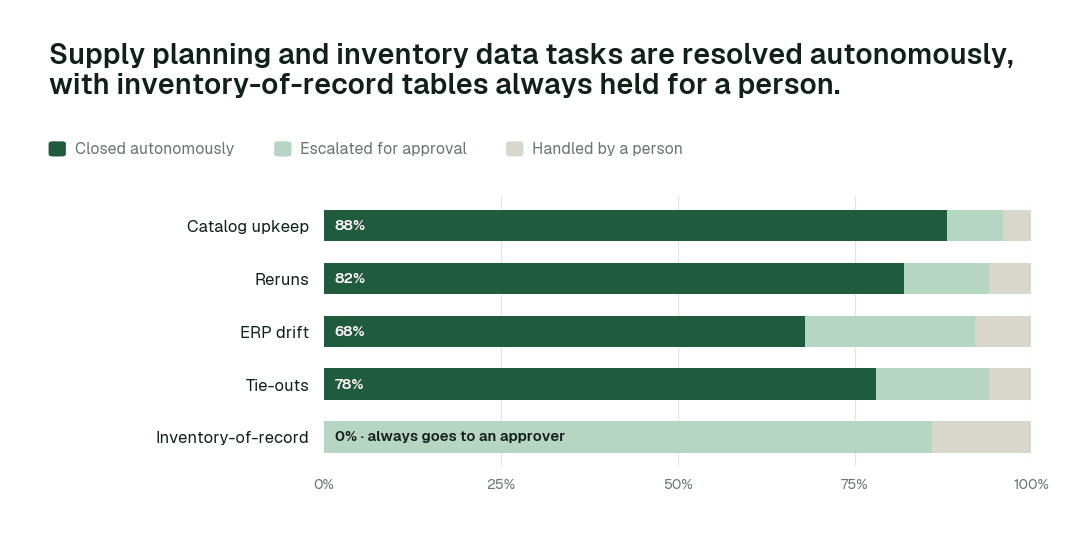
Catalog upkeep closes autonomously 88% of the time. For Inventory-of-record, autonomous closure is 0% by design.
What happens when an agent is wrong
- •At L2 propose, nothing changes until a named person approves. The proposal shows the full diff, the blast radius and how to roll it back. Unanswered requests expire and escalate.
- •At L3 act, reversibly, every change keeps a rollback point, and Conductor verifies the downstream number after the change. If verification fails, the change is reversed and the domain drops a level.
- •No agent approves or promotes its own work. Autonomy only grows on evidence, per repair class, and repeated errors shrink scope automatically.
- •One org-wide stop halts all autonomous dispatch, and every action lands in a hash-chained audit trail you can export with generate_audit_report.
How it fits your stack
Data Workers connects to what you already run: SAP, Oracle or NetSuite; WMS; supplier portals; Snowflake or Databricks; dbt; planning tools such as Kinaxis, o9 or Blue Yonder. Each agent is an MCP server, so the same agents work inside Claude Code, Cursor or Codex and in Slack or Teams through Spellbook. Nothing migrates.
- •Runs in your infrastructure with your credentials and your model key. The hosted Autonomous Data-Conductor sees workflow metadata only, never rows.
- •Uses the access you already govern. Agents act under scoped service identities and your existing roles; every grant goes through provision_access and is logged.
- •Proposes changes as diffs in your dbt project, orchestrator and warehouse, with blast radius, tests and a rollback point, and applies them only at the autonomy level you set for that domain.
- •Open-source core. The Apache-2.0 community edition ships 11 agents and 160+ MCP tools, so your engineers can read exactly what the agents call.
Governance and regulation
Inventory feeds financial statements. Data Workers keeps lineage, tie-outs and approvals on inventory-of-record tables.
Data Workers doesn't make you compliant; your controls, people and assessors do. It supplies controls and evidence wherever agents touch data. Not legal advice.
The alternatives supply planning data teams weigh
Build it yourselves. A strong team can wire a coding agent to MCP servers for the warehouse and dbt. The work is everything around it: routing approvals to the right owner, blast radius, rollback, receipts, and current context about every other system.
Observability, catalogs and point tools. Observability alerts, catalogs document, and quality tools test. Data Workers takes their signals, diagnoses, proposes the fix, verifies it and leaves the receipt.
Platform-native agents. Snowflake made its managed MCP server and Cortex Agents generally available on Nov 4, 2025, and Databricks made Genie One generally available on Jun 16, 2026. They are excellent inside their platform; this work crosses the source systems, orchestrator, warehouse and BI, and Data Workers works across all of them.
In this space specifically. Planning platforms plan; Data Workers keeps the data feeding them correct.
The case for your CTO
What this replaces. Planners ordering against wrong inventory after ERP changes, supplier files by email and hand-built S&OP packs.
What your team gets back. Planning meetings that start from verified numbers.
Integration effort. Connecting is configuration, not a migration. The agents attach over MCP to the warehouse, orchestrator, dbt project and source systems you already run, under the roles you already govern, inside your own infrastructure. Your engineers can read every tool the agents call in the open-source core.
Risk and control. Autonomy is set per domain. Everything starts at L1, observing only; reversible work moves up only when the receipts justify it; planning and inventory-of-record tables stay at L2 with a named approver; and one org-wide stop halts all autonomous work.
Why now. AI forecasting magnifies input errors.
The first win. Daily inventory tie-out at L2. The pilot below lays out the scope, what you see each week and the cost.
The climb: from assisted to autonomous to agentic
Our thesis is that the data platform climbs the way analytics did, in stages, and that the hard part of data work was never knowing what to do but doing it. For supply planning data teams, the climb looks like this:
- •Assisted. Agents work alongside your team. They read the whole stack, show what needs doing and propose every fix with a receipt; planning and inventory-of-record tables always go to a named approver.
- •Autonomous, under your governance. Routine work runs on its own: eRP changes are detected at the boundary, inventory is tied to the ledger daily, and the S&OP pack is built and verified as a routine. Your team governs the agents instead of doing the upkeep.
- •The agentic enterprise. Planning will run on continuously verified data, and S&OP meetings will start from numbers no one questions. Supply chain data teams will move from extract maintenance to forecasting products.
You choose the altitude, every step is visible and reversible, and the pilot below is the first rung.
The pilot: how supply planning data teams start
The pilot is how your team proves the value on its own data before committing.
- •What we connect. SAP, Oracle or NetSuite; WMS; supplier portals; Snowflake or Databricks; dbt; planning tools such as Kinaxis, o9 or Blue Yonder, over MCP, inside your infrastructure. Nothing migrates.
- •Scope. Daily inventory tie-out at L2.
- •First week. Agents run at L1 across the scoped domain. They map every pipeline, definition and lineage path and show the fixes they would have made, with receipts, so your team sees the value before anything changes.
- •By week two. ERP changes are detected at the boundary and inventory is tied to the ledger daily start running on reversible work. Planning and inventory-of-record tables stay at L2 with a named approver.
- •At day 30. We review the impact metrics against your baseline:
- •Inventory tie-out: from about a week to 8-15 min
- •Supplier file landed: from about 2 days to under 1 h
- •ERP change absorbed: from about a week to hours
- •the share of catalog upkeep closed autonomously, targeting 88% as the deployment matures
- •What you decide. Whether to expand to the next domain. The pilot fee is credited in full against the first year.
- •Cost. Start with a pilot ($7,500 one-time, credited in full against the first year). Scale is from $1,000 a month and Enterprise from $3,000 a month, billed annually, with unlimited seats, no usage meter and no markup on model spend. See pricing.
The pilot is the start of a longer curve:
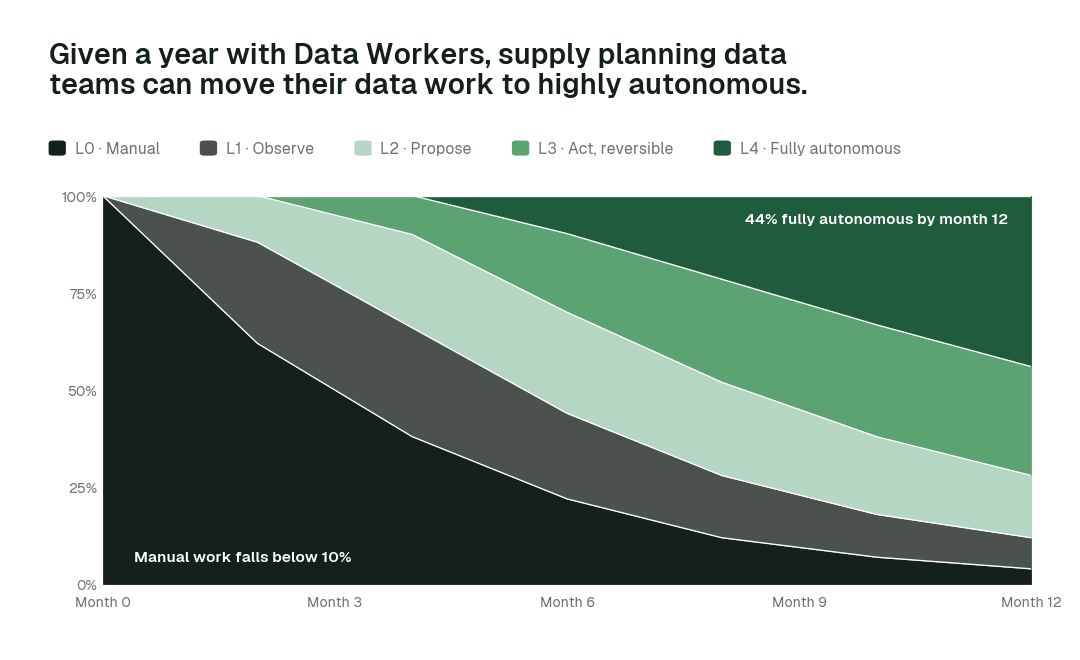
By month 12, more than 44% of agent actions run fully autonomously while inventory-of-record tables stay with a named approver.
FAQ
Does it work with SAP? Through extracts and APIs.
Can it change inventory? Inventory-of-record is L2.
Does it help S&OP? It builds and verifies the pack.
Where do the agents run? In your infrastructure, with your credentials and model key. The hosted Conductor sees workflow metadata only.
Do we have to migrate anything? No. Your warehouse, dbt project, orchestrator, catalog and BI stay where they are.
Sources
- •Keurig Dr Pepper and Moët Hennessy data PM listings (Glassdoor): https://www.glassdoor.com/Job/product-management-cpg-jobs-SRCH_KO0,22.htm
- •Data Workers pricing: https://dataworkers.io/pricing/
- •Data Workers open-source repository (tool registrations): https://github.com/DataWorkersProject/dataworkers-claw-community
- •Snowflake, managed MCP server and Cortex Agents GA release note (Nov 4, 2025): https://docs.snowflake.com/en/release-notes/2025/other/2025-11-04-cortex-agents-mcp
- •Databricks, Genie One launch (Jun 16, 2026): https://www.databricks.com/company/newsroom/press-releases/databricks-launches-genie-one-all-new-agentic-coworker-every-team