Best practices for agentic supply planning and inventory data: a field guide for supply planning data teams
How supply planning data teams move their data back office to agents, practice by practice: the state of the space, the old world and the new, what the agents do step by step, how to set autonomy, who owns what, and how to start.
Planning cycles are shorter and AI forecasts amplify bad inputs.
Keeping planning data fresh and tied out is repeatable work.
The state of the space
Teams that feed demand and supply planning: ERP and WMS extracts, supplier data, inventory positions and forecast inputs. Titles include Senior PM (Data), Supply Chain Data Lead and Planning Data Product Owner.
Planning cycles are getting shorter and AI forecasting needs cleaner inputs. Every ERP change, supplier file and master-data update can quietly skew inventory and forecasts. Agents keep the planning data fresh, mapped and tied out.
The old world
An ERP upgrade doubles inventory for 2,000 SKUs; planners order against it on Monday.
It is rarely one failure. Three patterns repeat:
- •An ERP upgrade that moved units of measure. Units change for 2,000 SKUs; inventory looks doubled.
- •Supplier lead times that stay current. Supplier files arrive in different formats.
- •An S&OP pack built and verified. Analysts build the pack by hand every month.
The new world
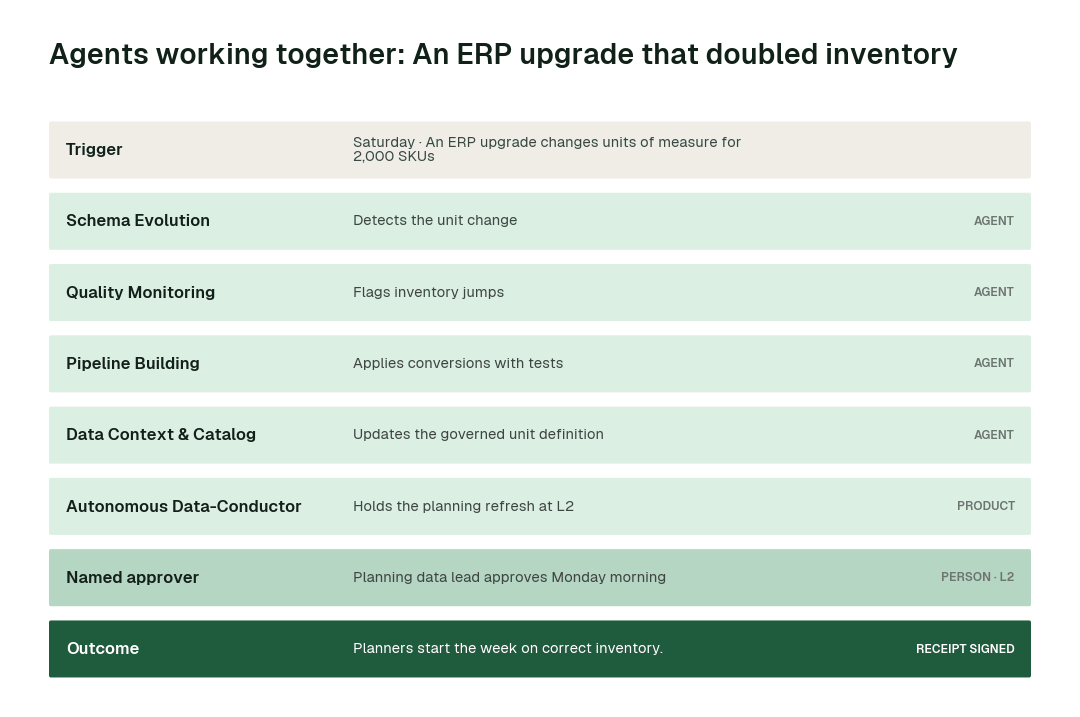
The unit change was caught Saturday, conversions approved Monday at 05:30, and planners saw correct inventory.
Here is that new world as a chain of hand-offs between agents:
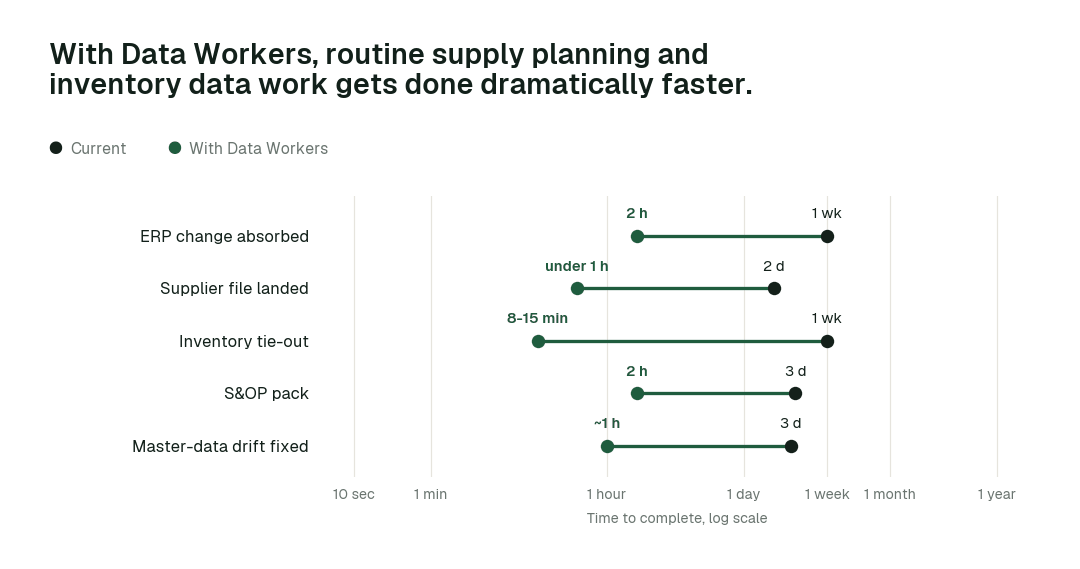
These are the impact metrics we move:
- •Inventory tie-out: from about a week to 8-15 min
- •Supplier file landed: from about 2 days to under 1 h
- •ERP change absorbed: from about a week to hours
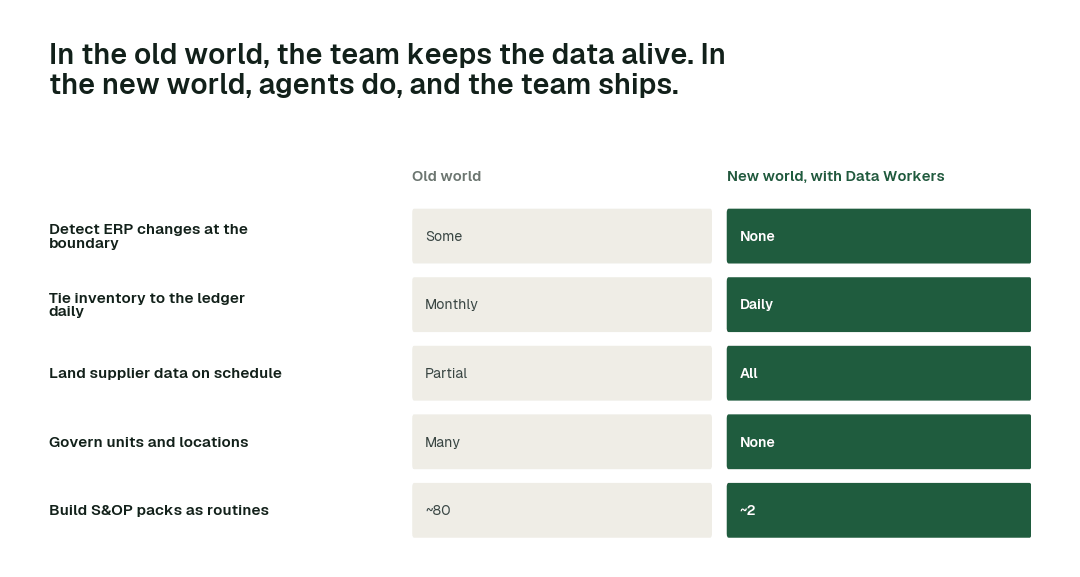
The rest of this report walks through the 5 practices that make that possible. At a glance:
The practices, one by one
1. Detect ERP changes at the boundary
Upgrades move numbers.
Why it is harder than it looks. ERP upgrades change units, codes and fields quietly.
The old world. Found in planning.
The new world. detect_schema_change.
What the agents do, step by step:
- 1.The Schema Evolution agent calls
detect_schema_changeand detects the change. - 2.The Quality Monitoring agent calls
get_anomaliesand flags jumps. - 3.The Pipeline Building agent calls
validate_pipelineand tests conversions.
In practice. Caught Saturday.
What to measure. ERP breaks reaching planners.
2. Tie inventory to the ledger daily
Monthly is too late.
Why it is harder than it looks. Inventory and the ledger drift by location and timing.
The old world. Monthly.
The new world. Daily tie-out.
What the agents do, step by step:
- 1.The Quality Monitoring agent calls
run_quality_checkand ties daily. - 2.The Incident Debugging agent calls
get_root_causeand explains gaps. - 3.The Autonomous Data-Conductor calls
request_governance_reviewand escalates.
In practice. Gaps found same day.
What to measure. Days inventory ties.
Practices like these compound. Across the routine work they cover:
3. Land supplier data on schedule
Lead times drive the plan.
Why it is harder than it looks. Suppliers send data in every format.
The old world. Email.
The new world. Connectors and SLAs.
What the agents do, step by step:
- 1.The Data Ingestion agent calls
get_connector_statusand lands files. - 2.The Schema Evolution agent calls
generate_migrationand maps formats. - 3.The Quality Monitoring agent calls
set_slaand tracks timeliness.
In practice. Weekly lead times.
What to measure. Supplier files on time.
4. Govern units and locations
Definitions drive math.
Why it is harder than it looks. Units and locations drive every calculation.
The old world. Spreadsheets.
The new world. Context Wizard.
What the agents do, step by step:
- 1.The Data Context & Catalog agent calls
define_business_ruleand defines units. - 2.The Data Context & Catalog agent calls
mark_authoritativeand marks the master. - 3.The Data Context & Catalog agent calls
trace_cross_platform_lineageand shows consumers.
In practice. One unit definition.
What to measure. Definition conflicts.
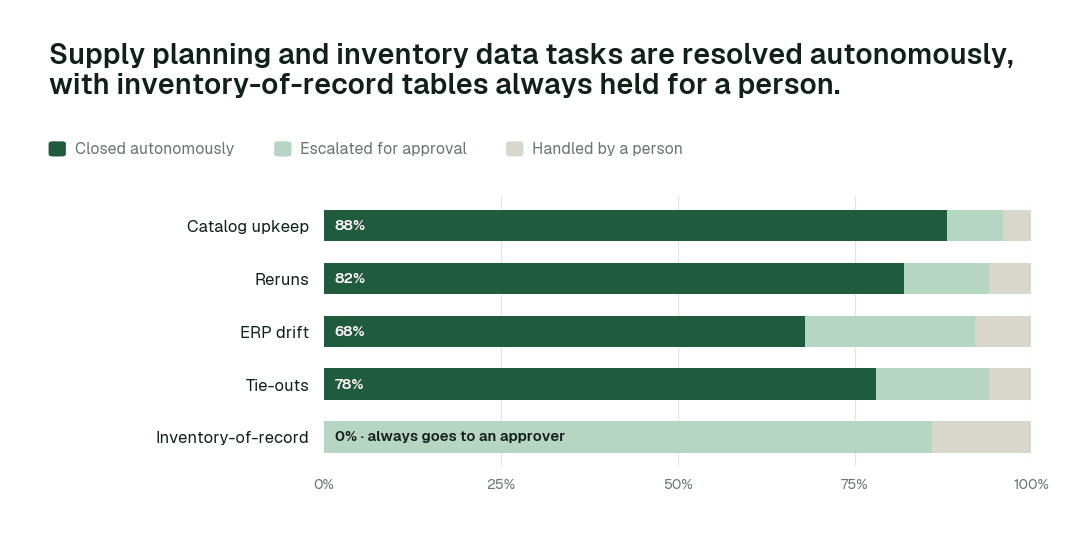
Autonomy where work is reversible, a named approver where it matters:
5. Build S&OP packs as routines
Packs repeat monthly.
Why it is harder than it looks. The pack is rebuilt by hand every month.
The old world. Manual.
The new world. Autopilot.
What the agents do, step by step:
- 1.The Pipeline Building agent calls
generate_pipelineand builds the pack. - 2.The Quality Monitoring agent calls
run_quality_checkand verifies it. - 3.The Autonomous Data-Conductor calls
verify_dataand publishes it.
In practice. Verified pack.
What to measure. Hours per pack.
Designing the autonomy ladder
Autonomy is set per task class, not per tool. This is where we would set each class for a mature deployment, and why:
| Task class | Closed autonomously | Escalated | Handled by a person | Where we set it | Why |
|---|---|---|---|---|---|
| Catalog upkeep | 88% | 8% | 4% | L4 once the receipts are clean | The work is reversible and repeatable |
| Reruns | 82% | 12% | 6% | L4 once the receipts are clean | The work is reversible and repeatable |
| ERP drift | 68% | 24% | 8% | L3: acts and keeps a rollback point | Most cases are routine; the rest escalate with evidence |
| Tie-outs | 78% | 16% | 6% | L3: acts and keeps a rollback point | Most cases are routine; the rest escalate with evidence |
| Inventory-of-record | 0% | 86% | 14% | L2: always proposed to a named approver | The number carries accountability outside the data team |
The operating model: who owns what
Agents change who does the work, not who is accountable for it:
| Role | Owns | What the agents take off their plate |
|---|---|---|
| Head of Supply Chain Data | Standards, autonomy levels per domain and which domain goes next | Assembling status, chasing owners, keeping the catalog current |
| Domain owners and approvers | Planning and inventory-of-record tables | Preparing the diff, blast radius and rollback plan for every proposal |
| Data engineers | Reviewing agent proposals and building new data products | ERP changes are detected at the boundary; inventory is tied to the ledger daily |
The swarm behind the practices
| Agent | What it does for you | Tools it calls |
|---|---|---|
| Connectors and Data Ingestion | ERP, WMS and supplier sources | get_connector_status, trigger_airflow_dag, get_dbt_run_history |
| Schema Evolution | ERP and supplier format changes | detect_schema_change, validate_schema_compatibility, generate_migration, rollback_migration |
| Quality Monitoring | Inventory-to-ledger and range checks | set_sla, run_quality_check, get_anomalies, create_quality_tests_for_pipeline |
| Pipeline Building | Planning models and packs | generate_pipeline, validate_pipeline, sandbox_test, deploy_pipeline |
| Data Context & Catalog | Governed SKU, location and unit definitions | trace_cross_platform_lineage, blast_radius_analysis, define_business_rule, generate_documentation |
| Incident Debugging | Traces planning anomalies | diagnose_incident, get_root_cause, prepare_backfill, execute_backfill |
Data Context Wizard keeps one governed graph of definitions, lineage and owners that every agent and person answers from. Autonomous Data-Conductor runs each job from detection to a verified result. Spellbook Data Catalog is where your team approves, audits and rolls back, and asks questions in plain English.
What disappears
- •Orders against doubled inventory.
- •Monthly-only tie-outs.
- •Supplier files by email.
- •Unit conflicts.
- •Hand-built S&OP packs.
The magic is not any single agent. It is that the back office keeps running: bad data is caught where it enters, every new table gets quality rules and documentation without anyone writing them, access follows policy, fixes are verified before anyone opens a dashboard, and every action leaves a signed receipt.
A product manager's scorecard
| Metric | How to read it |
|---|---|
| ERP breaks reaching planners | Baseline it in the first week of the pilot; review it monthly. |
| Days inventory ties | Baseline it in the first week of the pilot; review it monthly. |
| Supplier files on time | Baseline it in the first week of the pilot; review it monthly. |
| Definition conflicts | Baseline it in the first week of the pilot; review it monthly. |
| Hours per S&OP pack | Baseline it in the first week of the pilot; review it monthly. |
Where this goes next
Planning will run on continuously verified data, and S&OP meetings will start from numbers no one questions. Supply chain data teams will move from extract maintenance to forecasting products.
The climb: from assisted to autonomous to agentic
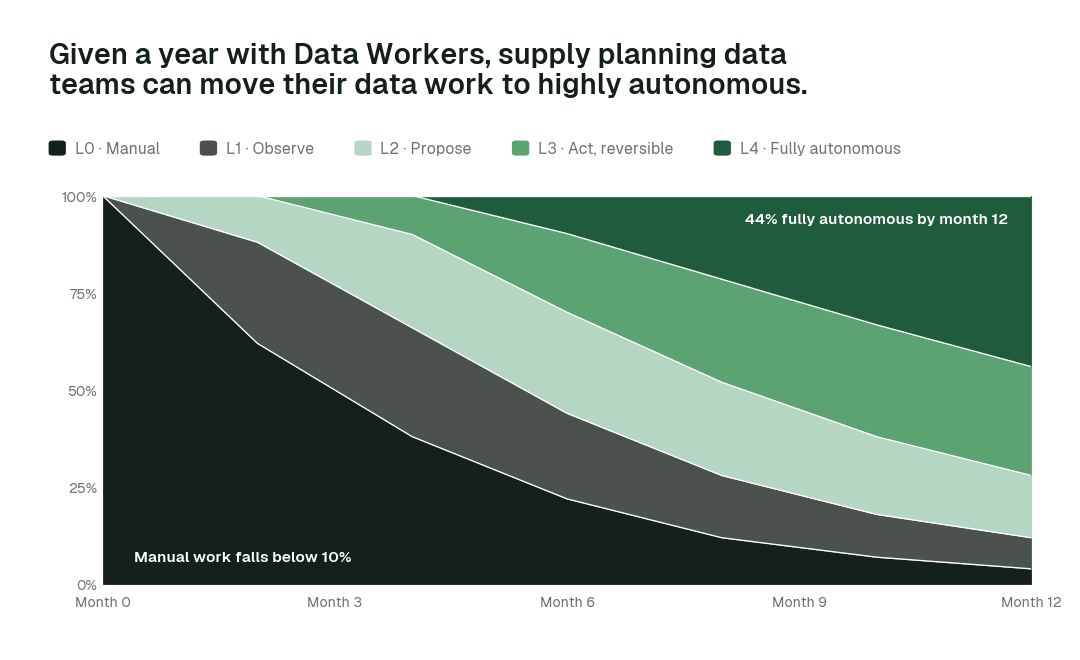
Our thesis is that the data platform climbs the way analytics did, in stages, and that the hard part of data work was never knowing what to do but doing it. For supply planning data teams, the climb looks like this:
- •Assisted. Agents work alongside your team. They read the whole stack, show what needs doing and propose every fix with a receipt; planning and inventory-of-record tables always go to a named approver.
- •Autonomous, under your governance. Routine work runs on its own: eRP changes are detected at the boundary, inventory is tied to the ledger daily, and the S&OP pack is built and verified as a routine. Your team governs the agents instead of doing the upkeep.
- •The agentic enterprise. Planning will run on continuously verified data, and S&OP meetings will start from numbers no one questions. Supply chain data teams will move from extract maintenance to forecasting products.
You choose the altitude, every step is visible and reversible, and the pilot below is the first rung.
The pilot: how supply planning data teams start
The pilot is how your team proves the value on its own data before committing.
- •What we connect. SAP, Oracle or NetSuite; WMS; supplier portals; Snowflake or Databricks; dbt; planning tools such as Kinaxis, o9 or Blue Yonder, over MCP, inside your infrastructure. Nothing migrates.
- •Scope. Daily inventory tie-out at L2.
- •First week. Agents run at L1 across the scoped domain. They map every pipeline, definition and lineage path and show the fixes they would have made, with receipts, so your team sees the value before anything changes.
- •By week two. ERP changes are detected at the boundary and inventory is tied to the ledger daily start running on reversible work. Planning and inventory-of-record tables stay at L2 with a named approver.
- •At day 30. We review the impact metrics against your baseline:
- •Inventory tie-out: from about a week to 8-15 min
- •Supplier file landed: from about 2 days to under 1 h
- •ERP change absorbed: from about a week to hours
- •the share of catalog upkeep closed autonomously, targeting 88% as the deployment matures
- •What you decide. Whether to expand to the next domain. The pilot fee is credited in full against the first year.
- •Cost. Start with a pilot ($7,500 one-time, credited in full against the first year). Scale is from $1,000 a month and Enterprise from $3,000 a month, billed annually, with unlimited seats, no usage meter and no markup on model spend. See pricing.
The pilot is the start of a longer curve:
Read the full playbook: Data Workers for supply planning data teams