A self-maintaining data catalog for the agentic era
Catalog documentation is written in a burst, then falls behind the warehouse. Data Workers drafts a page for every table, model and dashboard, keeps it current as the data changes, flags missing owners and stale pages, and lists dead assets, with a named person approving.
Before and after
| Today | With Data Workers |
|---|---|
| Documentation written in a push, then left to age | A page per table, model and dashboard that agents draft and refresh |
| Stale pages found when someone gets a wrong answer | Stale pages and documentation gaps flagged to the owner |
| Tables with no owner, or the name of someone who left | An owner proposed for each asset and confirmed by a person |
| Dead tables and old dashboards nobody dares retire | Unused assets listed with what depends on them, for the owner to retire |
| A stewardship sprint every quarter | Upkeep that runs as a routine, with stewards approving |
A catalog is only as useful as the last time someone updated it, and the readers are no longer just analysts. Copilots and coding agents read the same pages, so a stale description becomes a wrong answer at machine speed. Keeping the pages true is metadata management work that agents can take over, with people deciding what is right. The data catalog guide covers the basics. This page is about that upkeep; for the step where the catalog becomes context agents read, see Make your data catalog agentic.
How it works
1. Draft the documentation
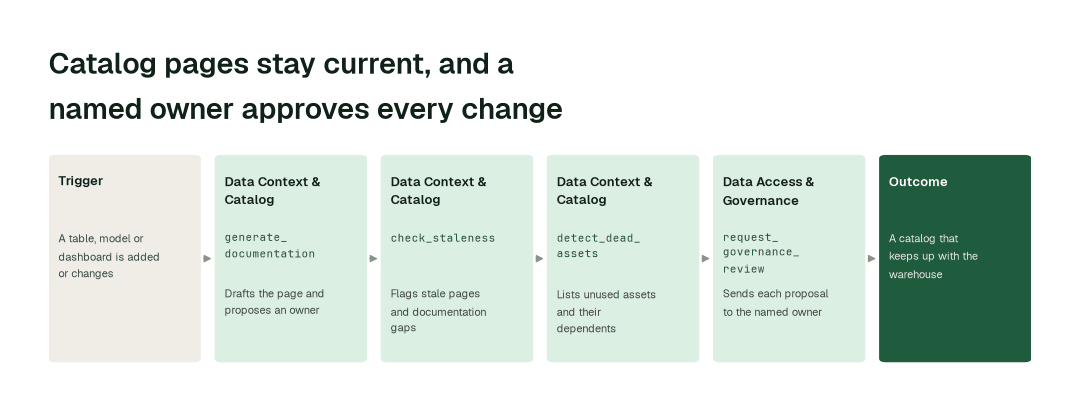
The Data Context & Catalog Agent writes a page for each table, model and dashboard: what it is, how it is built, what it feeds and who owns it (generate_documentation). Anyone can ask it to explain an asset in plain language (explain_table), and it brings in context your team already holds (import_tribal_knowledge). The pages live in Spellbook Data Catalog, which is in preview, and people can suggest edits right on the page.
2. Keep every page current
Pages change when the data does: an incident, a schema change or a new owner shows up on the asset's page. A routine checks each page against its table (check_staleness, check_freshness) and lists what has no description or owner (flag_documentation_gap). Each flag goes to the person who owns the asset, so upkeep stops depending on a documentation drive.
3. Retire what is dead
The agent lists tables and dashboards nobody has used (detect_dead_assets) and shows what would break if each one went (blast_radius_analysis). The Data Access & Governance Agent sends the proposal to the named owner for approval (request_governance_review). Nothing is retired without that approval.
The impact metrics we move
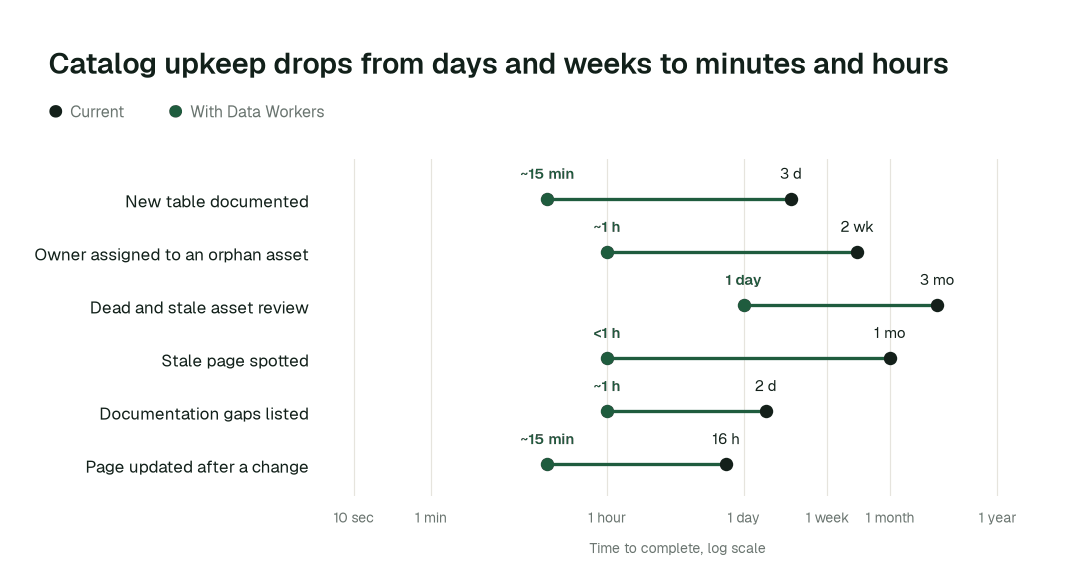
- •New table documented: from about 3 days to ~15 min
- •Owner assigned to an orphan asset: from about 2 weeks to ~1 h
- •Dead and stale asset review: from about a quarter to 1 day
Where teams start
- •The domain with the most "which table is right?" questions. Revenue or customer data first: agents draft the pages and propose owners, and the domain lead approves.
- •Assets with no owner. After a reorg or departures, start with the tables nobody is named on and have a person confirm each proposed owner.
- •The catalog you already run. Run beside DataHub, Purview, Unity Catalog or OpenMetadata, and compare freshness with what the pages say. The automated cataloging guide covers the discovery side.
- •A cleanup before a migration or a cost drive. List dead tables and dashboards with their dependents before anyone moves or pays for them; unused tables and idle warehouses is the cost view.
- •Before a copilot rollout. Make sure the pages assistants will read are current, with auto-generated documentation in place first.
What powers it
The Data Context & Catalog Agent does the writing, the freshness checks and the dead-asset search, and the Data Access & Governance Agent routes each proposal to its owner. Spellbook Data Catalog (in preview) is where the pages live, and it works alongside the catalog you already run rather than replacing it. The Data Context Wizard keeps the shared picture of your estate that the pages draw on. Autopilot Routines run the sweeps on a schedule, Autopilot Standards turn "every production table has an owner and a description" into a rule agents follow, and the Autonomous Data-Conductor routes the work. This upkeep shows up in AI-ready data teams and in governed product metrics, and it feeds end-to-end lineage. The data platform and governance teams page shows the wider back office.
The climb: from assisted to autonomous to agentic
Every domain climbs the same ladder from our thesis. Agents start by watching and suggesting, then act after a named owner approves, and a domain can go further only on its own review record. L0 to L2 run today; L3 and L4 are where a domain can go on evidence.
The pilot
- •Scope. One domain, read access to its warehouse schemas and catalog, and a named owner for the pages.
- •First week. Agents start by watching and suggesting: the pages they would write, the gaps and stale pages they find, and the dead assets they would list, each with a receipt, against a baseline of what is documented today.
- •By week two. Pages are drafted and flagged on a routine; owners approve what is written, and anything sensitive stays with a named approver.
- •At day 30. We review the impact metrics against your baseline:
- •New table documented: from about 3 days to ~15 min
- •Owner assigned to an orphan asset: from about 2 weeks to ~1 h
- •Dead and stale asset review: from about a quarter to 1 day
- •Cost. Start with a pilot ($7,500 one time, a 6 to 12 week pilot, credited in full against the first year). Scale is from $1,000 a month and Enterprise from $3,000 a month, billed annually, with unlimited seats, no usage meter and no markup on model spend. See pricing.
FAQ
Will agents overwrite what our stewards wrote? No. Agents propose changes and people can edit any page; a named owner approves what is written at first.
Does it replace our catalog? No. Spellbook Data Catalog works alongside the catalog you run, and it is in preview.
What if a page is wrong? Treat pages as drafts until an owner confirms them. Anyone can suggest an edit on the page, and agents can be wrong, which is why approval comes first.
Will it delete anything? It lists unused assets and what depends on them. The owner decides what is retired.
Which stacks does it work with? Snowflake, Databricks, BigQuery and the catalogs you run, through 50+ connectors.