Data classification, supercharged with agents
Classification projects label the estate once, then drift as every new table and column lands unlabelled. Data Workers finds sensitive data, proposes tags as data arrives, sends each one to a named approver and carries the label into access and lineage, so the estate stays classified.
Before and after
| Today | With Data Workers |
|---|---|
| A classification project that ends with a spreadsheet | Tags that live on the columns and follow the data |
| New tables and columns unlabelled until the next audit | New data labelled for sensitivity as it appears |
| One catalog tagged, the warehouse and lakehouse copies not | Labels carried through lineage to every downstream copy |
| Stewards tagging columns by hand | Stewards approving proposed tags |
| A tag that is only a label | A tag that drives access and masking decisions |
Most teams classify once, for an audit, and the labels are stale within a quarter. Every new pipeline adds columns nobody has looked at, and AI assistants and analysts read them before any steward does. Agents change the economics of data classification and tagging from a yearly project to a standing routine, with a person approving what gets written. For how detection and tagging fit together, see PII detection and classification with a catalog agent.
How it works
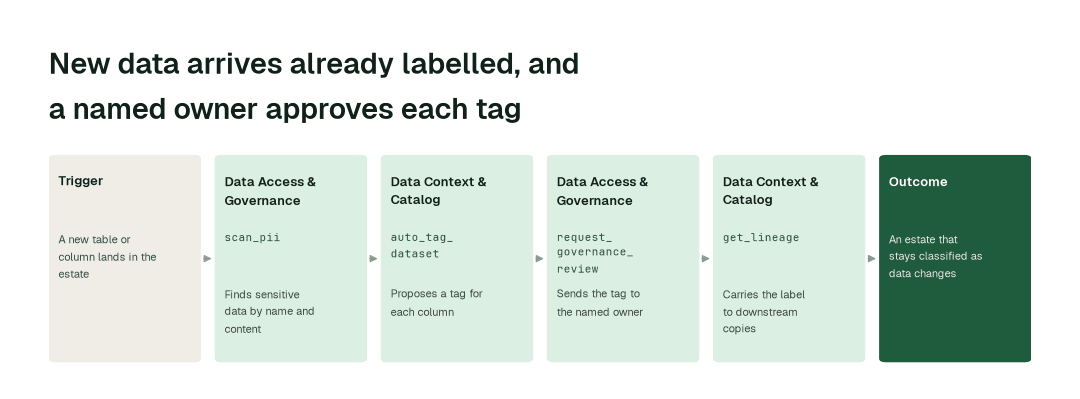
1. Find the sensitive data
The Data Access & Governance Agent scans the tables you point it at, by column name and by content, without sending sample values outside your network (scan_pii). Ready-made classifications cover financial services and healthcare, including the HIPAA identifier categories.
2. Tag it and get the tag approved
The Data Context & Catalog Agent proposes a tag for each column (auto_tag_dataset) and sends it to the named data owner through the Data Access & Governance Agent (request_governance_review). Every tag is versioned and approved before it lands in your catalog, so classification is auditable.
3. Keep it current, and put it to work
When the Schema Evolution Agent sees a new table or column (detect_schema_change), classification runs on arrival, so new data is already labelled. The Data Context & Catalog Agent carries each label through lineage to every downstream copy (get_lineage), and the same label feeds access checks (check_policy) and the masking decision proposed for each sensitive column.
The impact metrics we move
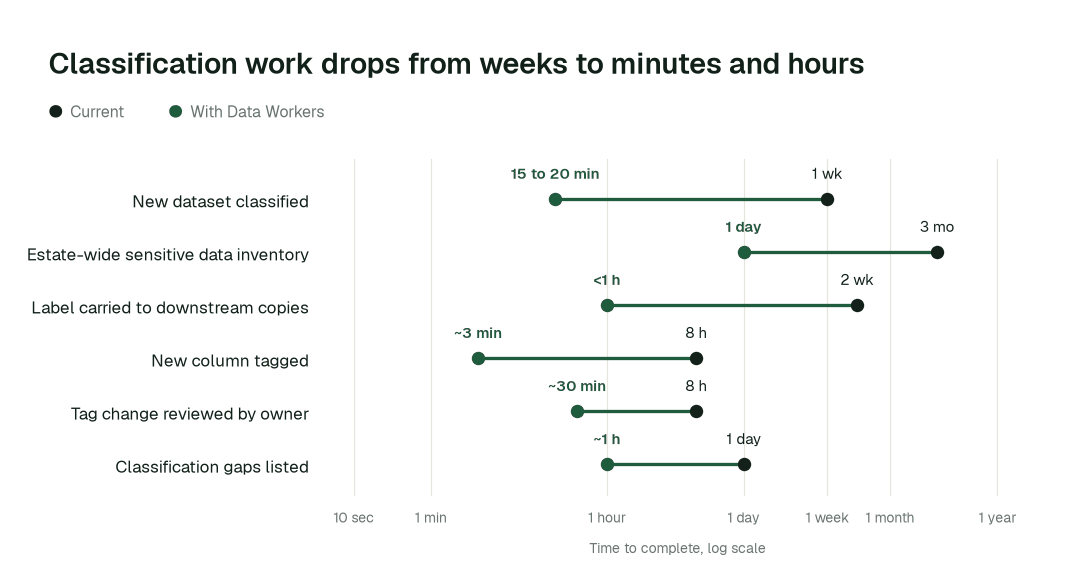
- •New dataset classified: from about a week to 15 to 20 min
- •Estate-wide sensitive data inventory: from about a quarter to 1 day
- •Tag carried to downstream copies: from about 2 weeks to under 1 h
Where teams start
- •The warehouse that feeds AI assistants. Classify the schemas copilots and analysts can already query, before the next rollout.
- •Regulated domains. Customer, claims, payments and patient tables, using the financial services and healthcare classifications.
- •The catalog you already run. Tag alongside DataHub, Purview, Unity Catalog or OpenMetadata, and compare coverage with the last audit. Teams on BigID can read how Data Workers fits beside it.
- •Every new pipeline. Classify on schema change, so a new column never ships unlabelled.
- •A policy that never reached the data. Turn the written classification scheme in your policy template into tags on real columns.
What powers it
The Data Access & Governance Agent and the Data Context & Catalog Agent do the finding and tagging, the Data Security Agent works alongside them on exposure, and the Data Context Wizard keeps the shared picture of your estate that lineage and access checks read. Autopilot Routines run classification sweeps on a schedule and on schema change, and Autopilot Standards are where your classification scheme becomes a rule agents follow. Spellbook Data Catalog is where approved tags are visible, and the Autonomous Data-Conductor routes each proposal to its owner. Classification comes before masking, which the page on PII detection and masking covers. It shows up in PII in logs and in healthcare analytics data marts.
The climb: from assisted to autonomous to agentic
Every domain climbs the same ladder from our thesis. Agents start by watching and suggesting, then act after a named owner approves, and a domain can go further only on its own review record. L0 to L2 run today; L3 and L4 are where a domain can go on evidence.
The pilot
- •Scope. One regulated domain, read access to its tables and catalog, and a named owner for the tags.
- •First week. Agents start by watching and suggesting: the sensitive columns they find and the tags they would propose, each with a receipt, against a baseline of what is labelled today.
- •By week two. Proposed tags arrive on a routine and new columns are classified as they land; the owner approves what is written and anything sensitive stays with a named approver.
- •At day 30. We review the impact metrics against your baseline:
- •New dataset classified: from about a week to 15 to 20 min
- •Estate-wide sensitive data inventory: from about a quarter to 1 day
- •Tag carried to downstream copies: from about 2 weeks to under 1 h
- •Cost. Start with a pilot ($7,500 one time, a 6 to 12 week pilot, credited in full against the first year). Scale is from $1,000 a month and Enterprise from $3,000 a month, billed annually, with unlimited seats, no usage meter and no markup on model spend. See pricing.
FAQ
Will it send our data to a model? Scanning finds sensitive data by name and by content without sending sample values outside your network, and agents scrub personal data and secrets out of anything they write.
Who decides what a column is? A named owner. Agents propose, every tag is versioned and approved before it lands in the catalog, and the trail is auditable.
Can we trust the labels? Treat them as proposals until an owner approves. Agents can be wrong, which is why nothing is written without that approval at first.
Which stacks does it work with? Snowflake, Databricks, BigQuery and the catalogs you run, through 50+ connectors.
Does it mask the data? It proposes a masking decision for each sensitive column for a person to approve.