You're on Sisense: Your Analytics Live Inside Your Customers' Product. Data Workers Owns Whether Those Numbers Are Right
Already on Sisense? Data Workers checks the tables under every ElastiCube and embedded dashboard, traces a wrong customer-facing number to its cause and fixes it behind a named approval, with a receipt.
Your analytics are part of your product. Product engineers embed Sisense dashboards and widgets with Compose SDK, white-labelled under your brand, and your customers open them every morning without knowing Sisense is there. Behind them sit data models: ElastiCubes that import data from Snowflake on a build schedule, and live models that query it directly. Shared formulas keep "on-time rate" defined once, data security rules filter each customer to its own rows, and Sisense Intelligence lets customers ask the assistant in plain language, read narratives and set Pulses. Since Sisense 2026.3, your engineers reach the same governed models from Claude, ChatGPT or Cursor through the Sisense MCP server. Sisense's homepage puts the stakes plainly: AI will answer your customers with your name on it, so make sure it's right. Data Workers owns whether those numbers are right: it checks the tables under every data model after each run, traces a wrong number to the change that caused it, proposes the fix behind a named approval and verifies it with a receipt.
Key takeaways
- •Sisense keeps its job. Embedded dashboards, data models, shared formulas, data security rules, ElastiCube builds and Sisense Intelligence stay with their owners.
- •In embedded analytics, the customer sees a wrong number first. A broken table reaches paying customers' screens, under your brand, before your data team opens a laptop. Data Workers checks the tables under every data model after each run.
- •The tenant key is your most important column. Data security rules trust it completely. Data Workers holds rows per tenant key to a baseline, so a key that silently changes meaning opens an incident, not a support queue.
- •The fix lands where the cause is. Data Workers proposes the upstream change as a diff, routes it to a named approver and queues the rerun. It changes nothing in Sisense.
- •Start with the one embedded dashboard your customers use most, then climb from L0 manual to L4 autonomous per domain.
Sisense puts analytics inside your customers' product. Data Workers owns whether the numbers they see are right.
Embedded analytics changes who finds the error. In an internal BI tool, an analyst spots an odd chart and asks around. In Sisense, the chart lives inside a product a logistics manager at another company pays for, and the first report of a wrong number is a support ticket. Multitenancy adds a second edge: every widget is filtered by a tenant key, and Sisense applies the data security rule exactly as written. If the key upstream is wrong, Sisense shows each customer precisely the wrong rows.
A Tuesday at a freight-visibility SaaS company, as an illustrative example.
| Time | System | What happens |
|---|---|---|
| Mon 21:00 | GitHub, Amazon RDS for PostgreSQL | The app team ships "organizations" so shippers can group accounts. The release adds org_id to shipments and a new EDI ingest service that writes it. The legacy tenant_id column stays, with a default of 0: the demo tenant sales shows prospects |
| 21:00 to 01:00 | Amazon RDS for PostgreSQL | 41,200 shipment events arrive through the new EDI path with the right org_id and tenant_id 0 |
| Tue 01:30 | Airbyte | The incremental sync copies shipments into RAW_APP on Snowflake, as every night |
| 02:15 | Dagster, dbt Core | The nightly Dagster job runs dbt build. fct_shipments keys every row by tenant_id, as the Sisense data security rule expects. The run is green |
| 02:40 | Data Workers | The post-run run_quality_check on stg_shipments and fct_shipments passes: no null tenant_id, no duplicate shipment_id, row counts above the minimum. The rows are valid. But the value the team records with monitor_metrics after each run, rows filed under tenant 0, reads 41,200 against a baseline of 12 demo seed rows, and it is flagged |
| 02:44 | Data Workers, PagerDuty, Slack | The dbt manifest shows no model changed since the last good run, so diagnose_incident points upstream. trace_cross_platform_lineage follows fct_shipments back to RAW_APP.SHIPMENTS; blast_radius_analysis lists the models downstream. Context graph notes the team recorded at onboarding add the Shipments and On-time performance data models, the embedded customer dashboards, and what tenant 0 is: the demo tenant prospects see in the sales demo app. send_pagerduty_alert pages the analytics on-call; send_slack_alert posts the evidence and a check query to #data-oncall |
| 03:00 | Sisense | The scheduled ElastiCube build imports the night's rows. Its Pulse build tile shows success |
| 03:12 | Sisense | The on-call engineer, also a Sisense admin, turns off the demo app's embed until tenant 0 is clean. No prospect saw a real customer's shipments |
| 03:20 | Snowflake | The on-call runs the check Data Workers sent: SELECT org_id, count(*) FROM raw_app.shipments WHERE tenant_id = 0 AND _airbyte_extracted_at >= '2026-09-28 21:00' GROUP BY 1; It returns 41,200 rows across 180 organizations, all from the EDI service |
| 03:35 | Data Workers | Proposes the fix as a diff for the owner to merge: stg_shipments takes tenant_id from organizations.legacy_tenant_id when a row carries tenant_id 0 and a non-demo org_id, and a dbt test fails the run if a non-demo organization lands under tenant 0 again. With it: the blast radius, the rerun plan and the undo (revert the diff). The mapping needs the app team's confirmation, so the request waits |
| 07:00 to 07:40 | Sisense, embedded dashboards | East Coast customers open the Shipments widget. 180 shippers see last night's EDI loads missing and their on-time rate moves. Support's first tickets are already linked to the incident |
| 07:50 | Slack | The app team lead confirms the mapping in the thread and files the change that removes the column default |
| 08:05 | Spellbook | The head of data approves in Spellbook; the analytics engineer merges the diff |
| 08:10 | Dagster | Data Workers queues the approved job run with trigger_dagster_job |
| 08:40 | Snowflake, Data Workers | The run finishes. run_quality_check passes; monitor_metrics records 12 rows under tenant 0 and 212,400 shipments for yesterday, back on baseline |
| 08:45 | Sisense | The Sisense admin starts a By Table build for the shipments tables. It completes at 09:05 |
| 09:15 | Claude, Sisense MCP server | The customer success lead asks Claude, through the Sisense MCP server, for yesterday's shipments by customer: 212,400, matching the recorded value. The admin confirms tenant 0 holds only its seed rows and turns the demo embed back on. Data Workers writes the receipt (cause, diff, approver, rerun, checks, undo) and a graph note that fct_shipments needs a real tenant key on every row |
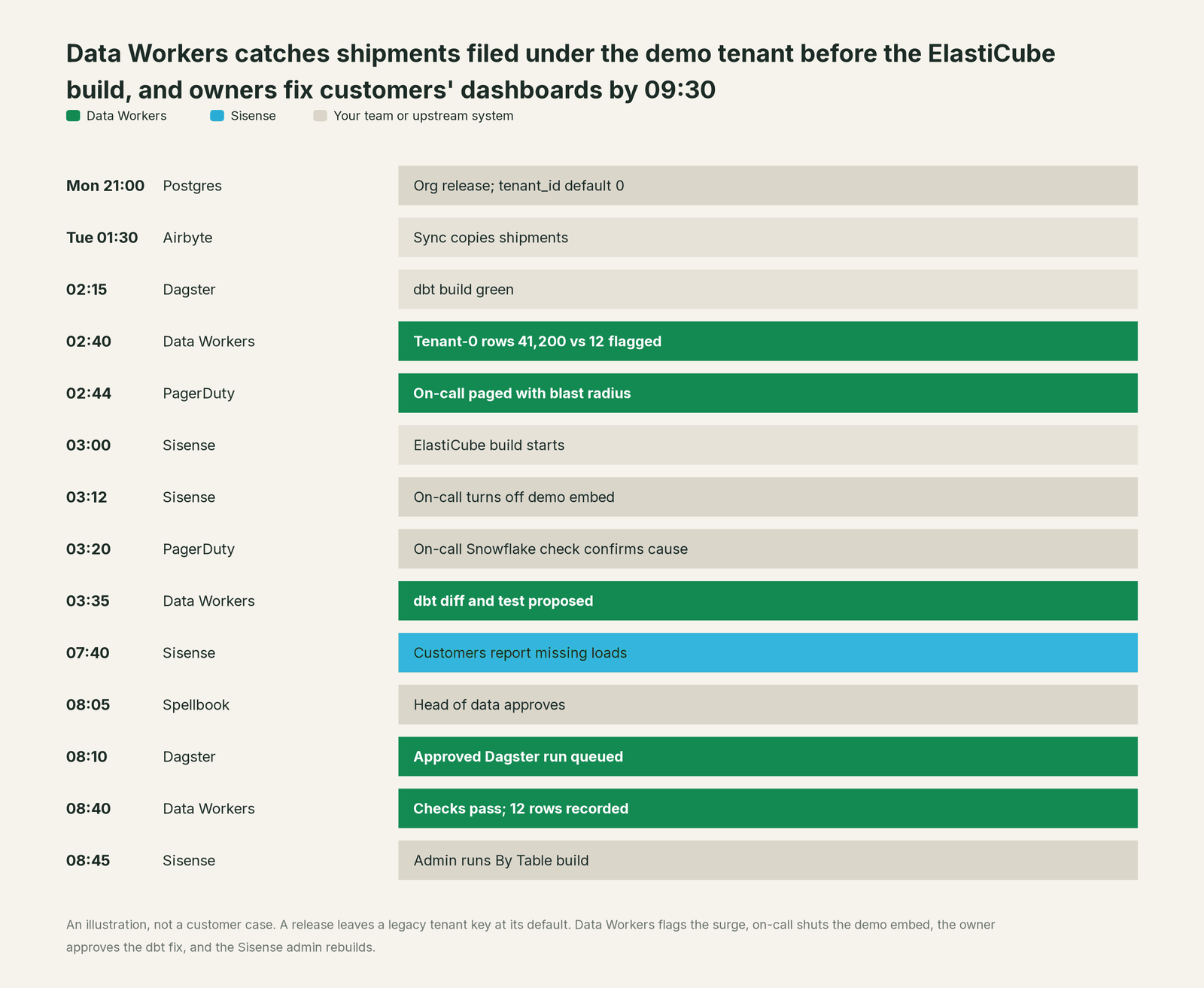
Every tool did its job. Sisense filtered each customer exactly as the rule said; the rule was fed a key that had quietly changed meaning. Data Workers caught it before the build, the on-call closed the privacy exposure at 03:12, and a named person approved the fix the morning customers noticed, with the support tickets already explained.
| Job | What Sisense does | What Data Workers does |
|---|---|---|
| The experience | Embeds dashboards, widgets and the assistant in your product with Compose SDK, under your brand | Keeps the Snowflake tables and dbt models under every data model right |
| The tenant boundary | Data security rules and multitenancy filter each customer to its own rows, every query | Holds rows per tenant key to a baseline, so a wrong key opens an incident before it reaches a widget |
| The break | Builds the ElastiCube from whatever the source holds; live models query it as is | Catches the surge, traces it to the change that caused it and lists the models and recorded dashboards it reaches |
| The fix | Owners update data models and rules, and run builds | Proposes the upstream fix as a diff for its owner, routes it to a named approver and queues the approved rerun |
| The proof | Serves fresh numbers in the embed, the assistant and the MCP server after the next build | Re-checks the tables, compares the recorded values and writes a receipt with cause, diff, approver and undo |
Why doesn't Sisense just do this itself?
Sisense built its product for a demanding job: analytics and AI that software companies put in front of their own customers. Its guardrails fit that job well. Data security decides which rows each signed-in user sees. Multitenancy isolates tenants, and Data Groups can give a tenant's builds and queries their own nodes. The MCP server runs every request as the signed-in user and its tools are read-only. Semantic enrichment and shared formulas give the assistant one approved definition.
All of that governs what happens inside Sisense, and it assumes the tenant key arriving from upstream is true. Sisense does not run your app database, Airbyte sync, dbt project or Dagster job, and should not have to. Fixing this incident took a check query, a dbt change, a confirmed mapping rule, a named approval, an orchestrator rerun and a verification. That is a different product with different liability: cross-system context, blast-radius scoping, approvals, rollback and receipts for changes in systems Sisense doesn't own. That product is Data Workers, and it builds on the Sisense your customers already use.
Every tool owns a slice. Data Workers covers the whole lifecycle
Sisense owns one slice outright: governed analytics and AI embedded in your product. Each point tool adds another console, contract and handoff. Data Workers covers the whole lifecycle with one context, one approval flow and one audit trail, and builds on the Sisense you already run.
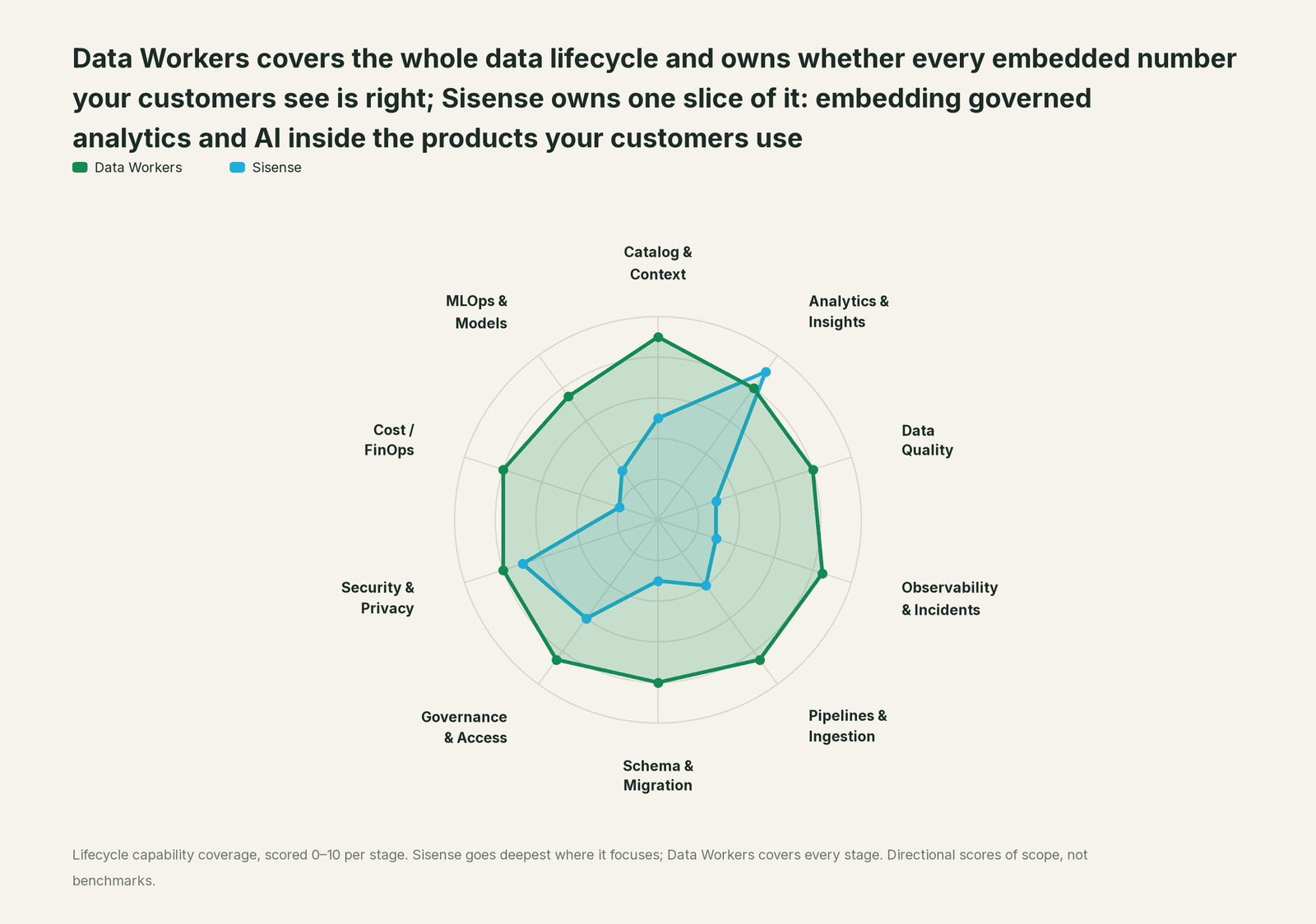
| Stage | Data Workers | Sisense | Why we scored it this way |
|---|---|---|---|
| Catalog & Context | 9 | 5 | Data models, shared formulas and semantic enrichment tell people and the assistant what each field means inside Sisense. Data Workers keeps one governed context graph across every platform, joined to lineage, quality and owners. |
| Analytics & Insights | 8 | 9 | Sisense's home stage: dashboards, widgets, the assistant, narratives and Pulse, embedded under your brand with Compose SDK. Data Workers makes sure the tables under them are right. |
| Data Quality | 8 | 3 | Sisense shows what the data model holds; it does not test the tables under a widget. Data Workers checks them after every run for duplicate keys, nulls and row counts, and holds recorded values to a baseline. |
| Observability & Incidents | 8.5 | 3 | Pulse watches KPIs and ElastiCube build status and notifies people; it does not trace a cause. Data Workers traces a wrong number back to the source change, sync or model behind it, proposes the fix and verifies it. |
| Pipelines & Ingestion | 8.5 | 4 | ElastiCube builds import data from the sources into the Sisense instance on a schedule. Data Workers queues approved reruns through the orchestrator for the pipelines under Sisense. |
| Schema & Migration | 8 | 3 | Changes Only builds and Publish Semantics apply data model changes inside Sisense. Data Workers reads the dbt manifest and scopes the blast radius of a change across models and the dashboards your team records. |
| Governance & Access | 8.5 | 6 | Roles, groups, data security rules and multitenancy govern who sees what in Sisense. Data Workers routes every data change to a named approver. |
| Security & Privacy | 8 | 7 | Row-level data security, tenant isolation and per-user OAuth on the MCP server keep each customer to its own rows. Data Workers leaves a receipt on every data change and proposes masking for the owner to apply. |
| Cost / FinOps | 8 | 2 | Data Groups size the nodes that run builds and queries. Data Workers attributes Snowflake spend per query and per dbt model through query tags, and sums BigQuery spend for the account. |
| MLOps & Models | 7.5 | 3 | Forecasts sit inside dashboards; Sisense does not run models. Data Workers keeps the data under models and agents healthy. |
How Sisense and Data Workers work together
Your customers stay in your product; your engineers stay in Sisense, Claude or Cursor, Slack and PagerDuty. Spellbook Data Catalog (in preview) is where the data team looks: each proposed fix, its blast radius, approver and rollback. Underneath, Data Context Wizard keeps one governed context graph, the Data-Agents Swarm's 20+ specialist agents do the work, the Autonomous Data-Conductor runs each fix end to end (detect, diagnose, fix, review, verify, remember), and per-domain guardrails hold approvals, receipts and rollback.
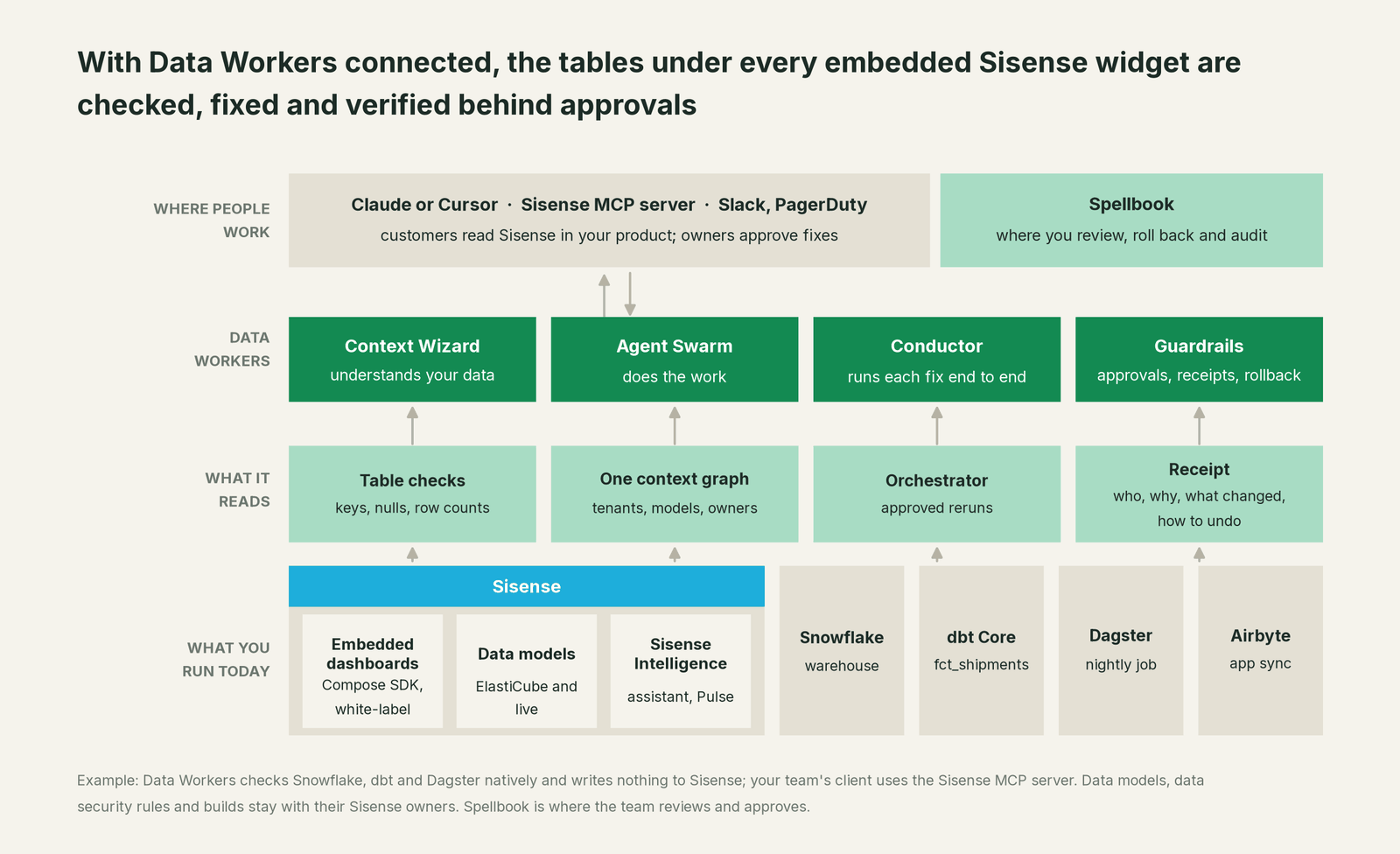
Where Data Workers works. Data Workers works natively on what sits under Sisense: Snowflake, dbt and the orchestrator. It connects to Sisense over its REST APIs today. Data models and embedded dashboards enter the blast radius through context graph notes your team records (which dashboard reads which model, "tenant 0 is the demo tenant"), and through the lineage diff in pull-request review when a fix goes through a pull request. Data Workers writes nothing to Sisense, starts no builds and never edits a data security rule.
What Data Workers checks under each embedded dashboard. run_quality_check runs nulls, uniqueness on id columns and a minimum row count on Snowflake and Postgres (and BigQuery with a service-account key); get_quality_score rolls them up. monitor_metrics holds values your team records, such as rows per tenant key, to a baseline: that is how a valid-looking change in meaning gets caught. trace_cross_platform_lineage and blast_radius_analysis follow a table to its source and its downstream models; diagnose_incident, remediate and get_incident_history run and record the incident. Your data stays in your systems: the agents, warehouse credentials and model key run in your infrastructure, and the hosted Conductor sees workflow metadata only.
Setup over MCP today. Clone the open-source repository and add start-agent.sh entries to your client's MCP config, as the client setup docs show. The Sisense MCP server can sit next to Data Workers in the same client for your own questions; Data Workers' agents never call it. Its remote endpoint with OAuth 2.1 shipped as a Beta in 2026.3.1 and went GA in 2026.3.2, per Sisense's release notes. It is on by default (admins control it under System Configuration > MCP) and runs every request as the signed-in user. Its tools are getDataSources, getDataSourceFields, buildQuery and buildChart (the last two need Cloud-Linked Features and an LLM provider); the 2026.4 pre-release notes add buildDashboard.
// Example: .cursor/mcp.json. The sisense entry is your team's own connection
// (remote endpoint URL for your deployment; OAuth on first connect). Data Workers does not call it.
{
  "mcpServers": {
    "sisense": {
      "url": "<remote MCP endpoint URL for your Sisense deployment>"
    },
    "dw-context-catalog": {
      "command": "/path/to/dataworkers-claw-community/start-agent.sh",
      "args": ["dw-context-catalog"]
    },
    "dw-quality": {
      "command": "/path/to/dataworkers-claw-community/start-agent.sh",
      "args": ["dw-quality"]
    },
    "dw-incidents": {
      "command": "/path/to/dataworkers-claw-community/start-agent.sh",
      "args": ["dw-incidents"]
    }
  }
}
List the tools with your client's own command. Ask "is everything under the embedded Shipments dashboard healthy?" and get the model's fields from Sisense and the lineage, checks and open incidents from Data Workers in one answer.
Where fixes go. Data Workers proposes the change as a diff for the owner to merge, usually a dbt model, test or source mapping, with its blast radius and undo step; it opens the pull request itself when your team turns on the dbt GitHub pull-request target. After approval it queues the rerun through the orchestrator, such as Dagster, Airflow or Prefect. ElastiCubes rebuild on schedule or when the owner starts a build; live models read the fixed tables on their next query.
One request, L0 to L4. The autonomy ladder is set per domain.

- •L0 manual. Connected, not acting. A customer files a ticket and someone digs.
- •L1 observe. Checks every table under your embedded data models and logs what it would do.
- •L2 propose. Drafts the upstream fix with its blast radius; a named owner approves in Spellbook first.
- •L3 act reversibly. For proven classes, such as the nightly Dagster rerun after an approved staging fix, acts, verifies and records the undo.
- •L4 autonomous. For a narrow class in one domain, fixes and verifies on its own and posts the receipt.
Approvals go to a named person; a request nobody answers expires and escalates, and never grants itself. No agent can promote its own work. The full safety model: is it safe to let AI agents change production data, how approvals work, autonomy levels L0 to L4 and where does our data go.
You're on GoodData, You're on Metabase and You're on Superset and Preset show the same loop on other BI tools; You're on Airbyte and You're on Dagster cover the systems under this example. For how shared definitions ground AI answers, see what is a semantic layer.
What changes for your team
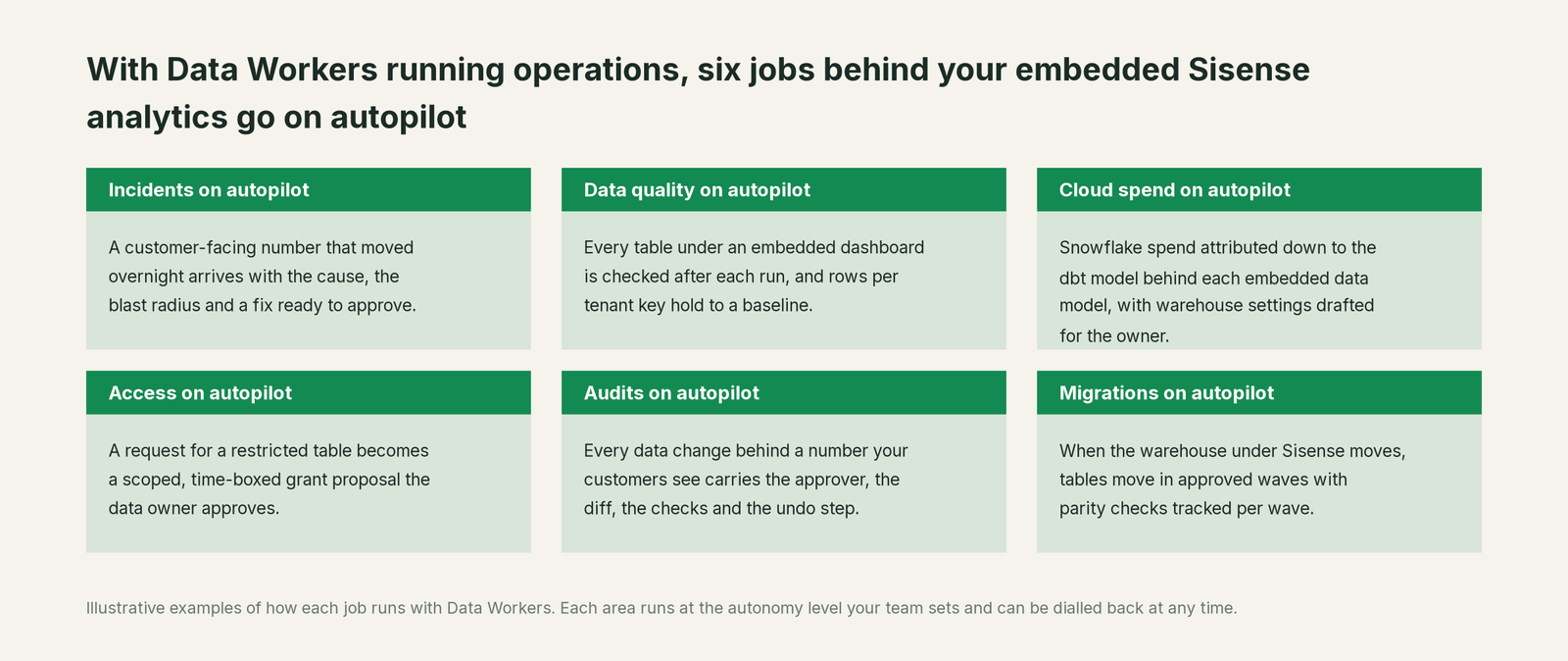
Product engineers own the embed, a small data team owns the models and pipelines, and support owns the customer when a number looks wrong. With Data Workers, these jobs run on autopilot at the level you set.
- •Incidents. A customer-facing number that moved overnight arrives with the cause, blast radius and a fix ready to approve.
- •Data quality. Every table under an embedded dashboard is checked after each run, and rows per tenant key hold to a baseline.
- •Cloud spend. Snowflake spend is attributed down to the dbt model behind each embedded data model, with warehouse settings drafted for the owner.
- •Access. A request for a restricted table becomes a scoped, time-boxed grant proposal the data owner approves.
- •Audits. Every data change behind a customer-facing number carries the approver, diff, checks and undo step, ready for a customer's security review.
- •Migrations. When the warehouse under Sisense moves, tables move in approved waves with parity checks tracked.
Keep Sisense, or consolidate?
Keep Sisense if you love it; Data Workers works with it from day one. Many teams consolidate once Data Workers runs that slice too.
For most teams the answer is to keep Sisense: the embed, the white-label experience, the data models and the assistant belong there. What teams consolidate is the tooling around it: a separate data-quality tool, a nightly row-count script, a spreadsheet of which dashboard reads which dbt model. If you are weighing building this yourself on the Sisense MCP server and a coding agent, read build it ourselves with Claude Code and MCP servers: connecting servers is the easy part; cross-system context, approvals and rollback are the work. For what Data Workers reads and changes on each system, see Data Workers integrations.
The case for your CFO
The outcome: the analytics inside your product, the part customers pay for and renew on, stay right. When something upstream changes what a number means, the cause and the fix arrive with a named approver, and support stops being the place errors are found.
The risk story: Data Workers changes nothing in Sisense. It checks the tables and dbt models under each embedded data model, proposes upstream fixes as diffs, and nothing runs until the named owner approves. Every change is verified and leaves a receipt: what broke, what changed, who approved it, how to undo it. Autonomy is set per domain, and an org-wide stop halts all autonomous dispatch. Your data stays in your systems; the hosted Conductor sees workflow metadata only. There is zero migration.
Why now: Sisense Intelligence answers your customers in plain language, and the MCP server puts your governed models in every AI client. A wrong table now reaches a customer as a confident sentence under your brand. In multi-tenant analytics, a wrong tenant key is also a privacy question.
The first win: the embedded dashboard your customers use most, every table under it checked after each run. What stays the same: your Sisense data models, rules and embed code, your Snowflake, Airbyte, dbt and Dagster, and your review process. For the numbers, see the ROI of agentic data operations.
The sentence to repeat upstairs: "Sisense keeps putting analytics inside our product; Data Workers makes sure every number our customers see is right, and a named owner approves every fix with a receipt."
Getting started
Start with a pilot. Pick the embedded Sisense dashboard your customers open most, connect Data Workers read-only to the warehouse, dbt and the orchestrator under it, record rows per tenant key and your headline numbers, and let it check every table that data model reads for a few weeks before turning on the first fix class. The pilot path and plans are on the pricing page, and the pilot is credited in full against the first year.
FAQ
Does Data Workers edit our Sisense data models, shared formulas or data security rules? No. They stay with their Sisense owners. When a rule or formula should change, Data Workers says which one and why; masking or access changes are proposals the owner applies.
Does Data Workers start ElastiCube builds? No. After an approved fix and rerun, ElastiCubes rebuild on their Sisense schedule or when the owner starts a build (Replace All, By Table or Changes Only). Data Workers re-checks the tables and records the result.
Our checks all passed. How did Data Workers catch the wrong tenant key? The rows were valid; their meaning changed. Data Workers holds values your team records, like rows per tenant key, to a baseline with monitor_metrics, so a surge no null or uniqueness check would see still opens an incident with its lineage.
Does Data Workers read our numbers through the Sisense MCP server? No. Data Workers' agents never call the Sisense MCP server. Your team's own client can use it next to Data Workers' servers, under each person's Sisense permissions; Data Workers' checks rest on what it reads natively in Snowflake, dbt and the orchestrator.
Does this work with live models as well as ElastiCubes? Yes. Data Workers checks the warehouse tables both kinds of model read. With a live model, a fix shows up on the next query; with an ElastiCube, after the next build. Table checks run natively on Snowflake and Postgres, and on BigQuery with a service-account key.
Sources
- •Sisense, homepage (AI inside your product; tenant-safe access; MCP and APIs), https://www.sisense.com/ (checked Oct 3, 2026)
- •Sisense, Sisense Intelligence (assistant, narratives, Pulse, semantic enrichment), https://www.sisense.com/ai-analytics-platform/generative-ai-analytics/ (checked Oct 3, 2026)
- •Sisense, Embedded analytics (white-label, multi-tenant), https://www.sisense.com/ai-analytics-platform/embedded-analytics/ (checked Oct 3, 2026)
- •Sisense, Compose SDK, https://www.sisense.com/ai-analytics-platform/compose-sdk/ (checked Oct 3, 2026)
- •Sisense Docs, MCP Server (tools, read-only scope, OAuth 2.1, on by default; page still says "validated for the Beta"), https://docs.sisense.com/main/SisenseLinux/mcp-server.htm (updated Aug 26, 2026; checked Oct 3, 2026)
- •Sisense Docs, 2026.3 Release Notes (MCP server Beta in 2026.3.1, GA in 2026.3.2), https://docs.sisense.com/main/SisenseLinux/l2026-3-release-notes.htm (updated Oct 1, 2026; checked Oct 3, 2026)
- •Sisense Docs, 2026.4 Release Notes (pre-release:
buildDashboard, Pulse Beta, Compose SDK 2.36.0), https://docs.sisense.com/main/SisenseLinux/l2026-4-release-notes.htm (updated Oct 1, 2026) - •Sisense Docs, AI assistant (LLM provider required), https://docs.sisense.com/main/SisenseLinux/ai-assistant.htm (updated Oct 1, 2026; checked Oct 3, 2026)
- •Sisense Docs, Building ElastiCubes (build types), https://docs.sisense.com/main/SisenseLinux/building-elasticubes.htm (updated Jun 11, 2026; checked Oct 3, 2026)
- •Sisense Docs, Self-contained multitenancy (Data Groups), https://docs.sisense.com/main/SisenseLinux/overview-of-self-contained-multitenancy.htm (updated Jun 10, 2026; checked Oct 3, 2026)
- •Sisense Docs, Data security (row-level filters), https://docs.sisense.com/main/SisenseLinux/data-security.htm (updated Jun 10, 2026; checked Oct 3, 2026)
- •Sisense Docs, Pulse introduction (build tiles), https://docs.sisense.com/main/SisenseLinux/sisense-pulse-introduction.htm (updated Jun 11, 2026; checked Oct 3, 2026)
- •Data Workers, Client setup (open-source docs), https://dataworkers.io/opensource-docs/client-setup/ (checked Oct 3, 2026)
- •Data Workers open-source repository, https://github.com/DataWorkersProject/dataworkers-claw-community (checked Oct 3, 2026)