You're on GoodData: It Serves Every Tenant Governed Analytics From Code. Data Workers Owns Whether the Data Under Each Tenant's Numbers Is Right
Already on GoodData? Data Workers checks the tables under every workspace, catches a tenant key gone wrong before customers log in, and fixes it upstream behind a named approval, with a receipt.
Your product ships analytics, and GoodData serves them. One root workspace holds the logical data model, the MAQL metrics and the dashboards as code, deployed from the CLI. Under it sit more than a thousand child workspaces, one per customer, each limited to its own rows by a workspace data filter on a tenant column. Customers open the Insights tab in your app, ask the AI Assistant why a number moved and set anomaly detection alerts. Engineers reach them from Claude Code or Cursor through the GoodData MCP server, generally available since May 21, 2026. Underneath sit the app database, an ingestion tool, Snowflake, dbt and an orchestrator. GoodData serves governed analytics to every tenant from code. Data Workers owns whether the data under each tenant's numbers is right: it checks the tables after every load, traces a wrong number to the change that caused it, proposes the fix behind a named approval and verifies it with a receipt.
Key takeaways
- •GoodData keeps its job. The model, MAQL metrics, workspace hierarchy, data filters, embeds and the AI Assistant stay with their owners.
- •Multi-tenant analytics fails per tenant. An upstream change can empty the column a workspace data filter reads, and every customer silently loses rows. Data Workers checks that column and per-tenant counts after every load.
- •The fix lands where the cause is. Data Workers proposes the upstream change as a diff, routes it to a named approver and queues the rerun in the orchestrator.
- •Data Workers changes nothing in GoodData. It works natively on Snowflake, dbt and Prefect; your team's own client reaches GoodData through its MCP server.
- •Start with the tenant key and your largest customers, then climb from L0 manual to L4 autonomous per domain.
GoodData serves governed analytics to every tenant from code. Data Workers owns whether the data under each tenant's numbers is right.
GoodData's multitenancy is clean by design. Child workspaces inherit the parent's model, metrics and dashboards read-only, and a workspace data filter compares each child's filter value to a mapped column, usually prefixed wdf__ so it never shows up as an attribute. The docs are explicit about the edge: "Data records with no value in the specified column are treated as not meeting the filter condition." For isolation, that is the right failure: a row with no tenant belongs to nobody. It also means a null tenant key never throws an error. The dashboard renders, the AI Assistant answers, and the number is smaller than it should be, for every customer at once.
Here is a Tuesday at a SaaS company that sells field-service scheduling and embeds GoodData. This is an illustrative example.
| Time | System | What happens |
|---|---|---|
| Mon 16:40 | GitHub, dbt Core | The analytics team merges a pull request for the new reseller program: fct_jobs_daily now takes each account's tenant from a new tenant_memberships table instead of accounts.tenant_id, and writes it to wdf__tenant_id |
| Mon 19:00 | MySQL | The app team ships tenant_memberships. It holds rows for accounts created since the reseller launch; the backfill for older accounts is planned as a separate migration on Thursday |
| Tue 01:00 | Airbyte, Snowflake | The nightly sync lands tenant_memberships in raw_app on Snowflake as usual |
| 02:00 | Prefect, dbt Core | The nightly-dbt flow runs dbt build. The left join finds no membership for older accounts, so 34% of rows in fct_jobs_daily carry a null wdf__tenant_id. The run is green; nothing tests that column |
| 02:31 | Prefect, GoodData | The flow's last task sends GoodData's upload notification for the Snowflake data source, as GoodData recommends after every load. The cache clears. The root workspace total is unchanged, because the root has no filter. Every child workspace now hides its older accounts' jobs |
| 02:38 | Data Workers | Data Workers reads the completed Prefect flow run and runs the registered checks. run_quality_check on fct_jobs_daily fails: wdf__tenant_id is 34% null against the 10% threshold. monitor_metrics flags 19 of the 50 largest tenants' daily job counts, which the team records, below their 30-day baseline |
| 02:44 | Data Workers, Slack | The dbt manifest diff since the last good run shows Monday's change to fct_jobs_daily, so diagnose_incident points at the model. trace_cross_platform_lineage shows wdf__tenant_id now comes from raw_app.tenant_memberships. blast_radius_analysis lists the downstream model fct_technician_utilization; a context-graph note the team recorded adds that GoodData's tenant filter reads wdf__tenant_id in every child workspace. send_slack_alert posts the evidence to #data-oncall |
| 02:50 | Data Workers | Proposes the fix as a diff for the owner to merge: fall back to accounts.tenant_id when no membership exists, plus a not_null test on wdf__tenant_id so the next gap fails the build instead of the dashboards. With it: the blast radius, the rerun plan and the undo (revert the diff). The approval request reaches the analytics engineering lead in Slack |
| 06:00 | GoodData | In one customer's workspace, an anomaly detection alert the customer set up emails their operations director: completed jobs down 41%. Asked why, the AI Assistant answers faithfully from the filtered data that volume fell across all regions |
| 06:55 | Intercom | The operations director opens a ticket: did our technicians stop logging work? Support links it to the open incident |
| 07:05 | Spellbook | The analytics engineering lead approves in Spellbook; the analytics engineer merges the diff at 07:12 |
| 07:15 | Prefect | Data Workers queues the approved nightly-dbt rerun with trigger_prefect_flow |
| 07:48 | Prefect, GoodData | The run finishes; the flow's own last task sends the upload notification and GoodData's cache clears again |
| 07:55 | Data Workers | run_quality_check passes with no null tenant keys and unique job_ids. All 50 recorded tenant counts are back within baseline. Data Workers writes the receipt (cause, diff, approver, rerun, checks, undo) and a graph note that wdf__tenant_id must never be null |
| 08:15 | Intercom | Support replies to the operations director with the corrected numbers and a two-line explanation from the receipt, before most customers log in |
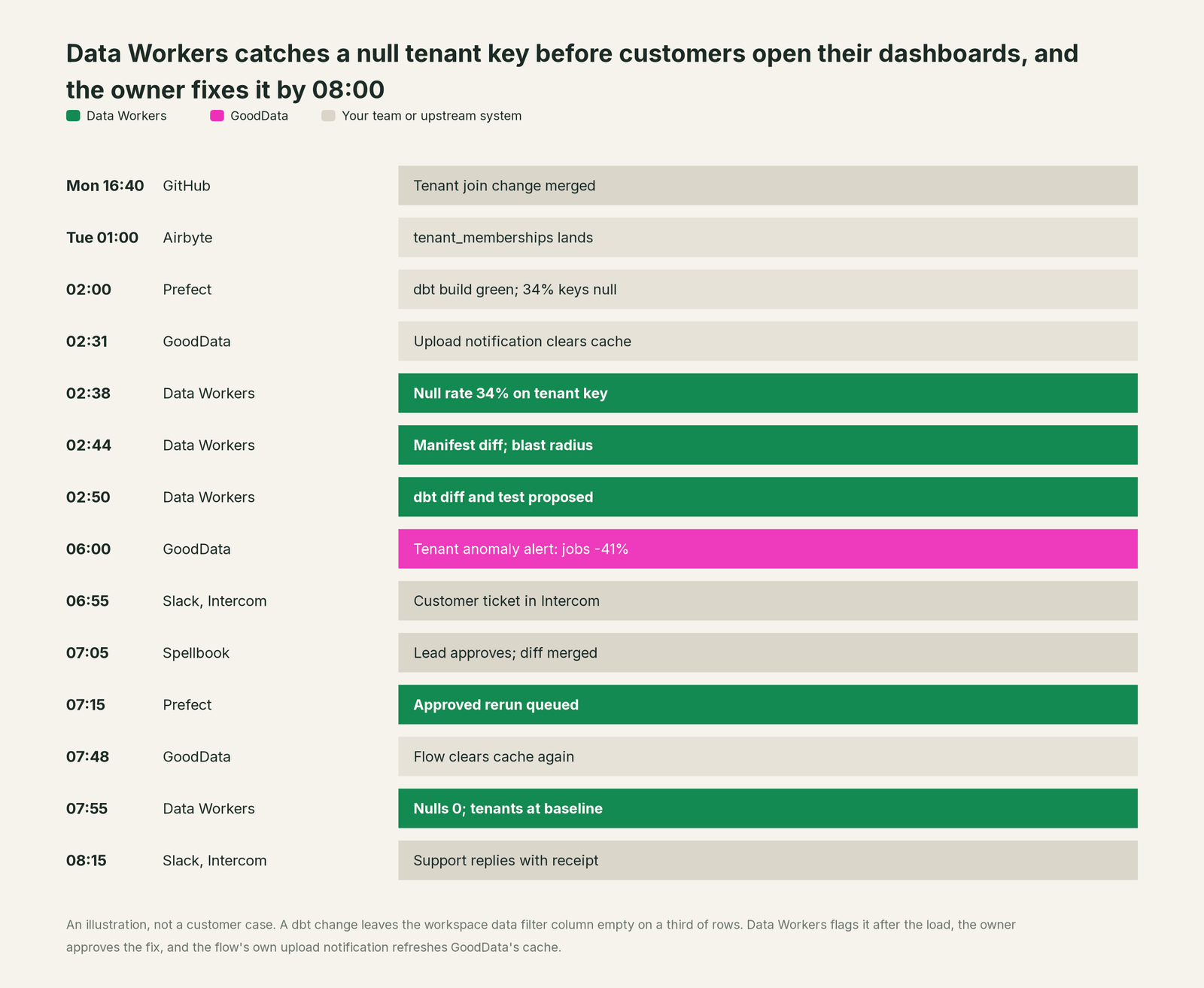
Every tool did its job, including GoodData's filter, which kept each tenant's data private. A reasonable model change met a backfill that had not run yet. Data Workers caught it after the load, a named person approved the fix, and one customer saw the dip instead of a thousand.
| Job | What GoodData does | What Data Workers does |
|---|---|---|
| The model | Holds the logical data model and MAQL metrics as code, deployed to the root workspace and inherited by every child | Keeps the dbt models and tables under that model right |
| Tenant isolation | Workspace data filters show each customer only the rows that match its filter value | Checks the column every filter reads, after every load, and holds per-tenant counts to a baseline |
| The delivery | Embedded dashboards, the AI Assistant, anomaly alerts and the MCP server, scoped to each workspace | Records the numbers your largest tenants act on and flags drift before they log in |
| The fix | Owners change the model, metrics or filters; the load job clears the cache with an upload notification | Proposes the upstream fix as a diff for its owner, routes it to a named approver and queues the approved rerun |
| The proof | Serves the corrected numbers once the cache clears | Re-checks the tables, compares the recorded values and writes a receipt with cause, diff, approver and undo |
Why doesn't GoodData just do this itself?
GoodData made a focused bet: one governed model, served to many tenants and many agents at predictable latency, defined as code. Its guardrails fit that job. An agent "can answer only using data the user is allowed to access in the workspace." MCP operations are scoped to one workspace, generated tools "grant no additional access", and the docs warn that deploy_workspace_analytics replaces a workspace's analytics model. Anomaly detection alerts tell a tenant when a metric moves.
All of that protects GoodData's own surface, and it should. The cause of a wrong tenant number almost always sits below it: an app table, an Airbyte sync, a dbt join or a backfill on another team's calendar. GoodData does not run those systems, and write access to your dbt project and orchestrator would carry a liability its customers would not want. Fixing this incident took a manifest diff, a lineage trace, a dbt change, a named approval, a rerun and a verification across systems GoodData doesn't own. That is the product Data Workers is, and it builds on the GoodData your customers already open every morning.
Every tool owns a slice. Data Workers covers the whole lifecycle
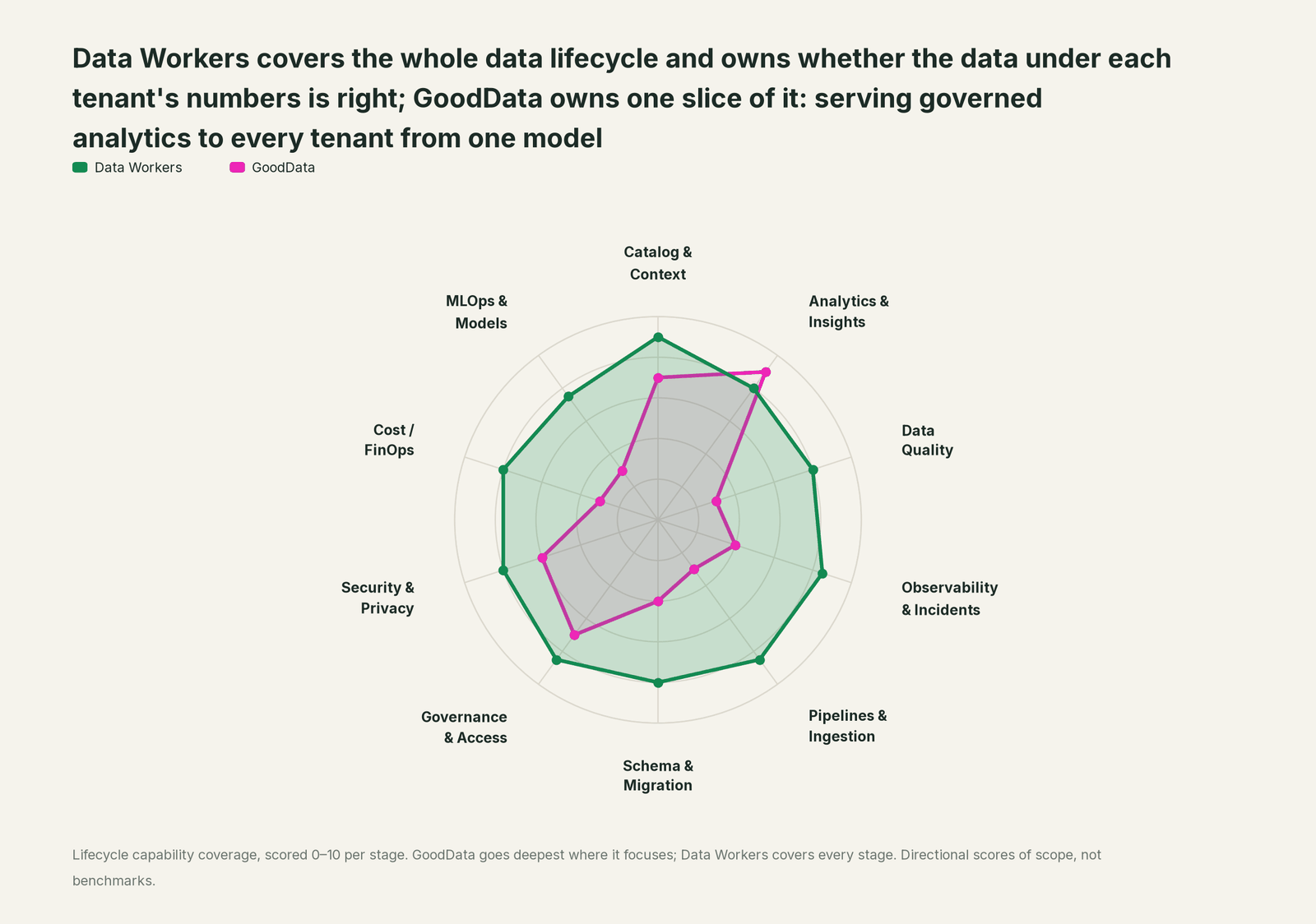
GoodData owns one slice outright: serving governed analytics to every tenant from one model. Each point tool adds another console, contract and handoff. Data Workers covers the whole lifecycle with one context, one approval flow and one audit trail, and builds on the GoodData you already run.
| Stage | Data Workers | GoodData | Why we scored it this way |
|---|---|---|---|
| Catalog & Context | 9 | 7 | The logical data model, MAQL metrics, the Analytics Catalog and the Semantic Quality Agent keep definitions governed in code. Data Workers keeps one governed context graph across every platform, joined to lineage, quality and owners. |
| Analytics & Insights | 8 | 9 | GoodData's home stage: dashboards, embedded analytics, the AI Assistant, Agent Builder and the MCP server, served to every workspace from one model. Data Workers makes sure the tables under them are right. |
| Data Quality | 8 | 3 | GoodData computes what the data source returns; it does not test the tables under a metric. Data Workers checks them after every run for nulls, duplicate keys and row counts, and holds recorded values to a baseline. |
| Observability & Incidents | 8.5 | 4 | Anomaly detection alerts flag an unusual change in a metric; they do not trace a cause. Data Workers traces a wrong number back to the model, sync or source change behind it, proposes the fix and verifies it. |
| Pipelines & Ingestion | 8.5 | 3 | GoodData reads the warehouse and caches results until the load job sends an upload notification. Data Workers queues approved reruns through the orchestrator for the pipelines under GoodData. |
| Schema & Migration | 8 | 4 | Analytics as code and the CLI deploy the model from YAML; generate_ldm infers it from the warehouse. Data Workers reviews dbt changes and scopes the blast radius across downstream models and the workspaces your team records. |
| Governance & Access | 8.5 | 7 | Workspace hierarchies, workspace and user data filters, permission hierarchies and metric permissions govern who sees what. Data Workers routes every data change to a named approver. |
| Security & Privacy | 8 | 6 | Multi-workspace isolation, SSO and audit logs protect each tenant. Data Workers leaves a receipt on every data change and proposes masking for the owner to apply. |
| Cost / FinOps | 8 | 3 | Per-workspace pricing and a result cache keep serving costs predictable. Data Workers attributes Snowflake spend per query and per dbt model through query tags. |
| MLOps & Models | 7.5 | 3 | Forecasting, clustering and key driver skills analyze metrics; GoodData does not run models. Data Workers keeps the data under models and agents healthy. |
How GoodData and Data Workers work together
Customers stay in your app's Insights tab. Developers stay in Claude Code or Cursor, with the GoodData MCP server next to Data Workers, and in Slack for alerts and approval requests. Spellbook Data Catalog (in preview) is where the data team reviews each fix, its blast radius, approver and rollback. Underneath, Data Context Wizard keeps one governed context graph, the Data-Agents Swarm (20+ specialist agents) does the work, and the Autonomous Data-Conductor runs each fix end to end.
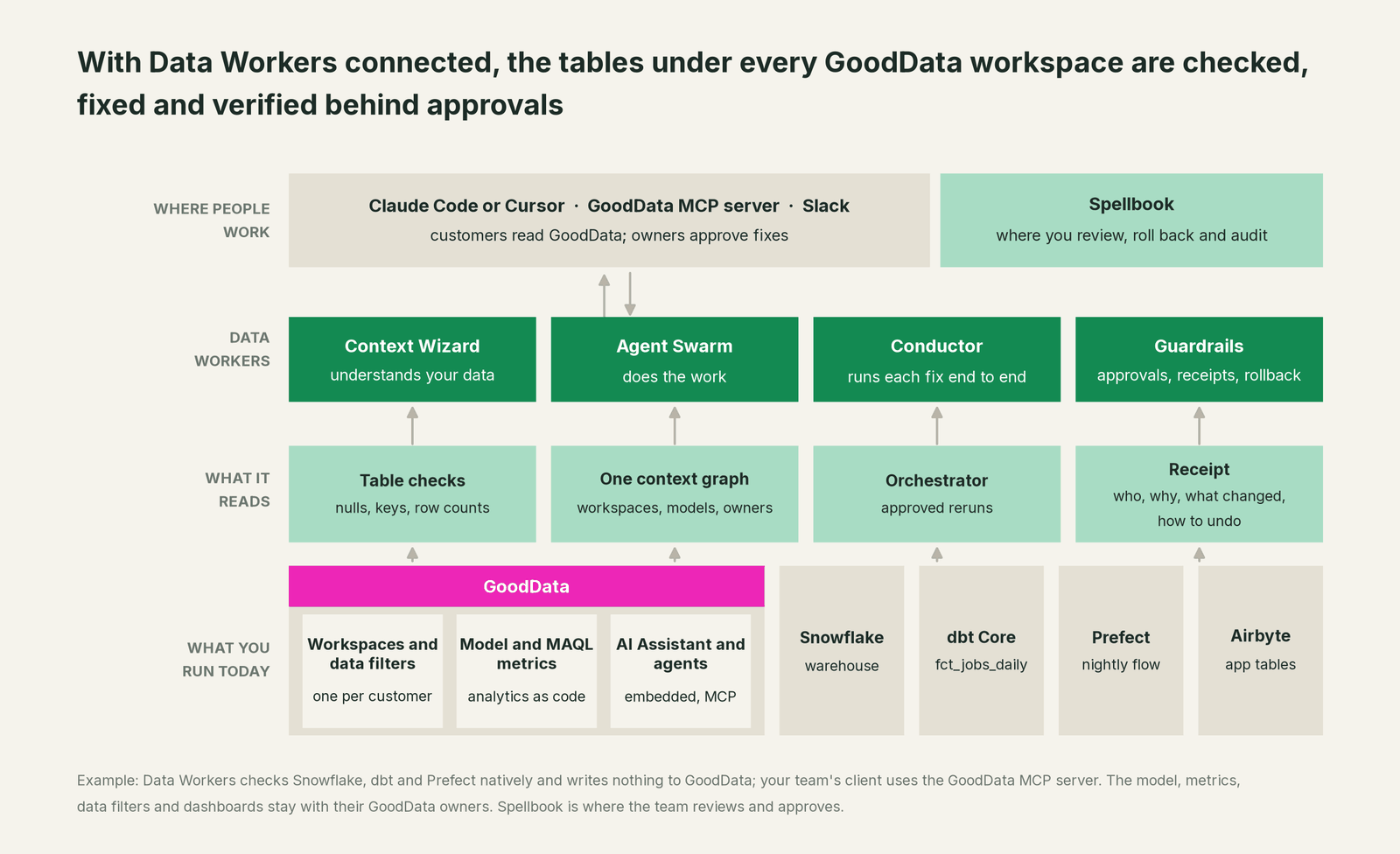
Where Data Workers works. Data Workers connects to GoodData over its API or MCP server today, through your team's own client, and works natively on what sits under it: Snowflake, dbt and the orchestrator. Workspaces enter the picture through context-graph notes your team records, such as "the tenant filter reads wdf__tenant_id", and through pull-request review, whose lineage diff reads dbt exposures, when a change goes through a pull request. Data Workers writes nothing to GoodData and clears no cache; BI is read by design.
What it checks under each workspace. run_quality_check runs null rates, uniqueness on id columns and a minimum row count on Snowflake and Postgres tables (and BigQuery with a service-account key): point it at the tenant column first. monitor_metrics holds values your team records, such as daily rows for your largest tenants, against a baseline, catching a tenant that gains or loses rows even when every key is filled. trace_cross_platform_lineage and blast_radius_analysis follow a column back to its source and forward to every downstream model. Your data stays in your systems: the agents, warehouse credentials and model key run in your infrastructure, and the hosted Conductor sees workflow metadata only.
Setup over MCP today. Clone the open-source repository and add start-agent.sh entries to your client's MCP config, as the client setup docs show. The GoodData MCP server can sit in the same client for your own work; Data Workers' agents never call it. Each GoodData endpoint is scoped to one workspace; authenticate with an API token or interactive SSO (beta since September 8, 2026). Use a token for a user without Workspace.MANAGE (GoodData notes such users can bypass data filters), and keep tool approval on for write tools such as create_metric, generate_ldm and deploy_workspace_analytics.
// Example: .mcp.json for Claude Code. The gooddata entry is your team's own connection.
{
  "mcpServers": {
    "gooddata": {
      "type": "http",
      "url": "https://analytics.example.com/api/v1/actions/workspaces/product_analytics/ai/mcp",
      "headers": { "Authorization": "Bearer ${GOODDATA_API_TOKEN}" }
    },
    "dw-context-catalog": {
      "command": "/path/to/dataworkers-claw-community/start-agent.sh",
      "args": ["dw-context-catalog"]
    },
    "dw-quality": {
      "command": "/path/to/dataworkers-claw-community/start-agent.sh",
      "args": ["dw-quality"]
    },
    "dw-incidents": {
      "command": "/path/to/dataworkers-claw-community/start-agent.sh",
      "args": ["dw-incidents"]
    }
  }
}
List the tools with your client's own command (/mcp in Claude Code). Ask "is everything under the customer Insights dashboards healthy?" and get metric definitions from GoodData's server and lineage, checks and open incidents from Data Workers in one answer.
Where fixes go. Data Workers proposes the change as a diff for the owner to merge, with its blast radius and undo step; it opens the pull request itself when your team turns on the dbt GitHub pull-request target. After approval it queues the rerun through Prefect, Airflow or Dagster. GoodData's cache clears when your load job sends its upload notification, the step GoodData recommends automating, or when an owner clears it.
One request, L0 to L4. The autonomy ladder is set per domain.

- •L0 manual. Connected, not acting. A customer ticket starts the hunt.
- •L1 observe. Checks the tenant column and the tables under your root workspace after each load and logs what it would do.
- •L2 propose. Drafts the upstream fix with its blast radius; a named owner approves in Spellbook before anything runs.
- •L3 act reversibly. For proven classes, such as rerunning the nightly flow after an approved fix, Data Workers acts, verifies and records the undo.
- •L4 autonomous. For a narrow class in one domain, Data Workers fixes and verifies on its own and posts the receipt.
Approvals go to a named person; an unanswered request expires and escalates, never grants itself. No agent can promote its own work. The full safety model is in is it safe to let AI agents change production data, how approvals work for AI data agents and where does our data go.
Embedding more than one BI tool? You're on Sisense and You're on Metabase show the same loop there; You're on Prefect and You're on dbt cover the systems under this example, and our semantic layer tools comparison covers metrics across layers.
What changes for your team
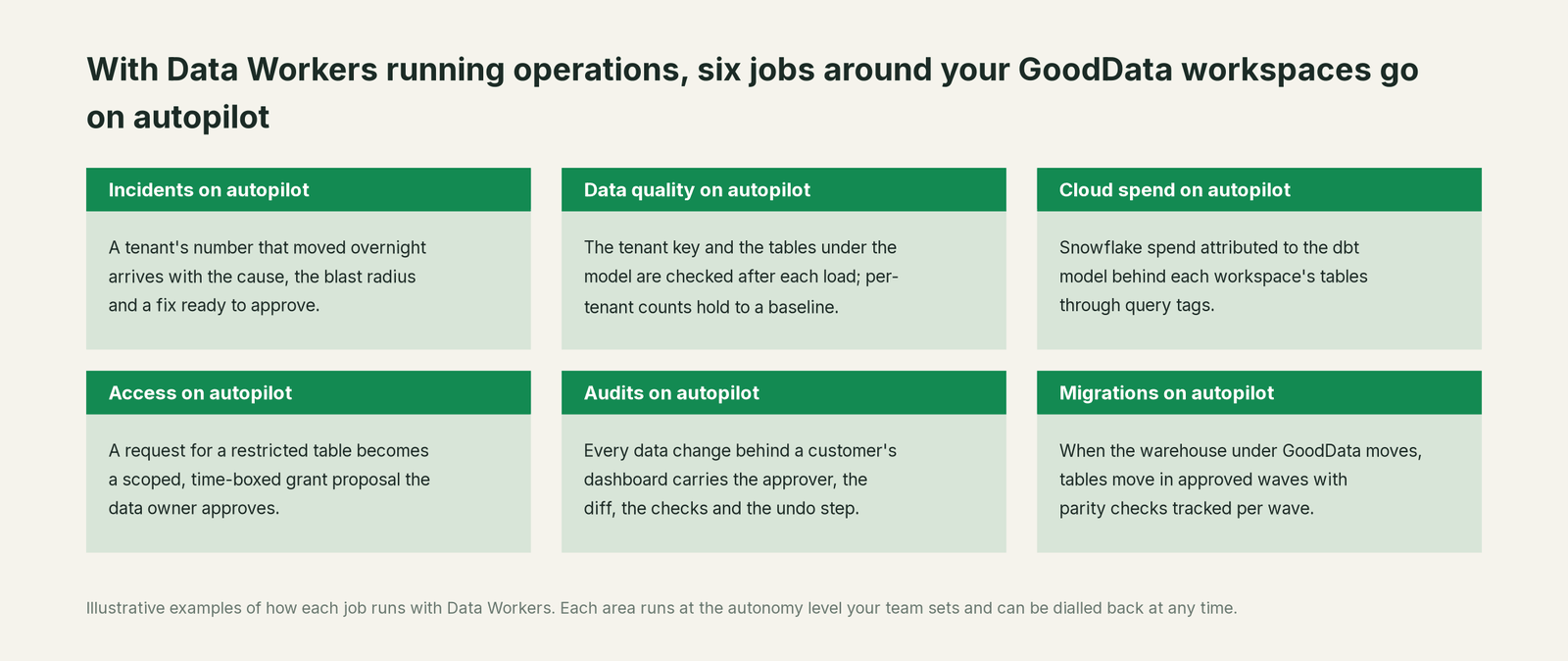
Teams that embed GoodData usually run a small data group serving the company and every customer, and much of their unplanned week goes to "why does this customer's number look wrong?" With Data Workers, these jobs run on autopilot at the level you set.
- •Incidents. A tenant's number that moved overnight arrives with the cause, the blast radius and a fix ready to approve.
- •Data quality. The tenant key and the tables under the model are checked after each load; per-tenant counts hold to a baseline.
- •Cloud spend. Snowflake spend is attributed to the dbt model behind each workspace's tables through query tags.
- •Access. A request for a restricted table becomes a scoped, time-boxed grant proposal the data owner approves.
- •Audits. Every data change behind a customer's dashboard carries the approver, the diff, the checks and the undo step.
- •Migrations. When the warehouse under GoodData moves, tables move in approved waves with parity checks tracked per wave.
Keep GoodData, or consolidate?
Keep GoodData if you love it; Data Workers works with it from day one. Many teams consolidate once Data Workers runs that slice too.
Most teams keep GoodData. What they consolidate is the tooling around it: a separate data-quality tool, a script that compares row counts per tenant, and a wiki page listing which dbt models feed which workspaces. Weighing a build on the GoodData MCP server and a coding agent? Read build it ourselves with Claude Code and MCP servers: connecting servers is the easy part; cross-system context, approvals and rollback are the work. For what Data Workers reads and changes on each system, see Data Workers integrations.
The case for your CFO
The outcome: the analytics your customers pay for stay complete and right in every workspace, and when something upstream breaks a tenant's numbers, the fix is approved and verified before they log in. Fewer tickets, fewer awkward renewal calls.
The risk story: Data Workers changes nothing in GoodData. It checks the tables under each workspace, proposes upstream fixes as diffs, and nothing runs until the named owner approves. Every change leaves a receipt: what broke, what changed, who approved it and how to undo it. Autonomy is set per domain from L0 manual to L4 autonomous, and an org-wide stop halts all autonomous dispatch. There is zero migration.
Why now: GoodData's AI Assistant, agents and MCP server put your numbers in front of customers as answers and alerts. A gap in one table now reaches a customer's inbox at 06:00 as a confident anomaly alert. Per-workspace analytics is a product you sell, and it deserves the same operations as the rest of your product.
The first win: the tenant column and your 50 largest customers' headline counts, checked after every load. What stays the same: your GoodData model, metrics, filters and embeds, your app database and Airbyte, your dbt project, Prefect flows and review process. For the numbers, see the ROI of agentic data operations.
The sentence to repeat upstairs: "GoodData keeps serving every customer their own analytics; Data Workers makes sure each customer's numbers are complete and right, and a named owner approves every fix with a receipt."
Getting started
Start with a pilot. Connect Data Workers read-only to the warehouse, dbt project and orchestrator under your root workspace, register checks on the tenant column and the tables your MAQL metrics read, record headline counts for your largest tenants, and let it watch every load before turning on the first fix class. The pilot path and plans are on the pricing page, and the pilot is credited in full against the first year.
FAQ
Does Data Workers edit our GoodData model, MAQL metrics or workspace data filters? No. The model, metrics, filters and dashboards stay with their GoodData owners and your analytics-as-code repository. When a definition should change, Data Workers says which one and why, and the owner changes it.
Why didn't GoodData show an error when tenant keys went null? Its data filter did what it should: rows with no value in the filter column stay out of every child workspace, which protects tenant isolation. Missing rows then look like a quiet day, so Data Workers checks the column itself after every load.
Can Data Workers catch rows landing in the wrong tenant, as well as missing ones? It catches the signal: one tenant gaining rows and another losing them against the baselines your team records with monitor_metrics, and duplicate ids when a join fans out. Data Workers traces the cause and proposes the fix; if customer data was exposed, your security process and the data owner decide what happens next, and any masking change is a proposal the owner applies.
Our customers ask the AI Assistant why numbers moved. Can Data Workers tell why it gave a wrong answer? Usually the Assistant was faithful to the filtered data and the data underneath was wrong. Data Workers' agents never call the Assistant or the GoodData MCP server; they trace the tables under the metric back to the change that moved them, and the receipt records cause and fix.
Does this work with GoodData on BigQuery or Postgres instead of Snowflake? Yes. The table checks run natively on Snowflake and Postgres, and on BigQuery with a service-account key. Wherever the data source lives, the dbt project and orchestrator underneath are where the fixes go.
Sources
- •GoodData.AI, homepage (gooddata.com redirects here; Agentic Serving Plane; SQL, MCP, A2A and SDK interfaces), https://www.gooddata.ai/ (checked Oct 3, 2026)
- •GoodData.AI, Pricing, https://www.gooddata.ai/pricing/ (checked Oct 3, 2026)
- •GoodData, What's New in GoodData Cloud (MCP Server GA May 21, 2026; Agent Builder GA May 21, 2026; Anomaly Detection Alerts GA May 14, 2026; Semantic Quality Agent GA Mar 19, 2026; interactive SSO for MCP beta Sep 8, 2026), https://www.gooddata.ai/docs/cloud/whats-new-cloud/ (checked Oct 3, 2026)
- •GoodData, MCP Server (workspace endpoint, tools, authentication), https://www.gooddata.ai/docs/cloud/ai/mcp-server/ (checked Oct 3, 2026)
- •GoodData, Agents, https://www.gooddata.ai/docs/cloud/ai/agents/ (checked Oct 3, 2026)
- •GoodData, Workspace Data Filters, https://www.gooddata.ai/docs/cloud/workspaces/workspace-data-filters/ (checked Oct 3, 2026)
- •GoodData, Multitenancy concepts, https://www.gooddata.ai/docs/cloud/workspaces/concepts/multitenancy/ (checked Oct 3, 2026)
- •GoodData, Build a Workspace Hierarchy, https://www.gooddata.ai/docs/cloud/workspaces/workspace-hierarchy/ (checked Oct 3, 2026)
- •GoodData, Invalidate Cached Data, https://www.gooddata.ai/docs/cloud/connect-data/cache-management/reload-cached-data/ (checked Oct 3, 2026)
- •GoodData, MAQL, https://www.gooddata.ai/docs/cloud/create-metrics/maql/ (checked Oct 3, 2026)
- •GoodData, GoodData for VS Code and CLI (beta), https://www.gooddata.ai/docs/cloud/api-and-sdk/vs-code-extension/ (checked Oct 3, 2026)
- •GoodData, Semantic Quality Agent, https://www.gooddata.ai/docs/cloud/analytics-catalog/semantic-quality-agent/ (checked Oct 3, 2026)
- •Data Workers, Client setup (open-source docs), https://dataworkers.io/opensource-docs/client-setup/ (checked Oct 3, 2026)
- •Data Workers open-source repository, agent tools and start-agent.sh, https://github.com/DataWorkersProject/dataworkers-claw-community (checked Oct 3, 2026)