You're on Select Star: Keep the Map of Your Data True, With Data Workers Doing the Operations Work
Already on Select Star? It maps and documents your data on its own. Data Workers does the operations work that keeps that map true, behind approvals, beside Select Star's MCP server in your team's client.
Your team set up Select Star so nobody had to draw the map by hand. It connected to Redshift, dbt, Airflow and your BI tool, and the catalog filled itself in: column-level lineage to every dashboard, popularity from query history, entity-relationship diagrams inferred from the joins your analysts write, and documentation drafted from all of that. Every dbt pull request gets a downstream impact report from Select Star's GitHub Action. Schema change detection tells asset owners when a table or column changes, and downstream notifications let them reach the top users of every table and dashboard below it. Ask AI answers from that metadata in Slack, AI Agents (private beta) apply tags and owners daily, Semantic Model Generation turns the logic in your dashboards into semantic models for Snowflake Cortex Analyst, and the Select Star MCP server hands the whole map to Claude, Cursor and VS Code Copilot. On November 24, 2025, Snowflake announced a definitive agreement to acquire the Select Star team and platform technology to expand Horizon Catalog's view of enterprise data.
Select Star maps and documents your data on its own. Data Workers does the operations work that keeps that map true, behind approvals. A map tells you where the road broke. Someone still has to fix the road and confirm the traffic is moving before the 09:00 meeting.
Key takeaways
- •Select Star keeps its job. The catalog, lineage, popularity, ERDs, impact reports, schema change notifications, Ask AI and the MCP server stay exactly as they are.
- •Select Star's signals start the work. A schema change, its lineage and the queries that touch the column come to Data Workers from your team's assistant over Select Star's MCP server, and become an incident with a traced cause.
- •The fix lands where the cause lives. Data Workers proposes the dbt change as a diff for the owner to merge, queues the rerun through Airflow and verifies the result in the warehouse.
- •The map updates from the fix. Approved descriptions and deprecation notes go back as dbt docs, and Select Star picks them up on its next sync.
- •Start with a pilot. One dbt project, read-only first, on the ladder from L0 manual to L4 autonomous, set per domain.
Select Star is the self-updating map. Data Workers is the road crew that keeps it accurate.
Select Star holds where your data comes from, where it goes and who uses it. Data Workers holds what happens when something on that map changes: one context across the systems Select Star maps, one approval flow and one audit trail for every change, with Spellbook Data Catalog (in preview) as the place your team reviews it. Still choosing tools? See Data Workers vs Select Star.
Here is a Tuesday night at a B2B marketplace that runs Amazon Redshift, dbt Core and Airflow, with Select Star as its catalog and Metabase for dashboards. This is an illustrative example.
| Time | System | What happens |
|---|---|---|
| 16:40 | GitHub | An analytics engineer opens a dbt pull request that renames dim_accounts.customer_tier to plan_tier, matching the term the business just agreed on. Select Star's GitHub Action posts its impact report: one dbt model, nine Metabase questions and the "Revenue by tier" dashboard sit downstream |
| 17:05 | GitHub | A reviewer approves and the pull request merges. The plan is to update the Metabase questions in the morning |
| 02:00 | Airflow | The dbt_nightly DAG run rebuilds dim_accounts in Redshift without customer_tier |
| 02:04 | dbt on Redshift | rpt_churn_by_tier fails on the missing column and its Airflow task goes red. The nine native SQL questions in Metabase now return errors |
| 03:10 | Select Star | After the nightly metadata sync, schema change detection records the column deletion and notifies the owners of dim_accounts in Slack |
| 03:14 | Data Workers | The on-call's assistant reads the change, the column lineage and the queries that touch customer_tier over Select Star's MCP server and hands them to Data Workers, which ties the break to the merged pull request and the failed Airflow task, and opens an incident |
| 03:25 | Data Workers | blast_radius_analysis lists the reach: the failed dbt model, nine Metabase questions, and the dashboard on the agenda for the 09:00 sales QBR |
| 03:30 | Data Workers | It proposes a dbt diff that adds customer_tier back as a compatibility column equal to plan_tier, with a deprecation note and a 30-day removal date in the model docs, and a rerun plan for the failed tasks. It drafts the SQL edit for each Metabase question and routes each one to that question's owner |
| 07:50 | Spellbook | The analytics engineer who wrote the rename, named as the model owner, reviews the cause, the diff and the blast radius, approves and merges |
| 08:05 | Airflow | Data Workers queues the failed tasks through Airflow |
| 08:20 | Redshift | Over Redshift's API, Data Workers checks that the row count of dim_accounts is unchanged, that the two columns match on every row and that rpt_churn_by_tier rebuilt, then writes the receipt |
| 09:00 | Metabase | The QBR dashboard loads with the right tiers. Question owners apply the drafted SQL edits over the deprecation window |
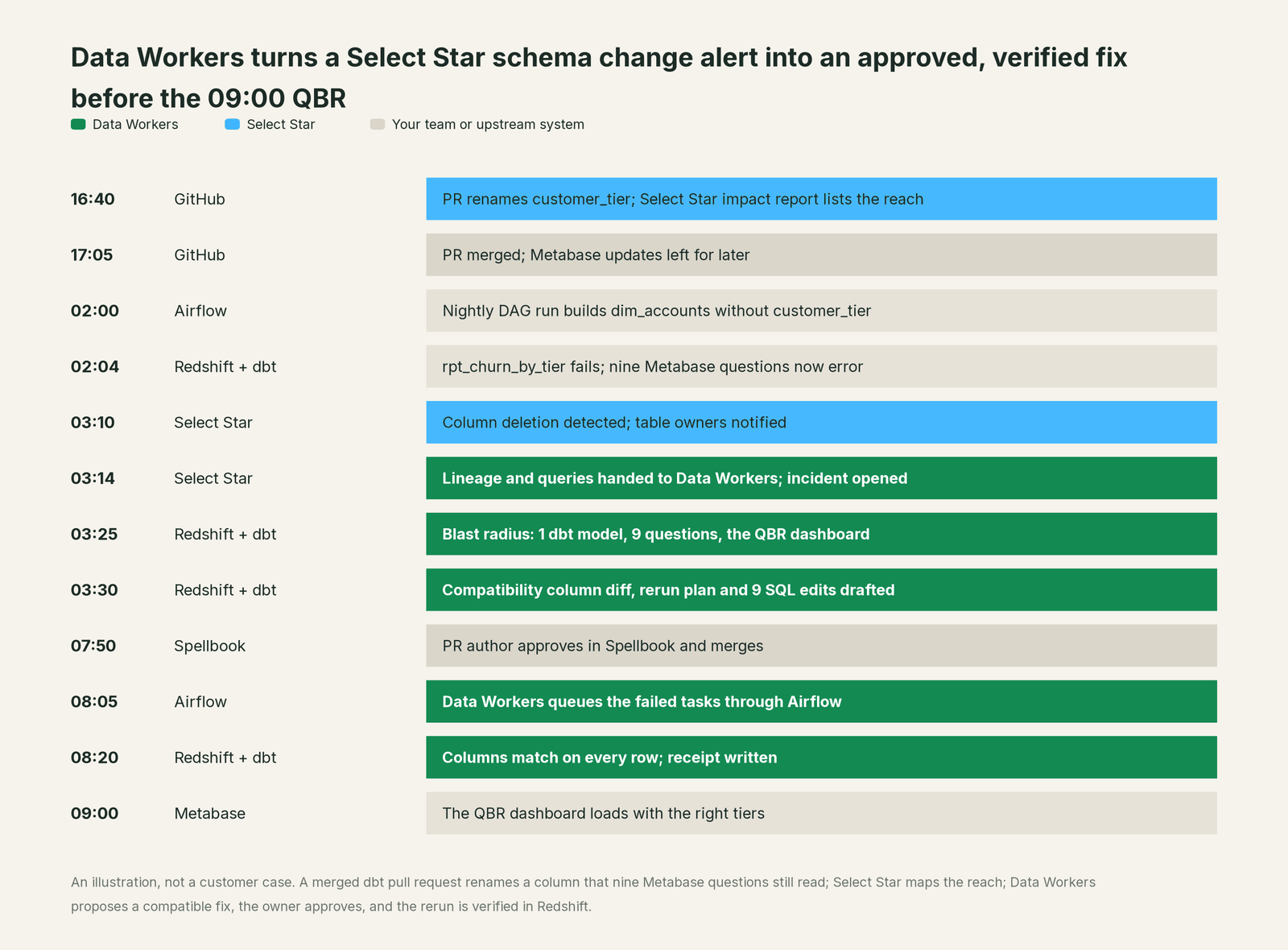
Select Star did its part exactly. The impact report named the reach before the merge, and the notification reached the owners after the column disappeared. The gap sat between two good decisions: a rename that matched the glossary, and a plan to clean up the dashboards later.
| Job | What Select Star does | What Data Workers does |
|---|---|---|
| The map | Holds column lineage, popularity, ERDs, owners and documentation | Brings them in as sourced context and joins them to run results and code |
| The warning | Posts an impact report on the dbt pull request | Reads the same reach and keeps it attached to the change after the merge |
| The signal | Detects the column deletion and notifies the asset's owners | Picks up the change with its owners attached and opens an incident |
| The cause | Shows where the column went and who reads it | Ties the break to the merged rename, the Airflow run and the failed model |
| The fix | Records the new schema on its next sync | Proposes a compatible dbt diff and the SQL edits, routes them to named owners, queues the rerun after approval |
| The proof | Shows the column back on the map | Verifies row counts and column parity in Redshift and keeps a receipt with cause, diff, approver and rollback path |
Why doesn't Select Star just do this itself?
Because Select Star is built to be a complete, automatic and safe picture of your data. Its pitch for Ask AI is "no data accessed, only metadata and query logs." The MCP server exposes seven tools, all of them reads: search, asset details, table info, lineage, the queries behind a table or column, and two for semantic models. Where Select Star writes, it writes metadata: tags synced back to sources, descriptions confirmed in Select Star sent to your dbt repository as a daily pull request (dbt docs Sync, private preview), semantic views created in Snowflake for Cortex Analyst (beta), and tags, owners and collections applied by AI Agents inside Select Star. Impact reports advise the reviewer; they don't block or rewrite the pull request. That restraint is why security teams approve it quickly.
Keeping the map true means changing a dbt model's logic, scoping what else that touches, getting the right person to approve, rerunning an Airflow task, proving the numbers in the warehouse and owning the rollback. Under the announced Snowflake agreement, the Select Star team also has a large job of its own: expanding Horizon Catalog's view of the estate. The operations work is a different product with a different liability: Data Workers.
Every tool owns a slice. Data Workers covers the whole lifecycle
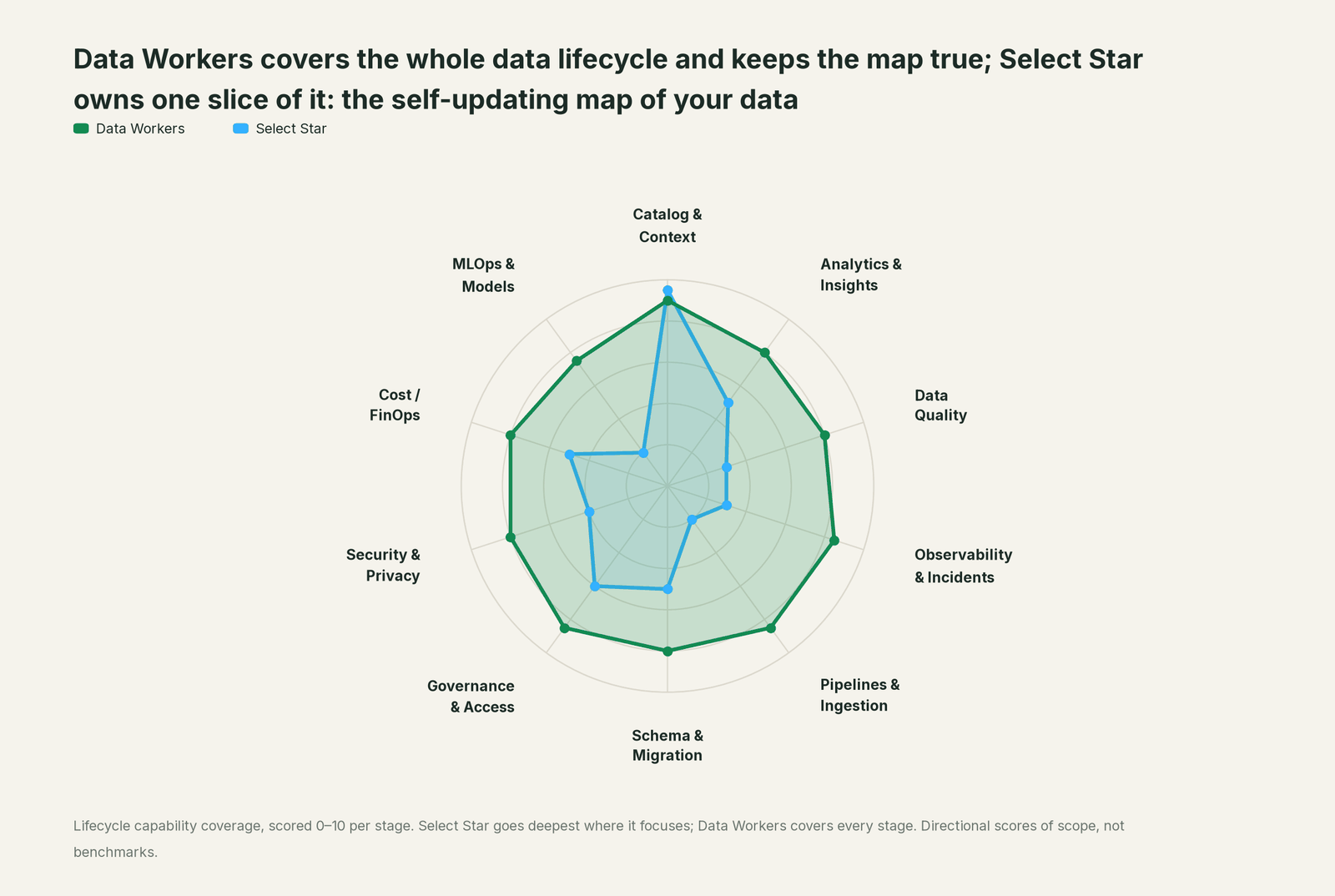
Select Star owns one slice outright: the self-updating map of your data, built from metadata and query history. Each point tool adds another console, contract and handoff. Data Workers covers the whole lifecycle with one context, one approval flow and one audit trail.
| Stage | Data Workers | Select Star | Why we scored it this way |
|---|---|---|---|
| Catalog & Context | 9 | 9.5 | Select Star's home stage: an automated catalog with column-level lineage, popularity from query history, ERDs inferred from joins and a glossary, served to AI over an MCP server. Data Workers reads it as a first-class source. |
| Analytics & Insights | 8 | 5 | Ask AI answers data questions from metadata, popularity and query history, and Semantic Model Generation turns BI logic into semantic models for Cortex Analyst. Data Workers answers across platforms from approved definitions and acts on the answer. |
| Data Quality | 8 | 3 | Select Star documents and tags data and ingests dbt test results; quality checks run elsewhere. Data Workers runs quality checks, traces failures and re-checks after the fix. |
| Observability & Incidents | 8.5 | 3 | Schema change detection notifies owners, and downstream notifications let them reach table and dashboard users. Data Workers traces the cause, proposes the fix behind approval and verifies it. |
| Pipelines & Ingestion | 8.5 | 2 | Select Star maps dbt, Airflow and Fivetran lineage; running pipelines is outside its job. Data Workers proposes pipeline changes and queues reruns through your orchestrator after approval. |
| Schema & Migration | 8 | 5 | A GitHub Action posts a downstream impact report on every dbt pull request, and schema changes are detected after they land. Data Workers detects the change, proposes the compatible fix and generates migrations with rollback SQL for the owner. |
| Governance & Access | 8.5 | 6 | Field-level RBAC and ABAC govern who sees metadata in Select Star, and governance and migration workflows run on its lineage. Data Workers dry-runs a proposed warehouse grant and applies approved Unity Catalog grants. |
| Security & Privacy | 8 | 4 | PII is detected and tagged automatically, masked in Select Star's own UI and synced back to sources as tags. Data Workers finds new sensitive columns and proposes the warehouse masking for the owner to apply. |
| Cost / FinOps | 8 | 5 | Cost Analysis, on some plans, breaks Snowflake credits down by query, dashboard, warehouse and user, and popularity points to unused assets. Data Workers attributes Snowflake credits to the dbt model behind each query and drafts the fix for its owner. |
| MLOps & Models | 7.5 | 2 | Models are outside Select Star's catalog scope. Data Workers keeps the data under the models healthy. |
How Select Star and Data Workers work together
People keep working where they work: Claude, Cursor or VS Code Copilot for SQL and dbt, Metabase for dashboards, Select Star for search and lineage. Spellbook is where the data team looks at proposed changes, each with its blast radius, approver and rollback path. Approval requests reach the named approver in Slack or email; the decision is made in Spellbook with the diff in view. Between them, Data Context Wizard keeps one governed context graph, the Data-Agents Swarm does the work with more than 20 specialist agents, and the Autonomous Data-Conductor runs each fix end to end: detect, diagnose, fix, review, verify, remember.
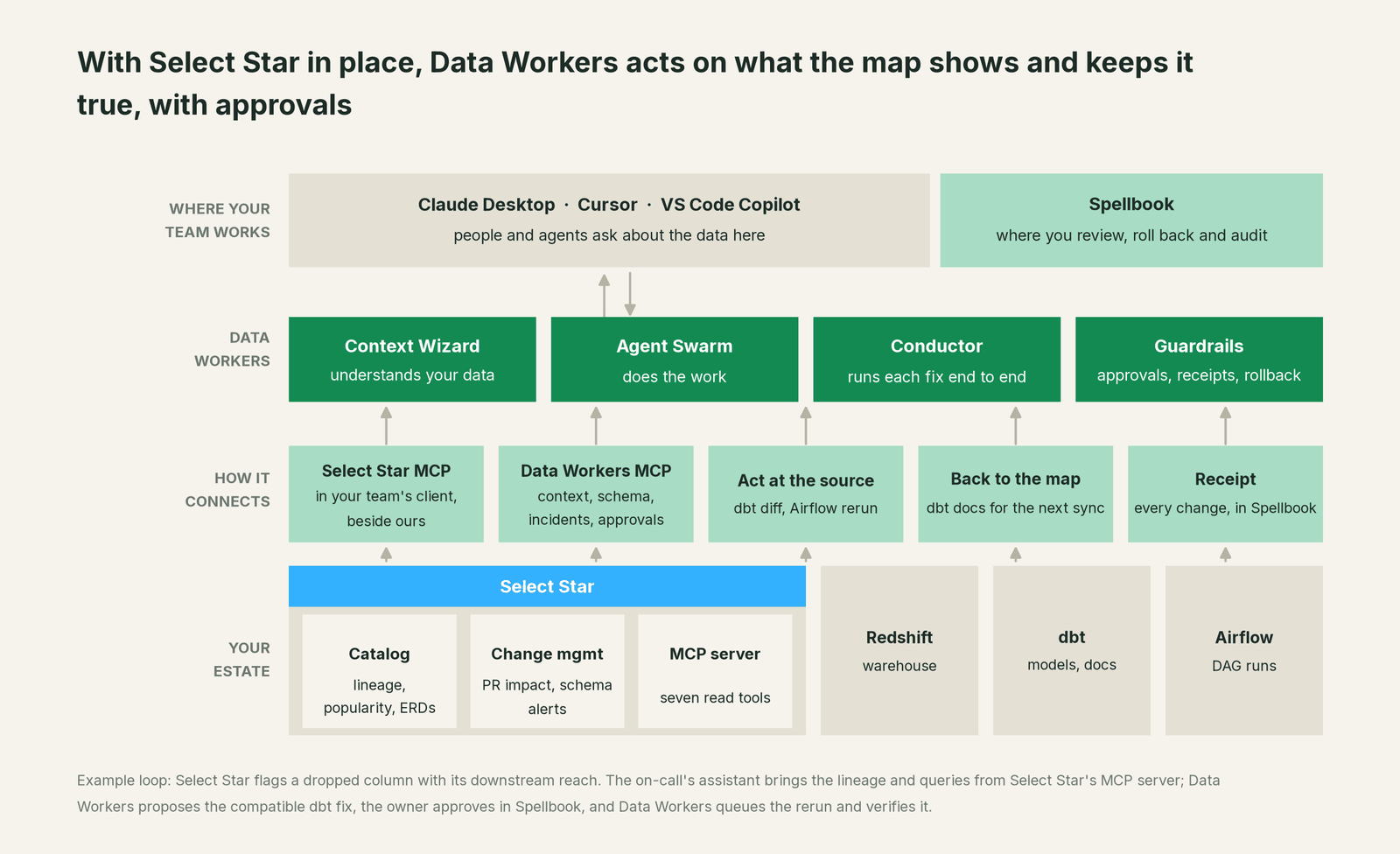
What comes in from Select Star. Data Workers connects to Select Star over its MCP server or API today, using the read tools search_metadata, get_asset_details, get_table_info, traverse_lineage and get_asset_queries. Context Wizard joins what arrives, with its source and time, to what the map points to but doesn't hold: Airflow run history, dbt manifests and test results, and each model's change history. Data Workers connects natively to dbt, Airflow and GitHub (for pull-request review), and to Redshift and Metabase over their APIs today. Your agent can call explain_table (definition, lineage, trust score), trace_cross_platform_lineage, blast_radius_analysis, assess_impact, get_quality_score and get_incident_history.
Setup over MCP today. Create a Select Star API token for a service user whose access matches your pilot scope. For Data Workers, clone the open-source repository and add start-agent.sh entries, as the client setup docs show. Select Star's documented Claude Desktop config uses mcp-remote; the Data Workers agents sit next to it.
// Example: claude_desktop_config.json
{
  "mcpServers": {
    "select-star": {
      "command": "npx",
      "args": ["-y", "mcp-remote@latest", "https://mcp.production.selectstar.com/mcp",
               "--header", "Authorization:${SELECT_STAR_TOKEN}"],
      "env": { "SELECT_STAR_TOKEN": "Bearer <your-select-star-token>" }
    },
    "dw-context-catalog": {
      "command": "/path/to/dataworkers-claw-community/start-agent.sh",
      "args": ["dw-context-catalog"]
    },
    "dw-schema": {
      "command": "/path/to/dataworkers-claw-community/start-agent.sh",
      "args": ["dw-schema"]
    },
    "dw-incidents": {
      "command": "/path/to/dataworkers-claw-community/start-agent.sh",
      "args": ["dw-incidents"]
    }
  }
}
List the tools with your client's own tools menu. Then "what broke when we renamed customer_tier?" gets the lineage and the affected queries from Select Star, the cause from get_root_cause and the reach from blast_radius_analysis, in one answer.
Where writes go. Fixes land where your team already reviews change. Data Workers proposes the dbt change as a diff for the owner to merge, and queues reruns through Airflow after approval. BI stays read by design: edits to Metabase questions are drafted for each question's owner. Approved facts land in the Context Wizard graph, and approved descriptions and deprecation notes go back as dbt docs that Select Star picks up on its next sync, the same repository its own dbt docs Sync writes to. Select Star stays the system of record for its map.
One request, L0 to L4. The autonomy ladder is set per domain.

- •L0 manual. Connected, not acting. Your engineer works the notification by hand.
- •L1 observe. Each change is explained with its cause, owners and blast radius; nothing changes, and what each action would have needed is logged.
- •L2 propose. Data Workers drafts the diff, the rerun plan and the Metabase SQL edits; a named owner approves in Spellbook.
- •L3 act reversibly. For proven classes, such as a rerun after an approved fix, Data Workers acts, verifies and keeps the undo path.
- •L4 autonomous. For a scoped, trusted class in one domain, it fixes and verifies on its own and posts the receipt.
An unanswered approval request expires and escalates; it never auto-grants. No agent can promote its own work, and an org-wide stop halts all autonomous dispatch. The safety model is in is it safe to let AI agents change production data, sign-off in how approvals work for AI data agents and who owns the agents, and the levels in autonomy levels L0 to L4 explained. The agents run in your infrastructure and hold your warehouse credentials and model key; your data stays in your systems, and the hosted Conductor sees workflow metadata only (where does our data go).
More for this stack: Data Workers on AWS, Horizon Catalog vs Spellbook, the guides for teams on Snowflake Horizon context, Atlan, DataHub and Secoda, Data Workers integrations and how Data Workers differs from a data catalog.
What changes for your team
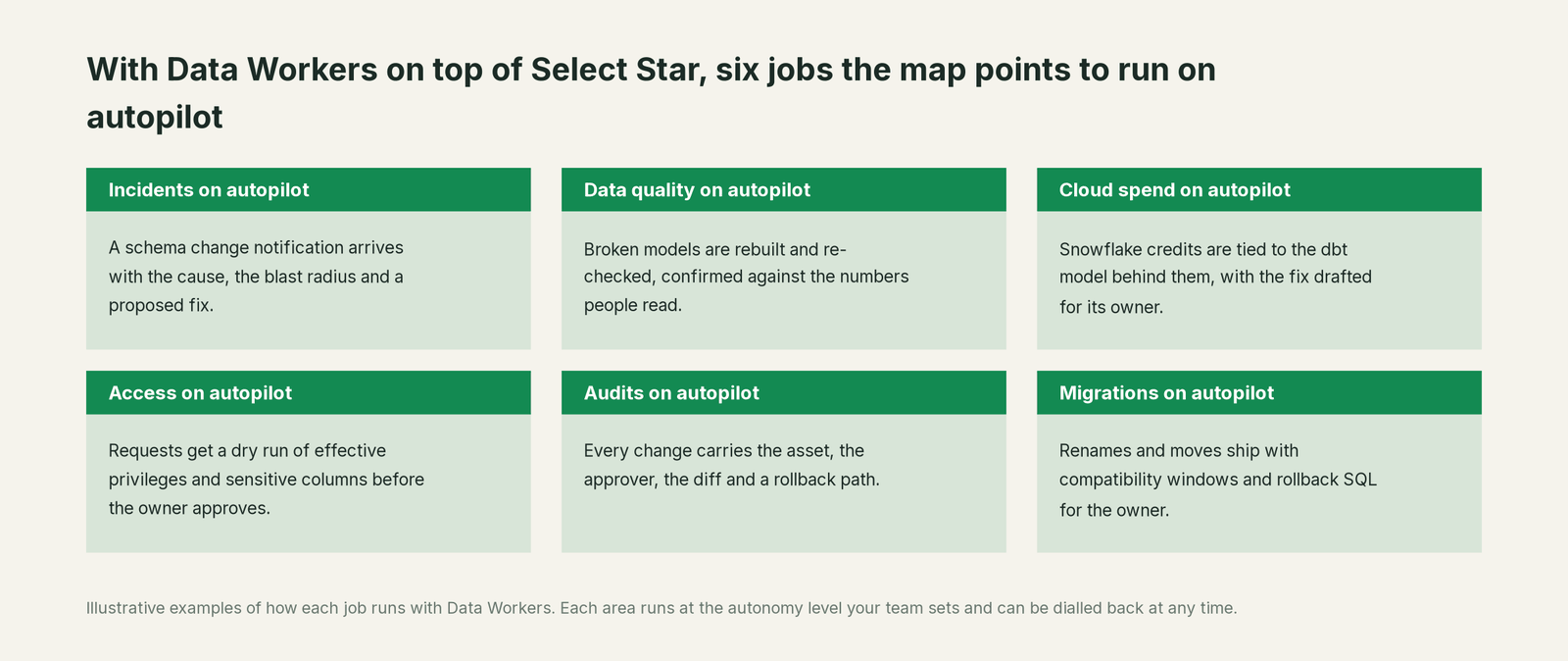
Teams on Select Star spend much of the week acting on what the map shows: deciding who updates which dashboard, chasing a model owner after a schema change, rerunning a failed task. With Data Workers on top, those jobs run on autopilot at the level you set.
- •Incidents. A schema change notification arrives with the cause, the blast radius and a proposed fix.
- •Data quality. Broken models are rebuilt and re-checked, confirmed against the numbers people read.
- •Cloud spend. Snowflake credits are tied to the dbt model behind them, with the fix drafted for its owner.
- •Access. Requests get a dry run of effective privileges and sensitive columns before the owner approves.
- •Audits. Every change carries the asset, the approver, the diff and a rollback path.
- •Migrations. Renames and moves ship with compatibility windows and rollback SQL for the owner.
Analytics engineers can rename a column to match the glossary without a cleanup sprint.
Keep Select Star, or consolidate?
Keep Select Star if you love it; Data Workers works with it from day one. Many teams consolidate once Data Workers runs that slice too.
For most Select Star teams the answer today is to keep it. The catalog maintains itself and your AI tools already read it over MCP. What teams consolidate is the tooling around it: the script that turns impact reports into reminders, the rerun runbook, the spreadsheet of Metabase question owners. Teams planning around Snowflake's agreement can plan calmly: Data Workers reads Select Star now and connects natively to Snowflake, so the operations layer stays the same whichever catalog you land on. If you are thinking about building this layer yourself on Select Star's MCP server, read build it ourselves with Claude Code and MCP servers: reading the map is the easy part; cross-system context, approvals and rollback are the work.
The case for your CFO
The outcome: the catalog that already maps your data starts preventing broken numbers instead of only describing them. Select Star knows the reach of every change; Data Workers turns that reach into an approved fix before people open the dashboard.
The risk story is plain. Data Workers reads Select Star with a token scoped to the pilot. Every change it proposes shows its blast radius, goes to a named owner, lands through your dbt review and Airflow, is verified and leaves a receipt: the trigger, the diff, the checks with before and after values, the approver and the undo path. Autonomy is set per domain and can be dialled back any time. There is zero migration: Select Star, Redshift, dbt, Airflow and Metabase stay where they are.
Why now: agents across the stack already read your map over MCP and are starting to change things, and an operations layer that doesn't depend on any one catalog keeps your options open. The first win is one dbt project where every schema change arrives explained, owned and fixable. What stays the same: your catalog, your glossary, your review process and your dashboards. For the numbers, see the ROI of agentic data operations.
The sentence to repeat upstairs: "Select Star shows us where every change lands; Data Workers fixes what breaks, with the owner approving each fix and a receipt for every one."
Getting started
Start with a pilot. Pick one dbt project where Select Star impact reports already run, connect Select Star's MCP server with a scoped token next to Data Workers, and let Data Workers explain every schema change there before you turn on the first fix class. The pilot path and plans are on the pricing page, and the pilot is credited in full against the first year.
FAQ
Does Data Workers write to Select Star? No. Select Star's MCP server is read-only and Data Workers only needs those reads. Catalog updates reach Select Star the way they do today: approved descriptions and deprecation notes go back as dbt docs, and Select Star picks them up on its next sync.
How does Data Workers connect to Select Star? Over Select Star's hosted MCP server or API today, with a bearer API token. Data Workers uses the search, asset, table, lineage and query tools; the token's access decides what it can read.
Snowflake is acquiring Select Star. What does that mean for us? On November 24, 2025, Snowflake announced that it "has entered into a definitive agreement to acquire the Select Star team and platform technology" to expand Horizon Catalog's view of enterprise data. As of October 3, 2026 we found no later closing or integration note on snowflake.com, and Select Star's product pages and MCP documentation are live. Data Workers reads Select Star today and connects natively to Snowflake, so your operations layer, approvals and receipts carry over whichever catalog you run next.
Select Star already posts impact reports on our dbt pull requests. Why add Data Workers? Keep the reports; they are the warning. Data Workers acts on the same reach after the merge: it traces the break, proposes the compatible fix, routes it to a named owner, queues the rerun and proves the result.
Does Data Workers change our Metabase dashboards? BI stays read by design. Data Workers drafts the SQL edit for each affected question, routes it to that question's owner and checks the tables those questions read.
What about the Cortex Analyst semantic models we generate in Select Star? Keep generating them. Data Workers treats the semantic model and the tables under it as downstream assets: when a column it relies on changes, the model shows up in the blast radius and the fix is verified before the next question hits it.
Sources
- •Select Star, homepage, https://www.selectstar.com/ (checked Oct 3, 2026)
- •Select Star, MCP Server for Data, https://www.selectstar.com/product/mcp-for-data (checked Oct 3, 2026)
- •Select Star docs, MCP Server, https://docs.selectstar.com/features/mcp-server (checked Oct 3, 2026)
- •Select Star docs, AI Agents (Private Beta), https://docs.selectstar.com/features/ai-tagging-agent (checked Oct 3, 2026)
- •Select Star docs, Schema Change Detection, https://docs.selectstar.com/features/schema-change-detection (checked Oct 3, 2026)
- •Select Star docs, Downstream Notifications, https://docs.selectstar.com/features/downstream-notifications (checked Oct 3, 2026)
- •Select Star docs, dbt Impact Report, https://docs.selectstar.com/integrations/dbt/dbt-impact-report (checked Oct 3, 2026)
- •Select Star docs, dbt docs Sync, https://docs.selectstar.com/integrations/dbt/dbt-docs-sync (checked Oct 3, 2026)
- •Select Star docs, Cortex Analyst (beta), https://docs.selectstar.com/integrations/snowflake/cortex-analyst (checked Oct 3, 2026)
- •Select Star docs, Cost Analysis, https://docs.selectstar.com/features/cost-analysis-private-preview (checked Oct 3, 2026)
- •Select Star, Ask AI, https://www.selectstar.com/product/ask-ai (checked Oct 3, 2026)
- •Select Star, Semantic Model Generation, https://www.selectstar.com/solutions/semantic-model-generation (checked Oct 3, 2026)
- •Select Star, Change Management, https://www.selectstar.com/solutions/change-management (checked Oct 3, 2026)
- •Select Star, Data Access Control, https://www.selectstar.com/product/data-access-control (checked Oct 3, 2026)
- •Snowflake, "Snowflake to Acquire Select Star to Expand Horizon Catalog's View of Enterprise Data for Next-Gen AI" (Nov 24, 2025), https://www.snowflake.com/en/blog/snowflake-acquire-select-star/ (checked Oct 3, 2026)
- •Data Workers, Client setup, https://dataworkers.io/opensource-docs/client-setup/ (checked Oct 3, 2026)
- •Data Workers open-source repository, https://github.com/DataWorkersProject/dataworkers-claw-community (checked Oct 3, 2026)