You're on RudderStack: It Collects Your Customer Events and Builds Profiles in Your Warehouse. Data Workers Owns Whether What Lands and Flows Out Is Right
RudderStack collects customer events and builds profiles in your warehouse. Data Workers catches a wrong identity merge or cohort before an activation sends it out, and gets the fix approved.
Your team runs the event stream: SDKs in the web app, mobile apps and backend, a tracking plan on each source, transformations in flight, and 200+ destinations. Events land in Snowflake, BigQuery or Databricks. Profiles stitches every anonymousId, userId and email into one rudder_id, computes features such as lifetime value, and writes feature views and cohorts back to the warehouse. Activations and Reverse ETL send those cohorts to Braze, ad platforms and the CRM. Since June 2, 2026 RudderAI sits on top, "anchored by our CLI and MCP", and Rudder Lookout, introduced in June and now in public beta, lets marketing build and activate audiences in plain language. RudderStack calls itself "The Agentic Customer Data Platform".
That puts your most valuable customer data in your own warehouse, which is exactly why it is worth checking. A tracking plan validates the shape of every event. It cannot tell you that a valid email address is one shared inbox for 2,870 shoppers, or that the ID stitcher followed its rules and merged them all into one customer. Data Workers watches what lands and what Profiles builds, traces it through dbt, BI and every activation, and gets the fix approved before anything is sent out.
Key takeaways
- •RudderStack keeps its job. Sources, tracking plans, transformations, Profiles, activations and Reverse ETL stay with your team.
- •Valid events get checked for meaning. Identity cluster size and cohort counts are tracked against a baseline after every Profiles run, so a clean run that merged the wrong people becomes a diagnosed incident before the next activation.
- •Connected over the RudderStack MCP or API today. Data Workers reads the ID graph, feature views and cohorts natively in your warehouse; the RudderStack MCP sits next to the Data Workers agents in the same client.
- •Every fix goes through a named person. The owner approves the hold, the Profiles change and the rebuild plan, and runs the RudderStack side; each step leaves a receipt.
- •Autonomy is set per domain. Start at L1 observe, move to L2 propose, and open L3 act reversibly for narrow classes once the record earns it.
RudderStack is your customer data pipeline. Data Workers is the check before anything ships.
RudderStack's job is to collect every event, keep it to the tracking plan, resolve identities by your rules and deliver the result everywhere. The job after that is different: notice that a successful Profiles run built the wrong customers, find the identifier that did it, size the damage, hold whatever would send it out, get the cause fixed, rebuild in order and prove the result. Here is one weekend at an outdoor gear retailer with 140 stores. This is an illustration, not a customer case.
| Time | System | What happens |
|---|---|---|
| Thu 11:00 | Kiosk app (RudderStack SDK) | Version 5.3 of the in-store sign-up app rolls out. When a shopper skips the email field, the app now sends the store network's shared inbox address as the email trait on identify, next to the shopper's loyalty number as userId |
| Thu to Fri | RudderStack event stream | 2,870 identify calls carry the shared address. Every one passes the tracking plan: email is present, a string and well formed. Events land in Databricks |
| Sat 01:00 | RudderStack Profiles + Databricks | The scheduled Profiles run succeeds. The ID stitcher links 2,870 loyalty IDs and their anonymous IDs through the one email node into a single rudder_id: 5,741 IDs, one customer. The user_id feature view now gives each of those loyalty IDs the merged profile's lifetime spend, $1.42M, and the Summit tier |
| 01:40 | dbt Cloud | The nightly job builds fct_loyalty_liability from the feature view. Every test passes: one row per loyalty ID, no nulls. Outstanding points liability rises 9% |
| 01:52 | Data Workers + Databricks | The post-run step records two metrics the team set up during the pilot with monitor_metrics. The largest identity cluster reads 5,741 IDs against a 30-day maximum of 7 (households sharing devices). The Summit cohort reads 12,286 against 9,416 on Friday. Both are flagged against their baselines and Data Workers opens an incident |
| 02:01 | Data Workers | diagnose_incident finds that every new Summit member sits in that one cluster, joined through one email node first seen Thursday at 11:04 in identify calls from kiosk app 5.3. trace_cross_platform_lineage and blast_radius_analysis map the reach: the Profiles activation "Summit tier to Braze" at 06:00, the Braze campaign that sends Summit members a $25 reward credit at 10:00 (a consumer the team approved into the context graph at onboarding), and fct_loyalty_liability, which feeds the Tableau "Loyalty liability" workbook finance reads on Monday |
| 02:05 | Opsgenie + Slack | Data Workers raises an Opsgenie alert for the customer data on-call with the diagnosis and a link to the incident, and sends the approval request in Slack to the Profiles project owner, with the lifecycle marketing owner of the Braze activation copied |
| 02:30 | Spellbook | The owner reviews four proposals: turn off the Summit activation until the rebuild verifies; a pb_project.yaml diff that adds an exclude filter on the email ID type for the shared inbox and for store inbox addresses by regex; a note for the kiosk team to stop sending a fallback email; and a run plan (rerun Profiles with rebase_incremental, rebuild the loyalty models, check, then turn the activation back on). She approves all four |
| 02:40 | RudderStack | She turns off the "Summit tier to Braze" activation connection |
| 02:55 | GitHub | She merges the Profiles project change; Data Workers posted the blast radius on the pull request |
| 03:10 | RudderStack Profiles | She runs pb run --rebase_incremental from the Profiles CLI. The ID graph rebuilds from the full edge history without the shared address, and the 2,870 shoppers split back into their own profiles. IDs derive from each cluster's earliest node, so each gets back the rudder_id it had before Thursday |
| 04:05 | dbt Cloud | The owner queues the approved dbt Cloud job, recorded in Spellbook; fct_loyalty_liability rebuilds |
| 04:30 | Data Workers + Databricks | Data Workers verifies: the largest cluster is back to 7 IDs, the Summit cohort reads 9,416, no loyalty ID shares an email node with another loyalty ID through the shared address, and points liability is back within 0.2% of Thursday. remediate re-checks the recorded assertions and would send any failure to a person |
| 04:40 | Opsgenie + Spellbook | Data Workers closes the alert. The receipt in Spellbook holds the cause, approvals, runs, checks passed and the undo |
| 05:00 | RudderStack | The owner turns the activation back on; the 06:00 sync sends Braze the true Summit cohort |
| 10:00 | Braze | The reward campaign reaches 9,416 real Summit members. None of the 2,870 in-store shoppers gets a credit they didn't earn, about $71,750 in this illustration |
| Mon 09:00 | Tableau | Finance opens the loyalty liability workbook on verified numbers |
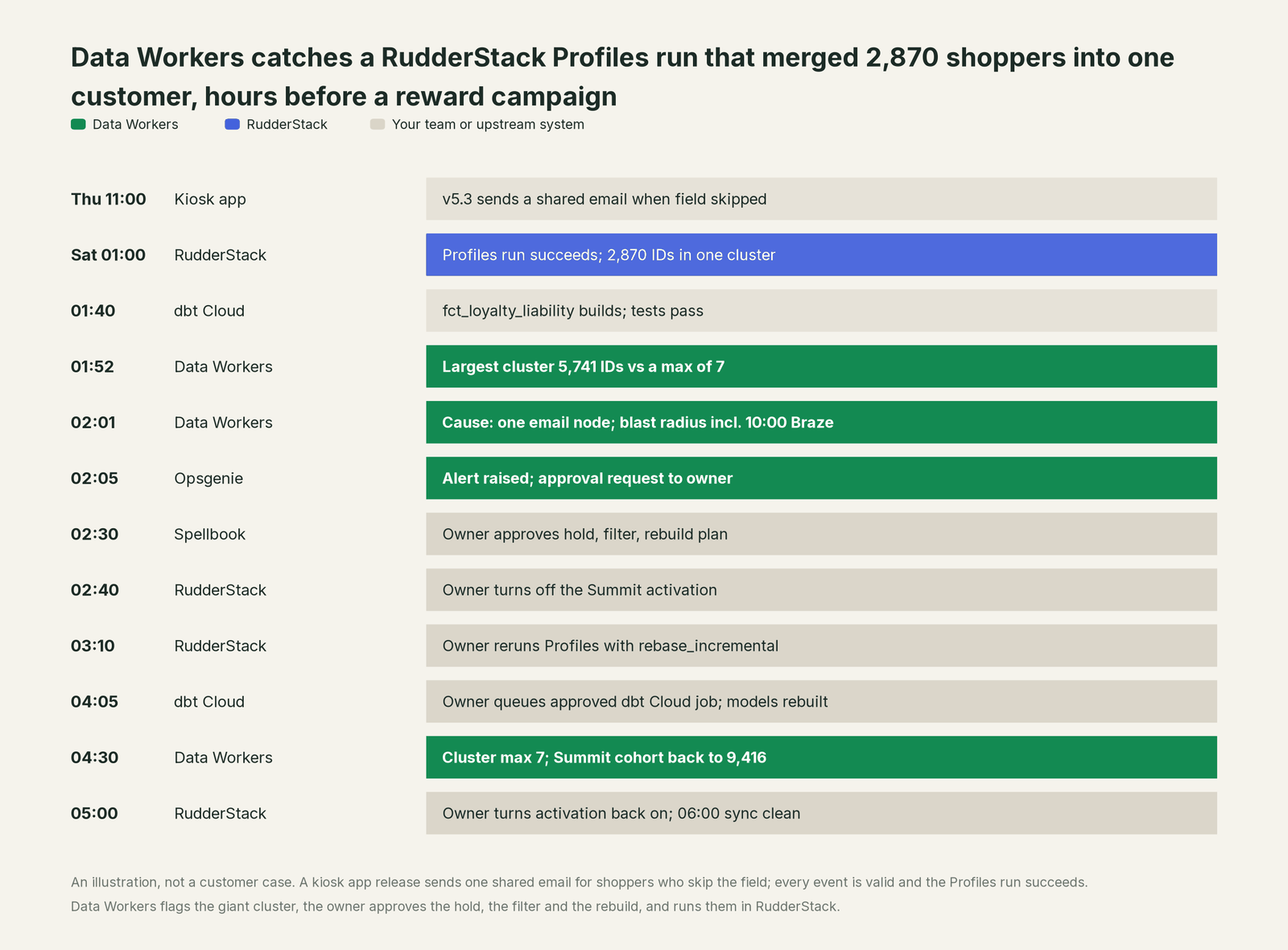
Every part of RudderStack did its job: the SDK sent what the app gave it, the tracking plan passed valid events, the ID stitcher followed its rules and the activation would have delivered faithfully. Catching it takes knowledge RudderStack was never meant to hold: that seven IDs is a normal largest customer, that a reward campaign reads the Summit cohort at 10:00, and that finance books liability from the same feature view.
| Job | What RudderStack does | What Data Workers does |
|---|---|---|
| The collection | SDKs, sources and the event stream; tracking plans validate every event and flag violations | Reads what lands natively in the warehouse; connects to RudderStack over its MCP server or API |
| The identity | Profiles stitches IDs into a rudder_id by your id_types, filters and cardinality rules, and computes features | Tracks cluster size and cohort counts as recorded metrics against a baseline, so a clean run that merged the wrong people still raises an incident |
| The diagnosis | RudderAI and the MCP explain delivery errors, violations and pipeline state; the ID Stitcher Audit tool analyzes the graph on demand | Joins the ID graph, the events and lineage into one cause, with the blast radius across dbt models, dashboards and every activation |
| The fix | Applies whatever Profiles project, tracking plan and transformation the team ships | Proposes the activation hold, the Profiles diff and the run plan to a named owner, who approves and applies them |
| The rebuild | Reruns Profiles, including a full rebase_incremental rebuild; turns activations on and off | Orders the rebuild for the owner, including the dbt Cloud run the owner queues after approval |
| The proof | Keeps audit logs of workspace changes and sync history | Re-checks the tables and writes a receipt: what changed, who approved it, how it was checked, how to undo it |
Why doesn't RudderStack just do this itself?
Because RudderStack is built to collect, unify and activate customer data faithfully, and its guardrails are rules you set before the data arrives. A tracking plan checks an event against its schema: required properties, types, unplanned events. Profiles gives you id_types filters and, on Snowflake and BigQuery, cardinality rules that its docs describe as a way to prevent "identity explosion" from shared emails and device IDs. Those are the right tools. They answer "does this follow the rules we wrote?" They can't answer "is this new value a shared inbox nobody wrote a rule for yet?", or "which campaign, model and finance report read this cohort?"
RudderStack's AI features keep the same scope, carefully. RudderAI in the dashboard "cannot create, modify, or delete any workspace configuration" and masks PII before it reaches the model. The RudderStack MCP exposes 30+ tools for pipeline monitoring, source and destination management, transformation authoring and tracking plans, scoped by your permissions, and RudderStack describes a team finding overstitched profiles through an MCP-powered audit. The open-source Profiles MCP Server builds identity projects through conversation, RudderAI Reviewer checks SDK instrumentation in pull requests, and RudderCrew, an agent harness for real-time decisioning, is in research preview. All of it makes RudderStack better to run.
Checking every run without being asked, across an app release, the ID graph, a warehouse, dbt, BI, Braze and finance, is a different product: a context graph of every table and consumer, blast-radius scoping, named approvers, a recorded undo and receipts an auditor can read. That is Data Workers. More in is it safe to let AI agents change production data.
Every tool owns a slice. Data Workers covers the whole lifecycle
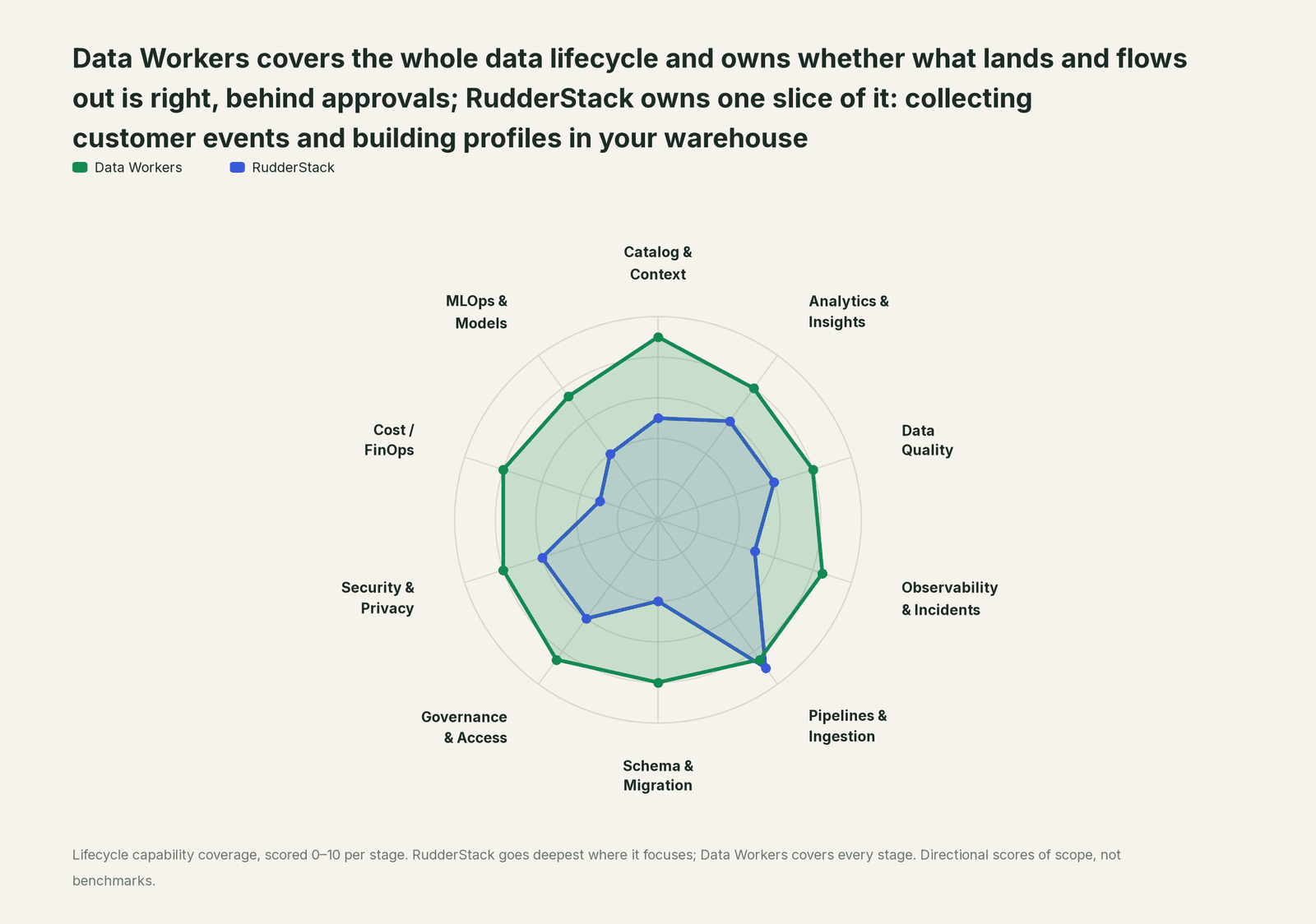
Each point tool adds another console, contract and handoff. Data Workers covers the whole lifecycle with one context, one approval flow and one audit trail, and builds on the RudderStack pipelines already there.
| Stage | Data Workers | RudderStack | Why we scored it this way |
|---|---|---|---|
| Catalog & Context | 9 | 5 | The Data Catalog defines events and properties, and Lookout's Context Hub stores docs and agent memory. Data Workers keeps one governed context graph of every table, owner and consumer across the estate. |
| Analytics & Insights | 8 | 6 | Lookout (public beta) answers marketing questions from a live warehouse query and builds audiences. Data Workers answers data questions from governed definitions with lineage behind every number. |
| Data Quality | 8 | 6 | Tracking plans validate every event's shape and flag violations; bot management drops bot traffic. Data Workers checks what the events become: identity clusters, cohorts and the models built on them. |
| Observability & Incidents | 8.5 | 5 | Delivery metrics, live events and MCP root-cause tools explain a failing destination. Data Workers diagnoses the data incident when every event was valid and every run succeeded. |
| Pipelines & Ingestion | 8.5 | 9 | RudderStack's home stage: SDKs for every channel, the event stream, transformations, Reverse ETL and 200+ destinations. Data Workers plans the Profiles rerun and the activation hold for the owner. |
| Schema & Migration | 8 | 4 | Tracking plans version event schemas as code through Rudder CLI. Data Workers traces a change through the ID graph, dbt models, BI and every activation. |
| Governance & Access | 8.5 | 6 | Consent management, roles and audit logs govern the pipeline; MCP acts with your own permissions. Data Workers routes every data change to a named approver. |
| Security & Privacy | 8 | 6 | PII handling, consent automation and cookieless tracking protect the collection. Data Workers leaves a receipt on every data change it proposes. |
| Cost / FinOps | 8 | 3 | Event volume prices the pipeline; warehouse spend for Profiles runs sits in the warehouse. Data Workers records the model cost of every action and attributes Snowflake credits to dbt models. |
| MLOps & Models | 7.5 | 4 | Profiles computes features such as LTV and propensity for activation and ML. Data Workers keeps the data under models and agents healthy. |
How RudderStack and Data Workers work together
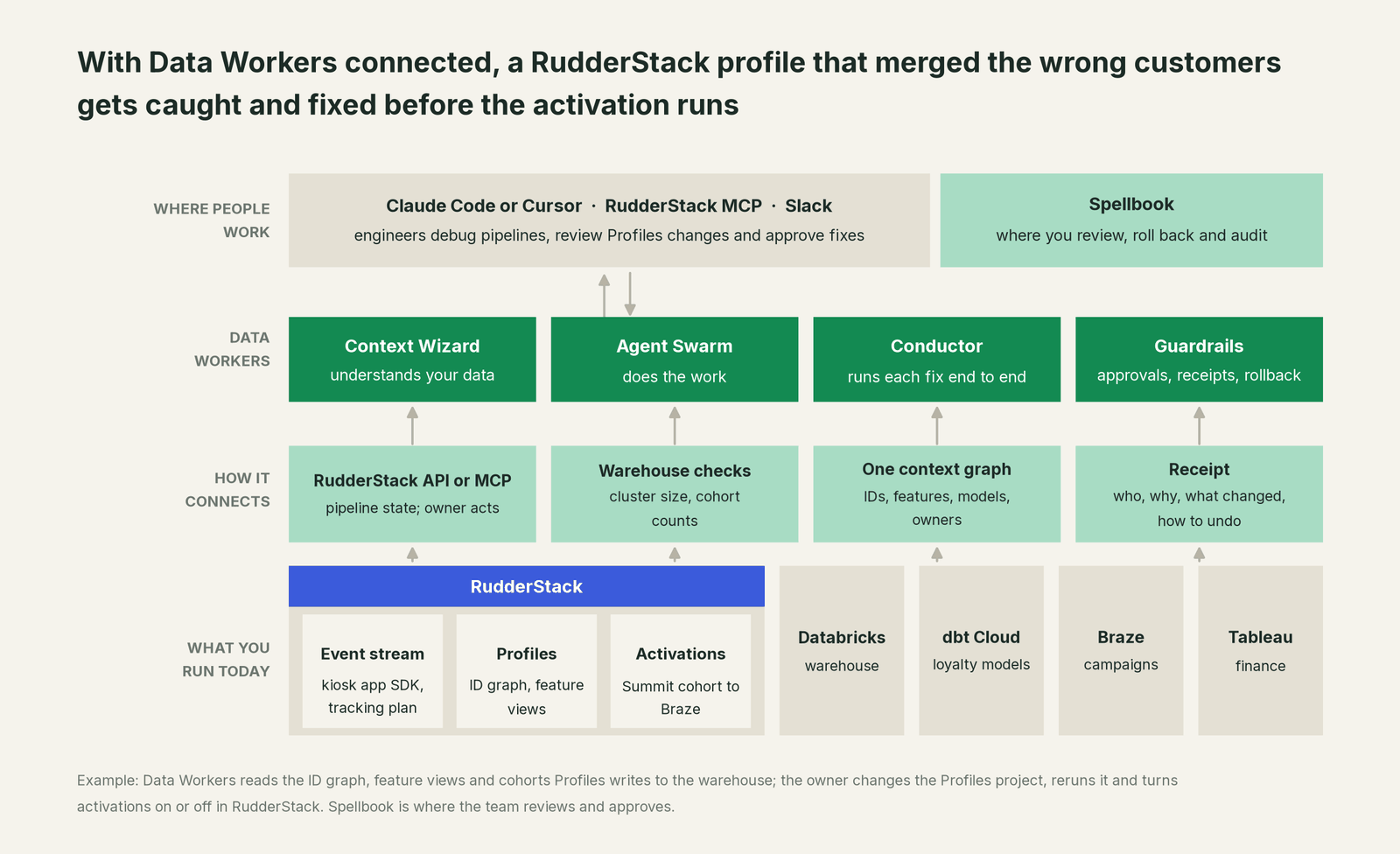
Data Workers connects to RudderStack over its MCP server or API today. What it needs from each Profiles run sits in the warehouse: the ID graph view, the feature views and the cohorts are ordinary tables Data Workers reads natively on Databricks, Snowflake or BigQuery. Sources, tracking plans, transformations, the Profiles project, activations and Reverse ETL stay with your team: Data Workers never changes them, runs Profiles, pauses a destination or starts, stops or resets a sync. It proposes the Profiles change for the owner to merge and the hold and rebuild for the owner to run in RudderStack. The rest of the incident runs on native connections: Databricks and Unity Catalog, dbt Cloud, Tableau (read), Opsgenie, Slack and GitHub, among 50+ connectors. Braze connects over its API today.
The hosted RudderStack MCP signs you in with OAuth to your workspace, so the owner checks pipeline state in the same session where Data Workers explains what last night's Profiles run did. The Data Workers side follows the documented client setup: clone the open-source repo and add each agent's start-agent.sh entry.
# Example: the RudderStack MCP plus Data Workers agents in Claude Code
# RudderStack MCP (hosted): authenticate from /mcp in Claude Code
claude mcp add --transport http --scope user rudderstack https://mcp.rudderstack.com/mcp

# Data Workers agents, from a clone of the open-source repo
claude mcp add --scope user dw-incidents -- "$(pwd)/start-agent.sh" dw-incidents
claude mcp add --scope user dw-catalog -- "$(pwd)/start-agent.sh" dw-context-catalog
claude mcp add --scope user dw-connectors -- "$(pwd)/start-agent.sh" dw-connectors
List the tools with your client's own command (/mcp in Claude Code). In this incident: monitor_metrics (dw-incidents) flags the cluster size and cohort counts the team records after each run; diagnose_incident names the cause; blast_radius_analysis and trace_cross_platform_lineage (dw-context-catalog) map what the merge reached; send_opsgenie_alert and resolve_opsgenie_alert open and close the alert; remediate re-checks the assertions and escalates any failure to a person.
In production the agents run in your infrastructure and hold the warehouse credentials and model key. Your data stays in your systems; the hosted Conductor sees workflow metadata only. More in where does our data go.
One incident, L0 to L4, set per domain:

- •L0 manual. Store managers call on Monday about unearned rewards; an analyst finds the giant cluster by Tuesday.
- •L1 observe. Data Workers flags the cluster at 01:52 with the cause and blast radius. Nothing changes.
- •L2 propose. Data Workers proposes the hold, the Profiles diff and the rebuild plan; nothing moves until the named owner approves.
- •L3 act reversibly. For a class with a clean record, Data Workers queues the approved downstream rebuilds itself and sends any failed check to a person. Profiles changes, reruns and activations stay with the owner.
- •L4 autonomous. For a scoped domain, every Profiles run is checked as it lands, so the owner's fix is waiting before any activation reads the output.
Who sets those levels: who owns the agents, how approvals work for AI data agents and autonomy levels L0 to L4 explained.
What changes for your team
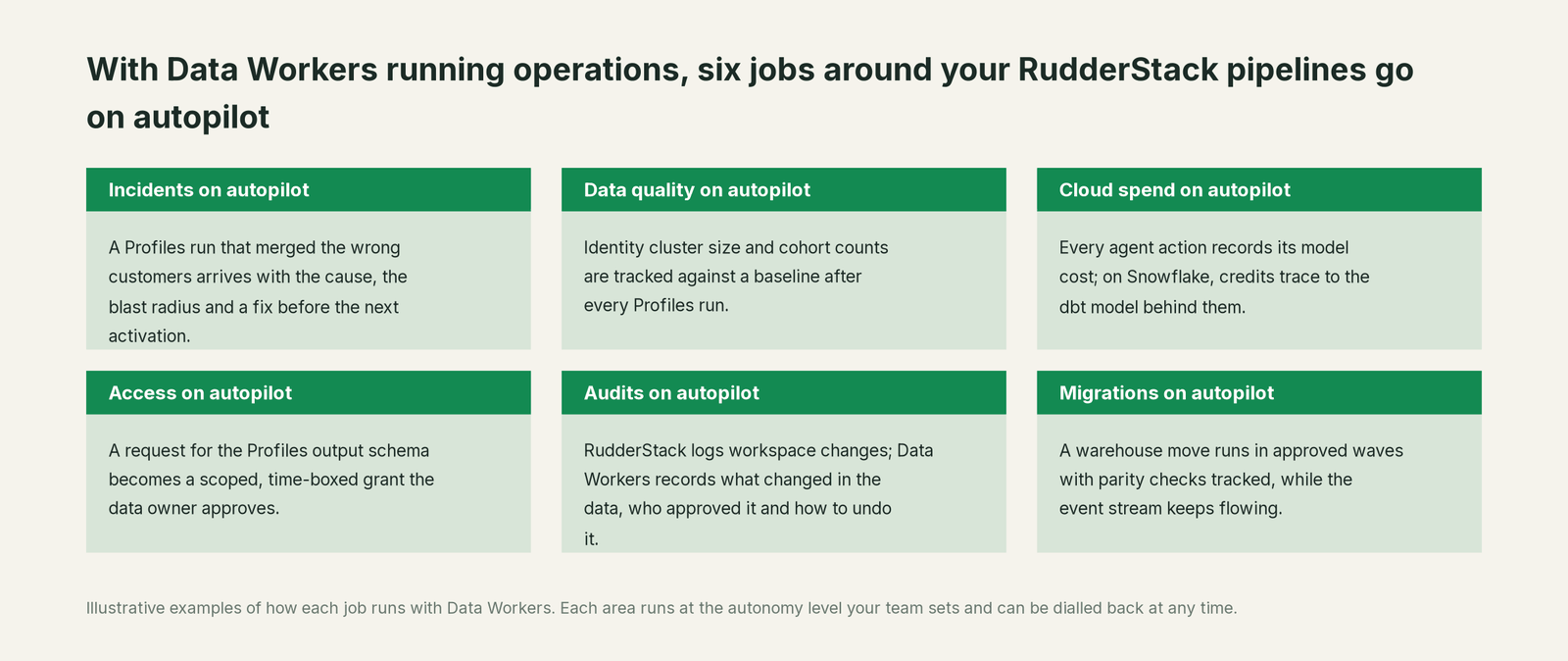
- •On-call starts from a cause. The alert carries the merged cluster, the identifier behind it, the damage and the proposed fix.
- •Activations get a guard. When a cohort that feeds Braze, an ad platform or the CRM goes wrong, the hold is proposed before the next sync.
- •One record for data and marketing. Both see the same incident and receipt in Spellbook Data Catalog (in preview), linked from the Opsgenie alert.
Keep RudderStack, or consolidate?
Keep RudderStack if you love it; Data Workers works with it from day one. Many teams consolidate once Data Workers runs that slice too.
For most RudderStack teams the answer is keep it: SDKs on every channel, tracking plans as code and identity resolution inside your own warehouse are hard to replace. What teams consolidate is the tooling around the output: a separate observability tool, hand-written cluster-size queries and "rerun Profiles and eyeball the cohort" runbooks. Many estates run more than one customer data path: see you're on Segment, you're on Hightouch and you're on Census. One incident record spans them. See also the agentic data platform for retail and e-commerce and Data Workers integrations.
Weighing a build on the RudderStack MCP and a coding agent? Read build it ourselves with Claude Code and MCP servers: reading pipeline state from a chat is easy; the context graph, approvals, undo and receipts are the work.
The case for your CFO
The outcome. When a pipeline or Profiles run gets customer data wrong, it is caught before an activation sends it to a campaign, an ad platform or the CRM, and corrected with a record of how it was checked. Rewards, offers and the liability finance books come from the right customers.
The risk story. At L0 and L1, agents only read. At L2 they propose and a named person approves; an unanswered request expires and escalates, never auto-grants. At L3 they act on reversible changes inside the domains you open; L4 is a later choice. The Profiles project, reruns and activations stay with the owner. No agent can promote its own work, and an org-wide stop halts all autonomous dispatch. Every change carries a receipt: what changed, who approved it, the blast radius and the undo.
Why now. RudderStack now feeds agents as well as people, through RudderAI, the MCP and Lookout audiences built in plain language, so a wrong profile reaches customers faster.
The first win. L1 on the Profiles project and the cohorts that feed paid offers: a merge or a cohort jump becomes a diagnosed incident before the next activation runs.
What stays the same. Nothing migrates: RudderStack, your Profiles project, activations, dbt project, warehouse and on-call rota. For the numbers, see the ROI of agentic data operations.
The sentence for upstairs: "RudderStack collects our customer data and builds the profiles; Data Workers makes sure they're right before we spend money on them, and gets them fixed with our approval when they aren't."
Getting started
Start with a pilot. Pick the Profiles project and the cohorts that feed offers, rewards and revenue numbers, give Data Workers read access to the schemas RudderStack writes, record cluster size and cohort counts after each run, and run at L1 for a few weeks. Then turn on L2 for one domain, and open L3 for a narrow class once the receipts show the agents were right. The pilot path is on the pricing page, and the pilot is credited in full against the first year.
FAQ
How does Data Workers connect to RudderStack? Over RudderStack's MCP server or API today, with the RudderStack MCP in the same client as in the example above. Data Workers reads the events, the ID graph, feature views and cohorts natively in your warehouse, on Databricks, Snowflake or BigQuery.
We have tracking plans. Isn't that enough? Keep them: they catch unplanned events, missing properties and wrong types at collection. They validate shape, so a well-formed value that means something new passes, as the shared email did. Data Workers checks what the valid events become.
Should we turn on Profiles cardinality rules? Where your warehouse supports them (Snowflake and BigQuery today), yes, with id_types filters. They stop the merges you anticipated. Data Workers watches cluster size and cohort counts after every run, so the merge you didn't anticipate still gets caught, and the rule that would have stopped it joins the proposed fix.
Will Data Workers change our RudderStack workspace? No. Sources, tracking plans, transformations, the Profiles project and its runs, activations, destinations and Reverse ETL syncs stay with the owner, in the dashboard, the CLIs or the RudderStack MCP. Data Workers proposes the change and the run order, queues approved downstream runs through your orchestrator and records the dbt Cloud runs the owner queues.
How is this different from RudderAI and Rudder Lookout? RudderAI helps your team run and debug the RudderStack workspace, and Lookout helps marketing analyze, build and activate audiences from the warehouse, with a person approving each activation. Both work inside RudderStack's slice. Data Workers works across the whole estate: dbt, BI, finance models and every activation, with one approval flow and one audit trail.
Sources
- •RudderStack, homepage ("The Agentic Customer Data Platform"; Rudder Lookout public beta banner), https://www.rudderstack.com/ (checked Oct 3, 2026)
- •RudderStack docs index (warehouse-native customer data platform; 200+ destinations; Profiles, governance, AI features), https://www.rudderstack.com/docs/llms.txt (checked Oct 3, 2026)
- •RudderStack blog, Introducing RudderAI (Jun 2, 2026), https://www.rudderstack.com/blog/introducing-rudderai/ (checked Oct 3, 2026)
- •RudderStack blog, RudderStack MCP: your whole customer data stack, one conversation away (Aug 11, 2026), https://www.rudderstack.com/blog/rudderstack-mcp-customer-data-pipelines/ (checked Oct 3, 2026)
- •RudderStack blog, Introducing Lookout (Jun 4, 2026, private beta at launch), https://www.rudderstack.com/blog/introducing-lookout-ai-analytics-instrumentation/ (checked Oct 3, 2026)
- •RudderStack docs, How to Connect to RudderStack MCP, https://www.rudderstack.com/docs/ai-features/rudderstack-mcp/connect/ (checked Oct 3, 2026)
- •RudderStack docs, RudderAI Key Capabilities (read-only), https://www.rudderstack.com/docs/ai-features/rudder-ai/capabilities/, and How to Set Up RudderAI Reviewer, https://www.rudderstack.com/docs/ai-features/rudder-ai-reviewer/get-started/ (checked Oct 3, 2026)
- •RudderStack docs, Public Beta Features (Rudder CLI, RudderAI in Dashboard, Rudder Lookout, bot management), https://www.rudderstack.com/docs/get-started/introduction/alpha-and-beta-features/beta-features/public-beta/ (checked Oct 3, 2026)
- •RudderStack docs, Rudder Lookout, https://www.rudderstack.com/docs/activate/lookout/overview/, and How to Connect External AI Tools to Lookout, https://www.rudderstack.com/docs/activate/lookout/integrations/external-mcp/ (checked Oct 3, 2026)
- •RudderStack docs, Violation Management (tracking plans), https://www.rudderstack.com/docs/data-governance/tracking-plans/violation-management/ (checked Oct 3, 2026)
- •RudderStack docs, How Profiles Works, https://www.rudderstack.com/docs/profiles/overview/how-profiles-works/, and Profiles quickstart in the dashboard (Snowflake, Redshift, BigQuery, Databricks), https://www.rudderstack.com/docs/profiles/overview/quickstart-ui/ (checked Oct 3, 2026)
- •RudderStack docs, ID Stitcher, https://www.rudderstack.com/docs/profiles/dev-docs/profiles-yaml/id-stitcher/, ID Types (filters), https://www.rudderstack.com/docs/profiles/dev-docs/pb-project-yaml/id-types/, and ID Graph Cardinality Rules, https://www.rudderstack.com/docs/profiles/dev-docs/advanced-id-stitcher-features/id-graph-cardinality-rules/ (checked Oct 3, 2026)
- •RudderStack docs, Advanced ID Stitcher Operations (
rebase_incremental), https://www.rudderstack.com/docs/profiles/dev-docs/advanced-id-stitcher-features/advanced-operations/, Profiles Commands (pb run,--rebase_incremental), https://www.rudderstack.com/docs/profiles/dev-docs/commands/, and Profiles ID Stitcher Audit Tool, https://www.rudderstack.com/docs/profiles/dev-docs/profiles-audit/ (checked Oct 3, 2026) - •RudderStack docs, Feature Views, https://www.rudderstack.com/docs/profiles/concepts/feature-views/, Activate Profiles Data, https://www.rudderstack.com/docs/profiles/management/activations/, and Warehouse Output, https://www.rudderstack.com/docs/profiles/dev-docs/warehouse-output/ (checked Oct 3, 2026)
- •RudderStack docs, How to Start and Stop Reverse ETL Syncs, https://www.rudderstack.com/docs/data-pipelines/reverse-etl/developer-guides/start-stop-syncs/ (checked Oct 3, 2026)
- •Data Workers open-source repository (tool registrations in dw-incidents, dw-context-catalog, dw-connectors), https://github.com/DataWorkersProject/dataworkers-claw-community (checked Oct 3, 2026)
- •Data Workers client setup guide, https://dataworkers.io/opensource-docs/client-setup/ (checked Oct 3, 2026)