You're on Grafana: It Shows the Alert. Data Workers Fixes the Data Behind It
Grafana alert rules, IRM and Assistant catch the broken pipeline. Data Workers finds the data it left wrong, fixes it with approval and proves the fix.
Your platform team runs on Grafana. Prometheus scrapes Postgres, Kafka Connect, Trino and Airflow and remote-writes to Mimir in Grafana Cloud; Loki holds the logs. Alert rules watch consumer lag and task errors, notification policies route them, and Grafana IRM groups the alerts and pages whoever is on call. When something breaks, an IRM webhook can start a Grafana Assistant investigation that tests hypotheses across metrics, logs, traces and profiles and posts its summary back to the incident. Grafana is where metrics, logs and traces are visualized and alerts fire. Data Workers is where data incidents get diagnosed, fixed and verified.
Grafana will tell you the Kafka Connect sink stalled at 09:13 and that a Postgres migration caused it. It will not tell you that two hours of revenue were summed from a column that went empty while every panel turned green again. Data Workers finds that gap, repairs it with a named approver, checks the numbers and puts a receipt on the IRM incident.
Key takeaways
- •Grafana keeps its job. Alert rules, IRM, dashboards and Assistant investigations stay where they are.
- •A green panel can hide a wrong table. A sink that recovers after a schema change can leave rows with an empty column. Data Workers checks the table, not the task.
- •Side by side with the Grafana MCP server today. The on-call's assistant adds Data Workers' data impact and receipt to the IRM incident and annotates the dashboard, with mcp-grafana running read-only plus two named write tools; Data Workers' agents never call it.
- •Inside Grafana Assistant. Connect Data Workers as a remote MCP server, signed in through your identity provider, so an investigation can ask it for lineage, blast radius and data impact, with your approval policy on every tool.
- •Autonomy per domain. Each domain climbs from L0 manual to L4 autonomous at your pace, with approvals, rollback and receipts.
Grafana is the smoke alarm. Data Workers is the crew.
Grafana sees the symptom in your infrastructure. Data Workers fixes the data behind it and proves the fix. Here is a Thursday on a self-hosted stack: Postgres, Kafka Connect with an Iceberg sink, Iceberg tables in a Nessie catalog queried by Trino, Airflow, Superset, and Grafana watching all of it. This is an illustrative example.
| Time | System | What happens |
|---|---|---|
| Thu 09:10 | Postgres | Flyway migration V212 adds orders.total_amount numeric(12,2); the new app release stops writing total_cents |
| 09:13 | Kafka Connect | The Iceberg sink task for pg.public.orders fails on the new record schema; Loki captures the worker errors |
| 09:24 | Grafana Alerting | The alert rule on the sink's consumer group lag (over 200,000 for 10m) fires; IRM groups it and pages the platform on-call |
| 09:31 | Grafana Assistant | The IRM webhook starts an investigation; it ties the lag to the sink errors in Loki and the 09:10 deploy annotation, and recommends turning on schema evolution |
| 09:41 | Kafka Connect | The on-call turns on schema evolution and restarts the task; lake.orders gains total_amount |
| 10:22 | Grafana IRM | Lag is back to zero, the alert resolves and the incident is resolved. Every panel is green |
| 10:31 | Data Workers | The fill-rate metric the team records on lake.orders with monitor_metrics flags total_cents empty on 48,906 rows since 09:10 (it was never empty before); Flyway migration V212, merged in GitHub, ties it to the new total_amount column |
| 10:36 | Data Workers | Maps the blast radius: the Airflow DAG revenue_hourly summed total_cents in Trino, so the 09:00 and 10:00 hours are low in analytics.revenue_hourly, the Superset "Revenue today" dashboard and the 18:00 finance export. Adds the data impact to the IRM incident timeline |
| 10:44 | Data Workers | Proposes the fix: a diff to the revenue_hourly SQL that reads total_amount when total_cents is empty, for its owner to merge, and a rerun of the two hours with the owner's Iceberg snapshot to restore named as the undo step |
| 10:58 | Spellbook | The finance data owner merges the diff, reviews the row counts and approves the rerun |
| 11:02 | Airflow | Data Workers queues the rerun of both hours through Airflow and reads their status; both tasks succeed |
| 11:14 | Superset | The owner checks the hourly totals behind the dashboard against Postgres; they match, and the fill-rate metric is back on baseline |
| 11:17 | Grafana IRM | The receipt is linked on the incident timeline and an annotation marks the data fix on the revenue dashboard |
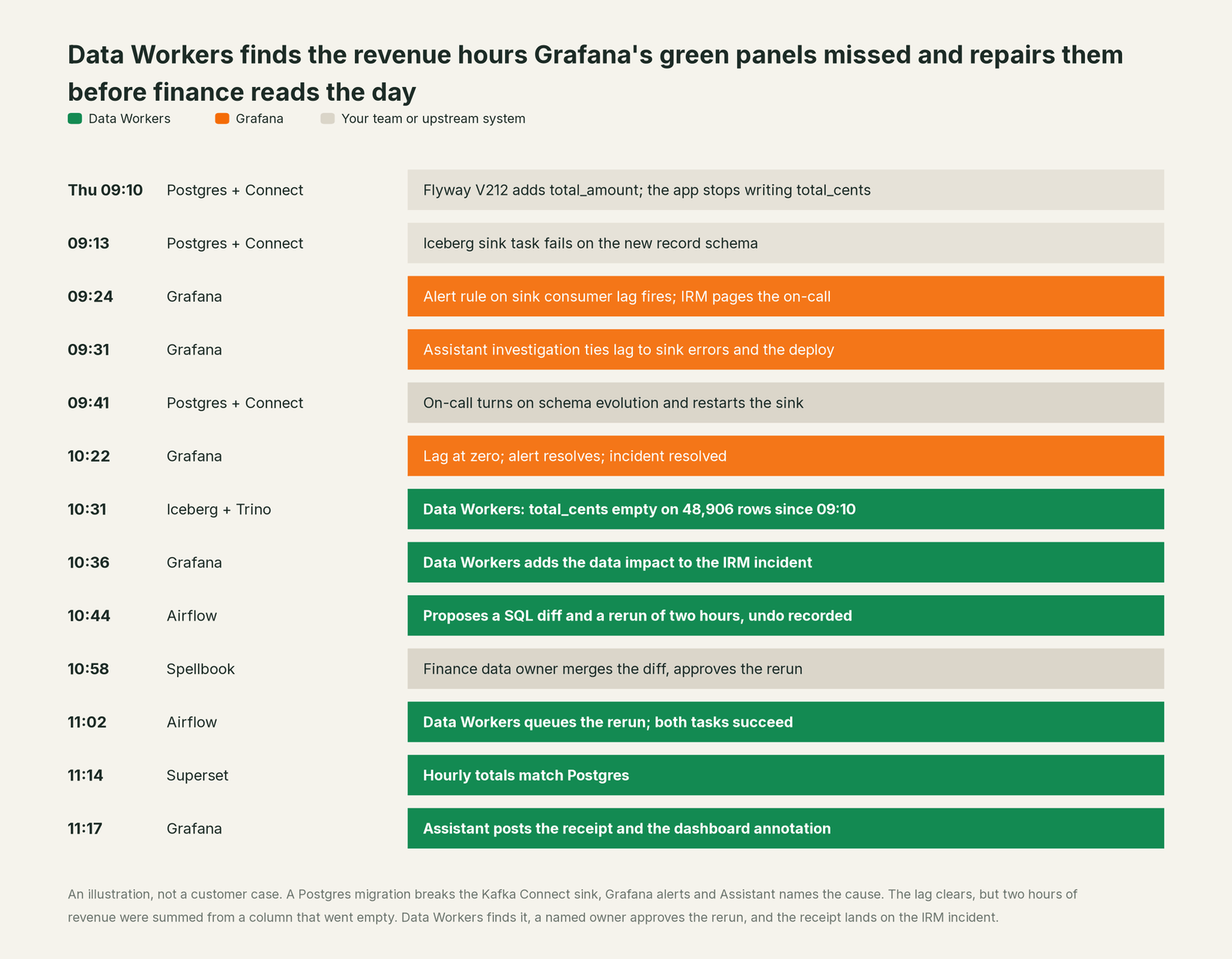
Grafana did everything it was built to do: the alert fired, the investigation named the cause, and the restart ended the infrastructure incident. The data incident started where that one ended. Without Data Workers, the first sign would have been a finance lead asking why Thursday morning's revenue looked 70% low. With it, the hours were fixed and verified before anyone read them.
| Job | What Grafana does | What Data Workers does |
|---|---|---|
| Detection | Alert rules on Prometheus and Loki watch lag, errors, latency and job outcomes | Checks the tables themselves: null rates and volume, so a gap is caught when every panel is green |
| Coordination | IRM groups alerts, walks the escalation chain and runs the incident from declaration to review | Adds the data impact to the same IRM incident, so the on-call sees it where they already look |
| Investigation | Assistant investigations test hypotheses across metrics, logs, traces and profiles and write a report | Traces the break into the data: which rows, which tables, which dashboards and exports, which owners |
| The fix | The report recommends next steps for an engineer to take | Proposes the data change (a rerun with its undo step, a SQL diff, a schema migration with rollback SQL), routes it to a named owner and queues the rerun after approval |
| Verification | The alert recovers and the incident resolves | Checks the numbers: totals match the source and quality checks pass |
| The record | The incident timeline, the investigation report and post-incident review | A receipt for the data change: cause, diff, approver, what it touched, how it was verified, how to undo it |
Why doesn't Grafana just do this itself?
Because Grafana built its AI around the telemetry it can see and the people who respond to it, the right focus for the platform that visualizes every system you run. Its docs say where an investigation ends: it "produces a report with key findings, supporting evidence, and recommended next steps," using the user's identity and only the telemetry that user may query. When Assistant calls an outside MCP server, each tool is labelled Read or Write and set to auto-approve or always ask, and Grafana is explicit that "you're responsible for any MCP server you connect to Assistant, including its security, reliability, data access, and actions performed through its tools."
The Grafana MCP server follows the same line. Its write tools change Grafana itself (dashboards, alert rules, silences, incidents, annotations), and one flag, --disable-write, removes them along with the raw SQL tools that could write to a data source. That is sound design for an observability vendor. A data fix is a different job with a different liability: a rerun against a production lake table with a snapshot to restore, a SQL change the owner merges, lineage to every export downstream, totals checked against Postgres, and a receipt an auditor can read. Data Workers is built for that job.
Every tool owns a slice. Data Workers covers the whole lifecycle
Grafana owns one slice and owns it well. Each point tool adds another console, another contract and another handoff. Data Workers covers the whole lifecycle with one context, one approval flow and one audit trail, and builds on Grafana where your engineers already look.
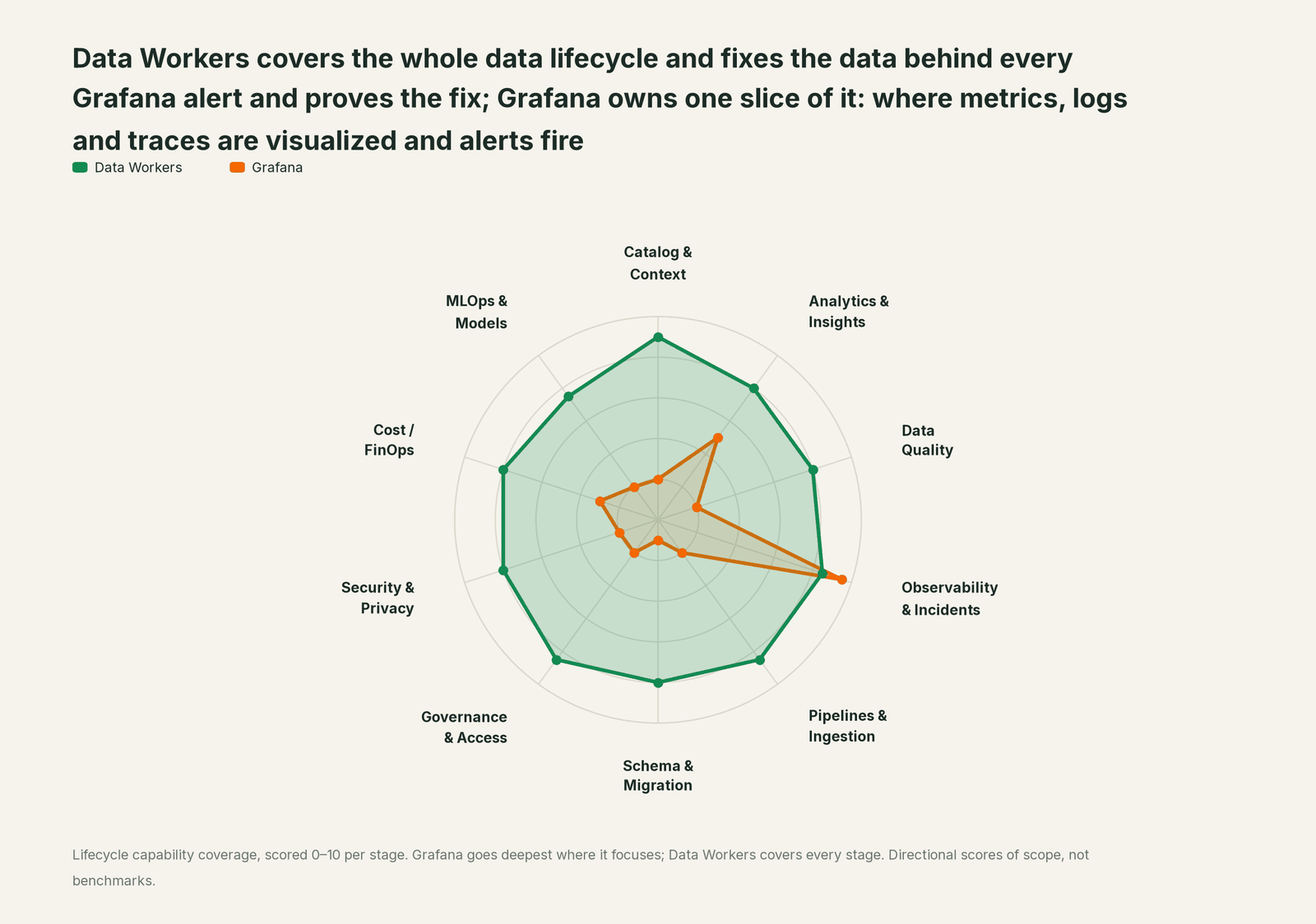
| Stage | Data Workers | Grafana | Why we scored it this way |
|---|---|---|---|
| Catalog & Context | 9 | 2 | Infrastructure memory learns services, namespaces and dependencies from your telemetry, not tables. Data Workers keeps one governed context graph of definitions, owners, lineage, quality and usage across every platform. |
| Analytics & Insights | 8 | 5 | Dashboards, Explore and Grafana Assistant answer questions about telemetry and any connected data source. Data Workers answers business data questions from governed definitions with lineage behind every number. |
| Data Quality | 8 | 2 | A Prometheus metric or a SQL panel can carry a data check if someone builds it. Data Workers writes, runs and repairs the checks on the tables themselves. |
| Observability & Incidents | 8.5 | 9.5 | Grafana's home stage: alert rules, IRM escalation and incidents, and Assistant investigations across metrics, logs, traces and profiles. Data Workers diagnoses the data incident across lineage, fixes it with approval and verifies it. |
| Pipelines & Ingestion | 8.5 | 2 | Exporters put Kafka Connect, Airflow and Trino metrics on a dashboard. Data Workers repairs the data pipeline itself: reruns and backfills through the orchestrator, with approvals. |
| Schema & Migration | 8 | 1 | Deploy annotations mark a release, not a column. Data Workers catches schema changes, scores their blast radius and plans migrations in waves. |
| Governance & Access | 8.5 | 2 | RBAC governs who sees and edits Grafana, and Assistant respects it. Data Workers dry-runs each access request and proposes a time-bound grant for the owner to approve, recorded with its expiry. |
| Security & Privacy | 8 | 2 | Assistant runs queries as the signed-in user with your RBAC policies. Data Workers' pull request review flags new columns whose names or annotations look sensitive, and leaves a receipt on every data change. |
| Cost / FinOps | 8 | 3 | Adaptive Telemetry trims the observability bill itself. Data Workers records the cost of every agent action, attributes Snowflake spend down to the dbt model and drafts warehouse settings for the owner. |
| MLOps & Models | 7.5 | 2 | Agent and AI observability watch AI applications and their evaluations. Data Workers keeps the data under your models fresh and correct. |
For the split between watching systems and fixing data, read Data Workers vs data observability and what is an agentic data platform.
How Grafana and Data Workers work together
Grafana stays on top, where alert rules fire, IRM pages and Assistant investigates. Spellbook Data Catalog (in preview) is where the data team reviews, approves and rolls back changes. Between them, Data Context Wizard keeps one governed context graph across Postgres, Kafka, the lake and the jobs between them, the Data-Agents Swarm does the work with 20 specialist agents, and the Autonomous Data-Conductor runs each fix end to end (detect, diagnose, fix, review, verify, remember) under per-domain guardrails.
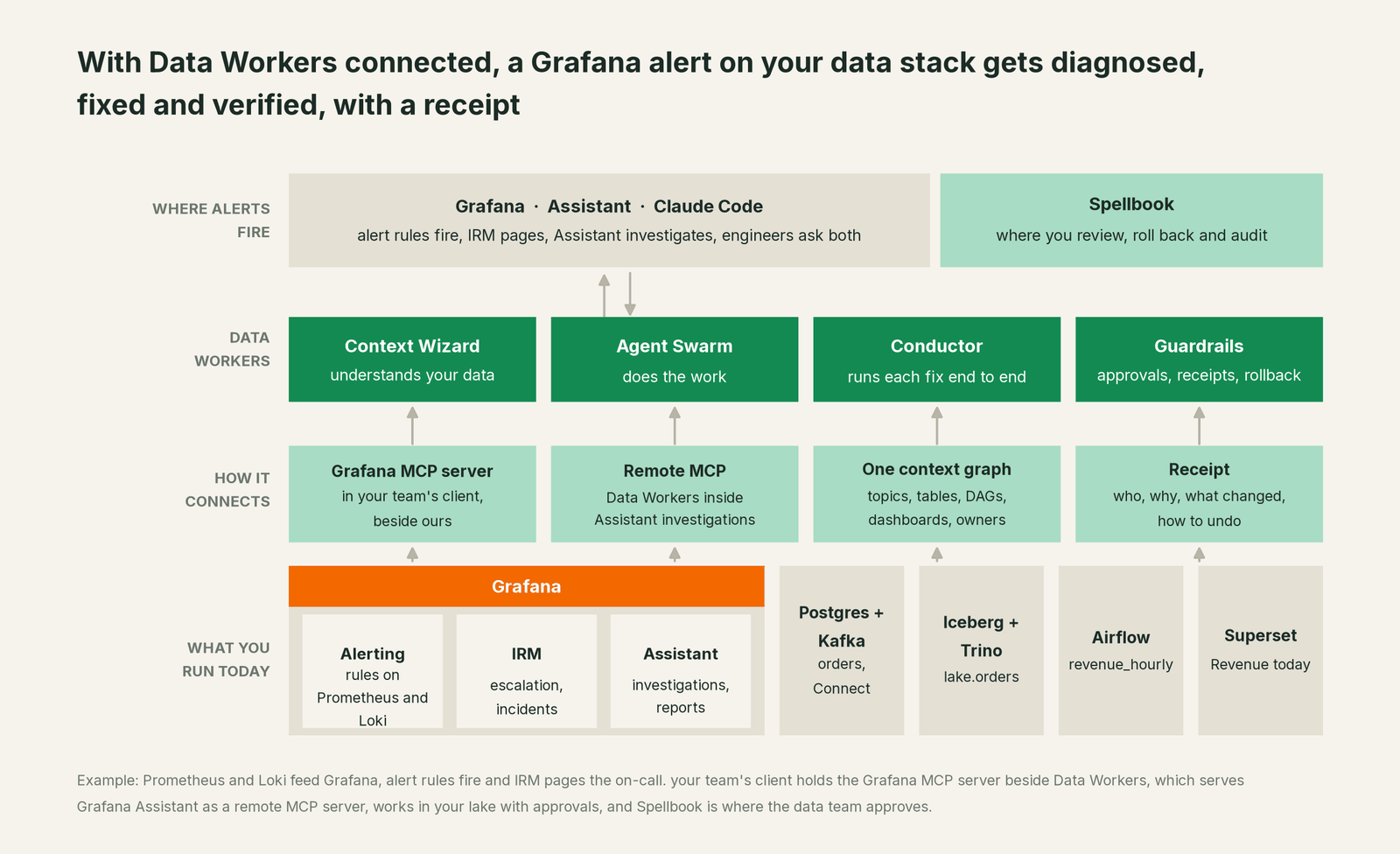
Data Workers to Grafana, through your team's client. Grafana connects over its API or the Grafana MCP server today, beside Data Workers. mcp-grafana (v2.0.0, released October 1, 2026) carries add_activity_to_incident and create_annotation, so the on-call's assistant puts Data Workers' data impact and receipt on the incident and the dashboard the on-call is already reading. Run it read-only with --disable-write and turn back on only those two tools with --enable-write-tools. Incident writes need the Editor role on the service account.
Data Workers inside Grafana Assistant. Assistant connects to remote MCP servers, and investigations use their tools as evidence. Add the Data Workers remote endpoint as a custom server in Assistant settings, signed in through your identity provider (Okta or Entra) as the authorization server; Data Workers verifies those tokens through JWKS and issues none of its own. Enable a handful of tools, such as diagnose_incident, blast_radius_analysis and run_quality_check, set any tool labelled Write to always ask, and add a Skill that tells investigations to ask Data Workers for data impact whenever an alert names a pipeline service. The IRM webhook starts the investigation, Data Workers answers what the data looks like, and the summary posts back to the incident.
The data work. diagnose_incident and get_root_cause work through the evidence, assess_impact on the schema agent sizes the column change, trace_cross_platform_lineage and blast_radius_analysis map everything downstream, and get_incident_history recalls past sink breaks. Fixes run through remediate (the backfill_data playbook queues the rerun through Airflow and reads its status), verification uses the monitor_metrics baseline and the owner's check against Postgres, and every step lands in get_audit_trail. Postgres, Kafka Connect, Schema Registry and Airflow are native; Iceberg with Nessie, Trino and Superset connect over their APIs or MCP servers today.
Side by side in one client. Every Data Workers agent is an MCP server; the client setup guide documents the path: clone the open-source repo and add one start-agent.sh entry per agent beside mcp-grafana.
# Example: Grafana MCP server plus Data Workers in Claude Code
# mcp-grafana read-only, two write tools back on for the incident timeline and annotations
claude mcp add --scope user grafana \
  -e GRAFANA_URL=https://yourstack.grafana.net \
  -e GRAFANA_SERVICE_ACCOUNT_TOKEN=<service-account-token> \
  -- uvx mcp-grafana --disable-write --enable-write-tools=add_activity_to_incident,create_annotation

# Data Workers agents over stdio, from a clone of the open-source repo
claude mcp add --scope user dw-catalog -- "$(pwd)/start-agent.sh" dw-context-catalog
claude mcp add --scope user dw-incidents -- "$(pwd)/start-agent.sh" dw-incidents
claude mcp add --scope user dw-schema -- "$(pwd)/start-agent.sh" dw-schema
claude mcp add --scope user dw-quality -- "$(pwd)/start-agent.sh" dw-quality
Ask "why is this morning's revenue low?" and the client calls both: Grafana returns the alert, the incident, the Loki errors and the deploy annotation; Data Workers returns the empty column, the blast radius and a proposed rerun. Grafana enforces its RBAC on its tools; Data Workers' guardrail decides whether a data change may run in that domain, with a named approver.
One incident, L0 to L4. The same sink incident at each level of the autonomy ladder, set per domain.

- •L0 manual. An engineer finds the empty column and rewrites the SQL by hand.
- •L1 observe. Data Workers adds the data impact to the incident. No data changes.
- •L2 propose. It proposes the diff and the rerun; nothing runs until the owner approves.
- •L3 act reversibly. For proven change classes, such as rerunning a closed hour with a snapshot to restore, it queues the rerun, verifies it and records the receipt.
- •L4 autonomous. In a scoped domain, every resolved sink incident triggers a data check, and any gap is repaired and verified before the hour is reported.
Read is it safe to let AI agents change production data, how approvals work and autonomy levels L0 to L4. On where data lives: the agents run in your infrastructure, your data stays in your systems, and the hosted Conductor sees workflow metadata only.
What changes for your team
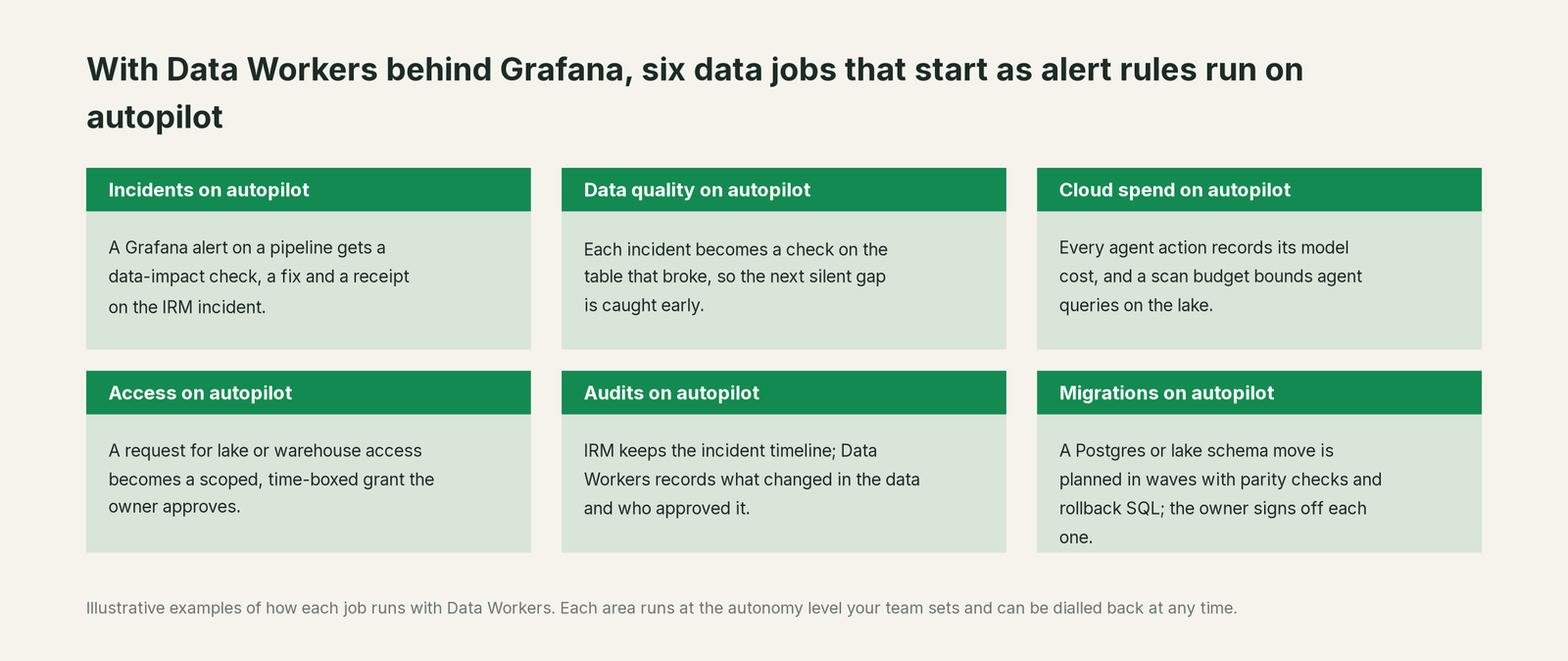
- •Incidents. A pipeline alert gets a data-impact check, a fix and a receipt on the IRM incident.
- •Data quality. Each incident becomes a check on the table that broke, such as a null-rate check on a revenue column.
- •Cloud spend. Every agent action records its model cost, and a scan budget bounds agent queries on the lake.
- •Access. Lake and warehouse access becomes a scoped, time-boxed grant the owner approves.
- •Audits. IRM keeps the incident timeline; Data Workers records what changed in the data and who approved it.
- •Migrations. A Postgres or lake schema move is planned in waves with parity checks and rollback SQL, and the owner signs off each one.
The platform on-call changes most: upstream schema changes stop turning into silent data incidents. See tools that detect breaking schema changes, the data incident response playbook, MCP servers for Trino and who owns the agents.
Keep Grafana, or consolidate?
Keep Grafana if you love it; Data Workers works with it from day one. Many teams consolidate once Data Workers runs that slice too.
For almost every Grafana team the answer is to keep it: Prometheus, Loki, the dashboards and the on-call workflow run there, and teams that ran Grafana OnCall OSS have moved to Grafana Cloud IRM since it was archived on March 24, 2026. What teams consolidate is the stack around the lake: a separate data observability contract, a data-quality tool, a stale catalog and SQL checks wired into Grafana by hand. Weighing a build on mcp-grafana and a coding agent? Read build it ourselves with Claude Code and MCP servers. The same pattern holds across the incident stack: see you're on New Relic, you're on Datadog, you're on PagerDuty and Data Workers integrations.
The case for your CFO
The outcome: Grafana already shows infrastructure problems early. Data Workers makes sure the business numbers that infrastructure carries are right after every incident, so a 09:41 restart does not become a wrong revenue morning in the board pack.
The risk story is plain. Autonomy is set per domain: at L1 Data Workers changes no data; at L2 nothing changes until a named person approves; at L3 it applies changes it can undo. An unanswered approval request expires and escalates, never auto-grants. No agent can promote its own work. Every change carries a receipt: cause, diff, approver, what it touched, how it was verified and how to undo it. An org-wide stop halts all autonomous dispatch. Zero migration: Grafana, Prometheus, Postgres, Kafka, Trino, Airflow and Superset stay where they are.
Why now: Assistant investigations name the likely cause of an infrastructure alert quickly, so the slow part has moved to the data the incident left behind. The first win is read-only: every resolved IRM incident on a pipeline service gets a data check and a blast radius on its timeline. What stays the same: alert rules, notification policies, escalation chains, lake permissions and code review. For the numbers, see the ROI of agentic data operations.
The sentence to repeat upstairs: "Grafana tells us the system recovered; Data Workers proves the data did, with an approval and a receipt for every change."
Getting started
Start with a pilot. Pick one pipeline whose alert rules already live in Grafana, such as the orders sink behind the revenue dashboard, connect Data Workers to Postgres, Kafka Connect, the lake and Airflow, add mcp-grafana read-only, and run at L1 so every resolved IRM incident gets a data check and a blast radius. Then turn on the first write class at L2, such as reruns of affected hours with owner approval. The pilot path and plans are on the pricing page, and the pilot is credited in full against the first year.
FAQ
How does Data Workers connect to Grafana? Side by side, over Grafana's API or the Grafana MCP server today. Your team's assistant uses mcp-grafana to add Data Workers' data impact and receipts to incidents and annotate dashboards, and Data Workers serves Grafana Assistant as a remote MCP server. OpenTelemetry is native: Data Workers exports its agent activity as spans Grafana can store and chart.
Can Grafana alert on stale or wrong tables directly? It alerts on any query it can run, so a freshness metric or a SQL data source can drive a freshness alert. Data Workers checks quality on the tables themselves and tracks load lag against the baselines your team records, then fixes and verifies.
How is this different from Grafana Assistant investigations? An investigation tests hypotheses across your telemetry and writes a report with recommended next steps. Data Workers works on the data: checking a table, rerunning affected hours, proposing a SQL or schema change, each with approval, rollback and a receipt. Connect Data Workers to Assistant and the investigation gets the data impact as evidence.
Which Grafana write permissions does Data Workers need? Only what you grant: add_activity_to_incident and create_annotation, re-enabled with --enable-write-tools on a read-only mcp-grafana. Alert rules, notification policies, dashboards and escalation chains stay untouched.
We are self-hosted on Grafana OSS. Does this work? Yes. mcp-grafana works against any Grafana URL with a service account token, and Data Workers connects natively to Postgres, Kafka and Airflow wherever they run, and to Iceberg catalogs over their APIs today. Assistant investigations and IRM need Grafana Cloud; OSS teams get the data impact as dashboard annotations and in their own incident channel.
Will Data Workers add more alerts to our on-call? No. It adds the data impact to the incident your alert rule already opened, so the on-call sees one incident with both stories on it.
Sources
- •Grafana Labs Docs, Grafana IRM (on-call and incident response; paid Grafana Cloud add-on billed on monthly active IRM users), https://grafana.com/docs/grafana-cloud/alerting-and-irm/irm/ (checked Oct 2, 2026)
- •Grafana Labs Docs, Grafana Assistant overview (investigations and MCP connections need the full Grafana Cloud feature set), https://grafana.com/docs/grafana-cloud/platform/grafana-assistant/ (checked Oct 2, 2026)
- •Grafana Labs Docs, Grafana Assistant Investigations (report with recommended next steps, IRM webhooks, user identity, MCP servers, Skills), https://grafana.com/docs/grafana-cloud/machine-learning/assistant/investigations/ (checked Oct 2, 2026)
- •Grafana Labs Docs, Grafana Assistant MCP servers (remote only, header auth, Read and Write labels, per-tool approval), https://grafana.com/docs/grafana-cloud/platform/grafana-assistant/configure/mcp-servers/ (checked Oct 2, 2026)
- •Grafana Labs Docs, Grafana Assistant Automations, https://grafana.com/docs/grafana-cloud/platform/grafana-assistant/platform/automations/ (checked Oct 2, 2026)
- •Grafana Labs, mcp-grafana README (tools, permissions,
--disable-write,--enable-write-tools, Agent Observability tools), https://github.com/grafana/mcp-grafana (checked Oct 2, 2026) - •Grafana Labs, mcp-grafana release v2.0.0 (Oct 1, 2026), https://github.com/grafana/mcp-grafana/releases (checked Oct 2, 2026)
- •Grafana Labs, Grafana OnCall OSS repository (maintenance mode Mar 11, 2025; archived Mar 24, 2026), https://github.com/grafana/oncall (checked Oct 2, 2026)
- •Grafana Labs press release via Business Wire (Aug 26, 2026; Grafana Assistant, Assistant Investigations, Adaptive Telemetry), https://mediaconnect.com/grafana-labs-crosses-10000-customer-milestone-as-ai-adoption-accelerates-growth-across-the-platform (checked Oct 2, 2026)
- •Data Workers open-source repository, https://github.com/DataWorkersProject/dataworkers-claw-community (checked Oct 2, 2026)
- •Data Workers client setup guide, https://dataworkers.io/opensource-docs/client-setup/ (checked Oct 2, 2026)
- •Data Workers, Data-Agents Swarm, https://dataworkers.io/product/data-agents-swarm/ (checked Oct 2, 2026)