Snowflake and Databricks Lineage, Traced as One Path: A Cross-Cloud How-To Over MCP
Trace Snowflake ACCESS_HISTORY and Databricks table_lineage as one cross-cloud lineage path over MCP: setup, one worked run and the receipt it leaves.
Snowflake and Databricks each keep an accurate lineage record of what runs inside them. Data Workers reads both records, traces the path across the seam, and keeps every cross-platform edge it confirms in the Data Context Wizard graph, so a break that starts in a Databricks job and lands on a Snowflake dashboard has one path, one owner and one receipt.
If you run both, your estate probably looks like this. Data engineering builds Delta tables in Databricks with Lakeflow Jobs and notebooks. Analytics reads some of those tables from Snowflake through a catalog-linked database or an Iceberg table, builds dynamic tables and views on top, and finance looks at a Snowsight dashboard. Unity Catalog shows orders_enriched with its upstream job and no readers outside Databricks. Snowflake shows UC_SALES.SALES.ORDERS_ENRICHED as a source with nothing upstream. When a column changes on one side, the other side finds out from a failed refresh, and two teams spend the morning proving whose change it was.
No single platform can publish this path, because each one's lineage stops at its own boundary. This guide shows how to trace it with Data Workers, the agentic data platform, over MCP today: what each side exposes, the roles it needs, a setup example, one run end to end, and the next autonomy step.
Key takeaways
- •Both platforms keep their lineage. Data Workers reads it with read-only roles and never edits either catalog.
- •The path crosses the seam. Databricks
table_lineagerows, Snowflake query history and ACCESS_HISTORY, and the catalog integration both engines share become one path from commit to dashboard, and the edges that cross stay in the context graph. - •Blast radius covers both sides. Before a column changes in Databricks, you see the Snowflake objects and dashboards that read it.
- •Fixes are diffs the owner merges. The owner of the repo that needs the change approves it, once, for both platforms.
- •Every run leaves a receipt. The path, the checks on both platforms, the approver and the times.
What it connects
Each platform has strong lineage for its own work, and each now reads the other's tables. Here is what is available as of October 2026.
| Surface | What it gives you | Status, October 2026 |
|---|---|---|
Snowflake ACCOUNT_USAGE.ACCESS_HISTORY | Per query: objects named, base objects read, objects modified, and column flow for writes. Reads of externally managed Iceberg tables are recorded. | Enterprise Edition; latency up to 3 hours; 365 days |
Snowflake lineage (Lineage tab, GET_LINEAGE) | Object-to-object lineage for tables, dynamic tables, Iceberg tables, views and more | Enterprise Edition |
| Snowflake external lineage | Accepts OpenLineage COMPLETE events at /api/v2/lineage/external-lineage; up to 20,000 external edges per account | GA, September 3, 2026 |
| Snowflake catalog-linked databases | Sync a remote Iceberg REST catalog, Unity Catalog included, every 30 seconds by default | GA |
Databricks system.access.table_lineage | One row per read or write on a Unity Catalog table, with the job, notebook or pipeline behind it | GA; 365 days |
| Unity Catalog external lineage | External objects and edges you add through Catalog Explorer or the API; not recorded in the lineage system tables | Available |
| Unity Catalog Iceberg REST catalog | Lets Snowflake read Delta tables with Iceberg reads enabled (read-only) and managed Iceberg tables | Available |
| Databricks catalog federation to Snowflake | Unity Catalog reads Snowflake-managed Iceberg tables straight from storage | Available |
Data Workers connects to Snowflake through its shipped connector, and Databricks lineage reaches it from your coding agent today. The Snowflake connector reads databases, schemas, table DDL and query history from ACCOUNT_USAGE.QUERY_HISTORY. On Databricks, your coding agent queries table_lineage through Databricks' managed DBSQL MCP server and hands the rows to Data Workers, each naming the job, notebook or pipeline behind it, as the Unity Catalog metric views and lineage guide shows in detail. ACCESS_HISTORY and GET_LINEAGE come in today through a read-only role, or from your coding agent over Snowflake's managed MCP server.
What moves in each direction
| Data Workers reads from Snowflake and Databricks | Data Workers sends back |
|---|---|
Databricks table_lineage rows, with the job or notebook each one names | Cross-platform edges kept in the context graph, each with the evidence that joins it |
| Snowflake query history: SQL text and errors, parsed into table and column lineage | Blast radius: readers on both platforms before a change ships |
| Snowflake ACCESS_HISTORY base objects, over MCP today | Diffs for the repo that owns the fix |
| Iceberg REST catalog metadata for the tables both engines share | One approval request in Spellbook that covers both platforms |
| The dbt manifest, and the team's notes for hops no platform records | Receipts: path, checks, approver and time |
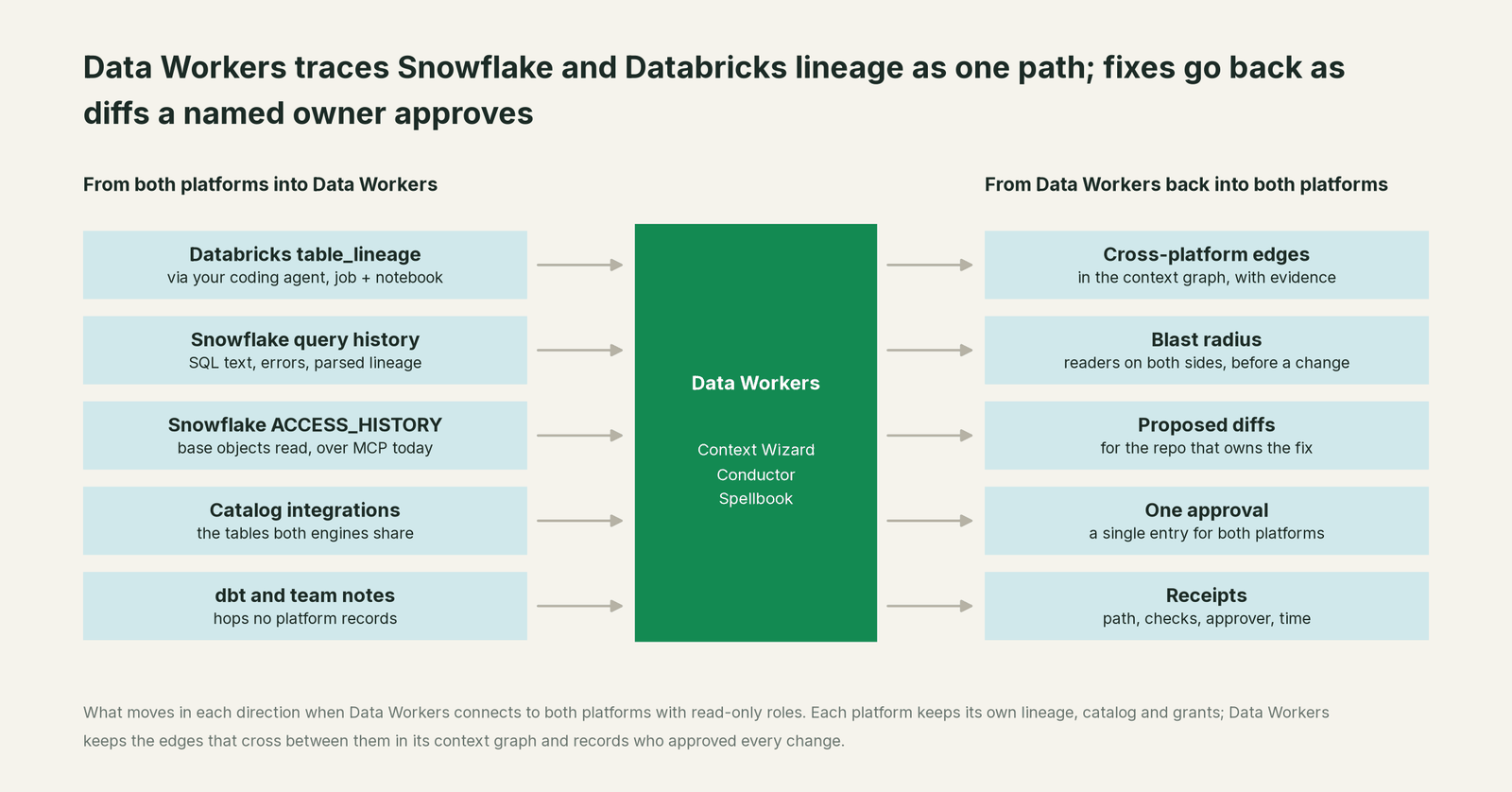
The join happens in Data Context Wizard. Each platform's own record stays the source of truth for what ran there; the context graph holds the edges that connect them. parse_sql_lineage turns Snowflake SQL into table and column edges. register_pipeline_asset records a job with the tables it reads and writes. update_lineage records the edge between a catalog-linked table in Snowflake and its Unity Catalog source, with the catalog integration as evidence; it is additive, and a retired edge is soft-deleted and kept for audit. trace_cross_platform_lineage walks the context graph upstream and downstream across both platforms, and blast_radius_analysis lists the owners on each side. The Autonomous Data-Conductor sequences a run and holds every change at the autonomy level you set.
Prerequisites
- •A Databricks service principal with an OAuth token,
USE CATALOGonsystem,USE SCHEMAonsystem.access,SELECTontable_lineage,BROWSEon the catalogs you want covered, andCAN USEon one SQL warehouse. - •A Snowflake role and user for Data Workers, with
IMPORTED PRIVILEGESon theSNOWFLAKEdatabase (for query history and ACCESS_HISTORY),USAGEon one warehouse, andUSAGEon the databases to map, including each catalog-linked database. ACCESS_HISTORY and lineage need Enterprise Edition. - •The list of shared tables. Your Snowflake catalog integrations and catalog-linked databases tell you which Unity Catalog schemas Snowflake reads. Data Workers reads them too, and this is where most cross-platform edges come from.
- •Optional OpenLineage. If Airflow or dbt already emits OpenLineage to Marquez, keep it as the history your team browses and send Data Workers' own run events there too. Databricks has no native OpenLineage emitter in its docs; the open-source OpenLineage Spark listener installs on classic clusters with an init script.
- •Your repos. Read access to the Git repos for Databricks jobs and Snowflake models, so fixes can arrive as diffs for the owner to merge.
No write grants on either platform. Data Workers acts with the grants you give it.
Setup
Add the context agent and the Conductor to your MCP client and give each platform its own read-only credentials.
Example: MCP client config
{
  "mcpServers": {
    "dw-context-catalog": {
      "command": "./start-agent.sh",
      "args": ["dw-context-catalog"],
      "env": {
        "DATABRICKS_HOST": "https://<workspace>.cloud.databricks.com",
        "DATABRICKS_TOKEN": "<OAuth token for the dw-reader service principal>",
        "DATABRICKS_HTTP_PATH": "/sql/1.0/warehouses/<warehouse-id>",
        "DATABRICKS_CATALOG": "main",
        "SNOWFLAKE_ACCOUNT": "<org>-<account>",
        "SNOWFLAKE_USER": "DW_READER",
        "SNOWFLAKE_PASSWORD": "<from your secrets manager>",
        "SNOWFLAKE_ROLE": "DW_LINEAGE_READER",
        "SNOWFLAKE_WAREHOUSE": "DW_XS"
      }
    },
    "dw-conductor": {
      "command": "./start-agent.sh",
      "args": ["dw-conductor"]
    }
  }
}
Then map the seam once. Record the job that writes each shared table and the Snowflake object that reads it, link the two sides, and trace one shared table to check the path.
Example: map the seam and trace it
[
  {
    "tool": "register_pipeline_asset",
    "arguments": {
      "pipelineId": "databricks.job.orders_enrich_nightly",
      "name": "orders_enrich_nightly",
      "sources": [{ "platform": "databricks", "table": "main.sales.orders_raw" }],
      "targets": [{ "platform": "databricks", "table": "main.sales.orders_enriched" }],
      "owner": "data-eng",
      "customerId": "<tenant>"
    }
  },
  {
    "tool": "register_pipeline_asset",
    "arguments": {
      "pipelineId": "snowflake.dt.daily_revenue",
      "name": "DAILY_REVENUE refresh",
      "sources": [{ "platform": "snowflake", "table": "UC_SALES.SALES.ORDERS_ENRICHED" }],
      "targets": [{ "platform": "snowflake", "table": "ANALYTICS.FINANCE.DAILY_REVENUE" }],
      "owner": "analytics",
      "customerId": "<tenant>"
    }
  },
  {
    "tool": "update_lineage",
    "arguments": {
      "sourceDatasetId": "databricks.main.sales.orders_enriched",
      "targetDatasetId": "snowflake.UC_SALES.SALES.ORDERS_ENRICHED",
      "transformationType": "view",
      "pipelineId": "catalog-integration:UC_SALES"
    }
  },
  {
    "tool": "trace_cross_platform_lineage",
    "arguments": { "assetId": "databricks.main.sales.orders_enriched", "direction": "both", "maxDepth": 6 }
  }
]
The trace returns one path: the job that writes the Delta table, the Snowflake objects that read it through the catalog-linked database, and the objects above them, with a confidence score on each node. Your catalog integrations and catalog-linked databases list every table that crosses the seam, so Data Workers can map them all the same way, read-only. For platform-specific setup beyond lineage, see Data Workers on Snowflake and Data Workers on Databricks.
One run, end to end
Here is a run most two-platform teams will recognize. It's an illustration, not a customer case.
At 22:10 a data engineer merges a notebook change that renames amount to amount_usd in main.sales.orders_enriched, a Delta table with Iceberg reads enabled. Databricks is happy: the job passes and every Databricks reader was updated in the same PR. Snowflake reads that table through the catalog-linked database UC_SALES, and the dynamic table ANALYTICS.FINANCE.DAILY_REVENUE still selects AMOUNT.
| Time | Platform | What happens | Who decides |
|---|---|---|---|
| 01:00 | Databricks | The orders_enrich_nightly job rewrites orders_enriched with amount_usd. | Your job |
| 01:01 | Snowflake | The catalog-linked database syncs the new schema. | Snowflake |
| 02:00 | Snowflake | The DAILY_REVENUE refresh fails: invalid identifier AMOUNT. The revenue dashboard now shows yesterday's numbers. | Snowflake |
| 02:04 | Snowflake | Data Workers reads the failed query and its error from query history. | Data Workers, read-only |
| 02:06 | Snowflake | Yesterday's ACCESS_HISTORY rows show DAILY_REVENUE reads UC_SALES.SALES.ORDERS_ENRICHED, and two other views read it too. | Data Workers, read-only |
| 02:08 | Databricks | table_lineage rows resolve the 01:00 write to orders_enrich_nightly and its notebook path; the table schema shows amount_usd where amount was. | Data Workers, read-only |
| 02:11 | Both | trace_cross_platform_lineage walks the mapped seam and returns one path: commit, notebook, job, Delta table, catalog-linked table, dynamic table, dashboard. The two other readers are added to the context graph. | Data Workers, read-only |
| 02:13 | Both | blast_radius_analysis lists three Snowflake objects, one dashboard, their owners, and no other Databricks readers at risk. | Data Workers, read-only |
| 02:15 | GitHub | Data Workers proposes a diff on the analytics repo mapping AMOUNT_USD in the three Snowflake objects, with the path and blast radius attached, and notifies the job owner. One approval entry covers both platforms. | Data Workers proposes |
| 07:20 | Spellbook | The analytics owner approves and merges; CI deploys and the dynamic table refreshes. | A named person |
| 07:32 | Both | Data Workers compares yesterday's order total in orders_enriched with DAILY_REVENUE. They match. | Data Workers, read-only |
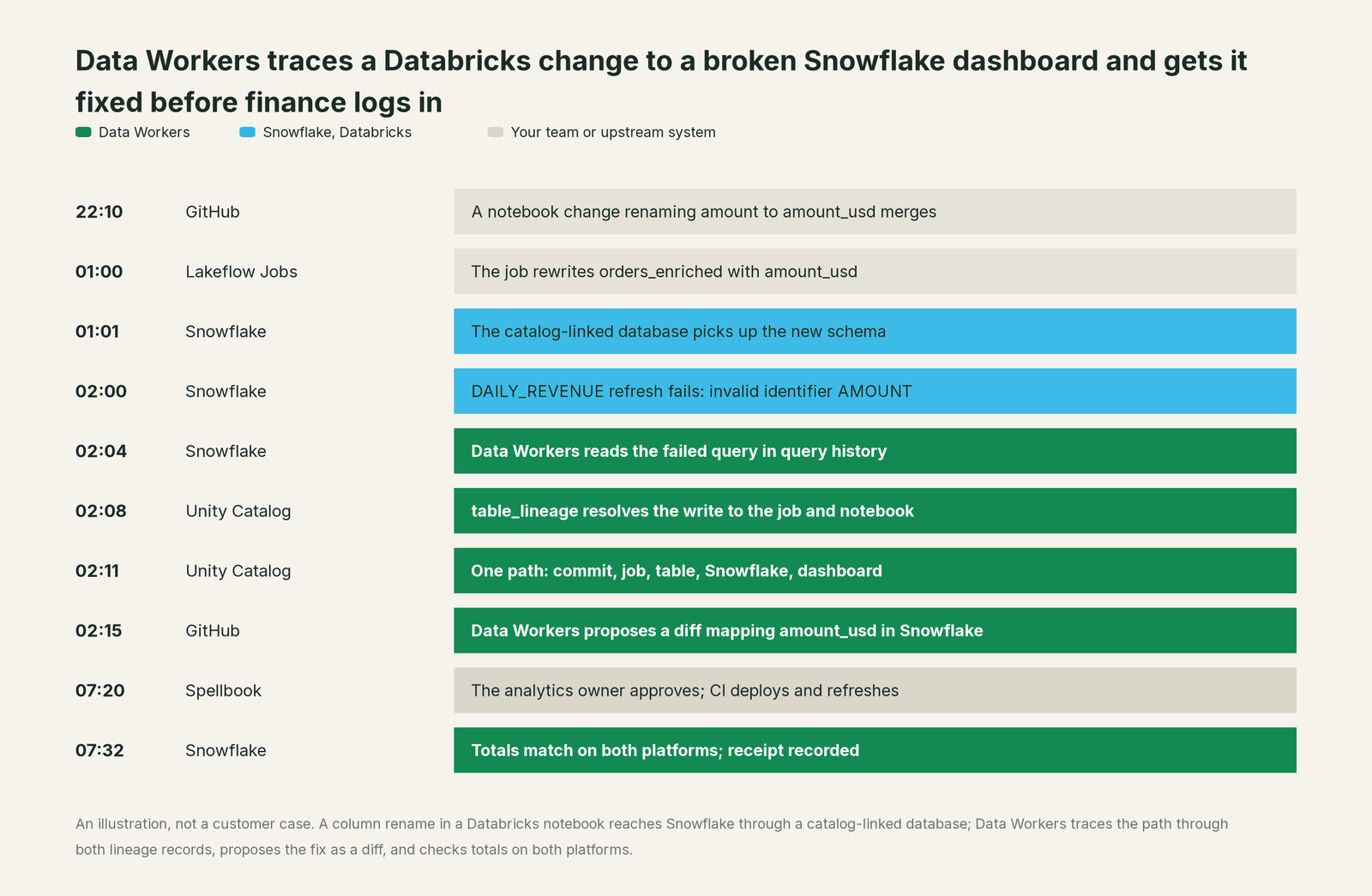
The receipt it leaves. One record, readable in Spellbook Data Catalog (in preview) and through get_change_receipt: the failed Snowflake query and its error, the full path across both platforms with the evidence behind each edge, the Databricks commit and job run that started it, the blast radius on both sides, the pull request and its diff, the approver, the checks run on each platform with their values, and the time each fact was observed. Neither catalog changed. The next time anyone renames a column in orders_enriched, the blast radius shows the Snowflake readers before the PR merges.
Why doesn't Snowflake or Databricks just do this itself?
Each platform built lineage for one job: recording what runs on that platform, accurately, under its own governance. Unity Catalog captures lineage for queries run on Databricks. Snowflake's lineage and ACCESS_HISTORY record what runs in your Snowflake account. That focus is the right design. A lineage record you can trust is one the platform observed itself.
Both platforms accept lineage from outside, and both draw a sensible line around it. Unity Catalog external lineage is objects and edges someone adds, and they stay out of the lineage system tables. Snowflake external lineage takes OpenLineage COMPLETE events, with a cap on external edges per account. Neither vendor observes the other's runtime, and neither should be on the hook for proposing changes in objects the other vendor runs.
Joining the two records, keeping the join current, and acting on it is a different product. It needs context about systems neither platform runs, approvals from owners on both sides, a record an auditor can read, and accountability for a change that crosses vendors. That cross-platform product is what Data Workers is.
The next autonomy step
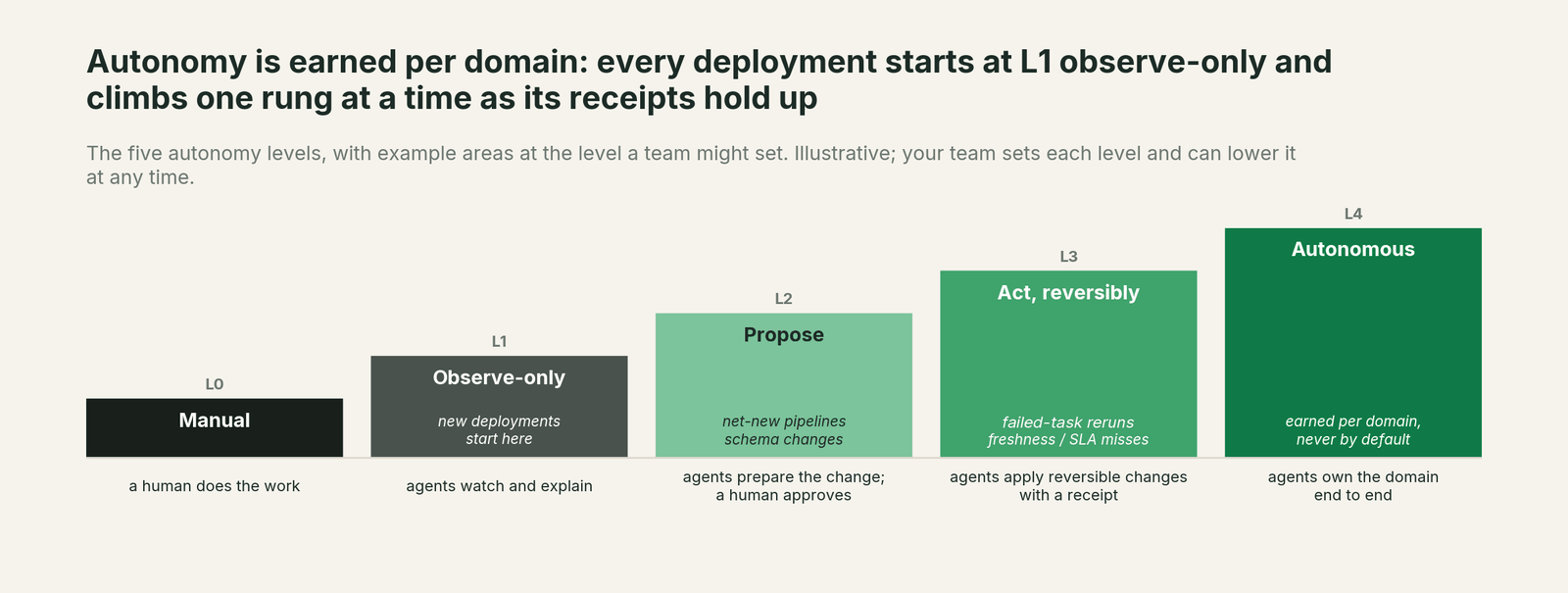
The run above is L0 to L2: observe, trace, and propose a diff a person approves. The next step most teams take is to move the check earlier. At L2, Data Workers comments the cross-platform blast radius on every Databricks job PR that changes a shared table's schema, so the rename above never reaches Snowflake unannounced. After a few weeks of clean receipts, reversible fixes in one domain, such as remapping a renamed column in a Snowflake view behind your CI, can move to L3 with rollback ready. Autonomy is set per domain, an agent can't approve its own work, and every step keeps a rollback path.
The case for your CFO
The outcome. A change on one platform no longer breaks a number on the other without warning. When something does break, one team owns it from the first failed query, and the dashboard is right before the business opens it.
The risk story. At observe, Data Workers reads lineage and query history on both platforms with read-only roles and changes nothing. At propose, fixes arrive as diffs for the owner to merge, and a named owner approves each one. Your catalogs, grants, jobs and models stay where they are. Each receipt holds the path, the evidence, the checks, the approver and the time. There is no migration.
Why now. Iceberg REST catalogs and catalog-linked databases made it easy for Snowflake and Databricks to read each other's tables in 2026. Cross-platform dependencies now grow faster than either catalog can see.
The first win. Map every table that crosses the seam and every reader on the other side, read-only, then put a cross-platform blast radius on the next schema change.
What stays the same. Unity Catalog, Snowflake Horizon, your jobs, your dbt project, your dashboards and your coding agent.
The pilot path. Start with a pilot on one shared domain, read-only first. The pilot is credited in full against the first year.
One sentence for upstairs: "Our Snowflake and Databricks teams now see one lineage path across both platforms, so a break that crosses platforms gets one owner and a verified fix before the business sees it."
FAQ
Does Data Workers write to Unity Catalog or Snowflake lineage? No. It reads lineage from both and keeps the cross-platform edges in the Data Context Wizard graph, with the evidence for each. Changes to your objects arrive as diffs for the owner to merge.
Snowflake ingests OpenLineage now. Isn't that enough? It's a good input for Snowflake's own lineage view. Databricks has no native emitter in its docs, so Databricks runs need the Spark listener on classic clusters, and Snowflake caps external edges per account. Data Workers builds the Databricks side from table_lineage rows instead.
What about Unity Catalog external lineage? It's useful for showing a Snowflake object inside Catalog Explorer. The edges are added by hand or by Lakeflow Connect, and they aren't recorded in the lineage system tables.
Which roles does it need? A read-only service principal on Databricks and a read-only role on Snowflake, as listed above. No write grants.
Does it work when Databricks reads Snowflake? The same approach applies. With catalog federation, Unity Catalog reads Snowflake-managed Iceberg tables directly; Data Workers maps those tables on both sides the way it maps catalog-linked ones. Start with the direction your teams depend on most.
Sources
Snowflake and Databricks capabilities and statuses, checked October 2, 2026: Snowflake Access History (columns, Iceberg coverage, Enterprise Edition), ACCESS_HISTORY view (latency up to 3 hours, 365 days), data lineage (objects covered, GET_LINEAGE), external lineage (OpenLineage endpoint, COMPLETE events, edge limits) and its GA release note (Sep 3, 2026), catalog-linked databases (Unity Catalog, 30-second sync); Databricks system tables reference (Sep 30, 2026), lineage system tables (Sep 28, 2026; table and column lineage listed without a preview label on the reference, so GA), external lineage (Sep 11, 2026), Iceberg client access (Sep 24, 2026) and Snowflake catalog federation (Sep 22, 2026); OpenLineage on Databricks (Spark listener via init script). Product names and statuses change quickly; if we've got something wrong, tell us and we'll fix it.