SAP and ERP reporting data, run by agents
SAP and ERP extracts break after every upgrade, transport or new company code, and reports go out wrong. Here is how Data Workers runs it instead.
Key takeaways
- •The problem today. SAP and ERP extracts break after every upgrade, transport or new company code, and reports go out wrong.
- •What changes. Agents detect ERP changes at the boundary, remap extracts and verify reports against the ledger before they publish.
- •What stays with your people. Published financial reports: they are reviewed by auditors.
- •The result. ERP reports survive upgrades.
The problem today
SAP and ERP extracts break after every upgrade, transport or new company code, and reports go out wrong.
What changes with Data Workers
Agents detect ERP changes at the boundary, remap extracts and verify reports against the ledger before they publish.
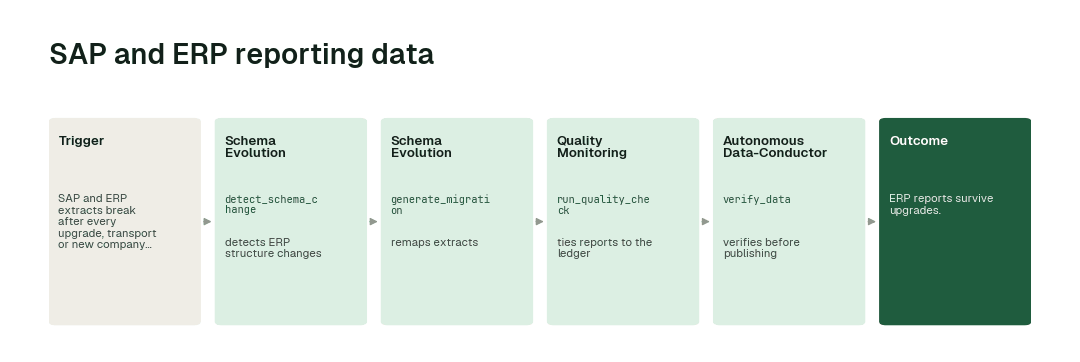
The workflow, step by step
- 1.The Schema Evolution agent calls
detect_schema_changeand detects ERP structure changes. - 2.The Schema Evolution agent calls
generate_migrationand remaps extracts. - 3.The Quality Monitoring agent calls
run_quality_checkand ties reports to the ledger. - 4.The Autonomous Data-Conductor calls
verify_dataand verifies before publishing.
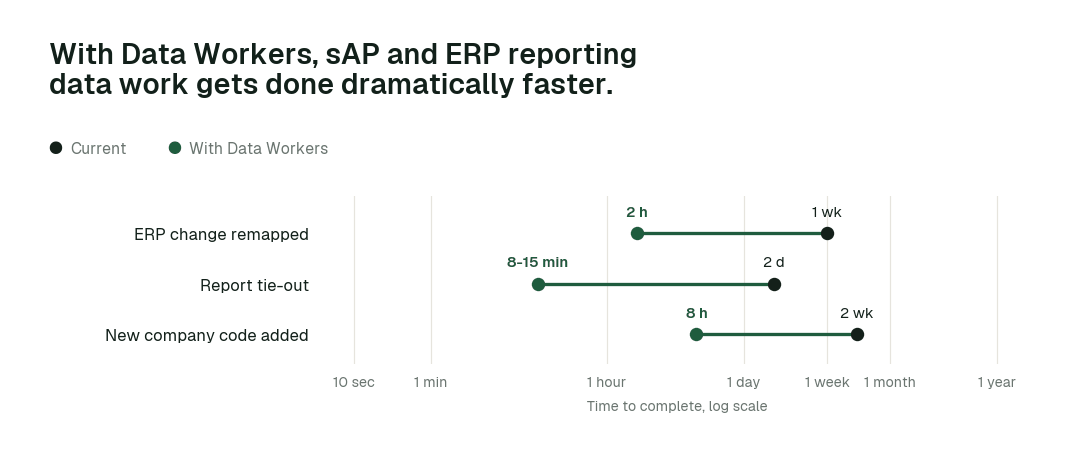
The impact metrics we move
- •ERP change remapped: from about a week to 2 h
- •Report tie-out: from about 2 days to 8-15 min
- •New company code added: from about 2 weeks to 8 h
What goes on autopilot
- •ERP changes are caught on load, so reports never read broken extracts.
- •Reports tie to the ledger, so finance trusts them.
Where your people stay in charge
Published financial reports always go to a named approver, because they are reviewed by auditors. Everything starts at L1, observing only, and autonomy rises only on evidence.
The pilot
- •Scope. Remapping and tie-out for one SAP extract family.
- •First week. Agents run at L1, observing only, and show the fixes they would have made, with receipts.
- •By week two. The routine work above runs on its own; anything sensitive stays with a named approver.
- •At day 30. We review the impact metrics against your baseline:
- •ERP change remapped: from about a week to 2 h
- •Report tie-out: from about 2 days to 8-15 min
- •New company code added: from about 2 weeks to 8 h
- •Cost. Start with a pilot ($7,500 one-time, credited in full against the first year). Scale is from $1,000 a month and Enterprise from $3,000 a month, billed annually, with unlimited seats, no usage meter and no markup on model spend. See pricing.