Account intelligence data, run by agents
Account data is split across CRM, billing, product usage and enrichment vendors that identify accounts differently. Here is how Data Workers runs it instead.
Key takeaways
- •The problem today. Account data is split across CRM, billing, product usage and enrichment vendors that identify accounts differently.
- •What changes. Agents maintain account identity across systems and keep a governed account view for sellers and their agents.
- •What stays with your people. Identity rule changes: they decide who owns which account.
- •The result. Sellers and their agents see the same account.
The problem today
Account data is split across CRM, billing, product usage and enrichment vendors that identify accounts differently.
What changes with Data Workers
Agents maintain account identity across systems and keep a governed account view for sellers and their agents.
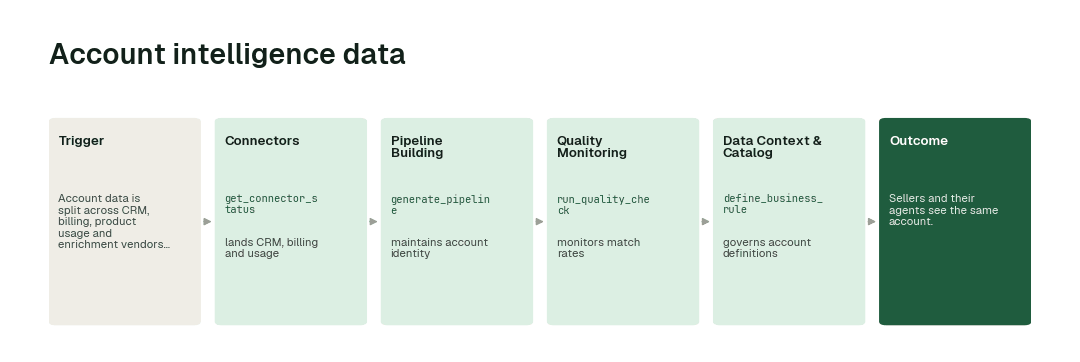
The workflow, step by step
- 1.The Connectors agent calls
get_connector_statusand lands CRM, billing and usage. - 2.The Pipeline Building agent calls
generate_pipelineand maintains account identity. - 3.The Quality Monitoring agent calls
run_quality_checkand monitors match rates. - 4.The Data Context & Catalog agent calls
define_business_ruleand governs account definitions.
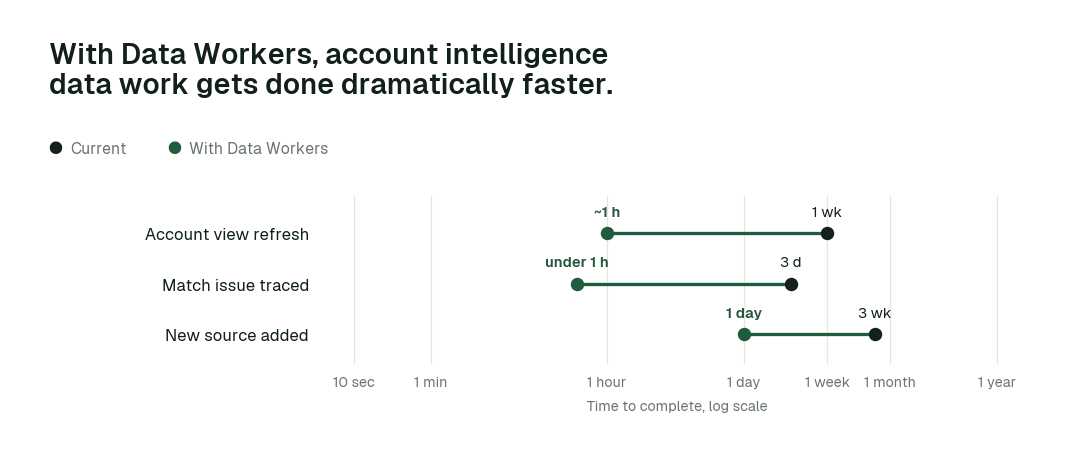
The impact metrics we move
- •Account view refresh: from about a week to ~1 h
- •Match issue traced: from about 3 days to under 1 h
- •New source added: from about 3 weeks to 1 day
What goes on autopilot
- •Account identity is maintained, so everyone counts customers the same way.
- •Match rates are monitored, so drops are caught early.
Where your people stay in charge
Identity rule changes always go to a named approver, because they decide who owns which account. Everything starts at L1, observing only, and autonomy rises only on evidence.
The pilot
- •Scope. Account identity across CRM and billing.
- •First week. Agents run at L1, observing only, and show the fixes they would have made, with receipts.
- •By week two. The routine work above runs on its own; anything sensitive stays with a named approver.
- •At day 30. We review the impact metrics against your baseline:
- •Account view refresh: from about a week to ~1 h
- •Match issue traced: from about 3 days to under 1 h
- •New source added: from about 3 weeks to 1 day
- •Cost. Start with a pilot ($7,500 one-time, credited in full against the first year). Scale is from $1,000 a month and Enterprise from $3,000 a month, billed annually, with unlimited seats, no usage meter and no markup on model spend. See pricing.
Related: The sales and revenue page · The full team playbook