Customer energy usage data, run by agents
Green Button downloads, the customer portal and third-party feeds all draw on the same usage tables, and the team that owns them answers for both accuracy and consent. A wrong interval or a release outside what the customer agreed to is found by the customer. Here is how Data Workers runs it instead.
Key takeaways
- •The problem today. The same usage tables feed the portal, Green Button files and third-party feeds. Errors show up as complaints, and nobody can quickly say which feed carried which customer's data, or on what consent.
- •What changes. Agents check usage against billing before it is shown, and check every release against the consent record you hold, so fresh and correct data goes only where the customer allowed.
- •What stays with your people. Every release of customer data to a third party, including a CCA, is a proposal. The privacy owner approves it.
- •The result. Customers and consented third parties get current, correct usage, with an evidence trail per release.
The problem today
Green Button gives customers two routes: Download My Data, a file of their own usage, and Connect My Data, an automated transfer to an authorised third party on opt-in consent. One dataset serves three outputs: the portal chart, the downloaded file and the vendor or CCA feed.
Each fails in its own way. A daylight-saving shift moves a day of intervals by an hour. A meter exchange leaves a gap the portal draws as zero. A customer revokes consent in one channel and the feed keeps running in another. The team hears from a call centre ticket or a regulator, then spends days working out who received what. This is the customer-facing end of the week for utility data teams.
What changes with Data Workers
Agents work beside your portal, meter data management system and consent system, which stay the systems of record. They watch the usage tables behind every output, tie them to what was billed, and check each release against the consent on file: which customer, which recipient, which data, which dates, active or revoked.
Each finding arrives with its cause, the customers touched and a proposed fix or hold. This is the customer-facing practice in the field guide for utility data teams, for the operations and supply chain data teams that run billing, the grid and customer programs on one estate. The energy and utilities platform view covers the stack.
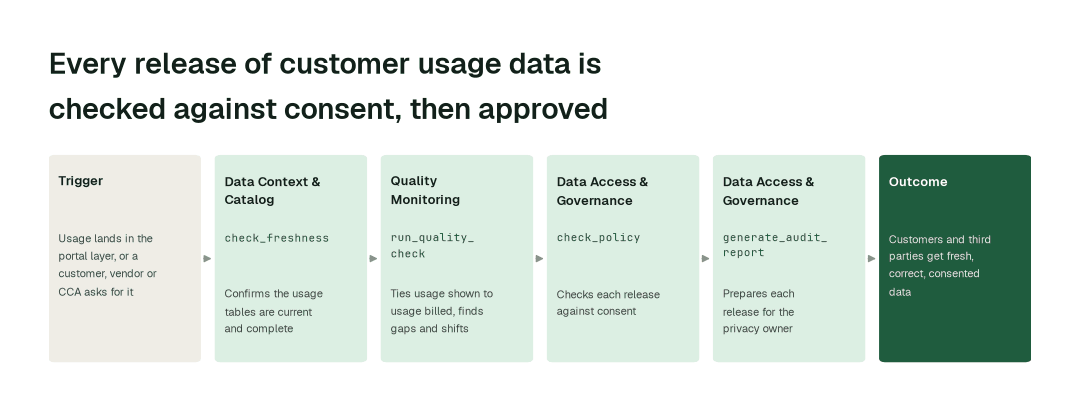
The workflow, step by step
- 1.The Data Context & Catalog agent calls
check_freshnessand confirms the usage tables behind the portal, the downloads and the feeds are current after each bill run and each late-read backfill. - 2.The Quality Monitoring agent calls
run_quality_checkand ties usage shown to usage billed, flagging gaps, duplicates, unit errors and time shifts before a customer sees them. - 3.The Data Access & Governance agent calls
check_policyand matches each requested release to the consent record you hold: customer, recipient, data scope, date range and whether it has been revoked. - 4.The Data Access & Governance agent calls
generate_audit_reportand prepares every third-party release, and any release that does not match consent, for the privacy owner: recipient, scope, consent relied on and how to undo it.
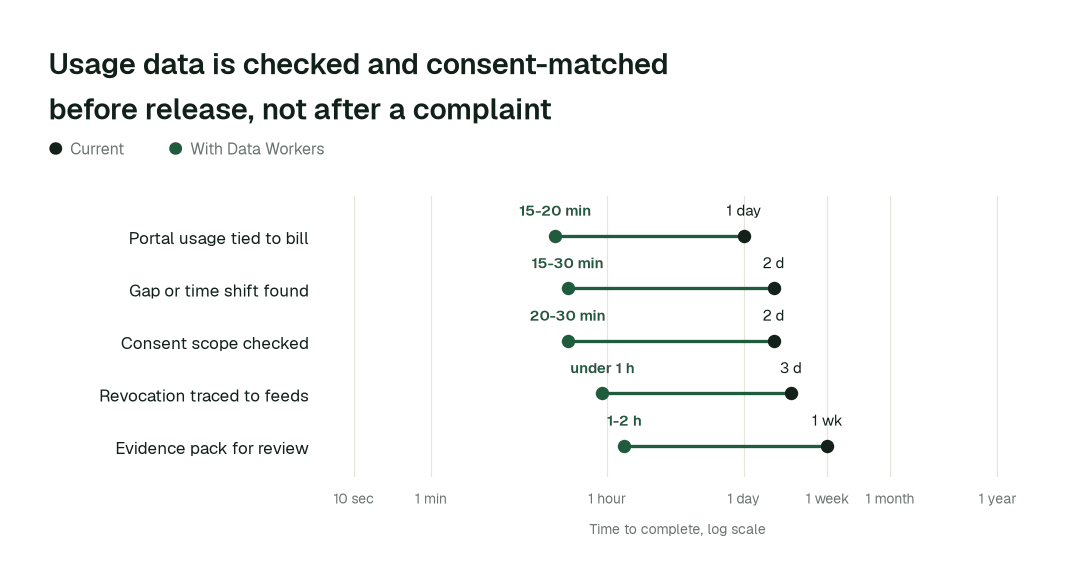
The impact metrics we move
- •Portal usage tied to billed usage: from about 1 day to 15-20 min
- •Gap or time shift found in the customer view: from about 2 days to 15-30 min
- •Consent scope checked for a third-party feed: from about 2 days to 20-30 min
- •Revocation traced to every feed: from about 3 days to under 1 h
- •Release evidence pack for a privacy review: from about 1 week to 1-2 h
What goes on autopilot
- •Usage is tied to billing after every run, so the portal and downloads stop drifting from the bill.
- •Freshness is watched continuously, so a late backlog is re-checked when it lands.
- •Each release is checked against consent as it is requested, so a mismatch is caught before the data leaves.
- •Every release is recorded: what went to whom, under which consent, approved by whom.
Where your people stay in charge
Releasing customer data is a privacy decision, so each release to a third party, including a CCA feed, goes to a named approver: the privacy owner. The customer data lead sees the same proposal. Approvals are recorded in a tamper-evident audit trail with a signed record of what ran and how to undo it, the evidence a privacy review or regulator asks for later (how approvals work). Which recipients are registered and what consent allows stay your decisions; the agents apply them the same way every time (the Data Access & Governance agent, handling personal data). Everything starts at L1, observing only, and autonomy rises only on evidence.
The pilot
- •Scope. One customer-facing output, such as the Green Button download or one CCA feed, with releases held at L2.
- •First week. Agents run at L1, observing only, and show the mismatches and consent gaps they would have flagged.
- •By week two. Usage-to-bill checks and consent matching run on their own; every third-party release goes to the privacy owner.
- •At day 30. We review the impact metrics against your baseline:
- •Portal usage tied to billed usage: from about 1 day to 15-20 min
- •Consent scope checked for a third-party feed: from about 2 days to 20-30 min
- •Revocation traced to every feed: from about 3 days to under 1 h
- •Cost. Start with a pilot ($7,500 one-time, credited in full against the first year). Scale is from $1,000 a month and Enterprise from $3,000 a month, billed annually, with unlimited seats, no usage meter and no markup on model spend. See pricing.