Supply chain data teams: less upkeep, more data products
Less upkeep, more data products. Most of the week on supply chain data teams goes to upkeep: broken feeds, reruns, access queues and documentation. Data Workers hands that work to agents so the team ships the data products the business has been asking for.
Key takeaways
- •Who this is for. Data leaders and teams at carriers, 3PLs, distributors and manufacturers.
- •The problem today. Most of the data team's week goes to partner-feed maintenance and morning firefighting before planning.
- •What changes. Specialised agents take that work over across the systems you already run: they catch bad data where it enters, fix it where it lives and verify the number before anyone reads it.
- •What stays with your people. Anything regulated or customer-facing waits for a named approver with the full diff, blast radius and rollback plan in front of them.
- •The result. Data teams that spend their time on visibility and forecasting products.
The PRD for agentic data in supply chain
This is the requirements document we would write with you. Everything below expands on it.
| Who | Data leaders and teams at carriers, 3PLs, distributors and manufacturers. |
| The job | A network that keeps its own data straight. |
| Environment | Kafka; Snowflake or BigQuery; TMS and WMS; partner APIs and EDI; dbt; shipper-facing APIs, and the other platforms your teams run. |
| Constraints | Regulated and customer-facing numbers always go to a named approver; agents run in your infrastructure under the roles you already govern. |
| Success is measured by | Planner question on inventory: from about a day to seconds; Lot traced supplier to shelf: from about 3 days to minutes; Finding the right feed: from about 2 hours to 30 s; catalog and feed docs closed autonomously 88% of the time. |
| Owned by | The head of data or CDO, with domain owners as named approvers. |
| Pilot scope | One partner domain at L2. |
What going fully agentic and autonomous means in supply chain
- •Put your data pipelines on autopilot. Agents catch bad data where it enters, fix it where it lives and verify the number before anyone reads it.
- •Run the data back office without the busywork. The week that goes to partner-feed maintenance and morning firefighting before planning moves to agents.
- •Scale data without scaling headcount. New sources, partners and data products are onboarded as missions, not projects.
- •Get the plumbing off your plate. Data teams spend their time on visibility and forecasting products.
The shift
A supply chain is a network of other people's data. Carriers, 3PLs, suppliers, marketplaces and customers all send files, EDI messages and API payloads, and every one of them changes on its own schedule. The planning meeting at 8am runs on whatever arrived overnight.
For years the industry has handled this with integration platforms that move the data and people who notice when it is wrong. The integration layer is mature. The work of noticing, fixing and verifying is still manual, and it scales with the number of partners, not the number of engineers.
Our view: every partner feed should be watched, mapped, repaired and verified by agents, so planners always work on fresh numbers, new partners go live in days, and the data team spends its time on visibility and forecasting products instead of feed maintenance.
How data work in supply chain got here
The EDI and ERP era. Data moved through EDI standards and nightly ERP batches. Partner onboarding was a project, and changes were negotiated over email.
The integration platform era. iPaaS tools, APIs and cloud warehouses made it possible to connect hundreds of partners and build control towers. But every partner still sends its own variant of a standard, and the burden of catching changes moved to the data team.
The agentic back office. Agents watch every feed, map new layouts, update downstream models, verify the numbers planners use and onboard new partners as a mission. People decide on the exceptions that need judgment.
The three eras side by side:
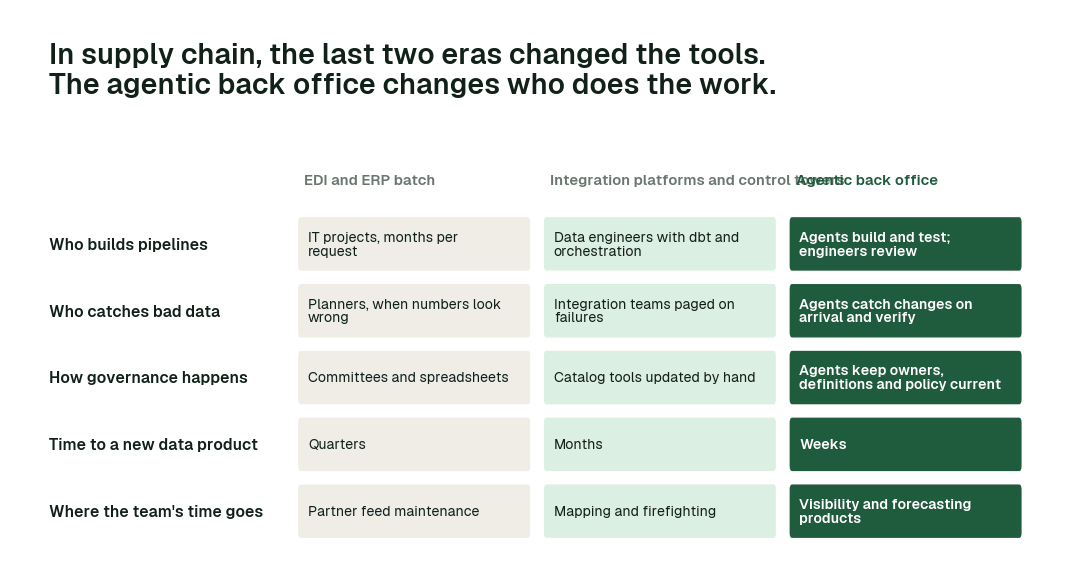
Each era changed the tools. Only the agentic back office changes who does the work.
A day on a supply chain data team today
It is Monday at a 3PL. Over the weekend a large shipper changed its advance ship notice format, adding a pallet-level field and moving the PO number. Saturday's loads landed but 18% of inbound lines no longer match a purchase order.
At 7:45 the inventory planner sees on-hand quantities that do not match the warehouse floor. The integration team is paged at 8:10. By 11:00 they have found the change, by 14:00 a mapping fix is in test, and the backlog of unmatched lines is reprocessed overnight. Planning ran on bad numbers for a day, and two customer service tickets were opened about missing inventory.
That morning is typical, not exceptional. Across a week, this is where the team's time goes, today and with agents on the back office:
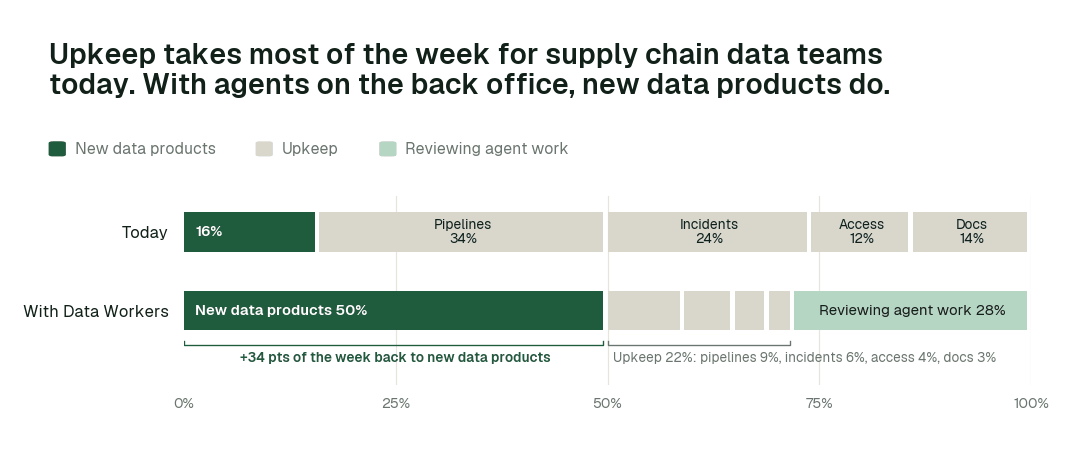
Time spent on new data products moves from 16% of the week to 50%. Most of the rest becomes review: people steer and approve agent work instead of doing it by hand.
Then and now
| Work | Today | With Data Workers |
|---|---|---|
| A partner changes a feed layout | Found when planners see wrong numbers, fixed by hand | Caught on arrival, mapped, tested and verified before planning |
| Onboarding a new supplier or carrier | Weeks of mapping and testing per partner | A mission: connect, land, profile, map, test and document, live in days |
| Stale inventory and ETA data | Discovered in the planning meeting | Freshness SLAs on every planning table, reruns handled automatically |
| Tracing a lot or shipment | Queries across ERP, WMS and partner files by hand | One question against a joined lineage graph |
| Peak-season compute cost | Spikes and never comes back down | Idle and oversized workloads found and cleaned up after peak |
| Partner documentation | Spreadsheets and tribal knowledge | A living page per feed with owner, SLA and schema history |
These are the impact metrics we move:
- •Planner question on inventory: from about a day to seconds
- •Lot traced supplier to shelf: from about 3 days to minutes
- •Finding the right feed: from about 2 hours to 30 s
Across the routine work:
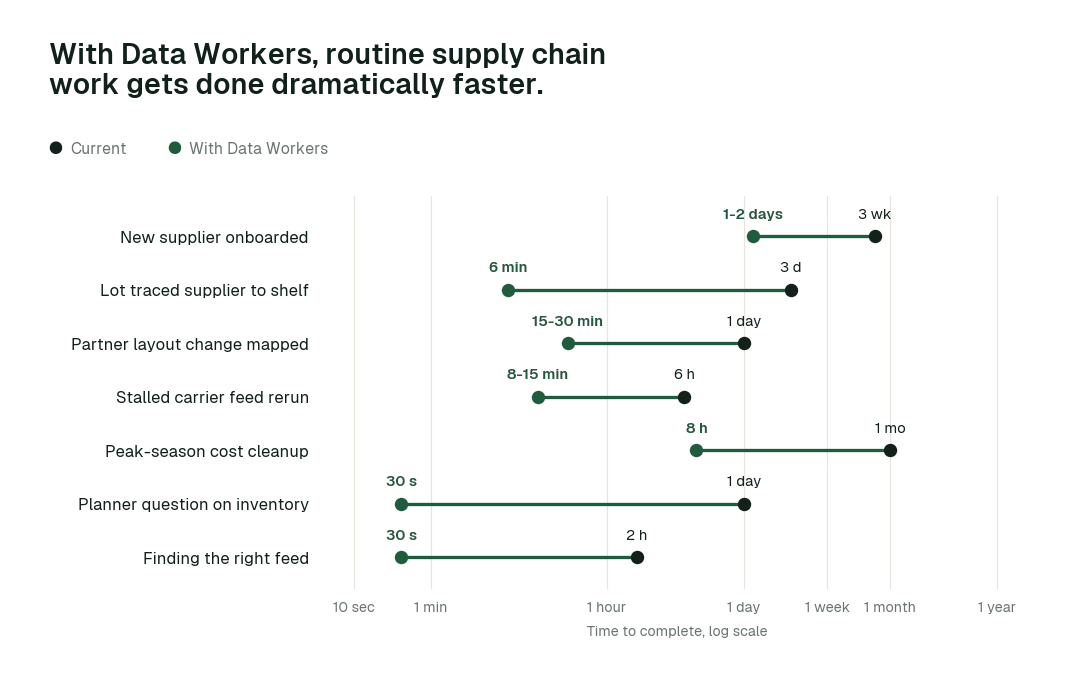
The biggest change is Lot traced supplier to shelf: from about 3 days to minutes. Work that waited in queues finishes in minutes or hours, because agents detect, fix and verify in one pass.
Use cases, in depth
1. The partner that changed its ship notice
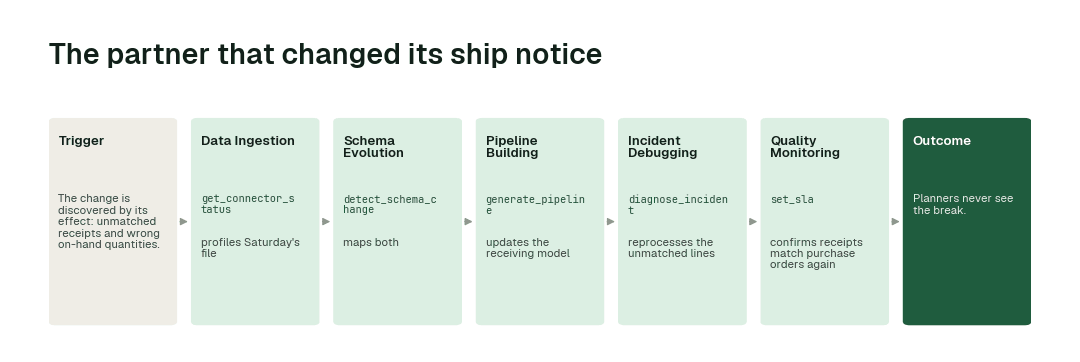
Today. The change is discovered by its effect: unmatched receipts and wrong on-hand quantities. Integration engineers trace it, fix the mapping and reprocess.
With Data Workers. The Data Ingestion agent profiles Saturday's file and flags the moved PO field and the new pallet field. Schema Evolution maps both, Pipeline Building updates the receiving model and its tests, and the Incident Debugging agent reprocesses the unmatched lines. Quality Monitoring confirms receipts match purchase orders again. Autonomous Data-Conductor verifies the planning tables before 7am. The mapping for a feed that drives inventory of record sits at L2, so the integration lead approves it with one tap.
What changes. Planners never see the break. The customer service tickets never get opened.
2. Onboarding 30 new suppliers before peak
Today. Each supplier is a small project: a mapping spec, a test cycle and a go-live. The integration team becomes the bottleneck for the business's growth.
With Data Workers. Onboarding runs as an Autopilot mission. Connectors set up each feed, Ingestion profiles the first files, Schema Evolution maps them to the canonical model, Pipeline Building writes tests, and Data Context & Catalog creates each partner's page. Conductor sets freshness SLAs. The team reviews the exceptions.
What changes. Partner onboarding scales with the business, not with integration headcount. See a full onboarding mission.
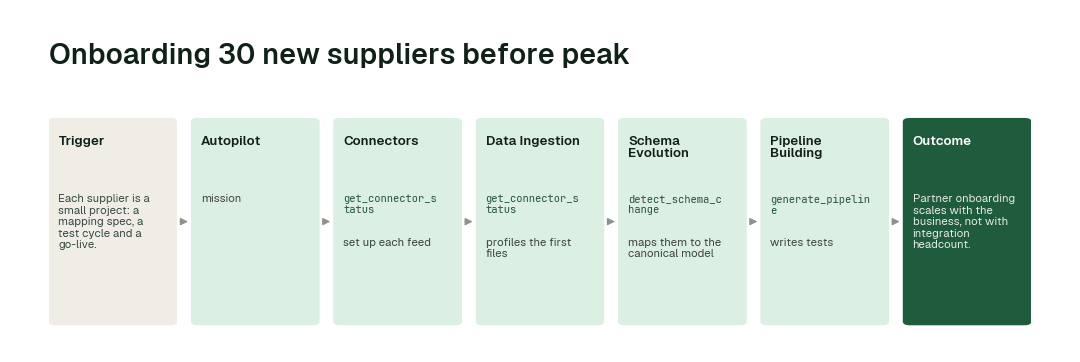
3. ETA and inventory freshness for the planning meeting
Today. A stalled carrier feed or a failed load is discovered in the meeting itself.
With Data Workers. Conductor tracks freshness on every table planners depend on, reruns and backfills failed loads, verifies the inventory and ETA figures, and escalates exactly one decision when a carrier is genuinely late and someone has to call them.
What changes. The 8am meeting runs on numbers that were checked at 6.
4. Tracing a lot from supplier to shelf
Today. A quality hold or a customer complaint triggers a manual trace across ERP, WMS, TMS and partner files that takes days.
With Data Workers. Data Context Wizard joins lineage across every system into one graph. Ask where a lot went and get every shipment, location and transformation, with the records behind each step.
What changes. A trace that took days takes minutes, and the records are ready to share.
Agents working together: A partner changes its ship notice over the weekend
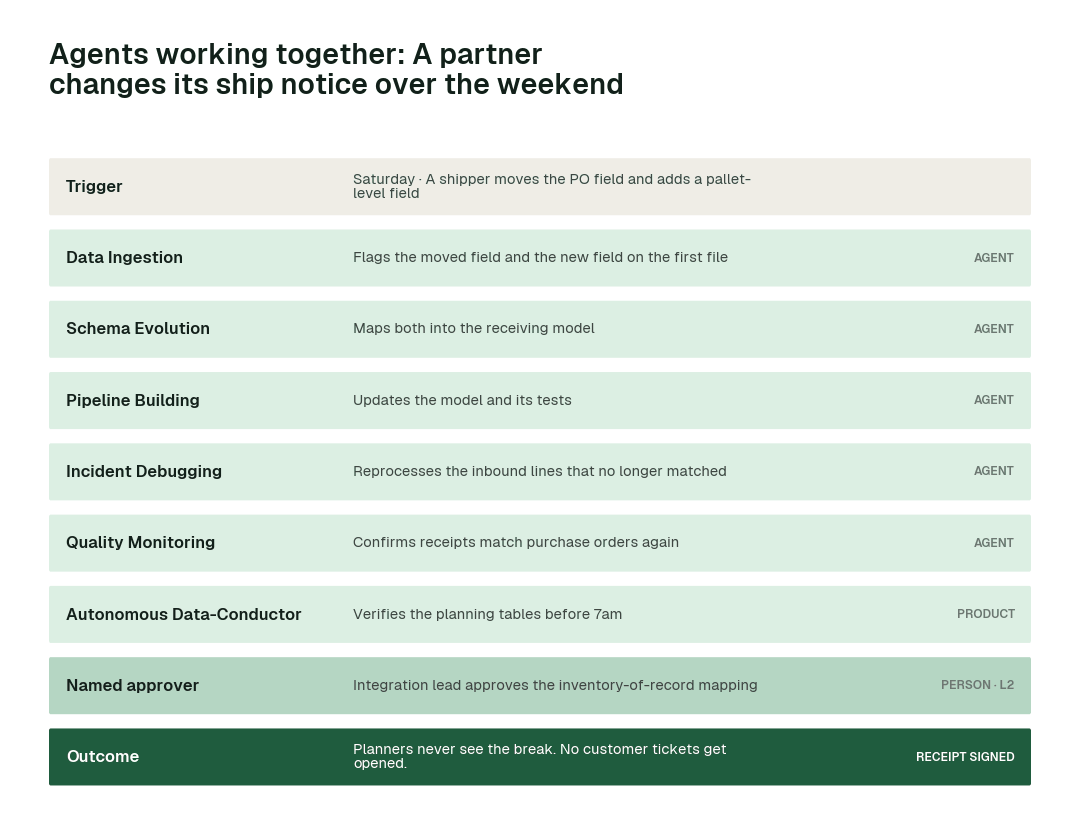
The ship-notice change from the first use case, end to end. Six agents and one approver absorb a partner change over the weekend so Monday planning is unaffected.
Minute by minute
Illustrative example. Scans stream into Snowflake; ETAs refresh every 15 minutes for shipper APIs.
| Time | Who | What happens |
|---|---|---|
| 14:00 | Hub 12 | Uploads start failing |
| 14:15 | Quality Monitoring agent | Volume drop flagged for hub 12 |
| 14:18 | Incident Debugging agent | diagnose_incident: upload service error |
| 16:05 | Hub 12 | Uploads resume |
| 16:07 | Autonomous Data-Conductor | Backlog loaded; ETAs recomputed |
| 16:20 | Shipper API | Fresh ETAs served |
How it fits your stack
Data Workers connects to what you already run: Kafka; Snowflake or BigQuery; TMS and WMS; partner APIs and EDI; dbt; shipper-facing APIs. Each agent is an MCP server, so the same agents work inside Claude Code, Cursor or Codex and in Slack or Teams through Spellbook. Nothing migrates.
- •Runs in your infrastructure with your credentials and your model key. The hosted Autonomous Data-Conductor sees workflow metadata only, never rows.
- •Uses the access you already govern. Agents act under scoped service identities and your existing roles; every grant goes through provision_access and is logged.
- •Proposes changes as diffs in your dbt project, orchestrator and warehouse, with blast radius, tests and a rollback point, and applies them only at the autonomy level you set for that domain.
- •Open-source core. The Apache-2.0 community edition ships 11 agents and 160+ MCP tools, so your engineers can read exactly what the agents call.
How autonomy expands over the first year
Autonomy is earned per task class. In a mature deployment, it looks like this:
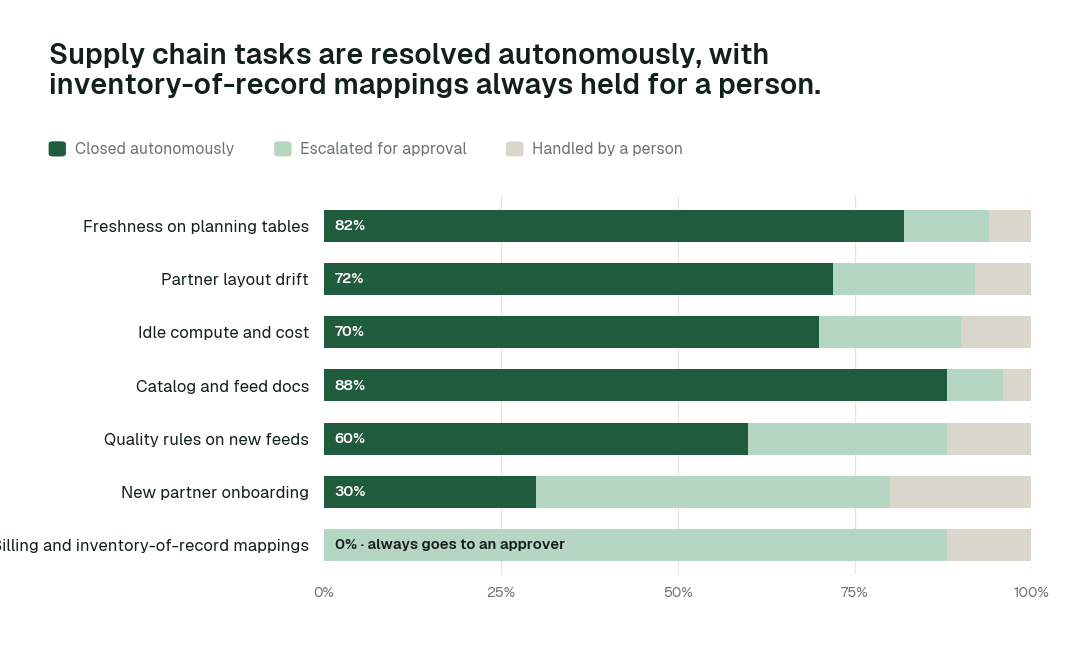
Catalog and feed docs closes autonomously 88% of the time. For Billing and inventory-of-record mappings, autonomous closure is 0% by design: every change is proposed with a full diff and approved by a named person.
A typical path to get there:
- •Month 1, L1 on every feed. Agents map every partner feed, SLA and lineage path.
- •Months 2 to 3. Reruns, backfills and freshness fixes on planning and staging tables run at L3. Catalog upkeep and idle compute shutdown run at L4.
- •Months 4 to 6. Partner onboarding becomes a standing mission. New feeds are profiled, mapped and tested by agents and reviewed by people.
- •Months 6 to 12. Mapping changes on feeds with a clean record move from L2 to L3. Feeds that drive billing or inventory of record stay at L2. Customer communications stay with people.
The same path as a curve, month by month:
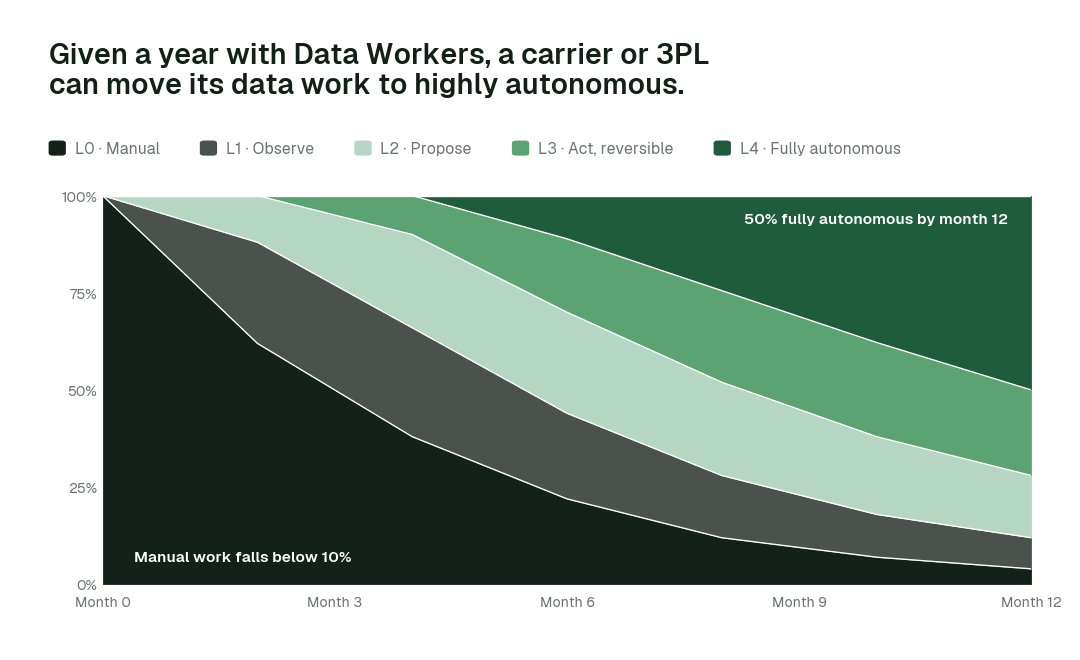
By month 12, more than 50% of agent actions run fully autonomously and manual work falls below 10%, while inventory-of-record mappings stay with a named approver.
What happens when an agent is wrong
- •At L2 propose, nothing changes until a named person approves. The proposal shows the full diff, the blast radius and how to roll it back. Unanswered requests expire and escalate.
- •At L3 act, reversibly, every change keeps a rollback point, and Conductor verifies the downstream number after the change. If verification fails, the change is reversed and the domain drops a level.
- •No agent approves or promotes its own work. Autonomy only grows on evidence, per repair class, and repeated errors shrink scope automatically.
- •One org-wide stop halts all autonomous dispatch, and every action lands in a hash-chained audit trail you can export with generate_audit_report.
Governance and regulation
Supply chain data feeds financial statements and customer contracts. Data Workers keeps lineage, tie-outs and approvals on inventory-of-record and billing-relevant data.
Data Workers doesn't make you compliant; your controls, people and assessors do. It supplies controls and evidence wherever agents touch data. Not legal advice.
The alternatives supply chain data teams weigh
Build it yourselves. A strong team can wire a coding agent to MCP servers for the warehouse and dbt. The work is everything around it: routing approvals to the right owner, blast radius, rollback, receipts, and current context about every other system.
Observability, catalogs and point tools. Observability alerts, catalogs document, and quality tools test. Data Workers takes their signals, diagnoses, proposes the fix, verifies it and leaves the receipt.
Platform-native agents. Snowflake made its managed MCP server and Cortex Agents generally available on Nov 4, 2025, and Databricks made Genie One generally available on Jun 16, 2026. They are excellent inside their platform; this work crosses the source systems, orchestrator, warehouse and BI, and Data Workers works across all of them.
In this space specifically. Integration platforms move data; planning and visibility platforms use it; Data Workers keeps it correct between them.
The case for your CTO
What this replaces. The week spent on partner-feed maintenance and morning firefighting before planning.
What your teams get back. Time for visibility and forecasting products, on data that is verified before anyone reads it.
Integration effort. Connecting is configuration, not a migration. The agents attach over MCP to the platforms you already run, under the roles you already govern, inside your own infrastructure.
Risk and control. Autonomy is set per domain, starts at L1 and rises only on evidence. Regulated and customer-facing numbers stay at L2 with a named approver, and one org-wide stop halts all autonomous work.
Why now. Shorter planning cycles and visibility expectations.
The first win. One partner domain at L2. The pilot below lays out the scope, what you see each week and the cost.
The climb: from assisted to autonomous to agentic
Our thesis is that the data platform climbs the way analytics did, in stages. In supply chain, that climb looks like this:
- •Assisted. Agents work alongside each data team, read the whole stack and propose every fix with a receipt. Regulated and customer-facing numbers always go to a named approver.
- •Autonomous, under your governance. The upkeep behind partner-feed maintenance and morning firefighting before planning runs on its own, domain by domain, as the receipts earn it.
- •The agentic enterprise. The platform largely runs itself. People set direction and standards, and the teams spend their time on visibility and forecasting products.
You choose the altitude, every step is visible and reversible, and the pilot below is the first rung.
The pilot: how supply chain data teams start
The pilot is how a team proves the value on its own data before committing.
- •What we connect. Kafka; Snowflake or BigQuery; TMS and WMS; partner APIs and EDI; dbt; shipper-facing APIs, over MCP, inside your infrastructure. Nothing migrates.
- •Scope. One partner domain at L2.
- •First week. Agents run at L1 and show the fixes they would have made, with receipts.
- •By week two. Reversible upkeep (reruns, staging fixes, documentation, cleanup) runs on its own; regulated and customer-facing numbers stay at L2 with a named approver.
- •At day 30. We review the impact metrics against your baseline:
- •Planner question on inventory: from about a day to seconds
- •Lot traced supplier to shelf: from about 3 days to minutes
- •Finding the right feed: from about 2 hours to 30 s
- •the share of catalog and feed docs closed autonomously, targeting 88%
- •What you decide. Which domain or team goes next. The pilot fee is credited in full against the first year.
- •Cost. Start with a pilot ($7,500 one-time, credited in full against the first year). Scale is from $1,000 a month and Enterprise from $3,000 a month, billed annually, with unlimited seats, no usage meter and no markup on model spend. See pricing.
Use-case guides
- •Delivery performance data: One on-time number across regions.
- •Inventory and demand planning data: Plans run on verified inventory.
- •Carrier and lane analytics data: Lane performance is current for every procurement cycle.
- •Warehouse operations data: Supervisors see throughput by the hour.
- •Freight cost and audit data: Overcharges are caught before payment.
Teams we work with in supply chain
FAQ
Does it replace our iPaaS? No.
Real time? Yes.
ERP support? Through extracts and APIs.
Where do the agents run? In your infrastructure, with your credentials and model key. The hosted Conductor sees workflow metadata only.
Do we have to migrate anything? No. Your warehouse, dbt project, orchestrator, catalog and BI stay where they are.
Sources
- •FedEx Dataworks posting: https://jobs.thecentermemphis.org/companies/fedex/jobs/40836217-product-manager-lead
- •Data Workers pricing: https://dataworkers.io/pricing/
- •Data Workers open-source repository (tool registrations): https://github.com/DataWorkersProject/dataworkers-claw-community
- •Snowflake, managed MCP server and Cortex Agents GA release note (Nov 4, 2025): https://docs.snowflake.com/en/release-notes/2025/other/2025-11-04-cortex-agents-mcp
- •Databricks, Genie One launch (Jun 16, 2026): https://www.databricks.com/company/newsroom/press-releases/databricks-launches-genie-one-all-new-agentic-coworker-every-team